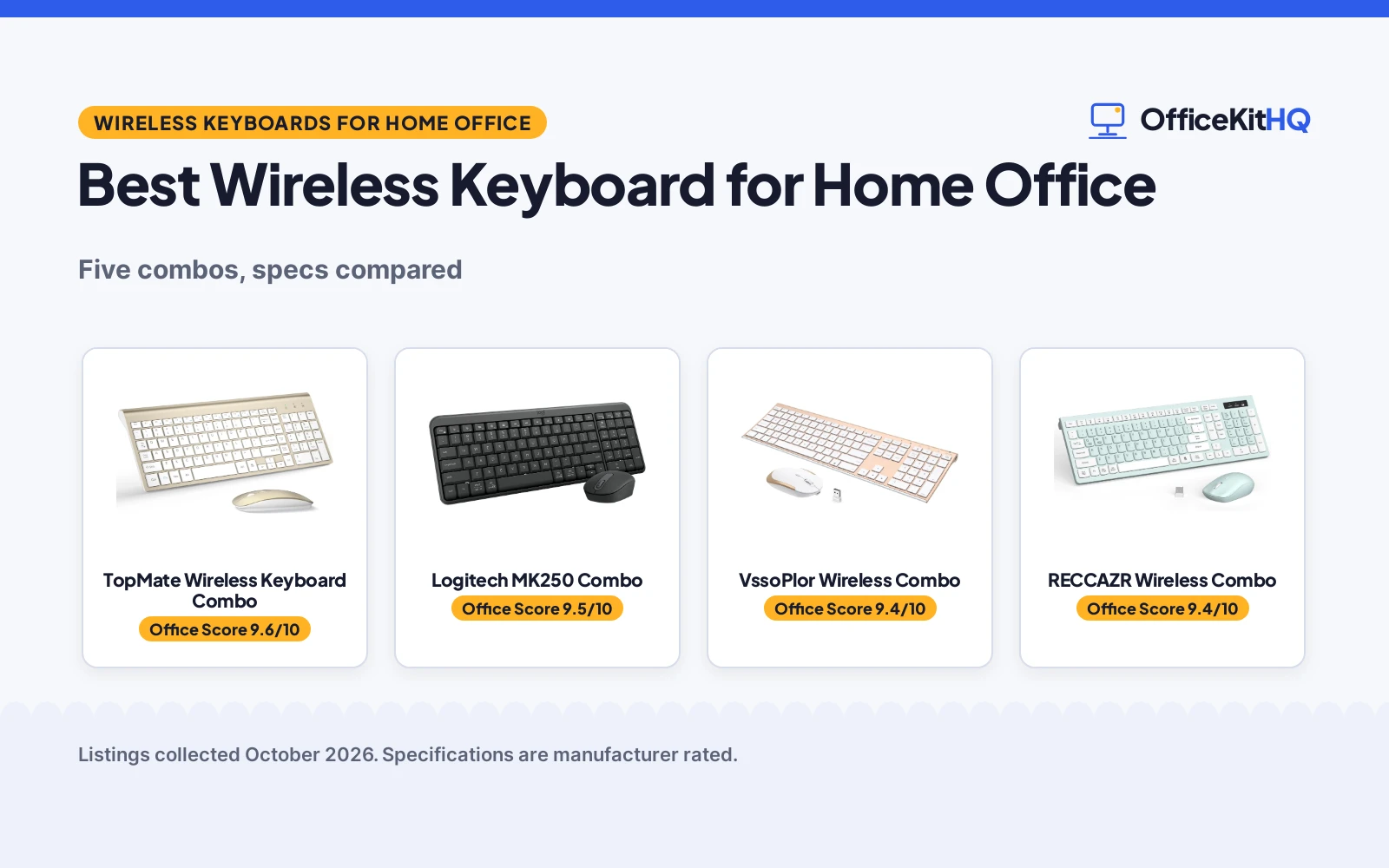
The best wireless keyboard for home office use is the one whose connection, layout and battery fit the desk, because a keyboard that drops keys or dies mid-email slows the whole day. Picture a 9 a.m. call where the cursor lags three words behind the typing: that is the moment most people start shopping. We compared five wireless keyboard and mouse combos by connection type, layout, DPI levels, battery and warranty term, using only what each listing publishes.
OfficeKitHQ earns a commission when you buy through links on this page, at no extra cost to you. As an Amazon Associate I earn from qualifying purchases. Affiliate disclosure.
Quick picks
 Best Overall TopMate Wireless Keyboard Combo: 2-year warranty, 5 DPI levels, batteries and cover included Check price on Amazon
 Best Bluetooth Logitech MK250 Combo: Bluetooth only, no dongle, 12-month battery life Check price on Amazon
 Best Rechargeable VssoPlor Wireless Combo: USB rechargeable, 5.5mm slim, scissor switch keys Check price on Amazon
 Best Full-Size RECCAZR Wireless Combo: 104 keys, silent, tilt legs, 1-year warranty Check price on Amazon
 Best Phone Holder MARVO Wireless Combo: 9.84 in phone holder, 92 keys, silent mouse Check price on Amazon
The picks
| # | Product | Office Score | Buy |
|---|---|---|---|
| 1 | TopMate Wireless Keyboard Combo | 9.6/10 | Buy on Amazon |
| 2 | Logitech MK250 Combo | 9.5/10 | Buy on Amazon |
| 3 | VssoPlor Wireless Combo | 9.4/10 | Buy on Amazon |
| 4 | RECCAZR Wireless Combo | 9.4/10 | Buy on Amazon |
| 5 | MARVO Wireless Combo | 9.4/10 | Buy on Amazon |

TopMate Wireless Keyboard Combo
A 2.4GHz wireless keyboard and mouse combo with 5 DPI levels, scissor switch keys, included batteries and cover, and a 2-year warranty.
Pros
- 2-year warranty stated
- 5 DPI levels (800/1200/1600/2000/2400)
- Batteries and cover included
- Scissor switch, silent keys
Cons
- No key count stated
- 0.8 in thick
- Hot-keys not fully Mac compatible
- 4 AAA batteries required
Detailed Review
The listing states a 2.4GHz wireless keyboard and mouse combo with 5 DPI levels (800/1200/1600/2000/2400), scissor switch keys, a 14.55 by 5.5 by 0.8 inch keyboard and a silent mouse. Batteries are included with 3 to 5 months of life, plus a keyboard cover for dust and liquid protection. The listing states a 2-year warranty.
Who it's for: home office users who want the longest warranty here with adjustable DPI and included accessories. Who should skip it: anyone who needs a stated key count or full Mac hot-key support.
Its Office Score of 9.6/10 comes from performance 30/35, build 21/25, value 21/25, safety 0/10 and warranty 3/5: 75 of 100 points, placed on our 9.2 to 9.8 scale.
Key Specifications
| Connection | 2.4GHz wireless |
|---|---|
| DPI | 800/1200/1600/2000/2400, 5 levels |
| Size | 14.55 by 5.5 by 0.8 in |
| Battery | AA/AAA, battery life between 3 and 5 months |
Figures as published on the retailer listing, collected 22 October 2026. Performance figures are manufacturer rated.
Safety and Warranty
What this listing states. No FCC or other safety listing is stated, so safety scores zero. 2-year warranty stated. It does not say everything a buyer needs, such as who pays return shipping, so warranty scores 3 of 5. See How We Pick.
Fit the desk first. Check the stated size against your desk depth and keyboard tray, and charge or pair as the manual describes. No keyboard, mouse or wrist rest prevents or treats injury.
This is general buying information, not professional advice. Follow each product manual and local rules, and see our Safety Disclaimer.

Logitech MK250 Combo
A Bluetooth keyboard and mouse combo with 99 keys, spill-resistant design, 12-month battery and 1-year warranty.
Pros
- Bluetooth, no dongle needed
- Spill-resistant design stated
- 12-month battery life
- 99 keys with number pad
Cons
- Bluetooth only, no 2.4GHz
- Mouse has 3 non-customizable buttons
- 1.5 lb
- 1-year warranty
Detailed Review
The listing states a Bluetooth wireless keyboard and mouse combo with 99 keys, a compact layout with number pad, deep-profile keys and adjustable tilt legs. The keyboard is spill-resistant, the mouse is ambidextrous, and the battery lasts 12 months. Plastic parts use 66% (mouse) and 64% (keyboard) recycled plastic. The warranty is 1 year limited hardware.
Who it's for: laptop and tablet users who want Bluetooth without a dongle. Who should skip it: anyone who needs 2.4GHz or customizable mouse buttons.
Its Office Score of 9.5/10 comes from performance 29/35, build 20/25, value 20/25, safety 0/10 and warranty 1/5: 70 of 100 points, placed on our 9.2 to 9.8 scale.
Key Specifications
| Connection | Bluetooth |
|---|---|
| Keys | 99 |
| Battery | 12 months |
| Weight | 1.5 lb |
Figures as published on the retailer listing, collected 22 October 2026. Performance figures are manufacturer rated.
Safety and Warranty
What this listing states. No FCC or other safety listing is stated, so safety scores zero. 1 Year Limited Hardware Warranty stated. It does not say everything a buyer needs, such as who pays return shipping, so warranty scores 1 of 5. See How We Pick.
Fit the desk first. Check the stated size against your desk depth and keyboard tray, and charge or pair as the manual describes. No keyboard, mouse or wrist rest prevents or treats injury.
This is general buying information, not professional advice. Follow each product manual and local rules, and see our Safety Disclaimer.

VssoPlor Wireless Combo
A rechargeable 2.4GHz wireless keyboard and mouse combo with 5.5mm slim design, scissor switch and 1-year warranty.
Pros
- USB rechargeable
- 5.5mm ultra slim
- Scissor switch, quiet keys
- 33 ft range stated
Cons
- No key count stated
- White and gold color only
- 0.7 kg
- 1-year warranty
Detailed Review
The listing states a 2.4GHz wireless keyboard and mouse combo with a 33-foot range, one nano receiver for both devices, a 5.5mm ultra-slim keyboard with scissor switch keys and a quiet mouse with 3 DPI levels (1000/1600/2400). It is rechargeable via USB with auto sleep mode. The warranty is 1 year.
Who it's for: users who want a rechargeable slim combo for office or home. Who should skip it: anyone who needs a stated key count or AA batteries.
Its Office Score of 9.4/10 comes from performance 28/35, build 20/25, value 20/25, safety 0/10 and warranty 1/5: 69 of 100 points, placed on our 9.2 to 9.8 scale.
Key Specifications
| Connection | 2.4GHz, 33 ft |
|---|---|
| Thickness | 5.5mm |
| DPI | 1000/1600/2400 |
| Power | Rechargeable USB |
Figures as published on the retailer listing, collected 22 October 2026. Performance figures are manufacturer rated.
Safety and Warranty
What this listing states. This product does not plug in or run on a battery, so safety is not part of its score. 1 year warranty stated. It does not say everything a buyer needs, such as who pays return shipping, so warranty scores 1 of 5. See How We Pick.
Fit the desk first. Check the stated size against your desk depth and keyboard tray, and charge or pair as the manual describes. No keyboard, mouse or wrist rest prevents or treats injury.
This is general buying information, not professional advice. Follow each product manual and local rules, and see our Safety Disclaimer.

RECCAZR Wireless Combo
A silent 2.4GHz wireless keyboard and mouse combo with 104 keys, tilt legs, 3 DPI levels and 1-year warranty.
Pros
- 104 keys, full size
- Silent membrane keys
- Tilt legs for comfort
- 33 ft range stated
Cons
- Batteries not included
- Membrane, not scissor
- 0.63 kg
- 1-year warranty
Detailed Review
The listing states a 2.4GHz wireless keyboard and mouse combo with a 33-foot range, one nano receiver, 104 keys with 12 multimedia shortcuts, tilt legs and a silent mouse with 3 DPI levels (800/1200/1600). It has auto sleep mode and is spillproof per the spec table. The listing offers a 1-year worry-free warranty.
Who it's for: users who want a full 104-key silent combo with tilt legs. Who should skip it: anyone who needs rechargeable power or scissor switches.
Its Office Score of 9.4/10 comes from performance 28/35, build 20/25, value 19/25, safety 0/10 and warranty 1/5: 68 of 100 points, placed on our 9.2 to 9.8 scale.
Key Specifications
| Connection | 2.4GHz, 33 ft |
|---|---|
| Keys | 104 |
| DPI | 800/1200/1600 |
| Power | 2 AA batteries |
Figures as published on the retailer listing, collected 22 October 2026. Performance figures are manufacturer rated.
Safety and Warranty
What this listing states. This product does not plug in or run on a battery, so safety is not part of its score. 1-year worry-free warranty stated. It does not say everything a buyer needs, such as who pays return shipping, so warranty scores 1 of 5. See How We Pick.
Fit the desk first. Check the stated size against your desk depth and keyboard tray, and charge or pair as the manual describes. No keyboard, mouse or wrist rest prevents or treats injury.
This is general buying information, not professional advice. Follow each product manual and local rules, and see our Safety Disclaimer.

MARVO Wireless Combo
A 2.4GHz wireless keyboard and mouse combo with 92 keys, 9.84-inch phone holder, silent 6-button mouse and 12-month warranty.
Pros
- 9.84 in phone holder
- Silent 6-button mouse
- 92 keys, full size
- Ergonomic per listing
Cons
- Batteries not included
- 92 keys (fewer)
- 1 AA battery required
- 12-month warranty
Detailed Review
The listing states a 2.4GHz wireless keyboard and mouse combo with 92 keys, a 9.84-inch phone and tablet holder, 6 multimedia keys and a silent mouse with 6 buttons and 3 DPI levels (800/1200/1600). Batteries are not included; it needs 1 AA. The listing provides a 12-month warranty.
Who it's for: users who want a phone holder on the keyboard for home office multitasking. Who should skip it: anyone who needs included batteries or more keys.
Its Office Score of 9.4/10 comes from performance 26/35, build 19/25, value 19/25, safety 0/10 and warranty 1/5: 65 of 100 points, placed on our 9.2 to 9.8 scale.
Key Specifications
| Connection | 2.4GHz |
|---|---|
| Keys | 92 |
| DPI | 800/1200/1600 |
| Holder | 9.84 in phone holder |
Figures as published on the retailer listing, collected 22 October 2026. Performance figures are manufacturer rated.
Safety and Warranty
What this listing states. This product does not plug in or run on a battery, so safety is not part of its score. 12-month warranty stated. It does not say everything a buyer needs, such as who pays return shipping, so warranty scores 1 of 5. See How We Pick.
Fit the desk first. Check the stated size against your desk depth and keyboard tray, and charge or pair as the manual describes. No keyboard, mouse or wrist rest prevents or treats injury.
This is general buying information, not professional advice. Follow each product manual and local rules, and see our Safety Disclaimer.
As an Amazon Associate I earn from qualifying purchases.
Compare the picks
| Keyboard | Office Score | Connection | Keys | DPI Levels | Battery | Warranty | Amazon |
|---|---|---|---|---|---|---|---|
| TopMate Wireless Keyboard Combo | 9.6/10 | 2.4GHz | Not stated | 5 (800/1200/1600/2000/2400) | AA/AAA included | 2-year | View on Amazon |
| Logitech MK250 Combo | 9.5/10 | Bluetooth | 99 | Not stated | AAA included | 1-year | View on Amazon |
| VssoPlor Wireless Combo | 9.4/10 | 2.4GHz | Not stated | 3 (1000/1600/2400) | Rechargeable | 1-year | View on Amazon |
| RECCAZR Wireless Combo | 9.4/10 | 2.4GHz | 104 | 3 (800/1200/1600) | AA not included | 1-year | View on Amazon |
| MARVO Wireless Combo | 9.4/10 | 2.4GHz | 92 | 3 (800/1200/1600) | AA not included | 12-month | View on Amazon |
Specifications are manufacturer rated as listed, collected 22 October 2026. All five state a warranty term; four use 2.4GHz wireless, one uses Bluetooth.
How we scored them
The Office Score weighs performance (connection, layout, DPI levels and features), build (materials and construction), value for the stated specs, safety and warranty. For a keyboard combo, safety means a stated spill-resistant design or similar protection; only the Logitech states one. All five state a warranty term: 2 years for the TopMate, 1 year for the other four. How we pick explains the weights.
| Product | Office Score | Perf. /35 | Build /25 | Value /25 | Safety /10 | Warranty /5 |
|---|---|---|---|---|---|---|
| TopMate Wireless Keyboard Combo | 9.6 | 30 | 21 | 21 | 0 | 3 |
| Logitech MK250 Combo | 9.5 | 29 | 20 | 20 | 0 | 1 |
| VssoPlor Wireless Combo | 9.4 | 28 | 20 | 20 | 0 | 1 |
| RECCAZR Wireless Combo | 9.4 | 28 | 20 | 19 | 0 | 1 |
| MARVO Wireless Combo | 9.4 | 26 | 19 | 19 | 0 | 1 |
Scores run from 9.2 to 9.8: each product’s point total is placed on that range, so more points always means a higher score.
How to choose the best wireless keyboard for home office
Pick the connection type
Four combos use 2.4GHz wireless with a nano USB receiver: the VssoPlor, MARVO, RECCAZR and TopMate. The Logitech MK250 uses Bluetooth only, with no dongle or USB port needed. Bluetooth suits laptops and tablets with limited ports; 2.4GHz suits desktops where a receiver can stay plugged in. Check the listing for the range: the VssoPlor, RECCAZR and TopMate state up to 33 feet or 10 meters.
Check the layout and the mouse
All five are full-size or compact with a number pad. The RECCAZR lists 104 keys, the Logitech 99 keys and the MARVO 92 keys. DPI levels for the mouse run from 3 (VssoPlor 1000/1600/2400, RECCAZR 800/1200/1600) to 5 (TopMate 800/1200/1600/2000/2400); the MARVO mouse has 6 buttons with 800/1200/1600 DPI. The MARVO adds a phone holder; the TopMate includes a keyboard cover. For more input options, see our wireless mouse for work picks.
Compare battery and warranty
The VssoPlor is rechargeable via USB; the others use AA or AAA batteries (the MARVO does not include them, the TopMate and Logitech do). Battery life varies: the Logitech lists 12 months, the TopMate 3 to 5 months. On warranty, the TopMate leads with 2 years; the other four state 1 year. A longer warranty matters for a device used eight hours a day.
Setup Notes
- Measure the desk: the TopMate keyboard is 14.55 by 5.5 inches; the others do not state dimensions.
- Confirm the OS: all five list Windows; check Mac or Chrome OS in the listing.
- Keep the nano receiver plugged in; the Logitech needs Bluetooth, no receiver.
- Replace batteries before they die; the MARVO does not include them.
Frequently Asked Questions
Which combo has the longest warranty?
The TopMate, with a 2-year warranty. The other four state a 1-year term.
Which uses Bluetooth?
The Logitech MK250. The other four use 2.4GHz wireless with a nano USB receiver.
Are any rechargeable?
The VssoPlor is rechargeable via USB. The others use AA or AAA batteries.
Which mouse has the most DPI levels?
The TopMate, with 5 levels (800/1200/1600/2000/2400 DPI). The VssoPlor (1000/1600/2400) and RECCAZR (800/1200/1600) have 3 levels.
Do they work with Mac?
The listings state varying Mac compatibility. The Logitech lists MacBook; check each listing for the exact OS.
Related guides
See every Keyboards and Keyboard Trays guide and all Monitor Mounts, Keyboards and Mice guides.
More picks: wireless mice for work, keyboards and keyboard trays.