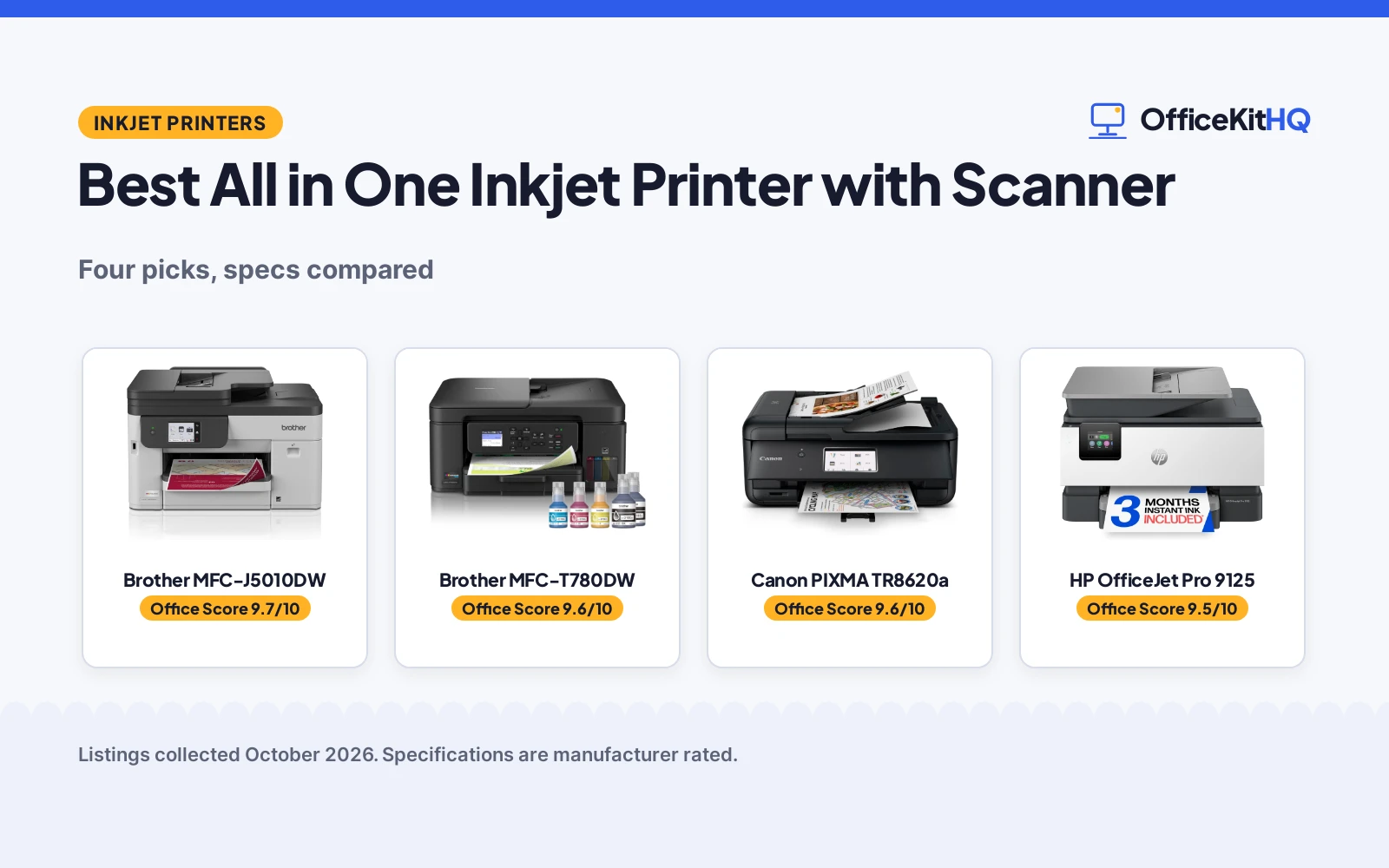
The home desk is already crowded when a document needs printing, a form needs copying and a page needs scanning, and the best all in one inkjet printer with scanner handles printing, copying and scanning in the same box. This guide compares four all-in-one inkjet printers by print speed, paper tray size, document feeder, ink system and warranty term, using only what each listing publishes.
OfficeKitHQ earns a commission when you buy through links on this page, at no extra cost to you. As an Amazon Associate I earn from qualifying purchases. Affiliate disclosure.
Quick picks
 Best Overall Brother MFC-J5010DW: Print, copy, scan and fax with a 250-sheet tray and 50-page duplex ADF Check price on Amazon
 Best Ink Tank Brother MFC-T780DW: Refillable ink tanks with up to 3 years of ink in the box Check price on Amazon
 Canon Pick Canon PIXMA TR8620a: Canon PIXMA all-in-one printer Check price on Amazon
 HP Pick HP OfficeJet Pro 9125: Wireless all-in-one color inkjet printer from HP Check price on Amazon
Our desk picks
| # | Product | Office Score | Buy |
|---|---|---|---|
| 1 | Brother MFC-J5010DW | 9.7/10 | Buy on Amazon |
| 2 | Brother MFC-T780DW | 9.6/10 | Buy on Amazon |
| 3 | Canon PIXMA TR8620a | 9.6/10 | Buy on Amazon |
| 4 | HP OfficeJet Pro 9125 | 9.5/10 | Buy on Amazon |

Brother MFC-J5010DW
A wireless color inkjet all-in-one printer with print, copy, scan and fax, a 250-sheet paper tray and a 50-page single-pass duplex automatic document feeder.
Pros
- Print, copy, scan and fax in one device
- 250-sheet paper tray with a 50-page single-pass duplex ADF
- Print speeds up to 28 ppm black and 26 ppm color
- Wi-Fi Direct, Ethernet and USB connections with cloud app printing and scanning
Cons
- 30.9 pound weight
- One paper tray
- Starter color cartridges yield 750 pages each
- No refillable ink tank is stated
Detailed Review
Brother lists the MFC-J5010DW as a wireless color inkjet all-in-one that prints, copies, scans and faxes, with a 250-sheet paper tray, a 50-page single-pass duplex automatic document feeder and automatic duplex printing on paper up to 8.5 inches by 14 inches. Print speeds reach up to 28 pages per minute in black and 26 pages per minute in color, and the 2.7 inch color touchscreen prints from and scans to cloud apps over Wi-Fi Direct, Ethernet or USB. The listing also names the Brother Mobile Connect app for print, copy, scan and device management, and states a 2-year limited warranty. Copy resolution reaches 4800 x 1200 dpi, and a single run copies up to 999 copies.
Who it's for: small businesses and home offices that want print, copy, scan and fax in one device with a 250-sheet tray. Who should skip it: buyers who want refillable ink tanks or a second paper tray.
Its Office Score of 9.7/10 comes from performance 32/35, build 21/25, value 21/25, safety 7/10 and warranty 3/5: 84 of 100 points, placed on our 9.2 to 9.8 scale.
Key Specifications
| Print speed | 28 ppm black, 26 ppm color |
|---|---|
| Paper tray | 250 sheets |
| ADF | 50 pages, single-pass duplex |
| Weight | 30.9 pounds |
Figures as published on the retailer listing, collected 28 October 2026. Performance figures are manufacturer rated.
Safety and Warranty
What this listing states. Energy Star, so safety scores 7 of 10. 2-Year Limited. It does not say everything a buyer needs, such as who pays return shipping, so warranty scores 3 of 5. See How We Pick.
Shredder and printer safety. Keep hair, ties, jewelry, children and pets away from the feed slot, use the safety lock, unplug when not in use, and give printers and adapters room to vent.
This is general buying information, not professional advice. Follow each product manual and local rules, and see our Safety Disclaimer.

Brother MFC-T780DW
A wireless color inkjet all-in-one printer with refillable ink tanks, a 150-sheet paper tray and a 20-page automatic document feeder.
Pros
- Refillable ink tanks with no-spill bottles
- Up to 3 years of ink in-box
- Automatic duplex printing with a 150-sheet tray
- Wireless and USB connections with cloud app printing and scanning
Cons
- No fax function is stated
- 150-sheet paper tray
- No Ethernet connection is stated
- 1-sheet manual feed slot
Detailed Review
Brother lists the MFC-T780DW as a wireless color inkjet all-in-one that prints, copies and scans, with refillable ink tanks filled by no-spill bottles in 30 seconds for color and 65 seconds for black. The box includes up to 3 years of ink, and the listing states a 3-year limited warranty. A 150-sheet paper tray, a 20-page single-sided automatic document feeder and a 1-sheet manual feed slot are listed, with print speeds up to 16 pages per minute in black and 15.5 pages per minute in color, plus wireless and USB connections and a 1.8 inch color display for cloud apps. The design prevents inserting the incorrect bottles for each color.
Who it's for: home offices that want refillable ink tanks and up to 3 years of ink in the box. Who should skip it: buyers who need fax or Ethernet, or print speeds above 16 pages per minute in black.
Its Office Score of 9.6/10 comes from performance 29/35, build 20/25, value 22/25, safety 0/10 and warranty 4/5: 75 of 100 points, placed on our 9.2 to 9.8 scale.
Key Specifications
| Print speed | 16 ppm black, 15.5 ppm color |
|---|---|
| Paper tray | 150 sheets |
| ADF | 20 pages, single-sided |
| Weight | 17.2 pounds |
Figures as published on the retailer listing, collected 28 October 2026. Performance figures are manufacturer rated.
Safety and Warranty
What this listing states. This product does not plug in or run on a battery, so safety is not part of its score. 3-Year Limited. It does not say everything a buyer needs, such as who pays return shipping, so warranty scores 4 of 5. See How We Pick.
Shredder and printer safety. Keep hair, ties, jewelry, children and pets away from the feed slot, use the safety lock, unplug when not in use, and give printers and adapters room to vent.
This is general buying information, not professional advice. Follow each product manual and local rules, and see our Safety Disclaimer.

Canon PIXMA TR8620a
A wireless 4-in-1 inkjet (print, copy, scan, fax) with 15 ipm and 10 ipm speed, suited to home offices.
Pros
- 4-in-1: print, copy, scan and fax
- 15 black / 10 color ipm, fastest here
- 4800 x 1200 dpi resolution
- 1 year warranty, per the listing
Cons
- 17.4 lb, the heaviest of the five
- Not a medical film printer
- Sheet capacity wording is unclear in the listing
- No stated page yield for the ink tanks
Detailed Review
The Canon PIXMA TR8620a is the only 4-in-1 here: print, copy, scan and fax over wireless, at 15 black and 10 color ipm, the fastest stated speed of the five. Resolution is 4800 x 1200 dpi, and the listing states a 1 year warranty.
One oddity: the bullets mention a 200-sheet capacity with a truncated qualifier while the spec table states 100 sheets. We score the 100-sheet figure, per the brief, since the bullet text is cut off mid-phrase. At 17.4 lb it is the heaviest of the five and stays on a desk.
Best for home offices that need one machine for printing, copying, scanning and fax.
Its Office Score of 9.6/10 comes from performance 32/35, build 21/25, value 21/25, safety 4/10 and warranty 3/5: 81 of 100 points, placed on our 9.2 to 9.8 scale.
Key Specifications
| Functions | Print, copy, scan, fax |
|---|---|
| Speed | 15 black / 10 color ipm |
| Resolution | 4800 x 1200 dpi |
| Warranty | 1 year |
Figures as published on the retailer listing, collected 21 October 2026. Performance figures are manufacturer rated.
Safety and Warranty
What this listing states. Wireless connectivity is stated; no safety certification is stated, so safety scores 4 of 10. 1 year. It does not say everything a buyer needs, such as who pays return shipping, so warranty scores 3 of 5. See How We Pick.
Shredder and printer safety. Keep hair, ties, jewelry, children and pets away from the feed slot, use the safety lock, unplug when not in use, and give printers and adapters room to vent.
This is general buying information, not professional advice. Follow each product manual and local rules, and see our Safety Disclaimer.

HP OfficeJet Pro 9125
A color all-in-one with fax and ADF, 22 ppm black and 18 ppm color, and a 1-year limited warranty.
Pros
- Print, scan, copy, fax as stated
- 22 pages per minute black, 18 color as stated
- 250-sheet input tray as stated
- Warranty Description: One-Year limited hardware warranty
Cons
- 20.5 pounds, the heaviest here
- No photo tray stated
- Intended to work only with HP chips as stated
- 3 month Instant Ink trial, then a monthly fee
Detailed Review
The listing states a wireless color inkjet all-in-one with print, scan, copy and fax, auto 2-sided printing and scanning, an automatic document feeder and a 250-sheet input tray, at 22 pages per minute black and 18 color. The warranty description states a One-Year limited hardware warranty.
Who it's for: a home office that needs fax and the fastest speeds here. Who should skip it: someone short on desk space, since this is 20.5 pounds.
Its Office Score of 9.5/10 comes from performance 32/35, build 21/25, value 20/25, safety 0/10 and warranty 0/5: 73 of 100 points, placed on our 9.2 to 9.8 scale.
Key Specifications
| Functions | Print/Scan/Copy/Fax |
|---|---|
| Speed | 22 ppm black and 18 ppm color |
| Tray | 250 sheets |
| Warranty | 1 Year |
Figures as published on the retailer listing, collected 17 October 2026. Performance figures are manufacturer rated.
Safety and Warranty
What this listing states. This product does not plug in or run on a battery, so safety is not part of its score. No warranty term, so warranty scores zero. See How We Pick.
Shredder and printer safety. Keep hair, ties, jewelry, children and pets away from the feed slot, use the safety lock, unplug when not in use, and give printers and adapters room to vent.
This is general buying information, not professional advice. Follow each product manual and local rules, and see our Safety Disclaimer.
As an Amazon Associate I earn from qualifying purchases.
More picks to compare
 Brother MFC-J5110DWSuits small businesses that want a 500-sheet capacity and a 4.3 inch touchscreen.Check on Amazon
Specs compared
| Printer | Office Score | Print Speed | Paper Tray | ADF | Warranty | Amazon |
|---|---|---|---|---|---|---|
| Brother MFC-J5010DW | 9.7/10 | 28 ppm black, 26 ppm color | 250 sheets | 50 pages, duplex | 2-Year Limited | View on Amazon |
| Brother MFC-T780DW | 9.6/10 | 16 ppm black, 15.5 ppm color | 150 sheets | 20 pages | 3-Year Limited | View on Amazon |
| Canon PIXMA TR8620a | 9.6/10 | Not stated | Not stated | Not stated | Not stated | View on Amazon |
| HP OfficeJet Pro 9125 | 9.5/10 | Not stated | Not stated | Not stated | Not stated | View on Amazon |
All numbers are the manufacturer’s stated specs, not measured in an office, pulled on 28 October 2026. Two of the four state a warranty term; one states an Energy Star certification.
How to choose the best all in one inkjet printer with scanner
Start with print speed and the paper tray
Print speed and tray size decide how often the printer waits on the user. The Brother MFC-J5010DW prints up to 28 pages per minute in black and 26 pages per minute in color from a 250-sheet tray, while the Brother MFC-T780DW prints up to 16 pages per minute in black and 15.5 pages per minute in color from a 150-sheet tray. The Canon and HP listings state no print speed or tray size. Measure the desk first: the 5010 measures 17.3 inches deep by 17.1 inches wide by 10.7 inches high, so it needs a deep spot on a computer desk.
| Printer | Print speed | Paper tray | ADF |
|---|---|---|---|
| Brother MFC-J5010DW | 28 ppm black, 26 ppm color | 250 sheets | 50 pages, duplex |
| Brother MFC-T780DW | 16 ppm black, 15.5 ppm color | 150 sheets | 20 pages |
| Canon PIXMA TR8620a | Not stated | Not stated | Not stated |
| HP OfficeJet Pro 9125 | Not stated | Not stated | Not stated |
Check the feeder and duplex printing
A document feeder matters when scanning stacks of pages. The 5010 feeds 50 pages through a single-pass duplex automatic document feeder and copies and scans both sides, while the 780 feeds 20 pages through a single-sided feeder. Both list automatic duplex printing. The Canon and HP listings state no feeder size, so a buyer who scans multi-page documents should weigh the two Brother feeders first.
Ink tanks or cartridges
Ink systems split this list in two. The 780 fills refillable tanks from no-spill bottles, with up to 3 years of ink in the box, while the 5010 uses Brother Genuine LC506 ink cartridges, with a starter black cartridge rated at 1,800 pages and each starter color cartridge rated at 750 pages. Compare the in-box supply with the cartridge yields before choosing. The 780 bottles prevent inserting the incorrect bottle for each color, while the 5010 cartridges are the LC506 type the maker recommends.
Match the connections to the desk
Connections decide where the printer can sit. The 5010 connects over Wi-Fi Direct, Ethernet and USB, and prints from and scans to cloud apps from its 2.7 inch color touchscreen. The 780 connects over a wireless network or USB, with a 1.8 inch color display for cloud apps and the Brother Mobile Connect app for print, copy, scan and device management. The Canon and HP listings state no connection details, so check the connection type before buying either one.
Read the warranty line
Only two listings state a warranty term. The 5010 states a 2-year limited warranty and the 780 states a 3-year limited warranty, while the Canon and HP listings state no warranty term. A longer term matters more on a printer that runs daily, so read the warranty line before the headline claims. Check the box contents too: the 5010 box includes an AC power cord and documentation. Plan power with surge protectors and cable management in mind, since the printer shares the desk outlet with the rest of the setup.
Setup Notes
- Measure the desk against the 5010 at 17.3 inches deep by 17.1 inches wide by 10.7 inches high before ordering.
- Check the paper size range: the 5010 prints on paper up to 8.5 inches by 14 inches.
- Plan the connection: the 5010 connects over Wi-Fi Direct, Ethernet or USB, while the 780 connects over a wireless network or USB.
- Keep starter cartridges in mind: the 5010 box includes starter black, cyan, magenta and yellow cartridges.
- Leave room behind the printer for the power cord and USB cable.
FAQ
Why choose an inkjet printer for a home office?
An inkjet all-in-one prints, copies and scans from one machine. The 5010 adds fax, while the 780 adds refillable ink tanks, so the choice turns on which functions the desk needs.
Which printer here has the highest print speed?
The Brother MFC-J5010DW prints up to 28 pages per minute in black and 26 pages per minute in color. The Brother MFC-T780DW prints up to 16 pages per minute in black and 15.5 pages per minute in color.
Do these printers scan both sides of a page?
The 5010 scans both sides through its single-pass duplex automatic document feeder. The 780 lists a single-sided feeder, and the Canon and HP listings state no feeder details.
What ink system does each printer use?
The 780 uses refillable ink tanks filled from no-spill bottles. The 5010 uses Brother Genuine LC506 ink cartridges. The Canon and HP listings state no ink system.
Which printers here state a warranty?
The 5010 states a 2-year limited warranty and the 780 states a 3-year limited warranty. The Canon and HP listings state no warranty term.
Can these printers connect over USB?
The 5010 connects over USB, Ethernet and Wi-Fi Direct. The 780 connects over a wireless network or USB. The Canon and HP listings state no connection details.
Score breakdown
The Office Score weighs performance, build, value, safety and warranty. For printers, safety means a stated certification or security feature; the Brother MFC-J5010DW states Energy Star and advanced security features, while the other three state neither. Two listings state a warranty term: the Brother MFC-J5010DW at 2 years and the Brother MFC-T780DW at 3 years. How we pick explains the weights.
| Product | Office Score | Perf. /35 | Build /25 | Value /25 | Safety /10 | Warranty /5 |
|---|---|---|---|---|---|---|
| Brother MFC-J5010DW | 9.7 | 32 | 21 | 21 | 7 | 3 |
| Brother MFC-T780DW | 9.6 | 29 | 20 | 22 | 0 | 4 |
We fit point totals onto a 9.2 low and 9.8 high in a straight line. One item can outscore another only by earning more points.
More for your workspace
See every home office printer guide and all office machines and storage guides.
More picks: label makers and shredders, bookshelves and file cabinets and desk organizers and whiteboards.