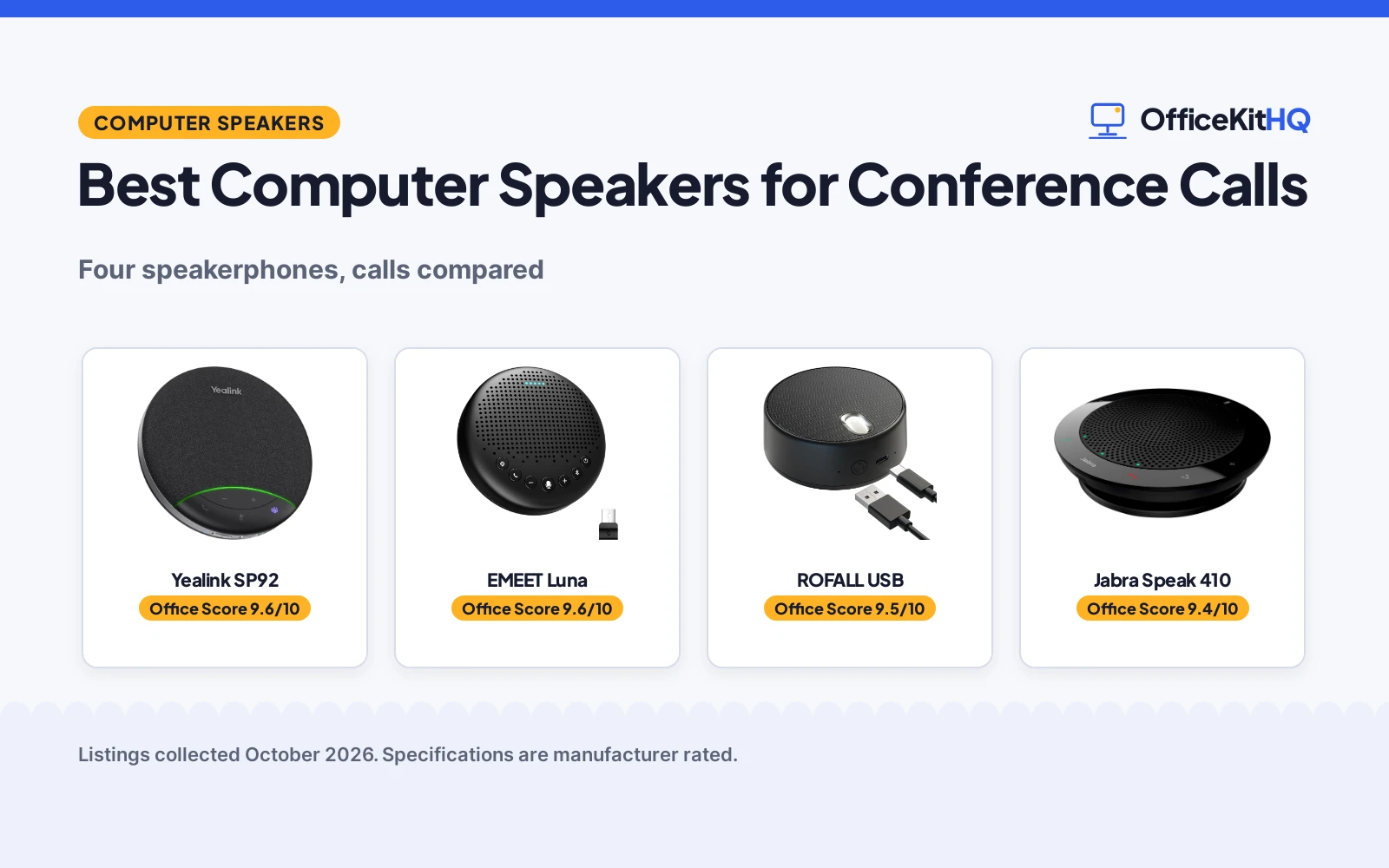
The best computer speakers for conference calls are really speakerphones: a speaker and a microphone in one puck that sits in the middle of the table. Call clarity, pickup range and battery life decide everything else. We compared four conference speakerphones by microphone pickup, noise reduction, battery, connectivity and warranty, using only what each listing publishes.
OfficeKitHQ earns a commission when you buy through links on this page, at no extra cost to you. As an Amazon Associate I earn from qualifying purchases. Affiliate disclosure.
Quick picks
 Top pick Yealink SP92: Teams certified, AI noise cancelling, 20-hour battery, 2-year warranty Check price on Amazon
 Best for large rooms EMEET Luna: 3-mic 360 array, daisy chains to 16, 2-year warranty Check price on Amazon
 Best for Linux ROFALL USB: USB plug-and-play, Linux listed as compatible, 1-year warranty Check price on Amazon
 Basic USB pick Jabra Speak 410: 360 mic, UC platform compatible, carrying case included Check price on Amazon
The picks
| # | Product | Office Score | Buy |
|---|---|---|---|
| 1 | Yealink SP92 | 9.6/10 | Buy on Amazon |
| 2 | EMEET Luna | 9.6/10 | Buy on Amazon |
| 3 | ROFALL USB | 9.5/10 | Buy on Amazon |
| 4 | Jabra Speak 410 | 9.4/10 | Buy on Amazon |

Yealink SP92
A Teams-certified speakerphone with AI noise cancelling, 20-hour battery and Bluetooth 5.3, for 4 to 8 person rooms.
Pros
- Microsoft Teams certified, compatible with Zoom, Google Meet, Cisco Webex
- AI noise cancelling with 360-degree pickup in a 13ft radius
- 20-hour battery, recharges in 2.5 hours
- 2-year manufacturer warranty is stated
Cons
- No Linux compatibility is stated on the listing
- Dongle is optional, not included in this package
- 276g is heavier than the 104g ROFALL
- No safety features are stated
Detailed Review
Yealink lists the SP92 as a Teams-certified conference speakerphone with AI noise cancelling, an omnidirectional mic covering a 13ft (4m) radius for 4 to 8 person rooms, and a 50mm speaker. The listing states a 20-hour battery that recharges in 2.5 hours, Bluetooth 5.3 with a 30m range, USB-C with a C-to-A adapter, and a 2 Year Manufacturer warranty. The BT51C dongle is optional. The listing does not mention Linux.
Who it's for: someone running Teams or Zoom meetings who wants long battery life. Who should skip it: anyone who needs stated Linux support or a bundled dongle.
Its Office Score of 9.6/10 comes from performance 32/35, build 21/25, value 20/25, safety 0/10 and warranty 4/5: 77 of 100 points, placed on our 9.2 to 9.8 scale.
Key Specifications
| Pickup | 360 deg, 13ft radius |
|---|---|
| Battery | 20 hours |
| Connectivity | Bluetooth 5.3, USB-C |
| Weight | 276g |
Figures as published on the retailer listing, collected 19 October 2026. Performance figures are manufacturer rated.
Safety and Warranty
What this listing states. No volume limit or safety listing is stated, so safety scores zero. 2 Year Manufacturer. It does not say everything a buyer needs, such as who pays return shipping, so warranty scores 4 of 5. See How We Pick.
Protect your hearing. Keep volume moderate during long calls, take breaks, and treat noise cancelling and battery figures as the maker's claims.
This is general buying information, not professional advice. Follow each product manual and local rules, and see our Safety Disclaimer.

EMEET Luna
A 3-mic 360-degree speakerphone that daisy-chains to 16 attendees, for bigger rooms and growing meetings.
Pros
- 3-microphone array with 360-degree voice pickup
- Daisy chains two units for up to 16 attendees
- VoiceIA noise reduction with 85 dB max volume
- 2-year warranty is stated
Cons
- Daisy-chain cable is sold separately
- No Linux compatibility is stated on the listing
- Auto shutoff after one hour idle may annoy always-on desks
- No safety features are stated
Detailed Review
EMEET lists the Luna as a conference speakerphone with 3 microphone arrays for 360-degree pickup, VoiceIA noise reduction, an 85 dB maximum volume and a full-metal sandblasted casing. The listing states USB, Bluetooth, AUX and dongle connections, a 2600mAh battery, and daisy chaining two units for up to 16 attendees with a separately sold cable. The spec table states a 2 YEARS WARRANTY. The listing does not mention Linux.
Who it's for: someone hosting larger meetings who may add a second unit later. Who should skip it: anyone who needs stated Linux support or dislikes auto shutoff.
Its Office Score of 9.6/10 comes from performance 30/35, build 21/25, value 20/25, safety 0/10 and warranty 4/5: 75 of 100 points, placed on our 9.2 to 9.8 scale.
Key Specifications
| Pickup | 3-mic 360 deg |
|---|---|
| Daisy chain | Up to 16 attendees |
| Battery | 2600mAh |
| Max volume | 85 dB |
Figures as published on the retailer listing, collected 19 October 2026. Performance figures are manufacturer rated.
Safety and Warranty
What this listing states. No volume limit or safety listing is stated, so safety scores zero. 2 YEARS WARRANTY. It does not say everything a buyer needs, such as who pays return shipping, so warranty scores 4 of 5. See How We Pick.
Protect your hearing. Keep volume moderate during long calls, take breaks, and treat noise cancelling and battery figures as the maker's claims.
This is general buying information, not professional advice. Follow each product manual and local rules, and see our Safety Disclaimer.

ROFALL USB
A pocket-size USB speaker with mic and voice mode, the only pick that lists Linux as compatible.
Pros
- Linux is listed among compatible systems
- 2 EQ sound modes with a dedicated voice mode for meetings
- USB plug-and-play with no downloads, per the listing
- Metal body at 104g, pocketable
Cons
- 3W output is modest for group calls
- Mono audio output, per the spec table
- Personal-call focus; not built for large rooms
- No safety features are stated
Detailed Review
ROFALL lists the USB speaker as a plug-and-play computer speaker with a built-in microphone, 2 EQ sound modes including a voice mode for online meetings, and a metal body at 104g and 3 watts. The bullets list Windows, Chrome OS, Mac OS and Linux among compatible systems, the only Linux mention in this group. The spec table states a 1 Year warranty and mono audio output.
Who it's for: a Linux user who wants a simple USB speaker for personal calls. Who should skip it: anyone equipping a conference room.
Its Office Score of 9.5/10 comes from performance 28/35, build 20/25, value 21/25, safety 0/10 and warranty 3/5: 72 of 100 points, placed on our 9.2 to 9.8 scale.
Key Specifications
| Audio | Mono, 3W |
|---|---|
| Modes | 2 EQ sound modes |
| Weight | 104g |
| Connection | USB plug-and-play |
Figures as published on the retailer listing, collected 19 October 2026. Performance figures are manufacturer rated.
Safety and Warranty
What this listing states. No volume limit or safety listing is stated, so safety scores zero. 1 Year. It does not say everything a buyer needs, such as who pays return shipping, so warranty scores 3 of 5. See How We Pick.
Protect your hearing. Keep volume moderate during long calls, take breaks, and treat noise cancelling and battery figures as the maker's claims.
This is general buying information, not professional advice. Follow each product manual and local rules, and see our Safety Disclaimer.

Jabra Speak 410
A corded USB speakerphone with 360-degree mic and carrying case, for simple plug-and-dial meetings.
Pros
- 360-degree microphone for conference calls
- Compatible with leading UC platforms, per the listing
- Carrying case and integrated cable management included
- No IT setup: plug and dial-in
Cons
- Warranty is stated as 'Jabra manufacturer's warranty' with no term
- Spec table lists 410 watts, matching the model number rather than a plausible USB output
- Plastic body where two picks use metal
- No Linux compatibility is stated on the listing
Detailed Review
Jabra lists the Speak 410 as a corded USB speakerphone with a 360-degree microphone, compatibility with leading UC platforms, a carrying case and integrated cable management. The spec table lists a 410-watt maximum output, which matches the model number 410 and is not a plausible USB speaker figure; we treat it as a spec-table error. The warranty is stated only as 'Jabra manufacturer's warranty' with no term, so warranty scores zero. The listing does not mention Linux.
Who it's for: someone who wants a basic corded speakerphone for travel. Who should skip it: anyone who wants a written warranty term or stated Linux support.
Its Office Score of 9.4/10 comes from performance 27/35, build 19/25, value 20/25, safety 0/10 and warranty 0/5: 66 of 100 points, placed on our 9.2 to 9.8 scale.
Key Specifications
| Pickup | 360 deg mic |
|---|---|
| Connection | USB corded |
| Platforms | Leading UC platforms |
| Extras | Carrying case included |
Figures as published on the retailer listing, collected 19 October 2026. Performance figures are manufacturer rated.
Safety and Warranty
What this listing states. No volume limit or safety listing is stated, so safety scores zero. No warranty term, so warranty scores zero. See How We Pick.
Protect your hearing. Keep volume moderate during long calls, take breaks, and treat noise cancelling and battery figures as the maker's claims.
This is general buying information, not professional advice. Follow each product manual and local rules, and see our Safety Disclaimer.
As an Amazon Associate I earn from qualifying purchases.
More picks to compare
 Yealink SP92 USB Speakerphone BluetoothCheck on Amazon
 Yealink SP92 Bluetooth Speakerphone USBCheck on Amazon
 Lenovo SpeakerphoneCheck on Amazon
Compare the picks
| Speaker | Office Score | Pickup | Battery | Connectivity | Warranty | Amazon |
|---|---|---|---|---|---|---|
| Yealink SP92 | 9.6/10 | 360 deg, 4-8 person | 20 hours | Bluetooth 5.3, USB-C | 2 Year Manufacturer | View on Amazon |
| EMEET Luna | 9.6/10 | 3-mic 360 deg | 2600mAh | Bluetooth, USB, dongle | 2 YEARS WARRANTY | View on Amazon |
| ROFALL USB | 9.5/10 | Built-in mic | Corded USB | USB | 1 Year | View on Amazon |
| Jabra Speak 410 | 9.4/10 | 360 deg mic | Corded USB | USB | Not stated | View on Amazon |
Specifications are manufacturer rated as listed, collected 19 October 2026. Three of the four state a warranty term.
How we scored them
The Office Score weighs performance (pickup range, noise reduction, battery and platform compatibility), build (materials and portability), value for the stated specs, safety and warranty. For a speakerphone, safety means a stable tabletop build and stated auto shutoff where one applies; the EMEET states auto shutoff after one hour idle. Three listings state a warranty term: two at 2 years and one at 1 year. How we pick explains the weights.
| Product | Office Score | Perf. /35 | Build /25 | Value /25 | Safety /10 | Warranty /5 |
|---|---|---|---|---|---|---|
| Yealink SP92 | 9.6 | 32 | 21 | 20 | 0 | 4 |
| EMEET Luna | 9.6 | 30 | 21 | 20 | 0 | 4 |
| ROFALL USB | 9.5 | 28 | 20 | 21 | 0 | 3 |
| Jabra Speak 410 | 9.4 | 27 | 19 | 20 | 0 | 0 |
Scores run from 9.2 to 9.8: each product’s point total is placed on that range, so more points always means a higher score.
How to choose the best computer speakers for conference calls
Match pickup to the room
All four offer 360-degree pickup, but room size differs. The Yealink covers 4 to 8 people in a 13ft radius, the EMEET handles up to 8 on its own and 16 daisy-chained, and the ROFALL and Jabra suit personal or small-group calls. Noise reduction is stated on the Yealink (AI) and the EMEET (VoiceIA). For camera-plus-audio setups, see computer speakers for video conferencing.
Check battery and connectivity
The Yealink states 20 hours per charge with a 2.5-hour recharge, the EMEET states a 2600mAh battery, and the ROFALL and Jabra are corded USB. The Yealink offers Bluetooth 5.3 with a 30m range plus USB-C, the EMEET offers Bluetooth, USB, AUX and a dongle, and the Jabra and ROFALL are USB only. If the speaker will move between machines, computer speakers for multiple devices covers more flexible options.
Read the platform and OS lines
The Yealink is Microsoft Teams certified and lists Zoom, Google Meet and Cisco Webex; the Jabra states compatibility with leading UC platforms. Only the ROFALL lists Linux among its compatible systems, so Linux users should note the other three state nothing about it. The Jabra states no IT setup is needed, and the EMEET states no driver is needed.
Setup Notes
- Place the speakerphone in the middle of the table; 360-degree pickup assumes central placement.
- Charge before long days: the Yealink states 20 hours per charge and 2.5 hours to recharge.
- Plan connections: the EMEET daisy-chain cable is sold separately, and the Yealink dongle is optional.
- Check range figures: Bluetooth 30m on the Yealink and 10m on the EMEET, per the listings.
Frequently Asked Questions
Which of these lists Linux compatibility?
Only the ROFALL lists Linux among its compatible systems. The other three state nothing about Linux.
Which speakerphone lasts longest on battery?
The Yealink states up to 20 hours per charge. The EMEET states a 2600mAh battery without an hours figure; the ROFALL and Jabra are corded.
Can two EMEET Lunas be linked?
Yes. The listing states two units daisy-chain for up to 16 attendees, with the cable sold separately.
Do these need drivers or IT setup?
The EMEET states no driver is needed and the Jabra states no IT setup is required. All four are plug-and-play over USB.
Related guides
See every computer speakers guide and all audio, power and connectivity guides.
More picks: computer speakers for video conferencing, computer speakers for multiple devices, monitor arms and stands.