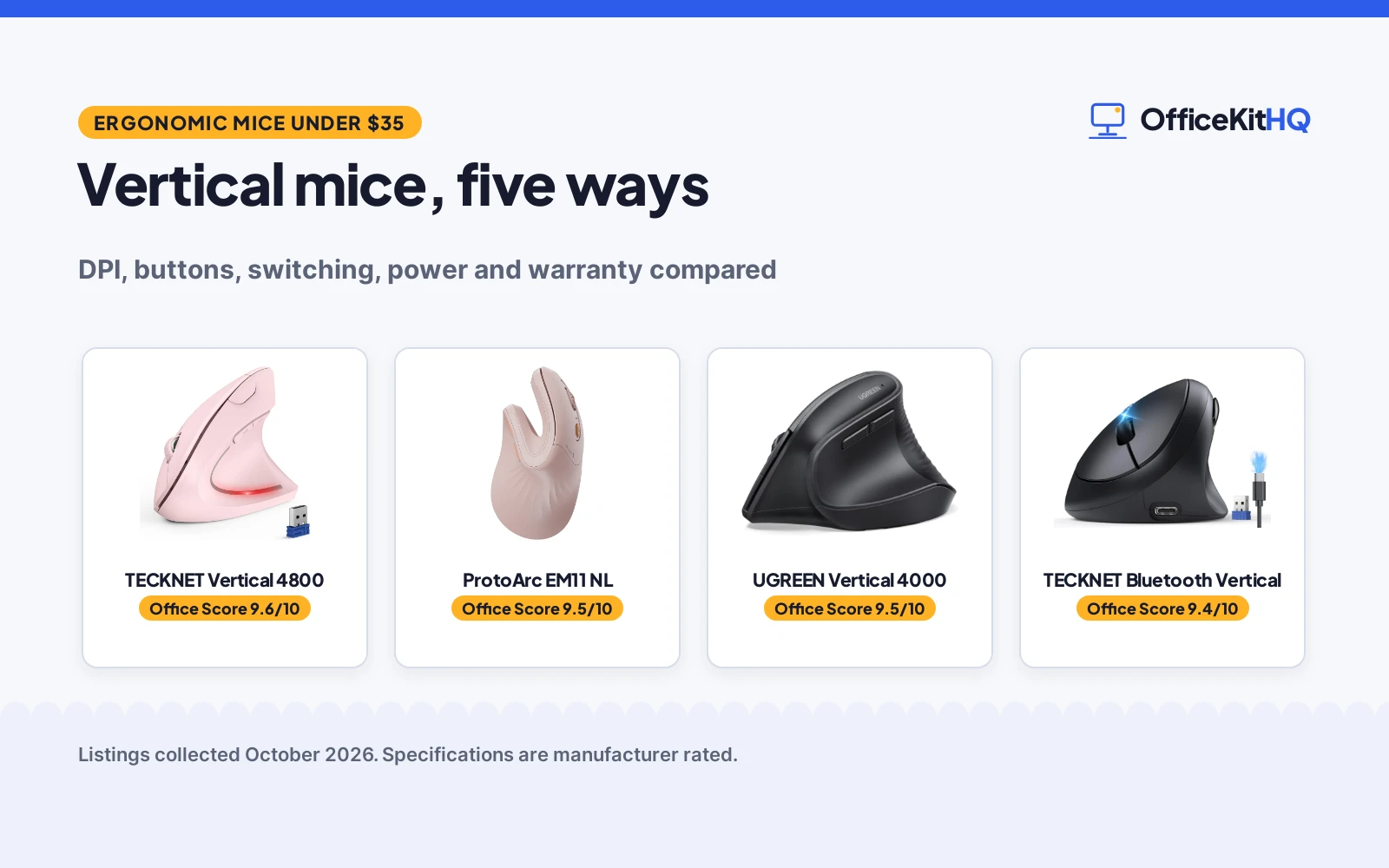
A workday starts with a laptop, a coffee and a mouse that holds the hand flat on the desk all day. By the afternoon the same small movements feel like a chore, and the wrist wants a different angle. The best ergonomic mouse under 35 changes that angle: a vertical shape holds the hand upright instead of flat. We compared five vertical mice by DPI, buttons, connection, power and warranty, using only what each listing publishes.
OfficeKitHQ earns a commission when you buy through links on this page, at no extra cost to you. As an Amazon Associate I earn from qualifying purchases. Affiliate disclosure.
Quick picks
 Best Overall TECKNET Vertical 4800: 4800 DPI, 6 levels, 3-device switch, 36 month warranty. Check price on Amazon
 Best Rechargeable ProtoArc EM11 NL: 500mAh USB-C rechargeable, 3-device switch, 2400 DPI. Check price on Amazon
 Best Slim Guiheng Slim Vertical: Slim rechargeable vertical mouse, 1600 DPI, BT5.2 and USB. Check price on Amazon
 Bluetooth Vertical TECKNET Bluetooth Vertical: Vertical mouse with Bluetooth 5.0/3.0 and USB A. Check price on Amazon
 4000 DPI UGREEN Vertical 4000: Vertical wireless mouse with 4000 DPI. Check price on Amazon
Our desk picks
| # | Product | Office Score | Buy |
|---|---|---|---|
| 1 | TECKNET Vertical 4800 | 9.6/10 | Buy on Amazon |
| 2 | ProtoArc EM11 NL | 9.5/10 | Buy on Amazon |
| 3 | UGREEN Vertical Mouse | 9.5/10 | Buy on Amazon |
| 4 | TECKNET Vertical | 9.4/10 | Buy on Amazon |
| 5 | Guiheng Slim Vertical | 9.3/10 | Buy on Amazon |

TECKNET Vertical 4800
A right-handed vertical mouse with 4800 DPI, 6 DPI levels, 3-device Bluetooth and 2.4G switching, and quiet clicks.
Pros
- 4800 DPI with 6 adjustable levels
- Switches among 3 devices over Bluetooth and 2.4G
- Quiet left and right clicks
- 36 month warranty, registered only
Cons
- 2 AAA batteries not included
- Side buttons not compatible with macOS
- Only left and right clicks are silent
- Right-handed only
Detailed Review
TECKNET lists a right-handed vertical mouse with 6 DPI levels up to 4800 DPI, Bluetooth and 2.4GHz USB-A modes, and switching among 3 devices: hold the bottom button for 3 seconds to enter pairing, then short press to switch modes, with the 2.4G receiver built into the bottom of the mouse. Only the left and right click buttons are silent, while other function buttons are not silent. The mouse sleeps deeply after 10-30 minutes of inactivity, wakes on a left or right button press, and blinks an LED when the battery is low. It runs on 2 AAA batteries, not included, with a stated battery average life of 24 months and a range of 33 feet. The listing states a 36 month warranty, registered only, and dimensions of 4.74 by 2.49 inches.
Who it is for: right-handed users who switch among 3 devices and want the widest DPI range here. Who should skip it: anyone who needs macOS side buttons, which are not compatible with macOS, or anyone who wants a rechargeable battery instead of AAA cells.
Its Office Score of 9.6/10 comes from performance 30/35, build 21/25, value 21/25, safety 0/10 and warranty 4/5: 76 of 100 points, placed on our 9.2 to 9.8 scale.
Key Specifications
| Max DPI | 4800 DPI |
|---|---|
| DPI levels | 6 |
| Buttons | 6 |
| Connection | Bluetooth, 2.4G USB-A |
| Range | 33 feet |
Figures as published on the retailer listing, collected 29 October 2026. Performance figures are manufacturer rated.
Safety and Warranty
What this listing states. This product does not plug in or run on a battery, so safety is not part of its score. 36 months, registered only. It does not say everything a buyer needs, such as who pays return shipping, so warranty scores 4 of 5. See How We Pick.
Fit the desk first. Check the stated size against your desk depth and keyboard tray, and charge or pair as the manual describes. No keyboard, mouse or wrist rest prevents or treats injury.
This is general buying information, not professional advice. Follow each product manual and local rules, and see our Safety Disclaimer.

ProtoArc EM11 NL
A rechargeable vertical mouse for small to medium hands with 3-device switching, 2400 DPI and quiet clicks.
Pros
- 500mAh USB-C rechargeable battery with cable included
- Fits small to medium hands under 7.5 in
- 58 degree vertical shape
- 2 year warranty stated
Cons
- Buttons are not programmable
- Scroll wheel and side buttons are not silent
- USB-C receiver not included
- Type-C cable is for charging only
Detailed Review
ProtoArc lists the EM11 NL vertical mouse for small to medium hands, with hand lengths under 7.5 in and a 58 degree vertical shape. It pairs up to 3 devices over dual Bluetooth and 2.4G USB-A modes and switches with one click, with a built-in 500mAh battery recharged over USB-C with the included Type-C cable. DPI runs 1000, 1600 and 2400, with back and forward buttons that are not programmable, and 7 buttons in total. The main buttons are quiet, while the scroll wheel and side buttons are not silent. The listing states a 2 year warranty, a range of 10 meters and a weight of 0.31 kg.
Who it is for: small to medium hands that want a rechargeable mouse with 3-device switching. Who should skip it: anyone with hands over 7.5 in, or anyone who wants programmable buttons.
Its Office Score of 9.5/10 comes from performance 29/35, build 21/25, value 20/25, safety 0/10 and warranty 3/5: 73 of 100 points, placed on our 9.2 to 9.8 scale.
Key Specifications
| Max DPI | 2400 DPI |
|---|---|
| DPI levels | 1000, 1600, 2400 DPI |
| Buttons | 7 |
| Power | 500mAh USB-C rechargeable |
| Hand fit | Under 7.5 in |
Figures as published on the retailer listing, collected 29 October 2026. Performance figures are manufacturer rated.
Safety and Warranty
What this listing states. No FCC or other safety listing is stated, so safety scores zero. 2 year. It does not say everything a buyer needs, such as who pays return shipping, so warranty scores 3 of 5. See How We Pick.
Fit the desk first. Check the stated size against your desk depth and keyboard tray, and charge or pair as the manual describes. No keyboard, mouse or wrist rest prevents or treats injury.
This is general buying information, not professional advice. Follow each product manual and local rules, and see our Safety Disclaimer.

UGREEN Vertical Mouse
A vertical ergonomic mouse with Bluetooth and 2.4G, 4 DPI levels to 4000, for larger hands and long sessions.
Pros
- Vertical handshake position
- 1000 to 4000 DPI across 4 levels
- Bluetooth plus 2.4G, up to 3 devices
- PTFE glide feet stated
Cons
- Right hand only
- 170 g, the heaviest here
- AA battery not included
Detailed Review
UGREEN lists an ergonomic vertical wireless mouse with Bluetooth and 2.4G, 4 DPI levels from 1000 to 4000, quiet clicks, PTFE glide feet and switching between up to 3 devices. The specs state a 170 g weight, a 10 m range, one AA battery and a 1 Year Manufacturer warranty. The contradiction: the title says 6 buttons while the bullets say a 5-button layout and the spec table says 5. The spec table is more specific, so we trust 5.
Who it's for: a right-handed user with larger hands who wants a vertical grip. Who should skip it: anyone wanting a lightweight travel mouse or left-hand use.
Its Office Score of 9.5/10 comes from performance 30/35, build 20/25, value 20/25, safety 0/10 and warranty 3/5: 73 of 100 points, placed on our 9.2 to 9.8 scale.
Key Specifications
| Max DPI | 4000 |
|---|---|
| Connection | BT + 2.4G |
| Buttons | 5 |
| Warranty | 1 year |
Figures as published on the retailer listing, collected 20 October 2026. Performance figures are manufacturer rated.
Safety and Warranty
What this listing states. This product does not plug in or run on a battery, so safety is not part of its score. 1 Year Manufacturer. It does not say everything a buyer needs, such as who pays return shipping, so warranty scores 3 of 5. See How We Pick.
Fit the desk first. Check the stated size against your desk depth and keyboard tray, and charge or pair as the manual describes. No keyboard, mouse or wrist rest prevents or treats injury.
This is general buying information, not professional advice. Follow each product manual and local rules, and see our Safety Disclaimer.

TECKNET Vertical
A vertical wireless mouse with Bluetooth 5.0/3.0 and 2.4G, switching between 3 devices.
Pros
- Vertical; wrist comfort
- BT5.0/3.0 and 2.4G; 3 devices
- USB-A receiver included
- Ergonomic shape
Cons
- No warranty term is stated
- No DPI is stated
- No battery life is stated
- Vertical shape; not for precision grip
Detailed Review
TECKNET lists an ergonomic vertical Bluetooth mouse with Bluetooth 5.0/3.0 and 2.4G connectivity. The listing states 3-device switching and an included USB-A receiver. The listing states no DPI, no battery life and no warranty term.
Who it's for: editors with wrist strain who switch devices. Who should skip it: anyone who needs stated DPI or a warranty term.
Its Office Score of 9.4/10 comes from performance 27/35, build 20/25, value 19/25, safety 0/10 and warranty 0/5: 66 of 100 points, placed on our 9.2 to 9.8 scale.
Key Specifications
| Shape | Vertical |
|---|---|
| Devices | 3 |
| Warranty | Not stated |
| Receiver | USB-A included |
Figures as published on the retailer listing, collected 17 October 2026. Performance figures are manufacturer rated.
Safety and Warranty
What this listing states. This product does not plug in or run on a battery, so safety is not part of its score. No warranty term, so warranty scores zero. See How We Pick.
Fit the desk first. Check the stated size against your desk depth and keyboard tray, and charge or pair as the manual describes. No keyboard, mouse or wrist rest prevents or treats injury.
This is general buying information, not professional advice. Follow each product manual and local rules, and see our Safety Disclaimer.

Guiheng Slim Vertical
A slim rechargeable vertical mouse with dual-mode Bluetooth and USB connection and quiet clicks.
Pros
- Slim rechargeable design with no disposable batteries
- Dual-mode Bluetooth 5.2 and USB receiver
- Quiet left and right clicks
- LED lights
Cons
- Listing says 5 DPI levels but does not name every level
- Only 3 buttons
- Warranty description states only 1, with no unit
- No battery capacity stated
Detailed Review
Guiheng lists a slim rechargeable vertical mouse with dual-mode Bluetooth 5.2 and USB receiver connection, LED lights and quiet left and right clicks. The listing says 5 levels of adjustable DPI up to 1600 DPI but does not name every level, so the level count is unclear and the top speed is 1600 DPI. It has 3 buttons, a right-hand orientation, and compatibility with laptops, desktops, PCs, Macbooks, Chromebooks and tablets. The listing says to fully charge before first use and not to use a fast charger. Its warranty description states only 1, with no unit, so no warranty term is scored.
Who it is for: travelers who want a slim rechargeable mouse for home, office, libraries, dormitories, high-speed rail and airplanes. Who should skip it: anyone who wants a stated battery capacity, a stated warranty term, or more than 3 buttons.
Its Office Score of 9.3/10 comes from performance 26/35, build 19/25, value 19/25, safety 0/10 and warranty 0/5: 64 of 100 points, placed on our 9.2 to 9.8 scale.
Key Specifications
| Max DPI | 1600 DPI |
|---|---|
| DPI levels | 5 levels, up to 1600 DPI |
| Buttons | 3 |
| Connection | Bluetooth 5.2, USB receiver |
| Power | Rechargeable |
Figures as published on the retailer listing, collected 29 October 2026. Performance figures are manufacturer rated.
Safety and Warranty
What this listing states. This product does not plug in or run on a battery, so safety is not part of its score. No warranty term, so warranty scores zero. See How We Pick.
Fit the desk first. Check the stated size against your desk depth and keyboard tray, and charge or pair as the manual describes. No keyboard, mouse or wrist rest prevents or treats injury.
This is general buying information, not professional advice. Follow each product manual and local rules, and see our Safety Disclaimer.
As an Amazon Associate I earn from qualifying purchases.
Specs compared
| Mouse | Office Score | Max DPI | Buttons | Connection | Power | Warranty | Amazon |
|---|---|---|---|---|---|---|---|
| TECKNET Vertical 4800 | 9.6/10 | 4800 DPI | 6 | Bluetooth, 2.4G | 2 AAA batteries | 36 months, registered only | View on Amazon |
| ProtoArc EM11 NL | 9.5/10 | 2400 DPI | 7 | Bluetooth, 2.4G | 500mAh rechargeable | 2 year | View on Amazon |
| Guiheng Slim Vertical | 9.3/10 | 1600 DPI | 3 | Bluetooth 5.2, USB | Rechargeable | Not stated | View on Amazon |
| TECKNET Bluetooth Vertical | 9.6/10 | Not stated | Not stated | Bluetooth 5.0/3.0, USB A | Not stated | Not stated | |
| UGREEN Vertical 4000 | 9.5/10 | 4000 DPI | Not stated | Wireless | Not stated | Not stated |
We quote these figures from each listing as the brand rates them; captured 29 October 2026. Warranty terms appear on the TECKNET and ProtoArc listings; the Guiheng listing gives a warranty description of 1 with no unit, and the title-only listings state no warranty term.
How to choose the best ergonomic mouse under 35
DPI and sensitivity
DPI sets how far the pointer moves for a hand movement, and the Guiheng listing notes that a higher numerical DPI gives higher sensitivity than an ordinary optical mouse. The TECKNET mouse leads on range with 6 DPI levels up to 4800 DPI, followed by the UGREEN title-only mouse at 4000 DPI and the ProtoArc at 2400 DPI across 1000, 1600 and 2400 DPI. The Guiheng listing says 5 levels but does not name every level, so treat its level count as unclear and its top speed as 1600 DPI. For desk work, a mid level suits most days, while the top level suits large monitors where the pointer must cross more screen. More small-hand options appear in our ergonomic mouse for small hands picks.
Connection and switching
Every full-data pick here connects over Bluetooth and a 2.4G USB-A receiver, but switching differs. The TECKNET mouse switches among 3 devices: hold the bottom button for 3 seconds to enter pairing, then short press the button to switch modes, with the 2.4G receiver built into the bottom of the mouse. The ProtoArc mouse pairs up to 3 devices and switches with one click, but its USB-C receiver is not included and its Type-C cable is for charging only. The Guiheng mouse uses BT5.2 plus a USB receiver in dual mode. The title-only TECKNET mouse lists Bluetooth 5.0/3.0 and USB A. If you work across a laptop and a desktop, switching without re-pairing matters more than the radio itself.
Power: batteries or rechargeable
Power splits this set down the middle. The TECKNET mouse runs on 2 AAA batteries, not included, with a stated battery average life of 24 months, a deep sleep mode after 10-30 minutes of inactivity, and an LED that blinks when the battery is low. The ProtoArc mouse carries a built-in 500mAh battery that recharges over USB-C with the included Type-C cable, so no disposable batteries are needed. The Guiheng mouse also has a built-in rechargeable battery, with a first-use instruction to fully charge before use and a warning not to use a fast charger. Rechargeable suits a desk with a free USB-C cable; disposable batteries suit a drawer stocked with AAA cells.
Hand fit and buttons
Fit decides whether the shape helps. The ProtoArc mouse is built for small to medium hands, with hand lengths under 7.5 in and a 58 degree vertical angle, while the TECKNET mouse is right-handed only and the Guiheng mouse is right-handed. Button counts run from 3 on the Guiheng to 6 on the TECKNET and 7 on the ProtoArc, but count is not control: the ProtoArc buttons are not programmable, and the TECKNET side buttons are not compatible with macOS. Quiet clicks need the same care: only the left and right clicks are silent on the TECKNET and ProtoArc mice, and the Guiheng left and right buttons use a low-noise quiet click, while other function buttons are not silent. Check hand size, hand side and the buttons you actually press before choosing.
Setup Notes
- Measure hand length against the ProtoArc limit of under 7.5 in before ordering for small to medium hands.
- Confirm right-handed fit for the TECKNET and Guiheng mice, since both listings state right-hand orientation.
- Plan power before the first day: 2 AAA batteries for the TECKNET mouse, a USB-C cable for the ProtoArc mouse, and no fast charger for the Guiheng mouse.
- Note receiver storage: the TECKNET 2.4G receiver is built into the bottom of the mouse, and the ProtoArc 2.4G USB-A receiver is included in the box.
- Check macOS use on the TECKNET mouse, since its side buttons are not compatible with macOS even though the mouse lists Mac among compatible devices.
FAQ
What DPI should I choose?
Choose by screen size and habit, not by the largest number. The TECKNET mouse offers 6 levels up to 4800 DPI, the ProtoArc offers 1000, 1600 and 2400 DPI, and the Guiheng offers levels up to 1600 DPI. A mid level suits most desk work, while a higher level crosses a large monitor with less hand movement.
Do these mice work with Mac?
The TECKNET listing names Mac among compatible devices, with side buttons not compatible with macOS. The Guiheng listing names Macbooks among compatible devices. The ProtoArc listing names computers, laptops and tablets for pairing.
Are the clicks really silent?
Only in part. The TECKNET and ProtoArc listings state quiet or silent left and right clicks, with other function buttons not silent. The Guiheng listing states a low-noise quiet click for its left and right buttons.
Battery or rechargeable?
The TECKNET mouse runs on 2 AAA batteries, not included, with a stated battery average life of 24 months. The ProtoArc mouse has a built-in 500mAh battery recharged over USB-C, and the Guiheng mouse has a built-in rechargeable battery.
Which mice state a warranty term?
The TECKNET listing states a 36 month warranty, registered only, and the ProtoArc listing states a 2 year warranty. The Guiheng listing gives a warranty description of 1 with no unit, and the title-only listings state no warranty term.
Score breakdown
The Office Score weighs performance, build, value, safety and warranty. For mice, safety reflects a stated certification or safety feature on the listing; none of the five listings states one, so none earns safety points. The TECKNET listing states a 36 month warranty, registered only, and the ProtoArc listing states a 2 year warranty, while the Guiheng warranty description of 1 with no unit earns no warranty points. How we pick explains the weights.
| Product | Office Score | Perf. /35 | Build /25 | Value /25 | Safety /10 | Warranty /5 |
|---|---|---|---|---|---|---|
| TECKNET Vertical 4800 | 9.6 | 30 | 21 | 21 | 0 | 4 |
| ProtoArc EM11 NL | 9.5 | 29 | 21 | 20 | 0 | 3 |
| Guiheng Slim Vertical | 9.3 | 26 | 19 | 19 | 0 | 0 |
Score placement follows the weighted total: the lowest totals read 9.2, the highest 9.8, and everything between keeps its order.
More for your workspace
See every mice and mouse pads guide and all monitor mounts, keyboards and mice guides. Also see our ergonomic mouse for home office picks and our gaming mouse for travel picks.
More picks: mice and mouse pads, ergonomic mouse for small hands, ergonomic mouse for home office and ergonomic wrist rest for keyboard and mouse.