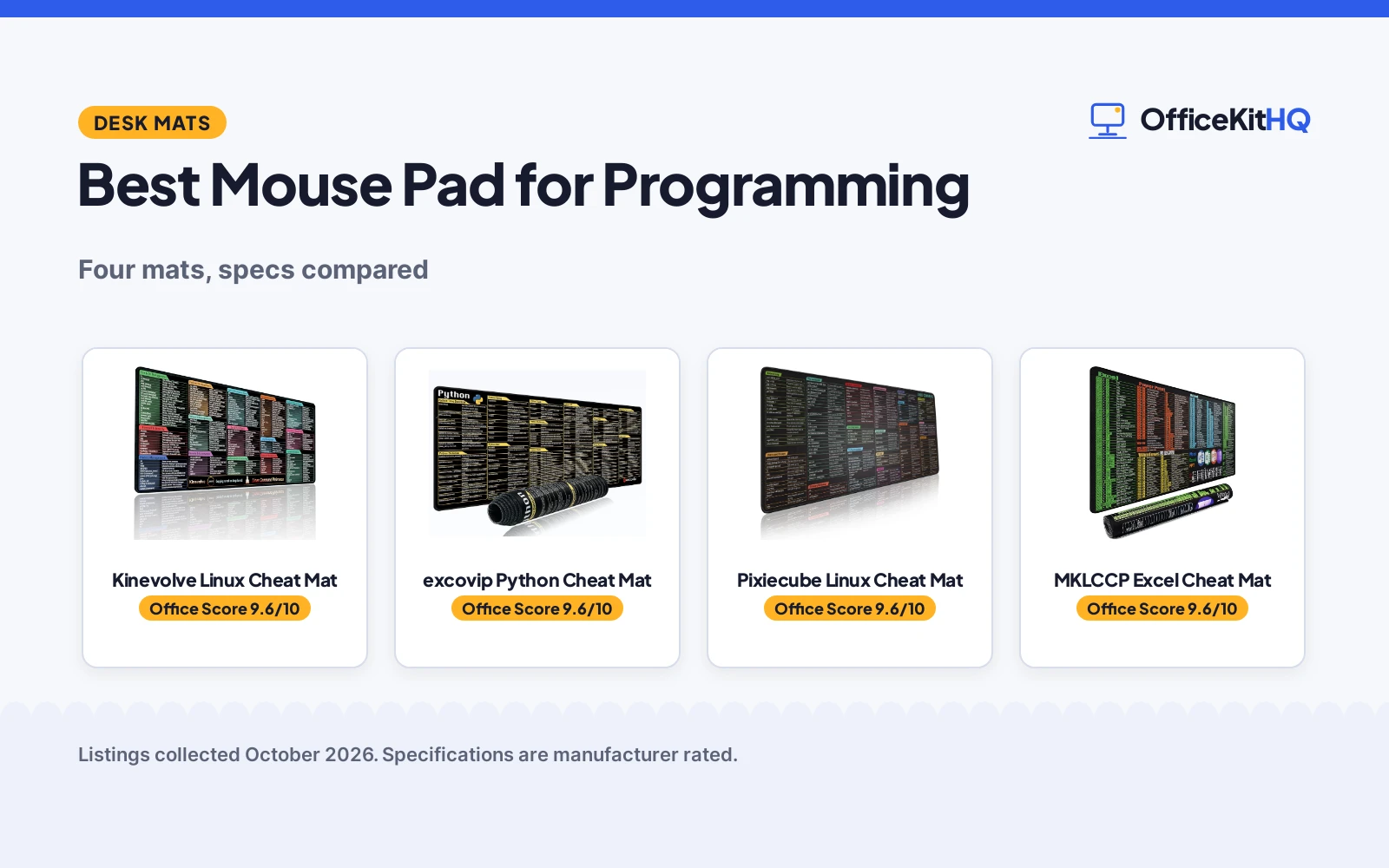
The terminal is open, the script is half-written, and the exact flag for that command slipped out of memory again, which is when best mouse pad for programming stops being a novelty and starts being a tool. We compared four cheat-sheet mouse pads on reference value, size, build and the honesty of their listings. Every number below comes from a listing. All four are extended desk mats around 31.5 inches wide, printed with shortcut references.
OfficeKitHQ earns a commission when you buy through links on this page, at no extra cost to you. As an Amazon Associate I earn from qualifying purchases. Affiliate disclosure.
Quick picks
 Best Overall Kinevolve Linux Cheat Mat: 180+ Linux commands, 3 mm thick, 30-day returns Check price on Amazon
 Best for Python excovip Python Cheat Mat: Python shortcuts on a washable 31.4 inch mat Check price on Amazon
 Best Linux Pick Pixiecube Linux Cheat Mat: Linux commands grouped by task, stitched edge Check price on Amazon
 Best Wide Mat MKLCCP Excel Cheat Mat: 31.5 x 15.7 in, the widest here, Excel shortcuts Check price on Amazon
The picks
| # | Product | Office Score | Buy |
|---|---|---|---|
| 1 | Kinevolve Linux Cheat Mat | 9.6/10 | Buy on Amazon |
| 2 | excovip Python Cheat Mat | 9.6/10 | Buy on Amazon |
| 3 | Pixiecube Linux Cheat Mat | 9.6/10 | Buy on Amazon |
| 4 | MKLCCP Excel Cheat Mat | 9.6/10 | Buy on Amazon |

Kinevolve Linux Cheat Mat
For Linux work: 180+ commands in a 31.5 inch mat, 3 mm thick, with 30 days return and exchange.
Pros
- 180+ Linux commands grouped by category
- 31.5 by 11.8 in with 3 mm thickness
- Stitched edges and non-slip rubber base
- Washable with high-resolution fade-resistant print
Cons
- 30-day return window is short
- 15.84 oz, the heaviest mat here
- Linux only; no Python or Excel reference
- No stated water resistance beyond washable
Detailed Review
Kinevolve lists a 31.5 by 11.8 inch Linux command mat, 0.12 inches (3 mm) thick and 15.84 ounces, with 180+ commands, stitched edges, a non-slip rubber base and a washable surface. The warranty description states 30 days return and exchange.
Who it's for: a Linux user who wants the terminal reference on the desk. Who should skip it: anyone who needs Python or spreadsheet shortcuts.
Its Office Score of 9.6/10 comes from performance 30/35, build 21/25, value 20/25, safety not scored (non-powered gear) and warranty 2/5: 73 of 90 points, placed on our 9.2 to 9.8 scale.
Key Specifications
| Size | 31.5 x 11.8 in |
|---|---|
| Thickness | 3 mm (0.12 in) |
| Reference | 180+ Linux commands |
| Base | Non-slip rubber |
Figures as published on the retailer listing, collected 19 October 2026. Performance figures are manufacturer rated.
Safety and Warranty
What this listing states. This product does not plug in or run on a battery, so safety is not part of its score. 30 days return and exchange. It does not say everything a buyer needs, such as who pays return shipping, so warranty scores 2 of 5. See How We Pick.
Fit the desk first. Check the stated size against your desk depth and keyboard tray, and charge or pair as the manual describes. No keyboard, mouse or wrist rest prevents or treats injury.
This is general buying information, not professional advice. Follow each product manual and local rules, and see our Safety Disclaimer.

excovip Python Cheat Mat
For Python work: shortcuts on a washable 31.4 inch mat with a smooth superfine fiber surface.
Pros
- Python shortcuts for quick reference while coding
- Superfine fiber surface for smooth mouse control
- Washable with stain-resistant coating
- Stitched edge with non-slip rubber base
Cons
- No warranty term is stated
- Bullets say 11.8 in wide while the spec table says 11.7 in
- Python only; no Linux or Excel reference
- 2 mm is the thinner end here
Detailed Review
excovip lists a 31.4 inch Python shortcuts mat, 800 by 300 by 2 mm, with a superfine fiber braided surface, stitched edge and non-slip rubber base. Note the small mismatch: the bullets say 11.8 inches wide while the spec table says 11.7; the 2 mm thickness is consistent. The mat is listed as washable and stain-resistant.
Who it's for: a Python programmer who glances down for syntax. Who should skip it: anyone who needs Linux or spreadsheet references.
Its Office Score of 9.6/10 comes from performance 32/35, build 21/25, value 20/25, safety not scored (non-powered gear) and warranty 0/5: 73 of 90 points, placed on our 9.2 to 9.8 scale.
Key Specifications
| Size | 31.4 x 11.7 in (spec) |
|---|---|
| Thickness | 2 mm (0.07 in) |
| Reference | Python shortcuts |
| Surface | Superfine fiber, washable |
Figures as published on the retailer listing, collected 19 October 2026. Performance figures are manufacturer rated.
Safety and Warranty
What this listing states. This product does not plug in or run on a battery, so safety is not part of its score. No warranty term, so warranty scores zero. See How We Pick.
Fit the desk first. Check the stated size against your desk depth and keyboard tray, and charge or pair as the manual describes. No keyboard, mouse or wrist rest prevents or treats injury.
This is general buying information, not professional advice. Follow each product manual and local rules, and see our Safety Disclaimer.

Pixiecube Linux Cheat Mat
For Linux and Unix across distributions: commands grouped by task on a 31.5 inch stitched mat.
Pros
- Covers Kali, Red Hat, Ubuntu, openSUSE, Arch, Debian and Unix
- Commands grouped by networking, files, processes and more
- Stitched edge with water- and stain-resistant surface
- Non-slip rubber base, 31.5 by 11.8 in
Cons
- No warranty term is stated
- Spec table mentions an option to 90x40cm against the 31.5 in listing
- 2 mm surface is the thinner end here
- Linux only; no Python or Excel reference
Detailed Review
Pixiecube lists a 31.5 by 11.8 inch Linux commands mat with a 2 mm surface, stitched edge, water- and stain-resistant top and non-slip rubber base. Commands are grouped by networking, directory navigation, processes, users, files and system management. Note: the spec table mentions an option to 90x40cm while the listed dimensions are 31.5 by 11.8 in.
Who it's for: a Linux or Unix user across many distributions. Who should skip it: anyone who needs Python or spreadsheet shortcuts.
Its Office Score of 9.6/10 comes from performance 30/35, build 21/25, value 20/25, safety not scored (non-powered gear) and warranty 0/5: 71 of 90 points, placed on our 9.2 to 9.8 scale.
Key Specifications
| Size | 31.5 x 11.8 in |
|---|---|
| Thickness | 2 mm (0.09 in) |
| Reference | Linux/Unix commands |
| Edge | Stitched, non-slip rubber base |
Figures as published on the retailer listing, collected 19 October 2026. Performance figures are manufacturer rated.
Safety and Warranty
What this listing states. This product does not plug in or run on a battery, so safety is not part of its score. No warranty term, so warranty scores zero. See How We Pick.
Fit the desk first. Check the stated size against your desk depth and keyboard tray, and charge or pair as the manual describes. No keyboard, mouse or wrist rest prevents or treats injury.
This is general buying information, not professional advice. Follow each product manual and local rules, and see our Safety Disclaimer.

MKLCCP Excel Cheat Mat
For spreadsheet work: Excel, Word and PPT shortcuts on the widest mat here at 31.5 by 15.7 in.
Pros
- 31.5 by 15.7 in, the deepest mat here
- Excel, Word and PPT shortcuts printed on the surface
- Stitched edges with water resistant coating
- Rolls up for transport, per the listing
Cons
- No warranty term is stated
- Excel focus suits office work more than programming
- No stated thickness
- No washable claim, water resistant only
Detailed Review
MKLCCP lists a 31.5 by 15.7 inch Excel shortcuts mat with stitched edges, a non-slip rubber base and a water resistant coating, in a lycra cloth the listing describes as smooth. It is the deepest mat here and rolls up for transport. No thickness is stated.
Who it's for: a spreadsheet-heavy worker who wants shortcuts under the mouse. Who should skip it: a programmer who needs Linux or Python references.
Its Office Score of 9.6/10 comes from performance 28/35, build 21/25, value 20/25, safety not scored (non-powered gear) and warranty 0/5: 69 of 90 points, placed on our 9.2 to 9.8 scale.
Key Specifications
| Size | 31.5 x 15.7 in |
|---|---|
| Reference | Excel/Word/PPT shortcuts |
| Surface | Lycra cloth, water resistant |
| Edge | Stitched, non-slip rubber base |
Figures as published on the retailer listing, collected 19 October 2026. Performance figures are manufacturer rated.
Safety and Warranty
What this listing states. This product does not plug in or run on a battery, so safety is not part of its score. No warranty term, so warranty scores zero. See How We Pick.
Fit the desk first. Check the stated size against your desk depth and keyboard tray, and charge or pair as the manual describes. No keyboard, mouse or wrist rest prevents or treats injury.
This is general buying information, not professional advice. Follow each product manual and local rules, and see our Safety Disclaimer.
As an Amazon Associate I earn from qualifying purchases.
More picks to compare
 excovip CSS&HTML Commands Shortcuts MouseCheck on Amazon
 MZSVDVD Python Commands Shortcuts Mouse PadCheck on Amazon
 excovip Mouse Pad with Linux Commands LineCheck on Amazon
Compare the picks
| Mouse pad | Office Score | Size (in) | Cheat sheet | Build | Warranty | Amazon |
|---|---|---|---|---|---|---|
| Kinevolve Linux Cheat Mat | 9.6/10 | 31.5 x 11.8 | 180+ Linux commands | Stitched, rubber, 3 mm | 30-day return | View on Amazon |
| excovip Python Cheat Mat | 9.6/10 | 31.4 x 11.7 | Python shortcuts | Stitched, washable | Not stated | View on Amazon |
| Pixiecube Linux Cheat Mat | 9.6/10 | 31.5 x 11.8 | Linux/Unix commands | Stitched, rubber, 2 mm | Not stated | View on Amazon |
| MKLCCP Excel Cheat Mat | 9.6/10 | 31.5 x 15.7 | Excel/Word/PPT | Stitched, waterproof | Not stated | View on Amazon |
Specifications are manufacturer rated as listed, collected 19 October 2026.
How we scored them
The Office Score weighs performance for a programming setup, build, value, safety and warranty. Safety barely applies to mouse pads: none of the four lists a safety feature, so safety scores are zero. One of the four states a warranty term, 30 days return and exchange; the rest state no term. How we pick explains the weights.
| Product | Office Score | Perf. /35 | Build /25 | Value /25 | Safety /10 | Warranty /5 |
|---|---|---|---|---|---|---|
| Kinevolve Linux Cheat Mat | 9.6 | 30 | 21 | 20 | n/a | 2 |
| excovip Python Cheat Mat | 9.6 | 32 | 21 | 20 | n/a | 0 |
| Pixiecube Linux Cheat Mat | 9.6 | 30 | 21 | 20 | n/a | 0 |
| MKLCCP Excel Cheat Mat | 9.6 | 28 | 21 | 20 | n/a | 0 |
Scores run from 9.2 to 9.8: each product’s point total is placed on that range, so more points always means a higher score. Safety counts only for powered gear or where the listing states safety features; where it does not apply, the score is taken over the remaining 90 points.
How to choose the best mouse pad for programming
Pick the cheat sheet you will actually read
Two mats print Linux commands: the Pixiecube across Kali, Red Hat, Ubuntu, openSUSE, Arch, Debian and Unix, and the Kinevolve with 180+ commands. One prints Python shortcuts, the excovip. One prints Excel, Word and PPT shortcuts, the MKLCCP. For programming, the Linux and Python mats match the work; the Excel mat suits a spreadsheet-heavy day more than a terminal. The Pixiecube groups commands by networking, navigation, processes, users, files and system management; the Kinevolve groups by file operations, networking and system processes.
Size: 31.5 inches is the standard here
Three mats are 31.5 inches wide; the excovip is 31.4. Depths run 11.7 to 15.7 inches, with the MKLCCP the deepest at 15.7. That is room for a keyboard and mouse with space to spare; the MKLCCP’s extra depth suits low-DPI mouse movement, per its listing. These are extended mats, not small pads: each one fits under a keyboard and mouse together. The Kinevolve is the only one to state a weight, 15.84 oz. More pads in our mice and mouse pads section.
Rubber bases and desk grip
All four list non-slip rubber bases that grip the desktop. The excovip specifies a dense, anti-slip natural rubber base; the Kinevolve and Pixiecube list rubber; the MKLCCP lists a rubberized non-slip grip that keeps the cloth from bunching up. A mat that walks across the desk during a long session is worse than no mat, so treat grip as a day-one check.
Stitched edges and washable tops
All four list stitched edges against fraying, and all four list non-slip rubber bases. The excovip and Kinevolve are washable; the Pixiecube and MKLCCP are water- or stain-resistant. The MKLCCP’s lycra cloth is listed as smooth for glide, and the excovip’s superfine fiber for speed and control. Coffee happens; pick accordingly.
Thickness: 2 mm to 3 mm
The excovip and Pixiecube list 2 mm (0.07 and 0.09 in); the Kinevolve lists 3 mm (0.12 in). Thicker mats cushion more under the wrist; thinner mats keep the mouse plane closer to the desk. At 15.84 oz the Kinevolve is also the heaviest mat here, which helps it stay put. None of this is a spec war: pick the feel.
Setup Notes
- Measure the desk: 31.5 in wide mats need a real desk, not a keyboard tray.
- Unroll and flatten before the first workday; the rubber bases are listed as non-slip on all four.
- Wipe spills promptly: two list washable tops, two list water- or stain-resistant.
- Check the cheat sheet print against the tools used daily; a Python mat will not help a Linux admin.
Frequently Asked Questions
Which cheat sheet mat suits a beginner programmer?
The Kinevolve prints 180+ Linux commands grouped by category, and the Pixiecube covers Linux and Unix across major distributions. The excovip covers Python shortcuts. Both Linux mats group commands by category, so a newcomer can find the right one without searching.
What size are these mouse pads?
31.5 inches wide on three, 31.4 on the excovip; depths run 11.7 to 15.7 inches. The MKLCCP is the deepest at 15.7. All are extended mats that fit under a keyboard and mouse together, not small pads.
Are these mouse pads washable?
The excovip and Kinevolve list washable; the Pixiecube lists water- and stain-resistant; the MKLCCP lists water resistant. Wipe the water-resistant ones promptly after a spill.
Do they work for gaming?
The MKLCCP lists low-DPI gaming use and the excovip mentions gaming sessions, but the cheat sheets target work. The MKLCCP’s 15.7 inch depth gives the mouse the most room; the others are 11.7 to 11.8 inches deep. For gaming-specific pads, see our mouse pad for superglides picks.
Is there a warranty?
The Kinevolve lists 30 days return and exchange; the Pixiecube lists a Standard Warranty with no term; the other two state none.
Related guides
See every mouse pad guide and all monitor mounts, keyboards and mice guides.
More picks: pads for superglides, white setups, vertical mice and office keyboards.