The best webcam for professional meetings is the one that looks sharp and sounds clear on every platform you use, because a blurry feed undermines the whole pitch. A 10 a.m. client call on a grainy camera starts every meeting at a disadvantage. We compared five webcams by video quality, audio, certifications, privacy and warranty, using only what each listing publishes.
OfficeKitHQ earns a commission when you buy through links on this page, at no extra cost to you. As an Amazon Associate I earn from qualifying purchases. Affiliate disclosure.
Quick picks
 Best Overall Logitech MX Brio Webcam: 4K, platform certified, 1-year warranty Check price on Amazon
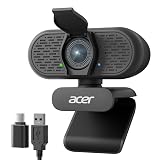 Best Warranty Acer A640 4K Webcam: 4K, AI noise canceling, 2 years Check price on Amazon
 Best Room j5create JVCU360 Camera: 360° view, 6 modes, 2-year warranty Check price on Amazon
 Best Portable Acer 4K Webcam: 4K aluminum, 57 grams, 1-year warranty Check price on Amazon
 Best Speakerphone Logitech BCC Conference Cam: 1080p, remote, 2-year warranty Check price on Amazon
The picks
| # | Product | Office Score | Buy |
|---|---|---|---|
| 1 | Logitech MX Brio Webcam | 9.6/10 | Buy on Amazon |
| 2 | Acer A640 4K Webcam | 9.6/10 | Buy on Amazon |
| 3 | j5create JVCU360 Camera | 9.6/10 | Buy on Amazon |
| 4 | Acer 4K Webcam | 9.6/10 | Buy on Amazon |
| 5 | Logitech BCC Conference Cam | 9.6/10 | Buy on Amazon |

Logitech MX Brio Webcam
A 4K webcam with platform certifications, best for professionals who want 4K.
Pros
- 4K at 30fps or 1080p at 60fps
- AI-enhanced image with dual beamforming mics
- Show Mode for sharing desk notes
- Certified for Zoom, Teams, Meet and Streamlabs
Cons
- 13.12 ounces is the heaviest here
- No stated FOV figure
- 1 Year Limited Hardware Warranty, shorter than others
- Logitech software needed for full controls
Detailed Review
Logitech lists the MX Brio as a 4K webcam at 30fps or 1080p at 60fps with AI-enhanced image quality and autofocus. Dual beamforming noise-reducing mics handle audio, and a built-in privacy cover rotates over the lens. Show Mode tilts down to share desk notes, and the camera is certified for Zoom, Microsoft Teams, Google Meet, Chromebook and Streamlabs. The spec table gives a 5.5 by 5.5 by 2.63 inch size, a 13.12-ounce weight and a 1 Year Limited Hardware Warranty.
Who it's for: professionals who want 4K with platform certifications. Who should skip it: anyone who wants the longest warranty.
Its Office Score of 9.6/10 comes from performance 33/35, build 21/25, value 20/25, safety 5/10 and warranty 3/5: 82 of 100 points, placed on our 9.2 to 9.8 scale.
Key Specifications
| Video | 4K@30fps |
|---|---|
| Audio | Dual beamforming |
| Certified | Zoom, Teams, Meet |
| Warranty | 1 Year |
Figures as published on the retailer listing, collected 17 October 2026. Performance figures are manufacturer rated.
Safety and Warranty
What this listing states. Built-in privacy cover; USB-C connection, so safety scores 5 of 10. 1 Year Limited Hardware Warranty. It does not say everything a buyer needs, such as who pays return shipping, so warranty scores 3 of 5. See How We Pick.
Light and privacy. Use the supplied adapter for ring lights, keep lights and cords away from drinks and paper, and cover or unplug a webcam when it is not in use.
This is general buying information, not professional advice. Follow each product manual and local rules, and see our Safety Disclaimer.

Acer A640 4K Webcam
A 4K webcam with AI noise canceling, best for professionals who want a 2-year warranty.
Pros
- 4K with Sony 1/2.8-inch sensor and PDAF autofocus
- 4K at 30fps, 1080p at 60fps
- AI noise canceling mic with privacy shutter
- 2 years warranty stated
Cons
- No built-in speakers, per the listing
- 4.64 ounces with no stated cable length
- 77.4° FOV is narrower than the Acer 4K's 83°
- No stated FOV presets
Detailed Review
Acer lists the A640 as a 4K webcam with a Sony 1/2.8-inch sensor and PDAF autofocus. It records 4K at 30fps and 1080p at 60fps, with AI noise cancellation on the mic and a physical privacy shutter. The 77.4-degree viewing angle suits solo calls, and a USB-A to C adapter is included. The spec table gives a 4.64-ounce weight and a 2 years warranty.
Who it's for: professionals who want 4K with AI noise cancellation. Who should skip it: anyone who needs built-in speakers.
Its Office Score of 9.6/10 comes from performance 32/35, build 20/25, value 21/25, safety 5/10 and warranty 3/5: 81 of 100 points, placed on our 9.2 to 9.8 scale.
Key Specifications
| Video | 4K@30fps |
|---|---|
| Sensor | Sony 1/2.8 in |
| Mic | AI noise canceling |
| Warranty | 2 years |
Figures as published on the retailer listing, collected 17 October 2026. Performance figures are manufacturer rated.
Safety and Warranty
What this listing states. Physical privacy shutter stated, so safety scores 5 of 10. 2 years. It does not say everything a buyer needs, such as who pays return shipping, so warranty scores 3 of 5. See How We Pick.
Light and privacy. Use the supplied adapter for ring lights, keep lights and cords away from drinks and paper, and cover or unplug a webcam when it is not in use.
This is general buying information, not professional advice. Follow each product manual and local rules, and see our Safety Disclaimer.
j5create JVCU360 Camera
A 360° meeting webcam, best for small rooms that need full coverage.
Pros
- 360° video with 6 display modes
- Omnidirectional microphone
- 1080p at 30fps with USB-A and USB-C
- 2 year manufacturer warranty
Cons
- Fixed focus, no autofocus
- No privacy cover stated
- 0.27 g is likely a listing error; confirm
- Firmware upgrade may be needed, per the listing
Detailed Review
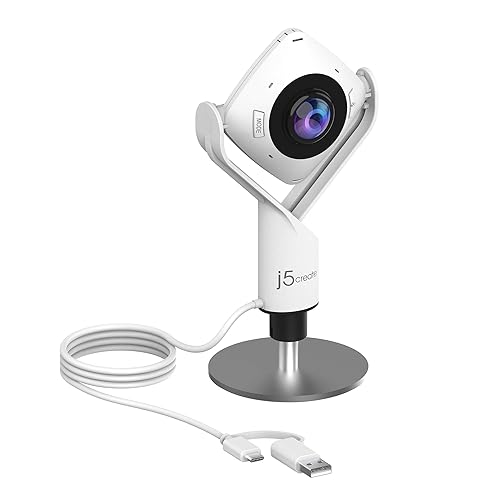
j5create lists the JVCU360 as a 360-degree meeting webcam at 1080p and 30fps with an omnidirectional microphone. Six display modes cover full screen, host, dual host and wide-angle views, with a touch bar to mark participant locations. USB-A and USB-C connections are included with a 9.84 ft cable. The spec table gives a 1.46 by 3.68 by 7.6 inch size and a 2 year manufacturer warranty.
Who it's for: small rooms that need 360-degree coverage. Who should skip it: anyone who needs autofocus.
Its Office Score of 9.6/10 comes from performance 30/35, build 19/25, value 21/25, safety 5/10 and warranty 3/5: 78 of 100 points, placed on our 9.2 to 9.8 scale.
Key Specifications
| Video | 1080p@30fps |
|---|---|
| View | 360° |
| Mic | Omnidirectional |
| Warranty | 2 year |
Figures as published on the retailer listing, collected 17 October 2026. Performance figures are manufacturer rated.
Safety and Warranty
What this listing states. No stated safety feature; USB-A and USB-C, so safety scores 5 of 10. 2 year manufacturer. It does not say everything a buyer needs, such as who pays return shipping, so warranty scores 3 of 5. See How We Pick.
Light and privacy. Use the supplied adapter for ring lights, keep lights and cords away from drinks and paper, and cover or unplug a webcam when it is not in use.
This is general buying information, not professional advice. Follow each product manual and local rules, and see our Safety Disclaimer.

Acer 4K Webcam
A 4K aluminum webcam, best for mobile professionals who want portability.
Pros
- 4K with Sony 1/2-inch sensor and PDAF
- Dual mics with magnetic privacy cover
- Aluminum unibody at 57 grams
- 83° viewing angle
Cons
- 1 years warranty stated, shorter than others
- No stated fps figure
- No stated cable length
- Projector listed as special feature; confirm
Detailed Review
Acer lists the 4K webcam with a Sony 1/2-inch sensor and PDAF autofocus. Dual high-sensitivity mics pick up voice from 2.5 meters, and a magnetic privacy cover snaps over the lens. The aluminum unibody weighs 57 grams with an 83-degree viewing angle. The spec table gives a 1 years warranty.
Who it's for: mobile professionals who want 4K in an aluminum body. Who should skip it: anyone who wants a longer warranty.
Its Office Score of 9.6/10 comes from performance 30/35, build 21/25, value 20/25, safety 5/10 and warranty 3/5: 79 of 100 points, placed on our 9.2 to 9.8 scale.
Key Specifications
| Video | 4K |
|---|---|
| Sensor | Sony 1/2 in |
| Cover | Magnetic |
| Warranty | 1 years |
Figures as published on the retailer listing, collected 17 October 2026. Performance figures are manufacturer rated.
Safety and Warranty
What this listing states. Magnetic privacy cover stated, so safety scores 5 of 10. 1 years. It does not say everything a buyer needs, such as who pays return shipping, so warranty scores 3 of 5. See How We Pick.
Light and privacy. Use the supplied adapter for ring lights, keep lights and cords away from drinks and paper, and cover or unplug a webcam when it is not in use.
This is general buying information, not professional advice. Follow each product manual and local rules, and see our Safety Disclaimer.

Logitech BCC Conference Cam
A 1080p conference cam with speakerphone, best for small meeting rooms.
Pros
- 1080p with speakerphone for 1 to 4 people
- Noise-cancelling mic with remote
- Certified for Skype for Business, Lync 2013
- 2 year limited warranty stated
Cons
- 1080p only, no 4K
- 2.3 pounds, the heaviest here
- No privacy cover stated
- 100x optical zoom in the spec table looks like a listing error; confirm
Detailed Review
Logitech lists the BCC conference cam as a 1080p desktop webcam and speakerphone for rooms of 1 to 4 people. A full duplex speakerphone and noise-cancelling microphone reach 8 feet, with a remote for pan, tilt, zoom and call controls. The camera is certified for Skype for Business and optimized for Microsoft Lync 2013. The spec table gives a 6.97 by 6.81 by 4.88 inch size, a 2.3-pound weight and a 2 year limited warranty.
Who it's for: small meeting rooms that need a speakerphone. Who should skip it: anyone who wants 4K.
Its Office Score of 9.6/10 comes from performance 28/35, build 20/25, value 20/25, safety 5/10 and warranty 3/5: 76 of 100 points, placed on our 9.2 to 9.8 scale.
Key Specifications
| Video | 1080p |
|---|---|
| Audio | Speakerphone |
| Room | 1 to 4 people |
| Warranty | 2 year |
Figures as published on the retailer listing, collected 17 October 2026. Performance figures are manufacturer rated.
Safety and Warranty
What this listing states. No stated safety feature; USB connection, so safety scores 5 of 10. 2 year limited warranty. It does not say everything a buyer needs, such as who pays return shipping, so warranty scores 3 of 5. See How We Pick.
Light and privacy. Use the supplied adapter for ring lights, keep lights and cords away from drinks and paper, and cover or unplug a webcam when it is not in use.
This is general buying information, not professional advice. Follow each product manual and local rules, and see our Safety Disclaimer.
As an Amazon Associate I earn from qualifying purchases.
More picks to compare
 Logitech Brio Ultra 4K HD WebcamCheck on Amazon
 PHILIPS 4K Webcam for PC with MicrophoneCheck on Amazon
Compare the picks
| Webcam | Office Score | Video | Audio | Certified | Warranty | Amazon |
|---|---|---|---|---|---|---|
| Logitech MX Brio Webcam | 9.6/10 | 4K@30fps | Dual beamforming | Zoom, Teams, Meet | 1 Year | View on Amazon |
| Acer A640 4K Webcam | 9.6/10 | 4K@30fps | AI noise canceling | Not stated | 2 years | View on Amazon |
| j5create JVCU360 Camera | 9.6/10 | 1080p@30fps | Omnidirectional | Not stated | 2 year | View on Amazon |
| Acer 4K Webcam | 9.6/10 | 4K | Dual mics | Not stated | 1 years | View on Amazon |
| Logitech BCC Conference Cam | 9.6/10 | 1080p | Speakerphone | Skype for Business | 2 year | View on Amazon |
Specifications are manufacturer rated as listed, collected 17 October 2026.
How we scored them
The Office Score weighs performance (video and audio for meetings), build, value for the stated specs, safety and warranty. For a webcam, safety means a stated water resistance rating and a privacy cover; three listings name one. Three of the five state a 2-year term: the A640, the j5create and the BCC. How we pick explains the weights.
| Product | Office Score | Perf. /35 | Build /25 | Value /25 | Safety /10 | Warranty /5 |
|---|---|---|---|---|---|---|
| Logitech MX Brio Webcam | 9.6 | 33 | 21 | 20 | 5 | 3 |
| Acer A640 4K Webcam | 9.6 | 32 | 20 | 21 | 5 | 3 |
| j5create JVCU360 Camera | 9.6 | 30 | 19 | 21 | 5 | 3 |
| Acer 4K Webcam | 9.6 | 30 | 21 | 20 | 5 | 3 |
| Logitech BCC Conference Cam | 9.6 | 28 | 20 | 20 | 5 | 3 |
Scores run from 9.2 to 9.8: each product’s point total is placed on that range, so more points always means a higher score.
How to choose the best webcam for professional meetings
Video quality
4K on the MX Brio, A640 and Acer 4K; 1080p on the j5create and BCC. The MX Brio and A640 record 1080p at 60fps.
Audio
Dual beamforming mics on the MX Brio; AI noise canceling on the A640; dual mics on the Acer 4K; omnidirectional mic on the j5create; speakerphone on the BCC.
Platform certifications
The MX Brio is certified for Zoom, Teams, Meet, Chromebook and Streamlabs; the BCC for Skype for Business and Lync 2013. The others list compatibility without certifications.
| Webcam | Video | Audio | Warranty |
|---|---|---|---|
| Logitech MX Brio | 4K@30fps | Dual beamforming | 1 Year |
| Acer A640 | 4K@30fps | AI noise canceling | 2 years |
| j5create JVCU360 | 1080p@30fps | Omnidirectional | 2 year |
| Acer 4K Webcam | 4K | Dual mics | 1 years |
| Logitech BCC Conference | 1080p | Speakerphone | 2 year |
Read the warranty line
The A640 states 2 years, the j5create 2 year manufacturer, the BCC 2 year limited warranty. The MX Brio and Acer 4K state 1 year each. For the full meeting setup, browse our webcams and ring lights guides, and compare the webcam with noise cancelling microphone picks for audio.
Setup Notes
- The MX Brio pairs with Logitech software for full controls.
- The j5create may need a firmware upgrade, per the listing.
- No assembly is stated for any of the five.
Frequently Asked Questions
Which webcam is best for professional meetings?
The MX Brio with 4K and platform certifications, or the A640 with 4K and a 2-year warranty.
Which have a speakerphone?
The Logitech BCC conference cam.
Which record 4K?
The MX Brio, A640 and Acer 4K.
Which have the longest warranty?
The A640 (2 years), j5create (2 year manufacturer) and BCC (2 year limited warranty).
Related guides
See every webcams and ring lights guide and all computer peripherals guides.
More picks: webcams with noise cancelling microphones, webcam for Respondus Lockdown Browser and webcam with speaker and microphone.