
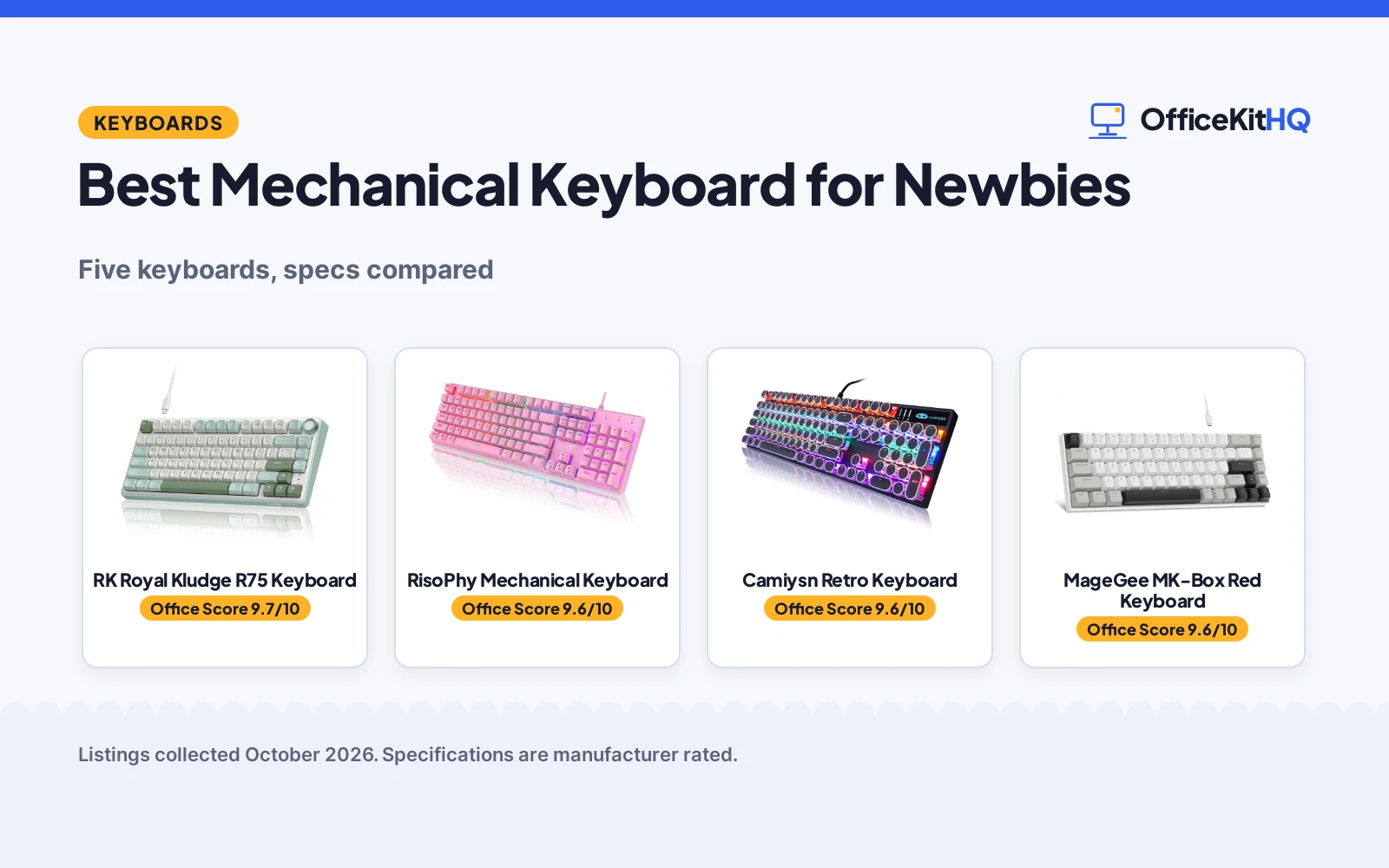
The best mechanical keyboard for newbies is one that feels good from the first keystroke, because a bad first board can turn you off the hobby for good. On a 9 a.m. call with the laptop running everything off one hub, nobody notices your keyboard, but you will feel it all day. We compared five mechanical keyboards by stated layout, switch type, backlight and beginner-friendly extras, using only what each listing publishes.
OfficeKitHQ earns a commission when you buy through links on this page, at no extra cost to you. As an Amazon Associate I earn from qualifying purchases. Affiliate disclosure.
Quick picks
 Best Overall RK Royal Kludge R75 Keyboard: 75%, hot-swappable, gasket mount, volume knob Check price on Amazon
 Best Full-Size RisoPhy Mechanical Keyboard: 104 keys, spill-resistant, Win lock Check price on Amazon
 Best Retro Style Camiysn Retro Keyboard: Typewriter round keycaps, RGB, 104 keys Check price on Amazon
 Best Quiet Pick MageGee MK-Box Red Keyboard: Red linear switches, 68 keys, white LED Check price on Amazon
 Best Compact MageGee MK-Box Blue Keyboard: 68 keys, blue switch, detachable USB Check price on Amazon
The picks
| # | Product | Office Score | Buy |
|---|---|---|---|
| 1 | RK Royal Kludge R75 Keyboard | 9.7/10 | Buy on Amazon |
| 2 | RisoPhy Mechanical Keyboard | 9.6/10 | Buy on Amazon |
| 3 | Camiysn Retro Keyboard | 9.6/10 | Buy on Amazon |
| 4 | MageGee MK-Box Red Keyboard | 9.6/10 | Buy on Amazon |
| 5 | MageGee MK-Box Blue Keyboard | 9.6/10 | Buy on Amazon |

RK Royal Kludge R75 Keyboard
A 75% mechanical keyboard with hot-swappable linear switches, a gasket mount, RGB and a volume knob.
Pros
- Hot-swappable PCB takes 3-pin and 5-pin switches, no soldering
- Gasket mount with sound-absorbing layers stated for creamy sound
- MDA PBT keycaps and a CNC aluminum volume knob
- 75% layout keeps arrow keys while saving desk space
Cons
- No warranty term is stated
- Green color may not suit every desk
- 75% layout drops the number pad
- Not stated as water resistant
Detailed Review
RK Royal Kludge lists the R75 as a 75% wired keyboard with 81 keys, pre-lubed Silver Pro linear switches on a hot-swappable PCB, and a gasket mount with multiple sound-absorbing layers for a creamy sound. The listing states MDA profile PBT keycaps, RGB backlighting, a CNC aluminum volume knob, N-key rollover and a WIN key lock. It is not stated as water resistant. No warranty term is stated.
Who it's for: newbies who want to try switch swapping without soldering. Who should skip it: anyone who needs a number pad.
Its Office Score of 9.7/10 comes from performance 33/35, build 21/25, value 21/25, safety not scored (non-powered gear) and warranty 0/5: 75 of 90 points, placed on our 9.2 to 9.8 scale.
Key Specifications
| Layout | 75%, 81 keys |
|---|---|
| Switch | Silver Pro linear, hot-swap |
| Backlight | RGB |
| Extras | Volume knob, PBT |
Figures as published on the retailer listing, collected 17 October 2026. Performance figures are manufacturer rated.
Safety and Warranty
What this listing states. This product does not plug in or run on a battery, so safety is not part of its score. No warranty term, so warranty scores zero. See How We Pick.
Fit the desk first. Check the stated size against your desk depth and keyboard tray, and charge or pair as the manual describes. No keyboard, mouse or wrist rest prevents or treats injury.
This is general buying information, not professional advice. Follow each product manual and local rules, and see our Safety Disclaimer.

RisoPhy Mechanical Keyboard
A full-size 104-key keyboard with blue clicky switches, RGB backlight and spill resistance.
Pros
- Full-size 104 keys, the most familiar layout
- Spill resistance with hydrophobic drain holes stated
- Win lock and pluggable keycaps stated
- 9 backlight modes with 5 speed and brightness levels
Cons
- Blue switches are loud for shared spaces
- No warranty term is stated
- ABS keycaps rather than PBT
- Pink color may not suit every desk
Detailed Review
RisoPhy lists a wired 104-key keyboard with clicky blue switches, RGB backlight with 9 modes and 5 speed and brightness levels, and double-injection ABS keycaps. The listing states spill resistance with 4 hydrophobic drain holes, a Win lock function, pluggable keycaps and anti-ghosting. It is pink. No warranty term is stated.
Who it's for: newbies who want a familiar full-size board with spill protection. Who should skip it: anyone who needs quiet switches.
Its Office Score of 9.6/10 comes from performance 30/35, build 21/25, value 21/25, safety not scored (non-powered gear) and warranty 0/5: 72 of 90 points, placed on our 9.2 to 9.8 scale.
Key Specifications
| Layout | 104 keys |
|---|---|
| Switch | Blue clicky |
| Backlight | RGB, 9 modes |
| Extras | Spill-resistant |
Figures as published on the retailer listing, collected 17 October 2026. Performance figures are manufacturer rated.
Safety and Warranty
What this listing states. This product does not plug in or run on a battery, so safety is not part of its score. No warranty term, so warranty scores zero. See How We Pick.
Fit the desk first. Check the stated size against your desk depth and keyboard tray, and charge or pair as the manual describes. No keyboard, mouse or wrist rest prevents or treats injury.
This is general buying information, not professional advice. Follow each product manual and local rules, and see our Safety Disclaimer.

Camiysn Retro Keyboard
A full-size 104-key keyboard with retro round typewriter keycaps, blue switches and RGB backlight.
Pros
- Full-size 104 keys with unique round retro keycaps
- Blue switches with audible click and tactile feedback
- RGB backlight with multiple modes stated
- 26 anti-ghosting keys and adjustable rear feet
Cons
- Blue switches are loud for shared spaces
- No warranty term is stated
- Round keycaps may slow touch typists
- Wired only
Detailed Review
Camiysn lists a wired 104-key keyboard in a retro typewriter style with round keycaps, blue switches with an audible click and tactile feedback, and RGB backlighting with multiple modes controlled by Fn combinations. The listing states 26 anti-ghosting keys, adjustable rear feet and plug-and-play USB for Windows, Mac and Linux. No warranty term is stated.
Who it's for: newbies who want a fun retro look with a full-size layout. Who should skip it: touch typists who need standard keycap shapes.
Its Office Score of 9.6/10 comes from performance 29/35, build 20/25, value 21/25, safety not scored (non-powered gear) and warranty 0/5: 70 of 90 points, placed on our 9.2 to 9.8 scale.
Key Specifications
| Layout | 104 keys |
|---|---|
| Switch | Blue clicky |
| Backlight | RGB |
| Extras | Round keycaps |
Figures as published on the retailer listing, collected 17 October 2026. Performance figures are manufacturer rated.
Safety and Warranty
What this listing states. This product does not plug in or run on a battery, so safety is not part of its score. No warranty term, so warranty scores zero. See How We Pick.
Fit the desk first. Check the stated size against your desk depth and keyboard tray, and charge or pair as the manual describes. No keyboard, mouse or wrist rest prevents or treats injury.
This is general buying information, not professional advice. Follow each product manual and local rules, and see our Safety Disclaimer.

MageGee MK-Box Red Keyboard
A compact 68-key keyboard with quiet red linear switches, white LED backlight and a detachable cable.
Pros
- Red linear switches are quieter for shared spaces
- Compact 68 keys with separate arrow keys
- White LED backlight with about 16 modes stated
- Detachable USB cable for portability
Cons
- 68 keys drop the number pad and function row
- No warranty term is stated
- ABS keycaps rather than PBT
- Compact layout has a learning curve for newbies
Detailed Review
MageGee lists the MK-Box as a 68-key compact wired keyboard with red linear switches, white LED backlight with about 16 modes and full anti-ghosting. The listing states separate arrow keys, ergonomic double-color injection keycaps, two-step kickstand feet and a detachable USB cable, with plug and play on Windows, Linux and Mac. No warranty term is stated.
Who it's for: newbies who want a quiet compact board for small desks. Who should skip it: anyone who needs a number pad or function row.
Its Office Score of 9.6/10 comes from performance 28/35, build 20/25, value 21/25, safety not scored (non-powered gear) and warranty 0/5: 69 of 90 points, placed on our 9.2 to 9.8 scale.
Key Specifications
| Layout | 68 keys |
|---|---|
| Switch | Red linear |
| Backlight | White LED |
| Extras | Detachable USB |
Figures as published on the retailer listing, collected 17 October 2026. Performance figures are manufacturer rated.
Safety and Warranty
What this listing states. This product does not plug in or run on a battery, so safety is not part of its score. No warranty term, so warranty scores zero. See How We Pick.
Fit the desk first. Check the stated size against your desk depth and keyboard tray, and charge or pair as the manual describes. No keyboard, mouse or wrist rest prevents or treats injury.
This is general buying information, not professional advice. Follow each product manual and local rules, and see our Safety Disclaimer.

MageGee MK-Box Blue Keyboard
A compact 68-key keyboard with clicky blue switches, blue LED backlight and a detachable cable.
Pros
- Blue clicky switches with crisp tactile feedback
- Compact 68 keys with separate arrow keys
- Blue LED backlight with about 15 modes stated
- Detachable USB cable for portability
Cons
- Blue switches are loud for shared spaces
- 68 keys drop the number pad and function row
- No warranty term is stated
- Compact layout has a learning curve for newbies
Detailed Review
MageGee lists the MK-Box as a 68-key compact wired keyboard with blue clicky switches, blue LED backlight with about 15 modes and full anti-ghosting on all 68 keys. The listing states separate arrow keys, ergonomic double-color injection keycaps, double kickstand feet and a detachable USB cable, with plug and play on Windows, Linux and Mac. No warranty term is stated.
Who it's for: newbies who want clicky feedback in a compact board. Who should skip it: anyone who needs quiet switches or a full layout.
Its Office Score of 9.6/10 comes from performance 28/35, build 20/25, value 20/25, safety not scored (non-powered gear) and warranty 0/5: 68 of 90 points, placed on our 9.2 to 9.8 scale.
Key Specifications
| Layout | 68 keys |
|---|---|
| Switch | Blue clicky |
| Backlight | Blue LED |
| Extras | Detachable USB |
Figures as published on the retailer listing, collected 17 October 2026. Performance figures are manufacturer rated.
Safety and Warranty
What this listing states. This product does not plug in or run on a battery, so safety is not part of its score. No warranty term, so warranty scores zero. See How We Pick.
Fit the desk first. Check the stated size against your desk depth and keyboard tray, and charge or pair as the manual describes. No keyboard, mouse or wrist rest prevents or treats injury.
This is general buying information, not professional advice. Follow each product manual and local rules, and see our Safety Disclaimer.
As an Amazon Associate I earn from qualifying purchases.
More picks to compare
 wegear Wired Mechanical Gaming KeyboardCheck on Amazon
 MageGee Portable 60% Mechanical GamingCheck on Amazon
Compare the picks
| Keyboard | Office Score | Layout | Switch | Backlight | Extras | Amazon |
|---|---|---|---|---|---|---|
| RK Royal Kludge R75 Keyboard | 9.7/10 | 75%, 81 keys | Linear, hot-swap | RGB | Volume knob, PBT | View on Amazon |
| RisoPhy Mechanical Keyboard | 9.6/10 | 104 keys | Blue clicky | RGB | Spill-resistant | View on Amazon |
| Camiysn Retro Keyboard | 9.6/10 | 104 keys | Blue clicky | RGB | Round keycaps | View on Amazon |
| MageGee MK-Box Red Keyboard | 9.6/10 | 68 keys | Red linear | White LED | Detachable USB | View on Amazon |
| MageGee MK-Box Blue Keyboard | 9.6/10 | 68 keys | Blue clicky | Blue LED | Detachable USB | View on Amazon |
Specifications are manufacturer rated as listed, collected 17 October 2026. None of the five state a warranty term.
How we scored them
The Office Score weighs performance (switch feel, layout and stated extras), build (keycaps, mounting and materials), value for the stated specs, safety and warranty. For a first board, performance means forgiving and fun: the R75’s hot-swappable linear switches and gasket mount, the RisoPhy’s spill resistance and Win lock, and the Camiysn’s full-size retro layout. No listing states a warranty term or a safety certification, so those scores are zero across the board. How we pick explains the weights.
| Product | Office Score | Perf. /35 | Build /25 | Value /25 | Safety /10 | Warranty /5 |
|---|---|---|---|---|---|---|
| RK Royal Kludge R75 Keyboard | 9.7 | 33 | 21 | 21 | n/a | 0 |
| RisoPhy Mechanical Keyboard | 9.6 | 30 | 21 | 21 | n/a | 0 |
| Camiysn Retro Keyboard | 9.6 | 29 | 20 | 21 | n/a | 0 |
| MageGee MK-Box Red Keyboard | 9.6 | 28 | 20 | 21 | n/a | 0 |
| MageGee MK-Box Blue Keyboard | 9.6 | 28 | 20 | 20 | n/a | 0 |
Scores run from 9.2 to 9.8: each product’s point total is placed on that range, so more points always means a higher score. Safety counts only for powered gear or where the listing states safety features; where it does not apply, the score is taken over the remaining 90 points.
How to choose the best mechanical keyboard for newbies
Start with the layout
The Camiysn and RisoPhy are full-size 104-key boards, the most familiar layout for anyone coming from a laptop or office keyboard. The RK R75 is a 75% board with 81 keys that keeps the arrow keys and adds a volume knob. The two MageGee MK-Box boards are compact 68-key 60% boards that save desk space but drop the number pad and function row. Newbies should start full-size or 75% before going compact.
Pick a switch
Blue switches are clicky with an audible click and tactile feedback, stated on the Camiysn, RisoPhy and blue MageGee. Red switches are linear and smoother with minimal resistance, stated on the red MageGee, and quieter for shared spaces. The R75 uses pre-lubed Silver Pro linear switches on a hot-swappable PCB, so you can try other switches later without soldering.
Extras that help beginners
Hot-swappable switches mean you can change switches without soldering, stated on the R75. A detachable USB cable makes the two MageGee boards easy to pack. The RisoPhy states spill resistance with hydrophobic drain holes and a Win lock for gaming. The R75’s volume knob and MDA PBT keycaps add comfort from day one.
| Keyboard | Layout | Switch | Backlight | Beginner extra |
|---|---|---|---|---|
| RK Royal Kludge R75 | 75%, 81 keys | Silver Pro linear, hot-swap | RGB | Volume knob, PBT keycaps |
| RisoPhy | 104 keys | Blue clicky | RGB, 9 modes | Spill-resistant, Win lock |
| Camiysn | 104 keys | Blue clicky | RGB | Round retro keycaps |
| MageGee MK-Box Red | 68 keys | Red linear | White LED | Detachable USB |
| MageGee MK-Box Blue | 68 keys | Blue clicky | Blue LED | Detachable USB |
Two more options
Two more options from the same listings did not make the ranked picks: a wegear keyboard and another MageGee keyboard.
Setup Notes
- Plug and play: all five state USB with no drivers or software needed.
- Reset the Camiysn: hold Fn+ESC, then press F1, F3 and F5 in turn, per its listing.
- Blue is loud: blue switches state an audible click; red and Silver Pro linear are quieter.
- Try before committing: the R75’s hot-swap PCB takes 3-pin and 5-pin switches with no soldering.
Frequently Asked Questions
Which is best for a first mechanical keyboard?
The RK R75, with hot-swappable switches, a gasket mount, PBT keycaps and a volume knob. The full-size RisoPhy is the simplest familiar option.
Are blue switches too loud?
Blue switches state an audible click and tactile feedback. For shared spaces, the red MageGee or the R75’s linear switches are quieter.
What does hot-swappable mean?
The R75’s PCB supports 3-pin and 5-pin switches with no soldering, per its listing, so you can pull switches out and press new ones in.
Which of these are full-size?
The Camiysn and the RisoPhy, both 104 keys. The R75 is 75% with 81 keys, and the MageGee pair are 68-key compact boards.
Related guides
See every keyboard guide and all computer peripherals guides. Also see our mechanical keyboard for accuracy picks. Also see our wrist rest for keyboard picks.
More picks: keyboards, mechanical keyboard for accuracy and wrist rest for keyboard.



