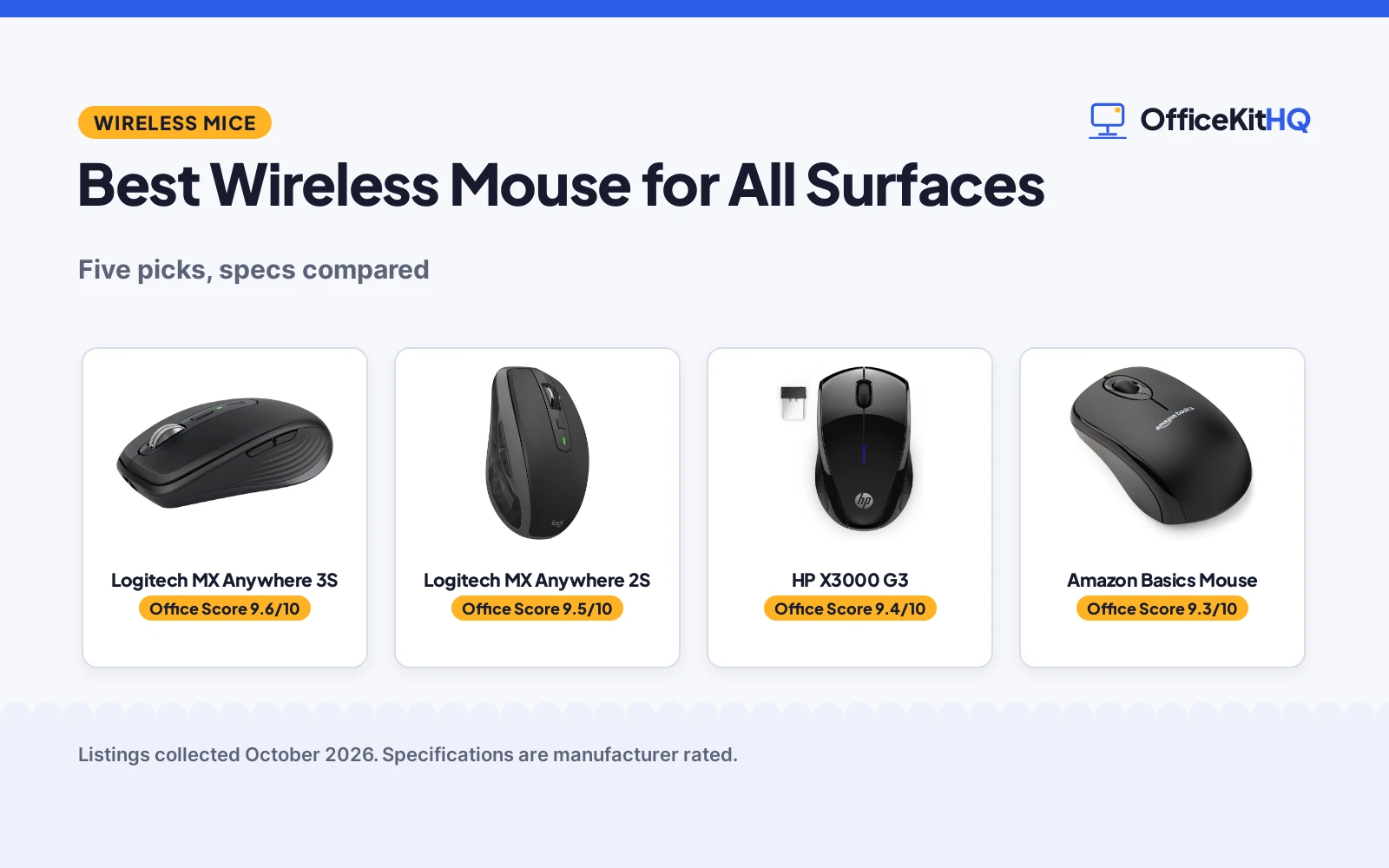
The best wireless mouse for all surfaces is the one that keeps tracking when the desk disappears: glass tables, glossy counters, the arm of a chair. A sensor that quits on glass turns a travel mouse into a paperweight. This roundup compares five wireless mice on sensor DPI, surface tracking, connection type, battery life and warranty terms, using only what each listing publishes.
OfficeKitHQ earns a commission when you buy through links on this page, at no extra cost to you. As an Amazon Associate I earn from qualifying purchases. Affiliate disclosure.
Quick picks
 Best Overall Logitech MX Anywhere 3S: 8K DPI any-surface, Bluetooth, 70-day battery, 1-year warranty Check price on Amazon
 Best Value Logitech MX Anywhere 2S: 4K DPI any-surface, 33-foot range, 1-year warranty Check price on Amazon
 Long Battery HP X3000 G3: Wireless mouse with 15-month battery stated Check price on Amazon
 Simple Pick Amazon Basics Mouse: 2.4 GHz wireless optical mouse Check price on Amazon
 Slim Pick VssoPlor Slim Mouse: 2.4G slim wireless mouse with quiet click Check price on Amazon
The picks
| # | Product | Office Score | Buy |
|---|---|---|---|
| 1 | Logitech MX Anywhere 3S | 9.6/10 | Buy on Amazon |
| 2 | Logitech MX Anywhere 2S | 9.5/10 | Buy on Amazon |
| 3 | HP X3000 G3 Wireless Mouse | 9.4/10 | Buy on Amazon |
| 4 | Amazon Basics Wireless | 9.3/10 | Buy on Amazon |
| 5 | VssoPlor 2.4G Slim | 9.3/10 | Buy on Amazon |
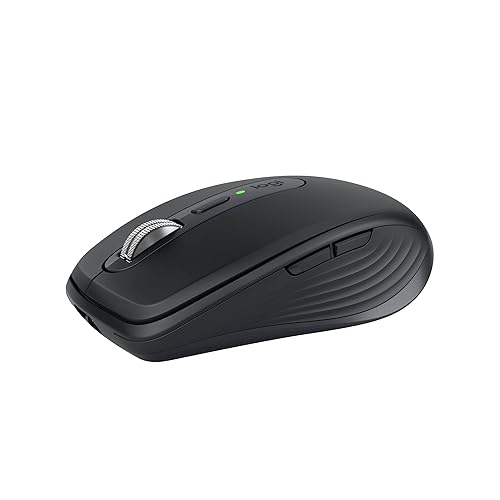
Logitech MX Anywhere 3S
A compact wireless mouse with an 8K DPI sensor that tracks on any surface including glass, Bluetooth for up to 3 devices and a 70-day battery.
Pros
- 8K DPI sensor tracks on any surface, including glass
- Bluetooth connects up to 3 devices across Windows, macOS, Chrome OS and Linux
- MagSpeed scroll wheel stated to scroll 1000 lines per second
- 70-day battery with up to 3 hours of use from a 1-minute charge
Cons
- No USB dongle in the box; Logi Bolt receiver compatibility only
- Ships a USB-A to USB-C charging cable only
- Plastic enclosure
- 7.04 ounces, the heaviest stated weight here
Detailed Review
Logitech lists the MX Anywhere 3S as a compact wireless mouse with an 8K DPI sensor that tracks on any surface, including glass. It connects over Bluetooth to up to 3 devices across Windows, macOS, Chrome OS, Googlebook OS and Linux, and it works with the Logi Bolt USB receiver, which is not included; the box ships a USB-A to USB-C charging cable only. The MagSpeed scroll wheel is stated to scroll 1000 lines per second, clicks are quiet, and six buttons are programmable through Logi Options+. A full charge lasts up to 70 days, and a 1-minute charge gives up to 3 hours of use. The listing gives a 10.0-meter range, a 7.04-ounce weight and 3.96 by 2.56 in dimensions. A 1 Year Limited Hardware Warranty is stated.
Who it's for: a traveler or hot-desk worker who wants glass-capable tracking and multi-device Bluetooth in a compact mouse. Who should skip it: anyone who needs a USB dongle in the box.
Its Office Score of 9.6/10 comes from performance 32/35, build 21/25, value 21/25, safety 0/10 and warranty 3/5: 77 of 100 points, placed on our 9.2 to 9.8 scale.
Key Specifications
| Sensor | 8K DPI |
|---|---|
| Connection | Bluetooth |
| Battery | 70 days |
| Warranty | 1 Year Limited Hardware Warranty |
Figures as published on the retailer listing, collected 17 October 2026. Performance figures are manufacturer rated.
Safety and Warranty
What this listing states. No FCC or other safety listing is stated, so safety scores zero. 1 Year Limited Hardware Warranty. It does not say everything a buyer needs, such as who pays return shipping, so warranty scores 3 of 5. See How We Pick.
Fit the desk first. Check the stated size against your desk depth and keyboard tray, and charge or pair as the manual describes. No keyboard, mouse or wrist rest prevents or treats injury.
This is general buying information, not professional advice. Follow each product manual and local rules, and see our Safety Disclaimer.

Logitech MX Anywhere 2S
A compact wireless mouse with a 4K DPI Darkfield sensor for any-surface tracking, Bluetooth with no USB receiver and a 2-month battery.
Pros
- 4K DPI Darkfield sensor for any-surface tracking
- 33 ft operating distance stated in the bullets
- 7 buttons on a right-hand shape
- 1 Year Limited Hardware Warranty is stated
Cons
- Spec table says 5.0 meters while the bullets state 33 ft
- Micro-USB charging, not USB-C
- 2-month battery is shorter than the 3S
- No USB receiver is included
Detailed Review
Logitech lists the MX Anywhere 2S as a compact wireless mouse with a 4K DPI Darkfield sensor for any-surface tracking and Bluetooth with no USB receiver. It lists 7 buttons, a right-hand shape, micro-USB charging and a 2-month battery life. The operating distance appears twice: the bullets state 33 ft while the spec table says 5.0 meters, so we trust the bullets and treat the range as 33 ft. The listing gives 6.4 ounces and 6.9 by 4.4 in dimensions. A 1 Year Limited Hardware Warranty is stated.
Who it's for: someone who wants any-surface tracking and Bluetooth without paying for the newest model. Who should skip it: anyone who needs USB-C charging or a stated dongle.
Its Office Score of 9.5/10 comes from performance 29/35, build 20/25, value 20/25, safety 0/10 and warranty 3/5: 72 of 100 points, placed on our 9.2 to 9.8 scale.
Key Specifications
| Sensor | 4K DPI |
|---|---|
| Connection | Bluetooth |
| Battery | 2 months |
| Warranty | 1 Year Limited Hardware Warranty |
Figures as published on the retailer listing, collected 17 October 2026. Performance figures are manufacturer rated.
Safety and Warranty
What this listing states. No FCC or other safety listing is stated, so safety scores zero. 1 Year Limited Hardware Warranty. It does not say everything a buyer needs, such as who pays return shipping, so warranty scores 3 of 5. See How We Pick.
Fit the desk first. Check the stated size against your desk depth and keyboard tray, and charge or pair as the manual describes. No keyboard, mouse or wrist rest prevents or treats injury.
This is general buying information, not professional advice. Follow each product manual and local rules, and see our Safety Disclaimer.

HP X3000 G3 Wireless Mouse
An ambidextrous wireless mouse with a stated 15-month battery life and 1600 DPI.
Pros
- 15-month battery stated in the bullets
- Ambidextrous contoured shape with side grips
- 1600 DPI optical sensor
- USB nano receiver stores inside the mouse
Cons
- Bullets say 1 AA while the spec table says 2 AA
- Only 3 buttons stated
- Stated warranty: "HP standard 1 year warranty"
- 1600 DPI maximum is mid-range here
Detailed Review
HP lists the X3000 G3 as a contoured wireless mouse with 3-button navigation, a 1600 DPI optical sensor and a 30 ft range. The bullets state up to 15 months of use on a 1 AA battery, while the spec table says 2 AA batteries are required; we trust the bullets on the term. The nano receiver stores inside the mouse. The listing states an "HP standard 1 year warranty".
Who it's for: travelers and either-hand users who want a compact mouse with a long battery term. Who should skip it: anyone who needs more buttons or higher DPI.
Its Office Score of 9.4/10 comes from performance 28/35, build 20/25, value 20/25, safety 0/10 and warranty 0/5: 68 of 100 points, placed on our 9.2 to 9.8 scale.
Key Specifications
| Battery | 15 months |
|---|---|
| DPI | 1600 max |
| Buttons | 3 |
| Hand | Ambidextrous |
Figures as published on the retailer listing, collected 17 October 2026. Performance figures are manufacturer rated.
Safety and Warranty
What this listing states. No FCC or other safety listing is stated, so safety scores zero. No warranty term, so warranty scores zero. See How We Pick.
Fit the desk first. Check the stated size against your desk depth and keyboard tray, and charge or pair as the manual describes. No keyboard, mouse or wrist rest prevents or treats injury.
This is general buying information, not professional advice. Follow each product manual and local rules, and see our Safety Disclaimer.

Amazon Basics Wireless
A no-frills ambidextrous mouse with 1600 DPI and a 10 m range, for basic daily work.
Pros
- Ambidextrous 3-button mouse for basic work
- 1600 DPI optical tracking; 10 m range
- 2 AAA batteries included
- Nano receiver stows inside the mouse
Cons
- No warranty term is stated
- 3 buttons only; no side buttons or DPI switch
- Not a true left-handed shape; ambidextrous only
- 2.4 GHz only; no Bluetooth is stated
Detailed Review
Amazon Basics lists a 3-button ambidextrous wireless optical mouse with 1600 DPI tracking, 2.4 GHz wireless and a 10 m range. The listing states 2 AAA batteries included and a nano receiver that stows inside the mouse. The listing states no warranty term. No other contradictions in the listing.
Who it's for: anyone who needs a basic, no-frills mouse for everyday work. Who should skip it: left-handed users who want a dedicated left-hand shape or extra buttons.
Its Office Score of 9.3/10 comes from performance 23/35, build 18/25, value 20/25, safety 0/10 and warranty 0/5: 61 of 100 points, placed on our 9.2 to 9.8 scale.
Key Specifications
| Hand | Ambidextrous |
|---|---|
| DPI | 1600 |
| Battery | 2 AAA |
| Warranty | Not stated |
Figures as published on the retailer listing, collected 17 October 2026. Performance figures are manufacturer rated.
Safety and Warranty
What this listing states. No FCC or other safety listing is stated, so safety scores zero. No warranty term, so warranty scores zero. See How We Pick.
Fit the desk first. Check the stated size against your desk depth and keyboard tray, and charge or pair as the manual describes. No keyboard, mouse or wrist rest prevents or treats injury.
This is general buying information, not professional advice. Follow each product manual and local rules, and see our Safety Disclaimer.

VssoPlor 2.4G Slim
A slim ambidextrous mouse with quiet clicks and up to 2400 DPI, for travel and shared offices.
Pros
- Ambidextrous slim design for travel and office
- Up to 2400 DPI for smooth tracking
- Quiet clicks for shared spaces
- 1 year warranty; 10 m range
Cons
- 3 buttons only; no side buttons stated
- Battery life not stated in months
- Not a true left-handed shape; ambidextrous only
- 2.4 GHz only; no Bluetooth is stated
Detailed Review
VssoPlor lists a slim ambidextrous wireless mouse with quiet clicks, up to 2400 DPI and 2.4 GHz wireless with a 10 m range. The listing states a 1 AA battery, auto sleep after 5 minutes and a 1 year warranty. No contradictions in the listing.
Who it's for: travelers and office workers who want a quiet, simple mouse. Who should skip it: left-handed users who need a dedicated left-hand shape.
Its Office Score of 9.3/10 comes from performance 24/35, build 18/25, value 19/25, safety 0/10 and warranty 3/5: 64 of 100 points, placed on our 9.2 to 9.8 scale.
Key Specifications
| Hand | Ambidextrous |
|---|---|
| DPI | Up to 2400 |
| Battery | 1 AA |
| Warranty | 1 year |
Figures as published on the retailer listing, collected 17 October 2026. Performance figures are manufacturer rated.
Safety and Warranty
What this listing states. No FCC or other safety listing is stated, so safety scores zero. The spec table states a 1 year warranty. It does not say everything a buyer needs, such as who pays return shipping, so warranty scores 3 of 5. See How We Pick.
Fit the desk first. Check the stated size against your desk depth and keyboard tray, and charge or pair as the manual describes. No keyboard, mouse or wrist rest prevents or treats injury.
This is general buying information, not professional advice. Follow each product manual and local rules, and see our Safety Disclaimer.
As an Amazon Associate I earn from qualifying purchases.
More picks to compare
 TECKNET Wireless MouseCheck on Amazon
 Apple Magic MouseCheck on Amazon
Compare the picks
| Mouse | Office Score | Sensor | Connection | Battery | Warranty | Amazon |
|---|---|---|---|---|---|---|
| Logitech MX Anywhere 3S | 9.6/10 | 8K DPI | Bluetooth | 70 days | 1 Year Limited Hardware Warranty | View on Amazon |
| Logitech MX Anywhere 2S | 9.5/10 | 4K DPI | Bluetooth | 2 months | 1 Year Limited Hardware Warranty | View on Amazon |
| HP X3000 G3 | 9.4/10 | Not stated | Not stated | 15-month battery | Not stated | |
| Amazon Basics Mouse | 9.3/10 | Optical | 2.4 GHz wireless | Not stated | Not stated | |
| VssoPlor Slim Mouse | 9.3/10 | Not stated | 2.4G wireless | Not stated | Not stated |
Specifications are manufacturer rated as listed, collected 17 October 2026. Two of the five state a warranty term; two state glass-capable tracking.
How we scored them
The Office Score weighs performance (sensor DPI, surface tracking and stated range), build (materials, shape and item weight), value for the stated specs, safety and warranty. For a mouse, safety means a stated certification or safety-relevant design feature; none of the listings state one. Two listings state a warranty term: both Logitech models at 1 Year Limited Hardware Warranty. How we pick explains the weights.
| Product | Office Score | Perf. /35 | Build /25 | Value /25 | Safety /10 | Warranty /5 |
|---|---|---|---|---|---|---|
| Logitech MX Anywhere 3S | 9.6 | 32 | 21 | 21 | 0 | 3 |
| Logitech MX Anywhere 2S | 9.5 | 29 | 20 | 20 | 0 | 3 |
Scores run from 9.2 to 9.8: each product’s point total is placed on that range, so more points always means a higher score.
How to choose the best wireless mouse for all surfaces
Any-surface tracking: what the listings state
Only two listings name a surface-tracking sensor. The MX Anywhere 3S lists an 8K DPI sensor that tracks on any surface, including glass, and the MX Anywhere 2S lists a 4K DPI Darkfield sensor for any-surface tracking. The three shorter cards state no sensor details, so treat them as ordinary optical mice until the listing says otherwise. If your desk is glass, the 3S is the only stated pick. See the mice and mouse pads category for more input gear.
Bluetooth or dongle
Neither Logitech model ships a dongle. The 3S connects over Bluetooth to up to 3 devices and works with the Logi Bolt USB receiver, which is not included; the box ships a USB-A to USB-C charging cable only. The 2S connects over Bluetooth with no USB receiver. The Amazon Basics and VssoPlor titles name 2.4 GHz wireless, which usually means a receiver, but neither listing states one. Confirm Bluetooth on your laptop before choosing a dongle-free mouse.
Battery: rechargeable or stated life
The stated battery figures split three ways. The 3S recharges over USB-C: up to 70 days on a full charge, with up to 3 hours of use from a 1-minute charge. The 2S recharges over micro-USB with a 2-month battery life. The HP X3000 G3 states a 15-month battery with no further details. Rechargeable suits a desk with a free USB port; a long stated battery suits a mouse you never want to think about.
| Mouse | Sensor | Battery | Warranty |
|---|---|---|---|
| Logitech MX Anywhere 3S | 8K DPI | 70 days | 1 Year Limited Hardware Warranty |
| Logitech MX Anywhere 2S | 4K DPI | 2 months | 1 Year Limited Hardware Warranty |
| HP X3000 G3 | Not stated | 15-month battery | Not stated |
| Amazon Basics Mouse | Optical | Not stated | Not stated |
| VssoPlor Slim Mouse | Not stated | Not stated | Not stated |
Size and travel
The 3S lists 3.96 by 2.56 in at 7.04 ounces, a compact right-hand shape made for bags. The 2S lists 6.9 by 4.4 in at 6.4 ounces, a larger stated footprint for a compact mouse, so check the numbers against your bag. The three shorter cards state no dimensions. For more portable picks, see our best wireless mouse for travel.
Setup Notes
- Confirm Bluetooth on your laptop; neither Logitech model ships a dongle in the box.
- Check the charging cable: USB-A to USB-C for the 3S, micro-USB for the 2S.
- Match the sensor to your surface: glass-capable 8K DPI on the 3S, Darkfield 4K on the 2S.
- Pair up to 3 devices on the 3S before a trip so switching takes one button press.
Frequently Asked Questions
Do these mice work on glass?
The MX Anywhere 3S lists tracking on any surface including glass with its 8K DPI sensor. The MX Anywhere 2S lists Darkfield any-surface tracking. The three shorter cards state no surface tracking.
Is a USB dongle included?
No. The 3S ships a charging cable only and works with the Logi Bolt receiver, which is not included. The 2S ships with no USB receiver.
How long does the battery last?
The 3S states up to 70 days per charge, with up to 3 hours from a 1-minute charge. The 2S states a 2-month battery life. The HP X3000 G3 states a 15-month battery.
Which mice work with multiple devices?
The 3S connects with up to 3 devices via Bluetooth. The other listings state no multi-device pairing.
Which mice state a warranty?
Two of the five: both Logitech models state 1 Year Limited Hardware Warranty. The three shorter cards state no warranty term.
Related guides
See every mice and mouse pads guide and all computer peripherals guides.
More picks: wireless mouse for travel, desk mat for mouse and keyboard, mouse pad for your wrist, wireless mouse for CAD.