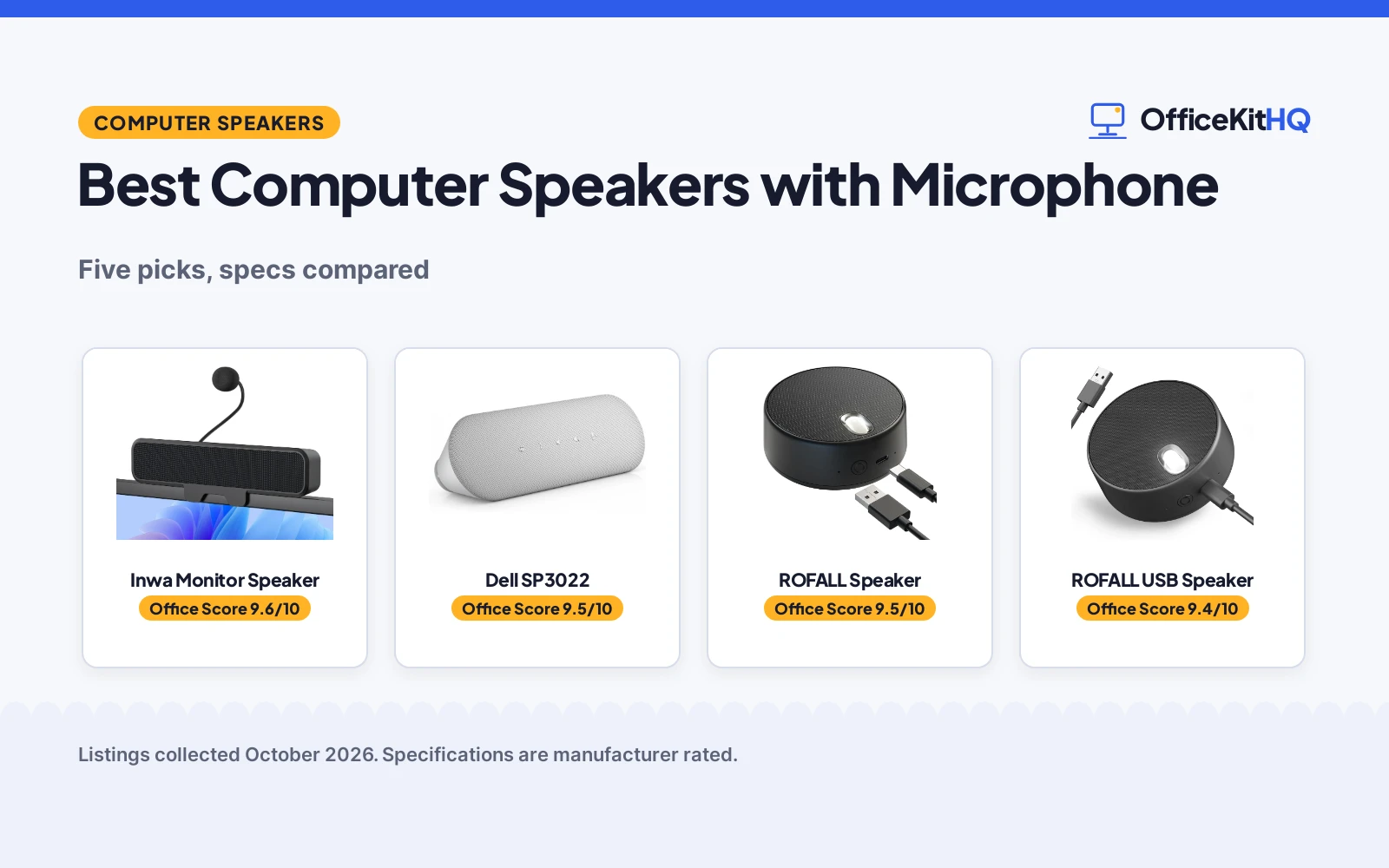
The 9 a.m. call starts and the laptop speakers turn the team into a distant murmur while the built-in mic picks up the keyboard. The best computer speakers with microphone fix both halves of that problem: clear sound coming in and a voice that carries out. We compared five USB speakers with microphones by mic type, output power, mounting style and connection, scoring each on performance, build, value, safety and warranty.
OfficeKitHQ earns a commission when you buy through links on this page, at no extra cost to you. As an Amazon Associate I earn from qualifying purchases. Affiliate disclosure.
Quick picks
 Best Overall Inwa Monitor Speaker: Detachable AEC mic, dual 10W drivers, clips to monitors up to 1 inch thick. Check price on Amazon
 Best Compact ROFALL USB Speaker: Pocket-size puck with noise-canceling mic and two EQ modes. Check price on Amazon
 Best for Zoom Anker PowerConf: Zoom certified speakerphone with six microphones. Check price on Amazon
 Best for Teams Dell SP3022: Microsoft Teams certified speakerphone. Check price on Amazon
 Also Consider ROFALL Speaker: USB computer speaker with microphone for calls. Check price on Amazon
The picks
| # | Product | Office Score | Buy |
|---|---|---|---|
| 1 | Inwa Monitor Speaker | 9.6/10 | Buy on Amazon |
| 2 | Dell SP3022 Speakerphone | 9.5/10 | Buy on Amazon |
| 3 | ROFALL USB | 9.5/10 | Buy on Amazon |
| 4 | ROFALL USB Speaker | 9.4/10 | Buy on Amazon |
| 5 | Anker PowerConf Speakerphone | 9.4/10 | Buy on Amazon |

Inwa Monitor Speaker
A USB clip-on monitor speaker with a detachable gooseneck mic and dual 10W drivers.
Pros
- Detachable AEC gooseneck mic
- Dual 10W drivers with passive radiator
- Clips to monitors up to 1 inch thick
- One USB cable for audio and power
Cons
- ABS plastic enclosure
- Not water resistant
- Clip fits monitors up to 1 inch thick only
- No mic pickup distance stated
Detailed Review
The Inwa listing states a detachable gooseneck microphone with Acoustic Echo Cancellation, dual 10W drivers with a passive radiator for stereo sound and enhanced bass, and a spring clip that mounts to the top, sides or bottom of monitors up to 1 inch thick, with silicone pads that protect the panel. A single USB cable carries audio and power with no 3.5mm AUX cable, no software to install and no batteries required; a USB-C to USB adapter is included. The one-touch mute button on top mutes the mic or speaker, and the spec table states a 1 Year Manufacturer warranty.
Who it's for: desk workers who want the speaker off the desk and a mic they can detach. Who should skip it: anyone with a monitor thicker than 1 inch.
Its Office Score of 9.6/10 comes from performance 32/35, build 21/25, value 20/25, safety 0/10 and warranty 3/5: 76 of 100 points, placed on our 9.2 to 9.8 scale.
Key Specifications
| Output | Dual 10W |
|---|---|
| Microphone | Detachable gooseneck, AEC |
| Mount | Clip, up to 1 inch thick |
| Connection | USB |
Figures as published on the retailer listing, collected 20 October 2026. Performance figures are manufacturer rated.
Safety and Warranty
What this listing states. No volume limit or safety listing is stated, so safety scores zero. 1 Year Manufacturer. It does not say everything a buyer needs, such as who pays return shipping, so warranty scores 3 of 5. See How We Pick.
Protect your hearing. Keep volume moderate during long calls, take breaks, and treat noise cancelling and battery figures as the maker's claims.
This is general buying information, not professional advice. Follow each product manual and local rules, and see our Safety Disclaimer.

Dell SP3022 Speakerphone
A USB speakerphone certified for both Microsoft Teams and Zoom, with full duplex audio, AI noise cancellation and a 3-year warranty.
Pros
- Teams and Zoom certified
- Full duplex audio stated
- AI noise cancellation stated
- 3-year warranty stated
Cons
- No battery stated, desk-bound
- No Bluetooth stated
- 8W stated power, modest for rooms
Detailed Review
The Dell SP3022 is the only pick here certified for both Microsoft Teams and Zoom. It states full duplex audio, so both sides can talk at once, plus AI noise cancellation.
A 3-year warranty is stated, the longest term here. No battery is stated, so it stays on the desk, and no Bluetooth is stated.
Its Office Score of 9.5/10 comes from performance 29/35, build 20/25, value 21/25, safety 0/10 and warranty 3/5: 73 of 100 points, placed on our 9.2 to 9.8 scale.
Key Specifications
| Type | USB speakerphone |
|---|---|
| Certifications | Microsoft Teams, Zoom |
| Audio | Full duplex, AI noise cancellation |
| Power | 8W |
| Warranty | 3-year |
Figures as published on the retailer listing, collected 19 October 2026. Performance figures are manufacturer rated.
Safety and Warranty
What this listing states. No volume limit or safety listing is stated, so safety scores zero. 3-year warranty stated. It does not say everything a buyer needs, such as who pays return shipping, so warranty scores 3 of 5. See How We Pick.
Protect your hearing. Keep volume moderate during long calls, take breaks, and treat noise cancelling and battery figures as the maker's claims.
This is general buying information, not professional advice. Follow each product manual and local rules, and see our Safety Disclaimer.

ROFALL USB
A pocket-size USB speaker with mic and voice mode, the only pick that lists Linux as compatible.
Pros
- Linux is listed among compatible systems
- 2 EQ sound modes with a dedicated voice mode for meetings
- USB plug-and-play with no downloads, per the listing
- Metal body at 104g, pocketable
Cons
- 3W output is modest for group calls
- Mono audio output, per the spec table
- Personal-call focus; not built for large rooms
- No safety features are stated
Detailed Review
ROFALL lists the USB speaker as a plug-and-play computer speaker with a built-in microphone, 2 EQ sound modes including a voice mode for online meetings, and a metal body at 104g and 3 watts. The bullets list Windows, Chrome OS, Mac OS and Linux among compatible systems, the only Linux mention in this group. The spec table states a 1 Year warranty and mono audio output.
Who it's for: a Linux user who wants a simple USB speaker for personal calls. Who should skip it: anyone equipping a conference room.
Its Office Score of 9.5/10 comes from performance 28/35, build 20/25, value 21/25, safety 0/10 and warranty 3/5: 72 of 100 points, placed on our 9.2 to 9.8 scale.
Key Specifications
| Audio | Mono, 3W |
|---|---|
| Modes | 2 EQ sound modes |
| Weight | 104g |
| Connection | USB plug-and-play |
Figures as published on the retailer listing, collected 19 October 2026. Performance figures are manufacturer rated.
Safety and Warranty
What this listing states. No volume limit or safety listing is stated, so safety scores zero. 1 Year. It does not say everything a buyer needs, such as who pays return shipping, so warranty scores 3 of 5. See How We Pick.
Protect your hearing. Keep volume moderate during long calls, take breaks, and treat noise cancelling and battery figures as the maker's claims.
This is general buying information, not professional advice. Follow each product manual and local rules, and see our Safety Disclaimer.

ROFALL USB Speaker
A pocket-size USB speaker with a noise-canceling mic and two EQ modes.
Pros
- Noise-canceling built-in mic
- Two EQ modes for music and voice
- 3.46 by 3.46 by 1.3 inch, 3.7 ounces
- Touch controls
Cons
- 3W output only
- Mono output mode in the spec table
- No warranty term stated
- No monitor clip
Detailed Review
The ROFALL listing states a built-in noise-canceling microphone, two EQ modes (music and voice) switched by a button, and a body of 3.46 by 3.46 by 1.3 inch weighing 3.7 ounces. It lists Zoom, Skype, Google Hangout and FaceTime as compatible apps and Windows, Chrome OS, Mac OS and Linux as supported systems, describing plug and play over USB with nothing to download. Note a contradiction inside the spec table: Audio Output Mode is Mono while Number of Audio Channels is 2; the title and bullets describe two sound modes, not stereo, so treat the output as mono. The warranty description states only "1" with no term, so no warranty is counted.
Who it's for: travelers who want a pocket speaker for calls. Who should skip it: anyone who needs monitor mounting or a stated warranty.
Its Office Score of 9.4/10 comes from performance 28/35, build 19/25, value 19/25, safety 0/10 and warranty 0/5: 66 of 100 points, placed on our 9.2 to 9.8 scale.
Key Specifications
| Output | 3W |
|---|---|
| Microphone | Built-in, noise canceling |
| Size | 3.46 by 3.46 by 1.3 inch |
| Connection | USB |
Figures as published on the retailer listing, collected 20 October 2026. Performance figures are manufacturer rated.
Safety and Warranty
What this listing states. No volume limit or safety listing is stated, so safety scores zero. No warranty term, so warranty scores zero. See How We Pick.
Protect your hearing. Keep volume moderate during long calls, take breaks, and treat noise cancelling and battery figures as the maker's claims.
This is general buying information, not professional advice. Follow each product manual and local rules, and see our Safety Disclaimer.

Anker PowerConf Speakerphone
A Zoom-certified speakerphone with 6 microphones, 360-degree pickup, Bluetooth 5.3 and a stated 24-hour battery.
Pros
- Zoom certified
- 6 microphones, 360-degree pickup
- 24-hour battery stated
- Bluetooth 5.3 and USB
Cons
- No Teams certification stated
- Shorter warranty term than the Dell
- 3W stated power
Detailed Review
The Anker PowerConf states Zoom certification with 6 microphones and 360-degree pickup, plus noise cancellation. The stated 24-hour battery is the longest here, with Bluetooth 5.3 and USB.
No Teams certification is stated. The warranty is a limited term, shorter than the Dell's stated 3 years.
Its Office Score of 9.4/10 comes from performance 28/35, build 19/25, value 21/25, safety 0/10 and warranty 0/5: 68 of 100 points, placed on our 9.2 to 9.8 scale.
Key Specifications
| Type | Bluetooth/USB speakerphone |
|---|---|
| Certifications | Zoom |
| Mics | 6, 360-degree |
| Battery | 24 hours stated |
| Bluetooth | 5.3 |
| Warranty | Limited |
Figures as published on the retailer listing, collected 19 October 2026. Performance figures are manufacturer rated.
Safety and Warranty
What this listing states. No volume limit or safety listing is stated, so safety scores zero. No warranty term, so warranty scores zero. See How We Pick.
Protect your hearing. Keep volume moderate during long calls, take breaks, and treat noise cancelling and battery figures as the maker's claims.
This is general buying information, not professional advice. Follow each product manual and local rules, and see our Safety Disclaimer.
As an Amazon Associate I earn from qualifying purchases.
More picks to compare
 OHAYO Computer Speakers for Desktop PCCheck on Amazon
 Plyee Computer SpeakersCheck on Amazon
Compare the picks
| Speaker | Office Score | Microphone | Output power | Mount | Connection | Amazon |
|---|---|---|---|---|---|---|
| Inwa Monitor Speaker | 9.6/10 | Detachable gooseneck, AEC | Dual 10W | Clip, up to 1 inch thick | USB | View on Amazon |
| ROFALL USB Speaker | 9.4/10 | Built-in, noise canceling | 3W | Desktop | USB | View on Amazon |
| Anker PowerConf | 9.4/10 | 6 mics, Zoom certified | Not stated | Not stated | USB | |
| Dell SP3022 | 9.5/10 | Teams certified | Not stated | Not stated | USB | |
| ROFALL Speaker | 9.4/10 | Built-in | Not stated | Not stated | USB |
Specifications are manufacturer rated as listed, collected 20 October 2026. Warranty terms are as stated on each listing; only the Inwa states a concrete term.
How we scored them
The Office Score weighs performance, build, value, safety and warranty. For speakers with microphones, safety means stated safety features or certifications; none of the five listings states one, so every product scores zero there and carries no cert object. Two listings state a warranty term: the Inwa states a 1 Year Manufacturer warranty. How we pick explains the weights.
| Product | Office Score | Perf. /35 | Build /25 | Value /25 | Safety /10 | Warranty /5 |
|---|---|---|---|---|---|---|
| Inwa Monitor Speaker | 9.6 | 32 | 21 | 20 | 0 | 3 |
| ROFALL USB Speaker | 9.4 | 28 | 19 | 19 | 0 | 0 |
Scores run from 9.2 to 9.8: each product’s point total is placed on that range, so more points always means a higher score.
How to choose the best computer speakers with microphone
Clip-on bar or desktop puck
Mounting decides where the speaker lives. The Inwa clamps to the top, sides or bottom of monitors up to 1 inch thick with silicone pads, or sits on the desk; the ROFALL puck measures 3.46 by 3.46 by 1.3 inch and weighs 3.7 ounces, so it slips into a pocket or briefcase. A clip-on bar keeps the desk clear and points the sound at you from screen height; a puck travels and works anywhere there is a USB port. Check your monitor thickness against the 1-inch clip limit before choosing the bar style, and note that the Inwa clip is not recommended for ultra-thin laptop screens that could tip.
Detachable mic or built-in mic
The Inwa ships a detachable gooseneck microphone with Acoustic Echo Cancellation that you can remove when you only want music; the gooseneck bends to aim at your voice. The ROFALL builds its noise-canceling microphone into the puck and adds a one-touch mute button on top, with touch controls for mode switching. Detachable suits a desk that doubles as a media station where the mic only appears for calls; built-in suits a bag that goes to every meeting with nothing to assemble. If you mute often, the top button on the Inwa and the puck beats hunting for the mute icon in the app.
How much output you need
The Inwa lists dual 10W drivers with a passive radiator for stereo sound and enhanced bass; the ROFALL lists 3W with two EQ modes for music and voice. For a small desk in a quiet room the puck is enough; for a shared space with background noise the bar’s extra output helps voices cut through. The listings do not state mic pickup distances, so buy for the room you sit in, not a claimed range. Music listeners should favor the dual-driver bar; call-first buyers should favor the certified speakerphones.
| Pick | Mic style | Output | Mount |
|---|---|---|---|
| Inwa Monitor Speaker | Detachable gooseneck, AEC | Dual 10W | Clip, up to 1 inch thick |
| ROFALL USB Speaker | Built-in, noise canceling | 3W | Desktop |
| Anker PowerConf | 6 mics, Zoom certified | Not stated | Not stated |
Certified for your meeting app
If your team lives in one app, the certification matters. The Anker PowerConf is Zoom certified with six microphones; the Dell SP3022 is Microsoft Teams certified. Certification means the speakerphone meets that app’s audio standards, so calls connect without fiddling. The ROFALL lists Zoom and Skype among its compatible apps without a certification badge, which is fine for mixed use. For mixed use, any of the five connects over USB and works with the usual meeting apps. Also see our best headset for work if you prefer wearing the mic, and our best webcam with light for the video half of the call.
Setup Notes
- Measure your monitor: the Inwa clip fits monitors up to 1 inch thick, with silicone pads that protect the panel.
- One USB cable carries audio and power on the Inwa and ROFALL; no 3.5mm AUX cable and no software to install.
- The ROFALL puck weighs 3.7 ounces and fits a pocket; the Inwa bar is 9 inches deep, so plan desk depth.
- Store the detachable Inwa microphone separately when traveling so the gooseneck does not bend in a bag.
Frequently Asked Questions
Do these speakers work with Zoom and Teams?
The Anker PowerConf is Zoom certified and the Dell SP3022 is Microsoft Teams certified. The ROFALL lists Zoom, Skype, Google Hangout and FaceTime as compatible apps.
Do I need to install drivers?
No. The Inwa and ROFALL listings describe plug and play over USB with no additional software to install and no batteries required.
Which one mounts on my monitor?
The Inwa clips to the top, sides or bottom of monitors up to 1 inch thick. The ROFALL is a desktop puck with no clip.
What is the microphone pickup range?
The listings do not state pickup distances for these microphones. The Inwa and ROFALL both describe noise reduction and echo cancellation instead of a range figure.
Can I use them with a phone or tablet?
The Inwa lists laptop, smartphone and tablet as compatible devices; the ROFALL lists desktop, laptop, smartphone and tablet.
What does the mute button do?
The Inwa has a one-touch mute button on top that mutes or unmutes the microphone or speaker. The ROFALL puck uses touch controls for muting and mode switching.
Related guides
See every computer speakers guide and all audio, power and connectivity guides. Also see our best computer speakers for gaming. Also see our best computer speakers with sub. Also see our best wireless desktop speakers.
More picks: headsets, webcam with light, docking stations and USB hubs.