The best printer for small business home office work earns its desk space one urgent page at a time: the contract you print minutes before a call, the invoice you scan before lunch, the form your kid needs tomorrow morning. A printer that jams on page two or eats a whole afternoon of setup is a printer you resent. We compared five printers by print speed, functions, paper handling, size, connectivity and warranty term, using only what each listing publishes.
OfficeKitHQ earns a commission when you buy through links on this page, at no extra cost to you. As an Amazon Associate I earn from qualifying purchases. Affiliate disclosure.
Quick picks
 Best Overall HP OfficeJet Pro 8125: 20 ppm black, ADF, auto duplex, 225-sheet tray, Wolf Security Check price on Amazon
 Best Portable Canon PIXMA TR160: 4.5 lb portable, 9 ppm black, prints up to 8.5 by 11 in Check price on Amazon
 Best Tank System Epson EcoTank ET-2803: Refillable tanks, 4,500 black pages per ink set, Wi-Fi Check price on Amazon
 Best Basic Home Pick HP DeskJet 2923: All-in-one, dual-band Wi-Fi, Energy Star and EPEAT Check price on Amazon
The picks
| # | Product | Office Score | Buy |
|---|---|---|---|
| 1 | HP OfficeJet Pro 8125 | 9.6/10 | Buy on Amazon |
| 2 | Canon PIXMA TR160 | 9.4/10 | Buy on Amazon |
| 3 | Epson EcoTank ET-2803 | 9.4/10 | Buy on Amazon |
| 4 | HP DeskJet 2923 | 9.3/10 | Buy on Amazon |
| 5 |  Canon PIXMA TS3720 Canon PIXMA TS3720 | 9.3/10 | Buy on Amazon |
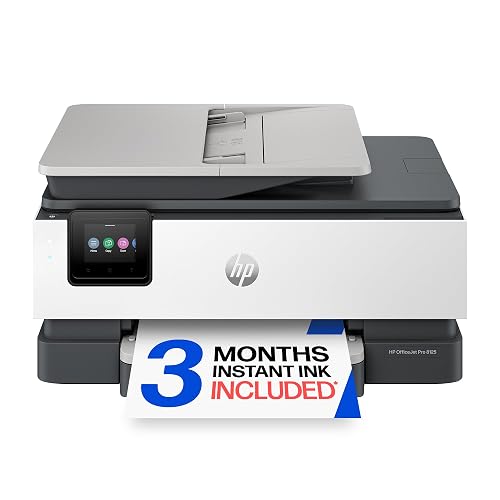
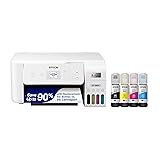
HP OfficeJet Pro 8125
For the home office that prints business documents, this all-in-one offers 20 ppm black printing, an auto document feeder, automatic duplex and a 225-sheet tray, though it weighs 17.6 lb.
Pros
- Print speed of 20 ppm black and 10 ppm color is the fastest color speed here
- Auto document feeder, automatic duplex and a 225-sheet input tray suit heavier home office days
- HP Wolf Essential Security is stated to protect data and the network
- Prints, scans and copies, with fax from a smartphone through the HP app
Cons
- 17.6 lb item weight is the heaviest here
- Only cartridges with original HP chips or circuitry work, per the listing, so third-party cartridges are blocked
- The 3-month Instant Ink trial converts to a monthly fee unless cancelled
- No Energy Star certification is stated on the listing
Detailed Review
HP lists the OfficeJet Pro 8125 as a wireless color all-in-one for home offices with print speeds of up to 20 ppm black and 10 ppm color, an auto document feeder, automatic duplex, a 225-sheet input tray and a 2.7 in touchscreen. Connectivity includes dual-band Wi-Fi, Ethernet, USB and wireless direct, and the listing states HP Wolf Essential Security plus HP AI formatting for web pages. A 3-month trial of Instant Ink is included, with a monthly fee after unless cancelled, and the listing states a one-year limited hardware warranty.
Who it's for: a home office that prints multi-page business documents and wants an auto document feeder with duplex. Who should skip it: anyone who only uses third-party cartridges, or who wants the lightest machine on the desk.
Its Office Score of 9.6/10 comes from performance 30/35, build 21/25, value 20/25, safety 8/10 and warranty 0/5: 79 of 100 points, placed on our 9.2 to 9.8 scale.
Key Specifications
| Print speed | 20 ppm black, 10 ppm color |
|---|---|
| Paper tray | 225 sheets |
| Functions | Print, scan, copy |
| Dimensions | 13.29 x 18.11 x 9.17 in |
Figures as published on the retailer listing, collected 17 October 2026. Performance figures are manufacturer rated.
Safety and Warranty
What this listing states. HP Wolf Essential Security is stated for data protection, so safety scores 8 of 10. No warranty term, so warranty scores zero. See How We Pick.
Shredder and printer safety. Keep hair, ties, jewelry, children and pets away from the feed slot, use the safety lock, unplug when not in use, and give printers and adapters room to vent.
This is general buying information, not professional advice. Follow each product manual and local rules, and see our Safety Disclaimer.

Canon PIXMA TR160
For the worker who prints away from the desk, this 4.5 lb portable printer fits in a bag, though it is print-only with a 50-sheet tray.
Pros
- 4.5 lb weight and a 12.7 by 7.3 by 2.6 in size are the smallest here, so it fits in a bag
- Print-only design keeps it simple for documents and photos up to 8.5 by 11 in
- Energy Star is stated on the listing
- A 1.44 in OLED display shows ink levels and status without a computer
Cons
- Print only, so it cannot scan or copy
- 50-sheet tray is the smallest here
- Maximum media size of 8.5 by 11 in is the smallest here
- No battery capacity is stated, so run time away from an outlet is not stated
Detailed Review
Canon lists the PIXMA TR160 as a lightweight portable color printer at 4.5 lb with a 12.7 by 7.3 by 2.6 in footprint, a 50-sheet tray and a 1.44 in OLED display. The title says TR160 but the spec table model name reads PIXMA TR150; we trust the title. The bullets describe wireless printing through the Canon PRINT app, AirPrint and wireless direct mode, while the spec table lists USB as the connectivity type; we trust the bullets, but confirm on the listing. Print speed is stated as 9 ppm black and 5.5 ppm color, and the warranty description reads 1 Year Manufacturer.
Who it's for: someone who prints documents and photos away from a fixed desk. Who should skip it: anyone who needs to scan or copy, or who prints in volume.
Its Office Score of 9.4/10 comes from performance 23/35, build 19/25, value 18/25, safety 6/10 and warranty 3/5: 69 of 100 points, placed on our 9.2 to 9.8 scale.
Key Specifications
| Weight | 4.5 lb |
|---|---|
| Print speed | 9 ppm black, 5.5 ppm color |
| Tray | 50 sheets |
| Functions | Print only |
Figures as published on the retailer listing, collected 17 October 2026. Performance figures are manufacturer rated.
Safety and Warranty
What this listing states. Energy Star is stated, so safety scores 6 of 10. 1 Year Manufacturer. It does not say everything a buyer needs, such as who pays return shipping, so warranty scores 3 of 5. See How We Pick.
Shredder and printer safety. Keep hair, ties, jewelry, children and pets away from the feed slot, use the safety lock, unplug when not in use, and give printers and adapters room to vent.
This is general buying information, not professional advice. Follow each product manual and local rules, and see our Safety Disclaimer.
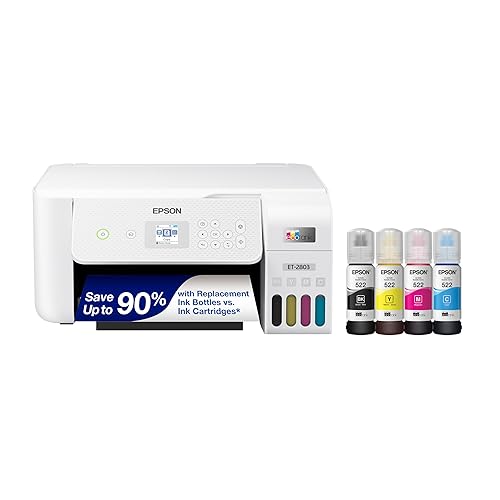
Epson EcoTank ET-2803
For the office tired of cartridges, this EcoTank uses refillable ink tanks with up to 4,500 black pages per ink set, though it prints at 10 ppm black.
Pros
- Refillable ink tanks with up to 4,500 pages in black and 7,500 in color per replacement ink set
- Up to 2 years of ink in the box, based on roughly 125 pages per month
- Prints, scans and copies with a flatbed scanner and a color display
- AirPrint and voice-activated printing are stated for phone and tablet printing
Cons
- 10 ppm black and 5 ppm color are mid-pack speeds here
- No automatic duplex is stated; the duplex field reads simplex
- No energy certification is stated
- 14.8 by 10 by 22.8 in footprint is deep for a small desk
Detailed Review
Epson lists the EcoTank ET-2803 as a cartridge-free color all-in-one with refillable ink tanks, print speeds of up to 10 ppm black and 5 ppm color, and a flatbed scanner with a color display. The listing states each replacement ink bottle set equals about 80 individual cartridges, with up to 4,500 pages in black and 7,500 in color, and up to 2 years of ink in the box based on roughly 125 pages per month. The spec table gives a 22.8 by 14.8 by 10 in footprint, an 8.8 lb item weight and a 12-watt power consumption, and the warranty description reads 1-year limited warranty.
Who it's for: a home office that prints steadily and wants to stop buying cartridges. Who should skip it: anyone who needs fast two-sided printing or a compact footprint.
Its Office Score of 9.4/10 comes from performance 27/35, build 21/25, value 21/25, safety 0/10 and warranty 3/5: 72 of 100 points, placed on our 9.2 to 9.8 scale.
Key Specifications
| Ink | Refillable tanks |
|---|---|
| Print speed | 10 ppm black, 5 ppm color |
| Tray | 100 sheets |
| Dimensions | 14.8 x 10 x 22.8 in |
Figures as published on the retailer listing, collected 17 October 2026. Performance figures are manufacturer rated.
Safety and Warranty
What this listing states. This product does not plug in or run on a battery, so safety is not part of its score. 1-year limited warranty. It does not say everything a buyer needs, such as who pays return shipping, so warranty scores 3 of 5. See How We Pick.
Shredder and printer safety. Keep hair, ties, jewelry, children and pets away from the feed slot, use the safety lock, unplug when not in use, and give printers and adapters room to vent.
This is general buying information, not professional advice. Follow each product manual and local rules, and see our Safety Disclaimer.

HP DeskJet 2923
For basic home printing, this compact all-in-one covers print, scan and copy at up to 7.5 ppm black, though the 60-sheet tray is small.
Pros
- ENERGY STAR and EPEAT certified are stated, plus at least 70 percent recycled plastics
- Compact design at 11.97 by 16.73 by 6.06 in and 7.6 lb
- Dual-band Wi-Fi plus mobile printing through the HP app
- A 6-month Instant Ink trial is included for automatic ink delivery
Cons
- 60-sheet input tray is small for a shared home office
- Duplex is manual only, with driver support
- Maximum copy resolution of 300 dpi is the lowest stated here
- The 6-month trial converts to a monthly fee unless cancelled
Detailed Review
HP lists the DeskJet 2923 as a color all-in-one for basic home printing with print speeds up to 7.5 ppm black and 5.5 ppm color, a 60-sheet input tray and manual duplex. The spec table gives an 11.97 by 16.73 by 6.06 in footprint and a 7.6 lb item weight. ENERGY STAR and EPEAT certified are stated, and the warranty description reads One-year limited warranty.
Who it's for: a home worker with basic, low-volume printing needs. Who should skip it: anyone who prints two-sided documents often or needs a bigger tray.
Its Office Score of 9.3/10 comes from performance 22/35, build 18/25, value 18/25, safety 6/10 and warranty 0/5: 64 of 100 points, placed on our 9.2 to 9.8 scale.
Key Specifications
| Print speed | 7.5 ppm black, 5.5 ppm color |
|---|---|
| Tray | 60 sheets |
| Functions | Print, scan, copy |
| Dimensions | 11.97 x 16.73 x 6.06 in |
Figures as published on the retailer listing, collected 17 October 2026. Performance figures are manufacturer rated.
Safety and Warranty
What this listing states. ENERGY STAR and EPEAT certified are stated, so safety scores 6 of 10. No warranty term, so warranty scores zero. See How We Pick.
Shredder and printer safety. Keep hair, ties, jewelry, children and pets away from the feed slot, use the safety lock, unplug when not in use, and give printers and adapters room to vent.
This is general buying information, not professional advice. Follow each product manual and local rules, and see our Safety Disclaimer.
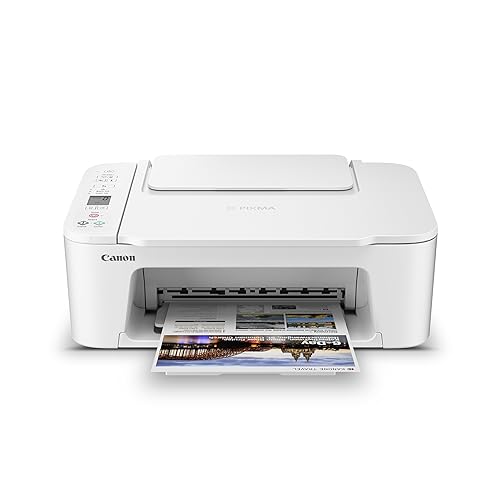
Canon PIXMA TS3720
For basic home printing with a low profile, this all-in-one stands 5.8 in tall with dual-band Wi-Fi, though color speed is 4 ipm.
Pros
- 5.8 in height is the shortest stationary printer here
- Dual-band Wi-Fi on 2.4 GHz or 5 GHz is stated
- 1.5 in LCD screen and a streamlined setup process are stated
- Prints, copies and scans with borderless photo support
Cons
- Color speed of 4 ipm is the slowest here
- Single-sided printing only is stated
- 60-sheet capacity is small
- No energy certification is stated
Detailed Review
Canon lists the PIXMA TS3720 as a wireless all-in-one for basic home printing with speeds of approximately 7.7 ipm black and 4 ipm color, a 60-sheet capacity and single-sided printing only. The spec table gives a 17.2 by 12.9 by 5.8 in footprint and an 8.7 lb item weight. Dual-band Wi-Fi and a 1.5 in LCD screen are stated, and the listing states a 1-year warranty.
Who it's for: a home worker who wants the lowest-profile all-in-one on a shelf. Who should skip it: anyone who needs two-sided printing or faster color.
Its Office Score of 9.3/10 comes from performance 22/35, build 18/25, value 18/25, safety 0/10 and warranty 3/5: 61 of 100 points, placed on our 9.2 to 9.8 scale.
Key Specifications
| Print speed | 7.7 ipm black, 4 ipm color |
|---|---|
| Tray | 60 sheets |
| Height | 5.8 in |
| Functions | Print, copy, scan |
Figures as published on the retailer listing, collected 17 October 2026. Performance figures are manufacturer rated.
Safety and Warranty
What this listing states. This product does not plug in or run on a battery, so safety is not part of its score. 1-year warranty. It does not say everything a buyer needs, such as who pays return shipping, so warranty scores 3 of 5. See How We Pick.
Shredder and printer safety. Keep hair, ties, jewelry, children and pets away from the feed slot, use the safety lock, unplug when not in use, and give printers and adapters room to vent.
This is general buying information, not professional advice. Follow each product manual and local rules, and see our Safety Disclaimer.
As an Amazon Associate I earn from qualifying purchases.
More picks to compare
 Canon PIXMA TR4720 All-in-One WirelessCheck on Amazon
 Brother DCP-L2640DW Wireless CompactCheck on Amazon
 HP DeskJet 2955 Color Inkjet PrinterCheck on Amazon
Compare the picks
| Printer | Office Score | Type | Speed (black) | Tray | Warranty | Amazon |
|---|---|---|---|---|---|---|
| HP OfficeJet Pro 8125 | 9.6/10 | Color inkjet | 20 ppm | 225 sheets | One-Year limited | View on Amazon |
| Canon PIXMA TR160 | 9.4/10 | Color inkjet | 9 ppm | 50 sheets | 1 Year Manufacturer | View on Amazon |
| Epson EcoTank ET-2803 | 9.4/10 | Color inkjet | 10 ppm | 100 sheets | 1-year limited | View on Amazon |
| HP DeskJet 2923 | 9.3/10 | Color inkjet | 7.5 ppm | 60 sheets | One-year limited | View on Amazon |
| Canon PIXMA TS3720 | 9.3/10 | Color inkjet | 7.7 ppm | 60 sheets | 1-year warranty | View on Amazon |
Specifications are manufacturer rated as listed, collected 17 October 2026. Three of the five state a one-year warranty term; two state Energy Star, one of them also stating EPEAT.
How we scored them
The Office Score weighs performance (print speed, functions, paper handling), build (size, weight, connectivity), value for the stated specs, safety and warranty. For printers, safety means stated certifications such as Energy Star or EPEAT, or stated security features like HP Wolf Essential Security. Three of the five listings state a one-year warranty term. How we pick explains the weights.
| Product | Office Score | Perf. /35 | Build /25 | Value /25 | Safety /10 | Warranty /5 |
|---|---|---|---|---|---|---|
| HP OfficeJet Pro 8125 | 9.6 | 30 | 21 | 20 | 8 | 0 |
| Canon PIXMA TR160 | 9.4 | 23 | 19 | 18 | 6 | 3 |
| Epson EcoTank ET-2803 | 9.4 | 27 | 21 | 21 | 0 | 3 |
| HP DeskJet 2923 | 9.3 | 22 | 18 | 18 | 6 | 0 |
| Canon PIXMA TS3720 | 9.3 | 22 | 18 | 18 | 0 | 3 |
Scores run from 9.2 to 9.8: each product’s point total is placed on that range, so more points always means a higher score.
How to choose the best printer for small business home office
Match the speed to your busiest day
Print speed here runs from 4 ipm color on the Canon TS3720 to 20 ppm black on the HP 8125. If your busy day means long documents, the HP 8125’s 20 ppm with an auto document feeder earns its space. If you print a few pages at a time, the Canon TS3720 at 7.7 ipm black is enough machine. Check both sides too: the HP 8125 prints duplex automatically, while the DeskJet 2923 needs the driver and the Epson, Canon TS3720 and TR160 list simplex.
Measure the desk before you buy
Printers claim desk space in three dimensions, not one. The Canon TR160 at 12.7 by 7.3 by 2.6 in and 4.5 lb slips into a bag, while the HP 8125 at 13.29 by 18.11 by 9.17 in and 17.6 lb wants a permanent spot with room around it. The Canon TS3720 is the shortest stationary pick at 5.8 in tall, so it fits under a shelf. Leave room behind any printer with an auto document feeder, and keep spare cartridges where you can find them: a desk organizer beats a drawer full of tangled cables.
| Printer | Footprint | Weight | Tray |
|---|---|---|---|
| HP OfficeJet Pro 8125 | 13.29 x 18.11 x 9.17 in | 17.6 lb | 225 sheets |
| Canon PIXMA TR160 | 12.7 x 7.3 x 2.6 in | 4.5 lb | 50 sheets |
| Epson EcoTank ET-2803 | 14.8 x 10 x 22.8 in | 8.8 lb | 100 sheets |
| Canon PIXMA TS3720 | 17.2 x 12.9 x 5.8 in | 8.7 lb | 60 sheets |
Figures as stated in each listing’s spec table or bullets. Footprint is depth by width by height as the listing gives it.
Tanks or cartridges
The Epson EcoTank ET-2803 skips cartridges entirely: refillable tanks with up to 4,500 pages in black and 7,500 in color per replacement ink set, and up to 2 years of ink in the box at roughly 125 pages per month. Every other pick uses cartridges: Canon PG-275 and CL-276 on the TS3720, HP 68 on the DeskJet 2923, HP 923 on the OfficeJet Pro. Tank printers trade a bigger machine for fewer reorders; cartridge printers trade ongoing cartridge buying for a smaller footprint.
Connectivity and the app
Dual-band Wi-Fi appears on the HP 8125, the DeskJet 2923 and the Canon TS3720, and the Canon PRINT app, HP app and Epson Smart Panel app are the stated control methods. The Canon TR160’s bullets describe wireless app printing and wireless direct mode, but its spec table lists USB only, so confirm the connection on the listing before you count on it. If your desk sits far from the router, Ethernet on the HP 8125 is the steady option. When the printer shares the desk with the shredder, see our label makers and shredders guide.
Setup Notes
- Measure the footprint first: the Canon TR160 measures 12.7 by 7.3 by 2.6 in and weighs 4.5 lb, while the HP 8125 measures 13.29 by 18.11 by 9.17 in and weighs 17.6 lb.
- Decide on the connection before you unbox: the HP 8125 and the DeskJet 2923 list dual-band Wi-Fi plus USB, while the TR160’s spec table lists USB even though its bullets describe wireless app printing, so confirm on the listing.
- Plan where the output lands: trays run from a 50-sheet tray on the TR160 to a 225-sheet tray on the HP 8125, and the picks with auto document feeders need clearance behind the machine.
- Setup is app-driven on most picks: the HP app, Canon PRINT app and Epson Smart Panel app are the stated control methods, so have your phone nearby.
Frequently Asked Questions
Which printer here is fastest for black and white documents?
The HP OfficeJet Pro 8125 states 20 ppm black and 10 ppm color, the fastest here.
Which of these printers also scan and copy?
All except the Canon TR160, which is print only. The HP OfficeJet Pro 8125 supports fax from a smartphone through the HP app.
Which printers print on both sides automatically?
The HP OfficeJet Pro 8125 states automatic duplex. The DeskJet 2923 lists manual duplex with driver support, and the Epson, Canon TS3720 and Canon TR160 list simplex.
Which pick fits the smallest desk?
The Canon PIXMA TR160 at 12.7 by 7.3 by 2.6 in and 4.5 lb is the smallest. The Canon PIXMA TS3720 at 5.8 in tall is the lowest-profile stationary pick.
What warranty do these printers list?
Three of the five list a one-year term: the Canon TR160 states 1 Year Manufacturer, the Epson states a 1-year limited warranty, and the Canon TS3720 states a 1-year warranty. The HP 8125 and DeskJet 2923 state no concrete term.
Related guides
See every printer guide and all office machines and storage guides.
More picks: label makers and shredders, desk organizers and whiteboards, bookshelves and file cabinets.