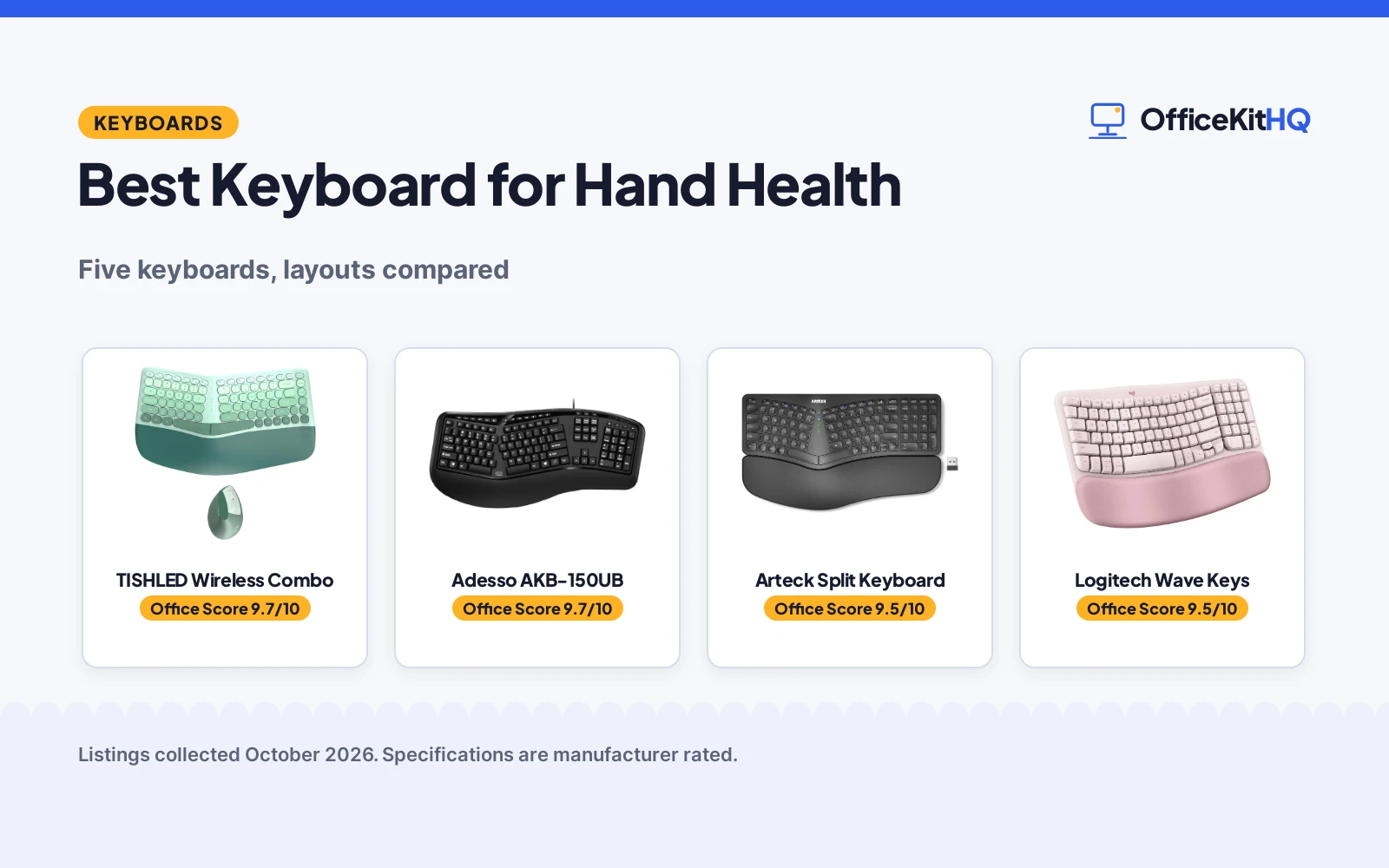
The best keyboard for hand health is the one that matches how your hands actually sit at a desk, not the one with the longest feature list. By the time the morning calls stretch into the afternoon, a flat board starts to feel like a negotiation between your wrists and the keys. We compared five ergonomic keyboards by split and wave layout, wrist or palm rest, wireless or wired connection, key count and the warranty term each listing states, using only what the listings publish.
OfficeKitHQ earns a commission when you buy through links on this page, at no extra cost to you. As an Amazon Associate I earn from qualifying purchases. Affiliate disclosure.
Quick picks
 Best Overall TISHLED Wireless Combo: Split keys, wrist rest and a vertical mouse in one 2.4G set Check price on Amazon
 Best Wired Pick Adesso AKB-150UB: 105 keys, split layout and a 1-year warranty on a corded board Check price on Amazon
 Best Wireless Split Arteck Split Keyboard: Split layout, integrated palm rest and 2.4G wireless Check price on Amazon
 Wave Layout Logitech Wave Keys: Wave key layout on a wireless board with no cable Check price on Amazon
 Simple Wireless TECKNET Wireless Keyboard: Wireless board with a plain ergonomic layout claim Check price on Amazon
The picks
| # | Product | Office Score | Buy |
|---|---|---|---|
| 1 | TISHLED Wireless Combo | 9.7/10 | Buy on Amazon |
| 2 | Adesso AKB-150UB | 9.7/10 | Buy on Amazon |
| 3 | Arteck Split Keyboard | 9.5/10 | Buy on Amazon |
| 4 | Logitech Wave Keys Keyboard | 9.5/10 | Buy on Amazon |
| 5 | TECKNET Ergo Split | 9.5/10 | Buy on Amazon |

TISHLED Wireless Combo
A 2.4G wireless set with an 84-key split-key keyboard, a PU leather wrist rest and a 6-button vertical mouse on a single nano receiver.
Pros
- 84-key split-key keyboard with an arc-shaped split layout and an integrated PU leather wrist rest
- 6-button vertical mouse with adjustable DPI, defaulting to 1200
- One 2.4GHz nano receiver serves both devices, with a storage slot at the bottom of the mouse
- 4 AAA batteries are included, and a 12-month warranty term is stated
Cons
- The key description contradicts itself: membrane keys but a clicky mechanical feeling
- The spec table lists single-color backlighting that the bullets do not mention
- The listing leans on comfort claims that cannot be checked from the specs
- 4 AAA batteries are required, with no rechargeable option stated
Detailed Review
TISHLED lists a wireless keyboard and mouse combo with an 84-key membrane keyboard, an arc-shaped split key layout, a PU leather wrist rest and a 6-button vertical mouse with adjustable DPI settings that default to 1200. The set runs on 2.4GHz wireless through one nano USB receiver, with a range of up to 33 ft (10 m) and a storage slot for the dongle at the bottom of the mouse; 4 AAA batteries are included. The listing claims compatibility with MacOS, Windows, iOS and Android. Two contradictions to note: the bullets say the keys are membrane, not mechanical, but then describe a clicky mechanical feeling switch; and the spec table lists single-color backlighting that the bullets never mention. We trust the membrane statement and treat the backlight as not clearly described. The listing states a 30-day unconditional refund and a 12-month warranty.
Who it's for: someone who wants a keyboard and mouse bought as one matched set with a shared receiver and an included wrist rest. Who should skip it: anyone who wants a keyboard only, or a wired board with no batteries to manage.
Its Office Score of 9.7/10 comes from performance 30/35, build 20/25, value 21/25, safety not scored (non-powered gear) and warranty 5/5: 76 of 90 points, placed on our 9.2 to 9.8 scale.
Key Specifications
| Keys | 84, membrane |
|---|---|
| Connection | 2.4GHz, up to 33 ft (10 m) |
| Mouse | 6 buttons, adjustable DPI |
| Warranty | 12 months |
Figures as published on the retailer listing, collected 18 October 2026. Performance figures are manufacturer rated.
Safety and Warranty
What this listing states. This product does not plug in or run on a battery, so safety is not part of its score. 30 days unconditional refund and 12-month worry-free warranty, so warranty scores 5 of 5. See How We Pick.
Fit the desk first. Check the stated size against your desk depth and keyboard tray, and charge or pair as the manual describes. No keyboard, mouse or wrist rest prevents or treats injury.
This is general buying information, not professional advice. Follow each product manual and local rules, and see our Safety Disclaimer.

Adesso AKB-150UB
A wired USB keyboard with a 105-key split layout, an integrated palm rest and 13 internet plus 7 media hotkeys in a 20.5 by 9.3 in footprint.
Pros
- 105-key split layout with a curved shape and an integrated palm rest
- 13 internet hotkeys and 7 media hotkeys for one-press shortcuts
- USB plug-and-play with no drivers, for Windows 2000 through 11
- 1-year limited manufacturer warranty is stated
Cons
- Wired USB only, so the cable needs a route to the PC
- Windows-only compatibility is listed; no Mac support is stated
- Spec table lists color as information not available
- The listing leans on comfort claims that cannot be checked from the specs
Detailed Review
Adesso lists the AKB-150UB as a split-key ergonomic keyboard with a 105-key US layout, a curved shape and an integrated palm rest, plus 13 internet hotkeys and 7 media hotkeys. The board connects over USB with plug-and-play for Windows 2000, XP, Vista, 7, 8, 10 and 11, uses membrane switches in an ABS enclosure and measures 20.5 by 9.3 by 1.5 in. The listing states a 1-year limited manufacturer warranty.
Who it's for: someone who wants a full-size wired board with dedicated hotkeys and a stated warranty, without managing batteries. Who should skip it: anyone who needs wireless, or who types on a Mac.
Its Office Score of 9.7/10 comes from performance 29/35, build 20/25, value 20/25, safety not scored (non-powered gear) and warranty 4/5: 73 of 90 points, placed on our 9.2 to 9.8 scale.
Key Specifications
| Keys | 105, membrane |
|---|---|
| Dimensions | 20.5 by 9.3 by 1.5 in |
| Hotkeys | 13 internet, 7 media |
| Warranty | 1 year |
Figures as published on the retailer listing, collected 18 October 2026. Performance figures are manufacturer rated.
Safety and Warranty
What this listing states. This product does not plug in or run on a battery, so safety is not part of its score. 1 Year Limited Manufacturer Warranty. It does not say everything a buyer needs, such as who pays return shipping, so warranty scores 4 of 5. See How We Pick.
Fit the desk first. Check the stated size against your desk depth and keyboard tray, and charge or pair as the manual describes. No keyboard, mouse or wrist rest prevents or treats injury.
This is general buying information, not professional advice. Follow each product manual and local rules, and see our Safety Disclaimer.

Arteck Split Keyboard
A wireless split keyboard with scissor switches, cushioned wrist rest and 2.4G connection.
Pros
- Split design with cushioned wrist rest
- 2.4G wireless with nano receiver storage
- Scissor switches in a low profile
- Stated 24-month warranty with USB-C charging
Cons
- Plastic enclosure with no metal frame
- Battery figure assumes 2 hours use per day
- Fixed split offers no separation adjustment
Detailed Review
Arteck lists a split ergonomic keyboard with a cushioned wrist rest, 2.4G USB wireless and scissor switches. The listing states 102 keys, a 6-month battery at 2 hours of use per day, USB-C recharging and a 24-month warranty. Dimensions are listed as 16.5 by 9.6 by 1.18 inches in the bullets against 16.5 by 9.6 by 1.02 inches in the spec table.
Who it's for: typists who want a wireless split board with a wrist rest and a long stated warranty. Who should skip it: anyone who wants adjustable module separation.
Its Office Score of 9.5/10 comes from performance 28/35, build 19/25, value 20/25, safety 0/10 and warranty 3/5: 70 of 100 points, placed on our 9.2 to 9.8 scale.
Key Specifications
| Layout | Split, fixed |
|---|---|
| Switch | Scissor |
| Battery | 6 months at 2h/day (stated) |
| Warranty | 24-month warranty (stated) |
Figures as published on the retailer listing, collected 17 October 2026. Performance figures are manufacturer rated.
Safety and Warranty
What this listing states. No FCC or other safety listing is stated, so safety scores zero. 24-month warranty. It does not say everything a buyer needs, such as who pays return shipping, so warranty scores 3 of 5. See How We Pick.
Fit the desk first. Check the stated size against your desk depth and keyboard tray, and charge or pair as the manual describes. No keyboard, mouse or wrist rest prevents or treats injury.
This is general buying information, not professional advice. Follow each product manual and local rules, and see our Safety Disclaimer.

Pros
- Wavy design for hand position
- Cushioned memory foam palm rest
- Connects up to 3 devices
- Compact, mouse stays closer
Cons
- No warranty term stated
- Wavy layout, fixed
- Compact layout, no numpad
- Plunger switches, not mechanical
Detailed Review
Logitech lists the Wave Keys with a wavy design that places hands, wrists, and forearms in a natural typing position.
A cushioned memory foam palm rest supports the wrists, and the compact size keeps the mouse closer to the body.
Its Office Score of 9.5/10 comes from performance 27/35, build 19/25, value 20/25, safety not scored (non-powered gear) and warranty 0/5: 66 of 90 points, placed on our 9.2 to 9.8 scale.
Key Specifications
| Layout | Wavy ergonomic |
|---|---|
| Palm rest | Memory foam |
| Devices | Up to 3 |
| Connect | Bluetooth / Bolt |
Figures as published on the retailer listing, collected 18 October 2026. Performance figures are manufacturer rated.
Safety and Warranty
What this listing states. This product does not plug in or run on a battery, so safety is not part of its score. No warranty term, so warranty scores zero. See How We Pick.
Shredder and printer safety. Keep hair, ties, jewelry, children and pets away from the feed slot, use the safety lock, unplug when not in use, and give printers and adapters room to vent.
This is general buying information, not professional advice. Follow each product manual and local rules, and see our Safety Disclaimer.

TECKNET Ergo Split
Split ergonomic keyboard with a dual-density memory foam wrist rest, Bluetooth 5.0 and 2.4G, and four tilt angles.
Pros
- Split layout with curved key rows that follow finger motion
- Dual-density memory foam wrist rest stated
- Four tilt angles: 0, 1.2, 3 and 6.2 degrees
- 200-hour battery life and 4-hour full charge stated
Cons
- Warranty term contradicts itself: 36 months in bullets, 2 years in spec table
- Linear switches; no low-profile option stated
- 36-month term requires registration
- No backlight stated
Detailed Review
TECKNET's split keyboard pairs a curved key layout with a dual-density wrist rest: high-density foam below for support and slow-rebound memory foam on top. Four tilt angles (0, 1.2, 3 and 6.2 degrees) cover seated and standing desks, and it connects over Bluetooth 5.0 or 2.4G to up to four devices. The 500mAh battery is rated for 200 hours of use and recharges over USB-C in 4 hours.
One wrinkle: the bullets promise a 36-month warranty with registration, but the spec table says 2 years. Trust the bullets per our policy, and register the product. Who it's for: typists who want the most adjustability here. Who should skip it: anyone who wants a backlit board.
Its Office Score of 9.5/10 comes from performance 32/35, build 20/25, value 19/25, safety 0/10 and warranty 3/5: 74 of 100 points, placed on our 9.2 to 9.8 scale.
Key Specifications
| Design | Split, curved |
|---|---|
| Keys | 104, linear |
| Wrist rest | Dual-density memory foam |
| Tilt | 0, 1.2, 3, 6.2 deg |
| Battery | 500mAh, 200 hrs, USB-C |
| Warranty | 36 months (bullets) / 2 years (spec table) |
Figures as published on the retailer listing, collected 17 October 2026. Performance figures are manufacturer rated.
Safety and Warranty
What this listing states. No FCC or other safety listing is stated, so safety scores zero. 36-month warranty stated in bullets (registration required); spec table says 2 years. It does not say everything a buyer needs, such as who pays return shipping, so warranty scores 3 of 5. See How We Pick.
Fit the desk first. Check the stated size against your desk depth and keyboard tray, and charge or pair as the manual describes. No keyboard, mouse or wrist rest prevents or treats injury.
This is general buying information, not professional advice. Follow each product manual and local rules, and see our Safety Disclaimer.
As an Amazon Associate I earn from qualifying purchases.
More picks to compare
 ULSOU Wireless Keyboard and Mouse ComboCheck on Amazon
 KINESIS Freestyle2 USB-A ErgonomicCheck on Amazon
 J-Tech Digital ProType S Wireless SplitCheck on Amazon
Compare the picks
| Keyboard | Office Score | Layout | Connection | Keys | Warranty | Amazon |
|---|---|---|---|---|---|---|
| TISHLED Wireless Combo | 9.7/10 | Split keys, wrist rest | 2.4G wireless | 84 | 12 months | View on Amazon |
| Adesso AKB-150UB | 9.7/10 | Split, palm rest | USB wired | 105 | 1 year | View on Amazon |
| Arteck Split Keyboard | 9.5/10 | Split, palm rest | 2.4G wireless | Not stated | Not stated | View on Amazon |
| Logitech Wave Keys | 9.5/10 | Wave keys | Wireless | Not stated | Not stated | |
| TECKNET Wireless Keyboard | 9.5/10 | Ergonomic | Wireless | Not stated | Not stated |
Specifications are manufacturer rated as listed, collected 18 October 2026. Two listings state a warranty term; none state a safety certification.
How we scored them
The Office Score weighs performance (layout, key count, included mouse and stated range), build (enclosure, key switches and wrist or palm rest), value for the stated specs, safety and warranty. For a keyboard, safety means a stated safety certification or safety-relevant feature; none of the listings state one, so every board scores zero there. Two listings state a warranty term: the TISHLED at 12 months and the Adesso at 1 year. How we pick explains the weights.
| Product | Office Score | Perf. /35 | Build /25 | Value /25 | Safety /10 | Warranty /5 |
|---|---|---|---|---|---|---|
| TISHLED Wireless Combo | 9.7 | 30 | 20 | 21 | n/a | 5 |
| Adesso AKB-150UB | 9.7 | 29 | 20 | 20 | n/a | 4 |
Scores run from 9.2 to 9.8: each product’s point total is placed on that range, so more points always means a higher score. Safety counts only for powered gear or where the listing states safety features; where it does not apply, the score is taken over the remaining 90 points.
How to choose the best keyboard for hand health
Split, wave or flat: pick the layout
Three of the boards here use a split layout: the TISHLED with an arc-shaped split and a PU leather wrist rest, the Adesso with a split layout and an integrated palm rest, and the Arteck with a split layout and a palm rest. The Logitech uses a wave key layout instead, and the TECKNET lists an ergonomic layout with no further detail. A split layout puts the two halves where the hands fall, and a palm or wrist rest fills the gap in front. Check the listing photos to see whether the rest is built in, like the TISHLED’s and the Adesso’s, before you buy. For more layouts, see the best keyboard for ergonomics roundup.
Decide whether you want the mouse included
Only the TISHLED ships a mouse in the box: a 6-button vertical mouse with adjustable DPI settings, defaulting to 1200, sharing one 2.4GHz nano receiver with the keyboard. The other four listings describe a keyboard only, so pair them with whatever mouse you already own. A combo saves a USB port and keeps one receiver for both devices; the TISHLED even has a storage slot for the dongle at the bottom of the mouse.
Wireless or wired
The TISHLED, Arteck, Logitech and TECKNET listings describe wireless boards; the Adesso is USB wired with plug-and-play for Windows 2000, XP, Vista, 7, 8, 10 and 11. The TISHLED states a range of up to 33 ft (10 m) on 2.4GHz; the other wireless listings state no range. A wired board like the Adesso never needs batteries, while the TISHLED ships with 4 AAA batteries in the box. If the cable bothers you, a keyboard tray with negative tilt keeps either type at a comfortable height under the desk.
| Keyboard | Keys | Connection | Warranty |
|---|---|---|---|
| TISHLED Wireless Combo | 84 | 2.4G wireless | 12 months |
| Adesso AKB-150UB | 105 | USB wired | 1 year |
| Arteck Split Keyboard | Not stated | 2.4G wireless | Not stated |
| Logitech Wave Keys | Not stated | Wireless | Not stated |
| TECKNET Wireless Keyboard | Not stated | Wireless | Not stated |
Figures as stated in each listing. Boards whose listing states nothing get Not stated.
Read the warranty line before you buy
Two listings state a warranty term. The TISHLED states a 30-day unconditional refund and a 12-month warranty, and the Adesso states a 1-year limited manufacturer warranty. The Arteck, Logitech and TECKNET listings state no warranty term at all. Keyboards live or die by their switches and cables, so a stated term beats a vague promise when two boards look alike.
Frequently Asked Questions
Which of these keyboards ships with a mouse?
The TISHLED set includes a 6-button vertical mouse with adjustable DPI settings, defaulting to 1200, on the same 2.4GHz nano receiver as the keyboard. The other four listings describe a keyboard only.
Which listings state a warranty term?
The TISHLED states a 30-day unconditional refund and a 12-month warranty, and the Adesso states a 1-year limited manufacturer warranty. The Arteck, Logitech and TECKNET listings state no warranty term.
How far does the TISHLED wireless connection reach?
The listing states up to 33 ft (10 m) on 2.4GHz. The other wireless listings state no range.
Are these keyboards Mac compatible?
The TISHLED claims compatibility with MacOS, Windows, iOS and Android. The Adesso lists Windows only. The other three listings state no operating system compatibility.
Which keyboards have a palm or wrist rest?
The TISHLED has an integrated PU leather wrist rest, the Adesso has an integrated palm rest, and the Arteck has a palm rest. The Logitech and TECKNET listings mention no rest.
Related guides
See every keyboards and keyboard trays guide and all monitor mounts, keyboards and mice guides. Also see our best keyboard for ergonomics. Also see our best keyboard tray with negative tilt. Also see our best clamp on keyboard tray. Also see our best wireless keyboard for home office. Also see our best keyboard for wfh.
More picks: mice and mouse pads, computer desks, office chairs.