
The cursor blinks at 9 a.m., a full day of documents ahead, and the best mechanical keyboard for typing under 2000 is the one whose switches, layout and connection match how you actually type. We compared five keyboards by switch feel, layout, connectivity and stated warranty, using only what each listing publishes. Note that several listings in this set are membrane or mechanical-feel boards rather than true mechanical switches, and each review says so plainly.
OfficeKitHQ earns a commission when you buy through links on this page, at no extra cost to you. As an Amazon Associate I earn from qualifying purchases. Affiliate disclosure.
Quick picks
 Best Overall AULA F2088: True mechanical blue clicky, 12-month warranty Check price on Amazon
 Best 96 Percent AULA S99: Membrane 96%, tri-mode wireless, 1-year warranty Check price on Amazon
 Best Compact GEODMAER GM68: 65% membrane, 3-year warranty Check price on Amazon
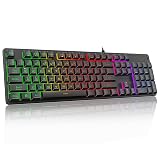 Best Full-Size Redragon K521: Mechanical-feel, rainbow LED backlight Check price on Amazon
 Best Large Print KOPJIPPOM Large Print: 4X large fonts, white LED backlight Check price on Amazon
The picks
| # | Product | Office Score | Buy |
|---|---|---|---|
| 1 | AULA F2088 | 9.5/10 | Buy on Amazon |
| 2 | AULA S99 | 9.4/10 | Buy on Amazon |
| 3 | GEODMAER GM68 | 9.4/10 | Buy on Amazon |
| 4 | Redragon K521 | 9.4/10 | Buy on Amazon |
| 5 | KOPJIPPOM Large Print | 9.3/10 | Buy on Amazon |

AULA F2088
A typewriter-style 104-key keyboard with blue clicky switches, aluminum panel and wrist rest.
Pros
- Blue clicky switches with crisp tactile feedback
- Aluminum alloy panel with matte finish
- Magnetic wrist rest and media control knob included
- 19 lighting effects with 3 custom slots
Cons
- Clicky blue switches carry in shared spaces
- Typewriter round keycaps will not suit every typist
- Wired only with no wireless option
Detailed Review
AULA lists the F2088 as a typewriter-style 104-key keyboard with blue clicky switches, rainbow LED backlighting, an aluminum alloy panel, a magnetic wrist rest and a media control knob. The listing states double-shot round keycaps, anti-ghosting and 19 lighting effects with 3 customizable. It measures 17.13 by 4.84 by 1.5 inches and weighs 1020 g, with a stated 12 months warranty.
Who it's for: typists who love the typewriter look and a crisp click. Who should skip it: shared offices, where clicky switches carry, or anyone who wants wireless.
Its Office Score of 9.5/10 comes from performance 28/35, build 19/25, value 16/25, safety not scored (non-powered gear) and warranty 3/5: 66 of 90 points, placed on our 9.2 to 9.8 scale.
Key Specifications
| Layout | Full-size, 104 keys |
|---|---|
| Switch | Blue, clicky |
| Size | 17.13 x 4.84 x 1.5 in |
| Warranty | 12 months |
Figures as published on the retailer listing, collected 17 October 2026. Performance figures are manufacturer rated.
Safety and Warranty
What this listing states. This product does not plug in or run on a battery, so safety is not part of its score. 12 months. It does not say everything a buyer needs, such as who pays return shipping, so warranty scores 3 of 5. See How We Pick.
Fit the desk first. Check the stated size against your desk depth and keyboard tray, and charge or pair as the manual describes. No keyboard, mouse or wrist rest prevents or treats injury.
This is general buying information, not professional advice. Follow each product manual and local rules, and see our Safety Disclaimer.

AULA S99
A 96 percent tri-mode membrane keyboard with 99 keys, RGB and macro programming.
Pros
- Tri-mode Bluetooth 5.0, 2.4GHz and USB-C
- 96 percent layout keeps the number pad
- Full-key macro programming with M1/M2/M3 keys
- Dual-mode knob for volume and lighting
Cons
- Title says membrane while spec table says Mechanical
- Does not support hot-swapping, per the listing
- Creamy silicone structure adds typing mush, per some tastes
Detailed Review
AULA lists the S99 as a 96 percent keyboard with 99 keys and tri-mode Bluetooth 5.0, 2.4GHz and USB-C connectivity. The title says membrane keyboard while the spec table says Mechanical for the switch type, so treat it as membrane per the title and the explicit hot-swap exclusion. The listing states RGB backlighting, full-key macro programming and a 1 Year Manufacturer warranty, at 17.4 by 7.28 by 2 inches.
Who it's for: typists who want 96 percent wireless on a membrane board. Who should skip it: anyone who wants hot-swapping or a true mechanical switch.
Its Office Score of 9.4/10 comes from performance 26/35, build 18/25, value 16/25, safety not scored (non-powered gear) and warranty 3/5: 63 of 90 points, placed on our 9.2 to 9.8 scale.
Key Specifications
| Layout | 96%, 99 keys |
|---|---|
| Switch | Membrane (per title) |
| Connectivity | Bluetooth 5.0, 2.4GHz, USB-C |
| Warranty | 1 Year Manufacturer |
Figures as published on the retailer listing, collected 17 October 2026. Performance figures are manufacturer rated.
Safety and Warranty
What this listing states. This product does not plug in or run on a battery, so safety is not part of its score. 1 Year Manufacturer. It does not say everything a buyer needs, such as who pays return shipping, so warranty scores 3 of 5. See How We Pick.
Fit the desk first. Check the stated size against your desk depth and keyboard tray, and charge or pair as the manual describes. No keyboard, mouse or wrist rest prevents or treats injury.
This is general buying information, not professional advice. Follow each product manual and local rules, and see our Safety Disclaimer.

GEODMAER GM68
A 65 percent wired membrane keyboard with 68 keys, LED backlight and a 3-year warranty.
Pros
- Stated 3 years manufacturer warranty
- 68-key 65 percent layout for small desks
- 10,000,000+ keystroke lifespan stated
- LED backlit with always-on and breathing modes
Cons
- Membrane board, not true mechanical switches
- 65 percent drops arrows into a function layer
- Plastic enclosure with no metal frame
Detailed Review
GEODMAER lists the GM68 as a 65 percent wired keyboard with 68 keys and a membrane design with mechanical feel, via a detachable Type-C cable. The listing states a 10,000,000+ keystroke lifespan, 26-key no-conflict, 11 media buttons and LED backlighting with always-on and breathing modes. No dimensions are stated. The warranty is a stated 3 years manufacturer term.
Who it's for: typists who want the smallest board here with a long warranty. Who should skip it: anyone who needs a number pad or true mechanical switches.
Its Office Score of 9.4/10 comes from performance 24/35, build 16/25, value 16/25, safety not scored (non-powered gear) and warranty 3/5: 59 of 90 points, placed on our 9.2 to 9.8 scale.
Key Specifications
| Layout | 65%, 68 keys |
|---|---|
| Switch | Membrane, linear feel |
| Lifespan | 10,000,000+ keystrokes (stated) |
| Warranty | 3 years manufacturer |
Figures as published on the retailer listing, collected 17 October 2026. Performance figures are manufacturer rated.
Safety and Warranty
What this listing states. This product does not plug in or run on a battery, so safety is not part of its score. 3 years manufacturer. It does not say everything a buyer needs, such as who pays return shipping, so warranty scores 3 of 5. See How We Pick.
Fit the desk first. Check the stated size against your desk depth and keyboard tray, and charge or pair as the manual describes. No keyboard, mouse or wrist rest prevents or treats injury.
This is general buying information, not professional advice. Follow each product manual and local rules, and see our Safety Disclaimer.
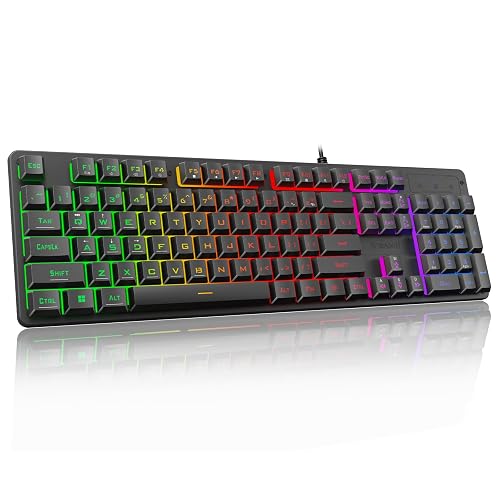
Redragon K521
A 104-key wired keyboard with mechanical feel, rainbow LED and 12 multimedia keys.
Pros
- 104 full-size keys with 12 multimedia keys
- Rainbow LED with one-touch on/off button
- 19-key anti-ghosting for key combinations
- Plug and play with no driver needed
Cons
- Membrane with mechanical feel, not true mechanical
- Only 19-key anti-ghosting, not full-key
- Warranty field lists only "2" with no unit
Detailed Review
Redragon lists the K521 as a 104-key wired keyboard with mechanical feel, rainbow LED backlighting and 12 multimedia keys. The title says mechanical feeling while the spec table says Mechanical for the switch type; treat it as membrane with mechanical feel per the title. The listing states 19-key anti-ghosting and a one-touch lighting button. The warranty field lists only "2" with no unit, so no warranty term is counted.
Who it's for: typists who want a full-size light-up board for basic work. Who should skip it: anyone who wants true mechanical switches or a stated warranty.
Its Office Score of 9.4/10 comes from performance 24/35, build 16/25, value 18/25, safety not scored (non-powered gear) and warranty 0/5: 58 of 90 points, placed on our 9.2 to 9.8 scale.
Key Specifications
| Layout | Full-size, 104 keys |
|---|---|
| Switch | Mechanical-feel (per title) |
| Backlight | Rainbow LED |
| Warranty | Not stated |
Figures as published on the retailer listing, collected 17 October 2026. Performance figures are manufacturer rated.
Safety and Warranty
What this listing states. This product does not plug in or run on a battery, so safety is not part of its score. No warranty term, so warranty scores zero. See How We Pick.
Fit the desk first. Check the stated size against your desk depth and keyboard tray, and charge or pair as the manual describes. No keyboard, mouse or wrist rest prevents or treats injury.
This is general buying information, not professional advice. Follow each product manual and local rules, and see our Safety Disclaimer.

KOPJIPPOM Large Print
A full-size membrane keyboard with 4X large-print keys, white LED backlight and spill resistance.
Pros
- 4X larger key fonts for low-vision typists
- White LED backlight with on/off and brightness
- Spill-resistant design, per the listing
- Full-size 104 keys at 17.7 by 6.3 inches
Cons
- Membrane board, not mechanical switches
- No warranty term is stated
- 690 g with no stated battery, wired only
Detailed Review
KOPJIPPOM lists a full-size 104-key membrane keyboard with 4X larger than standard key fonts, white LED backlighting and a spill-resistant design. The listing states 17.7 by 6.3 by 0.98 inches, 690 g, and keys rated for more than 5000W times, an odd figure taken as stated. No warranty term is stated.
Who it's for: typists who need large-print keys and a simple wired board. Who should skip it: anyone who wants mechanical switches or a stated warranty.
Its Office Score of 9.3/10 comes from performance 23/35, build 16/25, value 18/25, safety not scored (non-powered gear) and warranty 0/5: 57 of 90 points, placed on our 9.2 to 9.8 scale.
Key Specifications
| Layout | Full-size, 104 keys |
|---|---|
| 4X large fonts (stated) | |
| Size | 17.7 x 6.3 x 0.98 in |
| Warranty | Not stated |
Figures as published on the retailer listing, collected 17 October 2026. Performance figures are manufacturer rated.
Safety and Warranty
What this listing states. This product does not plug in or run on a battery, so safety is not part of its score. No warranty term, so warranty scores zero. See How We Pick.
Fit the desk first. Check the stated size against your desk depth and keyboard tray, and charge or pair as the manual describes. No keyboard, mouse or wrist rest prevents or treats injury.
This is general buying information, not professional advice. Follow each product manual and local rules, and see our Safety Disclaimer.
As an Amazon Associate I earn from qualifying purchases.
More picks to compare
 Redragon Mechanical Gaming Keyboard WiredCheck on Amazon
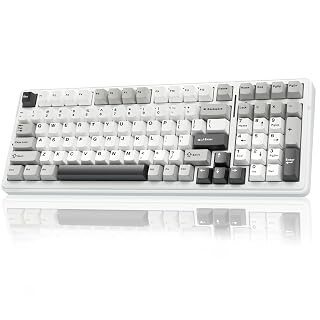 AULA F99 Wireless Mechanical KeyboardCheck on Amazon
 Logitech G413 SE Full-Size MechanicalCheck on Amazon
 Redragon K668 108-Key Hot-Swap Wired RGBCheck on Amazon
 Kisnt KN85 Wireless Mechanical KeyboardCheck on Amazon
Compare the picks
| Keyboard | Office Score | Layout | Switch | Connectivity | Warranty | Amazon |
|---|---|---|---|---|---|---|
| AULA F2088 | 9.5/10 | Clicky blue | Full-size 104-key | USB wired | 12 months | View on Amazon |
| AULA S99 | 9.4/10 | Membrane (per title) | 96%, 99 keys | Tri-mode | 1 year | View on Amazon |
| GEODMAER GM68 | 9.4/10 | Membrane, linear feel | 65%, 68 keys | USB wired | 3 years | View on Amazon |
| Redragon K521 | 9.4/10 | Mechanical-feel (per title) | Full-size 104-key | USB wired | Not stated | View on Amazon |
| KOPJIPPOM Large Print | 9.3/10 | Membrane | Full-size 104-key | USB wired | Not stated | View on Amazon |
Specifications are manufacturer rated as listed, collected 17 October 2026.
How we scored them
The Office Score weighs performance, build, value, safety and warranty. For keyboards, safety means stated safety-relevant features or certifications; none of the five listings state any, so safety scores are zero across the board. Three of the five state a warranty term, from 12 months to 3 years. How we pick explains the weights.
| Product | Office Score | Perf. /35 | Build /25 | Value /25 | Safety /10 | Warranty /5 |
|---|---|---|---|---|---|---|
| AULA F2088 | 9.5 | 28 | 19 | 16 | n/a | 3 |
| AULA S99 | 9.4 | 26 | 18 | 16 | n/a | 3 |
| GEODMAER GM68 | 9.4 | 24 | 16 | 16 | n/a | 3 |
| Redragon K521 | 9.4 | 24 | 16 | 18 | n/a | 0 |
| KOPJIPPOM Large Print | 9.3 | 23 | 16 | 18 | n/a | 0 |
Scores run from 9.2 to 9.8: each product’s point total is placed on that range, so more points always means a higher score. Safety counts only for powered gear or where the listing states safety features; where it does not apply, the score is taken over the remaining 90 points.
How to choose the best mechanical keyboard for typing under 2000
True mechanical or mechanical-feel
Read the listing twice here. The Redragon K521 is titled a mechanical-feeling keyboard while its spec table says Mechanical, the AULA S99 title says membrane keyboard while its spec table says Mechanical, and the GEODMAER GM68 and KOPJIPPOM are membrane boards. The AULA F2088 is the one true mechanical board in this set, with clicky blue switches. Membrane boards are quieter and usually lighter; mechanical boards offer hot-swapping and a more distinct key feel. Neither is automatically better for typing; the listing should just be honest about which it is. When a title and its spec table disagree, this roundup trusts the title, and each review notes the mismatch.
Size for your desk
Full-size boards (K521, F2088, KOPJIPPOM) keep the number pad and run about 17.13 to 17.7 inches long per the listings. The S99 keeps the pad at 96 percent in a shorter body, and the GM68 is 65 percent with 68 keys. If numbers are rare in your work, the smaller boards free real desk space. See the full keyboards category for more sizes.
Wired or wireless
The S99 offers tri-mode Bluetooth 5.0, 2.4GHz and wired USB-C. The rest are wired USB, which removes charging and pairing entirely. Pair any of them with a mouse and pad and a desk mat to complete the typing setup.
| Keyboard | Switch | Layout | Connectivity |
|---|---|---|---|
| AULA F2088 | Clicky blue | Full-size, 104 keys | USB wired |
| AULA S99 | Membrane (per title) | 96%, 99 keys | BT5.0, 2.4GHz, USB-C |
| GEODMAER GM68 | Membrane, linear feel | 65%, 68 keys | USB wired |
| Redragon K521 | Mechanical-feel (per title) | Full-size, 104 keys | USB wired |
| KOPJIPPOM Large Print | Membrane | Full-size, 104 keys | USB wired |
Setup Notes
- Measure desk depth against the listed footprint; full-size boards here run 17.13 to 17.7 inches long.
- Wired boards need a free USB port within cable reach; the S99 needs charging if you use it wirelessly.
- The K521, F2088 and S99 listings state Mac compatibility, and the S99 adds Android and iOS.
- Key remapping software on several boards is Windows only, per the listings; check OS support before buying.
Frequently Asked Questions
Are membrane keyboards bad for typing?
Not necessarily. The K521, S99, GM68 and KOPJIPPOM here are membrane or mechanical-feel boards, and the listings describe them as quieter. They lack hot-swapping and the distinct feel of mechanical switches, but for plain typing they work. Check which type each listing actually is before you buy.
What does hot-swappable mean?
No listing in this set states hot-swappable switches. The S99 listing explicitly notes it does not support hot-swapping, and the F2088’s clicky blue switches are fixed.
Which keyboard is best for a small desk?
The GEODMAER GM68 at 65 percent with 68 keys is the smallest here. The 96 percent S99 keeps the pad in a shorter body as a middle ground.
How long are the warranties?
Stated terms run 12 months on the AULA F2088, 1 year on the AULA S99, and 3 years on the GEODMAER GM68. The K521’s warranty field lists only “2” with no unit, and the KOPJIPPOM states none.
Do these keyboards work with Mac?
The K521, F2088 and S99 listings state Mac compatibility, and the S99 adds Android and iOS. Check each listing’s OS notes, since some software features are Windows only.
Related guides
See every Monitor Mounts, Keyboards and Mice guide and all Office Guides.
More picks: office chair for working from home, mice and mouse pads and desk mats and pads.



