
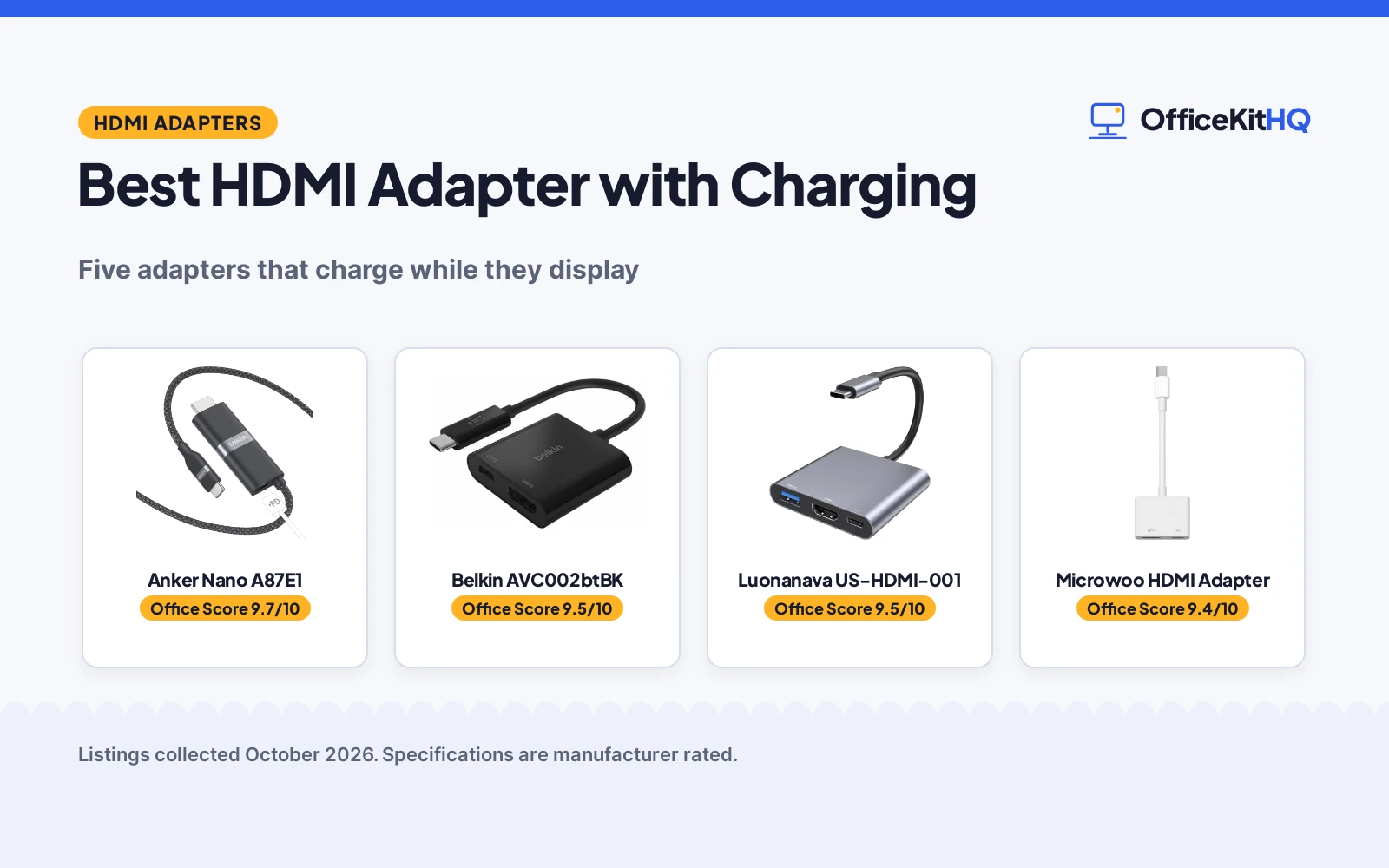
A laptop with a single USB-C port runs the whole desk: the external monitor, the charger and everything else, until the port runs out. The best hdmi adapter with charging solves that squeeze by carrying video and power through the same port, so the screen stays on while the battery fills. This guide compares five adapters that charge while they display, from a single cable to a three-port hub and a glasses adapter.
OfficeKitHQ earns a commission when you buy through links on this page, at no extra cost to you. As an Amazon Associate I earn from qualifying purchases. Affiliate disclosure.
Quick picks
 Best Overall Anker Nano A87E1: 140W charging with 4K at 60Hz in a single 6 ft cable Check price on Amazon
 Best for MacBook and iPad Belkin AVC002btBK: 60W pass-through charging with 4K video for Mac and Windows Check price on Amazon
 Best Three-Port Luonanava US-HDMI-001: 100W charging, 4K HDMI and a USB-A 3.0 port Check price on Amazon
 Best Simple Two-Port Microwoo HDMI Adapter: 100W charging with 4K video in a two-port adapter Check price on Amazon
 Best for AR Glasses RayNeo HDMI 2.0 Adapter: 4K at 30Hz with charging for RayNeo Air glasses Check price on Amazon
The picks
| # | Product | Office Score | Buy |
|---|---|---|---|
| 1 | Anker Nano A87E1 | 9.7/10 | Buy on Amazon |
| 2 | Belkin AVC002btBK | 9.5/10 | Buy on Amazon |
| 3 | Luonanava US-HDMI-001 | 9.5/10 | Buy on Amazon |
| 4 | Microwoo HDMI Adapter | 9.4/10 | Buy on Amazon |
| 5 | RayNeo HDMI 2.0 Adapter | 9.3/10 | Buy on Amazon |

Anker Nano A87E1
Single-cable USB-C to HDMI adapter with 140W charging and 4K at 60Hz, 6 ft long.
Pros
- 140W charging while streaming, the highest figure here
- 4K at 60Hz with Thunderbolt 5, 4 and 3 compatibility
- Single cable for power and display from one port
- 18-month warranty stated in the listing
Cons
- Charging while projecting needs a separate cable and wall charger
- No USB data port stated
- 6 ft cable may be long for a small desk
- Warranty stated as 18 months, not years
Detailed Review
The listing states a single USB-C to HDMI cable with 140W charging while streaming, 4K at 60Hz, Thunderbolt 5, 4 and 3 compatibility, and a 6 ft length. The listing offers the cable in 3 ft and 6 ft, and this unit count states 6 feet. The listing also states that charging while projecting needs an additional charging cable and wall charger.
Who it's for: owners who want the highest charging figure and 4K at 60Hz in one cable. Who should skip it: anyone who needs a USB data port or an included charger.
Its Office Score of 9.7/10 comes from performance 32/35, build 21/25, value 20/25, safety 7/10 and warranty 4/5: 84 of 100 points, placed on our 9.2 to 9.8 scale.
Key Specifications
| Charging | 140W PD |
|---|---|
| Video | 4K at 60Hz |
| Length | 6 ft |
| Compatibility | Thunderbolt 5, 4 and 3 |
Figures as published on the retailer listing, collected 25 October 2026. Performance figures are manufacturer rated.
Safety and Warranty
What this listing states. CE marking and HDCP 2.2 stated, so safety scores 7 of 10. 18-month warranty. It does not say everything a buyer needs, such as who pays return shipping, so warranty scores 4 of 5. See How We Pick.
Power and heat. Use the supplied adapter, treat power delivery wattage and display support as the maker's claims for your laptop model, and give the dock room to vent.
This is general buying information, not professional advice. Follow each product manual and local rules, and see our Safety Disclaimer.

Belkin AVC002btBK
USB-C to HDMI adapter with a charging port, 60W pass-through power and 4K video.
Pros
- 60W pass-through charging while displaying
- 4K video at 3840x2160 and 60Hz
- DP Alt Mode stated for video over USB-C
- 2 year manufacturer warranty stated
Cons
- 60W charging, the lowest figure here
- No USB data port
- No Thunderbolt compatibility stated
- Two ports only, HDMI plus charging
Detailed Review
The listing states a USB-C to HDMI adapter with a USB-C charging port, pass-through power delivery up to 60W, and 4K video at 3840x2160 and 60Hz. It states compatibility with Mac and Windows laptops and other USB-C devices, with a 2 year manufacturer warranty.
Who it's for: MacBook and iPad owners who want a simple two-port adapter from a known brand. Who should skip it: anyone who needs more than 60W charging or a USB data port.
Its Office Score of 9.5/10 comes from performance 29/35, build 21/25, value 20/25, safety 0/10 and warranty 4/5: 74 of 100 points, placed on our 9.2 to 9.8 scale.
Key Specifications
| Charging | 60W PD |
|---|---|
| Video | 4K at 3840x2160, 60Hz |
| Ports | 2 |
| Video mode | DP Alt Mode |
Figures as published on the retailer listing, collected 25 October 2026. Performance figures are manufacturer rated.
Safety and Warranty
What this listing states. No UL, FCC or over-current protection statement is stated, so safety scores zero. 2 year manufacturer warranty. It does not say everything a buyer needs, such as who pays return shipping, so warranty scores 4 of 5. See How We Pick.
Power and heat. Use the supplied adapter, treat power delivery wattage and display support as the maker's claims for your laptop model, and give the dock room to vent.
This is general buying information, not professional advice. Follow each product manual and local rules, and see our Safety Disclaimer.

Luonanava US-HDMI-001
Three-port USB-C adapter with 4K HDMI, a USB-A 3.0 port and 100W charging.
Pros
- 100W PD charging port, dedicated to charging
- USB-A 3.0 port with 5Gbps transfer stated
- Aluminum body for heat dissipation, as stated
- 1 year warranty stated in the listing
Cons
- Bullets state 4K at 30Hz while the spec table states 4K at 60Hz
- Aluminum body only in grey, as listed
- No Thunderbolt port stated, only a video note
- 1 year warranty, shorter than the Belkin and Anker terms
Detailed Review
The listing states a three-port adapter with an HDMI port, a USB-C 100W PD charging port and a USB-A 3.0 port, with an aluminum body. The listing is inconsistent on refresh rate: the bullets state 4K at 30Hz while the spec table states 4K at 60Hz, so this review goes by the bullets.
Who it's for: owners who need a USB-A port alongside HDMI and charging. Who should skip it: anyone who needs a stated 60Hz refresh rate or a longer warranty.
Its Office Score of 9.5/10 comes from performance 29/35, build 20/25, value 21/25, safety 0/10 and warranty 3/5: 73 of 100 points, placed on our 9.2 to 9.8 scale.
Key Specifications
| Charging | 100W PD |
|---|---|
| Video | 4K at 30Hz |
| Data port | USB-A 3.0, 5Gbps |
| Body | Aluminum |
Figures as published on the retailer listing, collected 25 October 2026. Performance figures are manufacturer rated.
Safety and Warranty
What this listing states. No UL, FCC or over-current protection statement is stated, so safety scores zero. 1 Year Warranty. It does not say everything a buyer needs, such as who pays return shipping, so warranty scores 3 of 5. See How We Pick.
Power and heat. Use the supplied adapter, treat power delivery wattage and display support as the maker's claims for your laptop model, and give the dock room to vent.
This is general buying information, not professional advice. Follow each product manual and local rules, and see our Safety Disclaimer.

Microwoo HDMI Adapter
Two-port USB-C to HDMI adapter with 100W charging and 4K video.
Pros
- 100W PD charging with 4K HDMI video
- Two-port design, HDMI plus charging
- ABS case with TPE cable, as stated
- Plug and play with no driver stated
Cons
- No warranty term stated in the listing
- No refresh rate stated for the 4K output
- No USB data port
- White color only, as listed
Detailed Review
The listing states a two-port USB-C to HDMI adapter with 100W charging and 4K HDMI video output, in an eco-friendly ABS case with a TPE cable. It states wide compatibility with iPhone, MacBook, iPad, Galaxy and Switch devices, and no warranty term is stated.
Who it's for: owners who want a simple two-port adapter with 100W charging. Who should skip it: anyone who needs a USB data port, a stated refresh rate or a warranty term.
Its Office Score of 9.4/10 comes from performance 28/35, build 20/25, value 21/25, safety 0/10 and warranty 0/5: 69 of 100 points, placed on our 9.2 to 9.8 scale.
Key Specifications
| Charging | 100W PD |
|---|---|
| Video | 4K |
| Ports | 2 |
| Case | ABS |
Figures as published on the retailer listing, collected 25 October 2026. Performance figures are manufacturer rated.
Safety and Warranty
What this listing states. No UL, FCC or over-current protection statement is stated, so safety scores zero. No warranty term, so warranty scores zero. See How We Pick.
Power and heat. Use the supplied adapter, treat power delivery wattage and display support as the maker's claims for your laptop model, and give the dock room to vent.
This is general buying information, not professional advice. Follow each product manual and local rules, and see our Safety Disclaimer.

RayNeo HDMI 2.0 Adapter
HDMI adapter for RayNeo Air glasses with 4K at 30Hz output and simultaneous charging.
Pros
- 4K at 30Hz output with simultaneous charging
- Built-in battery for charge and play
- HDMI and Lightning inputs stated
- 201-inch virtual display described for glasses use
Cons
- Built for RayNeo Air glasses, not general laptop use
- Lightning devices need an Apple Digital AV Adapter, not included
- No warranty term stated in the listing
- HDR10 output requires HDR10 sources, as stated
Detailed Review
The listing states an HDMI 2.0 adapter for RayNeo Air glasses with 4K at 30Hz and 1080P at 120Hz output, a built-in battery, and simultaneous charging while playing. It states HDMI and Lightning inputs, and notes that Lightning devices require an Apple Digital AV Adapter that is not included.
Who it's for: RayNeo Air glasses owners who want a big virtual display with charging. Who should skip it: anyone looking for a general laptop or tablet adapter.
Its Office Score of 9.3/10 comes from performance 26/35, build 19/25, value 18/25, safety 0/10 and warranty 0/5: 63 of 100 points, placed on our 9.2 to 9.8 scale.
Key Specifications
| Video | 4K at 30Hz |
|---|---|
| Also supports | 1080P at 120Hz |
| Inputs | HDMI and Lightning |
| Battery | Built-in battery |
Figures as published on the retailer listing, collected 25 October 2026. Performance figures are manufacturer rated.
Safety and Warranty
What this listing states. No UL, FCC or over-current protection statement is stated, so safety scores zero. No warranty term, so warranty scores zero. See How We Pick.
Power and heat. Use the supplied adapter, treat power delivery wattage and display support as the maker's claims for your laptop model, and give the dock room to vent.
This is general buying information, not professional advice. Follow each product manual and local rules, and see our Safety Disclaimer.
As an Amazon Associate I earn from qualifying purchases.
More picks to compare
 clickfish USB-C HDMI Adapter4K at 120Hz adapter with 100W charging and a USB port, for travel use.Check on Amazon
 Yeemie Pro 5-in-1 AdapterFive-port hub with 4K at 60Hz, 100W charging and 5Gbps data ports.Check on Amazon
Compare the picks
| Adapter | Office Score | Charging | Video | USB data port | Warranty | Amazon |
|---|---|---|---|---|---|---|
| Anker Nano A87E1 | 9.7/10 | 140W PD | 4K at 60Hz | Not stated | 18-month | View on Amazon |
| Belkin AVC002btBK | 9.5/10 | 60W PD | 4K at 60Hz | None | 2 year | View on Amazon |
| Luonanava US-HDMI-001 | 9.5/10 | 100W PD | 4K at 30Hz | USB-A 3.0 | 1 year | View on Amazon |
| Microwoo HDMI Adapter | 9.4/10 | 100W PD | 4K | None | Not stated | View on Amazon |
| RayNeo HDMI 2.0 Adapter | 9.3/10 | Built-in battery | 4K at 30Hz | None | Not stated | View on Amazon |
Specifications are manufacturer rated as listed, collected 25 October 2026.
How we scored them
The Office Score weighs performance, build, value, safety and warranty. For adapters, safety means stated certifications and protection features, and only one pick states a certification. 3 of the picks state a warranty term. How we pick explains the weights.
| Product | Office Score | Perf. /35 | Build /25 | Value /25 | Safety /10 | Warranty /5 |
|---|---|---|---|---|---|---|
| Anker Nano A87E1 | 9.7 | 32 | 21 | 20 | 7 | 4 |
| Belkin AVC002btBK | 9.5 | 29 | 21 | 20 | 0 | 4 |
| Luonanava US-HDMI-001 | 9.5 | 29 | 20 | 21 | 0 | 3 |
| Microwoo HDMI Adapter | 9.4 | 28 | 20 | 21 | 0 | 0 |
| RayNeo HDMI 2.0 Adapter | 9.3 | 26 | 19 | 18 | 0 | 0 |
Scores run from 9.2 to 9.8: each product’s point total is placed on that range, so more points always means a higher score.
How to choose the best hdmi adapter with charging
Charging wattage first
Charging power here runs from 60W to 140W. The RayNeo adapter charges from its built-in battery instead of pass-through power, which suits glasses use rather than laptop charging. The Belkin adapter passes through up to 60W, the Luonanava and Microwoo adapters state 100W, and the Anker cable states 140W. Match the figure to the laptop: a higher figure covers hungrier laptops, while 60W suits smaller machines and tablets. Note that the Anker cable needs a separate charging cable and wall charger to charge while projecting, according to its listing.
Video resolution and refresh rate
Four picks state 4K video, but the refresh rate differs: Belkin and Anker state 4K at 60Hz, while RayNeo states 4K at 30Hz. The Luonanava listing states 4K at 30Hz in its bullets, so go by that figure. For smooth video and games, a 60Hz listing is the safer pick; for presentations and streaming, 30Hz is enough.
Ports beyond HDMI
Only the Luonanava adapter adds a USB-A 3.0 port, with a stated 5Gbps transfer speed, for keyboards, mice and drives. The Belkin and Microwoo adapters are two-port designs, HDMI plus a charging port, with no data port. If the desk needs a drive or a receiver plugged in, the three-port adapter is the only pick here that covers it. The RayNeo adapter adds a Lightning input for glasses, not a USB data port.
Cable or adapter block
The Anker pick is a cable, 6 ft long, while the others are small adapter blocks: Belkin lists 1.1 x 4 x 5.1 inches and Luonanava lists 2.28 x 2.05 x 0.4 inches. A cable suits a monitor that sits farther from the laptop, while a block keeps the desk tidy and travels flat in a bag. Check the cable length and the block size against the desk layout before buying.
Device fit
Belkin, Luonanava, Anker and Microwoo all list MacBook and iPad compatibility, and the Luonanava listing notes that the laptop USB-C port must support video transmission. RayNeo is different: it is built for RayNeo Air glasses, with HDMI and Lightning inputs, and Lightning devices need an Apple Digital AV Adapter that is not included. Check the device list before buying, and see the best HDMI adapter for laptop guide for laptop-first picks.
Setup Notes
- Check that the laptop USB-C port supports video transmission before buying, as the Luonanava listing requires.
- For the Anker cable, plan for a separate charging cable and wall charger, which its listing says are required to charge while projecting.
- For the RayNeo adapter, note that Lightning devices need an Apple Digital AV Adapter, which is not included.
- Count the ports the desk needs: only one pick here adds a USB-A data port alongside HDMI and charging.
Frequently Asked Questions
Why use an HDMI adapter with charging?
It carries video and power through one USB-C port, so a laptop can drive an external display while staying charged. That matters on laptops with a single USB-C port.
Are USB to HDMI adapters good for a desk setup?
The listings here state 4K video with charging from 60W to 140W, which covers monitors, TVs and projectors for work and streaming. Check the stated refresh rate and wattage against the laptop and display.
How do I use an HDMI adapter on a Mac?
Plug the adapter into a USB-C port that supports video, connect the HDMI display, and plug the charger into the adapter charging port. The Belkin listing states plug-and-play use with Mac and Windows laptops.
How does an HDMI adapter work?
The adapter uses the USB-C port video mode, listed as DP Alt Mode on the Belkin adapter, to send video to HDMI while the charging port passes power to the laptop. One port carries both jobs at once.
Related guides
See every docking stations and USB hubs guide and all connectivity guides.
More picks: USB hubs with power delivery, HDMI adapters with VGA support and surge protectors and cable management.



