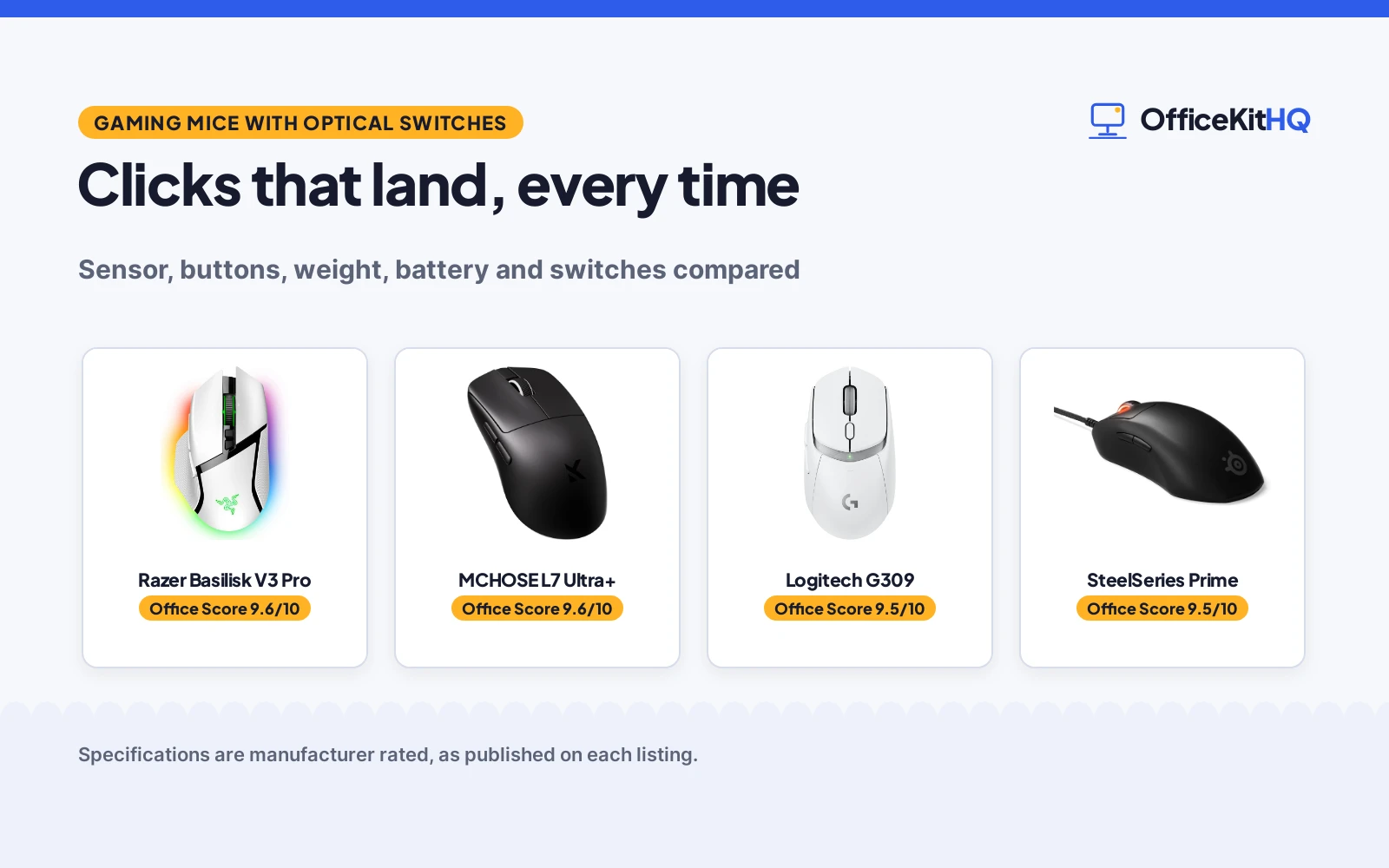
A match slips away on a click that never lands, and the cursor drags a beat behind the hand in a fight that needed speed. That missed click is the reason to look for the best gaming mouse with optical switches, switches that fire on light instead of metal contact. This guide compares wireless and wired mice by sensor, buttons, weight, battery and switches, for PC and Mac play in 2026.
OfficeKitHQ earns a commission when you buy through links on this page, at no extra cost to you. As an Amazon Associate I earn from qualifying purchases. Affiliate disclosure.
Quick picks
 Top Pick Razer Basilisk V3 Pro: Wireless, Gen-3 optical switches, 30K sensor, 11 buttons, 150 hour Bluetooth battery. Check price on Amazon
 8K Polling Pick MCHOSE L7 Ultra+: Dual 8K polling, 42K sensor, 48 g, 7 buttons. Check price on Amazon
 Long Battery Pick Logitech G309: 300+ hour battery, 68 g with PowerPlay, 6 buttons. Check price on Amazon
 Esports Pick SteelSeries Prime: 69 g, 18K sensor, magnetic optical switches, 5 buttons. Check price on Amazon
The picks
| # | Product | Office Score | Buy |
|---|---|---|---|
| 1 | Razer Basilisk V3 Pro | 9.6/10 | Buy on Amazon |
| 2 | MCHOSE L7 Ultra+ | 9.6/10 | Buy on Amazon |
| 3 | Logitech G309 | 9.5/10 | Buy on Amazon |
| 4 | SteelSeries Prime | 9.5/10 | Buy on Amazon |
| 5 |  Logitech G502 X Logitech G502 X | 9.5/10 | Buy on Amazon |

Razer Basilisk V3 Pro
Razer Basilisk V3 Pro is a wireless gaming mouse with Gen-3 optical switches, a 90-million click lifecycle and 0.2ms actuation, plus a Focus Pro 30K optical sensor. It offers 11 programmable buttons, a HyperScroll tilt wheel and 13-zone Chroma lighting with 16.8 million colors. Battery life runs to 150 hours over Bluetooth and 110 hours on HyperSpeed wireless, per the listing.
Pros
- Gen-3 optical switches with a 90-million click lifecycle
- Focus Pro 30K optical sensor
- 11 programmable buttons with a HyperScroll tilt wheel
- 150 hours over Bluetooth, 110 hours on HyperSpeed wireless
Cons
- 4KHz polling needs a dock or dongle sold separately
- Spec table lists a 90 hour battery average against mode figures
- No safety certification is stated
- White color only stated for this listing
Detailed Review
Razer is the feature pick here: Gen-3 optical switches, a 30K sensor, 11 buttons and a tilt wheel in a wireless mouse. The 13-zone Chroma lighting and 16.8 million colors suit a desk setup that values lighting control.
A battery note: the spec table lists a 90 hour average, while the bullets list 150 hours over Bluetooth, 110 hours on HyperSpeed wireless and 32 hours with the HyperPolling dongle. Trust the bullets here, since they break the figures down by mode.
Its Office Score of 9.6/10 comes from performance 32/35, build 21/25, value 21/25, safety 0/10 and warranty 4/5: 78 of 100 points, placed on our 9.2 to 9.8 scale.
Key Specifications
| Sensor | Focus Pro 30K Optical |
|---|---|
| Switches | Optical Switches Gen-3 |
| Buttons | 11 |
| Weight | 3.84 ounces |
| Connectivity | Wireless, Bluetooth, USB |
| Warranty | 2 year manufacturer |
Figures as published on the retailer listing, collected 25 October 2026. Performance figures are manufacturer rated.
Safety and Warranty
What this listing states. No FCC or other safety listing is stated, so safety scores zero. 2 year manufacturer. It does not say everything a buyer needs, such as who pays return shipping, so warranty scores 4 of 5. See How We Pick.
Fit the desk first. Check the stated size against your desk depth and keyboard tray, and charge or pair as the manual describes. No keyboard, mouse or wrist rest prevents or treats injury.
This is general buying information, not professional advice. Follow each product manual and local rules, and see our Safety Disclaimer.

MCHOSE L7 Ultra+
MCHOSE L7 Ultra+ is a wireless gaming mouse at 48 g with a PAW3950 sensor, up to 42,000 DPI and dual 8K polling at 0.125ms response. It uses Kailh Black Green Dot optical switches with a 150 million click lifespan, 7 programmable buttons and 3-mode connectivity. The listing states a maximum acceleration of 50G and tracking speeds up to 750 IPS.
Pros
- 48 g lightweight build with an ambidextrous shape
- 42,000 DPI with a PAW3950 sensor
- Dual 8K polling at 0.125ms response
- 150 million click optical switches
Cons
- No battery life figure is stated in hours
- No safety certification is stated
- 7 buttons only, below the 11 and 13 button picks here
- Black color only stated for this listing
Detailed Review
MCHOSE is the speed pick here: 48 g, a 42K sensor and dual 8K polling for fast, precise play. The ambidextrous shape suits left and right hands, unlike the right-handed picks here.
The switch figure stands out: 150 million clicks from Kailh optical switches, above the 90 million and 100 million figures on the other picks. The 2 year manufacturer warranty matches the Razer term.
Its Office Score of 9.6/10 comes from performance 32/35, build 21/25, value 20/25, safety 0/10 and warranty 4/5: 77 of 100 points, placed on our 9.2 to 9.8 scale.
Key Specifications
| Sensor | PAW3950 |
|---|---|
| DPI | 42,000 |
| Weight | 48 g |
| Buttons | 7 |
| Polling | Dual 8K |
| Warranty | 2 Year Manufacturer |
Figures as published on the retailer listing, collected 25 October 2026. Performance figures are manufacturer rated.
Safety and Warranty
What this listing states. This product does not plug in or run on a battery, so safety is not part of its score. 2 Year Manufacturer. It does not say everything a buyer needs, such as who pays return shipping, so warranty scores 4 of 5. See How We Pick.
Fit the desk first. Check the stated size against your desk depth and keyboard tray, and charge or pair as the manual describes. No keyboard, mouse or wrist rest prevents or treats injury.
This is general buying information, not professional advice. Follow each product manual and local rules, and see our Safety Disclaimer.

Logitech G309
Logitech G309 is a wireless gaming mouse with LIGHTFORCE optical-mechanical switches, a HERO 25K sensor and 6 programmable buttons. It weighs 68 g with PowerPlay wireless charging and 86 g with the included AA battery, with 300+ hours of battery life on AA. The box holds the mouse, a LIGHTSPEED receiver, a receiver extender cable, an AA battery and grip tape.
Pros
- 300+ hour battery life with an AA battery
- 68 g with PowerPlay, 86 g with AA battery
- LIGHTFORCE optical-mechanical switches
- HERO 25K sensor with 6 programmable buttons
Cons
- 6 buttons only, below the 11 and 13 button picks here
- No safety certification is stated
- AA battery needed without PowerPlay
- White color only stated for this listing
Detailed Review
G309 is the battery pick here: 300+ hours on AA, plus unlimited life with PowerPlay for a desk that never wants a dead mouse. The 68 g PowerPlay weight suits fast play, while the 86 g AA weight suits a steadier hand.
The LIGHTFORCE switches pair optical speed with a mechanical feel, and the HERO 25K sensor tracks to the sub-micron. The 1 Year Limited Hardware Warranty is shorter than the 2 year terms on the top picks.
Its Office Score of 9.5/10 comes from performance 29/35, build 20/25, value 21/25, safety 0/10 and warranty 3/5: 73 of 100 points, placed on our 9.2 to 9.8 scale.
Key Specifications
| Sensor | HERO 25K |
|---|---|
| Switches | LIGHTFORCE optical-mechanical |
| Buttons | 6 |
| Weight | 68 g with PowerPlay, 86 g with AA |
| Battery | 300 hours |
| Warranty | 1 Year Limited Hardware Warranty |
Figures as published on the retailer listing, collected 25 October 2026. Performance figures are manufacturer rated.
Safety and Warranty
What this listing states. No FCC or other safety listing is stated, so safety scores zero. 1 Year Limited Hardware Warranty. It does not say everything a buyer needs, such as who pays return shipping, so warranty scores 3 of 5. See How We Pick.
Fit the desk first. Check the stated size against your desk depth and keyboard tray, and charge or pair as the manual describes. No keyboard, mouse or wrist rest prevents or treats injury.
This is general buying information, not professional advice. Follow each product manual and local rules, and see our Safety Disclaimer.

SteelSeries Prime
SteelSeries Prime is a wired FPS gaming mouse at 69 g with magnetic optical switches, an 18K CPI TrueMove Pro sensor and 5 programmable buttons. The switches state 100 million clicks, and the sensor states 450 IPS and 50G tracking. The Prime shape suits right-handed players across finger, palm and claw grips, per the listing.
Pros
- 69 g lightweight build for FPS play
- Magnetic optical switches with 100 million clicks
- 18K CPI TrueMove Pro sensor
- Right-handed shape for finger, palm and claw grips
Cons
- 5 buttons only, the fewest here
- Wired only, with no wireless option stated
- No safety certification is stated
- Black color only stated for this listing
Detailed Review
Prime is the FPS pick here: 69 g, magnetic optical switches and an 18K sensor for fast, precise play. The right-handed shape and grip options suit players who switch between finger, palm and claw grips.
The 1 Year warranty matches the G309 term and sits below the 2 year terms on the top picks. For a wireless setup, look at the Razer, G309 or MCHOSE picks instead.
Its Office Score of 9.5/10 comes from performance 29/35, build 20/25, value 19/25, safety 0/10 and warranty 3/5: 71 of 100 points, placed on our 9.2 to 9.8 scale.
Key Specifications
| Sensor | TrueMove Pro 18K CPI |
|---|---|
| Switches | Magnetic Optical |
| Buttons | 5 |
| Weight | 69 g |
| Connectivity | USB |
| Warranty | 1 Year |
Figures as published on the retailer listing, collected 25 October 2026. Performance figures are manufacturer rated.
Safety and Warranty
What this listing states. This product does not plug in or run on a battery, so safety is not part of its score. 1 Year. It does not say everything a buyer needs, such as who pays return shipping, so warranty scores 3 of 5. See How We Pick.
Fit the desk first. Check the stated size against your desk depth and keyboard tray, and charge or pair as the manual describes. No keyboard, mouse or wrist rest prevents or treats injury.
This is general buying information, not professional advice. Follow each product manual and local rules, and see our Safety Disclaimer.

Logitech G502 X
Logitech G502 X is a wired gaming mouse with LIGHTFORCE hybrid optical-mechanical switches, a HERO 25K sensor and 13 buttons. It offers a reversible and removable DPI-shift button and a hyperfast scroll wheel with free spin, ratcheting and tilt modes. The mouse weighs 89 g and connects over USB for PC and Mac.
Pros
- 13 buttons for games with many commands
- LIGHTFORCE hybrid optical-mechanical switches
- HERO 25K sensor
- Reversible and removable DPI-shift button
Cons
- Wired only, with no wireless option stated
- No warranty term is stated in this listing
- No safety certification is stated
- Plastic enclosure stated, with no metal frame option
Detailed Review
G502 X is the button pick here: 13 buttons with a DPI-shift button and a hyperfast scroll wheel for games with many commands. The HERO 25K sensor and LIGHTFORCE switches match the G309 on core specs.
The wired design skips battery worries entirely, at the cost of a cable on the desk. With no warranty term stated, the warranty score sits below every other pick here.
Its Office Score of 9.5/10 comes from performance 30/35, build 21/25, value 20/25, safety 0/10 and warranty 0/5: 71 of 100 points, placed on our 9.2 to 9.8 scale.
Key Specifications
| Sensor | HERO 25K |
|---|---|
| Switches | LIGHTFORCE hybrid optical-mechanical |
| Buttons | 13 |
| Weight | 89 g |
| Connectivity | USB |
| Sensitivity | 25600 dots per inch |
Figures as published on the retailer listing, collected 25 October 2026. Performance figures are manufacturer rated.
Safety and Warranty
What this listing states. This product does not plug in or run on a battery, so safety is not part of its score. No warranty term, so warranty scores zero. See How We Pick.
Fit the desk first. Check the stated size against your desk depth and keyboard tray, and charge or pair as the manual describes. No keyboard, mouse or wrist rest prevents or treats injury.
This is general buying information, not professional advice. Follow each product manual and local rules, and see our Safety Disclaimer.
As an Amazon Associate I earn from qualifying purchases.
More picks to compare
 Logitech G502 X WhiteWhite wired G502 X, 25K sensor, infinite scroll, 1 year warranty.Check on Amazon
Compare the picks
| Mouse | Office Score | Sensor | Buttons | Weight | Warranty | Amazon |
|---|---|---|---|---|---|---|
| Razer Basilisk V3 Pro | 9.6/10 | 30K | 11 | 3.84 ounces | 2 year | View on Amazon |
| MCHOSE L7 Ultra+ | 9.6/10 | 42K | 7 | 48 g | 2 year | View on Amazon |
| Logitech G309 | 9.5/10 | 25K | 6 | 68 g | 1 year | View on Amazon |
| SteelSeries Prime | 9.5/10 | 18K | 5 | 69 g | 1 year | View on Amazon |
| Logitech G502 X | 9.5/10 | 25K | 13 | 89 g | Not stated | View on Amazon |
Specifications are manufacturer rated as listed, collected 25 October 2026. Some listings state battery life by mode, while others state a single figure.
How we scored them
The Office Score weighs performance (sensor, switches and polling), build (shape, weight and materials), value, safety and warranty. Warranty points go only to listings that state a term with a concrete length, such as 2 year or 1 year terms. No listing names a safety certification, so safety contributes nothing to any pick here.
| Product | Office Score | Perf. /35 | Build /25 | Value /25 | Safety /10 | Warranty /5 |
|---|---|---|---|---|---|---|
| Razer Basilisk V3 Pro | 9.6 | 32 | 21 | 21 | 0 | 4 |
| MCHOSE L7 Ultra+ | 9.6 | 32 | 21 | 20 | 0 | 4 |
| Logitech G309 | 9.5 | 29 | 20 | 21 | 0 | 3 |
| SteelSeries Prime | 9.5 | 29 | 20 | 19 | 0 | 3 |
| Logitech G502 X | 9.5 | 30 | 21 | 20 | 0 | 0 |
Scores run from 9.2 to 9.8: each product’s point total is placed on that range, so more points always means a higher score.
How to choose the best gaming mouse with optical switches
Optical switches explained
Optical switches fire when a light beam breaks, with no metal contact to wear or double-click. Razer Gen-3 switches state a 90-million click lifecycle with 0.2ms actuation, SteelSeries magnetic optical switches state 100 million clicks, and MCHOSE optical switches state 150 million clicks. Logitech LIGHTFORCE switches pair optical speed with a mechanical feel. For a mouse that must last through long sessions, the click lifecycle figure matters.
Sensor and DPI
Sensor figures here run from 18K CPI on the SteelSeries Prime to 42K DPI on the MCHOSE L7 Ultra+, with 25K on the Logitech picks and 30K on the Razer. Higher DPI suits a fast flick across a wide monitor, while a lower DPI suits a steady aim. Check the sensor name too: HERO 25K, Focus Pro 30K, TrueMove Pro and PAW3950 each state sub-micron or 1-to-1 tracking claims.
Weight and shape
Weights here run from 48 g on the MCHOSE to 89 g on the Logitech G502 X, with 68 g on the G309 with PowerPlay and 69 g on the SteelSeries Prime. A lighter mouse suits fast flicks, while a heavier mouse suits a steady hand. Shapes vary too: Razer and Logitech state right-handed shapes, while MCHOSE states an ambidextrous shape. Match the shape to the hand before ordering.
Wired or wireless
Wireless picks here are the Razer, the G309 and the MCHOSE, while the G502 X and the SteelSeries Prime are wired. Wireless battery figures run from 300+ hours on the G309 with an AA battery to 150 hours on the Razer over Bluetooth. Wired picks skip battery worries entirely. For a desk that moves, wireless wins; for a fixed desk, wired is simpler.
Buttons and scroll wheel
Button counts here run from 5 on the SteelSeries Prime to 13 on the Logitech G502 X, with 6 on the G309, 7 on the MCHOSE and 11 on the Razer. More buttons suit games with many commands, while fewer buttons suit a clean FPS setup. Scroll wheels vary too: Razer HyperScroll tilt wheel, Logitech hyperfast wheel and MCHOSE dual 8K polling all state fast, precise scrolling.
Setup Notes
- Check the hand orientation: right-handed for Razer, Logitech and SteelSeries, ambidextrous for MCHOSE.
- Check the battery plan: 300+ hours on the G309 with AA, 150 hours on the Razer over Bluetooth, wired for the G502 X and Prime.
- Check the sensor against the game: 18K CPI for the Prime, 25K for the Logitech picks, 30K for the Razer, 42K for the MCHOSE.
- Check the switch type: Gen-3 optical, LIGHTFORCE hybrid, magnetic optical and Kailh optical across the picks.
Frequently Asked Questions
What is an optical switch?
An optical switch fires when a light beam breaks, with no metal contact to wear out. Razer Gen-3 switches state a 90-million click lifecycle with 0.2ms actuation, and MCHOSE optical switches state 150 million clicks. Logitech LIGHTFORCE switches pair optical speed with a mechanical feel.
How much DPI do I need?
DPI figures here run from 18K CPI on the SteelSeries Prime to 42K DPI on the MCHOSE L7 Ultra+, with 25K on the Logitech picks and 30K on the Razer. A higher DPI suits fast flicks, while a lower DPI suits a steady aim. Pick the sensor that matches the game and the monitor.
Is wireless as fast as wired?
Wireless picks here state fast links: Razer HyperSpeed wireless, Logitech LIGHTSPEED wireless and MCHOSE dual 8K polling at 0.125ms response. The wired G502 X and Prime skip wireless entirely. For competitive play, check the polling figure on the listing before ordering.
How long does the battery last?
The G309 states 300+ hours with an AA battery and unlimited life with PowerPlay. The Razer states 150 hours over Bluetooth, 110 hours on HyperSpeed wireless and 32 hours with the HyperPolling dongle. The wired picks need no battery at all.
Do these mice work on Mac?
Razer, Logitech G502 X, Logitech G309 and SteelSeries Prime all state Mac and PC compatibility, and MCHOSE states Linux, Mac and PC. Check the listing for the exact platform before ordering, since some features may vary by system.
Related guides
Related: computer peripherals, gaming mouse for Mac and ergonomic gaming mouse.
More picks: computer peripherals, gaming mouse for Mac.