The best audio interface for dj is the one that keeps the mix audible from the opening track to the closing one, because a DJ set lives or dies on the connection between the mixer and the laptop. A morning call with a dim webcam is a familiar home desk problem; a set that drops out mid-track is another, and the answer is the same kind of work, checking the figures on the listing before the gear arrives. We compared five audio interfaces for DJ use by sample rate, DVS support, inputs, headphone monitoring, USB-C connection and stated warranty term, using only what each listing publishes.
OfficeKitHQ earns a commission when you buy through links on this page, at no extra cost to you. As an Amazon Associate I earn from qualifying purchases. Affiliate disclosure.
Quick picks
 Best Overall Reloop Flux Go: Serato DVS, 24-bit/96 kHz, 2-channel 4×4 with turntable inputs Check price on Amazon
 Best for Rekordbox Pioneer DJ INTERFACE2: Rekordbox DVS, 96 kHz, aluminum casing, cables in the box Check price on Amazon
 Best Portable Pick Synido A20 Pro: 24-bit/96 kHz, 100 dB SNR, LED meter, USB-C, wireless backing tracks Check price on Amazon
 Best Pocket-Size Pick EvermixBox5: USB-C DJ interface for iOS and Android, cable supplied Check price on Amazon
 Studio Bundle Focusrite Scarlett Solo Studio: Scarlett Solo Studio bundle with a microphone, USB-C Check price on Amazon
Our desk picks
| # | Product | Office Score | Buy |
|---|---|---|---|
| 1 | Reloop Flux Go | 9.6/10 | Buy on Amazon |
| 2 | Pioneer DJ INTERFACE2 | 9.6/10 | Buy on Amazon |
| 3 | Focusrite Scarlett Solo | 9.6/10 | Buy on Amazon |
| 4 | Synido A20 Pro | 9.5/10 | Buy on Amazon |
| 5 | EvermixBox5 | 9.3/10 | Buy on Amazon |

Reloop Flux Go
A pocket-sized USB-C DVS interface for Serato DJ Pro with 24-bit/96 kHz sound, 2-channel 4x4 audio, turntable inputs and a headphone jack.
Pros
- DVS support for Serato DJ Pro turns any mixer into a DVS system
- 24-bit/96 kHz sound with 2-channel 4x4 In/Out audio
- 2 inputs for turntables or CD players, switchable by DIP switches
- Headphone jack and RCA output play system audio at the same time
Cons
- No microphone input is stated
- No XLR output is stated; outputs are RCA and a 3.5 mm headphone jack
- Only Serato DJ Pro is named for DVS use
- Headphone volume control sits on the side panel rather than the front
Detailed Review
Reloop lists the Flux Go as a pocket-sized USB-C DVS audio interface for Serato DJ Pro with studio-grade 24-bit/96 kHz sound and ultra-low latency. It is a 2-channel interface with 4x4 In/Out audio, 2 inputs for turntables or CD and media players switchable by DIP switches, and 2 line outputs for a mixer. It doubles as a plug-and-play USB soundcard that plays system audio through the 3.5 mm headphone jack and the RCA output at the same time, with headphone volume control on the side panel. It is class-compliant over USB-C on macOS and other devices, with an ASIO driver available for Windows, and it also works as a studio interface for recording and playback in third-party audio software. The listing states a 1-year warranty.
Who it's for: a Serato DJ Pro user who wants to turn an analog mixer into a DVS setup with turntables or CD players. Who should skip it: anyone who needs a microphone input, XLR outputs or DVS for software other than Serato DJ Pro.
Its Office Score of 9.6/10 comes from performance 32/35, build 22/25, value 21/25, safety 0/10 and warranty 3/5: 78 of 100 points, placed on our 9.2 to 9.8 scale.
Key Specifications
| Sample rate | 24-bit/96 kHz |
|---|---|
| Channels | 2-channel, 4x4 In/Out |
| Inputs | 2 turntable or CD inputs |
| Connection | USB-C, class-compliant |
These specs mirror the retailer listing as of 19 November 2026; performance figures are stated by the brand.
Safety and Warranty
What this listing states. No volume limit or safety listing is stated, so safety scores zero. 1-year warranty. It does not say everything a buyer needs, such as who pays return shipping, so warranty scores 3 of 5. See How We Pick.
Protect your hearing. Keep volume moderate during long calls, take breaks, and treat noise cancelling and battery figures as the maker's claims.
This is general buying information, not professional advice. Follow each product manual and local rules, and see our Safety Disclaimer.

Pioneer DJ INTERFACE2
A 2-channel interface for rekordbox DVS with 96 kHz sampling, a seamless aluminum casing, LED signal indicators and a full cable set in the box.
Pros
- Rekordbox DVS lets any DJ setup scratch and control digital music
- Seamless aluminum casing with extended edges that protect the terminals
- LED indicators on the top panel show the signal flow
- 4 audio cables, a USB cable and a power cable ship in the box
Cons
- 12.8 by 13.3 by 3.4 in footprint is the largest stated here
- Heaviest interface here at 4.2 lb
- No headphone output is stated
- No USB-C connection is stated; the listing names a USB cable
Detailed Review
Pioneer DJ lists the INTERFACE2 as a 2-channel audio interface that lets rekordbox DVS scratch and control the digital music on a computer from any DJ setup. Audio files up to 96 kHz are supported by the high-quality D/A converter, and the unit records vinyl or any analog sound source through rekordbox. The seamless aluminum casing has extended edges that protect the terminals, and LED indicators in the top panel show the signal flow. The box holds 4 audio cables, a USB cable and a power cable, so the rekordbox DVS feature works right out of the box. The unit weighs 4.2 lb and measures 12.8 by 13.3 by 3.4 in, and it carries a 1-year limited warranty.
Who it's for: a rekordbox DJ who wants a rugged 2-channel DVS interface with every cable in the box. Who should skip it: anyone who needs a headphone output, a USB-C connection or a lighter unit for a small bag.
Its Office Score of 9.6/10 comes from performance 30/35, build 22/25, value 20/25, safety 0/10 and warranty 3/5: 75 of 100 points, placed on our 9.2 to 9.8 scale.
Key Specifications
| Sample rate | Up to 96 kHz |
|---|---|
| Channels | 2-channel |
| Casing | Seamless aluminum |
| In the box | 4 audio cables, USB cable, power cable |
These specs mirror the retailer listing as of 19 November 2026; performance figures are stated by the brand.
Safety and Warranty
What this listing states. No volume limit or safety listing is stated, so safety scores zero. 1-year limited warranty. It does not say everything a buyer needs, such as who pays return shipping, so warranty scores 3 of 5. See How We Pick.
Protect your hearing. Keep volume moderate during long calls, take breaks, and treat noise cancelling and battery figures as the maker's claims.
This is general buying information, not professional advice. Follow each product manual and local rules, and see our Safety Disclaimer.

Focusrite Scarlett Solo
A complete bundle with a USB-C interface, a CM25 MkIII mic, SH-450 headphones and recording software.
Pros
- Interface, mic, headphones and software in one bundle
- 120dB dynamic range stated
- 24-Bit/192kHz conversion stated
- 3 year manufacturer warranty stated
Cons
- No shock mount is stated
- No pop filter is stated
- The mic connects through the interface, not straight to a computer
- Red is the only color stated
Detailed Review
Focusrite lists the Scarlett Solo Studio as a complete bundle: a USB-C interface with 1 XLR mic preamp and 1 Hi-Z instrument input, a CM25 MkIII mic and SH-450 headphones. It offers 24-Bit/192kHz conversion with a 120dB dynamic range, and an Air mode that lifts vocals and guitars to the front of the mix. The box also includes Pro Tools Intro+, Ableton Live Lite, Cubase LE and Hitmaker Expansion. The interface measures 3.78 x 5.63 x 1.79 in and weighs 3.02 lb. The listing states a 3 year manufacturer warranty.
Who it's for: someone who wants an interface, a mic, headphones and software in one box for recording, mixing and mastering. Who should skip it: someone who wants a shock mount or a pop filter in the box, or a mic that plugs straight into a computer without an interface.
Its Office Score of 9.6/10 comes from performance 33/35, build 21/25, value 21/25, safety 0/10 and warranty 4/5: 79 of 100 points, placed on our 9.2 to 9.8 scale.
Key Specifications
| Interface | 1 XLR preamp, 1 Hi-Z input |
|---|---|
| Sampling | 24-Bit/192kHz |
| Dynamic range | 120dB |
| Item weight | 3.02 lb |
These specs mirror the retailer listing as of 14 November 2026; performance figures are stated by the brand.
Safety and Warranty
What this listing states. No volume limit or safety listing is stated, so safety scores zero. 3 year manufacturer. It does not say everything a buyer needs, such as who pays return shipping, so warranty scores 4 of 5. See How We Pick.
Protect your hearing. Keep volume moderate during long calls, take breaks, and treat noise cancelling and battery figures as the maker's claims.
This is general buying information, not professional advice. Follow each product manual and local rules, and see our Safety Disclaimer.

Synido A20 Pro
A portable USB-C interface with 24-bit/96 kHz audio, 100 dB signal-to-noise ratio, a real-time LED meter and wireless backing tracks for DJ recording.
Pros
- 24-bit/96 kHz audio with 100 dB signal-to-noise ratio and 0.006% THD
- Real-time LED meter shows gain at a glance, with full illumination on overload
- Records DJ mixer audio straight into a camera or phone, embedded in the video
- Wireless backing tracks from a second phone, with simultaneous charging
Cons
- No warranty term is stated, only service support
- Built around a single Hi-Z input; no second input is stated
- Recording into a camera or phone needs USB-C audio input support on that device
- No DVS support is stated
Detailed Review
Synido lists the A20 Pro as a portable USB-C audio interface for guitar and DJ recording with 24-bit/96 kHz resolution, a 100 dB signal-to-noise ratio and 0.006% THD through a 1MΩ Hi-Z input. Zero-latency monitoring works at the push of a button, and the front-panel LED meter pulses with the input signal, with full illumination warning of excessive gain. Flexible gain control covers 0 to 35 dB for condenser mics and 0 to 40 dB for dynamic mics, and the interface works with 5V condenser mics and dynamic mics across Android, iPhone, Mac and PC. Backing tracks stream wirelessly from a second phone, the unit charges while it records, and the box holds an OTG extension cable and a 1/4 in adapter. Audio from a DJ mixer records directly into an action camera or smartphone, embedded in the video file, where the camera or phone supports USB-C audio input. The listing gives a 0.4 lb item weight and a 6.0 by 4.45 by 1.1 in footprint, and the warranty note reads service support with no term stated.
Who it's for: a DJ who records sets straight to a phone or action camera and wants a pocketable interface with a live level meter. Who should skip it: anyone who needs DVS control, a second input or a written warranty term.
Its Office Score of 9.5/10 comes from performance 29/35, build 20/25, value 21/25, safety 0/10 and warranty 0/5: 70 of 100 points, placed on our 9.2 to 9.8 scale.
Key Specifications
| Sample rate | 24-bit/96 kHz |
|---|---|
| Signal-to-noise ratio | 100 dB |
| Item weight | 0.4 lb |
| Dimensions | 6.0 x 4.45 x 1.1 in |
These specs mirror the retailer listing as of 19 November 2026; performance figures are stated by the brand.
Safety and Warranty
What this listing states. No volume limit or safety listing is stated, so safety scores zero. No warranty term, so warranty scores zero. See How We Pick.
Protect your hearing. Keep volume moderate during long calls, take breaks, and treat noise cancelling and battery figures as the maker's claims.
This is general buying information, not professional advice. Follow each product manual and local rules, and see our Safety Disclaimer.
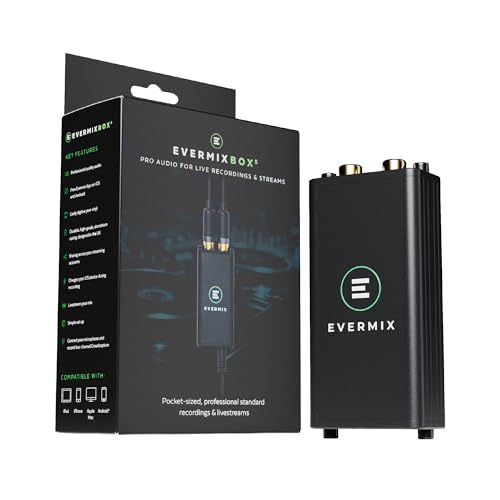
EvermixBox5
A USB-C DJ audio interface for iOS and Android devices, supplied with a USB-C cable for compatible devices.
Pros
- USB-C connection suits iOS and Android devices
- USB-C cable is supplied in the box
- DJ use is the stated purpose, not an add-on
- 1-year manufacturer warranty is stated
Cons
- No sample rate is stated
- No inputs, outputs or channel count are stated
- No DVS support is stated
- No headphone output is stated
Detailed Review
Evermix lists the EvermixBox5 as a DJ audio interface with a USB-C connection for iOS and Android devices, supplied with a USB-C cable for compatible devices. The listing states no sample rate, no input or output count, no channel count and no DVS support, so a buyer who needs those figures has nothing to check against. It carries a 1-year manufacturer warranty.
Who it's for: a DJ with a USB-C phone or tablet who wants a simple plug-in interface and already knows the Evermix workflow. Who should skip it: anyone who needs stated specs, DVS control or a headphone output.
Its Office Score of 9.3/10 comes from performance 23/35, build 15/25, value 16/25, safety 0/10 and warranty 3/5: 57 of 100 points, placed on our 9.2 to 9.8 scale.
Key Specifications
| Connection | USB-C |
|---|---|
| Compatibility | iOS and Android |
| In the box | USB-C cable |
| Warranty | 1 year manufacturer |
These specs mirror the retailer listing as of 19 November 2026; performance figures are stated by the brand.
Safety and Warranty
What this listing states. No volume limit or safety listing is stated, so safety scores zero. 1-year manufacturer warranty. It does not say everything a buyer needs, such as who pays return shipping, so warranty scores 3 of 5. See How We Pick.
Protect your hearing. Keep volume moderate during long calls, take breaks, and treat noise cancelling and battery figures as the maker's claims.
This is general buying information, not professional advice. Follow each product manual and local rules, and see our Safety Disclaimer.
As an Amazon Associate I earn from qualifying purchases.
Specs compared
| Interface | Office Score | Sample rate | Channels | DVS | Inputs | Warranty | Amazon |
|---|---|---|---|---|---|---|---|
| Reloop Flux Go | 9.6/10 | 24-bit/96 kHz | 2-channel, 4×4 | Serato DJ Pro | 2 turntable or CD inputs | 1 year | View on Amazon |
| Pioneer DJ INTERFACE2 | 9.6/10 | Up to 96 kHz | 2-channel | Rekordbox DVS | Vinyl and analog sources | 1 year limited | View on Amazon |
| Synido A20 Pro | 9.5/10 | 24-bit/96 kHz | Not stated | Not stated | 1 Hi-Z input | Not stated as a term | View on Amazon |
| EvermixBox5 | 9.3/10 | Not stated | Not stated | Not stated | Not stated | 1 year manufacturer | View on Amazon |
| Focusrite Scarlett Solo Studio | 9.6/10 | Not stated | Not stated | Not stated | Not stated | Not stated |
We quote these figures from each listing as the brand rates them; captured 19 November 2026. Three of the five state a warranty term, and none of the five states a safety certification.
How to choose the best audio interface for dj
Match the interface to your DJ software
DVS support is the first split in this group. The Reloop Flux Go is built for Serato DJ Pro, with 2-channel 4×4 audio and 2 inputs for turntables or CD players, while the Pioneer DJ INTERFACE2 is built for rekordbox DVS and records vinyl or any analog source through rekordbox. The Synido A20 Pro takes a different route: it records DJ mixer audio straight into an action camera or smartphone, embedded in the video file, which suits a DJ who posts sets rather than one who scratches digital tracks. The EvermixBox5 names DJ use in its title but states no DVS support, and the Focusrite Scarlett Solo Studio bundle states no software at all. If DVS is the job, pick the interface that names your software; if recording the set is the job, the Synido is the only pick that states it. Also see our best audio interface for live performance guide for more DVS and stage picks.
Check the sample rate and the inputs
Sample rate is stated on three of the five. The Reloop Flux Go and the Synido A20 Pro both list 24-bit/96 kHz, and the Pioneer DJ INTERFACE2 supports audio files up to 96 kHz. The Synido adds a 100 dB signal-to-noise ratio and 0.006% THD through a 1MΩ Hi-Z input, with gain from 0 to 35 dB for condenser mics and 0 to 40 dB for dynamic mics. Inputs differ just as much: the Reloop gives 2 inputs for turntables or CD players with DIP switches, the Synido gives a single Hi-Z input, and the EvermixBox5 and the Focusrite bundle state no inputs at all. A DJ who plays vinyl needs the turntable inputs; a DJ who records a mixer feed needs the Synido direct-to-camera route. For a closer look at recording setups, see our best audio interface for home recording guide.
Count the cables and the connections
Every pick here connects over USB, but the details differ. The Reloop is class-compliant over USB-C with an ASIO driver for Windows, the Synido and EvermixBox5 connect over USB-C, and the Focusrite bundle names USB-C in its title, while the Pioneer DJ INTERFACE2 names a USB cable without stating USB-C. What ships in the box matters just as much: the Pioneer ships 4 audio cables, a USB cable and a power cable, the Synido ships an OTG extension cable and a 1/4 in adapter, and the EvermixBox5 ships a USB-C cable. Check the port on the laptop before ordering, and keep the interface close to the mixer so the cables stay short and out of the way.
| Interface | Connection | Headphone output | In the box |
|---|---|---|---|
| Reloop Flux Go | USB-C, class-compliant | 3.5 mm jack and RCA output | Not stated |
| Pioneer DJ INTERFACE2 | USB cable | Not stated | 4 audio cables, USB cable, power cable |
| Synido A20 Pro | USB-C | Not stated | OTG cable, 1/4 in adapter |
| EvermixBox5 | USB-C | Not stated | USB-C cable |
| Focusrite Scarlett Solo Studio | USB-C | Not stated | Microphone |
Figures as stated in each listing. A headphone jack on the interface lets a DJ cue the next track without touching the mixer output.
Read the warranty line before you buy
Three listings state a warranty term. The Reloop Flux Go states a 1-year warranty, the Pioneer DJ INTERFACE2 states a 1-year limited warranty, and the EvermixBox5 states a 1-year manufacturer warranty. The Synido A20 Pro states only service support, with no term, and the Focusrite Scarlett Solo Studio bundle states no warranty at all. A one-year term covers the first year of gigs; after that, the interface is on its own. For more on choosing studio gear, see our best audio interface for beginners guide.
Setup Notes
- Measure the space beside the mixer before ordering: the Synido lists 6.0 by 4.45 by 1.1 in and the Pioneer lists 12.8 by 13.3 by 3.4 in.
- Plan a USB-C port for the interface and check that the phone or camera supports USB-C audio input before recording a set with the Synido.
- Keep the cables the Pioneer ships with beside the mixer: 4 audio cables, a USB cable and a power cable.
- Set the DIP switches on the Reloop for the turntable or CD inputs before the set, and check the headphone jack and RCA output.
FAQ
Which of these interfaces works with Serato DJ Pro?
The Reloop Flux Go. It is a 2-channel DVS audio interface for Serato DJ Pro with 2 inputs for turntables or CD players and 2 line outputs for a mixer.
Which interface is made for rekordbox DVS?
The Pioneer DJ INTERFACE2. It is a 2-channel interface that lets rekordbox DVS scratch and control digital music from any DJ setup, with audio files up to 96 kHz.
What sample rate do the Reloop and Synido interfaces list?
Both list 24-bit/96 kHz. The Pioneer DJ INTERFACE2 supports audio files up to 96 kHz, while the EvermixBox5 and the Focusrite bundle state no sample rate.
Which interfaces state a one-year warranty?
Three of them: the Reloop Flux Go states a 1-year warranty, the Pioneer DJ INTERFACE2 states a 1-year limited warranty, and the EvermixBox5 states a 1-year manufacturer warranty.
Can I record a DJ set with the Synido A20 Pro?
Yes. It records audio from a DJ mixer directly into an action camera or smartphone, embedded in the video file, where the camera or phone supports USB-C audio input. It also streams backing tracks wirelessly from a second phone.
Score breakdown
The Office Score weighs performance, build, value, safety and warranty. For an audio interface, performance means sample rate, DVS support, inputs and monitoring; build means casing, connection and what ships in the box; value means what the stated specs give a DJ buyer. Safety means a stated safety certification or safety feature on the listing, and none of the five states one, so every safety score is zero. Three listings state a warranty term: Reloop and Evermix at 1 year, Pioneer DJ at 1 year limited. How we pick explains the weights.
| Product | Office Score | Perf. /35 | Build /25 | Value /25 | Safety /10 | Warranty /5 |
|---|---|---|---|---|---|---|
| Reloop Flux Go | 9.6 | 32 | 22 | 21 | 0 | 3 |
| Pioneer DJ INTERFACE2 | 9.6 | 30 | 22 | 20 | 0 | 3 |
| Synido A20 Pro | 9.5 | 29 | 20 | 21 | 0 | 0 |
| EvermixBox5 | 9.3 | 23 | 15 | 16 | 0 | 3 |
Score placement follows the weighted total: the lowest totals read 9.2, the highest 9.8, and everything between keeps its order.
More for your workspace
See every audio, power and connectivity guide. Also see our best audio interface for live performance. Also see our best audio interface for home recording. Also see our best audio interface for beginners.
More picks: headset for recording audio, audio interface for drums, audio interface for bass guitar.