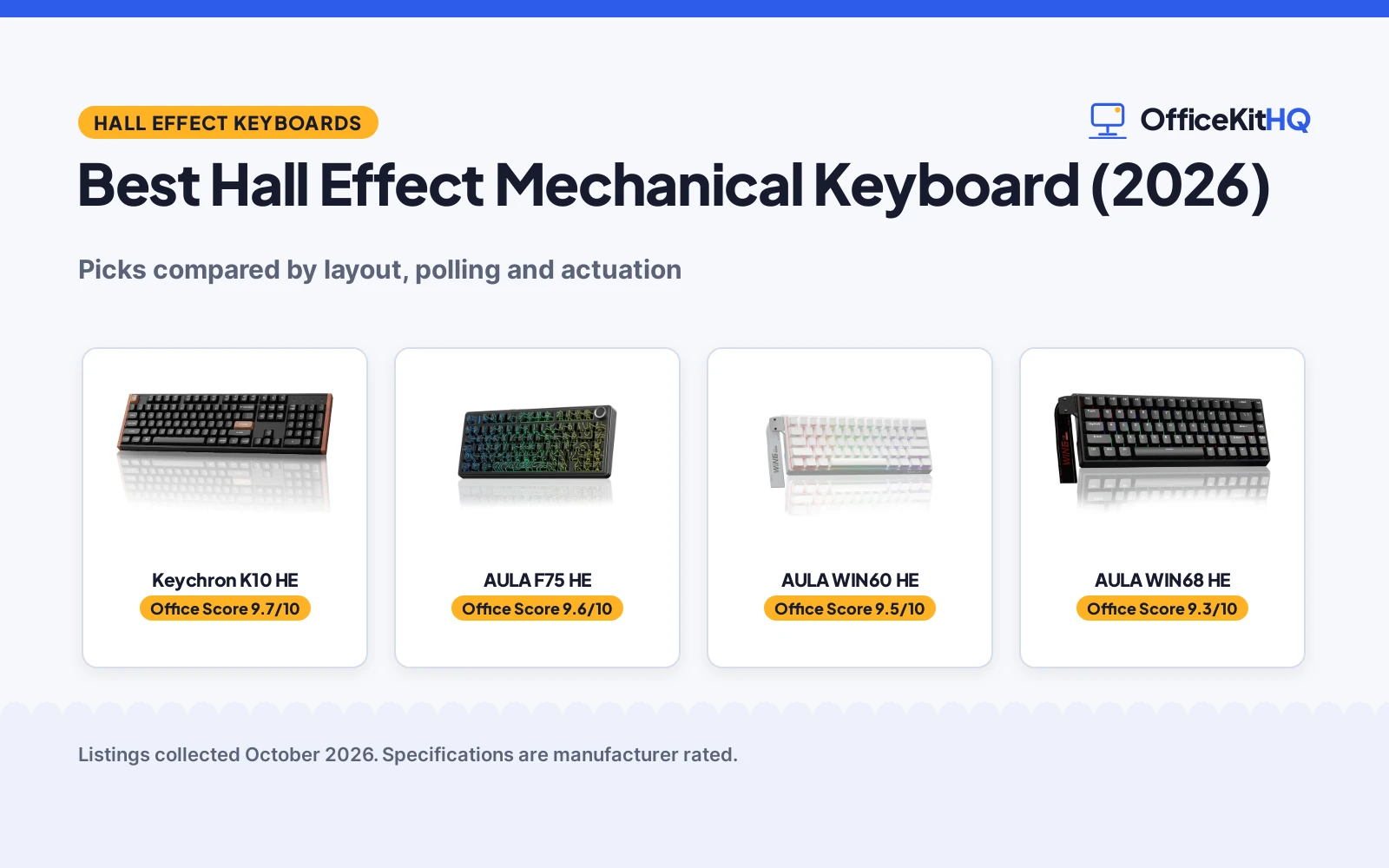
The best hall effect mechanical keyboard is the board that fits the desk, the hands and the way the day runs, from a morning call to an evening session at the same keyboard. A keyboard that crowds the mouse or drops its connection is a keyboard that gets swapped out. We compared Hall Effect keyboards by layout, polling rate, actuation range, connectivity, keycaps and warranty term, using only what each listing publishes.
OfficeKitHQ earns a commission when you buy through links on this page, at no extra cost to you. As an Amazon Associate I earn from qualifying purchases. Affiliate disclosure.
Quick picks
 Best Overall AULA F75 HE: Tri-mode, 4000mAh battery, 80 keys, knob, 8000Hz wired polling Check price on Amazon
 Best 60% Wired AULA WIN60 HE: 8000Hz polling, 0.02mm rapid trigger step, side-printed PBT keycaps Check price on Amazon
 Best Full-Size Keychron K10 HE: Full-size layout, tri-mode, QMK custom RGB, aluminum wood frame Check price on Amazon
 Best Actuation Range AULA WIN68 HE: 0.02mm to 3.44mm actuation, 0.3ms latency stated Check price on Amazon
Our desk picks
| # | Product | Office Score | Buy |
|---|---|---|---|
| 1 | Keychron K10 HE | 9.7/10 | Buy on Amazon |
| 2 | AULA F75 HE | 9.6/10 | Buy on Amazon |
| 3 | AULA WIN60 HE | 9.5/10 | Buy on Amazon |
| 4 | AULA WIN68 HE | 9.3/10 | Buy on Amazon |

Keychron K10 HE
A full-size Hall effect wireless keyboard with magnetic switches, adjustable actuation and tri-mode connection.
Pros
- Hall effect magnetic switches with adjustable actuation
- Rapid trigger for fast response
- Tri-mode: Bluetooth 5.2, 2.4GHz and Type-C
- Full-size 104-key layout
Cons
- Heaviest wireless pick at 1000 g
- Hall effect is overkill for pure typing
- Rosewood accents may not suit every desk
- Web configurator needs cookies cleared first
Detailed Review
Keychron lists the K10 HE as a full-size 100% layout wireless keyboard with Hall effect magnetic switches, adjustable actuation points and rapid trigger, with rosewood accents. The listing describes tri-mode connection pairing up to three devices over Bluetooth 5.2 plus 2.4GHz and Type-C wired modes, QMK custom support and a 1000 g weight.
Who it's for: developers who want the most advanced switch tech and full size. Who should skip it: minimalists who want a smaller, lighter board.
Its Office Score of 9.7/10 comes from performance 33/35, build 21/25, value 19/25, safety not scored (non-powered gear) and warranty 3/5: 76 of 90 points, placed on our 9.2 to 9.8 scale.
Key Specifications
| Keys | 104 |
|---|---|
| Switches | Hall effect magnetic |
| Weight | 1000 g |
| Warranty | 1 Year |
Figures as published on the retailer listing, collected 17 October 2026. Performance figures are manufacturer rated.
Safety and Warranty
What this listing states. This product does not plug in or run on a battery, so safety is not part of its score. 1 Year. It does not say everything a buyer needs, such as who pays return shipping, so warranty scores 3 of 5. See How We Pick.
Fit the desk first. Check the stated size against your desk depth and keyboard tray, and charge or pair as the manual describes. No keyboard, mouse or wrist rest prevents or treats injury.
This is general buying information, not professional advice. Follow each product manual and local rules, and see our Safety Disclaimer.
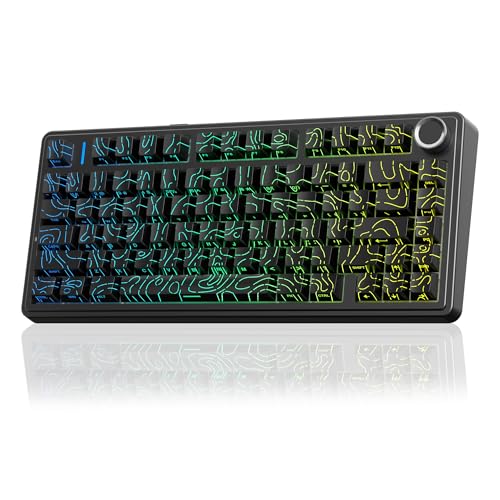
AULA F75 HE
A tri-mode 75% Hall Effect keyboard with a 4000mAh battery, an 80-key layout with a control knob, and 8000Hz polling in wired mode.
Pros
- Tri-mode connection: BT 5.0, 2.4GHz wireless and USB-C wired
- 4000mAh battery for wireless use, per the listing
- 8000Hz polling in wired mode and 1000Hz over 2.4GHz
- 80-key 75% layout with a multifunction control knob and hot-swap switches
Cons
- Warranty term is 6 months, with no longer term stated
- Largest footprint here at 14.7 by 7.2 in
- Driver functions work in USB-C wired and 2.4GHz wireless modes only
Detailed Review
AULA lists the F75 HE as a 75% Hall Effect keyboard with 80 keys, a multifunction control knob, hot-swap magnetic switches and tri-mode connection over BT 5.0, 2.4GHz wireless and USB-C wired, with a 4000mAh battery. The listing states 8000Hz polling in wired mode, 1000Hz over 2.4GHz, a 160,000Hz single-key scan rate and a 10,000Hz full-key scan rate, plus 0.01mm rapid trigger adjustment, SOCD, DKS and Mod-Tap through a web-based driver. The spec table gives 14.7 by 7.2 by 2.95 in dimensions and a 6-month warranty term.
Who it's for: someone who wants a wireless Hall Effect board with a knob, a 75% layout and a web-based driver for remapping and macros. Who should skip it: anyone who wants a smaller 60% board or a longer stated warranty term.
Its Office Score of 9.6/10 comes from performance 32/35, build 22/25, value 21/25, safety 0/10 and warranty 2/5: 77 of 100 points, placed on our 9.2 to 9.8 scale.
Key Specifications
| Layout | 75%, 80 keys |
|---|---|
| Polling rate | 8000Hz wired, 1000Hz wireless |
| Battery | 4000mAh |
| Dimensions | 14.7 x 7.2 x 2.95 in |
Figures as published on the retailer listing, collected 6 November 2026. Performance figures are manufacturer rated.
Safety and Warranty
What this listing states. No FCC or other safety listing is stated, so safety scores zero. 6 Month warranty stated in the spec table. It does not say everything a buyer needs, such as who pays return shipping, so warranty scores 2 of 5. See How We Pick.
Fit the desk first. Check the stated size against your desk depth and keyboard tray, and charge or pair as the manual describes. No keyboard, mouse or wrist rest prevents or treats injury.
This is general buying information, not professional advice. Follow each product manual and local rules, and see our Safety Disclaimer.

AULA WIN60 HE
A wired 60% Hall Effect keyboard with 8000Hz polling, a 0.02mm rapid trigger step and side-printed PBT keycaps.
Pros
- 8000Hz polling rate for wired play, per the listing
- 0.02mm rapid trigger step for fast key reset
- Side-printed PBT keycaps with 16.8 million RGB colors
- Web-based driver for remapping, macros and RGB, with no software download
Cons
- Wired only, with no wireless mode stated
- Warranty term is 6 months, with no longer term stated
- No control knob or media key stated
- Driver needs an internet connection, per the listing
Detailed Review
AULA lists the WIN60 HE as a wired 60% Hall Effect keyboard with self-developed magnetic switches, hot-swap support, adjustable actuation and an RT mode with a 0.02mm step. The listing states 8000Hz polling, side-printed PBT keycaps with 16.8 million RGB colors and a web-based driver for remapping, macros and RGB lighting. The spec table gives 11.0 by 5.0 by 1.1 in dimensions and a 6 Months warranty term.
Who it's for: someone who wants a compact wired Hall Effect board with a low rapid trigger step and a web driver. Who should skip it: anyone who needs wireless connection or a 75% layout with a knob.
Its Office Score of 9.5/10 comes from performance 30/35, build 21/25, value 21/25, safety 0/10 and warranty 2/5: 74 of 100 points, placed on our 9.2 to 9.8 scale.
Key Specifications
| Layout | 60% |
|---|---|
| Polling rate | 8000Hz |
| Rapid trigger step | 0.02mm |
| Dimensions | 11.0 x 5.0 x 1.1 in |
Figures as published on the retailer listing, collected 6 November 2026. Performance figures are manufacturer rated.
Safety and Warranty
What this listing states. This product does not plug in or run on a battery, so safety is not part of its score. 6 Months warranty stated in the spec table. It does not say everything a buyer needs, such as who pays return shipping, so warranty scores 2 of 5. See How We Pick.
Fit the desk first. Check the stated size against your desk depth and keyboard tray, and charge or pair as the manual describes. No keyboard, mouse or wrist rest prevents or treats injury.
This is general buying information, not professional advice. Follow each product manual and local rules, and see our Safety Disclaimer.

AULA WIN68 HE
A 60 percent wired Hall Effect keyboard with adjustable actuation and 8000Hz polling.
Pros
- Hall Effect magnetic switches
- Adjustable actuation 0.02-3.44mm
- 8000Hz polling with 0.3ms latency
- Hot-swappable with 16.8M RGB
Cons
- Wired only with no wireless option
- Web driver is Windows only, no Mac
- Only a 6 Months stated warranty
Detailed Review
AULA lists the WIN68 HE as a 60 percent wired keyboard with Hall Effect magnetic switches, adjustable actuation from 0.02mm to 3.44mm and 8000Hz polling. The listing states 68 keys, a detachable USB-C cable, a web driver for customization on Windows only, 16.8 million RGB colors and a stated 6 Months warranty. It measures 14 by 6 by 1.7 inches and weighs 686 g.
Who it's for: typists who want adjustable actuation in a compact wired board. Who should skip it: anyone who needs wireless or Mac driver support.
Its Office Score of 9.3/10 comes from performance 28/35, build 18/25, value 16/25, safety 0/10 and warranty 2/5: 64 of 100 points, placed on our 9.2 to 9.8 scale.
Key Specifications
| Layout | 60%, 68 keys |
|---|---|
| Switch | Hall Effect magnetic |
| Polling | 8000Hz |
| Warranty | 6 Months |
Figures as published on the retailer listing, collected 17 October 2026. Performance figures are manufacturer rated.
Safety and Warranty
What this listing states. This product does not plug in or run on a battery, so safety is not part of its score. 6 Months. It does not say everything a buyer needs, such as who pays return shipping, so warranty scores 2 of 5. See How We Pick.
Fit the desk first. Check the stated size against your desk depth and keyboard tray, and charge or pair as the manual describes. No keyboard, mouse or wrist rest prevents or treats injury.
This is general buying information, not professional advice. Follow each product manual and local rules, and see our Safety Disclaimer.
As an Amazon Associate I earn from qualifying purchases.
More picks to compare
 AULA F75 HE WhiteSame tri-mode 75% board in a white, grey and black colorway.Check on Amazon
Specs compared
| Keyboard | Office Score | Layout | Polling rate | Actuation | Connectivity | Warranty | Amazon |
|---|---|---|---|---|---|---|---|
| AULA F75 HE | 9.6/10 | 75%, 80 keys | 8000Hz wired, 1000Hz wireless | 0.01mm RT | BT 5.0, 2.4GHz, USB-C | 6 months | View on Amazon |
| AULA WIN60 HE | 9.5/10 | 60% | 8000Hz | 0.02mm RT step | Wired | 6 months | View on Amazon |
| Keychron K10 HE | 9.7/10 | Full-size | Not stated | 0.2mm to 3.8mm | BT 5.2, 2.4GHz, USB-C | Not stated | View on Amazon |
| AULA WIN68 HE | 9.3/10 | 60% | 8000Hz | 0.02mm to 3.44mm | Wired | Not stated | View on Amazon |
We quote these figures from each listing as the brand rates them; captured 6 November 2026. The AULA WIN60 HE and AULA F75 HE state a 6-month warranty term; the Keychron K10 HE and AULA WIN68 HE state no warranty term, and none of the listings state a certification.
How to choose the best hall effect mechanical keyboard
Start with layout and desk space
Layout decides how much desk the board takes. The AULA WIN60 HE and AULA WIN68 HE use a 60% layout, the AULA F75 HE uses a 75% layout with 80 keys, and the Keychron K10 HE is a full-size board. The WIN60 HE measures 11.0 by 5.0 by 1.1 in, while the F75 HE measures 14.7 by 7.2 by 2.95 in, so the F75 HE needs the wider desk. The WIN68 HE and K10 HE state no dimensions, so measure the desk before counting on a fit. A keyboard that leaves room for the mouse keeps the whole setup usable.
Match actuation and polling to how you type
Hall Effect switches let actuation move, and the range on offer varies. The F75 HE lists 0.01mm rapid trigger adjustment, the WIN60 HE lists a 0.02mm rapid trigger step, the WIN68 HE lists actuation from 0.02mm to 3.44mm in 0.1mm steps, and the K10 HE lists actuation from 0.2mm to 3.8mm with 0.1mm sensitivity. Polling is stated at 8000Hz for the WIN60 HE, the WIN68 HE and the F75 HE in wired mode, with the F75 HE at 1000Hz over 2.4GHz; the K10 HE states no polling rate.
| Keyboard | Actuation | Polling rate | Connection |
|---|---|---|---|
| AULA F75 HE | 0.01mm RT | 8000Hz wired | BT 5.0, 2.4GHz, USB-C |
| AULA WIN60 HE | 0.02mm RT step | 8000Hz | Wired |
| Keychron K10 HE | 0.2mm to 3.8mm | Not stated | BT 5.2, 2.4GHz, USB-C |
| AULA WIN68 HE | 0.02mm to 3.44mm | 8000Hz | Wired |
Figures as stated in each listing. A wider actuation range suits a board shared between typing and play, while a low rapid trigger step suits fast repeated presses.
Wired, wireless or both
The WIN60 HE and WIN68 HE are wired boards, while the F75 HE and K10 HE offer tri-mode connection over Bluetooth, 2.4GHz wireless and USB-C wired. The F75 HE lists BT 5.0 and a 4000mAh battery; the K10 HE lists Bluetooth 5.2 and pairs with three devices. A wireless board still needs a charge plan: the F75 HE charges over USB-C, so keep a port free near the desk. See our gaming mouse and keyboard guide for a matched set.
Read the warranty line, not the headline
Only the AULA WIN60 HE and AULA F75 HE state a warranty term, each at 6 months. The K10 HE and WIN68 HE state no warranty term at all. A short written term still beats a vague promise, so check the spec table line before buying. For a closer look at metal-frame boards, see our aluminum mechanical keyboard guide.
Setup Notes
- Measure the desk against the stated footprint: the WIN60 HE at 11.0 by 5.0 in and the F75 HE at 14.7 by 7.2 in; the WIN68 HE and K10 HE state no dimensions.
- Keep a USB-C port free near the desk: the wired boards connect over USB-C, and the F75 HE charges over USB-C.
- Check the driver before buying: the AULA boards use a web-based driver, and the WIN68 HE driver works on Windows only.
- Leave room for the knob on the F75 HE, a 75% board with 80 keys.
- Hot-swap boards let switches be replaced without soldering, per the Keychron listing.
FAQ
Do I want a mechanical keyboard?
A mechanical keyboard suits a desk where the board stays put and the keys see daily use. Hall Effect boards add adjustable actuation and hot-swap switches, so a single board can serve both typing and play. If the desk is shared or the board travels, a 60% layout such as the WIN60 HE takes less room.
How do I use a mechanical keyboard on an iPad?
Connect over Bluetooth: the F75 HE lists BT 5.0 and support for tablets, and the K10 HE lists Bluetooth 5.2 and dedicated media keys for macOS and Windows. Pair the board, then check that the keys map the way the app expects.
How do I choose a good mechanical keyboard?
Start with layout: 60% for a small desk, 75% with a knob such as the F75 HE for a middle ground, full-size such as the K10 HE for the widest layout. Then check actuation range, polling rate and connection, and read the warranty line.
What is a wireless mechanical keyboard?
A wireless mechanical keyboard connects without a cable, over Bluetooth or 2.4GHz wireless. The F75 HE and K10 HE both offer tri-mode connection: Bluetooth, 2.4GHz wireless and USB-C wired, with the F75 HE adding a 4000mAh battery.
What does a mechanical keyboard sound like?
None of the listings here state a sound level or describe the switch sound, so the listings give no basis for comparing sound. Keycap material is stated on the WIN60 HE, which lists side-printed PBT keycaps, and on the K10 HE, which lists double-shot PBT keycaps.
Score breakdown
The Office Score weighs performance, build, value, safety and warranty. Performance covers polling rate, actuation range, layout and connection options; build covers frame, keycaps and hot-swap support; value weighs the stated specs as a set. For a keyboard, safety means a stated certification or a safety-relevant feature on the listing, and no listing here states either, so safety adds nothing to any score. The AULA WIN60 HE and AULA F75 HE state a 6-month warranty term; the Keychron K10 HE and AULA WIN68 HE state no warranty term. How we pick explains the weights.
| Product | Office Score | Perf. /35 | Build /25 | Value /25 | Safety /10 | Warranty /5 |
|---|---|---|---|---|---|---|
| AULA F75 HE | 9.6 | 32 | 22 | 21 | 0 | 2 |
| AULA WIN60 HE | 9.5 | 30 | 21 | 21 | 0 | 2 |
Score placement follows the weighted total: the lowest totals read 9.2, the highest 9.8, and everything between keeps its order.
More for your workspace
See every keyboard guide and all monitor mounts, keyboards and mice guides. Also see our best keyboard for engineers. Also see our best keyboard for esports players. Also see our best ergonomic keyboard tray under desk. Also see our best desk mat for mechanical keyboard.
More picks: mice and mouse pads, monitor arms and stands, webcams and ring lights.