
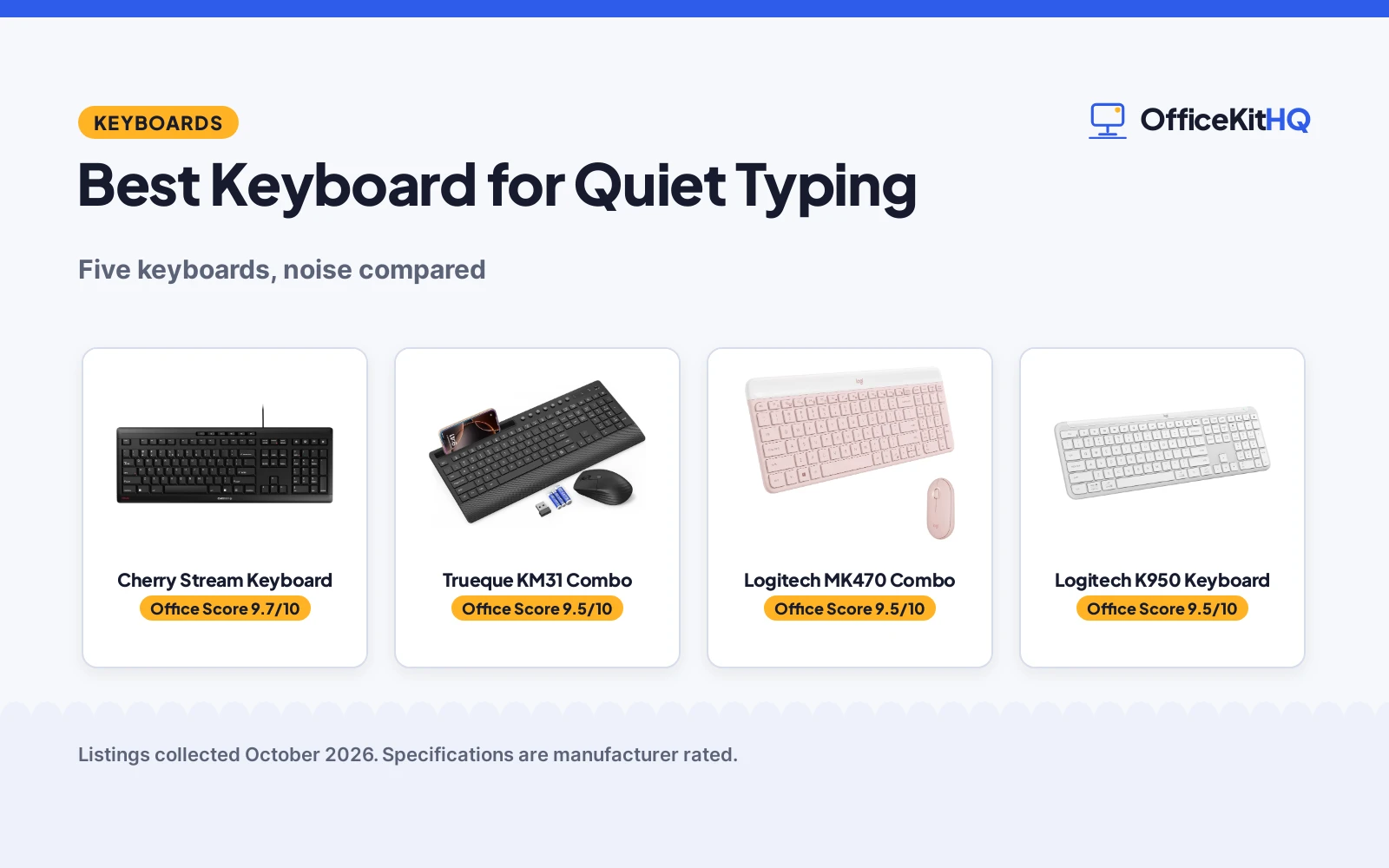
The best keyboard for quiet typing is the one you can hammer during a 9 a.m. video call without the mic picking up every keystroke, because in a spare-room office the keyboard is always closer to the microphone than you think. A clicky board, a hollow plastic shell or a mouse that snaps on every click will announce you to the whole call. We compared five keyboards by switch type, stated quiet features, connectivity, battery or power, included extras and warranty terms, using only what each listing publishes.
OfficeKitHQ earns a commission when you buy through links on this page, at no extra cost to you. As an Amazon Associate I earn from qualifying purchases. Affiliate disclosure.
Quick picks
 Best Overall Cherry Stream Keyboard: Whisper-quiet SX scissor switches, GS mark stated, 3-year warranty Check price on Amazon
 Best Combo with Palm Rest Trueque KM31 Combo: Quiet membrane combo, 1.57 in palm rest, 24-month warranty Check price on Amazon
 Best Slim Combo Logitech MK470 Combo: Low-profile scissor keys plus quiet mouse, 1-year warranty Check price on Amazon
 Best Multi-Device Logitech K950 Keyboard: Pairs 3 devices, quiet typing, Bluetooth or Logi Bolt Check price on Amazon
 Best Backlit COLIKES PC436A Keyboard: 15 RGB effects, 2500mAh rechargeable, leather wrist rest Check price on Amazon
The picks
| # | Product | Office Score | Buy |
|---|---|---|---|
| 1 | Cherry Stream Keyboard | 9.7/10 | Buy on Amazon |
| 2 | Trueque KM31 Combo | 9.5/10 | Buy on Amazon |
| 3 | Logitech MK470 Combo | 9.5/10 | Buy on Amazon |
| 4 | Logitech K950 Keyboard | 9.5/10 | Buy on Amazon |
| 5 | COLIKES PC436A Keyboard | 9.4/10 | Buy on Amazon |

Cherry Stream Keyboard
A wired slim keyboard with CHERRY SX scissor switches, whisper-quiet keys and a stated 3-year warranty.
Pros
- CHERRY SX scissor switches with whisper-quiet, silent-stroke keys and a precise pressure point.
- The listing states a GS mark, the only safety mark of the five picks.
- 3 Years warranty, the longest term here.
- Integrated metal plate with 8 rubber feet for a stable, non-slip desk feel.
Cons
- The bullets list 10 additional keys while the spec table lists 4 practical additional keys.
- The product weight is 1.17 lbs in one row and 2 pounds in another.
- Wired USB-A only: no wireless option.
- The spec table lists Windows only, with no stated Mac support.
Detailed Review
The Cherry Stream listing states a wired slim keyboard with CHERRY SX scissor switches, whisper-quiet silent-stroke keys, a numeric keypad, 115 keys, a GS mark, an integrated metal plate and a 3-year warranty. The bullets list 10 additional keys while the spec table lists 4, and the weight appears as 1.17 lbs in one row and 2 pounds in another; we trust the title and bullets where they disagree.
Who it's for: someone who wants a wired, no-battery quiet keyboard with a stated safety mark and the longest warranty here. Who should skip it: anyone who needs wireless or Mac support, since the listing states neither.
Its Office Score of 9.7/10 comes from performance 30/35, build 20/25, value 21/25, safety 7/10 and warranty 4/5: 82 of 100 points, placed on our 9.2 to 9.8 scale.
Key Specifications
| Keys | 115 |
|---|---|
| Switches | CHERRY SX scissor |
| Connection | USB-A wired |
| Warranty | 3 Years |
Figures as published on the retailer listing, collected 18 October 2026. Performance figures are manufacturer rated.
Safety and Warranty
What this listing states. GS mark as stated on the listing, so safety scores 7 of 10. 3 Years. It does not say everything a buyer needs, such as who pays return shipping, so warranty scores 4 of 5. See How We Pick.
Fit the desk first. Check the stated size against your desk depth and keyboard tray, and charge or pair as the manual describes. No keyboard, mouse or wrist rest prevents or treats injury.
This is general buying information, not professional advice. Follow each product manual and local rules, and see our Safety Disclaimer.
Trueque KM31 Combo
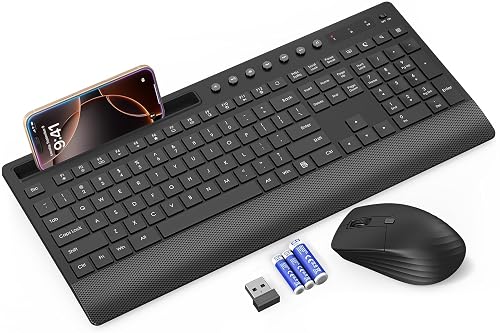
A full-size wireless keyboard and mouse combo with quiet membrane keys, a palm rest and a 24-month warranty.
Pros
- Low-profile membrane keys with over 97% noise reduction claimed by the maker.
- A 1.57-inch palm rest, 7-degree tilt legs and spill-resistant design.
- Phone and tablet holder with 7.8 inches of space.
- Trueque offers a 24-month warranty for the wireless keyboard and mouse.
Cons
- No key count is stated.
- The 90-day keyboard and 30-day mouse battery figures are the maker's claims and vary with use.
- Compatibility is listed as Windows and ChromeOS only.
- No certification is stated.
Detailed Review
The Trueque KM31 listing states a full-size wireless keyboard and mouse combo with quiet membrane keys, over 97% noise reduction, a 1.57-inch palm rest, 7-degree tilt legs, a phone holder, 7 multimedia keys and a 24-month warranty. The battery figures, up to 90 days for the keyboard and 30 days for the mouse, are the maker's claims. No contradictions stand out between the title, bullets and spec table.
Who it's for: someone who wants a full-size quiet combo with a palm rest and phone holder for a Windows or ChromeOS desk. Who should skip it: anyone on macOS, since the listing does not state Mac support.
Its Office Score of 9.5/10 comes from performance 28/35, build 20/25, value 21/25, safety 0/10 and warranty 3/5: 72 of 100 points, placed on our 9.2 to 9.8 scale.
Key Specifications
| Battery | Up to 90 days keyboard, 30 days mouse |
|---|---|
| Connection | 2.4 GHz USB |
| Warranty | 24-month warranty |
| Palm rest | 1.57-inch palm rest |
Figures as published on the retailer listing, collected 18 October 2026. Performance figures are manufacturer rated.
Safety and Warranty
What this listing states. No FCC or other safety listing is stated, so safety scores zero. Trueque offers a 24-month warranty for wireless keyboard and mouse. It does not say everything a buyer needs, such as who pays return shipping, so warranty scores 3 of 5. See How We Pick.
Fit the desk first. Check the stated size against your desk depth and keyboard tray, and charge or pair as the manual describes. No keyboard, mouse or wrist rest prevents or treats injury.
This is general buying information, not professional advice. Follow each product manual and local rules, and see our Safety Disclaimer.

Logitech MK470 Combo
A slim wireless keyboard and mouse combo with low-profile scissor keys and a whisper-quiet keyboard.
Pros
- Low-profile scissor keys with a whisper-quiet keyboard and noise-reduced mouse.
- Compact layout with a number pad for small desk spaces.
- Up to 36 months of keyboard battery and 18 months of mouse battery as stated.
- 12 customizable FN keys with Logi Options software.
Cons
- The spec table lists 3 AAA batteries while the box contents list 1 AA and 2 AAA batteries.
- No certification is stated.
- 1 Year Limited Hardware Warranty, shorter than the Cherry's 3 years.
- Rose colorway in this listing only.
Detailed Review
The Logitech MK470 listing states a slim wireless combo with low-profile scissor keys, a number pad, a whisper-quiet keyboard, a noise-reduced ambidextrous mouse, a 2.4 GHz USB nano receiver with 10 m of range, up to 36 months of keyboard battery and a 1-year limited hardware warranty. The spec table lists 3 AAA batteries while the box contents list 1 AA and 2 AAA batteries; we trust the title and bullets where they disagree.
Who it's for: someone who wants a slim, quiet keyboard plus a matching mouse for a small desk. Who should skip it: anyone who needs a longer warranty or a stated certification, since the listing gives the shortest term here and none.
Its Office Score of 9.5/10 comes from performance 29/35, build 20/25, value 21/25, safety 0/10 and warranty 2/5: 72 of 100 points, placed on our 9.2 to 9.8 scale.
Key Specifications
| Keys | 104 |
|---|---|
| Connection | 2.4 GHz USB receiver |
| Battery | 36 months keyboard, 18 months mouse |
| Warranty | 1 Year Limited Hardware Warranty |
Figures as published on the retailer listing, collected 18 October 2026. Performance figures are manufacturer rated.
Safety and Warranty
What this listing states. No FCC or other safety listing is stated, so safety scores zero. 1 Year Limited Hardware Warranty. It does not say everything a buyer needs, such as who pays return shipping, so warranty scores 2 of 5. See How We Pick.
Fit the desk first. Check the stated size against your desk depth and keyboard tray, and charge or pair as the manual describes. No keyboard, mouse or wrist rest prevents or treats injury.
This is general buying information, not professional advice. Follow each product manual and local rules, and see our Safety Disclaimer.

Logitech K950 Keyboard
A full-size wireless keyboard with quiet typing that pairs with up to 3 devices across Windows, Mac and mobile.
Pros
- Pairs up to 3 devices with one tap across Windows, macOS, Chrome OS, Linux, iPadOS, iOS and Android.
- Quiet typing with laptop-style keys in a full-size layout with number pad.
- Bluetooth or Logi Bolt connectivity.
- Customizable keys with the Logi Options+ app.
Cons
- Keyboard only: no mouse is included.
- No certification is stated.
- 1 Year Limited Hardware Warranty, shorter than the Cherry's 3 years.
- No battery-life figure is stated beyond 2 AAA batteries included.
Detailed Review
The Logitech Signature Slim K950 listing states a full-size wireless keyboard with quiet typing, laptop-style keys, a number pad, pairing for up to 3 devices, Bluetooth or Logi Bolt, multi-OS support and a 1-year limited hardware warranty. No contradictions stand out between the title, bullets and spec table; the color appears as White in the title and Off White in the spec table, a minor naming difference.
Who it's for: someone who types across a laptop, tablet and phone and wants one quiet keyboard for all three. Who should skip it: anyone who wants a combo with a mouse or a longer warranty.
Its Office Score of 9.5/10 comes from performance 28/35, build 20/25, value 21/25, safety 0/10 and warranty 2/5: 71 of 100 points, placed on our 9.2 to 9.8 scale.
Key Specifications
| Keys | 102 |
|---|---|
| Connection | Bluetooth or Logi Bolt |
| Devices | Pairs up to 3 |
| Warranty | 1 Year Limited Hardware Warranty |
Figures as published on the retailer listing, collected 18 October 2026. Performance figures are manufacturer rated.
Safety and Warranty
What this listing states. This product does not plug in or run on a battery, so safety is not part of its score. 1 Year Limited Hardware Warranty. It does not say everything a buyer needs, such as who pays return shipping, so warranty scores 2 of 5. See How We Pick.
Fit the desk first. Check the stated size against your desk depth and keyboard tray, and charge or pair as the manual describes. No keyboard, mouse or wrist rest prevents or treats injury.
This is general buying information, not professional advice. Follow each product manual and local rules, and see our Safety Disclaimer.

COLIKES PC436A Keyboard
A backlit wireless keyboard with silent membrane keys, 15 RGB lighting effects and a rechargeable battery.
Pros
- Silent membrane keys in an ergonomic wave layout.
- 15 RGB lighting effects with 5 backlight modes and 3 brightness levels.
- 2500mAh rechargeable battery: 277 days with backlight off at 3 hours daily, 10 days with it on.
- Leather wrist rest included.
Cons
- RGB backlighting and gaming-style effects suit a different buyer than a quiet office typist.
- No key count is stated.
- No certification is stated.
- 12 months warranty, shorter than the Cherry's 3 years.
Detailed Review
The COLIKES PC436A listing states a wireless keyboard with silent membrane keys, 15 RGB lighting effects, a 2500mAh rechargeable battery charging over USB-C in about 5 hours, a leather wrist rest, spill resistance and a 12-month warranty. The battery figures, 277 days with the backlight off and 10 days with it on, are the maker's claims for 3 hours of daily use. No contradictions stand out between the title, bullets and spec table.
Who it's for: someone who wants backlighting and a rechargeable battery with quiet membrane keys. Who should skip it: anyone who wants a stated certification or a plain office look, since the listing gives neither.
Its Office Score of 9.4/10 comes from performance 28/35, build 19/25, value 20/25, safety 0/10 and warranty 2/5: 69 of 100 points, placed on our 9.2 to 9.8 scale.
Key Specifications
| Battery | 2500mAh rechargeable |
|---|---|
| Backlight | 15 RGB lighting effects |
| Connection | 2.4 GHz wireless |
| Warranty | 12 months |
Figures as published on the retailer listing, collected 18 October 2026. Performance figures are manufacturer rated.
Safety and Warranty
What this listing states. No FCC or other safety listing is stated, so safety scores zero. 12 months. It does not say everything a buyer needs, such as who pays return shipping, so warranty scores 2 of 5. See How We Pick.
Fit the desk first. Check the stated size against your desk depth and keyboard tray, and charge or pair as the manual describes. No keyboard, mouse or wrist rest prevents or treats injury.
This is general buying information, not professional advice. Follow each product manual and local rules, and see our Safety Disclaimer.
As an Amazon Associate I earn from qualifying purchases.
Compare the picks
| Keyboard | Office Score | Keys | Connection | Switches | Warranty | Amazon |
|---|---|---|---|---|---|---|
| Cherry Stream Keyboard | 9.7/10 | 115 | USB-A wired | SX scissor | 3 years | View on Amazon |
| Trueque KM31 Combo | 9.5/10 | Not stated | 2.4 GHz USB | Membrane | 24 months | View on Amazon |
| Logitech MK470 Combo | 9.5/10 | 104 | 2.4 GHz USB | Scissor | 1 year | View on Amazon |
| Logitech K950 Keyboard | 9.5/10 | 102 | Bluetooth, Logi Bolt | Membrane | 1 year | View on Amazon |
| COLIKES PC436A Keyboard | 9.4/10 | Not stated | 2.4 GHz wireless | Membrane | 12 months | View on Amazon |
Specifications are manufacturer rated as listed, collected 18 October 2026. All five state a warranty term; one states a safety mark.
How we scored them
The Office Score weighs performance (switch type, stated quiet features and connectivity), build (materials, key life and battery), value for the stated specs, safety and warranty. For a keyboard, safety means a stated certification or safety mark on the listing; only the Cherry states one, a GS mark. All five state a warranty term: Cherry at 3 years, Trueque at 24 months, and Logitech, Logitech and COLIKES at 1 year or 12 months. How we pick explains the weights.
| Product | Office Score | Perf. /35 | Build /25 | Value /25 | Safety /10 | Warranty /5 |
|---|---|---|---|---|---|---|
| Cherry Stream Keyboard | 9.7 | 30 | 20 | 21 | 7 | 4 |
| Trueque KM31 Combo | 9.5 | 28 | 20 | 21 | 0 | 3 |
| Logitech MK470 Combo | 9.5 | 29 | 20 | 21 | 0 | 2 |
| Logitech K950 Keyboard | 9.5 | 28 | 20 | 21 | 0 | 2 |
| COLIKES PC436A Keyboard | 9.4 | 28 | 19 | 20 | 0 | 2 |
Scores run from 9.2 to 9.8: each product’s point total is placed on that range, so more points always means a higher score.
How to choose the best keyboard for quiet typing
Start with the switch type
Every pick here is either scissor or membrane, and both are the quiet choice next to mechanical switches. The Logitech MK470 and Cherry Stream use low-profile scissor keys, while the Trueque, Logitech K950 and COLIKES use membrane keys. Scissor keys give a laptop-like, precise feel; membrane keys are softer and usually cheaper to make. The listing’s own words matter here: the MK470 is called whisper quiet, the Cherry whisper-quiet with silent stroke, and the Trueque claims over 97% noise reduction as the maker’s claim.
Wired or wireless, and how it connects
The Cherry is wired USB-A only, which suits a fixed desk with a dock. The other four are wireless: the two Logitech combos and the K950 use 2.4 GHz receivers or Bluetooth, the Trueque uses a 2.4 GHz receiver, and the COLIKES uses 2.4 GHz wireless. The K950 pairs up to three devices and works across Windows, macOS, Chrome OS, Linux, iPadOS, iOS and Android, so it suits someone who types on a tablet between laptop sessions. If the desk never moves, a wired board removes batteries from the equation entirely.
| Keyboard | Keys | Switches | Power |
|---|---|---|---|
| Cherry Stream Keyboard | 115 | CHERRY SX scissor | Wired USB-A |
| Trueque KM31 Combo | Not stated | Membrane | Up to 90 days keyboard |
| Logitech MK470 Combo | 104 | Scissor | 36 months keyboard |
| Logitech K950 Keyboard | 102 | Membrane | 2 AAA batteries |
| COLIKES PC436A Keyboard | Not stated | Membrane | 2500mAh rechargeable |
Figures as stated in each listing. Key counts are not stated for the Trueque or COLIKES. Battery figures are the maker’s claims and vary with use.
Combos, extras and the mouse question
Two picks are combos: the Logitech MK470 and the Trueque KM31 each include a mouse, and the MK470’s mouse is described as noise-reduced. The Trueque adds a 1.57-inch palm rest, a phone holder and spill resistance, while the COLIKES adds a leather wrist rest and 15 RGB lighting effects. Decide what you will actually use: a wrist rest helps long sessions, backlighting helps a dim room, and a phone holder suits a desk that doubles as a charging spot. For more office setups, see our best keyboard for office typing.
Read the warranty line, not the headline
All five state a term: Cherry at 3 years, Trueque at 24 months, and the two Logitechs and COLIKES at 1 year or 12 months. Keyboards fail at the switches, the cable or the receiver, so a longer term on the board itself matters more than a bundle warranty. Pair the board with a keyboard and mouse pad for work to protect the desk surface under either combo.
Setup Notes
- Measure the desk: the Cherry lists 18.23 x 6.42 x 0.71 in, full size with a number pad, which needs more depth than a compact board.
- Plan the receiver: the wireless picks include a USB receiver, so keep one free USB port on the computer or dock.
- Keep batteries or a cable handy: the MK470 runs up to 36 months on its keyboard batteries, the Trueque up to 90 days, and the COLIKES recharges over USB-C in about 5 hours.
- For a shared room, place the keyboard away from the microphone side of the desk and keep the mouse pad under the mouse to soften clicks.
- The Cherry is wired only: run its USB-A cable with the monitor cables so it does not snag when the chair rolls.
Frequently Asked Questions
Which of these keyboards is quietest?
The listings describe quiet differently: the Logitech MK470 and Cherry Stream are both called whisper quiet, the Cherry adds silent stroke, and the Trueque claims over 97% noise reduction as the maker’s claim. None of the listings states a decibel figure, so the descriptions are the only guide.
Which keyboards are combos with a mouse?
The Logitech MK470 and Trueque KM31 are keyboard and mouse combos. The Cherry Stream, Logitech K950 and COLIKES are keyboards only.
Which of these work with a Mac?
The Logitech K950 lists Windows, macOS, Chrome OS, Linux, iPadOS, iOS and Android. The COLIKES lists Windows, Mac, Chrome OS and Linux. The MK470 lists Windows and ChromeOS, the Trueque lists Windows and ChromeOS, and the Cherry spec table lists Windows only.
Which keyboard has the longest stated battery life?
The Logitech MK470 states up to 36 months for the keyboard and 18 months for the mouse. The COLIKES states 277 days with the backlight off at 3 hours of daily use, or 10 days with it on. The Trueque states up to 90 days for the keyboard and 30 days for the mouse.
Which listings state a warranty term?
The Cherry states 3 years. The Trueque states 24 months. The two Logitechs state 1 year limited hardware warranty, and the COLIKES states 12 months.
Do any of these state a safety certification?
The Cherry Stream listing states a GS mark. The other four listings state no certification or safety mark.
Related guides
See every keyboard guide and all monitor mounts, keyboards and mice guides. Also see our best keyboard for office typing. Also see our best keyboard and mouse pad for work.



