
The best keyboard for steam machine setups is the one that works from the couch: a mini keyboard with a touchpad, so no separate mouse is needed. We compared four mini keyboards by wireless modes, key count, backlight, battery setup, touchpad features and warranty terms, using only what each listing publishes. All four include a touchpad, so the separate mouse question is settled before you start.
OfficeKitHQ earns a commission when you buy through links on this page, at no extra cost to you. As an Amazon Associate I earn from qualifying purchases. Affiliate disclosure.
Quick picks
 Best Warranty REIIE H9+ Mini Keyboard: 1-year warranty, 73 keys, white backlight Check price on Amazon
 Best Dual-Mode Miritz Mini Keyboard: Bluetooth plus 2.4 GHz, RGB, 600mAh USB-C Check price on Amazon
 Best Battery Life Fosmon Mini Keyboard: 10-day working time, Bluetooth 5.2, backlit Check price on Amazon
 Best Compact iPazzPort KP-810-19S: 4.72-inch body, touchpad, media hotkeys Check price on Amazon
The picks
| # | Product | Office Score | Buy |
|---|---|---|---|
| 1 | REIIE H9+ Mini Keyboard | 9.4/10 | Buy on Amazon |
| 2 | Miritz Mini Keyboard | 9.4/10 | Buy on Amazon |
| 3 | Fosmon Mini Keyboard | 9.4/10 | Buy on Amazon |
| 4 | iPazzPort KP-810-19S | 9.3/10 | Buy on Amazon |
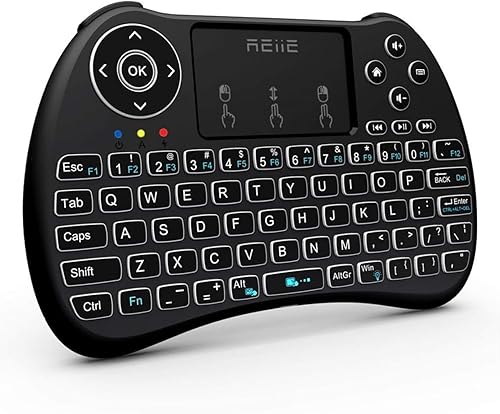
REIIE H9+ Mini Keyboard
A 73-key 2.4 GHz mini keyboard with touchpad, white backlight and a 1-year warranty.
Pros
- 1-year warranty, the only concrete term here
- 73 keys with documented touchpad gestures
- White backlight for dark rooms
- Plug-and-play 2.4 GHz with multi-finger touchpad
Cons
- 2.4 GHz only, no Bluetooth
- Needs a free USB port for the receiver
- Battery ships nearly empty; needs a 1-hour first charge
- No safety certification is stated
Detailed Review
The listing states 73 keys, 2.4 GHz wireless, a white backlight, a multi-finger touchpad and a 1-year warranty. It measures 7.17 by 4.13 by 0.91 inches. The listing warns the battery ships nearly empty and asks for a 1-hour recharge before use, and notes the keyboard is unsuitable for devices with no available USB port.
Who it's for: anyone with a free USB port who wants a documented touchpad and a stated warranty. Who should skip it: anyone who needs Bluetooth or a backlit color choice.
Its Office Score of 9.4/10 comes from performance 27/35, build 19/25, value 19/25, safety 0/10 and warranty 3/5: 68 of 100 points, placed on our 9.2 to 9.8 scale.
Key Specifications
| Keys | 73 |
|---|---|
| Wireless | 2.4 GHz (no Bluetooth) |
| Backlight | White, single color |
| Warranty | 1 year |
Figures as published on the retailer listing, collected 18 October 2026. Performance figures are manufacturer rated.
Safety and Warranty
What this listing states. This product does not plug in or run on a battery, so safety is not part of its score. Warranty Description: 1 year. It does not say everything a buyer needs, such as who pays return shipping, so warranty scores 3 of 5. See How We Pick.
Fit the desk first. Check the stated size against your desk depth and keyboard tray, and charge or pair as the manual describes. No keyboard, mouse or wrist rest prevents or treats injury.
This is general buying information, not professional advice. Follow each product manual and local rules, and see our Safety Disclaimer.

Miritz Mini Keyboard
A dual-mode Bluetooth and 2.4 GHz mini keyboard with 7-color RGB backlight and USB-C charging.
Pros
- Dual-mode Bluetooth and 2.4 GHz with 33-foot range
- 7-color RGB backlight with one-touch cycling
- 600mAh battery with USB-C charging and auto sleep/wake
- Touchpad sensitivity adjustable via Fn plus Spacebar
Cons
- No warranty term is stated
- 72 keys, the fewest stated count here
- No safety certification is stated
- 5.98 by 2.32 inches is cramped for large hands
Detailed Review
The listing states dual-mode Bluetooth and 2.4 GHz wireless with up to 33 feet of range, a 7-color RGB backlight, a 600mAh USB-C rechargeable battery and a touchpad with adjustable sensitivity. It has 72 keys, weighs 3.2 ounces and measures 5.98 by 2.32 inches. The listing mentions Steam Deck system recovery as a use case.
Who it's for: anyone who wants both Bluetooth and 2.4 GHz with RGB backlighting. Who should skip it: anyone who wants a stated warranty or a larger key layout.
Its Office Score of 9.4/10 comes from performance 30/35, build 20/25, value 21/25, safety 0/10 and warranty 0/5: 71 of 100 points, placed on our 9.2 to 9.8 scale.
Key Specifications
| Keys | 72 |
|---|---|
| Wireless | Bluetooth + 2.4 GHz, 33 feet |
| Backlight | 7-color RGB |
| Battery | 600mAh, USB-C rechargeable |
Figures as published on the retailer listing, collected 18 October 2026. Performance figures are manufacturer rated.
Safety and Warranty
What this listing states. No FCC or other safety listing is stated, so safety scores zero. No warranty term, so warranty scores zero. See How We Pick.
Fit the desk first. Check the stated size against your desk depth and keyboard tray, and charge or pair as the manual describes. No keyboard, mouse or wrist rest prevents or treats injury.
This is general buying information, not professional advice. Follow each product manual and local rules, and see our Safety Disclaimer.

Fosmon Mini Keyboard
A dual-mode Bluetooth 5.2 and 2.4 GHz mini keyboard with backlight and long stated battery life.
Pros
- Bluetooth 5.2 plus 2.4 GHz dongle
- Up to 10 days working time and 50 days standby per the listing
- Backlit keys for dark rooms
- 33 ft / 10 m working range
Cons
- Button count says 61 but key count says 104
- International version has no warranty per the listing
- No safety certification is stated
- 75 g weight with no stated dimensions conflict check needed
Detailed Review
The listing states Bluetooth 5.2 and 2.4 GHz wireless, a backlit QWERTY layout with touchpad, a 500mAh rechargeable battery and a 33 ft / 10 m range. It measures 6.38 by 2.72 by 0.49 inches and weighs 75 g. Contradiction: the spec table lists Button Quantity 61 but Number of Keys 104. The warranty description says International Version (No Warranty) and points to the US version.
Who it's for: anyone who wants dual wireless and the longest stated battery life. Who should skip it: anyone who wants a stated warranty or a firm key count.
Its Office Score of 9.4/10 comes from performance 29/35, build 19/25, value 20/25, safety 0/10 and warranty 0/5: 68 of 100 points, placed on our 9.2 to 9.8 scale.
Key Specifications
| Keys | 61 buttons / 104 keys (listing differs) |
|---|---|
| Wireless | Bluetooth 5.2 + 2.4 GHz, 33 ft |
| Backlight | Single color |
| Battery | 500mAh rechargeable, USB-C cable included |
Figures as published on the retailer listing, collected 18 October 2026. Performance figures are manufacturer rated.
Safety and Warranty
What this listing states. No FCC or other safety listing is stated, so safety scores zero. No warranty term, so warranty scores zero. See How We Pick.
Fit the desk first. Check the stated size against your desk depth and keyboard tray, and charge or pair as the manual describes. No keyboard, mouse or wrist rest prevents or treats injury.
This is general buying information, not professional advice. Follow each product manual and local rules, and see our Safety Disclaimer.

iPazzPort KP-810-19S
A compact 2.4 GHz mini keyboard with touchpad and media hotkeys, running on AAA batteries.
Pros
- 2.4 GHz plug-and-play with 30-foot range
- Touchpad plus dedicated return, mouse and scroll keys
- Media hotkeys for TV and HTPC use
- 4.72 by 1.97 inches, the most compact here
Cons
- Button count says 81 but key count says 92
- No backlight
- 2 AAA batteries not included
- No warranty term is stated
Detailed Review
The listing states 2.4 GHz RF wireless with up to 30 feet of range, a touchpad, media hotkeys and a 4.72 by 1.97 by 0.71 inch body weighing 1.6 ounces. It runs on 2 AAA batteries, not included, and has no backlight. Contradiction: the spec table lists Button Quantity 81 but Number of Keys 92.
Who it's for: anyone who wants the smallest 2.4 GHz keyboard with media keys. Who should skip it: anyone who wants backlighting, Bluetooth or a stated warranty.
Its Office Score of 9.3/10 comes from performance 27/35, build 18/25, value 19/25, safety 0/10 and warranty 0/5: 64 of 100 points, placed on our 9.2 to 9.8 scale.
Key Specifications
| Keys | 81 buttons / 92 keys (listing differs) |
|---|---|
| Wireless | 2.4 GHz RF, 30 feet |
| Power | 2 AAA batteries (not included) |
| Backlight | None |
Figures as published on the retailer listing, collected 18 October 2026. Performance figures are manufacturer rated.
Safety and Warranty
What this listing states. This product does not plug in or run on a battery, so safety is not part of its score. No warranty term, so warranty scores zero. See How We Pick.
Fit the desk first. Check the stated size against your desk depth and keyboard tray, and charge or pair as the manual describes. No keyboard, mouse or wrist rest prevents or treats injury.
This is general buying information, not professional advice. Follow each product manual and local rules, and see our Safety Disclaimer.
As an Amazon Associate I earn from qualifying purchases.
More picks to compare
 MEETION Foldable Wireless KeyboardCheck on Amazon
 Invensic DeckTopCheck on Amazon
 Rapoo Mini Wireless Keyboard with TouchpadCheck on Amazon
 BoxWave KeyboardCheck on Amazon
 IDEALROYAL M2 Mini Wireless KeyboardCheck on Amazon
Compare the picks
| Keyboard | Office Score | Keys | Wireless | Backlit | Warranty | Amazon |
|---|---|---|---|---|---|---|
| REIIE H9+ Mini Keyboard | 9.4/10 | 73 | 2.4GHz | White | 1 year | View on Amazon |
| Miritz Mini Keyboard | 9.4/10 | 72 | Bluetooth + 2.4GHz | 7-color RGB | Not stated | View on Amazon |
| Fosmon Mini Keyboard | 9.4/10 | 61 / 104 (differs) | Bluetooth 5.2 + 2.4GHz | Single color | Not stated | View on Amazon |
| iPazzPort KP-810-19S | 9.3/10 | 81 / 92 (differs) | 2.4GHz RF | None | Not stated | View on Amazon |
Specifications are manufacturer rated as listed, collected 18 October 2026. A 3-key macro keypad in the data is a different product type and is not listed here.
How we scored them
The Office Score weighs performance, build, value, safety and warranty. For mini keyboards, performance means wireless flexibility and touchpad quality, and build means battery setup and construction. No pick states a safety certification, and one of the four states a concrete warranty term. How we pick explains the weights.
| Product | Office Score | Perf. /35 | Build /25 | Value /25 | Safety /10 | Warranty /5 |
|---|---|---|---|---|---|---|
| REIIE H9+ Mini Keyboard | 9.4 | 27 | 19 | 19 | 0 | 3 |
| Miritz Mini Keyboard | 9.4 | 30 | 20 | 21 | 0 | 0 |
| Fosmon Mini Keyboard | 9.4 | 29 | 19 | 20 | 0 | 0 |
| iPazzPort KP-810-19S | 9.3 | 27 | 18 | 19 | 0 | 0 |
Scores run from 9.2 to 9.8: each product’s point total is placed on that range, so more points always means a higher score.
How to choose the best keyboard for steam machine
Check the wireless mode against your setup
Two picks offer dual-mode wireless: the Fosmon pairs over Bluetooth 5.2 or a 2.4 GHz dongle, and the Miritz pairs over Bluetooth or 2.4 GHz. The REIIE H9+ and iPazzPort are 2.4 GHz only, so each needs a free USB port for its receiver. The REIIE listing warns the device is not suitable if your device has no available USB port. Dual-mode picks can also hop between devices without re-pairing, per their listings. See all keyboards for more wireless options.
Compare backlight and keys
Three of the four are backlit: the Fosmon has a single-color backlight, the REIIE a white backlight, and the Miritz a 7-color RGB backlight. The iPazzPort has no backlight. Key counts are 73 on the REIIE, 72 on the Miritz, and disputed on the other two: the Fosmon lists 61 buttons but 104 keys, and the iPazzPort lists 81 buttons but 92 keys. We note both figures where they disagree. Backlight color matters in a dark room: white and RGB both beat fumbling for keys.
Look at battery and range
| Keyboard | Battery | Range | Size |
|---|---|---|---|
| REIIE H9+ Mini Keyboard | Rechargeable, 1-hour first charge | Not stated | 7.17 x 4.13 x 0.91 in |
| Miritz Mini Keyboard | 600mAh, USB-C rechargeable | 33 feet | 5.98 x 2.32 in |
| Fosmon Mini Keyboard | 500mAh, USB-C rechargeable | 33 ft / 10 m | 6.38 x 2.72 x 0.49 in |
| iPazzPort KP-810-19S | 2 AAA batteries, not included | 30 feet | 4.72 x 1.97 x 0.71 in |
The Fosmon claims up to 10 days of working time and 50 days of standby from its 500mAh battery, and the Miritz has a 600mAh battery with auto sleep and wake. The REIIE needs a 1-hour recharge before first use. The iPazzPort runs on 2 AAA batteries that are not included, so factor in a separate purchase.
Check the touchpad controls
Every pick includes a touchpad, but the controls differ. The REIIE maps a single-finger click to left mouse, a two-finger click to right mouse, and a two-finger drag to scrolling. The Miritz adjusts touchpad sensitivity between low, medium and high with Fn plus Spacebar. The Fosmon and iPazzPort describe standard touchpad navigation with media hotkeys. If the touchpad is your only mouse, favor the pick with the most documented gestures. A documented gesture set beats guessing: the REIIE and Miritz publish theirs, the others do not.
Setup Notes
- Confirm a free USB port for the 2.4 GHz receiver on the REIIE H9+ and iPazzPort; both are 2.4 GHz only.
- Recharge before first use: the REIIE listing asks for a 1-hour charge since the battery ships nearly empty.
- Range is stated at 33 feet for the Fosmon and Miritz and 30 feet for the iPazzPort; walls shorten it.
- Buy 2 AAA batteries for the iPazzPort; they are not in the package.
- Note the key-count discrepancies on the Fosmon (61 buttons vs 104 keys) and iPazzPort (81 buttons vs 92 keys) before comparing.
Frequently Asked Questions
Do these keyboards need a USB port?
The REIIE H9+ and iPazzPort connect by 2.4 GHz only, so each needs a free USB port for its receiver. The Fosmon and Miritz also offer Bluetooth, which needs no dongle at all.
Which keyboards are backlit?
The Fosmon has a single-color backlight, the REIIE a white backlight, and the Miritz a 7-color RGB backlight. The iPazzPort has no backlight.
Which keyboard has a stated warranty?
The REIIE H9+ lists a 1-year warranty. The Fosmon listing says the international version has no warranty and points to the US version instead. Keep the receipt: warranty claims need proof of purchase on most listings.
How are these keyboards powered?
The Fosmon and Miritz have rechargeable batteries charged over USB-C, 500mAh and 600mAh respectively. The REIIE is rechargeable with a 1-hour first charge. The iPazzPort uses 2 AAA batteries, not included.
Can the touchpad replace a mouse?
All four include a touchpad for cursor control. The REIIE documents single-finger, two-finger and drag gestures, and the Miritz offers three sensitivity levels, the most specified here.
Related guides
See every mice and mouse pads guide and all computer peripherals guides. Also see our best keyboard for working from home.
More picks: keyboard for working from home, mice and mouse pads, wireless mouse for daily office use.



