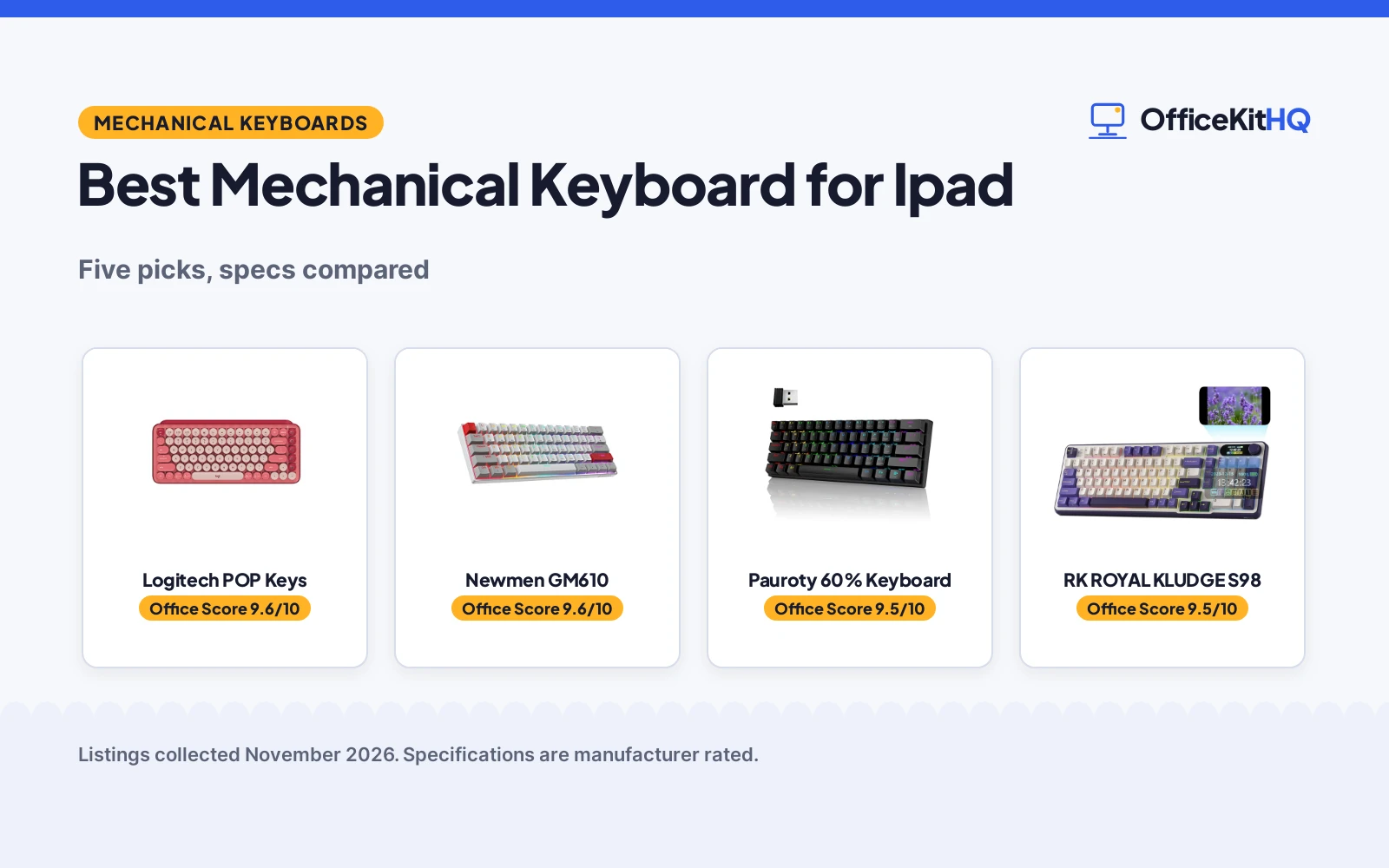
The morning video call starts with the laptop keyboard feeling cramped under tired fingers, and the best mechanical keyboard for ipad promises a roomier way to type at a home desk. This guide compares mechanical keyboards that pair with an iPad, from compact boards to a typewriter-style retro board, by connection, keys, backlight and battery. Every pick below connects over Bluetooth or a wireless receiver, and each board brings its own switch feel and layout to the desk.
OfficeKitHQ earns a commission when you buy through links on this page, at no extra cost to you. As an Amazon Associate I earn from qualifying purchases. Affiliate disclosure.
Quick picks
 Best Overall Logitech POP Keys: Bluetooth and Logi Bolt, 3 devices, iPadOS listed, keys rated to 50 million strokes Check price on Amazon
 Best Hot-Swappable Newmen GM610: Hot-swappable 3-pin sockets, 19 RGB effects, 3 devices, 18-month warranty Check price on Amazon
 Best 60 Percent Pauroty 60% Keyboard: Triple mode, blue switch, 16 RGB modes, 360-hour standby stated Check price on Amazon
 Best Retro Look Adventurers Retro Keyboard: Typewriter-style round keycaps, 83 keys, white LED backlight, Bluetooth 5.0 Check price on Amazon
 Smart Display and Knob RK ROYAL KLUDGE S98: Wireless keyboard with a smart display and knob stated in the title Check price on Amazon
Our desk picks
| # | Product | Office Score | Buy |
|---|---|---|---|
| 1 | Logitech POP Keys | 9.6/10 | Buy on Amazon |
| 2 | Newmen GM610 | 9.6/10 | Buy on Amazon |
| 3 | Pauroty 60% Keyboard | 9.5/10 | Buy on Amazon |
| 4 | RK ROYAL KLUDGE S98 | 9.5/10 | Buy on Amazon |
| 5 | Adventurers Retro 83-Key | 9.4/10 | Buy on Amazon |
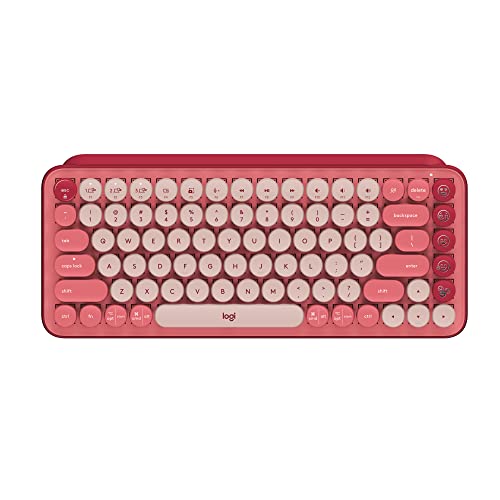
Logitech POP Keys
A compact wireless mechanical keyboard with 8 swappable emoji keys, Bluetooth and Logi Bolt connections, pairing with up to 3 devices including iPadOS.
Pros
- Bluetooth and Logi Bolt USB connect to iPadOS, iOS, Windows, macOS, Chrome OS and Android
- Pairs with up to 3 devices and switches between them with Easy-Switch keys
- Keys engineered to endure up to 50 million strokes, per the maker
- 8 swappable emoji keys and 1 emoji menu key, customizable via Logitech Software
Cons
- Emoji keys need Logitech Software on Windows and macOS only
- 12.65 in wide, wider than the Pauroty and Newmen boards
- No backlight is stated
- 1-year limited hardware warranty is shorter than the Newmen 18-month warranty
Detailed Review
Logitech lists the POP Keys as a compact wireless mechanical keyboard with typewriter-style keys, 8 swappable emoji keys and 1 emoji menu key. It connects over Bluetooth or a Logi Bolt USB receiver on Windows, macOS, Chrome OS, Android, iPadOS and iOS, pairs with up to 3 devices, and the maker rates the keys to 50 million strokes. The board measures 12.65 by 5.45 by 1.4 in, weighs 1.72 lb, and carries a 1 Year Limited Hardware Warranty.
Who it's for: someone who types on an iPad and wants emoji keys and three-device switching in a compact board. Who should skip it: someone who wants a backlit board or a number pad, since neither is stated here.
Its Office Score of 9.6/10 comes from performance 32/35, build 22/25, value 21/25, safety 0/10 and warranty 3/5: 78 of 100 points, placed on our 9.2 to 9.8 scale.
Key Specifications
| Connection | Bluetooth, Logi Bolt USB |
|---|---|
| Devices | Up to 3 |
| Battery life | 3-year battery life |
| Item weight | 1.72 lb |
These specs mirror the retailer listing as of 19 November 2026; performance figures are stated by the brand.
Safety and Warranty
What this listing states. No FCC or other safety listing is stated, so safety scores zero. 1 Year Limited Hardware Warranty. It does not say everything a buyer needs, such as who pays return shipping, so warranty scores 3 of 5. See How We Pick.
Fit the desk first. Check the stated size against your desk depth and keyboard tray, and charge or pair as the manual describes. No keyboard, mouse or wrist rest prevents or treats injury.
This is general buying information, not professional advice. Follow each product manual and local rules, and see our Safety Disclaimer.

Newmen GM610
A 60 percent wireless mechanical keyboard with a linear red switch, hot-swappable sockets and RGB backlight for office and gaming use.
Pros
- Hot-swappable sockets take 3-pin switches for easy swaps
- Connects up to 3 devices over USB-C, Bluetooth and 2.4G
- 19 RGB backlit effects with 4 brightness levels and 5 lighting speed levels
- Macro recording and assignment through the software
Cons
- No battery life figure is stated
- iPad is not named among the listed systems; Windows, Mac and Android are
- 61 keys, the same count as the Pauroty and fewer than the 83-key Adventurers
- 4.0 in deep, the shallowest stated here
Detailed Review
Newmen lists the GM610 as a 60 percent wireless mechanical keyboard with 61 keys, a linear red switch and RGB backlight. It connects over USB-C, Bluetooth 3.0 and 5.0 and 2.4G, pairs with up to 3 devices, and the double-shot keycaps and hot-swappable sockets take 3-pin switches. The board measures 11.0 by 4.0 by 1.0 in and carries an 18 months warranty.
Who it's for: someone who wants to swap switches and record macros on a compact board. Who should skip it: someone who needs a stated battery figure or an iPad named in the listing.
Its Office Score of 9.6/10 comes from performance 30/35, build 21/25, value 20/25, safety 0/10 and warranty 4/5: 75 of 100 points, placed on our 9.2 to 9.8 scale.
Key Specifications
| Keys | 61 |
|---|---|
| Connection | USB-C, Bluetooth, 2.4G |
| Dimensions | 11.0 x 4.0 x 1.0 in |
| Warranty | 18 months warranty |
These specs mirror the retailer listing as of 19 November 2026; performance figures are stated by the brand.
Safety and Warranty
What this listing states. No FCC or other safety listing is stated, so safety scores zero. 18 months warranty. It does not say everything a buyer needs, such as who pays return shipping, so warranty scores 4 of 5. See How We Pick.
Fit the desk first. Check the stated size against your desk depth and keyboard tray, and charge or pair as the manual describes. No keyboard, mouse or wrist rest prevents or treats injury.
This is general buying information, not professional advice. Follow each product manual and local rules, and see our Safety Disclaimer.
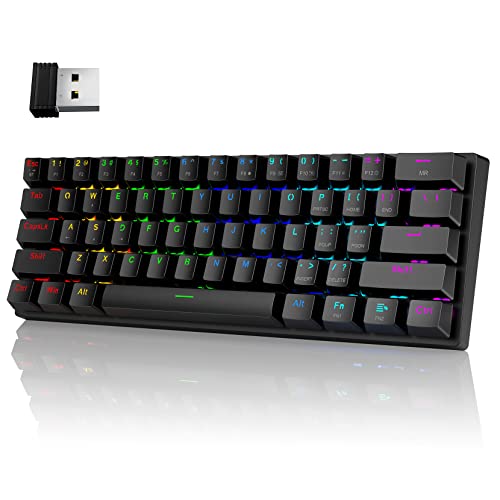
Pauroty 60% Keyboard
A 60 percent wireless mechanical keyboard with a clicky blue switch, RGB backlight and triple-mode connection for iPad, Mac and PC.
Pros
- Triple mode: 2.4G USB receiver, Bluetooth and USB-C wired
- 1600mAh battery with 360 hours of standby time stated
- 16 RGB backlight modes with 8 color choices and 6 brightness levels
- Compact 60 percent layout, stated to fit in most backpacks
Cons
- 12.2 in wide, wider than the Newmen at 11.0 in
- 1.65 in tall, the tallest stated here
- Sleep mode starts after 10 minutes of inactivity
- One-year refund or replacement is shorter than the Newmen 18-month warranty
Detailed Review
Pauroty lists this 60 percent keyboard with 61 keys, a clicky blue switch and RGB backlight, connecting over a 2.4G USB receiver, Bluetooth and USB-C, with iPad named among the devices. The built-in 1600mAh battery gives 360 hours of standby time and over 10 hours of continuous use on a full charge. The board measures 12.2 by 5.43 by 1.65 in, and the maker offers a 100% refund or replacement within one year.
Who it's for: someone who wants a compact board for iPad with long standby and RGB lighting. Who should skip it: someone who types in quiet rooms, since the blue switch clicks on each keystroke.
Its Office Score of 9.5/10 comes from performance 30/35, build 21/25, value 21/25, safety 0/10 and warranty 0/5: 72 of 100 points, placed on our 9.2 to 9.8 scale.
Key Specifications
| Keys | 61 |
|---|---|
| Battery | 1600mAh |
| Standby | 360 hours |
| Dimensions | 12.2 x 5.43 x 1.65 in |
These specs mirror the retailer listing as of 19 November 2026; performance figures are stated by the brand.
Safety and Warranty
What this listing states. No FCC or other safety listing is stated, so safety scores zero. No warranty term, so warranty scores zero. See How We Pick.
Fit the desk first. Check the stated size against your desk depth and keyboard tray, and charge or pair as the manual describes. No keyboard, mouse or wrist rest prevents or treats injury.
This is general buying information, not professional advice. Follow each product manual and local rules, and see our Safety Disclaimer.

RK ROYAL KLUDGE S98
A 98-key tri-mode wireless keyboard with a smart display and knob, for tactile-switch fans who like their stats on screen.
Pros
- Smart display shows custom GIF, date, layout, battery and connection mode
- Tri-mode BT 5.0, 2.4GHz and USB-C, with the knob for volume, backlight and RGB
- Hot-swap PCB fits 3-pin and 5-pin switches, with double-shot PBT keycaps
- 5-layer sound dampening, with the maker claiming 40% less noise
Cons
- No battery capacity is stated, only a massive battery claim
- Not water resistant, per the spec table
- 3 pound weight without a stated battery to explain it
- The listing does not explain how custom GIFs reach the display
Detailed Review
RK ROYAL KLUDGE lists a 98-key 96% wireless keyboard with a smart display and knob, tri-mode BT 5.0, 2.4GHz and USB-C, a hot-swap PCB for 3-pin and 5-pin switches, double-shot PBT keycaps and a 5-layer noise dampening set. The listing states a 1 year warranty and a 3 pound item weight, but no battery capacity, only a massive battery claim. The listing does not explain how custom GIFs reach the display.
Who it's for: wireless users who want a display and knob with tactile switches. Who should skip it: anyone who needs a stated battery capacity before buying.
Its Office Score of 9.5/10 comes from performance 29/35, build 21/25, value 20/25, safety 0/10 and warranty 3/5: 73 of 100 points, placed on our 9.2 to 9.8 scale.
Key Specifications
| Keys | 98 |
|---|---|
| Connectivity | BT 5.0 / 2.4GHz / USB-C |
| Screen | Smart display + knob |
| Switches | Tactile, hot-swap 3/5-pin |
Figures as published on the retailer listing, collected 17 October 2026. Performance figures are manufacturer rated.
Safety and Warranty
What this listing states. This product does not plug in or run on a battery, so safety is not part of its score. The spec table states a 1 year warranty. It does not say everything a buyer needs, such as who pays return shipping, so warranty scores 3 of 5. See How We Pick.
Fit the desk first. Check the stated size against your desk depth and keyboard tray, and charge or pair as the manual describes. No keyboard, mouse or wrist rest prevents or treats injury.
This is general buying information, not professional advice. Follow each product manual and local rules, and see our Safety Disclaimer.

Adventurers Retro 83-Key
An 83-key retro typewriter-style mechanical keyboard with clicky blue axis switches and Bluetooth 5.0.
Pros
- Clicky blue axis switches
- Bluetooth 5.0 with 3-device support
- 83-key retro typewriter design
- 12.8 x 6.6 x 1.6 in size
Cons
- 83 keys, no number pad
- White backlight only
- Retro keycaps may slow touch typists
- No warranty term is stated
Detailed Review
Adventurers lists an 83-key retro typewriter-style mechanical keyboard with clicky blue axis switches and round keycaps. The listing describes Bluetooth 5.0 with support for 3 devices at once, wide compatibility with iOS, Android, Windows, Linux and Mac, and a white LED backlight for dark rooms. The board measures 12.8 x 6.6 x 1.6 in and includes a USB cable.
Who it's for: typists who love the typewriter look and clicky feedback. Who should skip it: anyone who needs a number pad or a modern low profile.
Its Office Score of 9.4/10 comes from performance 27/35, build 20/25, value 19/25, safety 0/10 and warranty 0/5: 66 of 100 points, placed on our 9.2 to 9.8 scale.
Key Specifications
| Layout | 83 keys |
|---|---|
| Switches | Clicky blue axis |
| Connection | Bluetooth 5.0, wired |
| Dimensions | 12.8 x 6.6 x 1.6 in |
| Warranty | Not stated |
Figures as published on the retailer listing, collected 17 October 2026. Performance figures are manufacturer rated.
Safety and Warranty
What this listing states. This product does not plug in or run on a battery, so safety is not part of its score. No warranty term, so warranty scores zero. See How We Pick.
Fit the desk first. Check the stated size against your desk depth and keyboard tray, and charge or pair as the manual describes. No keyboard, mouse or wrist rest prevents or treats injury.
This is general buying information, not professional advice. Follow each product manual and local rules, and see our Safety Disclaimer.
As an Amazon Associate I earn from qualifying purchases.
Specs compared
| Keyboard | Office Score | Keys | Connection | Switch | Battery | Warranty | Amazon |
|---|---|---|---|---|---|---|---|
| Logitech POP Keys | 9.6/10 | Not stated | Bluetooth, Logi Bolt USB | Mechanical, typewriter-style | 3-year battery life | 1 Year Limited Hardware Warranty | View on Amazon |
| Newmen GM610 | 9.6/10 | 61 | USB-C, Bluetooth, 2.4G | Linear red | Not stated | 18 months warranty | View on Amazon |
| Pauroty 60% Keyboard | 9.5/10 | 61 | 2.4G, Bluetooth, USB-C | Clicky blue | 1600mAh, 360-hour standby | 100% refund or replacement within one year | View on Amazon |
| Adventurers Retro Keyboard | 9.4/10 | 83 | Bluetooth 5.0 | Blue axis | Not stated | Not stated | |
| RK ROYAL KLUDGE S98 | 9.5/10 | Not stated | Wireless | Not stated | Not stated | Not stated | View on Amazon |
Specs reflect manufacturer claims on each product listing (as of 19 November 2026).
How to choose the best mechanical keyboard for ipad
Start with the connection your iPad uses
The Pauroty names iPad among its devices, and the Logitech POP Keys lists iPadOS among its systems, so both state a direct route to an iPad over Bluetooth. The Pauroty and the Newmen GM610 also offer a 2.4G USB receiver and a USB-C wired connection, while the Adventurers connects over Bluetooth 5.0 only. If you type on an iPad, Bluetooth is the connection to look for first, since the Pauroty and the POP Keys both state it for iPad use. For a tablet on Android instead, see the best keyboard for Android tablet guide.
Count the keys and check the layout
Key counts run from 61 on the Pauroty and the Newmen GM610 to 83 on the Adventurers, while the Logitech POP Keys states no key count. The Pauroty drops the number pad, function row and navigation cluster for a 60 percent layout, and the Newmen GM610 is a 60 percent board too. The Adventurers keeps 83 keys with round keycaps in a typewriter style. The 83-key Adventurers gives the fullest layout stated here. The Pauroty states its compact design leaves more desk room for other items. If you type on a MacBook instead, see the best mechanical keyboard for MacBook Pro guide.
Switch feel and backlight
Switches differ across the group: the Pauroty uses a clicky blue switch, the Newmen GM610 uses a linear red switch, and the Adventurers uses a blue axis, while the Logitech POP Keys uses typewriter-style mechanical keys. Backlight runs from 16 RGB modes on the Pauroty and 19 RGB effects on the Newmen GM610 to a white LED backlight on the Adventurers, and the POP Keys states no backlight. The Newmen GM610 adds hot-swappable sockets for 3-pin switches, and the Pauroty adds a foldable stand. The Logitech POP Keys trades backlight for emoji keys, so pick it when shortcuts matter more than glow.
Battery and warranty
Battery figures vary: the Pauroty states a 1600mAh battery with 360 hours of standby and over 10 hours of continuous use, while the Logitech POP Keys states 3-year battery life. The Newmen GM610, the Adventurers and the RK ROYAL KLUDGE S98 state no battery figure. Warranties run from the POP Keys at 1 year to the Newmen GM610 at 18 months, while the Pauroty, the Adventurers and the S98 state no warranty term. Read the warranty line before ordering, since a stated term is the only coverage the maker puts in writing.
FAQ
Does the Logitech POP Keys work with an iPad?
Yes. The listing names iPadOS and iOS among its systems, and the board connects over Bluetooth or a Logi Bolt USB receiver. It pairs with up to 3 devices, so the iPad can sit beside a laptop or phone on the same board.
What battery life do these keyboards state?
The Pauroty states a 1600mAh battery with 360 hours of standby and over 10 hours of continuous use. The Logitech POP Keys states 3-year battery life. The Newmen GM610, the Adventurers and the RK ROYAL KLUDGE S98 state no battery figure.
Do any of these keyboards need a USB receiver?
No board here needs one. The Pauroty, the Newmen GM610 and the Logitech POP Keys all offer Bluetooth alongside a 2.4G or Logi Bolt receiver, and the Adventurers connects over Bluetooth only. The S98 is listed as wireless, with no connection type stated.
Can the switches on the Newmen GM610 be swapped?
Yes. The listing states hot-swappable sockets that take 3-pin switches, and the double-shot keycaps are stated to keep the backlighting uniform. The maker provides upgrade firmware on its official site for added functions.
Which keyboard is smallest here?
The Newmen GM610, at 11.0 by 4.0 by 1.0 in, is the smallest stated footprint. The Pauroty measures 12.2 by 5.43 by 1.65 in, the Logitech POP Keys measures 12.65 by 5.45 by 1.4 in, and the Adventurers measures 12.8 by 6.6 by 1.6 in. The RK ROYAL KLUDGE S98 states no dimensions.
Score breakdown
The Office Score weighs performance (connection, keys, switch and backlight), build (materials, keycaps and item weight), value for the stated specs, safety and warranty. For a keyboard, safety means a stated certification or electrical safety feature on the listing; none of these listings states one. Two listings state a warranty term: the Logitech POP Keys at 1 year and the Newmen GM610 at 18 months. How we pick explains the weights.
| Product | Office Score | Perf. /35 | Build /25 | Value /25 | Safety /10 | Warranty /5 |
|---|---|---|---|---|---|---|
| Logitech POP Keys | 9.6 | 32 | 22 | 21 | 0 | 3 |
| Newmen GM610 | 9.6 | 30 | 21 | 20 | 0 | 4 |
| Pauroty 60% Keyboard | 9.5 | 30 | 21 | 21 | 0 | 0 |
The scale opens at 9.2 and closes at 9.8; between those marks, weighted points translate linearly into the score you see.
More for your workspace
See every keyboards guide and all computer peripherals guides.
More picks: mechanical keyboard benefits, how to install keyboard switches, keyboard switches parts.