A key sticks on a Monday morning call, and knowing how to install keyboard switches saves the board before the next meeting. Pull the old switch out with a switch puller, press the new switch into the hot-swap socket until it sits flat, and check the key. The steps below show how to do it with the tools in this guide.
OfficeKitHQ earns a commission when you buy through links on this page, at no extra cost to you. As an Amazon Associate I earn from qualifying purchases. Affiliate disclosure.
The quick answer
Pull the keycap, pull the old switch with a switch puller, press the new switch into the socket until it sits flat, then press the keycap back on and check the key. Hot-swap boards take switches without solder, so the swap needs no soldering iron. The pullers and brushes in this guide cover the whole job, and the lube kit preps switches before they go in.
How to install keyboard switches
The swap takes a puller, a brush, and a steady hand. Work through the steps below, and check each key as you go.
Step 1: Pull the keycap
Hook the keycap puller under the keycap and lift it straight up. The 2-in-1 pullers in this guide pull keycaps and switches, so one tool covers the job. Set the keycap aside where it will not roll away. Keycap Puller How to Use on a Mechanical Keyboard shows the grip in more detail.
Step 2: Pull the old switch
Hook the switch puller around the old switch and lift it straight out of the socket. The steel wire puller in the Oxfraki kit (on Amazon) bends outward to fit most mechanical keycaps and holds up to 3 keys at once, so it grips the switch body well. Keep the old switch aside in case it still works.
Step 3: Press the new switch in
Line the pins of the new switch up with the socket holes and press it down until it sits flat. If the switch will not seat, lift it out and line the pins up again before pressing down. Never force a switch with bent pins; straighten them first or use a fresh switch.
Step 4: Check every key
Press the keycap back on, then press the key a few times to feel it move cleanly. Open a text window and type the key to confirm it registers. Repeat the check on each key you swapped, and re-seat any key that feels off.
The tools
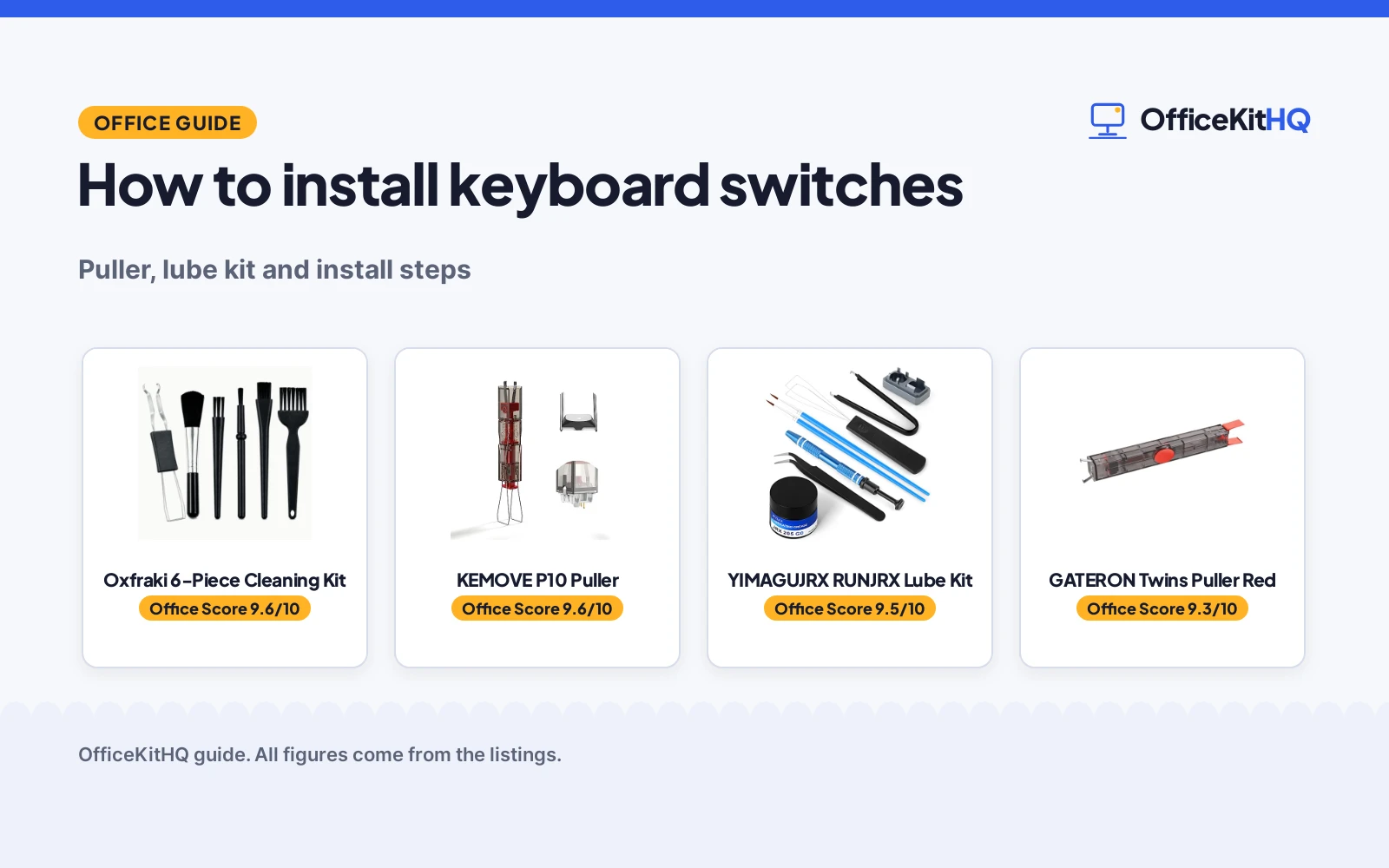
The gear below covers the swap: a puller for keycaps and switches, brushes for dust and debris, and a lube kit for switches you want to prep before they go in.
| # | Product | Office Score | Buy |
|---|---|---|---|
| 1 |  Oxfraki 6-Piece Cleaning Kit | 9.6/10 | Buy on Amazon |
| 2 |  KEMOVE P10 Puller | 9.6/10 | Buy on Amazon |
| 3 |  YIMAGUJRX RUNJRX Lube Kit | 9.5/10 | Buy on Amazon |
| 4 |  GATERON Twins Puller | 9.3/10 | Buy on Amazon |

Oxfraki 6-Piece Cleaning Kit
A 6-piece keyboard cleaning kit with 5 anti-static brushes and a 2-in-1 keycap puller and switch remover.
Pros
- 5 anti-static brushes with PP handles and dense nylon bristles
- 2-in-1 steel wire puller holds up to 3 keys at once
- Works with Cherry MX, Alps, and Topre switches
- Brushes also clean screens, printers, cameras, and car vents
Cons
- Not for scissor switches
- Wire puller fits most mechanical keycaps, so some keycaps may not fit
- No case or pouch is stated for the 6 pieces
- Brushes clean, they do not lube switches
Detailed Review
Oxfraki lists a 6-piece keyboard cleaning kit with 5 anti-static brushes and a 2-in-1 keycap puller and switch remover. The steel wire puller bends outward to fit most mechanical keycaps and holds up to 3 keys at once, and the kit works with Cherry MX, Alps, and Topre switches, but not with scissor switches. The brushes have PP handles and dense nylon bristles, and the kit carries a 1 Year warranty.
Who it's for: owners of a hot-swap keyboard who want a puller and brushes for installing switches. Who should skip it: anyone with scissor switches, or anyone who needs a lube kit.
Its Office Score of 9.6/10 comes from performance 30/35, build 21/25, value 21/25, safety 5/10 and warranty 3/5: 80 of 100 points, placed on our 9.2 to 9.8 scale.
Key Specifications
| Pieces | 6-piece kit |
|---|---|
| Brushes | 5 anti-static brushes |
| Puller | 2-in-1 keycap and switch puller |
| Fits | Cherry MX, Alps, Topre; not scissor switches |
These specs mirror the retailer listing as of 14 November 2026; performance figures are stated by the brand.
Safety and Warranty
What this listing states. Anti-static brushes stated, so safety scores 5 of 10. 1 Year warranty stated. It does not say everything a buyer needs, such as who pays return shipping, so warranty scores 3 of 5. See How We Pick.
Fit the desk first. Check the stated size against your desk depth and keyboard tray, and charge or pair as the manual describes. No keyboard, mouse or wrist rest prevents or treats injury.
This is general buying information, not professional advice. Follow each product manual and local rules, and see our Safety Disclaimer.

KEMOVE P10 Puller
Semi-auto 2-in-1 switch and keycap puller in 304 stainless steel and manganese steel, for MX-style hot-swappable switches.
Pros
- Semi-auto design aligns with switch latches and pulls straight up
- No need to keep pinching thin metal clamps with fingertips
- 304 stainless steel and manganese steel for long-term use
- Keycap puller works with 1U to 6.25U+ keycaps
Cons
- No keycap size beyond 1U to 6.25U+ is stated
- Time-saving figure is tied to a K68 comparison in the listing
- No cleaning brush is included in the listing
- No weight is stated on the listing
Detailed Review
The KEMOVE P10 is a semi-auto 2-in-1 puller: the design aligns with switch latches and pulls switches straight upward with better control, which the listing states makes repetitive removal faster during cleaning, modding, switch replacement and lubing. It is built with 304 stainless steel and manganese steel, and the keycap puller works with 1U to 6.25U+ keycaps. Compatibility covers most MX-style hot-swappable switches, including Gateron, Akko, CHERRY MX, Kailh, EPOMAKER, AULA, Glorious and OUTEMU. The listing states a 1 year manufacturer warranty, and its time-saving figure is tied to a K68 comparison stated in the listing.
Who it is for: frequent modders who want a finger-friendly semi-auto pull for repetitive removal. Who should skip it: anyone who wants cleaning brushes in the kit or a stated weight.
Its Office Score of 9.6/10 comes from performance 30/35, build 22/25, value 20/25, safety 3/10 and warranty 2/5: 77 of 100 points, placed on our 9.2 to 9.8 scale.
Key Specifications
| Type | 2-in-1 semi-auto switch and keycap puller |
|---|---|
| Material | 304 stainless steel and manganese steel |
| Compatibility | MX-style hot-swappable switches |
| Keycap range | 1U to 6.25U+ |
Figures as published on the retailer listing, collected 29 October 2026. Performance figures are manufacturer rated.
Safety and Warranty
What this listing states. Stable vertical pull-up design that reduces twisting, slipping and uneven force, so safety scores 3 of 10. The listing states a warranty of 1 year manufacturer. It does not say everything a buyer needs, such as who pays return shipping, so warranty scores 2 of 5. See How We Pick.
Fit the desk first. Check the stated size against your desk depth and keyboard tray, and charge or pair as the manual describes. No keyboard, mouse or wrist rest prevents or treats injury.
This is general buying information, not professional advice. Follow each product manual and local rules, and see our Safety Disclaimer.

YIMAGUJRX RUNJRX Lube Kit
A keyboard lube kit with JRX 205G0 grease for 450-500 switches, a switch opener, and a switch puller.
Pros
- JRX 205G0 grease covers 450-500 switches
- Aluminum switch opener fits Cherry MX, Kailh, and TTC switches
- 4-claw grabber holds the stem while lubing
- Package holds grease, opener, 2 pens, tweezers, puller, and grabber
Cons
- Grease covers 450-500 switches, so a larger job needs more
- Opener is made for listed brands, so unlisted switches may not fit
- No cleaning brushes are included
- No case is stated for the small tools
Detailed Review
YIMAGUJRX lists a keyboard lube kit with JRX 205G0 grease, 0.53oz/15g, enough for 450-500 switches. The aluminum switch opener is two-in-one and works with Cherry MX, Akko, Kailh, TTC, Tealios, Zealios, and Holy Panda switches, and the kit holds 2 lubrication pens, tweezers, a switch puller, a 4-claw grabber, and a keycap puller. The maker states a manufacturer warranty for 365 days from the date of purchase.
Who it's for: owners who lube switches before installing them. Who should skip it: anyone who installs switches dry, or anyone who needs cleaning brushes.
Its Office Score of 9.5/10 comes from performance 29/35, build 20/25, value 20/25, safety 0/10 and warranty 3/5: 72 of 100 points, placed on our 9.2 to 9.8 scale.
Key Specifications
| Grease | JRX 205G0, 0.53oz/15g |
|---|---|
| Covers | 450-500 switches |
| Opener | Aluminum, two-in-one |
| In the box | Opener, 2 pens, tweezers, puller, grabber, keycap puller |
These specs mirror the retailer listing as of 14 November 2026; performance figures are stated by the brand.
Safety and Warranty
What this listing states. This product does not plug in or run on a battery, so safety is not part of its score. Manufacturer warranty for 365 days stated. It does not say everything a buyer needs, such as who pays return shipping, so warranty scores 3 of 5. See How We Pick.
Fit the desk first. Check the stated size against your desk depth and keyboard tray, and charge or pair as the manual describes. No keyboard, mouse or wrist rest prevents or treats injury.
This is general buying information, not professional advice. Follow each product manual and local rules, and see our Safety Disclaimer.

GATERON Twins Puller
Integrated 2-in-1 switch puller and keycap puller in a rectangular design, with a PC housing, in red.
Pros
- Switch puller and keycap puller in one integrated tool
- Rectangular design described as more flexible to use
- Tool still holds the switch and keycap after pulling
- Press to pop out the switch and keycap easily, per the listing
Cons
- Warranty term is 1 month, the shortest stated here
- Spec color reads melange while the title states Red
- No material beyond PC housing is stated on the listing
- No keycap size range is stated on the listing
Detailed Review
The GATERON Twins tool combines a switch puller and a keycap puller in one integrated tool with a PC housing and a rectangular design. After pulling out the switch and keycap, the tool still holds them, which the listing states prevents them from falling off and getting lost, and a press pops out the switch and keycap held by the tool. The title states Red while the spec table color reads melange, so the color should be confirmed before ordering. The listing states a 1 month warranty.
Who it is for: owners who want one small integrated tool for both jobs. Who should skip it: anyone who needs a longer stated warranty, a stated keycap size range or a confirmed color.
Its Office Score of 9.3/10 comes from performance 24/35, build 18/25, value 18/25, safety 0/10 and warranty 0/5: 60 of 100 points, placed on our 9.2 to 9.8 scale.
Key Specifications
| Type | 2-in-1 integrated switch and keycap puller |
|---|---|
| Material | PC housing |
| Design | Rectangular |
| Color | Red in title, melange in spec table |
Figures as published on the retailer listing, collected 29 October 2026. Performance figures are manufacturer rated.
Safety and Warranty
What this listing states. This product does not plug in or run on a battery, so safety is not part of its score. The listing states a warranty of 1 month. It does not say everything a buyer needs, such as who pays return shipping, so warranty scores 0 of 5. See How We Pick.
Fit the desk first. Check the stated size against your desk depth and keyboard tray, and charge or pair as the manual describes. No keyboard, mouse or wrist rest prevents or treats injury.
This is general buying information, not professional advice. Follow each product manual and local rules, and see our Safety Disclaimer.
As an Amazon Associate I earn from qualifying purchases.
Ways to keep the swap smooth
Small habits keep the swap quick and the board clean.
- Pull the keycap first, then the switch, so the puller grips the switch body.
- Brush dust and debris out of the socket before the new switch goes in.
- Lube switches before installing them when you want a smoother feel.
- Keep the old switches aside until every key checks out.
| Tool | Job | Amazon |
|---|---|---|
| Keycap puller | Pulls the keycap off the switch | |
| Switch puller | Pulls the switch out of the socket | |
| Brushes | Clear dust and debris from the board | |
| Lube kit | Preps switches before they go in |
For more on keeping a board clean, see Mechanical Keyboard Maintenance: Cleaning and Lubing Guide.
FAQ
Do I need to solder switches to install them?
No. Hot-swap boards take switches without solder; pull the old switch out and press the new one in. The pullers in this guide pull switches out of the socket.
Can I install switches without a switch puller?
A puller makes the job easier and keeps the pins straight. The kits in this guide include pullers for keycaps and switches, so one tool covers the pull.
Should I lube switches before installing them?
Lubing is optional. The YIMAGUJRX kit (on Amazon) holds JRX 205G0 grease for 450-500 switches, a switch opener, and a 4-claw grabber, so it covers the prep work. If you skip lube, install the switches dry and check every key.
Do I need to remove keycaps first?
Yes. Pull the keycap with the keycap puller, then pull the switch with the switch puller. The 2-in-1 pullers in this guide do the job with one tool.
More for your workspace
See every Keyboards and Keyboard Trays guide and all Monitor Mounts, Keyboards and Mice guides.
More picks: Mechanical Keyboard Maintenance: Cleaning and Lubing Guide, Keycap Puller How to Use on a Mechanical Keyboard, Mechanical Keyboard Repair: Tools and Switch Pullers, How to Remove Keyboard Switches Without Tool.