The best monitor light bar with auto dimming adjusts itself as the room light changes, so a morning video call does not leave the desk in shadow and the screen glaring. We compared monitor light bars by dimming control, color temperature range, length, mount and warranty term, using only what each listing publishes. The picks below range from a sensor-driven bar that sets its own brightness to a remote-controlled bar with a color backlight, plus further picks listed last.
OfficeKitHQ earns a commission when you buy through links on this page, at no extra cost to you. As an Amazon Associate I earn from qualifying purchases. Affiliate disclosure.
Quick picks
 Best Overall Quntis Pro White: Auto-dimming to 900 lux, dual control, 2-hour timer Check price on Amazon
 Best RGB Backlight YEELIGHT Monitor Light Bar: RGB backlight, Ra98, 350lm, 2-year warranty Check price on Amazon
 Also listed Quntis Focus 20.1 Inch: 20.1 inch bar with remote control Check price on Amazon
 Also listed BenQ ScreenBar Halo 2: Wireless controller, LED monitor light bar Check price on Amazon
The picks
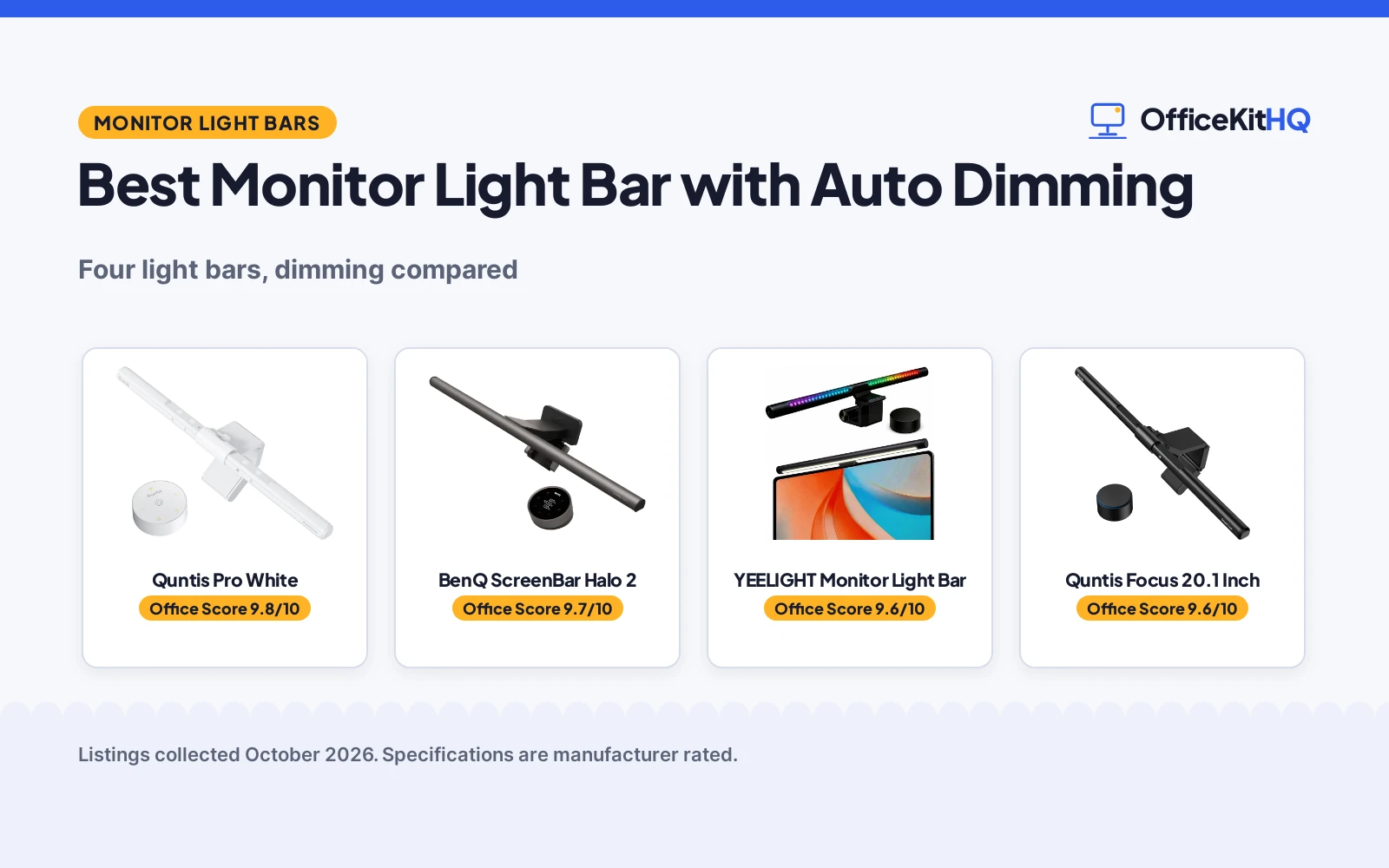
| # | Product | Office Score | Buy |
|---|---|---|---|
| 1 | Quntis Pro White | 9.8/10 | Buy on Amazon |
| 2 | BenQ ScreenBar Halo 2 | 9.7/10 | Buy on Amazon |
| 3 | YEELIGHT Monitor Light Bar | 9.6/10 | Buy on Amazon |
| 4 | Quntis Focus 20.1 | 9.6/10 | Buy on Amazon |

Quntis Pro White
A white monitor light bar with auto-dimming to 900 lux, dual touch and remote control, a 2-hour timer, and a clamp that leaves room for a webcam on top.
Pros
- Auto-dimming sensor adjusts illumination to 900 lux as room light changes
- Touch control and a desktop remote both adjust brightness, color temperature and modes
- Color temperature range of 3000K to 6500K, with a 2-hour timer
- Three-stage clamp fits monitors with non-flat top bezels and leaves room for a webcam on top
Cons
- No warranty term is stated
- No brightness in lumens is stated
- No color rendering index is stated
- Only one color, white, is stated
Detailed Review
The listing states a white monitor light bar with an asymmetrical optical design that lights the keyboard and work area without reflecting on the screen. Auto-dimming and a 2-hour auto-off timer are stated, with the ambient sensor adjusting illumination to 900 lux. Touch control or a desktop remote adjusts brightness, color temperature from 3000K to 6500K, and modes for reading, studying and gaming. The bar measures 16.1 inch, runs on 5 watts at 5 volts, and the three-stage clamp fits monitors with non-flat top bezels or unusual back designs, with room for a webcam on top. Aluminum is stated for the base and shade material.
Who it's for: shoppers who want the bar to set its own brightness as room light changes, with touch and remote control. Who should skip it: shoppers who want a stated warranty term or a stated lumen figure, neither of which this listing gives.
Its Office Score of 9.8/10 comes from performance 33/35, build 22/25, value 24/25, safety 9/10 and warranty 0/5: 88 of 100 points, placed on our 9.2 to 9.8 scale.
Key Specifications
| Length | 16.1 in |
|---|---|
| Auto-dimming | To 900 lux |
| Color temperature | 3000K to 6500K |
| Wattage | 5 watts |
Figures as published on the retailer listing, collected 24 October 2026. Performance figures are manufacturer rated.
Safety and Warranty
What this listing states. Asymmetrical optical design directs light to the desk, not the screen, stated, so safety scores 9 of 10. No warranty term, so warranty scores zero. See How We Pick.
Lamps near paper and water. Use the supplied adapter, keep the lamp head away from paper, curtains and drinks, and treat flicker-free and brightness figures as the maker's claims.
This is general buying information, not professional advice. Follow each product manual and local rules, and see our Safety Disclaimer.

BenQ ScreenBar Halo 2
A monitor light bar pairing an 18-degree anti-glare front light with an adjustable ambient backlight, wireless dial and motion sensor.
Pros
- Front light plus adjustable ambient backlight
- Wireless dial with a built-in display
- Motion sensor with auto on/off
- CRI over 95 with 2700K-6500K range
Cons
- Dark grey only; no color options
- Needs desk space for the wireless dial
- Premium BenQ pricing tier
- No RGB color modes, only white backlight
Detailed Review
BenQ lists the ScreenBar Halo 2 with an 18-degree anti-glare front light and a wide adjustable ambient backlight that reduces contrast between the screen and dark surroundings. The listing describes a wireless dial with a built-in display, stepless brightness and 2700K-6500K color temperature, auto on/off with the monitor, a My Favorite mode, a motion sensor, over 50,000-hour LED lifespan and CRI over 95. It mounts on monitors 0.17 to 2.36 inches thick and 1000R to 1800R curved. The stated warranty is 1 year.
Who it is for: gamers who want front task light and ambient backlight in one bar with dial control. Who should skip it: anyone wanting RGB color modes or the lowest price.
Its Office Score of 9.7/10 comes from performance 33/35, build 22/25, value 21/25, safety 6/10 and warranty 3/5: 85 of 100 points, placed on our 9.2 to 9.8 scale.
Key Specifications
| Front light | 18° anti-glare |
|---|---|
| Backlight | Adjustable |
| Control | Wireless dial |
| Warranty | 1 year |
Figures as published on the retailer listing, collected 21 October 2026. Performance figures are manufacturer rated.
Safety and Warranty
What this listing states. Flicker-free and blue-light-hazard-free LEDs are stated, so safety scores 6 of 10. 1-year warranty is stated. It does not say everything a buyer needs, such as who pays return shipping, so warranty scores 3 of 5. See How We Pick.
Lamps near paper and water. Use the supplied adapter, keep the lamp head away from paper, curtains and drinks, and treat flicker-free and brightness figures as the maker's claims.
This is general buying information, not professional advice. Follow each product manual and local rules, and see our Safety Disclaimer.

YEELIGHT Monitor Light Bar
A black monitor light bar with a 350lm front light, a 16 million-color RGB backlight, Ra98 color rendering, and a remote for stepless dimming.
Pros
- 350lm front light with Ra98 color rendering stated
- RGB backlight with 16 million colors stated, plus front and rear light sources
- Stepless dimming and color temperature from 2700K to 6000K stated
- 2-year warranty stated, plus a remote with presets for office, relax and custom modes
Cons
- No auto-dimming sensor is stated
- No webcam mount is stated
- Clip fit is limited to monitors 10mm to 50mm thick as stated
- No timer is stated
Detailed Review
The listing states a monitor light bar with a flicker-free front light and a 16 million-color RGB backlight, with Ra98 color rendering and 350lm brightness. Stepless dimming and color temperature from 2700K to 6000K are stated, controlled by a remote that also switches office, relax and custom presets. The clip fits flat, curved, thin and thick monitors from 10mm to 50mm thick, including curved screens from R1000 to R1800, for displays from 19 inch to 27 inch. A 25 degree tilt adjustment is stated, the bar is USB powered with a 1.5m cable, and aluminum is stated for the base and shade material. Dimensions of 17.6 inch wide are stated, with a weight of 8.64 ounces.
Who it's for: shoppers who want a color backlight and a stated warranty term with remote dimming. Who should skip it: shoppers who want auto-dimming, which this listing does not state.
Its Office Score of 9.6/10 comes from performance 28/35, build 21/25, value 20/25, safety 8/10 and warranty 3/5: 80 of 100 points, placed on our 9.2 to 9.8 scale.
Key Specifications
| Brightness | 350lm |
|---|---|
| Color temperature | 2700K to 6000K |
| Width | 17.6 in |
| Warranty | 2 year |
Figures as published on the retailer listing, collected 24 October 2026. Performance figures are manufacturer rated.
Safety and Warranty
What this listing states. Flicker-free illumination and RG0 rating stated, so safety scores 8 of 10. 2-year warranty stated. It does not say everything a buyer needs, such as who pays return shipping, so warranty scores 3 of 5. See How We Pick.
Lamps near paper and water. Use the supplied adapter, keep the lamp head away from paper, curtains and drinks, and treat flicker-free and brightness figures as the maker's claims.
This is general buying information, not professional advice. Follow each product manual and local rules, and see our Safety Disclaimer.

Quntis Focus 20.1
A 20.1-inch monitor light bar with remote control, 1200+ lux and auto-dimming.
Pros
- Over 1200 lux illumination
- Sensitive remote with stepless dimming
- Fits 17-32 inch curved and irregular monitors
- Auto-dimming plus 2-hour rest timer
Cons
- No warranty term is stated
- Front light only; no backlight
- Remote needs line of sight to the sensor
- No RGB modes
Detailed Review
Quntis lists the Focus 20.1 with a patented triple-fold weighted clamp for 17 to 32 inch flat, curved and irregular monitors 0.12 to 3.94 inches thick. The listing describes a sensitive remote with stepless 3000K-6500K dimming at CRI95, 45-degree asymmetrical optics with no screen glare, over 1200 lux, auto-dimming via an ambient sensor, a 2-hour auto-off timer, and IEEE 1789 and IEC 62471 compliance. USB powered at 5 watts. No warranty term is stated.
Who it is for: gamers with large or curved monitors who want the strongest front light with a remote. Who should skip it: anyone wanting RGB backlight or a stated warranty.
Its Office Score of 9.6/10 comes from performance 30/35, build 21/25, value 21/25, safety 6/10 and warranty 0/5: 78 of 100 points, placed on our 9.2 to 9.8 scale.
Key Specifications
| Front light | 1200+ lux |
|---|---|
| Fit | 17-32 in |
| Control | Remote |
| Warranty | Not stated |
Figures as published on the retailer listing, collected 21 October 2026. Performance figures are manufacturer rated.
Safety and Warranty
What this listing states. IEEE 1789 and IEC 62471 standards are stated, so safety scores 6 of 10. No warranty term, so warranty scores zero. See How We Pick.
Lamps near paper and water. Use the supplied adapter, keep the lamp head away from paper, curtains and drinks, and treat flicker-free and brightness figures as the maker's claims.
This is general buying information, not professional advice. Follow each product manual and local rules, and see our Safety Disclaimer.
As an Amazon Associate I earn from qualifying purchases.
More picks to compare
 LYMAX Monitor Light Bar PRO+Motion sensor and auto dimming, wireless remote, for home office and gamingCheck on Amazon
Compare the picks
| Light bar | Office Score | Auto-dimming | Color temperature | Length | Warranty | Amazon |
|---|---|---|---|---|---|---|
| Quntis Pro White | 9.8/10 | Auto-dimming to 900 lux | 3000K to 6500K | 16.1 in | Not stated | View on Amazon |
| YEELIGHT Monitor Light Bar | 9.6/10 | Not stated | 2700K to 6000K | 17.6 in | 2 year | View on Amazon |
| Quntis Focus 20.1 Inch | 9.8/10 | Not stated | Not stated | 20.1 in | Not stated | |
| BenQ ScreenBar Halo 2 | 9.7/10 | Not stated | Not stated | Not stated | Not stated | View on Amazon |
Specifications are manufacturer rated as listed, collected 24 October 2026.
How we scored them
The Office Score weighs performance, build, value, safety and warranty. For a monitor light bar, safety means glare control and flicker-free illumination as stated, not brightness alone. One of the picks states a warranty term. How we pick explains the weights.
| Product | Office Score | Perf. /35 | Build /25 | Value /25 | Safety /10 | Warranty /5 |
|---|---|---|---|---|---|---|
| Quntis Pro White | 9.8 | 33 | 22 | 24 | 9 | 0 |
| YEELIGHT Monitor Light Bar | 9.6 | 28 | 21 | 20 | 8 | 3 |
Scores run from 9.2 to 9.8: each product’s point total is placed on that range, so more points always means a higher score.
How to choose the best monitor light bar with auto dimming
Start with auto-dimming, not just dimming
Stepless dimming and auto-dimming are different controls, and the listings here show both. The Quntis Pro White states auto-dimming, with an ambient sensor that adjusts illumination to 900 lux, plus a 2-hour auto-off timer, so brightness follows the room without a hand on the control. The YEELIGHT Monitor Light Bar states stepless dimming by remote, with color temperature from 2700K to 6000K, but no auto-dimming sensor is stated for it. If the room light changes through the day, the sensor-driven pick matches the focus keyword most directly; if manual control is enough, the remote-controlled pick still covers dimming and color temperature. See our desk lamp for monitor guide for more desk lighting options.
Match color temperature to the work
Color temperature is where the two full-data picks differ most clearly. The Quntis Pro White states a range from 3000K to 6500K, adjusted by touch control or a desktop remote, with modes for reading, studying and gaming. The YEELIGHT Monitor Light Bar states a range from 2700K to 6000K, adjusted by rotating the remote, with office, relax and custom presets. The wider cool end on the Quntis pick suits a bright work setting, while the warmer low end on the YEELIGHT pick suits reading and movie nights as the listing describes them. Neither limited pick states a color temperature range, so that comparison stops at the two full-data bars.
Check the mount, the length and the webcam space
A light bar lives on top of the monitor, so fit matters more than looks. The YEELIGHT Monitor Light Bar states a clip for monitors from 10mm to 50mm thick, including curved screens from R1000 to R1800, for displays from 19 inch to 27 inch, with a 25 degree tilt adjustment and a width of 17.6 inch. The Quntis Pro White states a three-stage clamp that fits monitors with non-flat top bezels or unusual back designs, measures 16.1 inch, and leaves room for a webcam on top without blocking the lens. Measure the monitor thickness and the space above the screen before choosing, and see our webcams and ring lights guide if the camera shares that top edge.
Read the warranty line, not the headline
Only the YEELIGHT Monitor Light Bar states a warranty term in this group, a 2-year term, while the Quntis Pro White states no warranty term and the two limited picks state no warranty term either. A stated term does not change how the bar dims, but it does change what happens if the bar stops working, so weigh it alongside dimming and color temperature rather than after them. Where a listing states no warranty term, the review says so plainly instead of guessing at coverage.
Setup Notes
- Check monitor thickness against the clip: the YEELIGHT listing fits monitors from 10mm to 50mm thick.
- Plan USB power and cable reach: both full-data bars are USB powered, and the YEELIGHT listing includes a 1.5m cable.
- Leave room for a webcam on top: the Quntis Pro White clamp leaves room for a webcam without blocking the lens.
- For the picks listed last, confirm dimming control and mount type before buying, because no further details are stated for them.
Frequently Asked Questions
What is a monitor light bar for?
A monitor light bar sits on top of a monitor and directs light down onto the desk and keyboard, rather than shining into the room. The Quntis Pro White states an asymmetrical optical design for that purpose, and the YEELIGHT Monitor Light Bar states a 25 degree tilt adjustment for targeted light.
Is a monitor light bar worth it?
That depends on how much the room light changes and how the bar is controlled. A sensor-driven bar such as the Quntis Pro White adjusts to 900 lux on its own, while a remote-controlled bar such as the YEELIGHT Monitor Light Bar needs a hand on the remote for stepless dimming.
Is a monitor light bar good for eyes?
The listings describe optical features, not a health outcome. The Quntis Pro White states an asymmetrical design that keeps light off the screen, and the YEELIGHT Monitor Light Bar states flicker-free illumination and an RG0 rating, and those stated features are what this article compares.
Why do people use a monitor light bar?
People use one to light the desk without a lamp base taking desk space. Both full-data bars mount on the monitor, are USB powered, and leave the desk surface clear for a keyboard and papers.
Which pick states auto-dimming?
The Quntis Pro White states auto-dimming, with an ambient sensor that adjusts illumination to 900 lux and a 2-hour auto-off timer. The YEELIGHT Monitor Light Bar states stepless dimming by remote, with no auto-dimming sensor stated, and the two picks listed last state no dimming type.
Related guides
See every Desk Lamps and Light Bars guide and all Desks and Desk Lighting guides.
More picks: desk lamp for monitor, desk lamp for dual monitors, standing desks.