The best monitor light bar with webcam for a home desk is the one that lights the desk without covering the camera, because a bar that blocks the lens or throws glare on the screen fails at both jobs at once. Only one pick builds the webcam into the bar; the others leave room for a separate camera or mount one above the light. We compared five picks by camera arrangement, monitor thickness fit, stated brightness, color temperature range, controls and warranty term, using only what each maker publishes.
OfficeKitHQ earns a commission when you buy through links on this page, at no extra cost to you. As an Amazon Associate I earn from qualifying purchases. Affiliate disclosure.
Quick picks
 Best Overall Govee Monitor Light Bar: 1300lx center light, presence sensing, fits 0.12 to 6.3 in monitors Check price on Amazon
 Best Metal Build YEELIGHT Light Bar: Full-metal body, low profile that avoids webcam obstruction Check price on Amazon
 Best Built-In Webcam ALOGIC Illuminate: 12MP 4K autofocus webcam built into a USB-C light bar Check price on Amazon
 Best Motion Sensor LYMAX Light Bar PRO+: Radar sensor switches the light on when you sit down Check price on Amazon
 Best Webcam Mount JCWINY Webcam Stand: Adhesive mount that puts a separate webcam on the light bar Check price on Amazon
Our desk picks
| # | Product | Office Score | Buy |
|---|---|---|---|
| 1 | YEELIGHT Light Bar | 9.7/10 | Buy on Amazon |
| 2 | Govee Monitor Light Bar | 9.7/10 | Buy on Amazon |
| 3 | ALOGIC Illuminate | 9.5/10 | Buy on Amazon |
| 4 | LYMAX Light Bar PRO+ | 9.5/10 | Buy on Amazon |
| 5 | JCWINY Webcam Stand | 9.2/10 | Buy on Amazon |
YEELIGHT Light Bar
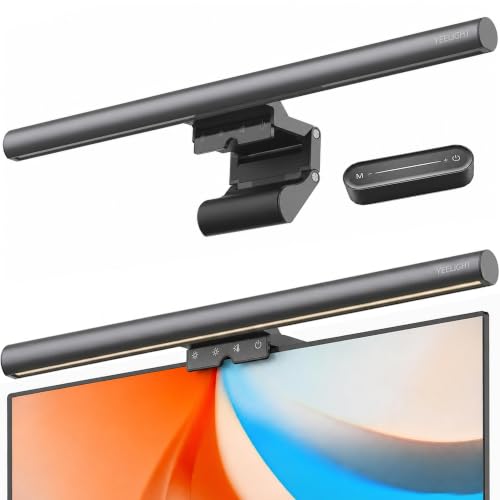
A full-metal light bar with a low profile made to avoid blocking a webcam, 250LM stated output, Ra95 color rendering and a remote.
Pros
- Low-profile design is stated to avoid webcam obstruction
- Full-metal body, the only metal build stated here
- Ra95 color rendering with 78 LED beads stated
- Remote and touch control with stepless dimming from 2700K to 6500K
Cons
- Clip fits monitors only 0.3 to 1.1 in thick, the narrowest range here
- No built-in webcam and no mount for one
- Powered by USB only, with a 1.5 m cable that limits placement
- No app or voice control; control is remote and touch only
Detailed Review
YEELIGHT lists a 250LM bar with 78 LED beads and Ra95 color rendering, stepless dimming and color temperature from 2700K to 6500K by long-press touch, three fixed color temperature modes, and a remote. The body is stated as full metal, and the low-profile design is made to avoid webcam obstruction. A retractable clip fits flat and curved monitors from 0.3 to 1.1 in thick, power is by USB with a 1.5 m cable, and the stated size is 2.64 by 17.6 by 3.07 in at 0.54 pounds.
Who it's for: a video-call desk where a separate webcam sits on the monitor and the bar must stay out of its way. Who should skip it: anyone with a monitor thicker than 1.1 in, or who wants the camera built in.
Its Office Score of 9.7/10 comes from performance 29/35, build 22/25, value 20/25, safety 7/10 and warranty 3/5: 81 of 100 points, placed on our 9.2 to 9.8 scale.
Key Specifications
| Brightness | 250LM |
|---|---|
| Color temperature | 2700K to 6500K |
| Monitor thickness | 0.3 to 1.1 in |
| Item weight | 0.54 pounds |
These specs mirror the retailer listing as of 21 November 2026; performance figures are stated by the brand.
Safety and Warranty
What this listing states. RG0 rating and flicker-free illumination are stated, so safety scores 7 of 10. 2 year. It does not say everything a buyer needs, such as who pays return shipping, so warranty scores 3 of 5. See How We Pick.
Lamps near paper and water. Use the supplied adapter, keep the lamp head away from paper, curtains and drinks, and treat flicker-free and brightness figures as the maker's claims.
This is general buying information, not professional advice. Follow each product manual and local rules, and see our Safety Disclaimer.

Govee Monitor Light Bar
A light bar for 22 to 34 in screens with stated 1300lx center brightness, RGBIC backlight, presence sensing and a front lip that covers only 3 mm of the bezel.
Pros
- Stated 1300lx center and 500lx uniform workspace light
- Presence sensing turns the light on when you arrive and off 5 minutes after you leave
- Fits monitors from 0.12 to 6.3 in thick, the widest range here
- RGBIC backlight with 90+ stated lighting effects and app control
Cons
- No built-in webcam; a separate camera still needs its own spot
- Heaviest pick here at a stated 1.4 lb
- Stated screen range stops at 34 in
- One year warranty is shorter than the two year terms on two rivals
Detailed Review
Govee lists this bar for flat and curved screens from 22 to 34 in, on monitors from 0.12 to 6.3 in thick, with a front lip that covers only 3 mm of the bezel. The maker states 1300lx at the center and 500lx of uniform workspace light, brightness from 1 to 100 percent and color temperature from 2700 to 6500K by long-press touch. A mmWave sensor switches the light on when you walk in and off 5 minutes after you leave. Voice control through Matter, Google Assistant and SmartThings is stated.
Who it's for: a desk where the light should switch itself on and off, with a separate webcam at the top of the screen. Who should skip it: anyone who wants the webcam built in, or a screen larger than 34 in.
Its Office Score of 9.7/10 comes from performance 33/35, build 21/25, value 21/25, safety 8/10 and warranty 0/5: 83 of 100 points, placed on our 9.2 to 9.8 scale.
Key Specifications
| Screen size | 22 to 34 in |
|---|---|
| Monitor thickness | 0.12 to 6.3 in |
| Brightness | 1300lx center, 500lx uniform |
| Color temperature | 2700 to 6500K |
These specs mirror the retailer listing as of 21 November 2026; performance figures are stated by the brand.
Safety and Warranty
What this listing states. RG0 blue light safety, TÜV Rheinland eye comfort and flicker-free light are stated, so safety scores 8 of 10. No warranty term, so warranty scores zero. See How We Pick.
Lamps near paper and water. Use the supplied adapter, keep the lamp head away from paper, curtains and drinks, and treat flicker-free and brightness figures as the maker's claims.
This is general buying information, not professional advice. Follow each product manual and local rules, and see our Safety Disclaimer.

ALOGIC Illuminate
The only pick with the webcam built in: a 12MP 4K autofocus camera in a USB-C light bar with a magnetic privacy cover.
Pros
- Built-in wide-angle 12MP 4K autofocus webcam, stated compatible with Mac and Windows
- Magnetic privacy cover snaps over the camera when the call ends
- Snap-on magnetic remote dial plus touch controls
- One USB-C cable connects light and camera to computer or monitor
Cons
- Fits monitors only 8 to 30 mm thick
- Needs a USB-C port on the computer or monitor
- Light color is limited to warm or neutral settings
- Privacy cover is a separate snap-on piece that has to be kept with the bar
Detailed Review
ALOGIC lists the Illuminate with warm or neutral lighting by touch controls or a snap-on magnetic remote dial, and a wide-angle 12MP 4K autofocusing webcam stated as compatible with Mac and Windows. A magnetic privacy cover snaps over the webcam after a call, and a status LED shows when you are sharing. The bar works with monitors from 8 to 30 mm thick, is colour matched to Edge ultrawide monitors, and connects to a USB-C port with one cable. No brightness figure or Kelvin range is stated.
Who it's for: someone who wants light and camera in one bar on one cable, with a physical cover for the lens. Who should skip it: anyone without a USB-C port to spare, or who wants a stated Kelvin range.
Its Office Score of 9.5/10 comes from performance 32/35, build 20/25, value 20/25, safety 0/10 and warranty 3/5: 75 of 100 points, placed on our 9.2 to 9.8 scale.
Key Specifications
| Webcam | 12MP 4K autofocus |
|---|---|
| Monitor thickness | 8 to 30 mm |
| Connection | USB-C |
| Controls | Touch and magnetic dial |
These specs mirror the retailer listing as of 21 November 2026; performance figures are stated by the brand.
Safety and Warranty
What this listing states. No UL or ETL listing is stated, so safety scores zero. 2 years. It does not say everything a buyer needs, such as who pays return shipping, so warranty scores 3 of 5. See How We Pick.
Lamps near paper and water. Use the supplied adapter, keep the lamp head away from paper, curtains and drinks, and treat flicker-free and brightness figures as the maker's claims.
This is general buying information, not professional advice. Follow each product manual and local rules, and see our Safety Disclaimer.

LYMAX Light Bar PRO+
A light bar with a radar motion sensor that switches it on when you sit down, a rechargeable wireless remote and stepless 2700K to 6500K dimming.
Pros
- Radar motion sensor turns the light on when you sit down and off after inactivity
- Wireless remote is USB-C rechargeable, with touch controls on the lamp
- Counterweight clamp fits screens 0.2 to 2.4 in thick, flat or curved
- CRI 95 or higher is stated, with 45 degree angled optics
Cons
- No built-in webcam and no camera mount
- Remote needs recharging by USB-C
- No app or voice control is offered; remote and touch only
- At 19.69 in long it is the longest bar here, which can crowd a smaller screen
Detailed Review
LYMAX lists a radar motion sensor that turns the light on when you sit down and off after inactivity, with stepless dimming from 2700K to 6500K and CRI 95 or higher stated. Control is by a USB-C rechargeable wireless remote or touch controls, and the optics direct light at a 45 degree angle onto the desk. A counterweight clamp fits screens from 0.2 to 2.4 in thick with 45 degrees of rotation, power is by any USB port, and the stated size is 3.78 by 19.69 by 1.65 in at 0.98 pounds.
Who it's for: a desk where the bar should turn itself on and off without reaching for a switch. Who should skip it: anyone who wants a webcam in or on the bar, or app and voice control.
Its Office Score of 9.5/10 comes from performance 28/35, build 19/25, value 20/25, safety 6/10 and warranty 0/5: 73 of 100 points, placed on our 9.2 to 9.8 scale.
Key Specifications
| Color temperature | 2700K to 6500K |
|---|---|
| Monitor thickness | 0.2 to 2.4 in |
| Dimensions | 3.78 x 19.69 x 1.65 in |
| Item weight | 0.98 pounds |
These specs mirror the retailer listing as of 21 November 2026; performance figures are stated by the brand.
Safety and Warranty
What this listing states. Flicker-free light with no blue light hazard is stated, so safety scores 6 of 10. No warranty term, so warranty scores zero. See How We Pick.
Lamps near paper and water. Use the supplied adapter, keep the lamp head away from paper, curtains and drinks, and treat flicker-free and brightness figures as the maker's claims.
This is general buying information, not professional advice. Follow each product manual and local rules, and see our Safety Disclaimer.

JCWINY Webcam Stand
Not a light itself: an adhesive webcam mount that sticks to a monitor light bar clamp and holds a separate webcam above the light.
Pros
- Mounts a webcam directly on the monitor light bar clamp
- 360 degree rotation and 180 degree tilt for aiming the camera
- Stated to fit BENQ, Quntis and Xiaomi monitor lamps
- Nano adhesive mount needs no tools and is stated to leave no residue
Cons
- It is a mount only; you still need a light bar and a webcam
- Only fits webcams with 1/4 inch thread holes
- Adhesive mount; removal uses dental floss, per the maker
- No warranty term is stated
Detailed Review
JCWINY lists this as a webcam holder for monitor light bars, stated to suit BENQ, Quntis and Xiaomi lamps among others. Nano adhesive sticks the holder to the light bar clamp with no tools, and the maker states it leaves no residue when removed with dental floss. The mount allows 360 degrees of rotation and 180 degrees of tilt, and fits webcams with 1/4 inch thread holes. The package includes one webcam holder, so the light bar and camera are separate purchases.
Who it's for: someone who already owns a light bar and a webcam and wants the camera mounted on the bar. Who should skip it: anyone starting from zero who wants light and camera in a single unit.
Its Office Score of 9.2/10 comes from performance 14/35, build 14/25, value 12/25, safety 0/10 and warranty 0/5: 40 of 100 points, placed on our 9.2 to 9.8 scale.
Key Specifications
| Rotation | 360 degrees |
|---|---|
| Tilt | 180 degrees |
| Mount | Nano adhesive |
| In the box | 1 webcam holder |
These specs mirror the retailer listing as of 21 November 2026; performance figures are stated by the brand.
Safety and Warranty
What this listing states. This product does not plug in or run on a battery, so safety is not part of its score. No warranty term, so warranty scores zero. See How We Pick.
Lamps near paper and water. Use the supplied adapter, keep the lamp head away from paper, curtains and drinks, and treat flicker-free and brightness figures as the maker's claims.
This is general buying information, not professional advice. Follow each product manual and local rules, and see our Safety Disclaimer.
As an Amazon Associate I earn from qualifying purchases.
More picks to compare
 ALOGIC Illuminate USB-CSame built-in 4K webcam light bar for Edge ultrawide setupsCheck on Amazon
 Quntis Curved Light BarCurved bar whose clip top doubles as a webcam baseCheck on Amazon
Specs compared
| Light bar | Office Score | Webcam | Monitor fit | Color temperature | Warranty | Amazon |
|---|---|---|---|---|---|---|
| Govee Monitor Light Bar | 9.7/10 | No camera; 3 mm front lip | 0.12 to 6.3 in thick, 22 to 34 in screens | 2700 to 6500K | One year | View on Amazon |
| YEELIGHT Light Bar | 9.7/10 | No camera; low profile | 0.3 to 1.1 in thick | 2700K to 6500K | 2 year | View on Amazon |
| ALOGIC Illuminate | 9.5/10 | Built-in 12MP 4K autofocus | 8 to 30 mm thick | Not stated | 2 years | View on Amazon |
| LYMAX Light Bar PRO+ | 9.5/10 | Not stated | 0.2 to 2.4 in thick | 2700K to 6500K | Not stated as a term | View on Amazon |
| JCWINY Webcam Stand | 9.2/10 | Mount for separate webcam | BENQ, Quntis, Xiaomi bars | Not stated | Not stated | View on Amazon |
Dimensions, weight limits and ranges are the maker’s ratings as each listing gives them, collected 21 November 2026. Three of the five state a warranty term; three state an eye-safety rating or flicker-free light.
How to choose the best monitor light bar with webcam
Decide where the webcam lives
Start with the camera, because it decides which bar makes sense. The ALOGIC Illuminate is the only pick with the webcam built in, a wide-angle 12MP 4K autofocus camera with a magnetic privacy cover, on one USB-C cable. The YEELIGHT low-profile body is stated to avoid webcam obstruction, and the Govee front lip covers only 3 mm of the bezel. The JCWINY stand sticks to the light bar clamp and holds the webcam above the light with 360 degrees of rotation and 180 degrees of tilt. For camera-first setups, see webcams with built-in light.
Measure your monitor thickness first
Every bar here sits on the top edge of the monitor, and the stated thickness ranges differ more than the lights do. The Govee fits 0.12 to 6.3 in thick monitors on 22 to 34 in screens, the widest range here. The LYMAX clamp takes 0.2 to 2.4 in, flat or curved. The YEELIGHT clip is the narrowest at 0.3 to 1.1 in, and the ALOGIC works with 8 to 30 mm. Measure the top edge of your monitor first. Curved screens have their own shortlist at monitor light bars for curved monitors.
Read the brightness and color figures as stated
The makers do not use the same brightness units, so compare each figure only as published. Govee states 1300lx at the center and 500lx of uniform workspace light. YEELIGHT states 250LM from 78 LED beads with Ra95 color rendering. LYMAX states CRI 95 or higher without a lux figure. All three publish 2700K to 6500K with stepless dimming. The ALOGIC states warm or neutral light only, with no Kelvin range or brightness figure.
Controls, sensors and power
Two picks switch themselves. The Govee uses mmWave presence sensing to turn on when you walk in and off 5 minutes after you leave, and adds app and voice control through Matter, Google Assistant and SmartThings. The LYMAX radar sensor turns on when you sit down and off after inactivity, with a USB-C rechargeable remote. The YEELIGHT uses a remote and touch controls on USB power. The ALOGIC uses touch controls and a snap-on magnetic dial on USB-C power.
Check the warranty term, not the headline
Three of the five state a warranty term: YEELIGHT at 2 year, ALOGIC at 2 years and Govee at one year. The LYMAX and JCWINY state no term, so their warranty score is zero.
Setup Notes
- Measure the top edge of your monitor against the stated range: 0.12 to 6.3 in (Govee), 0.2 to 2.4 in (LYMAX), 0.3 to 1.1 in (YEELIGHT), 8 to 30 mm (ALOGIC).
- Check the top bezel width; the Govee front lip covers 3 mm and fits bezels of 3 mm or wider.
- Plan the power run: the YEELIGHT cable is 1.5 m of USB, the LYMAX takes any USB port, and the ALOGIC needs USB-C.
- Keep the webcam sight line clear, or mount the camera on the bar: the JCWINY stand fits webcams with 1/4 inch thread holes.
FAQ
Which of these light bars has a webcam built in?
Only the ALOGIC Illuminate. It builds a wide-angle 12MP 4K autofocus webcam into the bar, with a magnetic privacy cover and a status LED, on one USB-C cable.
Will a light bar block my separate webcam?
The YEELIGHT low-profile design is stated to avoid webcam obstruction, and the Govee front lip covers only 3 mm of the bezel. The JCWINY stand mounts the webcam on the light bar clamp.
What monitor thickness do these bars fit?
The Govee fits 0.12 to 6.3 in thick monitors on 22 to 34 in screens, the LYMAX 0.2 to 2.4 in, the YEELIGHT 0.3 to 1.1 in and the ALOGIC 8 to 30 mm.
How are they powered?
The YEELIGHT runs on USB with a 1.5 m cable, the LYMAX on any USB port, and the ALOGIC from a USB-C port.
Which picks state a warranty term?
Three: YEELIGHT at 2 year, ALOGIC at 2 years and Govee at one year. The LYMAX and JCWINY state no warranty term.
Score breakdown
The Office Score weighs performance (stated brightness, color temperature range, camera arrangement and controls), build (body material, clamp and item weight), value for the stated specs, safety and warranty. For a light bar, safety means a stated eye-safety rating or flicker-free light; the Govee, YEELIGHT and LYMAX state one, the other two do not. Three of the five state a warranty term: YEELIGHT at 2 year, ALOGIC at 2 years and Govee at one year. How we pick explains the weights.
| Product | Office Score | Perf. /35 | Build /25 | Value /25 | Safety /10 | Warranty /5 |
|---|---|---|---|---|---|---|
| YEELIGHT Light Bar | 9.7 | 29 | 22 | 20 | 7 | 3 |
| Govee Monitor Light Bar | 9.7 | 33 | 21 | 21 | 8 | 0 |
| ALOGIC Illuminate | 9.5 | 32 | 20 | 20 | 0 | 3 |
| LYMAX Light Bar PRO+ | 9.5 | 28 | 19 | 20 | 6 | 0 |
| JCWINY Webcam Stand | 9.2 | 14 | 14 | 12 | 0 | 0 |
Office Scores run on a short 9.2 to 9.8 scale. We place each item’s weighted point total on it in proportion, so a larger total is always shown as a larger score.
More for your workspace
See every Desk Lamps and Light Bars guide and all Desks and Desk Lighting guides.
More picks: monitor light bars for curved monitors, webcams with built-in light, clip-on webcam lights.