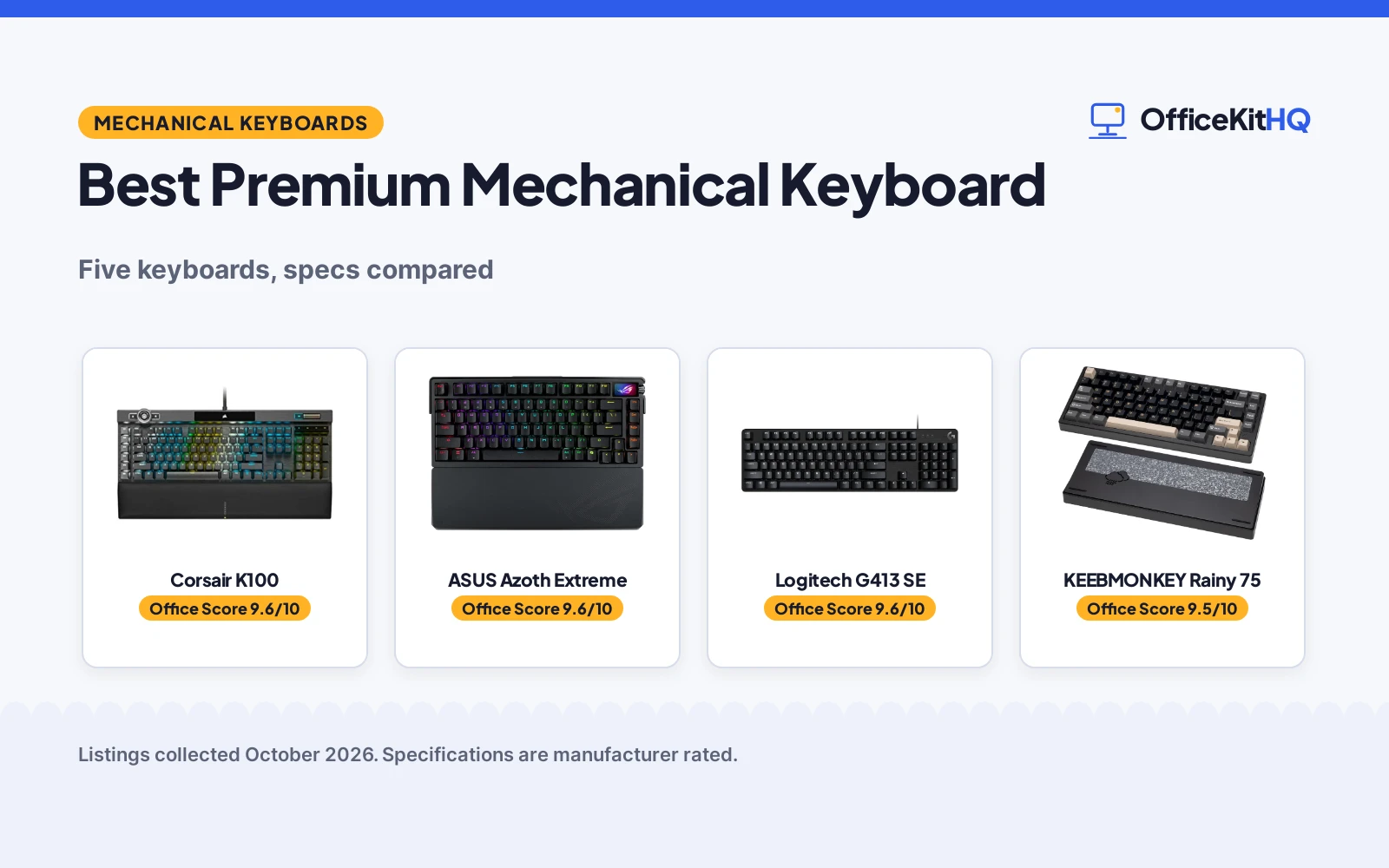
A long work session ends with the same board under the hands for hours, and the best premium mechanical keyboard is the one whose switches, frame and layout still feel right at the end of it. We compared seven keyboards by switch type, frame material, connection, backlight and warranty term, using only what each listing publishes.
OfficeKitHQ earns a commission when you buy through links on this page, at no extra cost to you. As an Amazon Associate I earn from qualifying purchases. Affiliate disclosure.
Quick picks
 Best Overall Corsair K100: 4000Hz polling, 1.2mm actuation, 2-year warranty stated Check price on Amazon
 Best Wireless ASUS Azoth Extreme: Tri-mode, 1600-hour battery claim, OLED screen, 1-year warranty Check price on Amazon
 Best Build KEEBMONKEY Rainy 75: CNC aluminum, five-layer foam, triple-mode Check price on Amazon
 Spare Hybrid SteelSeries Apex 5: Hybrid mechanical gaming keyboard, title-only listing Check price on Amazon
 Spare Full-Size Logitech G413 SE: Full-size mechanical keyboard, title-only listing Check price on Amazon
The picks
| # | Product | Office Score | Buy |
|---|---|---|---|
| 1 | Corsair K100 | 9.6/10 | Buy on Amazon |
| 2 | ASUS Azoth Extreme | 9.6/10 | Buy on Amazon |
| 3 | Logitech G413 SE | 9.6/10 | Buy on Amazon |
| 4 | KEEBMONKEY Rainy 75 | 9.5/10 | Buy on Amazon |
| 5 | SteelSeries Apex 5 | 9.3/10 | Buy on Amazon |

Corsair K100
A wired mechanical keyboard with Cherry MX Speed switches, 4,000Hz polling, per-key RGB, an aluminum frame and an iCUE control wheel.
Pros
- Cherry MX Speed switches with 1.2mm actuation distance
- 4,000Hz hyper-polling and 4,000Hz key scanning stated
- 100 million keystrokes stated
- Two-year manufacturer warranty stated
Cons
- Spec table lists both 104 and 110 keys
- Title states QWERTY NA layout while the spec table states Dutch language
- Wired only, no wireless option is stated
- No battery, since it is corded electric
Detailed Review
The Corsair K100 listing states a wired mechanical gaming keyboard with Cherry MX Speed RGB Silver switches, PBT double-shot keycaps, an aluminum frame and plate, dynamic per-key RGB backlighting, a 44-zone LightEdge and an iCUE control wheel. It states 4,000Hz hyper-polling, 4,000Hz key scanning, a 1.2mm actuation distance and 100 million keystrokes. It measures 10.3 x 19.7 x 3.1 inch and weighs 3 pounds, and the listing states a two-year manufacturer warranty. Two contradictions: the spec table lists a button quantity of 104 and a key count of 110, and the title states a QWERTY NA layout while the spec table states Dutch as the language, so both figures are shown.
Who it's for: a gamer or typist who wants fast linear switches, per-key RGB and a control wheel on a wired board. Who should skip it: anyone who wants wireless use or a single clear key count.
Its Office Score of 9.6/10 comes from performance 32/35, build 22/25, value 21/25, safety 0/10 and warranty 3/5: 78 of 100 points, placed on our 9.2 to 9.8 scale.
Key Specifications
| Switches | Cherry MX Speed RGB Silver |
|---|---|
| Polling | 4,000Hz |
| Frame | Aluminum |
| Size | 10.3 x 19.7 x 3.1 inch |
Figures as published on the retailer listing, collected 25 October 2026. Performance figures are manufacturer rated.
Safety and Warranty
What this listing states. This product does not plug in or run on a battery, so safety is not part of its score. 2-year manufacturer warranty. It does not say everything a buyer needs, such as who pays return shipping, so warranty scores 3 of 5. See How We Pick.
Fit the desk first. Check the stated size against your desk depth and keyboard tray, and charge or pair as the manual describes. No keyboard, mouse or wrist rest prevents or treats injury.
This is general buying information, not professional advice. Follow each product manual and local rules, and see our Safety Disclaimer.

ASUS Azoth Extreme
A 75% wireless mechanical keyboard with ROG NX Snow switches, an aluminum chassis, carbon-fiber plate, OLED screen and tri-mode connectivity.
Pros
- Tri-mode connectivity with 2.4GHz, Bluetooth and wired USB-C
- Up to 1600 hours of battery life with RGB and OLED off
- 8K Hz polling rate with the booster, wired and wireless
- 1.47-inch OLED touch display and multi-function knob
Cons
- Spec table lists both 104 and 84 keys
- Heaviest pick here at 4.9 pounds
- Battery claim depends on RGB and OLED being off
- One-year warranty, shorter than the Corsair term
Detailed Review
The ASUS ROG Azoth Extreme listing states a 75% wireless mechanical gaming keyboard with ROG NX Snow linear switches, PBT keycaps, an aluminum-alloy chassis made with a 12-step CNC process, a carbon-fiber plate, gasket mount and a 1.47-inch OLED touch display. It states tri-mode connectivity with 2.4GHz RF wireless, Bluetooth for up to 3 devices and wired USB-C, an 8K Hz polling rate with the ROG Polling Rate Booster, hot-swappable switches with 3-pin support, and up to 1600 hours of battery life with RGB and OLED off. It lists a silicone wrist rest in the box, measures 5.5 x 1.6 x 13.1 inch as listed and weighs 4.9 pounds, and the listing states a one-year warranty. One contradiction: the spec table lists a button quantity of 104 and a key count of 84, so both figures are shown.
Who it's for: a user who wants wireless freedom, an OLED screen and hot-swap switches in a metal chassis. Who should skip it: anyone who wants a light board or a longer warranty term.
Its Office Score of 9.6/10 comes from performance 33/35, build 22/25, value 21/25, safety 0/10 and warranty 2/5: 78 of 100 points, placed on our 9.2 to 9.8 scale.
Key Specifications
| Switches | ROG NX Snow linear |
|---|---|
| Layout | 75% TKL |
| Battery | Up to 1600 hours, RGB and OLED off |
| Display | 1.47-inch OLED |
Figures as published on the retailer listing, collected 25 October 2026. Performance figures are manufacturer rated.
Safety and Warranty
What this listing states. No FCC or other safety listing is stated, so safety scores zero. 1-year warranty. It does not say everything a buyer needs, such as who pays return shipping, so warranty scores 2 of 5. See How We Pick.
Fit the desk first. Check the stated size against your desk depth and keyboard tray, and charge or pair as the manual describes. No keyboard, mouse or wrist rest prevents or treats injury.
This is general buying information, not professional advice. Follow each product manual and local rules, and see our Safety Disclaimer.

Logitech G413 SE
A full-size wired mechanical keyboard with PBT keycaps, tactile switches and an aluminum top case.
Pros
- PBT keycaps, heat and wear resistant
- Tactile mechanical switches
- Black-brushed aluminum top case
- 1 Year Limited Hardware Warranty
Cons
- Gaming-first design, less dev-focused
- Wired only, no wireless option
- White LED only, no RGB
- Heavier than compact picks at 780 g
Detailed Review
Logitech lists the G413 SE as a full-size wired mechanical keyboard with gaming-first features, PBT keycaps, tactile mechanical switches and a black-brushed aluminum top case with white LED lighting. The listing describes 6-key rollover anti-ghosting, 108 keys and a 780 g weight.
Who it's for: developers who want a sturdy full-size wired board with PBT keycaps. Who should skip it: anyone who needs wireless or a compact layout.
Its Office Score of 9.6/10 comes from performance 28/35, build 21/25, value 18/25, safety not scored (non-powered gear) and warranty 3/5: 70 of 90 points, placed on our 9.2 to 9.8 scale.
Key Specifications
| Keys | 108 |
|---|---|
| Switches | Tactile mechanical |
| Weight | 780 g |
| Warranty | 1 Year Limited Hardware Warranty |
Figures as published on the retailer listing, collected 17 October 2026. Performance figures are manufacturer rated.
Safety and Warranty
What this listing states. This product does not plug in or run on a battery, so safety is not part of its score. 1 Year Limited Hardware Warranty. It does not say everything a buyer needs, such as who pays return shipping, so warranty scores 3 of 5. See How We Pick.
Fit the desk first. Check the stated size against your desk depth and keyboard tray, and charge or pair as the manual describes. No keyboard, mouse or wrist rest prevents or treats injury.
This is general buying information, not professional advice. Follow each product manual and local rules, and see our Safety Disclaimer.

KEEBMONKEY Rainy 75
A 75-size mechanical keyboard with a CNC aluminum build, custom lubricated switches and triple-mode connectivity.
Pros
- 6063 aluminum alloy build with FR4 plates and flex cuts
- Triple-mode connectivity: wired, BT 5.0 and 2.4G wireless
- Five-layer foam and 14 dampening buds for sound control
- Double shot PBT keycaps
Cons
- Spec table lists both 75 and 81 keys
- Warranty of 7 days, the smallest term here
- Colemak layout in the spec table, not QWERTY
- No battery life in hours is stated
Detailed Review
The KEEBMONKEY WOBKEY Rainy 75 listing states a mechanical keyboard with custom lubricated HMX, JWK and Cocoa switches, a sturdy 6063 aluminum alloy build, five-layer foam, 14 dampening buds, FR4 plates with flex cuts and double shot PBT keycaps. It states triple-mode connectivity with wired, BT 5.0 and 2.4G wireless, latency of 2ms wired, 3ms on 2.4G wireless and 7ms on BT, and a battery. It measures 12.6 x 5.12 x 1.57 inch and weighs 2 kg, and the listing states a 7-day warranty. Two notes: the spec table lists a button quantity of 75 and a key count of 81, and the spec table lists a Colemak layout, so both key figures are shown.
Who it's for: a typist who wants an aluminum board with tuned sound and triple-mode use. Who should skip it: anyone who wants a QWERTY layout statement or a longer warranty term.
Its Office Score of 9.5/10 comes from performance 30/35, build 22/25, value 21/25, safety 0/10 and warranty 1/5: 74 of 100 points, placed on our 9.2 to 9.8 scale.
Key Specifications
| Switches | Custom lubricated HMX/JWK/Cocoa |
|---|---|
| Frame | 6063 aluminum alloy |
| Plate | FR4 |
| Size | 12.6 x 5.12 x 1.57 inch |
Figures as published on the retailer listing, collected 25 October 2026. Performance figures are manufacturer rated.
Safety and Warranty
What this listing states. This product does not plug in or run on a battery, so safety is not part of its score. 7-day warranty. It does not say everything a buyer needs, such as who pays return shipping, so warranty scores 1 of 5. See How We Pick.
Fit the desk first. Check the stated size against your desk depth and keyboard tray, and charge or pair as the manual describes. No keyboard, mouse or wrist rest prevents or treats injury.
This is general buying information, not professional advice. Follow each product manual and local rules, and see our Safety Disclaimer.

SteelSeries Apex 5
A hybrid keyboard with an OLED smart display, per-key RGB and a magnetic wrist rest.
Pros
- OLED smart display for GIFs and notifications
- Per-key RGB illumination with reactive effects
- Magnetic wrist rest included in the box
- Aircraft-grade aluminum alloy frame
Cons
- Hybrid switch, not a true mechanical switch
- Bullets mix millimeters and inches on dimensions
- Spec table lists an AZERTY layout
- USB wired only, no wireless option
Detailed Review
SteelSeries lists the Apex 5 as a hybrid keyboard pairing a tactile blue click with a smooth membrane, plus an OLED smart display, per-key RGB and a magnetic wrist rest. The bullets list 900 x 300 x 4 millimeter alongside 35.43 x 11.81 inches, a unit mismatch, and the spec table lists an AZERTY layout, so US buyers should confirm the layout. The listing states an aircraft-grade aluminum alloy frame and a 1 Year Warranty.
Who it's for: engineers who want the OLED display and a wrist rest in the box. Who should skip it: anyone who wants true mechanical switches, since this one is hybrid.
Its Office Score of 9.3/10 comes from performance 26/35, build 19/25, value 16/25, safety 0/10 and warranty 3/5: 64 of 100 points, placed on our 9.2 to 9.8 scale.
Key Specifications
| Switch | Hybrid blue, tactile plus membrane |
|---|---|
| Display | OLED smart display |
| Extras | Magnetic wrist rest |
| Warranty | 1 Year Warranty |
Figures as published on the retailer listing, collected 17 October 2026. Performance figures are manufacturer rated.
Safety and Warranty
What this listing states. This product does not plug in or run on a battery, so safety is not part of its score. 1 Year Warranty. It does not say everything a buyer needs, such as who pays return shipping, so warranty scores 3 of 5. See How We Pick.
Fit the desk first. Check the stated size against your desk depth and keyboard tray, and charge or pair as the manual describes. No keyboard, mouse or wrist rest prevents or treats injury.
This is general buying information, not professional advice. Follow each product manual and local rules, and see our Safety Disclaimer.
As an Amazon Associate I earn from qualifying purchases.
More picks to compare
 Keychron Q6 UltraFull-size wireless board with 660-hour battery claim and hot-swap switches.Check on Amazon
 Keychron Q3 UltraTKL wireless board with 8KHz polling and 660-hour battery claim.Check on Amazon
Compare the picks
| Keyboard | Office Score | Keys | Connection | Switches | Warranty | Amazon |
|---|---|---|---|---|---|---|
| Corsair K100 | 9.6/10 | 104 buttons and 110 keys | Wired | Cherry MX Speed | 2 years | View on Amazon |
| ASUS Azoth Extreme | 9.6/10 | 84 keys and 104 buttons | Tri-mode | ROG NX Snow linear | 1 year | View on Amazon |
| KEEBMONKEY Rainy 75 | 9.5/10 | 75 buttons and 81 keys | Triple-mode | HMX/JWK/Cocoa | 7 days | View on Amazon |
| SteelSeries Apex 5 | 9.3/10 | Not stated | Not stated | Not stated | Not stated | View on Amazon |
| Logitech G413 SE | 9.6/10 | Not stated | Not stated | Not stated | Not stated | View on Amazon |
Specifications are manufacturer rated as listed, collected 25 October 2026. Where a listing contradicts itself, both figures are shown.
How we scored them
The Office Score weighs performance (switch type, polling, backlight and connection), build (frame material, plate and item weight), value for the stated specs, safety and warranty. For a keyboard, safety means a stated spill resistance or safety certification; no listing here states one, so safety scores zero across the group. Three listings state a warranty term: Corsair at two years, ASUS at one year and KEEBMONKEY at 7 days. How we pick explains the weights.
| Product | Office Score | Perf. /35 | Build /25 | Value /25 | Safety /10 | Warranty /5 |
|---|---|---|---|---|---|---|
| Corsair K100 | 9.6 | 32 | 22 | 21 | 0 | 3 |
| ASUS Azoth Extreme | 9.6 | 33 | 22 | 21 | 0 | 2 |
| KEEBMONKEY Rainy 75 | 9.5 | 30 | 22 | 21 | 0 | 1 |
Scores run from 9.2 to 9.8: each product’s point total is placed on that range, so more points always means a higher score.
How to choose the best premium mechanical keyboard
Switches first
Switches decide the feel. The Corsair lists Cherry MX Speed RGB Silver switches with a 1.2mm actuation distance and 100 million keystrokes stated, the ASUS lists ROG NX Snow linear switches with 3-pin hot-swap support, and the KEEBMONKEY lists custom lubricated HMX, JWK and Cocoa switches. The SteelSeries and Logitech listings give a title only, with no switch type stated, so their feel cannot be compared from the listing. If a linear feel matters, all three full-data picks list linear switches.
Frames and sound
Frames and dampening shape the sound. The Corsair lists an aluminum frame with an aluminum plate and PBT double-shot keycaps, the KEEBMONKEY lists a 6063 aluminum alloy build with five-layer foam, 14 dampening buds and FR4 plates with flex cuts, and the ASUS lists an aluminum-alloy chassis with a carbon-fiber plate, dual PORON foams and a silicone pad. A metal frame adds weight: the ASUS lists 4.9 pounds and the Corsair lists 3 pounds, while the KEEBMONKEY lists 2 kg.
| Keyboard | Keys | Connection | Frame |
|---|---|---|---|
| Corsair K100 | 104 buttons and 110 keys | Wired | Aluminum |
| ASUS Azoth Extreme | 84 keys and 104 buttons | Tri-mode | Aluminum-alloy |
| KEEBMONKEY Rainy 75 | 75 buttons and 81 keys | Triple-mode | 6063 aluminum |
| SteelSeries Apex 5 | Not stated | Not stated | Not stated |
| Logitech G413 SE | Not stated | Not stated | Not stated |
Figures as stated in each listing. Where a spec table lists two key counts, both are shown; see the card for the detail.
Connection and battery
Connection decides whether the board stays wired or roams. The Corsair is wired only, with 4,000Hz hyper-polling and 4,000Hz key scanning stated. The KEEBMONKEY lists triple-mode connectivity with wired, BT 5.0 and 2.4G wireless, latency of 2ms wired, 3ms on 2.4G wireless and 7ms on BT, plus a battery. The ASUS lists tri-mode connectivity with 2.4GHz RF wireless, Bluetooth for up to 3 devices and wired USB-C, an 8K Hz polling rate with the booster, and up to 1600 hours of battery life with RGB and OLED off. A wired board never needs charging; a wireless board needs the battery claim checked against the stated conditions.
Read the warranty line, not the headline
Only three listings state a warranty term. The Corsair states two years, the ASUS states one year and the KEEBMONKEY states 7 days, a very short term beside the other two. The SteelSeries and Logitech listings give a title only, with no warranty term, dimensions or switch detail stated, so their lower scores reflect missing information rather than a known flaw. If a written term matters, pick from the three that state one.
Setup Notes
- Check the stated dimensions: 10.3 x 19.7 x 3.1 inch for the Corsair, 12.6 x 5.12 x 1.57 inch for the KEEBMONKEY and 5.5 x 1.6 x 13.1 inch for the ASUS, as listed.
- Keep a free USB port for wired use or the receiver: wired USB for the Corsair, USB-C for the ASUS and KEEBMONKEY.
- Charge planning: the KEEBMONKEY lists a battery and the ASUS claims up to 1600 hours with RGB and OLED off.
- A silicone wrist rest is included with the ASUS; the other listings state none.
- A desk mat for mechanical keyboard can protect the desk under a metal-frame board.
Frequently Asked Questions
What switch types do these keyboards use?
The Corsair lists Cherry MX Speed RGB Silver switches, the ASUS lists ROG NX Snow linear switches and the KEEBMONKEY lists custom lubricated HMX, JWK and Cocoa switches. The SteelSeries and Logitech listings state no switch type.
Which keyboards here work wirelessly?
The KEEBMONKEY lists triple-mode connectivity and the ASUS lists tri-mode connectivity, both with wired, 2.4GHz wireless and Bluetooth. The Corsair is wired only, and the two title-only listings state no connection type.
What does hot-swappable mean here?
On the ASUS, the listing states hot-swappable switches with 3-pin hot-swap support, so switches can be changed for other 3-pin switches. The other full-data listings do not state hot-swap support.
Which keyboard here claims the longest battery life?
The ASUS claims up to 1600 hours with RGB and OLED off. The KEEBMONKEY lists a battery but states no hours, and the Corsair is wired only.
Do any of these keyboards state a warranty?
The Corsair states two years, the ASUS states one year and the KEEBMONKEY states 7 days. The SteelSeries and Logitech listings state no warranty term.
Related guides
See every Keyboards and Keyboard Trays guide and all Monitor Mounts, Keyboards and Mice guides.
More picks: aluminum mechanical keyboard, cute mechanical keyboard, desk mat for mechanical keyboard.