At a home desk, a white keyboard sits in front of a monitor, ready for writing, calls and work, and the best white mechanical keyboard question is about layout, switches and connection, not color alone. This roundup compares white mechanical keyboards by layout, switch type, connection, backlighting, battery and warranty, using only what each listing publishes. Some picks connect by wire, others connect by wireless modes, and the right pick depends on desk space, key count and how the keyboard will be used each day. The picks below cover compact layouts, layouts with a number pad, silent switches and hall effect switches, so a reader can match a layout to a desk.
OfficeKitHQ earns a commission when you buy through links on this page, at no extra cost to you. As an Amazon Associate I earn from qualifying purchases. Affiliate disclosure.
Quick picks
 Best Overall ASUS ROG Strix Scope II 96: Tri-mode 96% keyboard with clicky switches, PBT keycaps and 1,500 hours of battery life. Check price on Amazon
 Best Silent Strikonx F99 Pro: Silent 96% wireless keyboard with a knob, 8000mAh battery and hot swappable switches. Check price on Amazon
 Best Wired Newmen GM326: 75% wired keyboard with a knob, 82 keys and 6 backlighting colors. Check price on Amazon
 Best Hall Effect AULA WIN68 HE: 60% Hall Effect keyboard with 8,000Hz polling and adjustable actuation. Check price on Amazon
 Best 96% Wireless SOLAKAKA KI99 Pro: 96% wireless keyboard with a knob, 10,000mAh battery and PBT keycaps. Check price on Amazon
The picks
| # | Product | Office Score | Buy |
|---|---|---|---|
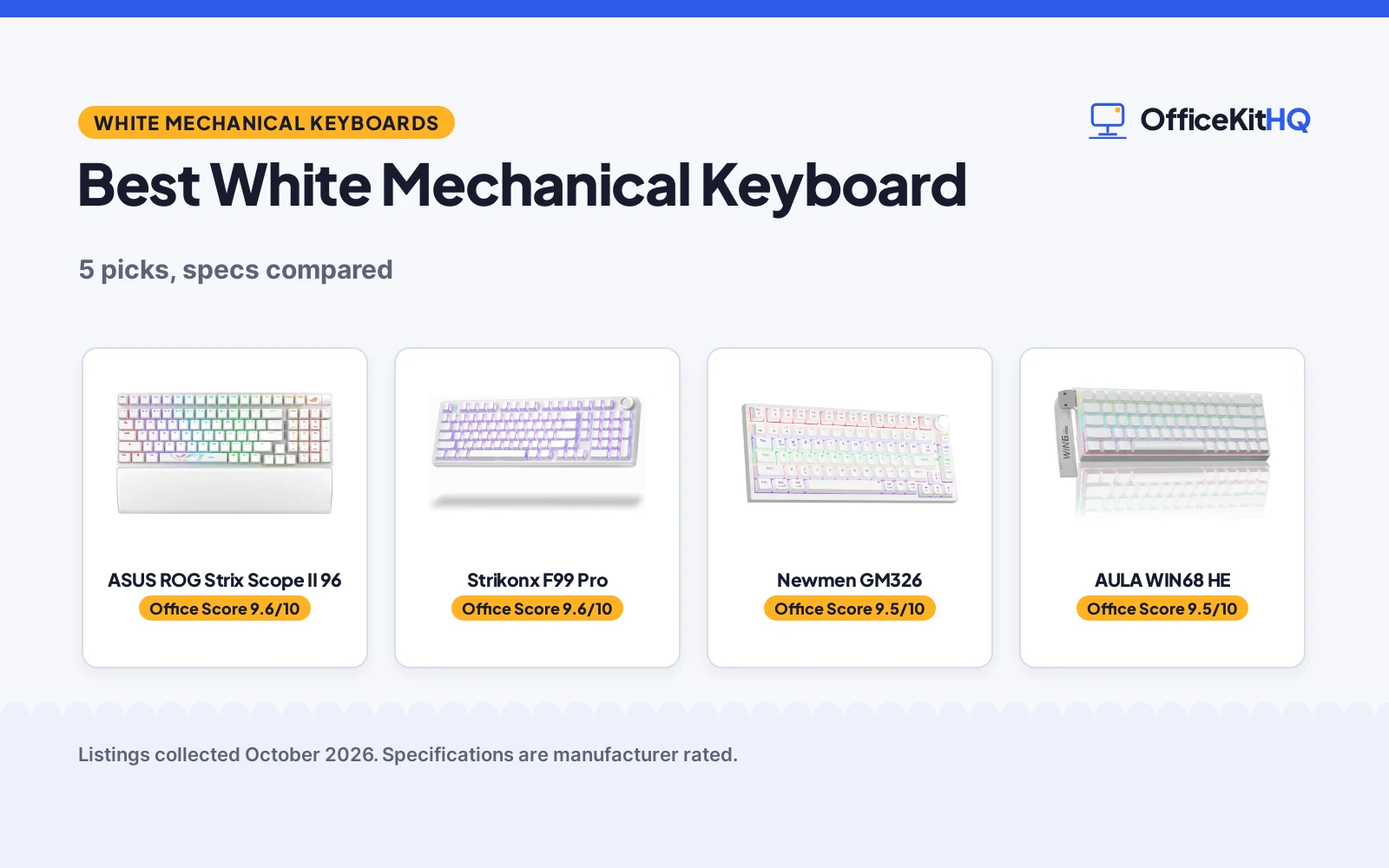
| 1 | ASUS ROG Strix Scope II 96 | 9.6/10 | Buy on Amazon |
| 2 | Strikonx F99 Pro | 9.6/10 | Buy on Amazon |
| 3 | Newmen GM326 | 9.5/10 | Buy on Amazon |
| 4 | AULA WIN68 HE | 9.5/10 | Buy on Amazon |
| 5 | SOLAKAKA KI99 Pro | 9.5/10 | Buy on Amazon |

ASUS ROG Strix Scope II 96
A 96% wireless mechanical keyboard with tri-mode connection, hot swappable pre-lubed ROG NX Storm clicky switches, PBT keycaps and RGB lighting.
Pros
- Tri-mode connection: Bluetooth for up to 3 devices, 2.4GHz wireless and USB wired
- Battery life of up to 1,500 hours in 2.4GHz wireless mode
- Hot swappable pre-lubed ROG NX Storm clicky switches with PBT keycaps
- Detachable wrist rest and three adjustable tilt positions
Cons
- Spec table lists Button Quantity 104 while Number of Keys is 96
- Battery life figure is for 2.4GHz wireless mode only
- No mAh battery capacity stated
- Clicky switches are not the silent type listed by other picks
Detailed Review
ASUS lists the ROG Strix Scope II 96 as a 96% wireless keyboard with tri-mode connection, hot swappable pre-lubed ROG NX Storm clicky switches, PBT keycaps and RGB lighting. It connects by Bluetooth for up to 3 devices, by 2.4GHz wireless and by USB wired, with a battery life of up to 1,500 hours in 2.4GHz wireless mode, sound-dampening foam and switch-dampening pads, a multi-function wheel, three adjustable tilt positions and a detachable wrist rest. The spec table lists Button Quantity 104 and Number of Keys 96, so the 96 figure from the title and the Number of Keys field is the one to follow.
Who it's for: someone who wants a 96% layout with a number pad, tri-mode connection and clicky switches. Who should skip it: anyone who wants silent switches or a stated mAh battery capacity.
Its Office Score of 9.6/10 comes from performance 32/35, build 22/25, value 20/25, safety 0/10 and warranty 3/5: 77 of 100 points, placed on our 9.2 to 9.8 scale.
Key Specifications
| Layout | 96% |
|---|---|
| Connection | Tri-Mode |
| Switch | Clicky ROG NX Storm |
| Battery | 1,500 hours in 2.4GHz mode |
Figures as published on the retailer listing, collected 25 October 2026. Performance figures are manufacturer rated.
Safety and Warranty
What this listing states. No FCC or other safety listing is stated, so safety scores zero. 1 year. It does not say everything a buyer needs, such as who pays return shipping, so warranty scores 3 of 5. See How We Pick.
Fit the desk first. Check the stated size against your desk depth and keyboard tray, and charge or pair as the manual describes. No keyboard, mouse or wrist rest prevents or treats injury.
This is general buying information, not professional advice. Follow each product manual and local rules, and see our Safety Disclaimer.

Strikonx F99 Pro
A 96% wireless silent mechanical keyboard with tri-mode connection, a multi-function knob, side-printed PBT keycaps and RGB backlighting.
Pros
- Tri-mode connection: BT5.0, 2.4G wireless and USB-C wired, for up to five devices
- Silent linear switches, hot swappable for 3-pin and 5-pin options
- 8000mAh rechargeable battery
- Multi-function knob for brightness, lighting effects, volume and media playback
Cons
- Mode switch needs a long press of 5 seconds
- No key count stated in the spec table
- No dimensions stated in the spec table
- Music rhythm modes need driver use
Detailed Review
Strikonx lists the F99 Pro as a 96% wireless silent keyboard with tri-mode connection, gasket mounting, hot swappable silent linear switches, side-printed PBT keycaps and RGB backlighting. It pairs with up to five devices by BT5.0, 2.4G wireless and USB-C wired, with an 8000mAh battery, a multi-function knob, 16 RGB lighting effects and 16.8 million colors. The title names AULA while the brand field names Strikonx, so the F99 Pro model name is the one to follow.
Who it's for: someone who wants a silent 96% layout with a knob and an 8000mAh battery. Who should skip it: anyone who wants a stated key count or stated dimensions in the spec table.
Its Office Score of 9.6/10 comes from performance 30/35, build 21/25, value 21/25, safety 0/10 and warranty 3/5: 75 of 100 points, placed on our 9.2 to 9.8 scale.
Key Specifications
| Layout | 96% |
|---|---|
| Connection | Tri-Mode |
| Switch | Linear Silent |
| Battery | 8000mAh |
Figures as published on the retailer listing, collected 25 October 2026. Performance figures are manufacturer rated.
Safety and Warranty
What this listing states. No FCC or other safety listing is stated, so safety scores zero. 1 Year. It does not say everything a buyer needs, such as who pays return shipping, so warranty scores 3 of 5. See How We Pick.
Fit the desk first. Check the stated size against your desk depth and keyboard tray, and charge or pair as the manual describes. No keyboard, mouse or wrist rest prevents or treats injury.
This is general buying information, not professional advice. Follow each product manual and local rules, and see our Safety Disclaimer.

Newmen GM326
A 75% wired mechanical keyboard with red linear switches, hot swappable 3-pin switches, a multi-function knob and rainbow backlighting.
Pros
- Hot swappable 3-pin switches with red linear switches
- Multi-function knob in the upper right corner for sound level
- 82 keys in a compact 75% layout
- 6 backlighting colors and 20 backlighting modes
Cons
- Spec table lists Single Color for backlighting while bullets list rainbow backlighting and 6 colors
- Wired USB-C only
- Spec table lists QWERTZ layout
- 82 keys, fewer keys than 96% layouts
Detailed Review
Newmen lists the GM326 as a 75% wired keyboard with rainbow backlighting, hot swappable red linear switches, a multi-function knob and 82 keys. It offers 6 backlighting colors and 20 backlighting modes, three indicator lights for Caps lock, Win lock and Windows/Mac switch, full key anti-ghosting and two-stage tilt legs. The spec table lists Single Color for backlighting, while the bullets list rainbow backlighting and 6 colors, so the bullets figure is the one to follow.
Who it's for: someone who wants a compact 75% wired keyboard with a knob and rainbow backlighting. Who should skip it: anyone who wants wireless connection or a QWERTY layout.
Its Office Score of 9.5/10 comes from performance 29/35, build 20/25, value 20/25, safety 0/10 and warranty 2/5: 71 of 100 points, placed on our 9.2 to 9.8 scale.
Key Specifications
| Layout | 75% |
|---|---|
| Keys | 82 |
| Switch | Linear Red |
| Connection | Wired USB-C |
Figures as published on the retailer listing, collected 25 October 2026. Performance figures are manufacturer rated.
Safety and Warranty
What this listing states. This product does not plug in or run on a battery, so safety is not part of its score. 12 month. It does not say everything a buyer needs, such as who pays return shipping, so warranty scores 2 of 5. See How We Pick.
Fit the desk first. Check the stated size against your desk depth and keyboard tray, and charge or pair as the manual describes. No keyboard, mouse or wrist rest prevents or treats injury.
This is general buying information, not professional advice. Follow each product manual and local rules, and see our Safety Disclaimer.

AULA WIN68 HE
A 60% wired mechanical keyboard with Hall Effect magnetic switches, adjustable actuation, 8,000Hz polling rate and RGB backlighting.
Pros
- 8,000Hz polling rate with 0.3ms latency
- Adjustable actuation from 0.02mm to 3.44mm, in 0.1mm units
- 68 keys in a 60% layout with arrow keys
- 16.8 million RGB colors with 14 preset lighting effects
Cons
- Wired USB-C only
- Web driver does not support Mac, only Windows
- Warranty term is 6 Months, shorter than 1 year terms
- No number pad, since the layout is 60%
Detailed Review
AULA lists the WIN68 HE as a 60% wired keyboard with Hall Effect magnetic switches, fast trigger mode, 8,000Hz polling rate and RGB backlighting. It offers adjustable actuation from 0.02mm to 3.44mm in 0.1mm units, 0.3ms latency, 16.8 million colors and 14 preset lighting effects, with a detachable USB cable and a keycap puller in the box. The web driver supports Windows only, not Mac, so the Windows figure is the one to follow for driver use.
Who it's for: someone who wants a compact 60% keyboard with Hall Effect switches and fast polling. Who should skip it: anyone who wants a number pad, wireless connection or Mac driver support.
Its Office Score of 9.5/10 comes from performance 30/35, build 21/25, value 19/25, safety 0/10 and warranty 1/5: 71 of 100 points, placed on our 9.2 to 9.8 scale.
Key Specifications
| Layout | 60% |
|---|---|
| Keys | 68 |
| Switch | Hall Effect Magnetic |
| Polling Rate | 8,000Hz |
Figures as published on the retailer listing, collected 25 October 2026. Performance figures are manufacturer rated.
Safety and Warranty
What this listing states. This product does not plug in or run on a battery, so safety is not part of its score. 6 Months. It does not say everything a buyer needs, such as who pays return shipping, so warranty scores 1 of 5. See How We Pick.
Fit the desk first. Check the stated size against your desk depth and keyboard tray, and charge or pair as the manual describes. No keyboard, mouse or wrist rest prevents or treats injury.
This is general buying information, not professional advice. Follow each product manual and local rules, and see our Safety Disclaimer.

SOLAKAKA KI99 Pro
A 96% wireless mechanical keyboard with triple-mode connection, a multifunctional knob, gasket structure, five-layer noise reduction and PBT keycaps.
Pros
- Triple-mode connection: BT5.0, 2.4GHz wireless and Type-C wired, with signal up to 10M
- 10,000mAh battery
- Gasket structure with five-layer noise reduction
- 16.8 million RGB colors with side RGB light bars
Cons
- Warranty Description is 1 with no unit stated, so no concrete warranty term
- Color is Graywhite, not pure White
- No key count stated in the spec table
- No dimensions stated in the spec table
Detailed Review
SOLAKAKA lists the KI99 Pro as a 96% wireless keyboard with triple-mode connection, a multifunctional knob, gasket structure, five-layer noise reduction, hot swappable switches and PBT keycaps. It connects by BT5.0, 2.4GHz wireless and Type-C wired, with a 10,000mAh battery, a 1.2mm flex-cut hot-swappable PCB for 3-pin and 5-pin switches, and 16.8 million colors. The warranty field lists 1 with no unit, so no concrete warranty term is stated for this pick.
Who it's for: someone who wants a 96% wireless keyboard with a 10,000mAh battery and a knob. Who should skip it: anyone who wants a concrete warranty term or a stated key count.
Its Office Score of 9.5/10 comes from performance 30/35, build 21/25, value 21/25, safety 0/10 and warranty 0/5: 72 of 100 points, placed on our 9.2 to 9.8 scale.
Key Specifications
| Layout | 96% |
|---|---|
| Connection | Tri-Mode |
| Switch | Linear Silent |
| Battery | 10,000mAh |
Figures as published on the retailer listing, collected 25 October 2026. Performance figures are manufacturer rated.
Safety and Warranty
What this listing states. No FCC or other safety listing is stated, so safety scores zero. No warranty term, so warranty scores zero. See How We Pick.
Fit the desk first. Check the stated size against your desk depth and keyboard tray, and charge or pair as the manual describes. No keyboard, mouse or wrist rest prevents or treats injury.
This is general buying information, not professional advice. Follow each product manual and local rules, and see our Safety Disclaimer.
As an Amazon Associate I earn from qualifying purchases.
More picks to compare
 E-YOOSO 75% Wireless Keyboard75% wireless mechanical keyboard in White for a compact desk.Check on Amazon
 Logitech G316 X 98 KeyboardMechanical gaming keyboard in White, model G316 X 98, with linear switches.Check on Amazon
Compare the picks
| Keyboard | Office Score | Layout | Keys | Connection | Switch | Warranty | Amazon |
|---|---|---|---|---|---|---|---|
| ASUS ROG Strix Scope II 96 | 9.6/10 | 96% | 96 | Tri-Mode | Clicky | 1 year | View on Amazon |
| Strikonx F99 Pro | 9.6/10 | 96% | Not stated | Tri-Mode | Linear Silent | 1 Year | View on Amazon |
| Newmen GM326 | 9.5/10 | 75% | 82 | Wired USB-C | Linear Red | 12 month | View on Amazon |
| AULA WIN68 HE | 9.5/10 | 60% | 68 | Wired USB-C | Hall Effect | 6 Months | View on Amazon |
| SOLAKAKA KI99 Pro | 9.5/10 | 96% | Not stated | Tri-Mode | Linear Silent | Not stated | View on Amazon |
Specifications are manufacturer rated as listed, collected 25 October 2026. 4 of the 5 state a concrete warranty term; 1 lists a warranty figure with no unit.
How we scored them
The Office Score weighs performance, build, value, safety and warranty. For a keyboard, safety means a stated safety listing or certification on the listing; none of the 5 state one, so safety scores are low for every pick here. 4 listings state a concrete warranty term, and the SOLAKAKA listing gives a warranty figure with no unit. How we pick explains the weights.
| Product | Office Score | Perf. /35 | Build /25 | Value /25 | Safety /10 | Warranty /5 |
|---|---|---|---|---|---|---|
| ASUS ROG Strix Scope II 96 | 9.6 | 32 | 22 | 20 | 0 | 3 |
| Strikonx F99 Pro | 9.6 | 30 | 21 | 21 | 0 | 3 |
| Newmen GM326 | 9.5 | 29 | 20 | 20 | 0 | 2 |
| AULA WIN68 HE | 9.5 | 30 | 21 | 19 | 0 | 1 |
| SOLAKAKA KI99 Pro | 9.5 | 30 | 21 | 21 | 0 | 0 |
Scores run from 9.2 to 9.8: each product’s point total is placed on that range, so more points always means a higher score.
How to choose the best white mechanical keyboard
Start with layout and key count
Layout decides desk space and key count. The ASUS and SOLAKAKA picks use a 96% layout, the Strikonx pick uses a 96% layout, the Newmen pick uses a 75% layout, and the AULA pick uses a 60% layout. Key counts where stated are 96 for the ASUS, 82 for the Newmen and 68 for the AULA, while the Strikonx and SOLAKAKA spec tables do not state a key count. A mechanical keyboard white search covers all of these layouts, so match the layout to desk space and to whether a number pad matters.
| Keyboard | Layout | Keys | Connection |
|---|---|---|---|
| ASUS ROG Strix Scope II 96 | 96% | 96 | Tri-Mode |
| Strikonx F99 Pro | 96% | Not stated | Tri-Mode |
| Newmen GM326 | 75% | 82 | Wired USB-C |
| AULA WIN68 HE | 60% | 68 | Wired USB-C |
| SOLAKAKA KI99 Pro | 96% | Not stated | Tri-Mode |
Figures as stated in each listing.
Switches and sound
Switch type decides the typing character in the listing words. The ASUS lists clicky ROG NX Storm switches, the Newmen lists red linear switches, the AULA lists Hall Effect magnetic switches, and the SOLAKAKA and Strikonx list silent linear switches. Silent switches suit shared spaces in the listing words, while clicky switches suit a reader who wants a tactile click. Check the switch line before choosing.
Connection and battery
Connection decides whether a cable stays on the desk. The ASUS, Strikonx and SOLAKAKA picks offer tri-mode connection by Bluetooth, 2.4GHz wireless and USB wired, while the Newmen and AULA picks offer wired USB-C only. Battery figures differ: the ASUS lists up to 1,500 hours in 2.4GHz wireless mode, the SOLAKAKA lists 10,000mAh, and the Strikonx lists 8000mAh. A mice and mouse pads guide can help with the rest of a desk setup, but the keyboard connection should be chosen first.
Backlighting and knob
Backlighting and a knob change daily use. The Newmen lists 6 backlighting colors and 20 backlighting modes, the ASUS lists per-key RGB lighting, the SOLAKAKA lists 16.8 million colors with side RGB light bars, the Strikonx lists 16 RGB lighting effects and 16.8 million colors, and the AULA lists 16.8 million colors with 14 preset lighting effects. The Newmen, SOLAKAKA and Strikonx list a knob, and the ASUS lists a multi-function wheel for media and lighting adjustments. A keyboard with a compact layout leaves room on a standing desk for other gear.
Setup Notes
- Check layout and key count against desk space: layouts in this set run from 60% to 96%, with key counts from 68 to 96 where stated.
- Check cable and power: wired picks use USB-C, and wireless picks use Bluetooth, 2.4GHz wireless and USB-C wired modes.
- Check battery figures before a wireless pick: the SOLAKAKA lists 10,000mAh and the Strikonx lists 8000mAh.
- Check knob or wheel lines: the Newmen, SOLAKAKA and Strikonx list a knob, and the ASUS lists a multi-function wheel.
- Check box contents for a keycap puller and a wrist rest: the ASUS box holds a wrist rest and a keycap puller, and other boxes hold a keycap puller where stated.
Frequently Asked Questions
What size mechanical keyboard should I get?
Match the layout to desk space and to whether a number pad matters. The picks here use 60%, 75% and 96% layouts, with key counts of 68, 82 and 96 where stated, so a compact layout suits a small desk and a 96% layout keeps a number pad.
Can mechanical keyboards be quiet?
Yes for picks that list silent switches. The SOLAKAKA lists a Silent Switch, and the Strikonx lists silent linear switches with multi-layer noise reduction. The ASUS lists clicky switches instead, so check the switch line for the pick in question.
Do I need a mechanical keyboard?
A mechanical keyboard suits a reader who wants a choice of switch type, layout and connection for a home desk. A membrane keyboard is not in this set, so compare the switch, layout and connection lines here against the keyboard already on the desk.
How to clean a mechanical keyboard properly?
Use the keycap puller where included to lift keycaps, then wipe the surface with a dry cloth and replace the keycaps in place. The ASUS, AULA and Strikonx boxes hold a keycap puller, so check the box contents for the pick in question before cleaning.
How to clean a mechanical keyboard without removing keys?
Wipe over the keycaps with a dry cloth and brush loose dust from between the keys without lifting them. Leave the keycaps in place, and avoid liquids on the keyboard surface.
Related guides
See every Keyboards and Keyboard Trays guide and all Monitor Mounts, Keyboards and Mice guides.
More picks: mice and mouse pads, webcams and ring lights, monitor arms and stands.