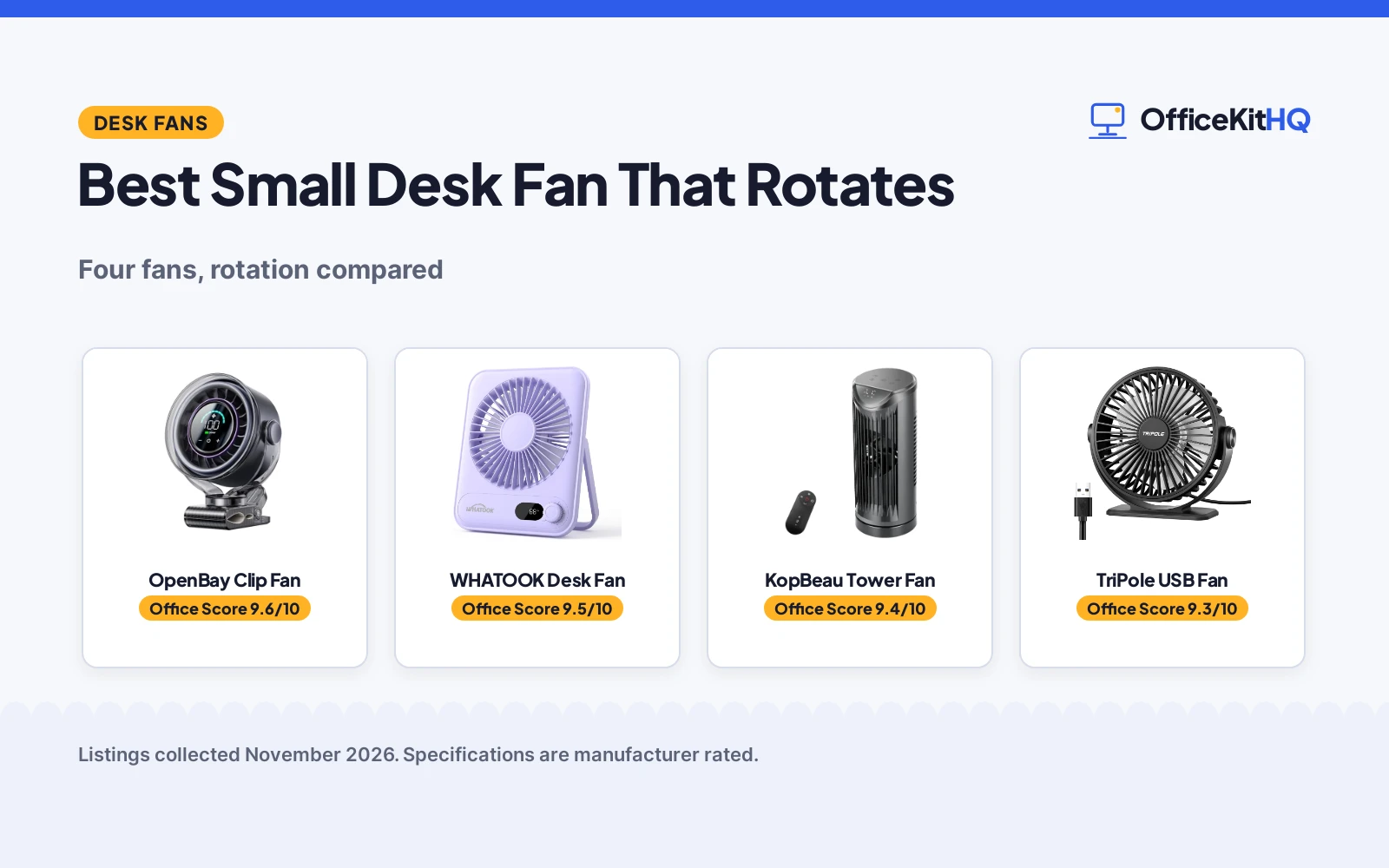
A morning video call at a home desk is when the best small desk fan that rotates earns its place: still air over the keyboard makes a long call feel longer, and a fan that sweeps the breeze across the desk instead of blasting the same spot keeps the setup comfortable. We compared rotating desk fans by rotation angle, speeds, power source, size and battery, using only what each listing publishes.
OfficeKitHQ earns a commission when you buy through links on this page, at no extra cost to you. As an Amazon Associate I earn from qualifying purchases. Affiliate disclosure.
Quick picks
 Best Overall OpenBay Clip Fan: 100 speeds, 360 degree rotation and a 3000mAh battery Check price on Amazon
 Best Tower Pick KopBeau Tower Fan: Tower fan with 60 and 110 degree oscillation and remote Check price on Amazon
 Small Desk Pick WHATOOK Desk Fan: Small desk fan with 100 speeds and 2000 mAh Check price on Amazon
 Simple USB Pick TriPole USB Fan: Small portable USB fan with 3 speeds Check price on Amazon
Our desk picks
| # | Product | Office Score | Buy |
|---|---|---|---|
| 1 | OpenBay Clip Fan | 9.6/10 | Buy on Amazon |
| 2 | WHATOOK 100-Speed Desk Fan | 9.5/10 | Buy on Amazon |
| 3 | KopBeau Tower Fan | 9.4/10 | Buy on Amazon |
| 4 | TriPole USB Mini | 9.3/10 | Buy on Amazon |

OpenBay Clip Fan
A clip fan with 100 speed levels and 360 degree rotation that clamps to desks, stroller handles and treadmills.
Pros
- 100 precise speed levels with touch control and LED display
- 360 degree rotation vertically and horizontally for aiming airflow
- 3000mAh battery lasts 3 to 8 hours and runs while charging via USB-C
- Anti-slip clamp grips desks, stroller handles, golf carts, car seats and treadmills
Cons
- No warranty term stated in the listing
- Clip mounting only, with no freestanding base stated
- Small 5.5 inch size suits personal cooling, not whole-room airflow
- No charging cable length stated in the listing
Detailed Review
The OpenBay listing states a 6000 RPM motor with a 7-blade design and a 7 m/s wind speed, 100 speed levels, 360 degree rotation, an LED display showing battery level and speed, a 3000mAh battery lasting 3 to 8 hours, a full charge in 3 hours via USB-C, and running while charging. One contradiction appears inside the listing: the bullets state 1.25 lb while the spec table states 1.0 pounds, and the bullets are used here. The listing also describes the fan as ultra-compact and portable for backpacks, diaper bags and gym duffels.
Who it's for: a desk worker or traveler who wants a clip fan with fine speed control and battery use. Who should skip it: a buyer who wants a freestanding desk fan or a stated warranty term.
Its Office Score of 9.6/10 comes from performance 32/35, build 21/25, value 21/25, safety 7/10 and warranty 0/5: 81 of 100 points, placed on our 9.2 to 9.8 scale.
Key Specifications
| Speeds | 100 speed levels |
|---|---|
| Rotation | 360 degrees |
| Battery | 3000mAh |
| Dimensions | 6.1 x 3.2 x 7.5 inches |
Figures as published on the retailer listing, collected 4 November 2026. Performance figures are manufacturer rated.
Safety and Warranty
What this listing states. Anti-slip clamp grips desks, stroller handles, golf carts, car seats and treadmills, so safety scores 7 of 10. No warranty term, so warranty scores zero. See How We Pick.
Follow the manual. Assemble and use the product as the maker describes, stay under any stated capacity, and read the manual before first use.
This is general buying information, not professional advice. Follow each product manual and local rules, and see our Safety Disclaimer.

WHATOOK 100-Speed Desk Fan
A tiny 1.5 x 5.2 x 6.5 in rechargeable fan with 100 speeds and a 2000 mAh battery for 10 hours, for desks with no spare outlet.
Pros
- 100 speeds, the most here
- 2000 mAh battery for 10 hours, usable while charging
- 28 dB stated, quiet for calls
- Grille gaps stated too small for fingers
Cons
- 3W, the lowest power here
- 1.5 x 5.2 x 6.5 in moves less air than the bigger fans
- Purple is the only color stated
Detailed Review
WHATOOK lists a small desk fan measuring 1.5 x 5.2 x 6.5 in, with 100 speeds, 28 dB, 3W and a 180-degree adjustable angle. The battery is 2000 mAh for 10 hours with an LED display, and the listing offers a replacement within one year. The contradiction: the title mentions 5000 mAh for 25 hours alongside 2000 mAh, while the size field says 2000 mAh. The size field is specific to this listing, so we trust the 2000 mAh and 10-hour figures. The grille gaps are stated too small for fingers, which matters on a shared desk.
Who it's for: a small desk or a traveler who wants cordless cooling with fine speed control. Who should skip it: anyone who needs big airflow or a stated 25-hour battery.
Its Office Score of 9.5/10 comes from performance 29/35, build 19/25, value 21/25, safety 5/10 and warranty 0/5: 74 of 100 points, placed on our 9.2 to 9.8 scale.
Key Specifications
| Size | 1.5 x 5.2 x 6.5 in |
|---|---|
| Speeds | 100 |
| Battery | 2000 mAh, 10 hours |
| Noise | 28 dB |
Figures as published on the retailer listing, collected 20 October 2026. Performance figures are manufacturer rated.
Safety and Warranty
What this listing states. Grille gaps stated too small for fingers, so safety scores 5 of 10. No warranty term, so warranty scores zero. See How We Pick.
Follow the manual. Assemble and use the product as the maker describes, stay under any stated capacity, and read the manual before first use.
This is general buying information, not professional advice. Follow each product manual and local rules, and see our Safety Disclaimer.

KopBeau Tower Fan
A tower fan with 4 speeds, 2 modes and adjustable oscillation for desks, nightstands and countertops.
Pros
- Air speeds up to 17 ft/s with 4 speeds and 2 modes
- Adjustable 60 degree and 110 degree oscillation
- Remote, LED display and 12-hour timer ON/OFF
- Carry handle and compact 13-inch design for desks and nightstands
Cons
- No warranty term stated in the listing
- No power source or cable length stated in the listing
- No battery stated in the listing
- Tower form does not clamp to a desk edge or shelf
Detailed Review
The KopBeau listing states a compact tower fan with air speeds up to 17 ft/s, 4 speeds, 2 modes called Nature and Normal, adjustable 60 degree and 110 degree oscillation, a remote with LED display, a programmable 12-hour timer ON/OFF, noise of 36 to 50 dB, and a carry handle. One contradiction appears inside the listing: the bullets call it 13 inches tall while the spec table lists 42.0 inches in height, and the bullets are used here. The listing also describes soft white noise for sleep and focus.
Who it's for: a desk or nightstand user who wants personal cooling with a remote and a timer. Who should skip it: a buyer who wants a clamp fan, battery power or a stated warranty term.
Its Office Score of 9.4/10 comes from performance 29/35, build 20/25, value 20/25, safety 0/10 and warranty 0/5: 69 of 100 points, placed on our 9.2 to 9.8 scale.
Key Specifications
| Size | 13 inch |
|---|---|
| Speeds | 4 speeds, 2 modes |
| Oscillation | 60 degrees and 110 degrees |
| Noise | 36 to 50 dB |
Figures as published on the retailer listing, collected 4 November 2026. Performance figures are manufacturer rated.
Safety and Warranty
What this listing states. This product does not plug in or run on a battery, so safety is not part of its score. No warranty term, so warranty scores zero. See How We Pick.
Follow the manual. Assemble and use the product as the maker describes, stay under any stated capacity, and read the manual before first use.
This is general buying information, not professional advice. Follow each product manual and local rules, and see our Safety Disclaimer.

Pros
- 25 decibels; very quiet stated
- USB powered; portable
- 360-degree rotation
- 4.9-foot cable
Cons
- No warranty term is stated
- No safety certification is stated
- 4.5-inch diameter; small airflow
- Requires USB power source
Detailed Review
The listing states a USB-powered mini desk fan with 3 speeds and 25 decibels noise level. The 4.5-inch diameter and 360-degree rotation are listed. No warranty term or safety certification is stated.
Who it is for: travelers or anyone needing a portable USB fan. Who should skip it: anyone needing a full-size bedroom fan or a stated warranty.
Its Office Score of 9.3/10 comes from performance 23/35, build 18/25, value 18/25, safety 0/10 and warranty 0/5: 59 of 100 points, placed on our 9.2 to 9.8 scale.
Key Specifications
| Size | 4.5 inches |
|---|---|
| Noise | 25 db |
| Power | USB |
Figures as published on the retailer listing, collected 22 October 2026. Performance figures are manufacturer rated.
Safety and Warranty
What this listing states. This product does not plug in or run on a battery, so safety is not part of its score. No warranty term, so warranty scores zero. See How We Pick.
Surge protector limits. Look for a UL 1449 listing, never plug one strip into another, keep the total load under the stated rating, and replace the unit after a major surge or when its indicator says protection has ended.
This is general buying information, not professional advice. Follow each product manual and local rules, and see our Safety Disclaimer.
As an Amazon Associate I earn from qualifying purchases.
More picks to compare
 Yincook 9 Inch Desk FanSmall oscillating fan with 3 speeds and 4 hour timer for bedroom or officeCheck on Amazon
Specs compared
| Fan | Office Score | Size | Speeds | Rotation | Power | Amazon |
|---|---|---|---|---|---|---|
| OpenBay Clip Fan | 9.6/10 | 5.5 inch | 100 speeds | 360 degrees | 3000mAh battery | View on Amazon |
| KopBeau Tower Fan | 9.4/10 | 13 inch | 4 speeds | 60 and 110 degrees | Not stated | View on Amazon |
| WHATOOK Desk Fan | 9.5/10 | Not stated | 100 speeds | Not stated | 2000 mAh | |
| TriPole USB Fan | 9.3/10 | Not stated | 3 speeds | Not stated | USB |
Dimensions, weight limits and ranges are the maker’s ratings as each listing gives them, collected 4 November 2026.
How to choose the best small desk fan that rotates
Rotation first, then size
Rotation is the headline feature here, and the two full-data listings cover it differently. The OpenBay clip fan adjusts 360 degrees vertically and horizontally, so it tilts, swivels and angles airflow exactly where it is needed. The KopBeau tower fan offers adjustable 60 degree and 110 degree oscillation, which sweeps air across a wider area without moving the fan itself. The two title-only listings state no rotation angle, so a buyer who wants a stated sweep should stick with the full-data picks. For a stronger breeze at a desk, see powerful desk fans. A clip fan also moves with the user: the OpenBay clamp grips desks, stroller handles, golf carts, car seats and treadmills, so the same fan cools a desk and a treadmill.
Power: battery, USB or unstated
Power decides where each fan can sit. The OpenBay fan runs on a 3000mAh battery for 3 to 8 hours, charges in 3 hours via USB-C, and keeps running while it charges, which suits a desk that moves between rooms. The TriPole listing states USB power in its title, with no battery figure stated. The WHATOOK title states a 2000 mAh figure, while the KopBeau listing states no power source at all, so its placement needs checking before buying. For cordless desk cooling, see rechargeable desk fans for the office. Battery life varies too: the OpenBay range runs 3 to 8 hours.
Check the footprint before the speeds
Speed counts look impressive, but the fan still has to fit the desk. The OpenBay fan measures 6.1 x 3.2 x 7.5 inches and clips to an edge, so it leaves the desk surface clear. The KopBeau listing calls its tower 13 inches tall for desks, nightstands and countertops, which suits a desk with spare surface room. The title-only listings state no dimensions, so measure the desk first and confirm the size on the listing before choosing one of them. A small fan also suits a tight corner: the OpenBay clip design works where a tower would crowd the monitor stand. The WHATOOK and TriPole titles state no dimensions, so a buyer who wants a stated footprint should choose a full-data pick.
Noise and modes
Noise figures differ across the listings. The KopBeau listing states 36 to 50 dB with gentle white noise for sleep and focus, while the OpenBay listing describes quiet running without stating a decibel figure. Modes also differ: KopBeau offers Nature and Normal modes, while OpenBay offers 100 speed levels with no mode names stated. A buyer who wants a stated noise range should pick the listing that publishes one.
Setup Notes
- Measure the desk edge for the OpenBay clamp: the fan measures 6.1 x 3.2 x 7.5 inches.
- Allow surface room for the KopBeau tower: the listing calls it 13 inches tall for desks, nightstands and countertops.
- Plan USB-C charging for the OpenBay fan: a full charge takes 3 hours, and the fan runs while charging.
- Confirm the power source for the KopBeau fan before buying: the listing states no power source or cable length.
- Check the timer needs: the KopBeau listing states a 12-hour timer ON/OFF, while the OpenBay listing states no timer.
FAQ
What is the best fan for a small room?
For a small room, the KopBeau listing describes a small fan for desks and limited spaces, while the OpenBay clip fan suits personal cooling at a desk. The choice depends on whether the fan sits on the desk surface or clips to an edge. The KopBeau tower also fits nightstands and countertops, which helps when the desk itself is full.
Do these fans run on battery?
The OpenBay fan runs on a 3000mAh battery for 3 to 8 hours and keeps running while charging via USB-C. The WHATOOK title states a 2000 mAh figure, the TriPole title states USB power with no battery figure, and the KopBeau listing states no power source. A full OpenBay charge takes 3 hours via USB-C.
How many speeds do these fans offer?
The OpenBay and WHATOOK listings state 100 speeds, the KopBeau listing states 4 speeds with 2 modes, and the TriPole title states 3 speeds. More speeds mean finer control, but the rotation and power source matter just as much. The KopBeau modes, Nature and Normal, sit alongside its 4 speeds.
What rotation do these fans offer?
The OpenBay fan adjusts 360 degrees vertically and horizontally, and the KopBeau fan offers adjustable 60 degree and 110 degree oscillation. The TriPole and WHATOOK titles state no rotation angle. Rotation matters most when the fan serves more than one seat at the desk.
Score breakdown
The Office Score weighs performance, build, value, safety and warranty. For desk fans, safety means a stated stability or mounting feature, and only the OpenBay listing names one, an anti-slip clamp. None of the four listings states a warranty term. How we pick explains the weights.
| Product | Office Score | Perf. /35 | Build /25 | Value /25 | Safety /10 | Warranty /5 |
|---|---|---|---|---|---|---|
| OpenBay Clip Fan | 9.6 | 32 | 21 | 21 | 7 | 0 |
| KopBeau Tower Fan | 9.4 | 29 | 20 | 20 | 0 | 0 |
Office Scores run on a short 9.2 to 9.8 scale. We place each item’s weighted point total on it in proportion, so a larger total is always shown as a larger score.
More for your workspace
See every computer desks guide and all desks guides.
More picks: desk fans for studio apartments, desk fans for standing desks and standing desks.