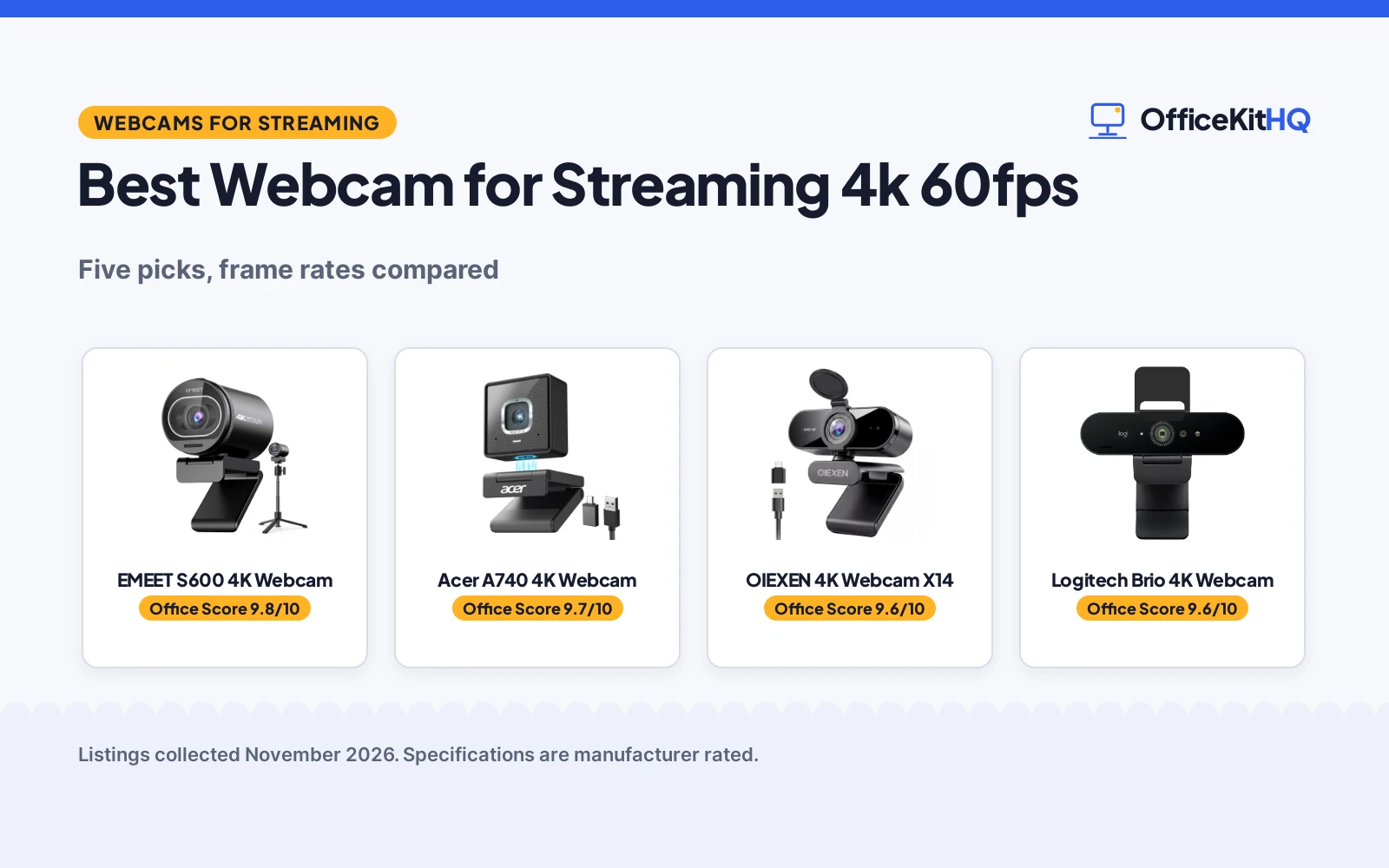
The best webcam for streaming 4k 60fps is the one that holds focus while you move, keeps your voice clear, and still looks sharp when the desk lamp is the only light. A morning call with a dim, soft webcam sets the tone for the whole stream, and the wrong camera turns every session into an apology for the picture. We compared five 4K webcams by frame rate, autofocus, microphones, privacy cover and warranty, using only what each listing publishes.
OfficeKitHQ earns a commission when you buy through links on this page, at no extra cost to you. As an Amazon Associate I earn from qualifying purchases. Affiliate disclosure.
Quick picks
 Best Overall Acer A740 4K Webcam: 4K at 30fps, 1080p at 60fps, PDAF autofocus, dual noise-canceling mics Check price on Amazon
 Best Voice Pickup OIEXEN 4K Webcam X14: Dual mics reach 16.4 ft, face-tracking PDAF autofocus, 4K at 30fps Check price on Amazon
 Best Wide View AOC 4K Webcam: 80 degree field of view, 360 degree swivel, 180 degree tilt, privacy cover Check price on Amazon
 Tripod Included EMEET S600 4K Webcam: 4K webcam with tripod, PDAF autofocus and dual noise reduction mics Check price on Amazon
 Autofocus Pick Logitech Brio 4K Webcam: 4K webcam with autofocus Check price on Amazon
Our desk picks
| # | Product | Office Score | Buy |
|---|---|---|---|
| 1 | EMEET S600 4K Webcam | 9.8/10 | Buy on Amazon |
| 2 | Acer A740 4K Webcam | 9.7/10 | Buy on Amazon |
| 3 | OIEXEN 4K Webcam X14 | 9.6/10 | Buy on Amazon |
| 4 | Logitech Brio Ultra 4K Webcam | 9.6/10 | Buy on Amazon |
| 5 | AOC AC310 4K | 9.5/10 | Buy on Amazon |

EMEET S600 4K Webcam
A 4K webcam with a Sony 1/2.55 in sensor, PDAF autofocus, two noise reduction mics and a tripod that adjusts from 6.7 to 18.5 in.
Pros
- 4K at 30FPS and 1080p at 60FPS from a Sony 1/2.55 in sensor
- PDAF autofocus with auto light adjustment for low-light rooms
- Two noise reduction mics built in
- Tripod adjusts from 6.7 to 18.5 in with a 360 degree swivel head
Cons
- 60FPS needs the 1080p mode; 4K runs at 30FPS
- 73-degree field of view is narrower than the 90-degree OIEXEN
- Tripod takes desk space a clip-on camera does not
- Video resolution depends on the camera software or apps used
Detailed Review
EMEET lists the S600 as a 4K webcam with a Sony 1/2.55 in sensor, PDAF autofocus and two noise reduction mics, plus a built-in privacy cover and a 73-degree field of view. It records 4K at 30FPS or 1080p at 60FPS, and the tripod adjusts from 6.7 to 18.5 in with a 360 degree swivel head and a 1/4 in screw for other mounts. The listing says it works with Zoom, Skype, Microsoft Teams, Google Meet and other meeting apps on Windows and macOS in UVC mode, and that video resolution depends on the camera software or apps used. The item weight is 0.41 lb and the stated warranty is 2 years.
Who it's for: a streamer who wants 4K video, autofocus and a height-adjustable tripod in one box. Who should skip it: anyone who wants 60FPS at 4K, or a clip-on camera with no tripod to set up.
Its Office Score of 9.8/10 comes from performance 33/35, build 22/25, value 21/25, safety 8/10 and warranty 4/5: 88 of 100 points, placed on our 9.2 to 9.8 scale.
Key Specifications
| Resolution | 4K at 30FPS, 1080p at 60FPS |
|---|---|
| Sensor | Sony 1/2.55 in |
| Field of view | 73 degrees |
| Item weight | 0.41 lb |
These specs mirror the retailer listing as of 18 November 2026; performance figures are stated by the brand.
Safety and Warranty
What this listing states. Built-in privacy cover is stated, so safety scores 8 of 10. 2 Year Warranty. It does not say everything a buyer needs, such as who pays return shipping, so warranty scores 4 of 5. See How We Pick.
Light and privacy. Use the supplied adapter for ring lights, keep lights and cords away from drinks and paper, and cover or unplug a webcam when it is not in use.
This is general buying information, not professional advice. Follow each product manual and local rules, and see our Safety Disclaimer.

Acer A740 4K Webcam
A 4K webcam with a Sony 1/2.8 inch sensor, PDAF autofocus and dual AI noise-canceling mics, with 4K at 30fps and 1080p at 60fps.
Pros
- 4K at 30fps with 1080p at 60fps for smoother streaming
- Sony 1/2.8 inch sensor with PDAF autofocus that locks on and holds focus
- Detachable magnetic mount with 360 degree rotation and 90 degree tilt
- Dual AI noise-canceling mics and a physical privacy shutter
Cons
- 4K tops out at 30fps, so 60fps needs 1080p
- No built-in speakers are included
- Privacy shutter slides closed by hand
- Automatic exposure only, with no manual exposure control stated
Detailed Review
The Acer A740 is a 4K webcam with a Sony 1/2.8 inch sensor, PDAF autofocus and dual AI noise-canceling mics. It records 4K at 30fps and switches to 2K or 1080p at 60fps, and the detachable magnetic mount turns 360 degrees and tilts 90 degrees. A USB-A to USB-C adapter is in the box, a physical privacy shutter slides closed, and automatic exposure with low-light correction brightens dim rooms. The maker lists it for Switch 2, Teams, Zoom, FaceTime and Twitch, and notes it has no built-in speakers. A 1 year warranty is stated.
Who it's for: a streamer who wants 4K at 30fps with 1080p at 60fps, autofocus and a mount that moves. Who should skip it: anyone who needs 4K at 60fps, which no pick here states.
Its Office Score of 9.7/10 comes from performance 32/35, build 21/25, value 21/25, safety 7/10 and warranty 2/5: 83 of 100 points, placed on our 9.2 to 9.8 scale.
Key Specifications
| Resolution | 4K at 30fps, 1080p at 60fps |
|---|---|
| Sensor | Sony 1/2.8 inch |
| Focus | PDAF autofocus |
| Mount | Magnetic, 360 degree rotation, 90 degree tilt |
These specs mirror the retailer listing as of 20 November 2026; performance figures are stated by the brand.
Safety and Warranty
What this listing states. Physical privacy shutter is stated, so safety scores 7 of 10. 1 year warranty. It does not say everything a buyer needs, such as who pays return shipping, so warranty scores 2 of 5. See How We Pick.
Light and privacy. Use the supplied adapter for ring lights, keep lights and cords away from drinks and paper, and cover or unplug a webcam when it is not in use.
This is general buying information, not professional advice. Follow each product manual and local rules, and see our Safety Disclaimer.

OIEXEN 4K Webcam X14
A 4K webcam with a Sony 1/2.8 inch 8MP CMOS sensor, PDAF autofocus with face tracking and dual mics that reach 16.4 ft.
Pros
- 4K at 30fps with 1080p at 60fps for fluid streaming
- PDAF autofocus with face tracking that holds focus while moving
- Dual mics pick up voice up to 16.4 ft with adaptive noise reduction
- Auto-exposure, auto white balance and intelligent light adjustment
Cons
- 4K tops out at 30fps, so 60fps needs 1080p
- 6.6 ft cable limits how far the camera can sit from the computer
- No manual focus control is stated
- Warranty covers 1 year only
Detailed Review
The OIEXEN X14 is a 4K webcam with a Sony 1/2.8 inch 8MP CMOS sensor, PDAF autofocus with face tracking and dual noise-canceling mics. It records 4K at 30fps and switches to 1080p at 60fps when the device or software does not support 4K. The mics pick up voice up to 16.4 ft, the mount turns on a 360 degree ball joint, and the 6.6 ft cable comes with a USB-A to USB-C adapter. Auto-exposure, auto white balance and intelligent light adjustment adapt to the room, and a privacy cover flips down over the lens. A 1 year manufacturer warranty is stated.
Who it's for: a streamer who moves in frame and wants face tracking with mics that reach across the room. Who should skip it: anyone who needs 4K at 60fps or a longer cable than 6.6 ft.
Its Office Score of 9.6/10 comes from performance 30/35, build 21/25, value 21/25, safety 7/10 and warranty 2/5: 81 of 100 points, placed on our 9.2 to 9.8 scale.
Key Specifications
| Resolution | 4K at 30fps, 1080p at 60fps |
|---|---|
| Sensor | 8MP CMOS, Sony 1/2.8 inch |
| Focus | PDAF autofocus with face tracking |
| Cable | 6.6 ft, USB-A to USB-C adapter |
These specs mirror the retailer listing as of 20 November 2026; performance figures are stated by the brand.
Safety and Warranty
What this listing states. Integrated privacy cover is stated, so safety scores 7 of 10. 1 Year Manufacturer warranty. It does not say everything a buyer needs, such as who pays return shipping, so warranty scores 2 of 5. See How We Pick.
Light and privacy. Use the supplied adapter for ring lights, keep lights and cords away from drinks and paper, and cover or unplug a webcam when it is not in use.
This is general buying information, not professional advice. Follow each product manual and local rules, and see our Safety Disclaimer.

Logitech Brio Ultra 4K Webcam
A 4K webcam with autofocus, best for interviewees who want 4K with platform certifications.
Pros
- 4K at 30fps with autofocus and 5x digital zoom
- Dual omnidirectional noise-canceling mics
- Windows Hello facial recognition
- 1 Year Limited Hardware Warranty stated
Cons
- 2.22 ounces with no stated cable length
- Not water resistant, per the spec table
- Logi Options+ app needed for full controls
- Attachable privacy shutter, not built in
Detailed Review
Logitech lists the Brio Ultra 4K as an Ultra HD webcam with 4K at 30fps, autofocus and 5x digital zoom. RightLight 3 adjusts exposure and contrast, and dual omnidirectional noise-canceling mics capture audio from up to 1.2 meters. Windows Hello facial recognition works with optical and infrared sensors, and an attachable privacy shutter flips up and down. The spec table gives a 1.06 by 4.02 by 1.02 inch size, a 2.22-ounce weight and a 1 Year Limited Hardware Warranty.
Who it's for: interviewees who want 4K with platform certifications. Who should skip it: anyone who wants a built-in privacy shutter.
Its Office Score of 9.6/10 comes from performance 33/35, build 20/25, value 20/25, safety 5/10 and warranty 3/5: 81 of 100 points, placed on our 9.2 to 9.8 scale.
Key Specifications
| Video | 4K@30fps |
|---|---|
| Zoom | 5x digital |
| Mic | Dual noise-canceling |
| Warranty | 1 Year |
Figures as published on the retailer listing, collected 17 October 2026. Performance figures are manufacturer rated.
Safety and Warranty
What this listing states. Attachable privacy shutter stated, so safety scores 5 of 10. 1 Year Limited Hardware Warranty. It does not say everything a buyer needs, such as who pays return shipping, so warranty scores 3 of 5. See How We Pick.
Light and privacy. Use the supplied adapter for ring lights, keep lights and cords away from drinks and paper, and cover or unplug a webcam when it is not in use.
This is general buying information, not professional advice. Follow each product manual and local rules, and see our Safety Disclaimer.

AOC AC310 4K
A 4K webcam with autofocus, a noise-reducing mic, sliding privacy cover and a 3-year manufacturer warranty.
Pros
- 4K video with 8 megapixel stills stated
- Autofocus with 180-degree tilt and 360-degree swivel
- Sliding privacy cover and noise-reducing mic
- 3-year manufacturer warranty, the longest here
Cons
- No safety certification is stated
- 0.16 kg with no stated clip details beyond USB form
- Viewing angle contradiction makes framing claims uncertain
Detailed Review
AOC lists the AC310 as a 4K webcam with 8 megapixel stills, autofocus, a wide-angle lens, a noise-reducing microphone and automatic light correction, with 180-degree tilt and 360-degree swivel and a sliding privacy cover. It connects over USB-C with a USB-A adapter included and works with Zoom, Teams and Skype. The listing contradicts itself on the field of view: the bullets say 80 degrees while the spec table says 90 degrees, so treat the exact figure as unconfirmed. A 3 year manufacturer warranty is stated.
Who it's for: someone who wants the only 4K image here with autofocus and the longest stated warranty. Who should skip it: anyone who needs a confirmed field of view figure or a clip-style mount.
Its Office Score of 9.5/10 comes from performance 30/35, build 20/25, value 20/25, safety 0/10 and warranty 4/5: 74 of 100 points, placed on our 9.2 to 9.8 scale.
Key Specifications
| Resolution | 4K |
|---|---|
| Focus | Autofocus |
| Field of view | 80 or 90 degrees |
| Warranty | 3 years |
Figures as published on the retailer listing, collected 17 October 2026. Performance figures are manufacturer rated.
Safety and Warranty
What this listing states. This product does not plug in or run on a battery, so safety is not part of its score. 3 Year Manufacturer. It does not say everything a buyer needs, such as who pays return shipping, so warranty scores 4 of 5. See How We Pick.
Light and privacy. Use the supplied adapter for ring lights, keep lights and cords away from drinks and paper, and cover or unplug a webcam when it is not in use.
This is general buying information, not professional advice. Follow each product manual and local rules, and see our Safety Disclaimer.
As an Amazon Associate I earn from qualifying purchases.
Specs compared
| Webcam | Office Score | Video | Autofocus | Microphones | Privacy | Warranty | Amazon |
|---|---|---|---|---|---|---|---|
| Acer A740 4K Webcam | 9.7/10 | 4K at 30fps, 1080p at 60fps | PDAF | Dual AI noise-canceling | Privacy shutter | 1 year | View on Amazon |
| OIEXEN 4K Webcam X14 | 9.6/10 | 4K at 30fps, 1080p at 60fps | PDAF, face tracking | Dual noise-canceling, 16.4 ft | Privacy cover | 1 year | View on Amazon |
| AOC 4K Webcam | 9.5/10 | 4K, frame rate not stated | Not stated | Built-in noise-reducing mic | Sliding lens cover | Not stated | |
| EMEET S600 4K Webcam | 9.8/10 | 4K, frame rate not stated | PDAF | Dual noise reduction | Not stated | Not stated | View on Amazon |
| Logitech Brio 4K Webcam | 9.6/10 | 4K, frame rate not stated | Autofocus | Not stated | Not stated | Not stated |
All numbers are the manufacturer’s stated specs, not measured in an office, pulled on 20 November 2026. None of the five lists 4K at 60fps: the Acer and OIEXEN record 4K at 30fps and switch to 1080p for 60fps, and the AOC, EMEET and Logitech state no frame rate.
How to choose the best webcam for streaming 4k 60fps
Start with the frame rate, not the resolution
Every pick here is a 4K webcam, and that is where the sameness ends. The Acer and OIEXEN both record 4K at 30fps and switch to 1080p for 60fps, so a stream that needs smooth motion runs at 1080p on those two. The AOC, EMEET and Logitech state 4K with no frame rate, so a buyer who needs 60fps cannot confirm it from those three. Pick the resolution the stream actually uses, then check the frame rate that goes with it.
| Webcam | 4K mode | 60fps mode |
|---|---|---|
| Acer A740 4K Webcam | 4K at 30fps | 1080p at 60fps |
| OIEXEN 4K Webcam X14 | 4K at 30fps | 1080p at 60fps |
| AOC 4K Webcam | 4K | Not stated |
| EMEET S600 4K Webcam | 4K | Not stated |
| Logitech Brio 4K Webcam | 4K | Not stated |
Autofocus that holds while you move
PDAF autofocus is the feature to look for when the speaker leans in, gestures, or shifts in the chair. The Acer and OIEXEN both state PDAF autofocus, and the OIEXEN adds face tracking that follows the speaker around the frame, which suits a webcam that follows you while you present. The EMEET states PDAF autofocus and the Logitech states autofocus, while the AOC states no focus system. A camera without a stated focus system can still work for a caller who sits still, but a streamer who moves needs the focus term in writing.
Microphones and how far they reach
Built-in mics decide whether a separate microphone is needed on the desk. The OIEXEN states dual mics that pick up voice up to 16.4 ft with adaptive noise reduction, which suits a room where the speaker moves away from the desk. The Acer states dual AI noise-canceling mics, the AOC states a built-in noise-reducing mic, and the EMEET states dual noise reduction mics. The Logitech states no microphone, so a buyer who needs one should check the best USB microphone for video calls before counting on it. A stated mic distance is worth more than a stated mic count when the room is large.
Privacy covers and mounts
A physical cover over the lens is the simplest privacy feature on a webcam, and three of these five state one: the Acer has a privacy shutter, the OIEXEN has a privacy cover, and the AOC has a sliding lens cover. Mounts decide where the camera can sit: the Acer uses a detachable magnetic mount with 360 degree rotation and 90 degree tilt, the OIEXEN uses a 360 degree ball joint with a 6.6 ft cable, the AOC swivels 360 degrees and tilts 180 degrees, and the EMEET comes with a tripod. See the full webcams and ring lights category for more mounts and lights. The Logitech states no cover and no mount, so its placement needs a separate check.
Read the warranty line
Two of the five state a warranty term, and both state 1 year: the Acer at 1 year and the OIEXEN at 1 year manufacturer. The AOC, EMEET and Logitech state no warranty term, which leaves the buyer with no written term to fall back on. A 1 year term is short for a camera that streams every day, so weigh it against the frame rate and microphone figures before choosing.
FAQ
Can any of these webcams stream 4K at 60fps?
No. None of the five lists 4K at 60fps. The Acer and OIEXEN record 4K at 30fps and switch to 1080p for 60fps, and the AOC, EMEET and Logitech state no frame rate.
Which webcam has the longest microphone reach?
The OIEXEN, with dual mics that pick up voice up to 16.4 ft. The Acer and AOC state noise-canceling or noise-reducing mics without a distance, and the Logitech states no microphone.
Do these webcams work with Zoom and Teams?
The Acer lists Teams, Zoom, FaceTime, Twitch and Switch 2, and the AOC lists Zoom, Teams, Skype and FaceTime. The OIEXEN, EMEET and Logitech state no platform list.
Which webcam is best for a dim room?
The Acer states automatic exposure with low-light correction, and the OIEXEN states auto-exposure, auto white balance and intelligent light adjustment. The AOC states automatic light correction, while the EMEET and Logitech state no lighting feature.
Do any of these webcams include a privacy cover?
The Acer has a physical privacy shutter, the OIEXEN has a privacy cover, and the AOC has a sliding lens cover. The EMEET and Logitech state no privacy cover.
Score breakdown
The Office Score weighs performance (resolution, frame rate, autofocus and microphones), build (sensor, mount and cable), value for the stated specs, safety and warranty. For a webcam, safety means a stated privacy cover or shutter; the Acer, OIEXEN and AOC state one, and the other two do not. Two listings state a warranty term: the Acer at 1 year and the OIEXEN at 1 year manufacturer. How we pick explains the weights.
| Product | Office Score | Perf. /35 | Build /25 | Value /25 | Safety /10 | Warranty /5 |
|---|---|---|---|---|---|---|
| Acer A740 4K Webcam | 9.7 | 32 | 21 | 21 | 7 | 2 |
| OIEXEN 4K Webcam X14 | 9.6 | 30 | 21 | 21 | 7 | 2 |
We fit point totals onto a 9.2 low and 9.8 high in a straight line. One item can outscore another only by earning more points.
More for your workspace
See every webcams and ring lights guide and all monitor mounts, keyboards and mice guides. Also see our best webcam for OBS. Also see our best webcam with built in light. Also see our best ring light for Zoom calls. Also see our best USB hub for webcams.
More picks: streaming gear, stream deck for streaming, headset for streaming.