The laptop is open on the kitchen table, the video call window is up, and the cursor keeps drifting past the button you meant to click. A mouse that wanders, stutters, or quits mid-sentence turns a normal workday into a wrestling match with the pointer. The best wireless mouse for Lenovo laptop setups pairs without fuss, tracks cleanly on the desk you actually have, and keeps working through a full day of calls and documents. We compared wireless mice by sensor resolution, stated click life, battery life, size, weight and warranty term, using only what each maker publishes.
OfficeKitHQ earns a commission when you buy through links on this page, at no extra cost to you. As an Amazon Associate I earn from qualifying purchases. Affiliate disclosure.
Quick picks
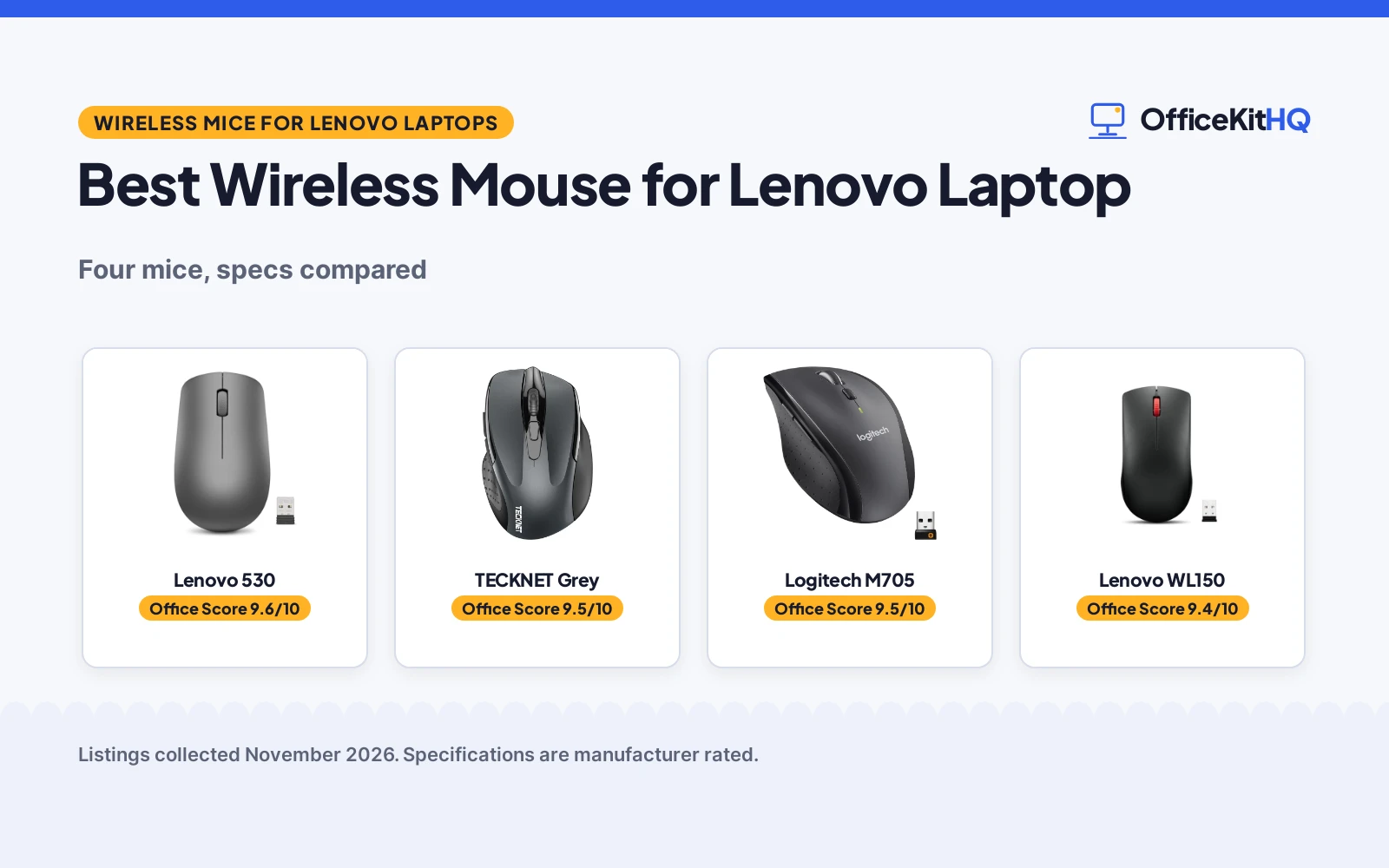
 Best Overall Lenovo 530: 1200 DPI, 8 million clicks, 12-month battery, 65 g body Check price on Amazon
 Best Scroll Durability Lenovo WL150: 300,000-cycle scroll wheel, 1,000 DPI, 1 AA battery Check price on Amazon
 Bluetooth and 2.4G TECKNET Grey: 4800 DPI, 6 buttons, Bluetooth and 2.4G in one mouse Check price on Amazon
 Five-Button Pick Logitech M705: 5 customizable buttons on a wireless mouse Check price on Amazon
Our desk picks
| # | Product | Office Score | Buy |
|---|---|---|---|
| 1 | Lenovo 530 | 9.6/10 | Buy on Amazon |
| 2 | TECKNET Grey Bluetooth Mouse | 9.5/10 | Buy on Amazon |
| 3 | Logitech M705 Marathon Mouse | 9.5/10 | Buy on Amazon |
| 4 | Lenovo WL150 | 9.4/10 | Buy on Amazon |

Lenovo 530
A full-size ambidextrous mouse with a 1200 DPI sensor, buttons rated for up to 8 million clicks, a battery life of up to 12 months and a 65 g body.
Pros
- 1200 DPI optical sensor gives responsive tracking for everyday work
- Buttons rated for up to 8 million clicks, the longest stated click life here
- Battery life of up to 12 months, the longest stated here
- 65 g body with a soft touch finish and an ambidextrous shape
Cons
- A fixed 1200 DPI setting gives no slower or faster option for fine work
- Full-size shape may crowd a small laptop sleeve or a tight bag pocket
- The nano receiver is small and easy to misplace between desks
- Graphite Grey is the only color in this listing
Detailed Review
Lenovo lists the 530 as a full-size wireless mouse with a 1200 DPI optical sensor, a 2.4 GHz nano USB receiver and an ambidextrous shape with a soft touch finish. The left and right buttons are rated for up to 8 million clicks, battery life runs up to 12 months, and the mouse weighs 65 g (2.29 oz). The stated dimensions are 4.17 by 2.48 by 1.46 in. A 1 year manufacturer warranty is stated.
Who it's for: a Lenovo laptop owner who wants a light full-size mouse with long battery life for daily office work. Who should skip it: anyone who wants adjustable DPI levels or a smaller travel mouse.
Its Office Score of 9.6/10 comes from performance 32/35, build 22/25, value 21/25, safety 0/10 and warranty 2/5: 77 of 100 points, placed on our 9.2 to 9.8 scale.
Key Specifications
| Sensor | 1200 DPI |
|---|---|
| Battery life | Up to 12 months |
| Click life | Up to 8 million clicks |
| Item weight | 65 g (2.29 oz) |
These specs mirror the retailer listing as of 18 November 2026; performance figures are stated by the brand.
Safety and Warranty
What this listing states. No FCC or other safety listing is stated, so safety scores zero. 1 year manufacturer warranty. It does not say everything a buyer needs, such as who pays return shipping, so warranty scores 2 of 5. See How We Pick.
Fit the desk first. Check the stated size against your desk depth and keyboard tray, and charge or pair as the manual describes. No keyboard, mouse or wrist rest prevents or treats injury.
This is general buying information, not professional advice. Follow each product manual and local rules, and see our Safety Disclaimer.

TECKNET Grey Bluetooth Mouse
A grey Bluetooth 5.0 mouse with 2.4G mode, 6 DPI levels to 4800, 6 buttons and a stated 36-month warranty.
Pros
- 6 DPI levels up to 4800, the widest range here
- Bluetooth 5.0/3.0 plus 2.4G with two-device switching
- 36-month warranty is stated (registration required)
- Silent clicks for shared spaces
Cons
- 2 AAA batteries are not included
- Side buttons are not silent
- Side buttons are not compatible with macOS
- No rechargeable option
Detailed Review
TECKNET lists this grey mouse with Bluetooth 5.0/3.0 and 2.4G USB-A connections, two-device switching, 6 DPI levels (4800/3200/2400/1600/1200/800), 6 buttons and silent clicks. The listing states a 10 m range, wide OS compatibility with Windows, macOS, Chrome and Linux, and 2 AAA batteries (not included) with automatic sleep. The bullets state a 36-month warranty with registration required, and the spec table agrees on 36 months.
Who it's for: someone who wants the widest DPI range here with a long stated warranty. Who should skip it: Mac users who need the side buttons, or anyone who wants rechargeable power.
Its Office Score of 9.5/10 comes from performance 29/35, build 20/25, value 21/25, safety 0/10 and warranty 4/5: 74 of 100 points, placed on our 9.2 to 9.8 scale.
Key Specifications
| Bluetooth | 5.0/3.0 + 2.4G |
|---|---|
| Max DPI | 4800 |
| Buttons | 6 |
| Warranty | 36-month |
Figures as published on the retailer listing, collected 18 October 2026. Performance figures are manufacturer rated.
Safety and Warranty
What this listing states. This product does not plug in or run on a battery, so safety is not part of its score. 36 Months Warranty (Registered Only). It does not say everything a buyer needs, such as who pays return shipping, so warranty scores 4 of 5. See How We Pick.
Fit the desk first. Check the stated size against your desk depth and keyboard tray, and charge or pair as the manual describes. No keyboard, mouse or wrist rest prevents or treats injury.
This is general buying information, not professional advice. Follow each product manual and local rules, and see our Safety Disclaimer.

Logitech M705 Marathon Mouse
A right-hand wireless mouse with 5 customizable buttons, a hyper-fast scroll wheel and a stated 3-year battery life.
Pros
- 3-year stated battery life, the longest here
- 5 customizable buttons including 2 thumb buttons
- Hyper-fast nearly frictionless metal scroll wheel
- Laser tracking stated for tricky surfaces
Cons
- 1000 DPI maximum is the lowest here
- Right-hand shape only
- No warranty term is stated
- No stated weight figure
Detailed Review
Logitech lists the M705 Marathon with 5 customizable buttons, a hyper-fast metal scroll wheel, laser-grade tracking and a sculpted right-hand shape. The listing states up to 3 years between battery changes on 2 AA batteries and a tiny Unifying receiver that stays in the laptop. The maximum sensitivity is 1000 DPI. No warranty term is stated.
Who it's for: office users who want years between battery changes and fast document scrolling. Who should skip it: gamers who need high DPI or more programmable buttons.
Its Office Score of 9.5/10 comes from performance 28/35, build 21/25, value 21/25, safety 0/10 and warranty 0/5: 70 of 100 points, placed on our 9.2 to 9.8 scale.
Key Specifications
| Buttons | 5 customizable |
|---|---|
| DPI | 1000 max |
| Battery | 3 years, 2 AA |
| Hand | Right |
Figures as published on the retailer listing, collected 17 October 2026. Performance figures are manufacturer rated.
Safety and Warranty
What this listing states. No FCC or other safety listing is stated, so safety scores zero. No warranty term, so warranty scores zero. See How We Pick.
Fit the desk first. Check the stated size against your desk depth and keyboard tray, and charge or pair as the manual describes. No keyboard, mouse or wrist rest prevents or treats injury.
This is general buying information, not professional advice. Follow each product manual and local rules, and see our Safety Disclaimer.

Lenovo WL150
A compact full-size Lenovo mouse with a 1,000 DPI sensor, buttons rated for up to 3 million clicks and one AA battery for up to 6 months.
Pros
- Receiver stores inside the mouse, so it travels with the mouse
- Scroll wheel rated for up to 300,000 cycles, the only stated scroll figure here
- Ambidextrous full-size shape suits left- and right-handed use
- One AA battery keeps the power setup simple
Cons
- 1,000 DPI is the lowest sensor resolution in this group
- 3 million click life is lower than the 8 million clicks on the Lenovo 530
- Battery life of up to 6 months is shorter than the 12 months on the Lenovo 530
- Compact full-size shape may suit medium hands better than large ones
Detailed Review
Lenovo lists the WL150 as a compact full-size wireless mouse with a 1,000 DPI optical sensor and a 2.4G nano USB-A receiver that stores in a compartment inside the mouse. The buttons are rated for up to 3 million clicks, the scroll wheel for up to 300,000 cycles, and one AA battery runs the mouse for up to 6 months. The stated length and width are 4.57 by 2.4 in. The maker gives a 0.1-inch height that does not fit the full-size shape; check before ordering. A 1 Year Warranty is stated.
Who it's for: a Lenovo laptop owner who wants a same-brand mouse with a stored receiver and a simple AA battery. Who should skip it: anyone who wants higher sensor resolution or a battery life longer than 6 months.
Its Office Score of 9.4/10 comes from performance 28/35, build 20/25, value 19/25, safety 0/10 and warranty 2/5: 69 of 100 points, placed on our 9.2 to 9.8 scale.
Key Specifications
| Sensor | 1,000 DPI |
|---|---|
| Battery life | Up to 6 months, 1 AA battery |
| Click life | Up to 3 million clicks |
| Scroll wheel | Up to 300,000 cycles |
These specs mirror the retailer listing as of 18 November 2026; performance figures are stated by the brand.
Safety and Warranty
What this listing states. No FCC or other safety listing is stated, so safety scores zero. 1 Year Warranty. It does not say everything a buyer needs, such as who pays return shipping, so warranty scores 2 of 5. See How We Pick.
Fit the desk first. Check the stated size against your desk depth and keyboard tray, and charge or pair as the manual describes. No keyboard, mouse or wrist rest prevents or treats injury.
This is general buying information, not professional advice. Follow each product manual and local rules, and see our Safety Disclaimer.
As an Amazon Associate I earn from qualifying purchases.
More picks to compare
 Lenovo 530 RedSame full-size Lenovo 530 shape in Cherry Red for buyers who want color.Check on Amazon
 TECKNET Purple MouseCompact purple mouse with adjustable DPI and long battery life for travel.Check on Amazon
 Afaartcci Rechargeable MouseRechargeable dual-mode mouse with silent clicks for quiet shared workspaces.Check on Amazon
 memzuoix Red MouseRed five-button mouse with long wireless range for large desk setups.Check on Amazon
Specs compared
| Mouse | Office Score | Sensor | Battery life | Click life | Size | Warranty | Amazon |
|---|---|---|---|---|---|---|---|
| Lenovo 530 | 9.6/10 | 1200 DPI | Up to 12 months | Up to 8 million clicks | 4.17 x 2.48 x 1.46 in | 1 year | View on Amazon |
| Lenovo WL150 | 9.4/10 | 1,000 DPI | Up to 6 months | Up to 3 million clicks | 4.57 x 2.4 in | 1 year | View on Amazon |
| TECKNET Grey | 9.5/10 | 4800 DPI | Not stated | Not stated | Not stated | Not stated | |
| Logitech M705 | 9.5/10 | Not stated | Not stated | Not stated | Not stated | Not stated |
Dimensions, weight limits and ranges are the maker’s ratings as each listing gives them, collected 18 November 2026. Two of the four state a warranty term; none state a safety certification.
How to choose the best wireless mouse for lenovo laptop
Start with sensor resolution and your screen
Sensor resolution runs from 1,000 DPI on the Lenovo WL150 to 1200 DPI on the Lenovo 530 and 4800 DPI on the TECKNET Grey, while the Logitech M705 states no sensor resolution. A higher figure suits a large screen or fast pointer movement, while a lower figure suits slow, careful work in documents and spreadsheets. The TECKNET Grey sits far above the rest on paper, but its battery life, weight and size are not stated, so the headline figure is only part of the picture. If you want grounding in how the connection and design choices differ, see the types of wireless mouse guide.
| Mouse | Sensor | Battery life | Click life |
|---|---|---|---|
| Lenovo 530 | 1200 DPI | Up to 12 months | Up to 8 million clicks |
| Lenovo WL150 | 1,000 DPI | Up to 6 months | Up to 3 million clicks |
| TECKNET Grey | 4800 DPI | Not stated | Not stated |
| Logitech M705 | Not stated | Not stated | Not stated |
Figures are as stated by each maker; a missing figure means the maker does not state it.
Match battery life to how often you travel
Battery life is the number that decides how often you think about power. The Lenovo 530 runs up to 12 months, the Lenovo WL150 runs up to 6 months on one AA battery, and the TECKNET Grey and the Logitech M705 state no battery life. A 12-month figure suits a mouse that stays on a desk, while a 6-month figure suits a mouse that moves between home and office. The WL150 takes one AA battery, so a spare fits in the same pocket as the receiver. For help picking the right cell, see the wireless mouse battery size guide.
Check the size against your hand and your bag
Size decides whether a mouse disappears into a laptop bag or fights for room beside the keyboard. The Lenovo 530 measures 4.17 by 2.48 by 1.46 in and weighs 65 g (2.29 oz), and the Lenovo WL150 measures 4.57 by 2.4 in. The TECKNET Grey and the Logitech M705 state no size or weight, so their fit in a bag is unknown before ordering. Both Lenovo mice use a full-size shape, so a buyer with small hands should check the length and width against the space beside the keyboard before ordering.
Pick the connection that fits your laptop
Both Lenovo mice connect through a 2.4G nano USB receiver: the WL150 receiver is USB-A and stores in a compartment inside the mouse, while the Lenovo 530 receiver is a nano USB receiver that plugs into a port. The TECKNET Grey adds Bluetooth beside its 2.4G connection, so it can pair without a receiver in the port. The Logitech M705 states no connection type. If your laptop has a free USB-A port, a receiver mouse is the simplest setup; if the ports are full, the Bluetooth option keeps one free. See the wireless mouse setup guide for the pairing steps.
Read the warranty line before you order
Two of the four state a warranty term, and both state 1 year: the Lenovo 530 states a 1 year manufacturer warranty and the Lenovo WL150 states a 1 Year Warranty. The TECKNET Grey and the Logitech M705 state no warranty term. A stated term matters most for the buttons and the scroll wheel, the parts that see the most use, so weigh it beside the stated click life: 8 million clicks on the Lenovo 530 and 3 million clicks on the Lenovo WL150. A mouse with no stated term is still usable, but a buyer who wants cover in writing should pick one of the two Lenovo mice.
Setup Notes
- Measure the mouse against your hand: the Lenovo 530 is 4.17 by 2.48 by 1.46 in and the Lenovo WL150 is 4.57 by 2.4 in, so check the length and width against the space beside your keyboard.
- Plan power around the stated battery life: the WL150 runs on one AA battery for up to 6 months and the Lenovo 530 runs up to 12 months, so keep a spare battery with the laptop charger.
- Keep the nano receiver with the mouse: the WL150 receiver stores in a compartment inside the mouse, so put it back there before the mouse goes in the bag.
- Check the port before you plug in: the WL150 receiver is USB-A, so confirm your laptop has a USB-A port free.
FAQ
Which wireless mouse has the highest stated sensor resolution?
The TECKNET Grey states 4800 DPI. The Lenovo 530 states 1200 DPI and the Lenovo WL150 states 1,000 DPI. The Logitech M705 states no sensor resolution.
Which of these mice has the longest stated battery life?
The Lenovo 530 states up to 12 months. The Lenovo WL150 states up to 6 months on one AA battery. The TECKNET Grey and the Logitech M705 state no battery life.
Do any of these mice work with Bluetooth?
The TECKNET Grey states Bluetooth and 2.4G. The Lenovo 530 and the Lenovo WL150 state a 2.4G nano receiver and no Bluetooth. The Logitech M705 states no connection type.
Which of these mice states a warranty term?
The Lenovo 530 and the Lenovo WL150 each state a 1 year warranty. The TECKNET Grey and the Logitech M705 state no warranty term.
Will these mice fit a small laptop bag?
The Lenovo 530 measures 4.17 by 2.48 by 1.46 in and the Lenovo WL150 measures 4.57 by 2.4 in. The TECKNET Grey and the Logitech M705 state no size, so their fit in a bag is unknown before ordering.
Score breakdown
The Office Score weighs performance (sensor resolution, stated click life and scroll durability), build (shape, finish and item weight), value for the stated specs, safety and warranty. For a mouse, safety means a stated certification or a safety-relevant feature; none of the four state one, so safety scores zero across the group. Two of the four state a warranty term: the Lenovo 530 and the Lenovo WL150 each state a 1 year warranty. How we pick explains the weights.
| Product | Office Score | Perf. /35 | Build /25 | Value /25 | Safety /10 | Warranty /5 |
|---|---|---|---|---|---|---|
| Lenovo 530 | 9.6 | 32 | 22 | 21 | 0 | 2 |
| Lenovo WL150 | 9.4 | 28 | 20 | 19 | 0 | 2 |
Office Scores run on a short 9.2 to 9.8 scale. We place each item’s weighted point total on it in proportion, so a larger total is always shown as a larger score.
More for your workspace
See every mice and mouse pads guide and all monitor mounts, keyboards and mice guides. Also see our best wireless mouse for Dell laptop. Also see our best wireless mouse for MacBook Pro. Also see our best wireless mouse for iMac. Also see our gaming mouse size. Also see our best gel wrist rest.
More picks: keyboards, desk mats and pads, monitor arms and stands, docking stations and USB hubs.