A morning call drops on Wi-Fi again, and the laptop has no Ethernet port to fall back on. Does Ethernet to USB C work? Yes, with a USB-C to Ethernet adapter: the adapter plugs into a USB-C port and gives the laptop a wired Ethernet connection, so the laptop can use a cable instead of Wi-Fi. The sections below show what the adapter needs, what speed to expect, and the adapters, from a USB-C adapter to USB A/C adapters that cover both port types.
OfficeKitHQ earns a commission when you buy through links on this page, at no extra cost to you. As an Amazon Associate I earn from qualifying purchases. Affiliate disclosure.
The quick answer
Plug a USB-C to Ethernet adapter into a USB-C port, plug an Ethernet cable into the adapter, and the laptop uses the wired connection. The TP-Link adapter needs no driver on Windows, macOS, Chrome OS and Linux, and the Amazon Basics adapter (on Amazon) is ready to use out of the box with no external power adapter. TP-Link states that a CAT6 or better Ethernet cable is needed to reach 1Gbps.
Does Ethernet to USB C Work on Any Laptop?
TP-Link states it works with most USB-C devices, and names the MacBook Pro and MacBook Air, iPad Pro, Dell XPS, Surface Laptop and Chromebook, plus the Dell XPS 13/15, Surface Laptop 3, Google Pixelbook, Asus ZenBook, Lenovo ThinkPad X1 Carbon and Yoga 720/910/920. The Amazon Basics adapter is compatible with current computers and devices, including the Nintendo Switch. The BENFEI and ALL-LUCKY adapters cover USB A and USB C, so a laptop with either port type has an option.
Speed and the cable
The TP-Link and Amazon Basics adapters carry a 10/100/1000 Mbps RJ45 port. The TP-Link adapter gives full Gigabit performance over USB-C 3.0, and TP-Link states that CAT6 or better Ethernet cables reach 1Gbps. The Amazon Basics adapter supports 10M/100M/1000M bandwidth for an instant Internet connection.
The adapters
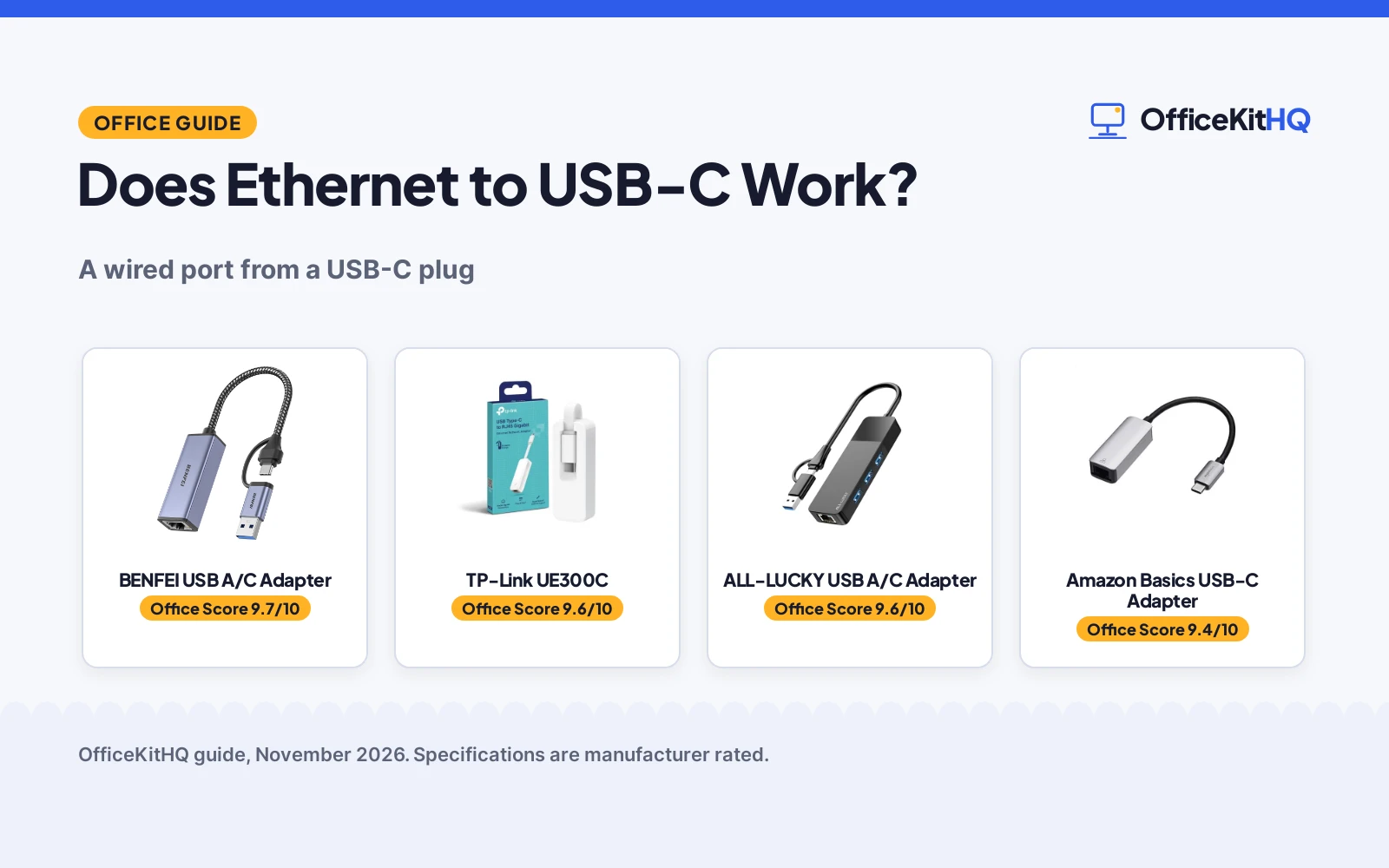
The adapter is the part that turns the USB-C port into a wired port, so the picks below cover the USB-C and USB A/C options in the listings.
| # | Product | Office Score | Buy |
|---|---|---|---|
| 1 |  BENFEI USB A/C Adapter | 9.7/10 | Buy on Amazon |
| 2 |  TP-Link UE300C | 9.6/10 | Buy on Amazon |
| 3 |  ALL-LUCKY HT-00603R | 9.6/10 | Buy on Amazon |
| 4 |  Amazon Basics USB-C Adapter | 9.4/10 | Buy on Amazon |

BENFEI USB A/C Adapter
A dual-connector adapter with an aluminium shell and nylon cable, gigabit speed over a 5Gbps bus, link and activity LEDs, and an 18-month warranty.
Pros
- Both USB-A and USB-C connectors on one adapter, so it fits either port
- Aluminium shell with a nylon cable, plus link and activity LEDs
- Wake-on-LAN, full and half duplex, crossover detection and Auto MDIX stated
- 18-month warranty stated in the listing
Cons
- Not compatible with Nintendo Switch, per the listing
- Windows RT is not supported
- Reaching 1Gbps needs CAT6 or above Ethernet cables, per the listing
Detailed Review
BENFEI lists this compact USB A/C to Ethernet adapter as adding a standard RJ45 port to an Ultrabook, notebook or MacBook Air for file transfers, video calls, gaming and streaming. A built-in IC chip bridges the RJ45 cable and the USB A/C device, with driver-free installation on Chrome, Mac and Windows. It supports 10/100/1000Mbps over USB A/C's 5Gbps bus, with Wake-on-LAN, duplex Ethernet, crossover detection, backpressure routing, Auto MDIX and LEDs. USB powered with no external power required, backward compatible with USB 2.0/1.1. Compatibility covers Windows 11/10/8.1/8/7/Vista/XP, Mac OSX 10.6/10.7/10.8/10.9/10.10/10.11/10.12, Linux kernel 3.x/2.6, Android and Chrome OS, with IEEE 802.3, 802.3u, 802.3ab and 802.3az Energy Efficient Ethernet. The listing states an 18-month warranty. One oddity: the spec table lists 0.39 in for length, width and height alike and a 1 g item weight, figures that read like placeholders, so judge size from the compact design instead.
Who it's for: someone with both USB-A and USB-C devices who wants one adapter for a desk and a bag. Who should skip it: anyone who needs Nintendo Switch support, or anyone on Windows RT.
Its Office Score of 9.7/10 comes from performance 32/35, build 21/25, value 21/25, safety 7/10 and warranty 4/5: 85 of 100 points, placed on our 9.2 to 9.8 scale.
Key Specifications
| Speed | 1000Mbps |
|---|---|
| Connector | USB-A and USB-C |
| Features | Wake-on-LAN, Auto MDIX |
| Warranty | 18 months |
Figures as published on the retailer listing, collected 24 October 2026. Performance figures are manufacturer rated.
Safety and Warranty
What this listing states. IEEE 802.3, IEEE 802.3u, IEEE 802.3ab and IEEE 802.3az stated, so safety scores 7 of 10. 18-month warranty. It does not say everything a buyer needs, such as who pays return shipping, so warranty scores 4 of 5. See How We Pick.
Power and heat. Use the supplied adapter, treat power delivery wattage and display support as the maker's claims for your laptop model, and give the dock room to vent.
This is general buying information, not professional advice. Follow each product manual and local rules, and see our Safety Disclaimer.

TP-Link UE300C
A compact USB-C to Ethernet adapter with a 10/100/1000 Mbps RJ45 port, USB-C 3.0 and Thunderbolt 3/4 compatibility, for a wired connection from a laptop or tablet.
Pros
- 10/100/1000 Mbps RJ45 port for a wired connection
- USB-C 3.0 with Thunderbolt 3/4 compatibility
- No driver required for Windows, macOS, Chrome OS and Linux (Ubuntu)
- Compact and foldable at 2.8 x 1.0 x 0.6 inches for a laptop bag
Cons
- CAT6 or better cable needed to reach 1Gbps
- USB-C only, so a USB-A port needs a different adapter
- Uses a USB-C port, so a laptop with one USB-C port has none free while it is plugged in
- Small and light at 0.04 lb, so it is easy to misplace
Detailed Review
TP-Link lists the UE300C as a compact USB-C to Ethernet adapter with a 10/100/1000 Mbps RJ45 port over USB-C 3.0, and Thunderbolt 3/4 compatibility is stated. It turns a USB-C port into a wired connection for online meetings, gaming and media streaming, and the maker states full Gigabit performance with a CAT6 or better Ethernet cable. Plug and play needs no driver on Windows 11/10/8.1/8/7, macOS, Chrome OS and Linux (Ubuntu), and the adapter measures 2.8 x 1.0 x 0.6 inches. The maker gives thicknesses of 0.6 and 0.64 inches; check before ordering.
Who it's for: a remote worker who wants a wired connection from a USB-C laptop or tablet for calls and streaming. Who should skip it: anyone with only USB-A ports or no CAT6 cable for full speed.
Its Office Score of 9.6/10 comes from performance 30/35, build 21/25, value 21/25, safety 0/10 and warranty 3/5: 75 of 100 points, placed on our 9.2 to 9.8 scale.
Key Specifications
| Port | 10/100/1000 Mbps RJ45 |
|---|---|
| Interface | USB-C 3.0 |
| Size | 2.8 x 1.0 x 0.6 in |
| Warranty | 2-year manufacturer |
These specs mirror the retailer listing as of 14 November 2026; performance figures are stated by the brand.
Safety and Warranty
What this listing states. No UL, FCC or over-current protection statement is stated, so safety scores zero. 2-year manufacturer warranty. It does not say everything a buyer needs, such as who pays return shipping, so warranty scores 3 of 5. See How We Pick.
Power and heat. Use the supplied adapter, treat power delivery wattage and display support as the maker's claims for your laptop model, and give the dock room to vent.
This is general buying information, not professional advice. Follow each product manual and local rules, and see our Safety Disclaimer.

ALL-LUCKY HT-00603R
A convertible USB-A/C hub that adds three USB 3.0 ports and a Gigabit Ethernet port to a laptop.
Pros
- Three USB 3.0 ports plus a Gigabit Ethernet port in a 4-in-1 hub
- Convertible connector switches between USB-A and USB-C
- Ethernet up to 1000Mbps with 10/100Mbps compatibility; CAT6 or above cable needed for 1Gbps
- 1 year manufacturer warranty stated in the listing
Cons
- Maximum output current of 900mA and no charging support for devices
- Driver required on Windows 7, despite plug-and-play on newer systems
- USB 2.0 figure of 480Gbps conflicts with the USB 3.0 figure of 5Gbps
- Reaching 1Gbps needs a CAT6 or above Ethernet cable, per the listing note
Detailed Review
The listing states a 4-in-1 hub with three USB 3.0 ports and one Gigabit Ethernet port, a convertible USB-A/C connector, and data transfer up to 5Gbps over USB 3.0. The same bullets state USB 2.0 at 480Gbps, which does not sit with the 5Gbps USB 3.0 figure; the USB 3.0 figure is the one used here. The listing also notes a driver is required on Windows 7 and a maximum output current of 900mA with no charging support.
Who it's for: a laptop owner who wants extra USB ports plus wired networking from one hub. Who should skip it: a laptop owner who needs to charge devices from the hub, since charging is not supported.
Its Office Score of 9.6/10 comes from performance 29/35, build 20/25, value 21/25, safety not scored (non-powered gear) and warranty 2/5: 72 of 90 points, placed on our 9.2 to 9.8 scale.
Key Specifications
| Ports | 3 USB 3.0 plus 1 Gigabit Ethernet |
|---|---|
| Connector | Convertible USB-A/C |
| Ethernet | Up to 1000Mbps, 10/100Mbps compatible |
| Data transfer | Up to 5Gbps over USB 3.0 |
Figures as published on the retailer listing, collected 2 November 2026. Performance figures are manufacturer rated.
Safety and Warranty
What this listing states. This product does not plug in or run on a battery, so safety is not part of its score. 1 year manufacturer. It does not say everything a buyer needs, such as who pays return shipping, so warranty scores 2 of 5. See How We Pick.
Power and heat. Use the supplied adapter, treat power delivery wattage and display support as the maker's claims for your laptop model, and give the dock room to vent.
This is general buying information, not professional advice. Follow each product manual and local rules, and see our Safety Disclaimer.

Amazon Basics USB-C Adapter
An aluminum USB-C to RJ45 Gigabit Ethernet adapter with 10M/100M/1000M bandwidth, reversible plugging and Nintendo Switch compatibility, for a wired connection with no external power adapter.
Pros
- 10M/100M/1000M bandwidth on the RJ45 port
- Reversible USB-C plugging for either orientation
- No external power adapter needed
- Aluminum housing in a slim, compact size
Cons
- No warranty term is stated
- USB-C only, so a USB-A port needs a different adapter
- Uses a USB-C port, so a laptop with one USB-C port has none free while it is plugged in
- Compact size makes it easy to misplace in a bag
Detailed Review
Amazon Basics lists this aluminum adapter as a USB-C to RJ45 Gigabit Ethernet adapter with 10M/100M/1000M bandwidth. The USB-C input allows reversible plugging, and the adapter is compatible with current computers and devices, including the Nintendo Switch. It is ready to use out of the box with no external power adapter needed, and the slim, compact aluminum housing measures 2.07 x 0.81 x 0.6 inches.
Who it's for: a reader who wants a simple aluminum USB-C to Ethernet adapter for a laptop or a Nintendo Switch. Who should skip it: anyone who wants a warranty term stated or a USB-A connection.
Its Office Score of 9.4/10 comes from performance 28/35, build 20/25, value 20/25, safety 0/10 and warranty 0/5: 68 of 100 points, placed on our 9.2 to 9.8 scale.
Key Specifications
| Port | 10M/100M/1000M RJ45 |
|---|---|
| Interface | USB-C, reversible |
| Size | 2.07 x 0.81 x 0.6 in |
| Housing | Aluminum, grey |
These specs mirror the retailer listing as of 14 November 2026; performance figures are stated by the brand.
Safety and Warranty
What this listing states. No UL, FCC or over-current protection statement is stated, so safety scores zero. No warranty term, so warranty scores zero. See How We Pick.
Power and heat. Use the supplied adapter, treat power delivery wattage and display support as the maker's claims for your laptop model, and give the dock room to vent.
This is general buying information, not professional advice. Follow each product manual and local rules, and see our Safety Disclaimer.
As an Amazon Associate I earn from qualifying purchases.
FAQ
Does Ethernet to USB-C work without a driver?
On the systems TP-Link names, yes: no driver is required for Windows 11/10/8.1/8/7, macOS, Chrome OS and Linux (Ubuntu). The Amazon Basics adapter is ready to use out of the box with no external power adapter needed.
What cable do I need for 1Gbps?
A CAT6 or better Ethernet cable, per TP-Link. The adapter carries a 10/100/1000 Mbps RJ45 port, and TP-Link states that CAT6 or better cables reach 1Gbps.
Does Ethernet to USB-C work on a Nintendo Switch?
The Amazon Basics adapter is compatible with the Nintendo Switch. TP-Link names laptops, tablets and Chromebooks, not a Switch.
Can I use an Ethernet adapter with a USB-A port?
The BENFEI and ALL-LUCKY adapters cover USB A and USB C, so a laptop with a USB-A port has an option. The TP-Link and Amazon Basics adapters are USB-C only.
More for your workspace
See every docking stations and USB hubs guide and all connectivity guides.
More picks: Best USB Ethernet Adapter, Best Ethernet Adapter for Laptop, Types of USB Adapters, USB Hub Types.