A print job waits on the laptop, the printer sits ready on the desk, and the cable in the drawer ends in a plug that does not fit the printer port. USB printer cable types come down to the plug on each end, and matching the plugs is most of the job. This guide walks through the types, the lengths and the speeds, so the cable ordered is the cable that fits.
OfficeKitHQ earns a commission when you buy through links on this page, at no extra cost to you. As an Amazon Associate I earn from qualifying purchases. Affiliate disclosure.
USB printer cable types at a glance
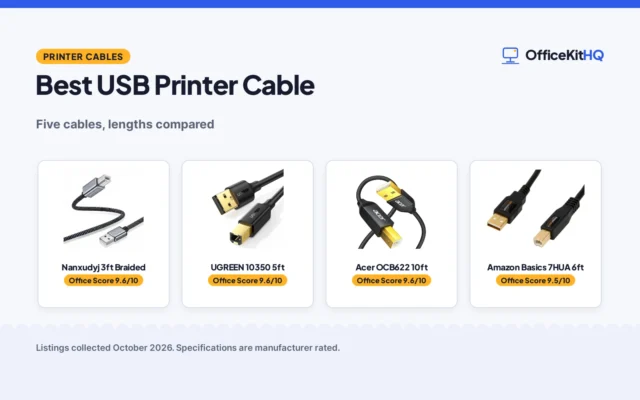
Most printers take a USB-B plug on the printer end and a USB-A or USB-C plug on the computer end, and the cable carries USB 2.0 data at 480 Mbps. The table below lists the cables in the reference listings: the ends, the length and the speed. Check the port on the printer before ordering, because the printer end decides the cable.
| Cable | Ends | Length | Speed |
|---|---|---|---|
| UGREEN USB-B to USB-C | USB-C to USB-B | 6.6 ft | 480 Mbps |
| Amazon Basics USB-A to USB-B | USB-A to USB-B | 10 ft | 480 Mbps |
| Amazon Basics USB-A to USB-B | USB-A to USB-B | 16 ft | 480 Mbps |
| Ruaeoda USB-A to USB-B | USB-A to USB-B | 10 ft | 480 Mbps |
| FXAVA USB-A to USB-B | USB-A to USB-B | 20 ft | 480 Mbps |
| sweguard USB-A to USB-B | USB-A to USB-B | 10 ft | 480 Mbps |
| Spofit USB-A to USB-B, 10-pack | USB-A to USB-B | 6 ft | USB 2.0 |
| UorMe USB-A to USB-B | USB-A to USB-B | 10 ft | 480 Mbps |
| BRENDAZ USB-A to USB-B, 10-pack | USB-A to USB-B | 10 ft | 480 Mbps |
| NC XQIN USB-A to USB-B | USB-A to USB-B | 25 ft | 480 Mbps |
Every cable in the table ends in USB-B at the printer, and every cable but one ends in USB-A at the computer; the UGREEN cable ends in USB-C instead. Lengths in the listings run from 6 ft to 25 ft, and every cable with a stated speed lists 480 Mbps.
Match the plugs first
The printer end is the square USB-B plug, and the computer end is the flat USB-A plug or the small oval USB-C plug. Look at the port on the printer: a USB-B port takes a USB-B plug, and the plug only fits one way round. On the computer, a USB-A port takes the flat plug, while a laptop with USB-C ports takes the UGREEN cable, the USB-C option in the listings. When the computer has USB-C ports only, a USB-C docking station adds USB-A ports through one connection. The listings name printers, external hard drives, scanners and cameras as USB-B devices.
Pick a length that reaches
Measure from the computer to the printer along the path the cable will run, then pick a length with slack to spare. The listings give 6 ft, 6.6 ft, 10 ft, 16 ft, 20 ft and 25 ft: the Spofit pack gives 6 ft cables, the UGREEN cable is 6.6 ft, the Amazon Basics cables come in 10 ft and 16 ft, the FXAVA cable (on Amazon) is 20 ft, and the NC XQIN cable (on Amazon) is 25 ft. A cable that pulls taut tugs at the plugs, so leave slack where the cable bends around the desk edge. For a printer across the room, the 20 ft FXAVA cable or the 25 ft NC XQIN cable reaches without an extension cord.
Speeds and backward compatibility
Every cable in the listings with a stated speed lists 480 Mbps for USB 2.0, and the UGREEN, sweguard and UorMe listings add backward compatibility with USB 1.1 at 12 Mbps and USB 1.0 at 1.5 Mbps. A USB 2.0 cable works with older USB 1.1 and USB 1.0 devices at the older speed, so an old printer still prints through a new cable. The speed matters for large files and scans, while plain text printing needs little of it.
Build: braid, shielding and connectors
Several of the listings describe a nylon braided jacket: the UGREEN, Ruaeoda, FXAVA, sweguard and UorMe cables all list nylon braiding, and the Ruaeoda and FXAVA listings add aluminum shells on the connectors. Shielding keeps interference out of the signal: the UGREEN cable lists triple shielding, the Ruaeoda lists multi-layer shielding, and the FXAVA and BRENDAZ listings list double shielding. Gold-plated connectors resist corrosion: the Amazon Basics, sweguard and UorMe listings list gold-plated connectors, and the NC XQIN listing lists 24K gold plated connectors. Bend figures differ: the UGREEN listing gives 3000 bends and twists, the Ruaeoda listing gives over 15,000 severe bends, and the FXAVA listing gives over 25,000 bends. The FXAVA, UorMe, NC XQIN and BRENDAZ listings state plug and play with no drivers to install, and the UGREEN listing states plug and play.
USB 2.0 Type B is not USB 3.0 Type B
The UorMe and NC XQIN listings carry the same warning: the cable has a USB 2.0 Type B plug, not a USB 3.0 Type B plug. The plugs look alike at a glance but the USB 3.0 Type B plug is wider, with extra pins for the faster standard, so a USB 3.0 cable does not fit a USB 2.0 printer port. Check the port on the printer before ordering: a USB 2.0 Type B port takes the cables in this guide, while a USB 3.0 Type B port needs a USB 3.0 cable.
Warranties and packs
The listings differ on warranty and pack size. The Amazon Basics 16 ft cable lists a 1 year warranty, the sweguard cable (on Amazon) lists 18 months warranty, and the FXAVA cable lists a 36-month (3-year) warranty and lifetime technical support. The Spofit and BRENDAZ cables come as 10-packs, which suits a desk with more than one printer or a spare cable in the drawer.
FAQ
Which USB cable does my printer need?
Check the port on the printer: the printers in the listings take a USB-B plug, and the computer end takes USB-A or USB-C. Match the plug on each end, then pick a length that reaches from the computer to the printer.
Can I use a USB-C cable with my printer?
Yes, when the printer has a USB-B port and the computer has a USB-C port. The UGREEN cable runs USB-B to USB-C at 6.6 ft and 480 Mbps, and the listing names MacBook Pro, Surface Book 2 and Chromebook Pixel as USB-C hosts.
What is the difference between USB 2.0 Type B and USB 3.0 Type B?
The plugs look alike but the USB 3.0 Type B plug is wider, with extra pins, so it does not fit a USB 2.0 Type B port. The cables in this guide have USB 2.0 Type B plugs, as the UorMe and NC XQIN listings state.
What lengths do USB printer cables come in?
The listings give 6 ft, 6.6 ft, 10 ft, 16 ft, 20 ft and 25 ft. Measure along the path the cable will run and leave slack where it bends, then pick a length that reaches with room to spare.
More for your workspace
See the best small desktop printers with USB, the best USB-C docking stations for multiple monitors, the best thermal printers and the best USB cable labels.