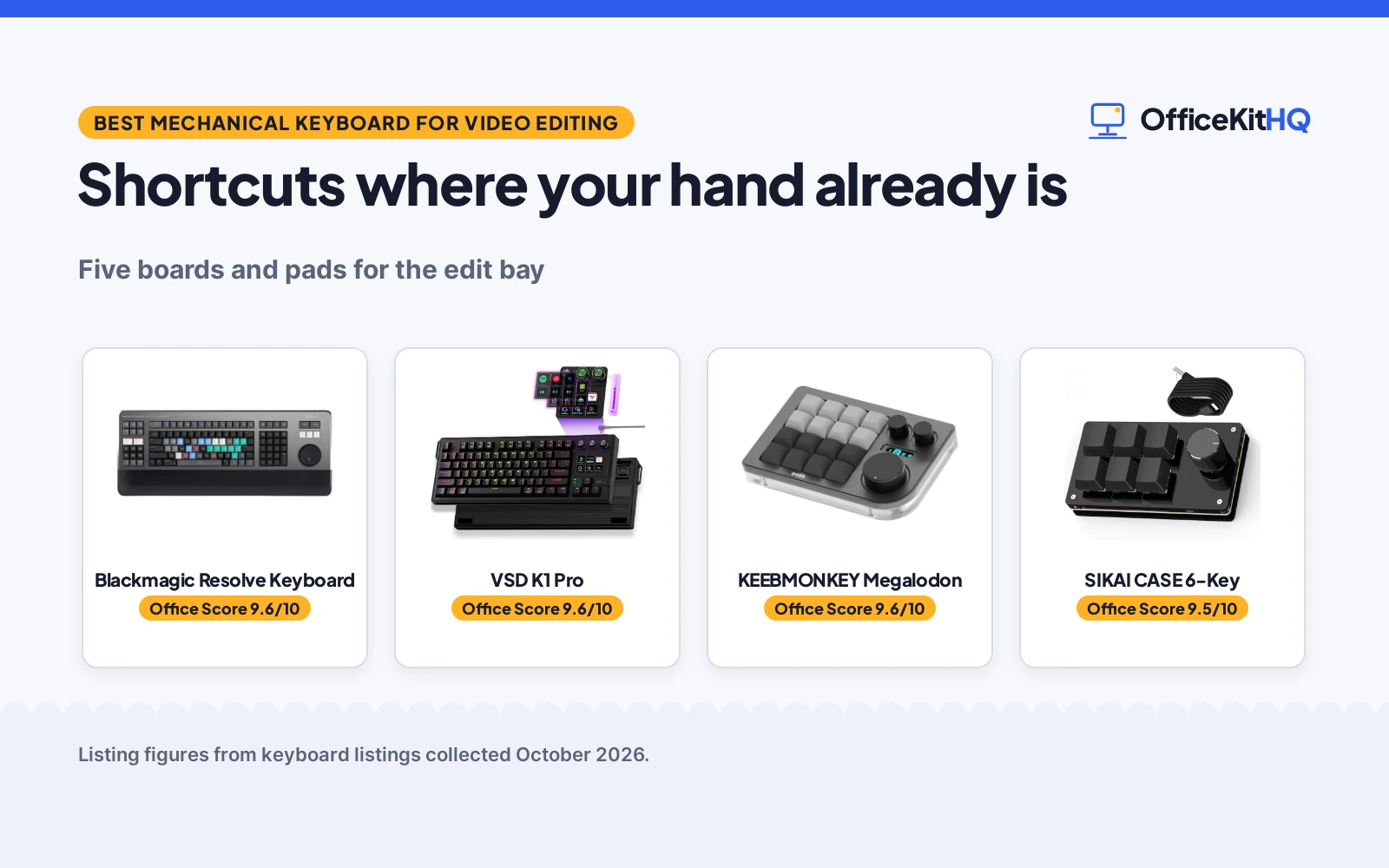
The timeline is open at 9 a.m., and the best mechanical keyboard for video editing is the one that puts your shortcuts where your left hand already is. This roundup compares five boards and pads from the listings, from the purpose-built Blackmagic Resolve Editor Keyboard with its search wheel to the KEEBMONKEY Megalodon macro pad with three knobs. Each entry below is written from its listing, with keys, knobs and connection details where the listing states them.
OfficeKitHQ earns a commission when you buy through links on this page, at no extra cost to you. As an Amazon Associate I earn from qualifying purchases. Affiliate disclosure.
Quick picks
 Best for Resolve Blackmagic Resolve Keyboard: Purpose-built for DaVinci Resolve, search wheel, mechanical. Check price on Amazon
 Best Macro Deck VSD K1 Pro: 87-key, 6 LCD keys, 3 knobs, gasket, hot-swap. Check price on Amazon
 Best Knob Pad KEEBMONKEY Megalodon: 16 keys, 3 knobs, OLED, VIA, 7-day warranty. Check price on Amazon
 Best Compact SIKAI CASE 6-Key: 6 keys plus knob, onboard memory, hot-swap. Check price on Amazon
 Best Tiny Pad BTXETUEL 4-Key: 4-key plug-and-play, clicky, RGB. Check price on Amazon
The picks
| # | Product | Office Score | Buy |
|---|---|---|---|
| 1 | Blackmagic Resolve Keyboard | 9.6/10 | Buy on Amazon |
| 2 | VSD K1 Pro | 9.6/10 | Buy on Amazon |
| 3 | KEEBMONKEY Megalodon | 9.6/10 | Buy on Amazon |
| 4 | SIKAI CASE 6-Key | 9.5/10 | Buy on Amazon |
| 5 | BTXETUEL 4-Key | 9.4/10 | Buy on Amazon |

Blackmagic Resolve Keyboard
A mechanical editing keyboard built for DaVinci Resolve 16 with an integrated search wheel and wrist rest.
Pros
- Built for DaVinci Resolve 16
- Integrated search wheel
- Mechanical switches, metal body
- Wrist rest and 2 USB ports
Cons
- No warranty term is stated
- 3 kg, needs a fixed desk
- No hot-swap is listed
- Single-purpose for Resolve
Detailed Review
Blackmagic Design lists the Resolve Editor Keyboard as designed for professional editors working in DaVinci Resolve 16, with an integrated search wheel and a wrist rest. The listing describes mechanical switches, a metal enclosure, 15 keys and 2 USB ports. It lists 25 by 10.71 by 3.58 inches and 3 kg, and states no warranty term.
Who it's for: editors who cut in DaVinci Resolve and want a purpose-built board. Who should skip it: anyone editing in other software or needing a portable pad.
Its Office Score of 9.6/10 comes from performance 32/35, build 21/25, value 20/25, safety not scored (non-powered gear) and warranty 0/5: 73 of 90 points, placed on our 9.2 to 9.8 scale.
Key Specifications
| Keys | 15 + search wheel |
|---|---|
| Switches | Mechanical |
| Connection | USB |
| Weight | 3 kg |
| Warranty | Not stated |
Figures as published on the retailer listing, collected 17 October 2026. Performance figures are manufacturer rated.
Safety and Warranty
What this listing states. This product does not plug in or run on a battery, so safety is not part of its score. No warranty term, so warranty scores zero. See How We Pick.
Fit the desk first. Check the stated size against your desk depth and keyboard tray, and charge or pair as the manual describes. No keyboard, mouse or wrist rest prevents or treats injury.
This is general buying information, not professional advice. Follow each product manual and local rules, and see our Safety Disclaimer.

VSD K1 Pro
An 87-key macro keyboard with a streaming deck of 6 LCD keys and 3 knobs, gasket mounted and hot-swappable.
Pros
- 87 keys plus streaming deck
- 6 LCD keys and 3 knobs
- Gasket with 5-layer dampening
- Hot-swap 3-pin and 5-pin
Cons
- No warranty term is stated
- Wired only
- Screen needs software and cable
- 87 keys still needs desk space
Detailed Review
VSDINSIDE lists the K1 Pro as an 87-key macro mechanical keyboard with a streaming deck of 6 LCD keys and 3 knobs, unlimited switchable pages and a TFT color display. The listing describes on-board programming, a gasket mount with an advanced 5-layer dampening structure, a hot-swappable PCB for 3-pin and 5-pin switches, and pre-lubed stabilizers. No warranty term is stated.
Who it's for: editors and streamers who want a deck of visual keys beside full keys. Who should skip it: anyone who wants a stated warranty.
Its Office Score of 9.6/10 comes from performance 30/35, build 21/25, value 20/25, safety not scored (non-powered gear) and warranty 0/5: 71 of 90 points, placed on our 9.2 to 9.8 scale.
Key Specifications
| Keys | 87 + 6 LCD |
|---|---|
| Knobs | 3 |
| Switches | Hot-swap, pre-lubed |
| Warranty | Not stated |
Figures as published on the retailer listing, collected 17 October 2026. Performance figures are manufacturer rated.
Safety and Warranty
What this listing states. This product does not plug in or run on a battery, so safety is not part of its score. No warranty term, so warranty scores zero. See How We Pick.
Fit the desk first. Check the stated size against your desk depth and keyboard tray, and charge or pair as the manual describes. No keyboard, mouse or wrist rest prevents or treats injury.
This is general buying information, not professional advice. Follow each product manual and local rules, and see our Safety Disclaimer.

KEEBMONKEY Megalodon
A 16-key macro pad with three clickable knobs, an OLED screen and VIA compatibility.
Pros
- 16 keys plus 3 knobs
- 0.91-inch OLED screen
- VIA compatible, hot-swap
- Aluminum body
Cons
- Only 7 days warranty
- Wired USB-C only
- 16 keys, not a full board
- Not water resistant
Detailed Review
KEEBMONKEY lists the Megalodon as a 16-key macro pad with 3 clickable knobs, a 0.91-inch OLED screen and 16 RGB LEDs, compatible with VIA. The listing describes hot-swappable Gateron Yellow switches, an aluminum alloy and acrylic body, and wired USB-C connectivity. It lists 5.91 by 3.94 by 1.18 inches, 320 g, and a stated 7 days warranty.
Who it's for: editors who want knobs and macros beside their main board. Who should skip it: anyone wanting a full keyboard or a longer warranty.
Its Office Score of 9.6/10 comes from performance 29/35, build 20/25, value 19/25, safety not scored (non-powered gear) and warranty 1/5: 69 of 90 points, placed on our 9.2 to 9.8 scale.
Key Specifications
| Keys | 16 + 3 knobs |
|---|---|
| Switches | Gateron Yellow, hot-swap |
| Connection | USB-C |
| Warranty | 7 days |
Figures as published on the retailer listing, collected 17 October 2026. Performance figures are manufacturer rated.
Safety and Warranty
What this listing states. This product does not plug in or run on a battery, so safety is not part of its score. 7 days. It does not say everything a buyer needs, such as who pays return shipping, so warranty scores 1 of 5. See How We Pick.
Fit the desk first. Check the stated size against your desk depth and keyboard tray, and charge or pair as the manual describes. No keyboard, mouse or wrist rest prevents or treats injury.
This is general buying information, not professional advice. Follow each product manual and local rules, and see our Safety Disclaimer.

SIKAI CASE 6-Key
A 6-key macro keypad with a knob, onboard memory and hot-swappable switches.
Pros
- 6 keys plus custom knob
- Onboard memory, 6 shortcuts
- Hot swappable switches
- Windows, Mac and Linux use
Cons
- No warranty term is stated
- Setup needs Windows software
- 6 keys, very small
- No screen is listed
Detailed Review
SIKAI CASE lists a 6-key macro mechanical keypad with a custom knob and hot-swappable switches. The listing describes programming on a Windows computer with software, after which the six shortcuts live in onboard memory and work on Mac and Linux too. It is wired and listed for gamers, designers and video creators. No warranty term is stated.
Who it's for: anyone who wants six one-press shortcuts in a tiny pad. Who should skip it: anyone who wants a stated warranty or a screen.
Its Office Score of 9.5/10 comes from performance 27/35, build 19/25, value 18/25, safety not scored (non-powered gear) and warranty 0/5: 64 of 90 points, placed on our 9.2 to 9.8 scale.
Key Specifications
| Keys | 6 + knob |
|---|---|
| Memory | Onboard, 6 shortcuts |
| Switches | Hot swappable |
| Warranty | Not stated |
Figures as published on the retailer listing, collected 17 October 2026. Performance figures are manufacturer rated.
Safety and Warranty
What this listing states. This product does not plug in or run on a battery, so safety is not part of its score. No warranty term, so warranty scores zero. See How We Pick.
Fit the desk first. Check the stated size against your desk depth and keyboard tray, and charge or pair as the manual describes. No keyboard, mouse or wrist rest prevents or treats injury.
This is general buying information, not professional advice. Follow each product manual and local rules, and see our Safety Disclaimer.

BTXETUEL 4-Key
A 4-key plug-and-play macro pad with clicky switches and RGB for select-all, cut, copy and paste.
Pros
- Plug and play, no software needed
- Default copy-paste shortcuts
- Clicky switches, RGB
- 3.5-inch ultra-small size
Cons
- No warranty term is stated
- Only 4 keys
- No knob is listed
- Plastic enclosure
Detailed Review
BTXETUEL lists a 4-key macro pad at 3.5 by 1.1 by 1.1 inches with default functions of select all, cut, copy and paste, plug and play with no software needed. The listing describes clicky switches, RGB backlighting, programming through a website saved on the device, and a detachable USB-C cable. No warranty term is stated.
Who it's for: anyone who wants four one-press editing shortcuts in the smallest pad. Who should skip it: anyone who needs knobs or a stated warranty.
Its Office Score of 9.4/10 comes from performance 24/35, build 18/25, value 16/25, safety not scored (non-powered gear) and warranty 0/5: 58 of 90 points, placed on our 9.2 to 9.8 scale.
Key Specifications
| Keys | 4 |
|---|---|
| Switches | Clicky |
| Connection | USB-C |
| Warranty | Not stated |
Figures as published on the retailer listing, collected 17 October 2026. Performance figures are manufacturer rated.
Safety and Warranty
What this listing states. This product does not plug in or run on a battery, so safety is not part of its score. No warranty term, so warranty scores zero. See How We Pick.
Fit the desk first. Check the stated size against your desk depth and keyboard tray, and charge or pair as the manual describes. No keyboard, mouse or wrist rest prevents or treats injury.
This is general buying information, not professional advice. Follow each product manual and local rules, and see our Safety Disclaimer.
As an Amazon Associate I earn from qualifying purchases.
More picks to compare
 AULA WIN68 HE Mechanical Gaming KeyboardCheck on Amazon
 SAYODEVICE Mini 8-Key Programmable KeyboardCheck on Amazon
 SAYODEVICE Mini 10-Key Programmable KeyboardCheck on Amazon
Compare the picks
| Keyboard | Desk Score | Keys | Knobs | Connection | Amazon |
|---|---|---|---|---|---|
| Blackmagic Resolve Keyboard | 9.6/10 | 15 + search wheel | Search wheel | USB | View on Amazon |
| VSD K1 Pro | 9.6/10 | 87 + 6 LCD | 3 | Wired | View on Amazon |
| KEEBMONKEY Megalodon | 9.6/10 | 16 | 3 + OLED | USB-C | View on Amazon |
| SIKAI CASE 6-Key | 9.5/10 | 6 | 1 | Wired | View on Amazon |
| BTXETUEL 4-Key | 9.4/10 | 4 | 0 | USB-C | View on Amazon |
Specifications are manufacturer rated as listed, collected 17 October 2026. Only the KEEBMONKEY lists a warranty term.
How we scored them
The Desk Score weighs editing fit, features, value and the maker’s description, plus warranty where a term is stated. The Blackmagic Resolve keyboard leads as the only board built for an editing program, with an integrated search wheel. The KEEBMONKEY Megalodon is the only one with a stated warranty term, so the warranty part of the score counts for it alone.
| Product | Office Score | Perf. /35 | Build /25 | Value /25 | Safety /10 | Warranty /5 |
|---|---|---|---|---|---|---|
| Blackmagic Resolve Keyboard | 9.6 | 32 | 21 | 20 | n/a | 0 |
| VSD K1 Pro | 9.6 | 30 | 21 | 20 | n/a | 0 |
| KEEBMONKEY Megalodon | 9.6 | 29 | 20 | 19 | n/a | 1 |
| SIKAI CASE 6-Key | 9.5 | 27 | 19 | 18 | n/a | 0 |
| BTXETUEL 4-Key | 9.4 | 24 | 18 | 16 | n/a | 0 |
Scores run from 9.2 to 9.8: each product’s point total is placed on that range, so more points always means a higher score. Safety counts only for powered gear or where the listing states safety features; where it does not apply, the score is taken over the remaining 90 points.
How to choose the best mechanical keyboard for video editing
Decide board or pad
The Blackmagic is a full editing board with a search wheel; the VSD K1 Pro is an 87-key macro keyboard with a streaming deck. The KEEBMONKEY, SIKAI and BTXETUEL are small pads (16, 6 and 4 keys) that sit beside your existing keyboard. A pad suits editors who keep their main board; a board suits a dedicated edit bay. See all keyboards for more types.
Count the knobs and keys
Knobs scrub timelines: the KEEBMONKEY has three clickable knobs with an OLED screen, the VSD K1 Pro three knobs plus six LCD keys, and the SIKAI one knob. The BTXETUEL has four keys with plug-and-play defaults (select all, cut, copy, paste). More keys mean fewer modifier combos to memorize.
Check the programming
The KEEBMONKEY is VIA compatible, the VSD K1 Pro programs on-board or through VSD Craf software, and the SIKAI stores six shortcuts in onboard memory after Windows setup. The BTXETUEL programs through a website and saves to the device. All five are wired: USB-C on the KEEBMONKEY and BTXETUEL, USB on the Blackmagic.
Note the warranty gap
Only the KEEBMONKEY states a warranty term: 7 days. The other four listings state no warranty, so the warranty part of the Desk Score counts for the KEEBMONKEY alone.
Setup Notes
- The Blackmagic board measures 25 by 10.71 inches and weighs 3 kg; clear desk space first.
- The KEEBMONKEY’s 0.91-inch OLED and knobs program through VIA; the JSON file is included.
- The VSD K1 Pro’s screen images and date calibration need Windows or macOS software and a wired connection.
- The BTXETUEL’s 3.5-inch pad plugs in beside your main keyboard with no software.
Frequently Asked Questions
Which is made for video editing?
The Blackmagic Design USB DaVinci Resolve Editor Keyboard is designed for DaVinci Resolve 16, with an integrated search wheel and a wrist rest, per the listing.
Which has the most macro keys?
The VSD K1 Pro has 87 keys plus 6 LCD keys and 3 knobs with unlimited switchable pages. The KEEBMONKEY has 16 keys and 3 knobs.
Which pads work without software?
The BTXETUEL works plug and play with default select-all, cut, copy and paste keys. The SIKAI needs Windows software for initial setup, then runs from onboard memory.
Which keyboards are hot-swappable?
The KEEBMONKEY lists hot-swappable keys and the VSD K1 Pro a hot-swap PCB for 3-pin and 5-pin switches. The SIKAI is also listed as hot swappable. The Blackmagic and BTXETUEL do not list hot-swap.
Do any state a warranty?
Only the KEEBMONKEY, with a stated 7 days. The other four state no warranty term.
Related guides
See every keyboards guide and all Monitor Mounts, Keyboards and Mice guides.
More picks: keyboards, mice and mouse pads and desk mats and pads.