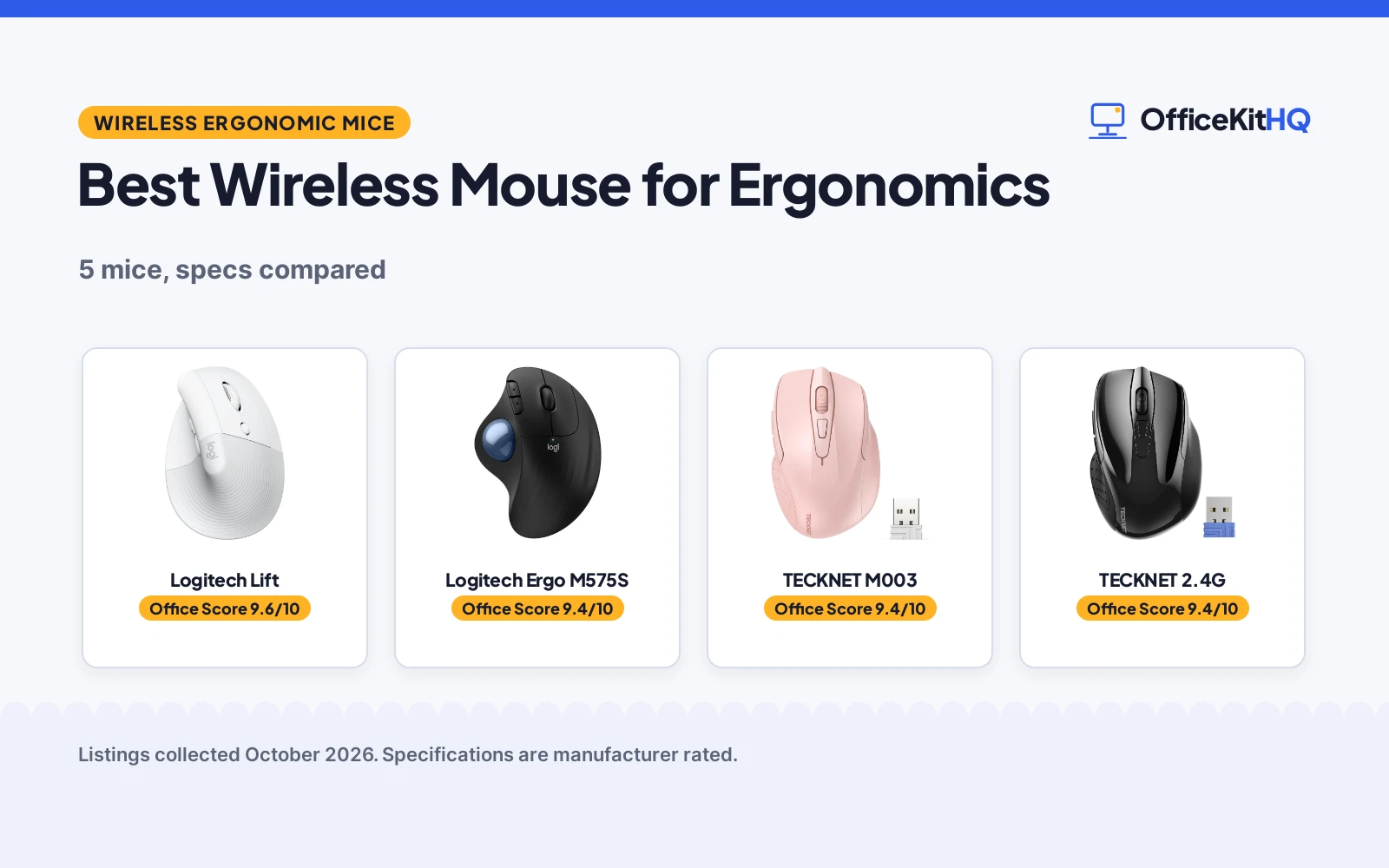
After a morning of video calls, the wrist does all the steering while the shoulder stays parked, and the small mouse that came with the laptop feels less comfortable every hour. The best wireless mouse for ergonomics comes down to shape, size and button layout fitting the hand that uses it, because a mouse that fights the hand gets left in the drawer. We compared the listings below on shape, DPI levels, button count and customization, connection type, battery life and stated warranty, using only what each listing publishes.
OfficeKitHQ earns a commission when you buy through links on this page, at no extra cost to you. As an Amazon Associate I earn from qualifying purchases. Affiliate disclosure.
Quick picks
 Best Overall Logitech Lift: Vertical 57-degree shape, 4000 DPI, 1-year warranty Check price on Amazon
 Best Trackball Logitech Ergo M575S: Thumb trackball for small desks, 18-month battery included Check price on Amazon
 Best Compact TECKNET M003: 5-level DPI to 2600, 24-month battery, compact 4.09 in body Check price on Amazon
 Best 2.4G Value TECKNET 2.4G: 2600 DPI and 24-month battery in a simple 2.4G mouse Check price on Amazon
 Best Vertical Value Anker Vertical: Vertical ergonomic shape on a 2.4G wireless connection Check price on Amazon
The picks
| # | Product | Office Score | Buy |
|---|---|---|---|
| 1 | Logitech Lift | 9.6/10 | Buy on Amazon |
| 2 | Logitech Ergo M575S | 9.4/10 | Buy on Amazon |
| 3 | TECKNET M003 | 9.4/10 | Buy on Amazon |
| 4 | TECKNET 2.4G Ergonomic Mouse | 9.4/10 | Buy on Amazon |
| 5 | Anker Vertical Mouse | 9.4/10 | Buy on Amazon |

Logitech Lift
A vertical wireless mouse with a 57-degree shape for small to medium right hands, 4000 DPI, quiet clicks and a 1-year warranty.
Pros
- Vertical 57-degree shape made for small to medium right hands
- 4000 DPI with 6 buttons, 4 of them customizable
- Connects by Bluetooth or the included Logi Bolt USB receiver
- 1 Year Limited Hardware Warranty is stated
Cons
- Right-hand orientation only; no left-hand option is stated
- 125 g is the heaviest stated weight here
- No lower DPI steps are stated, only the 4000 maximum
- Battery is a built-in Lithium Polymer cell, not a standard AA
Detailed Review
Logitech lists the Lift as a vertical ergonomic mouse in Off White with a 57-degree shape for small to medium right hands, a textured grip and a thumb rest. It states 4000 DPI, 6 buttons with 4 customizable, whisper-quiet clicks and a SmartWheel, and connects by Bluetooth Low Energy or the included Logi Bolt USB receiver across Windows, macOS, iPadOS, Chrome OS and Linux. The listing states up to two years of battery life from the included Lithium Polymer cell, a 30.0 ft range, 4.25 by 2.79 in dimensions and 125 g weight. The plastic parts include certified post-consumer recycled plastic, 54% for Off-White. The warranty description states 1 Year Limited Hardware Warranty.
Who it's for: a right-handed user with small to medium hands who wants a vertical shape, quiet clicks and a stated warranty. Who should skip it: a left-handed user, or anyone who needs a standard flat mouse or a replaceable AA battery.
Its Office Score of 9.6/10 comes from performance 32/35, build 21/25, value 20/25, safety 0/10 and warranty 3/5: 76 of 100 points, placed on our 9.2 to 9.8 scale.
Key Specifications
| DPI | 4000 |
|---|---|
| Buttons | 6, 4 customizable |
| Battery | 24 months, included |
| Connection | Bluetooth or Logi Bolt USB |
Figures as published on the retailer listing, collected 18 October 2026. Performance figures are manufacturer rated.
Safety and Warranty
What this listing states. No FCC or other safety listing is stated, so safety scores zero. 1 Year Limited Hardware Warranty. It does not say everything a buyer needs, such as who pays return shipping, so warranty scores 3 of 5. See How We Pick.
Fit the desk first. Check the stated size against your desk depth and keyboard tray, and charge or pair as the manual describes. No keyboard, mouse or wrist rest prevents or treats injury.
This is general buying information, not professional advice. Follow each product manual and local rules, and see our Safety Disclaimer.

Logitech Ergo M575S
A wireless trackball mouse that moves the cursor with the thumb, for small desks and use on any surface.
Pros
- Trackball moves the cursor without the hand moving
- Bluetooth or the included Logi Bolt USB receiver
- 18-month battery with the AA battery included
- Body uses certified post-consumer recycled plastic
Cons
- 2000 DPI is the lowest maximum stated here
- 5 buttons, fewer than the 6 on the Lift and TECKNET Pink
- Warranty description says 'Contact Manufacturer', no term stated
- No item weight is stated on the listing
Detailed Review
Logitech lists the Ergo M575S as a wireless trackball mouse in Black/Blue with 3 customizable buttons, shortcut actions and a thumb-controlled ball that moves the cursor without moving the hand. It states 2000 DPI, Bluetooth or Logi Bolt USB connection, an 18-month battery with the AA battery included, a 32.81 ft range and 6 by 4.2 in dimensions. The plastic parts are certified post-consumer recycled plastic. The warranty description reads 'Contact Manufacturer' with no term, so warranty scores zero.
Who it's for: someone with a cramped desk who wants the cursor to move while the hand stays put. Who should skip it: anyone who wants a traditional moving mouse or the highest DPI figure here.
Its Office Score of 9.4/10 comes from performance 29/35, build 20/25, value 20/25, safety 0/10 and warranty 0/5: 69 of 100 points, placed on our 9.2 to 9.8 scale.
Key Specifications
| DPI | 2000 |
|---|---|
| Buttons | 5, 3 customizable |
| Battery | 18 months, 1 AA included |
| Connection | Bluetooth or Logi Bolt USB |
Figures as published on the retailer listing, collected 18 October 2026. Performance figures are manufacturer rated.
Safety and Warranty
What this listing states. No FCC or other safety listing is stated, so safety scores zero. No warranty term, so warranty scores zero. See How We Pick.
Fit the desk first. Check the stated size against your desk depth and keyboard tray, and charge or pair as the manual describes. No keyboard, mouse or wrist rest prevents or treats injury.
This is general buying information, not professional advice. Follow each product manual and local rules, and see our Safety Disclaimer.

TECKNET M003
A compact 2.4G wireless mouse with 5-level DPI to 2600 and a 24-month battery, in pink with rubber side grips.
Pros
- 5-level adjustable DPI as listed
- 24-month battery life is stated
- Rubber side grips with thumb support
- USB receiver stores at the back of the mouse
Cons
- Warranty description shows '3' with no term, so no warranty is scored
- 2 AAA batteries are not included
- USB-A ports only, and no glass-surface tracking
- Spec table width of 1.88 in disagrees with the 2.68 in in the bullets
Detailed Review
TECKNET lists the M003 as a pink 2.4G ergonomic wireless mouse with 5-level adjustable DPI with the levels stated in the listing, 6 buttons, a contoured shape with rubber side grips and thumb support, and a 24-month battery life with a power-saving mode and on/off switch. The listing states a 15.0 m range, optical tracking that excludes glass surfaces, and a USB-A plug-and-play receiver stored at the back of the mouse. The bullets give 4.09 by 2.68 by 1.49 in while the spec table gives 4.09 by 1.88 in; per the listing rules the bullets win, so 2.68 in is the width used here. The warranty description shows '3' with no term attached, so warranty scores zero.
Who it's for: a traveler or small-desk user who wants adjustable DPI and a long battery life in a compact mouse. Who should skip it: anyone without a spare USB-A port, or who needs a stated warranty term.
Its Office Score of 9.4/10 comes from performance 28/35, build 19/25, value 21/25, safety 0/10 and warranty 0/5: 68 of 100 points, placed on our 9.2 to 9.8 scale.
Key Specifications
| DPI | 2600 max, 5 levels |
|---|---|
| Buttons | 6 |
| Battery | 24 months, 2 AAA not included |
| Connection | 2.4G USB-A |
Figures as published on the retailer listing, collected 18 October 2026. Performance figures are manufacturer rated.
Safety and Warranty
What this listing states. No FCC or other safety listing is stated, so safety scores zero. No warranty term, so warranty scores zero. See How We Pick.
Fit the desk first. Check the stated size against your desk depth and keyboard tray, and charge or pair as the manual describes. No keyboard, mouse or wrist rest prevents or treats injury.
This is general buying information, not professional advice. Follow each product manual and local rules, and see our Safety Disclaimer.

TECKNET 2.4G Ergonomic Mouse
A compact right-hand mouse with up to 2600 DPI across 5 levels, 6 buttons and a stated 49 ft range.
Pros
- 2600 DPI across 5 adjustable levels
- 6 buttons with rubber side grips
- Up to 49 ft wireless range stated
- Up to 24 months of battery life stated
Cons
- Warranty field states only "2" with no unit, so no term is stated
- AAA batteries not included
- Side button not compatible with Mac
Detailed Review
TECKNET lists a compact right-hand mouse at 4.09 by 2.68 by 1.49 in with 5-level adjustable DPI up to 2600, 6 buttons and rubber side grips. Battery life is stated at up to 24 months with a power-saving mode and on/off switch, and range at up to 49 feet. One contradiction: the spec table lists the item as 2.68 by 1.52 in against the bullets' 4.09 by 2.68 by 1.49 in. We trust the bullets. The warranty field states only "2" with no unit, so we treat the warranty as not stated.
Who it's for: someone who wants a compact travel mouse with the longest stated range. Who should skip it: anyone who wants a warranty term in writing.
Its Office Score of 9.4/10 comes from performance 28/35, build 20/25, value 21/25, safety 0/10 and warranty 0/5: 69 of 100 points, placed on our 9.2 to 9.8 scale.
Key Specifications
| DPI | Up to 2600 |
|---|---|
| Buttons | 6 |
| Battery | Up to 24 months |
| Warranty | Not stated |
Figures as published on the retailer listing, collected 17 October 2026. Performance figures are manufacturer rated.
Safety and Warranty
What this listing states. No FCC or other safety listing is stated, so safety scores zero. No warranty term, so warranty scores zero. See How We Pick.
Fit the desk first. Check the stated size against your desk depth and keyboard tray, and charge or pair as the manual describes. No keyboard, mouse or wrist rest prevents or treats injury.
This is general buying information, not professional advice. Follow each product manual and local rules, and see our Safety Disclaimer.

Anker Vertical Mouse
A vertical wireless mouse with a handshake grip, 5 buttons and 2.4G connectivity.
Pros
- Handshake wrist position stated
- 5 buttons with next and previous stated
- 800 to 1600 DPI stated
- Power-saving after 8 minutes stated
Cons
- Click sounds stated as unavoidable
- 2.4G only; no Bluetooth
- No battery term is stated
- No warranty term is stated
Detailed Review
Anker lists a 2.4G wireless vertical ergonomic mouse with a handshake wrist and arm position, 800, 1200 and 1600 DPI and next and previous buttons. The listing states power-saving mode after 8 minutes of inactivity and notes that key click sounds are unavoidable. It is not Bluetooth. No warranty term is stated.
Who it's for: anyone who wants a simple vertical mouse with extra buttons. Who should skip it: anyone who needs quiet clicks.
Its Office Score of 9.4/10 comes from performance 28/35, build 20/25, value 20/25, safety 0/10 and warranty 0/5: 68 of 100 points, placed on our 9.2 to 9.8 scale.
Key Specifications
| Shape | Vertical |
|---|---|
| DPI | 800-1600 |
| Buttons | 5 |
| Connection | 2.4G |
Figures as published on the retailer listing, collected 17 October 2026. Performance figures are manufacturer rated.
Safety and Warranty
What this listing states. This product does not plug in or run on a battery, so safety is not part of its score. No warranty term, so warranty scores zero. See How We Pick.
Fit the desk first. Check the stated size against your desk depth and keyboard tray, and charge or pair as the manual describes. No keyboard, mouse or wrist rest prevents or treats injury.
This is general buying information, not professional advice. Follow each product manual and local rules, and see our Safety Disclaimer.
As an Amazon Associate I earn from qualifying purchases.
More picks to compare
 TECKNET Wireless MouseCheck on Amazon
 Logitech Lift Vertical Ergonomic WirelessCheck on Amazon
Compare the picks
| Mouse | Office Score | DPI | Buttons | Connection | Battery | Amazon |
|---|---|---|---|---|---|---|
| Logitech Lift | 9.6/10 | 4000 | 6, 4 customizable | Bluetooth / Logi Bolt USB | 24 months | View on Amazon |
| Logitech Ergo M575S | 9.4/10 | 2000 | 5, 3 customizable | Bluetooth / Logi Bolt USB | 18 months | View on Amazon |
| TECKNET M003 | 9.4/10 | 2600, 5 levels | 6 | 2.4G USB-A | 24 months | View on Amazon |
| TECKNET 2.4G | 9.4/10 | 2600 | Not stated | 2.4G | 24 months | |
| Anker Vertical | 9.4/10 | Not stated | Not stated | 2.4G | Not stated |
Specifications are manufacturer rated as listed, collected 18 October 2026. Only the Lift states a warranty term, at 1 year.
How we scored them
The Office Score weighs performance (DPI range, button count and customization, connection options), build (materials, stated size and battery), value for the stated specs, safety and warranty. For a mouse, safety means stated certifications or safety-relevant features; none of these listings state any, so safety scores zero across the group. Only the Lift states a warranty term, at 1 year. How we pick explains the weights.
| Product | Office Score | Perf. /35 | Build /25 | Value /25 | Safety /10 | Warranty /5 |
|---|---|---|---|---|---|---|
| Logitech Lift | 9.6 | 32 | 21 | 20 | 0 | 3 |
| Logitech Ergo M575S | 9.4 | 29 | 20 | 20 | 0 | 0 |
| TECKNET M003 | 9.4 | 28 | 19 | 21 | 0 | 0 |
Scores run from 9.2 to 9.8: each product’s point total is placed on that range, so more points always means a higher score.
How to choose the best wireless mouse for ergonomics
Vertical, trackball or contoured
The group covers vertical, trackball and contoured shapes. The Logitech Lift is a vertical mouse with a 57-degree shape, made for small to medium right hands, with a textured grip and a thumb rest. The Logitech Ergo M575S is a trackball: the thumb moves the ball, so the cursor travels without the hand moving at all, which the listing pitches for small or space-saving setups. The two TECKNET mice and the Anker use a contoured standard shape; the TECKNET Pink adds rubber side grips with thumb support. Pick the shape that matches the hand and the desk before comparing any other spec.
DPI steps and buttons
DPI sets how far the cursor travels for each bit of hand movement. The Lift states 4000 DPI, the TECKNET Pink states 5 adjustable DPI levels as listed, the M575S states 2000 DPI, and the TECKNET 2.4G states 2600 DPI; the Anker states no DPI figure. On buttons, the Lift and the TECKNET Pink each state 6, with 4 of the Lift’s buttons customizable, while the M575S states 5 buttons with 3 customizable plus shortcut actions. More buttons help if the work lives in shortcuts; a single DPI figure is fine if the cursor speed never changes.
| Mouse | DPI | Buttons | Battery |
|---|---|---|---|
| Logitech Lift | 4000 | 6, 4 customizable | 24 months |
| Logitech Ergo M575S | 2000 | 5, 3 customizable | 18 months |
| TECKNET M003 | 2600, 5 levels | 6 | 24 months |
| TECKNET 2.4G | 2600 | Not stated | 24 months |
| Anker Vertical | Not stated | Not stated | Not stated |
Figures as stated on each listing. The table leaves out the score column on purpose; the compare table above carries the Office Score.
Bluetooth or a 2.4G receiver
The Lift and the M575S connect by Bluetooth Low Energy or the included Logi Bolt USB receiver, and both list wide system support across Windows, macOS, iPadOS, Chrome OS and Linux. The TECKNET mice connect through a 2.4G USB-A receiver only, and the Pink’s listing notes it works only with USB-A port devices. Bluetooth frees the single USB port on a slim laptop; a dedicated receiver suits a desktop that never moves. For more mouse lists by use, see every mice and mouse pads guide, the best wireless mouse for video editing and the best wireless mouse for all surfaces.
Hand size and desk space
The Lift states it fits small to medium right hands, the only sizing note in the group, and it is a right-hand shape only. The M575S suits a cramped desk because the hand never travels. The TECKNET Pink measures 4.09 by 2.68 by 1.49 in in the bullets, a compact size the listing pitches for travel, though its spec table gives a different width (see the review). Measure the space the hand will actually move in before choosing between them.
Setup Notes
- Measure the desk: the M575S trackball moves the cursor without the hand traveling, while the other mice need room to move.
- Check USB-A ports: the TECKNET mice connect through a USB-A receiver only; the Lift and M575S also offer Bluetooth.
- Plan batteries: the TECKNET Pink needs 2 AAA batteries, which are not included; the Lift and M575S include theirs.
- Keep the receiver with the mouse: the TECKNET receiver stores at the back of the mouse for travel.
Frequently Asked Questions
What does DPI mean on a mouse?
DPI is dots per inch: a higher number moves the cursor farther for the same hand movement. These listings state 2000, 2600 and 4000 DPI, and the TECKNET Pink offers 5 DPI steps as listed.
What is the difference between a vertical mouse and a trackball?
A vertical mouse like the Lift holds the hand upright in a 57-degree shape. A trackball like the M575S keeps the hand still while the thumb rolls the ball to move the cursor. Both are input styles, not health treatments.
Should I choose Bluetooth or a 2.4G receiver?
The Lift and M575S offer both Bluetooth and a Logi Bolt USB receiver. The TECKNET mice use a 2.4G USB-A receiver only, so they need a USB-A port.
How long do the batteries last?
The TECKNET Pink and the Lift state 24 months, the M575S states 18 months, and the TECKNET 2.4G title states a 24-month battery. The Anker listing states no battery figure.
Do any of these mice include a warranty?
Only the Lift states a concrete term: 1 Year Limited Hardware Warranty. The TECKNET Pink shows a warranty description of “3” with no term attached, and the M575S says “Contact Manufacturer”.
Which mouse fits a small desk?
The M575S trackball, because the cursor moves without the hand traveling. The TECKNET Pink is the most compact standard mouse here at 4.09 by 2.68 by 1.49 in in the bullets.
Related guides
See every mice and mouse pads guide and all computer peripherals guides.
More picks: best wireless mouse for video editing, best wireless mouse for all surfaces, best wireless mouse with USB-C dongle and keyboards.