A spare-room desk, a console under the monitor and a call that starts before the cables are sorted: that is where a capture card earns its place. The best capture card for linux is the one whose stated Linux support, capture resolution and passthrough figure match the source you plug in, because the input figure on the box is rarely the figure you record. We compared the picks below by capture and passthrough resolution, USB version, audio ports, stated Linux support and warranty term, using only what each maker publishes.
OfficeKitHQ earns a commission when you buy through links on this page, at no extra cost to you. As an Amazon Associate I earn from qualifying purchases. Affiliate disclosure.
Quick picks
 Best Overall NearStream CCD30: Capture up to 4K60, passthrough to 1080p240, USB-C 3.1 Check price on Amazon
 Best with Cables Included Mauexo 4K HDMI Capture Card: 1080P 60FPS recording, HDMI and USB cables in the box Check price on Amazon
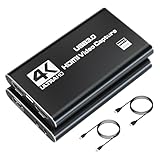 Best for Console Capture Bytebridges 4K Capture Card: 1080p 60fps capture, 4K 30fps passthrough, 3.5mm audio ports Check price on Amazon
 Best Dual USB-A and USB-C UGREEN 40189 Capture Card: USB-A and USB-C interfaces, 19.9g, 24 months warranty Check price on Amazon
 Best Lifetime Warranty Audio Express AXHDCAP: Lifetime warranty term, 1920×1080@30Hz maximum output Check price on Amazon
Our desk picks
| # | Product | Office Score | Buy |
|---|---|---|---|
| 1 | NearStream CCD30 | 9.6/10 | Buy on Amazon |
| 2 | Mauexo 4K HDMI Capture Card | 9.5/10 | Buy on Amazon |
| 3 | Bytebridges 4K Capture Card | 9.5/10 | Buy on Amazon |
| 4 | Audio Express AXHDCAP | 9.4/10 | Buy on Amazon |
| 5 | UGREEN 40189 Capture Card | 9.4/10 | Buy on Amazon |

NearStream CCD30
A USB-C 3.1 capture card that captures up to 4K60, passes through up to 1080p240, and states Windows, macOS and Linux support.
Pros
- Captures video up to 4K60 through USB-C 3.1
- Passthrough up to 4K60, 1440p120 or 1080p240
- HDR10 passthrough for compatible sources and displays
- 3.5mm microphone input and headphone output for commentary and monitoring
Cons
- HDR10 is supported for passthrough only, not for video capture
- HDMI 2.0 input sets the input ceiling for the card
- The 4.5 x 2.2 x 0.8 inches body needs desk space next to the computer
- 1 Year Manufacturer warranty is shorter than the lifetime term in this group
Detailed Review
NearStream lists the CCD30 as capturing video up to 4K60 through USB-C 3.1, with HDMI 2.0 input and passthrough up to 4K60, 1440p120 or 1080p240. Capture formats include up to 4K60 MJPG, up to 1440p60 NV12, up to 1440p50 YUY2 and up to 4K30 I420. It works with OBS, PotPlayer and other supported applications on Windows, macOS and Linux, and the maker states HDR10 is supported for passthrough only.
Who it's for: a Linux desk that records at up to 4K60 or plays through a high-refresh monitor at 1440p120 or 1080p240. Who should skip it: anyone who needs HDR10 in the recording itself, since HDR10 is stated for passthrough only.
Its Office Score of 9.6/10 comes from performance 33/35, build 20/25, value 22/25, safety 0/10 and warranty 2/5: 77 of 100 points, placed on our 9.2 to 9.8 scale.
Key Specifications
| Capture | Up to 4K60 |
|---|---|
| Passthrough | 4K60, 1440p120, 1080p240 |
| USB | USB-C 3.1 |
| Audio | 3.5mm mic in, headphone out |
These specs mirror the retailer listing as of 19 November 2026; performance figures are stated by the brand.
Safety and Warranty
What this listing states. No safety listing or safety feature is stated, so safety scores zero. 1 Year Manufacturer. It does not say everything a buyer needs, such as who pays return shipping, so warranty scores 2 of 5. See How We Pick.
Follow the manual. Assemble and use the product as the maker describes, stay under any stated capacity, and read the manual before first use.
This is general buying information, not professional advice. Follow each product manual and local rules, and see our Safety Disclaimer.

Mauexo 4K HDMI Capture Card
A USB 3.0 capture card that records at 1080P 60FPS, states instant recognition on Linux, and includes HDMI and USB cables in the box.
Pros
- Records at 1080P 60FPS over USB 3.0
- Windows, macOS or Linux will recognize it instantly, with no drivers required
- Package includes a USB 3.0 cable, an HDMI cable and a user manual
- Built-in 3.5mm microphone input and headphone output for monitoring
Cons
- Capture tops out at 1080P 60FPS
- Output resolution supports up to 2K@30Hz, below the 4K input figure
- HDMI input figures top out at 4K@30/60Hz and 1080P@120/144Hz
- 18-month warranty term is shorter than the lifetime term in this group
Detailed Review
Mauexo lists this card as recording at 1080P 60FPS over USB 3.0, with HDMI input support for 4K@30/60Hz and 1080P@120/144Hz and output resolution up to 2K@30Hz. The maker states that Windows, macOS or Linux will recognize it instantly with no drivers or extra software required. The maker gives two warranty terms, 18-month and 1 year; check before ordering.
Who it's for: a Linux desk that records console or camera sources at 1080P 60FPS and wants the cables included in the box. Who should skip it: anyone who needs capture above 1080P 60FPS, since the stated recording figure stops there.
Its Office Score of 9.5/10 comes from performance 29/35, build 19/25, value 21/25, safety 0/10 and warranty 3/5: 72 of 100 points, placed on our 9.2 to 9.8 scale.
Key Specifications
| Capture | 1080P 60FPS |
|---|---|
| Input | 4K@30/60Hz, 1080P@120/144Hz |
| USB | USB 3.0 |
| Audio | 3.5mm mic in, headphone out |
These specs mirror the retailer listing as of 19 November 2026; performance figures are stated by the brand.
Safety and Warranty
What this listing states. No safety listing or safety feature is stated, so safety scores zero. 18-month warranty. It does not say everything a buyer needs, such as who pays return shipping, so warranty scores 3 of 5. See How We Pick.
Follow the manual. Assemble and use the product as the maker describes, stay under any stated capacity, and read the manual before first use.
This is general buying information, not professional advice. Follow each product manual and local rules, and see our Safety Disclaimer.

Bytebridges 4K Capture Card
A USB 3.0 capture card with 4K 60fps HDMI input, 1080p 60fps capture, 4K 30fps passthrough and stated Linux compatibility.
Pros
- Compatible with Windows, macOS and Linux with no driver required
- Captures or streams at 1080p 60fps from 4K 60fps HDMI input
- No external power supply required
- Built-in 3.5mm microphone and audio input and output ports
Cons
- Capture tops out at 1080p 60fps while input is stated at 4K 60fps
- Passthrough tops out at 4K 30fps
- 1 Year warranty is shorter than the 24 months term in this group
- The 4K 30fps passthrough figure is lower than the 4K60 passthrough of the NearStream CCD30
Detailed Review
Bytebridges lists this card as supporting 4K 60fps HDMI input and 4K 30fps passthrough, with capture or streaming at 1080p 60fps over USB 3.0. The maker states compatibility with Windows, macOS and Linux, no driver or external power supply required, and use with applications such as OBS Studio, Quicktime and Discord. Sources named include PS5, PS4, Xbox, Switch, Steam Deck and ROG Ally.
Who it's for: a Linux desk that captures console gameplay at 1080p 60fps and wants microphone audio through the card. Who should skip it: anyone who needs passthrough above 4K 30fps on the monitor they play on.
Its Office Score of 9.5/10 comes from performance 29/35, build 19/25, value 21/25, safety 0/10 and warranty 2/5: 71 of 100 points, placed on our 9.2 to 9.8 scale.
Key Specifications
| Capture | 1080p 60fps |
|---|---|
| Input | 4K 60fps HDMI |
| Passthrough | 4K 30fps |
| USB | USB 3.0 |
These specs mirror the retailer listing as of 19 November 2026; performance figures are stated by the brand.
Safety and Warranty
What this listing states. No safety listing or safety feature is stated, so safety scores zero. 1 Year. It does not say everything a buyer needs, such as who pays return shipping, so warranty scores 2 of 5. See How We Pick.
Follow the manual. Assemble and use the product as the maker describes, stay under any stated capacity, and read the manual before first use.
This is general buying information, not professional advice. Follow each product manual and local rules, and see our Safety Disclaimer.

Audio Express AXHDCAP
A USB 2.0 HDMI capture card with stated Linux support, a maximum output of 1920x1080@30Hz and a lifetime warranty term.
Pros
- States Windows, MacOS and Linux support for cameras and consoles
- Plug-and-play design eliminates the need for drivers or external power supplies
- Lifetime warranty term stated for the card
- Measures 2.5 x 1.5 x 1.0 inches for a small desk
Cons
- Maximum output is stated at 1920x1080@30Hz
- USB 2.0 only, not compatible with USB 3.0 recording speeds
- Not for adding HDMI output to laptops or computers without HDMI out
- Nintendo Switch Lite is not supported, as it does not provide HDMI video output
Detailed Review
Audio Express lists the AXHDCAP as an HDMI to USB 2.0 capture card for DSLR, camcorder and action camera sources, with stated support for Windows, MacOS and Linux and streaming to OBS, Zoom, Potplayer and VLC. The maker gives two input figures, 4K 60FPS and 3840x2160@30Hz; check before ordering. The stated maximum output is 1920x1080@30Hz, and the maker states the card is USB 2.0 only.
Who it's for: a Linux desk that records a camera or console at 1920x1080@30Hz and puts the lifetime warranty term first. Who should skip it: anyone who needs capture above 1080p at 30fps or USB 3.0 recording speeds.
Its Office Score of 9.4/10 comes from performance 22/35, build 20/25, value 19/25, safety 0/10 and warranty 4/5: 65 of 100 points, placed on our 9.2 to 9.8 scale.
Key Specifications
| Capture | 1920x1080@30Hz max |
|---|---|
| Input | 3840x2160@30Hz max |
| USB | USB 2.0 |
| Size | 2.5 x 1.5 x 1.0 inches |
These specs mirror the retailer listing as of 19 November 2026; performance figures are stated by the brand.
Safety and Warranty
What this listing states. No safety listing or safety feature is stated, so safety scores zero. LIFETIME - NO QUESTIONS ASKED. It does not say everything a buyer needs, such as who pays return shipping, so warranty scores 4 of 5. See How We Pick.
Follow the manual. Assemble and use the product as the maker describes, stay under any stated capacity, and read the manual before first use.
This is general buying information, not professional advice. Follow each product manual and local rules, and see our Safety Disclaimer.

UGREEN 40189 Capture Card
A USB 2.0 capture card with USB-A and USB-C interfaces, 4K@60Hz input, 1080P@30Hz output and stated Linux compatibility at 19.9g.
Pros
- USB-A and USB-C dual interface for laptops, tablets and phones
- Compatible with Windows 8.1/10, Linux, iOS17 and Android
- Driver free with no external power supply required
- Aluminum-alloy shell at 19.9g with a 24 months warranty
Cons
- Output tops out at 1080P@30Hz
- USB 2.0 port with a stated transmission rate up to 480Mbps
- Does not support capture and recording if the signal source is HDCP encryption protocol
- iPadOS devices need to be updated to 17 or higher to use it
Detailed Review
UGREEN lists this card as accepting input resolutions up to 4K@60Hz and outputting up to 1080P@30Hz over a USB 2.0 port, with YCbCr 4:2:0 color sampling and a stated transmission rate up to 480Mbps. The maker states compatibility with Windows 8.1/10, Linux, iOS17 and Android, driver free operation, and an aluminum-alloy shell at 19.9g. The maker also states the card does not support capture and recording if the signal source is HDCP encryption protocol.
Who it's for: a Linux desk that records at 1080P@30Hz and moves the card between USB-A and USB-C machines. Who should skip it: anyone who needs capture above 1080P@30Hz or records from an HDCP encrypted source.
Its Office Score of 9.4/10 comes from performance 23/35, build 21/25, value 20/25, safety 0/10 and warranty 3/5: 67 of 100 points, placed on our 9.2 to 9.8 scale.
Key Specifications
| Capture | 1080P@30Hz |
|---|---|
| Input | Up to 4K@60Hz |
| USB | USB 2.0, USB-A and USB-C |
| Weight | 19.9g |
These specs mirror the retailer listing as of 19 November 2026; performance figures are stated by the brand.
Safety and Warranty
What this listing states. No safety listing or safety feature is stated, so safety scores zero. 24 months. It does not say everything a buyer needs, such as who pays return shipping, so warranty scores 3 of 5. See How We Pick.
Follow the manual. Assemble and use the product as the maker describes, stay under any stated capacity, and read the manual before first use.
This is general buying information, not professional advice. Follow each product manual and local rules, and see our Safety Disclaimer.
As an Amazon Associate I earn from qualifying purchases.
More picks to compare
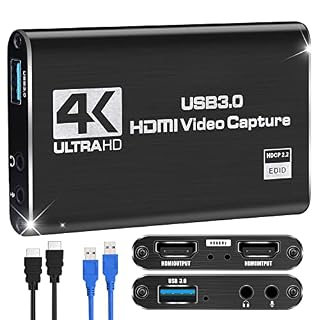 Naivaunsin Switch Capture CardSuits a Linux desk that records at 1080P60 with 4K30 pass-through.Check on Amazon
 VIXLW V181 Capture CardSuits a Linux setup that records 1080P@60fps through USB 3.0.Check on Amazon
Specs compared
| Capture card | Office Score | Capture | Passthrough | USB | Audio | Warranty | Amazon |
|---|---|---|---|---|---|---|---|
| NearStream CCD30 | 9.6/10 | Up to 4K60 | 4K60, 1440p120, 1080p240 | USB-C 3.1 | 3.5mm mic in, headphone out | 1 Year Manufacturer | View on Amazon |
| Mauexo 4K HDMI Capture Card | 9.5/10 | 1080P 60FPS | Not stated | USB 3.0 | 3.5mm mic in, headphone out | 18-month warranty | View on Amazon |
| Bytebridges 4K Capture Card | 9.5/10 | 1080p 60fps | 4K 30fps | USB 3.0 | 3.5mm mic and audio in/out | 1 Year | View on Amazon |
| UGREEN 40189 Capture Card | 9.4/10 | 1080P@30Hz | Not stated | USB 2.0, USB-A and USB-C | Audio recording stated | 24 months | View on Amazon |
| Audio Express AXHDCAP | 9.4/10 | 1920×1080@30Hz | Not stated | USB 2.0 | Stereo sound stated | LIFETIME – NO QUESTIONS ASKED | View on Amazon |
All numbers are the manufacturer’s stated specs, not measured in an office, pulled on 19 November 2026. Each of the picks states a warranty term; none states a safety certification.
How to choose the best capture card for linux
Start with the capture figure, not the input figure
Input and capture are different numbers, and mixing them up is the most common way to buy the wrong card. The Bytebridges accepts 4K 60fps HDMI input and captures at 1080p 60fps. The UGREEN accepts input up to 4K@60Hz and outputs up to 1080P@30Hz. The Mauexo supports 4K@30/60Hz and 1080P@120/144Hz input, records at 1080P 60FPS, and states output resolution up to 2K@30Hz. Only the NearStream CCD30 states capture up to 4K60. Read the capture line first, then check that the input line covers the source you own.
Passthrough and refresh rates on your monitor
Passthrough is the signal that continues to your monitor while the computer records. The NearStream CCD30 states passthrough up to 4K60, 1440p120 or 1080p240, with HDR10 on the passthrough path for compatible sources and displays. The Bytebridges states 4K 30fps passthrough. The Mauexo, UGREEN and Audio Express AXHDCAP do not state a passthrough figure in the facts compared here, so a buyer who plays on the same screen should weigh that gap. HDR10 on the NearStream is passthrough only and is not supported for video capture, which matters if you plan to record HDR gameplay rather than view it.
USB version, ports and audio
The USB version sets the ceiling for the capture figure. The NearStream CCD30 uses USB-C 3.1, and the Bytebridges and Mauexo use USB 3.0. The UGREEN and the Audio Express AXHDCAP use USB 2.0, and the UGREEN states a transmission rate up to 480Mbps. The UGREEN also has a USB-A and USB-C dual interface, which suits a desk that mixes older and newer laptops. For commentary, the NearStream, Mauexo and Bytebridges each state a 3.5mm microphone input, and the NearStream and Mauexo state a headphone output for monitoring. If your desk runs short of ports, a USB hub is the usual next purchase, and the cable between source and card matters as much as the card, as our HDMI cable for streaming guide explains.
Linux support and software
Every pick here states Linux support in its own facts. The Bytebridges states compatibility with Windows, macOS and Linux, with no driver or external power supply required. The Mauexo states that Windows, macOS or Linux will recognize it instantly, with no drivers or extra software required. The UGREEN states compatibility with Windows 8.1/10, Linux, iOS17 and Android, and is driver free. The Audio Express AXHDCAP states Windows, MacOS and Linux support with a plug-and-play design. The NearStream CCD30 works with OBS, PotPlayer and other supported applications on Windows, macOS and Linux. Readers who also record on a Mac can compare our capture card for Mac picks, and anyone building the camera side of the desk should see the webcam for Linux guide.
Read the warranty line, not the headline
Each pick states a warranty term, but the terms differ. The Audio Express AXHDCAP states a lifetime term. The UGREEN states 24 months. The Mauexo states an 18-month warranty. The Bytebridges and the NearStream CCD30 each state 1 Year. A capture card lives on a desk and rarely moves, so the warranty term is less about wear and more about what happens if the card stops being recognized. Weigh the term against the capture figure you need, not against the input figure in the headline.
FAQ
Will these capture cards work on Linux?
Each maker states Linux support. The Bytebridges states compatibility with Windows, macOS and Linux. The Mauexo states that Linux will recognize it instantly. The UGREEN states compatibility with Linux, the Audio Express AXHDCAP states Linux support, and the NearStream CCD30 works on Windows, macOS and Linux.
What is the difference between input and capture resolution?
Input is the signal the card accepts, and capture is the signal the computer records. The Bytebridges accepts 4K 60fps input and captures at 1080p 60fps. The UGREEN accepts input up to 4K@60Hz and outputs up to 1080P@30Hz. The NearStream CCD30 captures up to 4K60.
Which of these cards captures at 4K60?
The NearStream CCD30 captures video up to 4K60 through USB-C 3.1. The Bytebridges and the Mauexo capture at 1080p 60fps and 1080P 60FPS. The UGREEN outputs up to 1080P@30Hz, and the Audio Express AXHDCAP states a maximum output of 1920×1080@30Hz.
Do these capture cards need drivers on Linux?
The Bytebridges states no driver or external power supply is required. The Mauexo states no drivers or extra software are required. The UGREEN is driver free with no external power supply. The Audio Express AXHDCAP uses a plug-and-play design that eliminates drivers. The NearStream CCD30 works with OBS and other supported applications.
Can I add a microphone through the capture card?
The NearStream CCD30 includes a 3.5mm microphone input and headphone output. The Mauexo has a built-in 3.5mm microphone input and headphone output. The Bytebridges has built-in 3.5mm microphone and audio input and output ports. A 3.5mm microphone input is Not stated for the UGREEN or the Audio Express AXHDCAP.
Score breakdown
The Office Score weighs performance (capture and passthrough resolution, frame rates, USB version and audio ports), build (stated materials, size and weight), value for the stated specs, safety and warranty. For a capture card, safety means a stated safety certification; none of these picks states one, so that part of the score is 0 for every pick here. Each pick states a warranty term, from 1 Year to a lifetime term. How we pick explains the weights.
| Product | Office Score | Perf. /35 | Build /25 | Value /25 | Safety /10 | Warranty /5 |
|---|---|---|---|---|---|---|
| NearStream CCD30 | 9.6 | 33 | 20 | 22 | 0 | 2 |
| Mauexo 4K HDMI Capture Card | 9.5 | 29 | 19 | 21 | 0 | 3 |
| Bytebridges 4K Capture Card | 9.5 | 29 | 19 | 21 | 0 | 2 |
| Audio Express AXHDCAP | 9.4 | 22 | 20 | 19 | 0 | 4 |
| UGREEN 40189 Capture Card | 9.4 | 23 | 21 | 20 | 0 | 3 |
We fit point totals onto a 9.2 low and 9.8 high in a straight line. One item can outscore another only by earning more points.
More for your workspace
See every streaming gear guide and all home studio guides.
More picks: stream deck for streaming, condenser microphone for streaming, USB hub for webcams.