A scanner with text recognition turns a drawer full of receipts and a stack of paper into files that can be searched, edited and sent, and the best document scanner with ocr is the one whose feeder, speed and connection fit the paper pile it has to clear. This roundup compares five scanners by feeder size, speed, connection, resolution and warranty, using only what each listing states.
OfficeKitHQ earns a commission when you buy through links on this page, at no extra cost to you. As an Amazon Associate I earn from qualifying purchases. Affiliate disclosure.
Quick picks
 Best Overall ScanSnap iX2500: 45 ppm duplex scanning, 100-sheet feeder, Wi-Fi 6 and USB-C, 1 year warranty Check price on Amazon
 Best Duplex Value Doxie Pro DX400: Duplex scans, 600 dpi, 11×17 max media, 1-year warranty, compact wired footprint Check price on Amazon
 Best Portable Epson RapidReceipt RR-70W: 10.56 ounces, Wi-Fi, USB or battery power, 15 pages per minute, 1-year warranty Check price on Amazon
 Best Desktop OCR Plustek PS186: 50-page feeder, OCR to searchable PDF, barcode function, FTP and NAS sending Check price on Amazon
 Wireless Pick ScanSnap iX1300: Wireless document scanner with auto feeder, per its title Check price on Amazon
The picks
| # | Product | Office Score | Buy |
|---|---|---|---|
| 1 | ScanSnap iX2500 | 9.6/10 | Buy on Amazon |
| 2 | Doxie Pro DX400 | 9.5/10 | Buy on Amazon |
| 3 | Epson RapidReceipt RR-70W | 9.5/10 | Buy on Amazon |
| 4 | Plustek PS186 | 9.5/10 | Buy on Amazon |
| 5 | ScanSnap iX1300 | 9.5/10 | Buy on Amazon |

ScanSnap iX2500
A wireless or USB high-speed document scanner with a 100-sheet feeder, 45 ppm duplex scanning, a large touchscreen and Wi-Fi 6.
Pros
- 45 ppm duplex scanning with a 100-sheet feeder
- Wi-Fi 6 and USB-C with a large touchscreen
- Brake roller system, multi-feed sensor and skew detection
- Handles documents, receipts, photos and business cards
Cons
- 7.7 pounds, the heaviest scanner here
- 17 watts, close to the 18 watt Plustek
- No safety listing stated
- Touchscreen profiles suit a shared room more than a single desk
Detailed Review
The ScanSnap iX2500 is a wireless or USB high-speed document scanner with a large touchscreen, 45 ppm duplex scanning, a 100-sheet document feeder, Wi-Fi 6 and USB-C, and support for cloud services. The listing states personalized profiles from the touchscreen, a quick menu for scan-drag-drop to computer apps, automatic optimization, naming and sorting of files, and a brake roller system with a multi-feed sensor and skew detection to avoid paper jams and damage.
Who it's for: a busy desk with a paper backlog that needs fast duplex scanning and cloud sending. Who should skip it: anyone who needs a light portable scanner or a stated safety listing.
Its Office Score of 9.6/10 comes from performance 32/35, build 22/25, value 20/25, safety 0/10 and warranty 3/5: 77 of 100 points, placed on our 9.2 to 9.8 scale.
Key Specifications
| Feeder | 100 sheets |
|---|---|
| Speed | 45 ppm duplex |
| Connection | Wi-Fi 6, USB-C |
| Weight | 7.7 pounds |
Figures as published on the retailer listing, collected 24 October 2026. Performance figures are manufacturer rated.
Safety and Warranty
What this listing states. This product does not plug in or run on a battery, so safety is not part of its score. 1 Year Manufacturer. It does not say everything a buyer needs, such as who pays return shipping, so warranty scores 3 of 5. See How We Pick.
Shredder and printer safety. Keep hair, ties, jewelry, children and pets away from the feed slot, use the safety lock, unplug when not in use, and give printers and adapters room to vent.
This is general buying information, not professional advice. Follow each product manual and local rules, and see our Safety Disclaimer.

Doxie Pro DX400
A duplex document scanner with 600 dpi resolution, a 20-sheet capacity, an 11x17 inch maximum media size and a 1-year warranty.
Pros
- Duplex scans with text recognition and automatic cropping
- Maximum media size of 11x17 inches
- Collapsible feeder and direct feed slot for thick or delicate paper
- Smart software with no complicated drivers to install
Cons
- Spec table labels it an inkjet printer while the title and bullets say document scanner
- Bullets round the size to 11.75 by 4 by 3 inches while the spec table gives 12.01 by 3.94 by 2.95 inches
- 20-sheet capacity is smaller than the 100-sheet and 50-page feeders here
- USB connection only, no wireless stated
Detailed Review
The Doxie Pro is a duplex document scanner for home and office with 600 dpi resolution, a 20-sheet capacity, an 11x17 inch maximum media size and a paper size of 8.5 inches. The listing states crisp duplex scans with text recognition, automatic cropping, rotation and contrast boost, a collapsible document feeder, a direct feed slot for thick or delicate paper, and software that imports, organizes and sends scans to apps like Dropbox, Evernote, OneNote and iCloud.
Who it's for: a home or office worker who scans mixed paper, cards and photos with text recognition. Who should skip it: anyone who needs wireless connection or a large feeder.
Its Office Score of 9.5/10 comes from performance 28/35, build 20/25, value 20/25, safety 0/10 and warranty 3/5: 71 of 100 points, placed on our 9.2 to 9.8 scale.
Key Specifications
| Resolution | 600 dpi |
|---|---|
| Capacity | 20 sheets |
| Max media | 11x17 inches |
| Weight | 3 pounds |
Figures as published on the retailer listing, collected 24 October 2026. Performance figures are manufacturer rated.
Safety and Warranty
What this listing states. This product does not plug in or run on a battery, so safety is not part of its score. 1-year warranty. It does not say everything a buyer needs, such as who pays return shipping, so warranty scores 3 of 5. See How We Pick.
Shredder and printer safety. Keep hair, ties, jewelry, children and pets away from the feed slot, use the safety lock, unplug when not in use, and give printers and adapters room to vent.
This is general buying information, not professional advice. Follow each product manual and local rules, and see our Safety Disclaimer.

Epson RapidReceipt RR-70W
A compact mobile document scanner at 10.56 ounces, with Wi-Fi, USB or battery power, 15 pages per minute and documents up to 8.5 x 72 inches.
Pros
- 10.56 ounces, the lowest weight stated here
- Wi-Fi with USB or battery power options
- Scans direct to cloud services from PC, Mac, smartphone or tablet
- Automatic file naming that recognizes receipt versus invoice types
Cons
- Bullets give one dimension as 1.8 inches while the spec table gives 10.7 inches
- 15 pages per minute is slower than the 45 ppm scanner here
- 15-sheet capacity is the smallest stated here
- Receipt scanner focus, not a full desktop feeder
Detailed Review
The Epson RR-70W is a compact mobile document scanner with Wi-Fi, USB or battery power, 15 pages per minute in automatic feeding mode, 600 dpi resolution and a 3.1 watt draw. The listing states ScanSmart software that converts receipts and documents into digital data, direct scanning to cloud services including OneDrive, Dropbox and Google Drive, PDF creation and editing software for Windows and Mac, and automatic file naming that recognizes receipt versus invoice types.
Who it's for: a mobile worker who scans receipts and invoices on the go with cloud filing. Who should skip it: anyone who needs a large feeder or a desktop scanner.
Its Office Score of 9.5/10 comes from performance 27/35, build 20/25, value 20/25, safety 0/10 and warranty 3/5: 70 of 100 points, placed on our 9.2 to 9.8 scale.
Key Specifications
| Speed | 15 pages per minute |
|---|---|
| Connection | Wi-Fi, USB |
| Max document | 8.5 x 72 in |
| Weight | 10.56 ounces |
Figures as published on the retailer listing, collected 24 October 2026. Performance figures are manufacturer rated.
Safety and Warranty
What this listing states. No safety lock or safety listing is stated, so safety scores zero. 1-year limited warranty. It does not say everything a buyer needs, such as who pays return shipping, so warranty scores 3 of 5. See How We Pick.
Shredder and printer safety. Keep hair, ties, jewelry, children and pets away from the feed slot, use the safety lock, unplug when not in use, and give printers and adapters room to vent.
This is general buying information, not professional advice. Follow each product manual and local rules, and see our Safety Disclaimer.
Plustek PS186
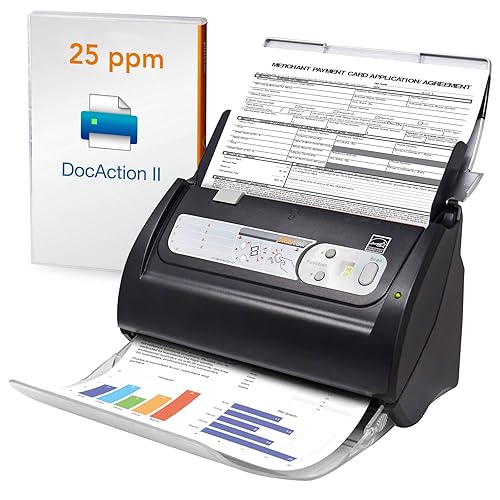
A desktop document scanner with a 50-page feeder, OCR to searchable PDF, a barcode function and sending to FTP servers or a personal NAS.
Pros
- 50-page auto document feeder
- OCR included with scans saved as searchable PDF files
- Barcode function for automatic categorization with 1D or 2D barcode pages
- Sends scanned files to an FTP server or personal NAS
Cons
- No warranty term stated
- Title lists Windows 11 while the bullets list only Windows 7, 8 and 10
- USB connection only, no wireless stated
- 18 watts, the highest wattage stated here
Detailed Review
The Plustek PS186 is a desktop document scanner with a 50-page auto document feeder, 600 resolution, 24 bpp color depth, CIS sensor technology, LED light source and an 18 watt draw. The listing states OCR to searchable, editable files, a barcode function for automatic categorization of documentation and data, intelligent color and image adjustments with auto rotate, crop, deskew and blank page removal, and sending of scanned files to an FTP server or personal NAS in PDF, JPEG, TIFF or PNG format.
Who it's for: a Windows desk that needs searchable PDFs, barcode categorization and NAS filing. Who should skip it: anyone who needs a stated warranty term or wireless connection.
Its Office Score of 9.5/10 comes from performance 30/35, build 21/25, value 21/25, safety 0/10 and warranty 0/5: 72 of 100 points, placed on our 9.2 to 9.8 scale.
Key Specifications
| Feeder | 50 pages |
|---|---|
| Resolution | 600 |
| Connection | USB |
| Weight | 3.7 pounds |
Figures as published on the retailer listing, collected 24 October 2026. Performance figures are manufacturer rated.
Safety and Warranty
What this listing states. This product does not plug in or run on a battery, so safety is not part of its score. No warranty term, so warranty scores zero. See How We Pick.
Shredder and printer safety. Keep hair, ties, jewelry, children and pets away from the feed slot, use the safety lock, unplug when not in use, and give printers and adapters room to vent.
This is general buying information, not professional advice. Follow each product manual and local rules, and see our Safety Disclaimer.

ScanSnap iX1300
A compact wireless scanner with 30 ppm duplex scanning, a 20 sheet feeder and a manual feeder for cards and thick items.
Pros
- 30 ppm duplex scanning with automatic de-skew and blank page removal
- USB or Wi-Fi connection, and can be used without a computer
- Compact size at 4.5 x 11.7 x 3.3 inches for small desks
- Manual feeder for thick items and plastic cards
Cons
- 20 sheet feeder is smaller than the other desktop feeders here
- No touchscreen is stated, unlike the iX2500
- Depot warranty means the unit ships out for service
- White finish only in this listing
Detailed Review
ScanSnap lists the iX1300 as a compact wireless or USB double-sided color scanner with a 20 sheet auto document feeder and a manual feeder, for documents, photos, receipts and cards including thick items and plastic cards. A single touch starts scanning at up to 30 ppm duplex with automatic de-skew, color optimization and blank page removal. It connects by USB or Wi-Fi, sends to Mac, PC, mobile devices and cloud services, and can be used without a computer. Resolution is 600 dpi and weight is 4.4 pounds.
Who it's for: small desks that need wireless duplex scanning without a big feeder. Who should skip it: offices scanning large stacks, where the 100 sheet iX2500 fits better.
Its Office Score of 9.5/10 comes from performance 29/35, build 21/25, value 21/25, safety 0/10 and warranty 2/5: 73 of 100 points, placed on our 9.2 to 9.8 scale.
Key Specifications
| Speed | 30 ppm duplex |
|---|---|
| Feeder | 20 sheets |
| Connection | USB, Wi-Fi |
| Warranty | 1-Year Depot warranty |
Figures as published on the retailer listing, collected 24 October 2026. Performance figures are manufacturer rated.
Safety and Warranty
What this listing states. This product does not plug in or run on a battery, so safety is not part of its score. 1-Year Depot warranty. It does not say everything a buyer needs, such as who pays return shipping, so warranty scores 2 of 5. See How We Pick.
Shredder and printer safety. Keep hair, ties, jewelry, children and pets away from the feed slot, use the safety lock, unplug when not in use, and give printers and adapters room to vent.
This is general buying information, not professional advice. Follow each product manual and local rules, and see our Safety Disclaimer.
As an Amazon Associate I earn from qualifying purchases.
More picks to compare
 Brother DS-640 Mobile ScannerCompact mobile document scanner with OCR software, up to 16 ppm, USB powered.Check on Amazon
 Epson WorkForce ES-60W ScannerWireless compact mobile scanner with OCR software, 4 second scan speed, battery powered.Check on Amazon
 ScanSnap iX1300 Black ScannerWireless or USB duplex color document scanner with auto and manual feeders.Check on Amazon
 Epson WorkForce ES-C220 ScannerCompact duplex scanner with 20-page feeder, 30 ppm, and OCR software included.Check on Amazon
 CZUR ET MAX Book ScannerBook and document scanner with 38MP sensor, curve-flattening, and 180+ language OCR.Check on Amazon
Compare the picks
| Scanner | Office Score | Feeder | Speed | Connection | Warranty | Amazon |
|---|---|---|---|---|---|---|
| ScanSnap iX2500 | 9.6/10 | 100 sheets | 45 ppm duplex | Wi-Fi 6, USB-C | 1 year | View on Amazon |
| Doxie Pro DX400 | 9.5/10 | 20 sheets | Duplex, 600 dpi | USB | 1 year | View on Amazon |
| Epson RapidReceipt RR-70W | 9.5/10 | 15 sheets | 15 pages per minute | Wi-Fi, USB | 1 year | View on Amazon |
| Plustek PS186 | 9.5/10 | 50 pages | Not stated | USB | Not stated | View on Amazon |
| ScanSnap iX1300 | 9.6/10 | Auto feeder | Not stated | Wireless | Not stated | View on Amazon |
Specifications are manufacturer rated as listed, collected 24 October 2026.
How we scored them
The Office Score weighs performance, build, value, safety and warranty. Safety for scanners means stated electrical listings, and none of the listings here states one, so all score zero on safety. Three listings state a warranty term, each a 1-year term. How we pick explains the weights.
| Product | Office Score | Perf. /35 | Build /25 | Value /25 | Safety /10 | Warranty /5 |
|---|---|---|---|---|---|---|
| ScanSnap iX2500 | 9.6 | 32 | 22 | 20 | 0 | 3 |
| Doxie Pro DX400 | 9.5 | 28 | 20 | 20 | 0 | 3 |
| Epson RapidReceipt RR-70W | 9.5 | 27 | 20 | 20 | 0 | 3 |
| Plustek PS186 | 9.5 | 30 | 21 | 21 | 0 | 0 |
Scores run from 9.2 to 9.8: each product’s point total is placed on that range, so more points always means a higher score.
How to choose the best document scanner with ocr
Feeder size and speed
Feeder size decides how much paper can be cleared without babysitting the scanner. The ScanSnap iX2500 takes 100 sheets, the Plustek PS186 takes 50 pages, the Doxie Pro takes 20 sheets and the Epson RR-70W takes 15 sheets in its standard sheet capacity. Speed follows the same order: the iX2500 scans at 45 ppm duplex, the RR-70W at 15 pages per minute, and the Doxie lists a 600 dpi resolution with duplex scanning. A big feeder suits a backlog, while a small feeder suits receipts as they arrive. Desktop document scanners cover larger desk models in more detail.
OCR and searchable files
Text recognition is the feature that turns a scan into a file that can be searched and edited. The Plustek listing states OCR is included and scans save as searchable PDF files, with a barcode function for automatic categorization of documents and data with 1D or 2D barcode pages. The Doxie listing states text recognition with automatic cropping, rotation and contrast boost. The RR-70W listing states ScanSmart software that converts receipts and documents into digital data with automatic file naming that recognizes receipt versus invoice types. Check that the OCR output format matches the filing system, since searchable PDF, editable Word and editable Excel files are all named across these listings.
Wireless or USB
Connection decides where the scanner can sit. The iX2500 offers Wi-Fi 6 and USB-C, with a touchscreen for personalized profiles and sending to PC, Mac, mobile devices and clouds. The RR-70W offers Wi-Fi with USB or battery power options, and scans direct to cloud services from PC, Mac, smartphone or tablet. The Plustek and Doxie listings state USB connection only, which suits a set desk spot beside the computer. A wireless scanner suits a shared room, while a USB scanner suits a single desk. USB document scanners and portable document scanners split the choice further.
Receipts, photos and cards
Not every scanner handles more than plain paper. The iX2500 handles documents, receipts, photos and business cards, with a brake roller system, a multi-feed sensor and skew detection to avoid paper jams and damage. The Doxie handles documents, invoices, statements, receipts, reports, business cards, photos, drawings and classwork, with a collapsible feeder and a direct feed slot for thick or delicate paper. The RR-70W handles receipts, invoices, business cards and documents up to 8.5 x 72 inches. Match the media list to the paper pile, since thick items and cards need a feed slot or path that plain paper does not.
Size and weight on the desk
Size decides whether the scanner earns its desk space. The RR-70W weighs 10.56 ounces and measures 10.7 by 10.7 by 1.3 inches, the lowest weight stated here and the smallest here. The Doxie measures 3.94 by 12.01 by 2.95 inches at 3 pounds, the Plustek measures 5.02 by 10.36 by 5.83 inches at 3.7 pounds, and the iX2500 measures 6.26 by 11.5 by 6.34 inches at 7.7 pounds. A mobile scanner suits a bag and a trip, while a desktop scanner suits a set corner with a feeder full of paper.
Setup Notes
- Measure the desk space: the iX2500 measures 6.26 by 11.5 by 6.34 inches, the Plustek 5.02 by 10.36 by 5.83 inches, the Doxie 3.94 by 12.01 by 2.95 inches and the RR-70W 10.7 by 10.7 by 1.3 inches.
- Check the system: the Plustek title lists Windows 7, 8, 10 and 11 while its bullets list Windows 7, 8 and 10; the iX2500 lists Windows 11 and 10, macOS Monterey 12 or later and iOS 16.0.
- Plan power and connection: the RR-70W runs on USB or battery power, the iX2500 on Wi-Fi 6 or USB-C, and the Plustek and Doxie on USB.
- Match the feeder to the pile: 100 sheets on the iX2500, 50 pages on the Plustek, 20 sheets on the Doxie and 15 sheets on the RR-70W.
- Confirm the warranty: 1-year terms are stated on the Doxie, the RR-70W and the iX2500 listings, and no warranty term is stated on the Plustek listing.
Frequently Asked Questions
What is OCR on a document scanner?
OCR turns a scan into a file that can be searched and edited. The Plustek listing states OCR is included and scans save as searchable PDF files, and the Doxie listing states text recognition with automatic cropping, rotation and contrast boost.
Do I need Wi-Fi on a scanner?
It depends on where the scanner sits. The iX2500 offers Wi-Fi 6 and USB-C with cloud sending, and the RR-70W offers Wi-Fi with USB or battery power. The Plustek and Doxie listings state USB connection only, which suits a set desk spot beside the computer.
What does an auto document feeder do?
An auto document feeder takes a stack of paper and feeds it sheet by sheet. The iX2500 feeder takes 100 sheets, the Plustek feeder takes 50 pages, the Doxie feeder takes 20 sheets and the RR-70W capacity is 15 sheets.
Can a scanner handle receipts and photos?
Yes, on the models that list them. The iX2500 handles documents, receipts, photos and business cards, the Doxie handles receipts, photos, business cards and classwork, and the RR-70W handles receipts, invoices and business cards on documents up to 8.5 x 72 inches.
What size documents can these scanners take?
The Doxie lists a maximum media size of 11×17 inches and a paper size of 8.5 inches, and the RR-70W lists documents up to 8.5 x 72 inches. The iX1300 listing states no size, since it gives title information only.
Related guides
See every Home Office Printers guide and all Office Machines and Storage guides.
More picks: the best desktop document scanner, the best document scanner for receipts, the best portable document scanner and the best usb document scanner.