The best gaming keyboard for Valorant is a keyboard that answers a strafe key before the peek ends, because a slow keypress turns a planned push into a lost round. A cramped desk, a keyboard that slides when the mouse flicks, and a key that stays down a beat too long all show up in the same round. This guide compares gaming keyboards by polling rate, switch type, layout, macro keys, size and warranty term, using only what each listing publishes.
OfficeKitHQ earns a commission when you buy through links on this page, at no extra cost to you. As an Amazon Associate I earn from qualifying purchases. Affiliate disclosure.
Quick picks
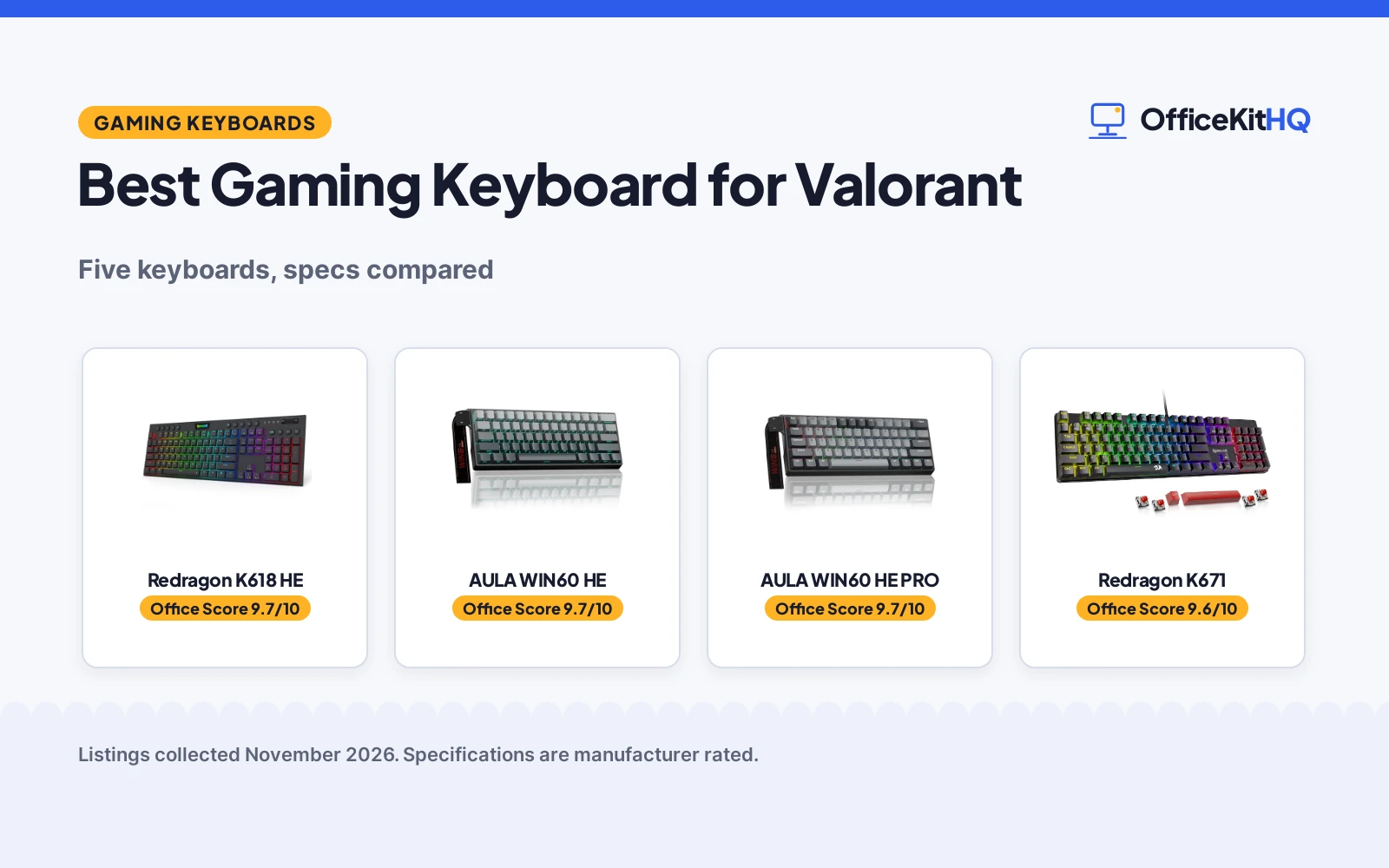
 Best Overall Redragon K618 HE: 104 keys, 8K polling, 0.1 to 2.8 mm actuation, 1-year warranty Check price on Amazon
 Best 60% for Valorant AULA WIN60 HE: 8000Hz polling, 0.02 mm rapid trigger, 11.0 by 5.0 in Check price on Amazon
 Best 60% Pro AULA WIN60 HE PRO: 8000Hz polling, adjustable actuation, black gray finish Check price on Amazon
 Longest Warranty Redragon K671: 24-month warranty, hot-swappable red switch, 11 backlight modes Check price on Amazon
 Wireless Combo CHONCHOW 60% Combo: 60% wireless keyboard and mouse combo, RGB backlit Check price on Amazon
Our desk picks
| # | Product | Office Score | Buy |
|---|---|---|---|
| 1 | Redragon K618 HE | 9.7/10 | Buy on Amazon |
| 2 | AULA WIN60 HE | 9.7/10 | Buy on Amazon |
| 3 | AULA WIN60 HE PRO | 9.7/10 | Buy on Amazon |
| 4 | Redragon K671 Wired | 9.6/10 | Buy on Amazon |
| 5 | CHONCHOW G100 Combo | 9.4/10 | Buy on Amazon |

Redragon K618 HE
A low-profile magnetic keyboard with 104 keys, 8K polling, actuation profiles from 0.1mm to 2.8mm, a control wheel and 20 macro keys.
Pros
- Low-profile magnetic switches sense keypresses without physical contact
- Actuation profiles from 0.1mm to 2.8mm suit different games and typing
- Control wheel adjusts backlight brightness and media volume
- 20 on-the-fly macro keys in a 4x5 zone need no software
Cons
- 17.32 in wide, so it needs more desk space than a 60% keyboard
- Wired connection only, so it needs a cable to the PC
- Low-profile switches may not suit typists who prefer full travel
- 1-year warranty is shorter than the 24-month warranty on the Redragon K671
Detailed Review
Redragon lists the K618 HE as a wired low-profile magnetic gaming keyboard with 104 keys and 8K polling for Valorant and FPS play. The magnetic switches sense keypresses without physical contact, and actuation profiles from 0.1mm to 2.8mm save through the desktop or web-based driver. A single control wheel adjusts backlight brightness and media volume, and a 4x5 macro zone gives 20 on-the-fly macro keys plus media controls with no software required. The low-profile design is stated as 30% slimmer, with shorter travel so keystrokes register quicker. The maker lists 17.32 by 7.48 by 1.26 in, and the warranty is 1 year.
Who it's for: a Valorant player who wants a full 104-key layout, macro keys and a control wheel on one board. Who should skip it: anyone who wants a compact 60% board or a wireless connection.
Its Office Score of 9.7/10 comes from performance 32/35, build 21/25, value 20/25, safety not scored (non-powered gear) and warranty 3/5: 76 of 90 points, placed on our 9.2 to 9.8 scale.
Key Specifications
| Polling rate | 8K |
|---|---|
| Layout | 104 keys |
| Actuation | 0.1mm to 2.8mm |
| Size | 17.32 x 7.48 x 1.26 in |
These specs mirror the retailer listing as of 19 November 2026; performance figures are stated by the brand.
Safety and Warranty
What this listing states. This product does not plug in or run on a battery, so safety is not part of its score. 1 year. It does not say everything a buyer needs, such as who pays return shipping, so warranty scores 3 of 5. See How We Pick.
Fit the desk first. Check the stated size against your desk depth and keyboard tray, and charge or pair as the manual describes. No keyboard, mouse or wrist rest prevents or treats injury.
This is general buying information, not professional advice. Follow each product manual and local rules, and see our Safety Disclaimer.
AULA WIN60 HE
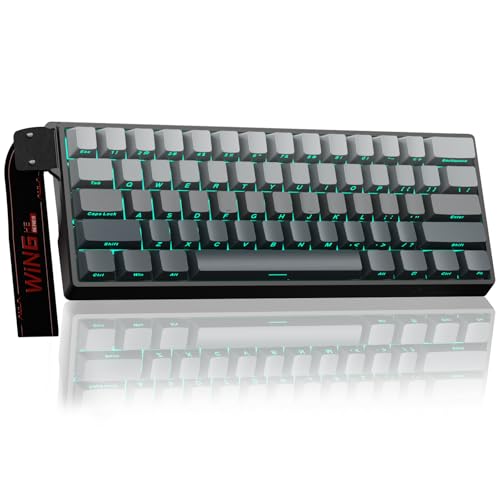
A compact 60% magnetic keyboard with 8000Hz polling, a 0.02mm rapid trigger step and hot-swappable switches for FPS play.
Pros
- 8000Hz polling rate for fast response times
- 0.02mm rapid trigger step distance is stated for fast response
- Magnetic switches actuate without physical contact
- Side-printed PBT keycaps with 16.8 million RGB colors
Cons
- Wired connection only, so it needs a cable to the PC
- 6-month warranty is the briefest term stated in this group
- Web-based driver needs an internet connection for remapping and macros
- Compact 60% layout leaves less room for dedicated keys than a full-size board
Detailed Review
AULA lists the WIN60 HE as a 60% mechanical gaming keyboard with Hall Effect magnetic switches, hot-swappable, and polling rates of up to 8000Hz. The maker describes it as designed for FPS titles like Valorant and CS2, with magnetic switches for faster peeking and quick-stop shooting. Rapid trigger works with an RT step distance of 0.02mm. The 60% layout measures 11.0 by 5.0 by 1.1 in, and the side-printed PBT keycaps sit under RGB lighting with 16.8 million customizable colors. A web-based driver remaps keys, creates macros and adjusts RGB without a software download. The warranty is 6 months.
Who it's for: a Valorant player who wants a compact 60% board with rapid trigger and 8000Hz polling. Who should skip it: anyone who wants a 104-key layout or a longer warranty term.
Its Office Score of 9.7/10 comes from performance 32/35, build 21/25, value 21/25, safety not scored (non-powered gear) and warranty 2/5: 76 of 90 points, placed on our 9.2 to 9.8 scale.
Key Specifications
| Polling rate | 8000Hz |
|---|---|
| Rapid trigger step | 0.02mm |
| Layout | 60% |
| Size | 11.0 x 5.0 x 1.1 in |
These specs mirror the retailer listing as of 19 November 2026; performance figures are stated by the brand.
Safety and Warranty
What this listing states. This product does not plug in or run on a battery, so safety is not part of its score. 6 Months. It does not say everything a buyer needs, such as who pays return shipping, so warranty scores 2 of 5. See How We Pick.
Fit the desk first. Check the stated size against your desk depth and keyboard tray, and charge or pair as the manual describes. No keyboard, mouse or wrist rest prevents or treats injury.
This is general buying information, not professional advice. Follow each product manual and local rules, and see our Safety Disclaimer.
AULA WIN60 HE PRO
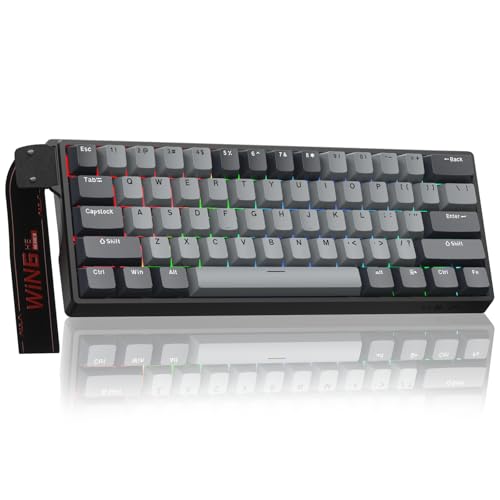
A compact 60% magnetic keyboard with 8000Hz polling, adjustable actuation, a 0.02mm rapid trigger step and hot-swappable switches.
Pros
- 8000Hz polling rate for fast response times
- Adjustable actuation with rapid trigger mode
- Hall Effect magnetic switches actuate without physical contact
- PBT keycaps with up to 16.8 million RGB colors
Cons
- Wired connection only, so it needs a cable to the PC
- 6-month warranty is the briefest term stated in this group
- Web-based driver needs an internet connection for remapping and macros
- Same 11.0 by 5.0 in footprint as the WIN60 HE, so it saves no extra desk space
Detailed Review
AULA lists the WIN60 HE PRO as a 60% mechanical gaming keyboard with Hall Effect magnetic switches, hot-swappable, adjustable actuation and rapid trigger mode, with polling rates of up to 8000Hz. The maker describes it as tailored for fast-paced FPS titles such as Valorant and CS2, with magnetic switches for quicker peeking and snap-shot shooting. Rapid trigger works with an RT step distance of 0.02mm. The 60% layout measures 11.0 by 5.0 by 1.1 in, in a black gray finish, and PBT keycaps sit under RGB lighting with up to 16.8 million colors. A web-based driver remaps keys, creates macros and adjusts RGB without a software download. The warranty is 6 months.
Who it's for: a Valorant player who wants adjustable actuation on a compact 60% board with 8000Hz polling. Who should skip it: anyone who wants a 104-key layout or a longer warranty term.
Its Office Score of 9.7/10 comes from performance 30/35, build 21/25, value 21/25, safety not scored (non-powered gear) and warranty 2/5: 74 of 90 points, placed on our 9.2 to 9.8 scale.
Key Specifications
| Polling rate | 8000Hz |
|---|---|
| Rapid trigger step | 0.02mm |
| Layout | 60% |
| Color | Black Gray |
These specs mirror the retailer listing as of 19 November 2026; performance figures are stated by the brand.
Safety and Warranty
What this listing states. This product does not plug in or run on a battery, so safety is not part of its score. 6 Months. It does not say everything a buyer needs, such as who pays return shipping, so warranty scores 2 of 5. See How We Pick.
Fit the desk first. Check the stated size against your desk depth and keyboard tray, and charge or pair as the manual describes. No keyboard, mouse or wrist rest prevents or treats injury.
This is general buying information, not professional advice. Follow each product manual and local rules, and see our Safety Disclaimer.

Redragon K671 Wired
Suits a typist or gamer who wants a full-size wired board with hot-swap and a 24-month warranty; skip it if you need wireless.
Pros
- 104-key full-size layout with hot-swappable red linear switches
- 11 backlight modes with 5 brightness levels
- Full-key anti-ghosting and 12 multimedia shortcuts
- 24-month warranty stated, the longest of the five
Cons
- Wired only, no wireless option
- Title says PBT but bullets say ABS keycaps
- Backlight color cannot be changed, per the bullets
- Heavier footprint at 17.13 inches wide
Detailed Review
Redragon lists the K671 as a wired mechanical keyboard with hot-swappable red linear switches, 104 keys, 11 backlight modes and macro editing. The bullets state full-key anti-ghosting, 12 multimedia shortcuts, water resistance, and a 24-month warranty. The listing gives dimensions of 17.13 x 4.88 x 1.42 inches. One contradiction: the title says double-shot PBT keycaps while the bullets say double injection ABS keycaps.
Who it's for: a typist or gamer who wants a full-size wired board with hot-swap and the longest stated warranty. Who should skip it: anyone who needs wireless, since this is wired only.
Its Office Score of 9.6/10 comes from performance 29/35, build 21/25, value 21/25, safety 0/10 and warranty 4/5: 75 of 100 points, placed on our 9.2 to 9.8 scale.
Key Specifications
| Keys | 104 |
|---|---|
| Switch | Red linear, hot-swap |
| Connection | Wired |
| Warranty | 24 months |
These specs mirror the retailer listing as of 17 October 2026; performance figures are stated by the brand.
Safety and Warranty
What this listing states. No FCC or other safety listing is stated, so safety scores zero. 24-Month Warranty. It does not say everything a buyer needs, such as who pays return shipping, so warranty scores 4 of 5. See How We Pick.
Fit the desk first. Check the stated size against your desk depth and keyboard tray, and charge or pair as the manual describes. No keyboard, mouse or wrist rest prevents or treats injury.
This is general buying information, not professional advice. Follow each product manual and local rules, and see our Safety Disclaimer.

CHONCHOW G100 Combo
Compact 60% wireless gaming keyboard and mouse with RGB backlight and rechargeable batteries for PC, laptop and consoles.
Pros
- Compact 60% layout with 68 keys, reducing desk space
- 2.4G connection with a shared USB adapter and a distance of 10 meters
- Rechargeable batteries: 2000 mAh keyboard and 500 mAh mouse
- Backlit keyboard with 4 brightness levels and 3 breathing speeds, as described by the maker
Cons
- No DPI figure is stated in the listing
- 2.4G only, with no Bluetooth or wired mode stated
- Warranty term is 12 months, with a separate 30-day refund term stated
Detailed Review
CHONCHOW lists G100 as a 60% compact wireless gaming keyboard and mouse combo with 68 keys, 2.4G connection sharing one USB adapter, and an effective distance of 10 meters. The keyboard battery is 2000 mAh and the mouse battery is 500 mAh, with an energy-saving sleep mode and wake on any key, and the keyboard has 4 brightness levels and 3 breathing speeds with a 7-color mouse. Compatibility includes PC, laptop, PS3, PS4, PS5, Xbox and Mac, with Windows versions from Windows 2000 to Windows 11 listed. The bullets give a keyboard size of 12.44 by 4.09 by 1.54 inches, while the spec table gives 15.75 by 5.31 by 1.77 inches, so the two sizes differ; the bullets are used here for the keyboard size.
Who it's for: a gamer who wants a compact rechargeable combo for PC and consoles with a shared receiver. Who should skip it: a reader who needs a stated DPI figure or a Bluetooth mode.
Its Office Score of 9.4/10 comes from performance 27/35, build 20/25, value 19/25, safety 0/10 and warranty 3/5: 69 of 100 points, placed on our 9.2 to 9.8 scale.
Key Specifications
| Layout | 60%, 68 keys |
|---|---|
| Connection | 2.4G |
| Keyboard battery | 2000 mAh |
| Mouse battery | 500 mAh |
Figures as published on the retailer listing, collected 3 November 2026. Performance figures are manufacturer rated.
Safety and Warranty
What this listing states. No FCC or other safety listing is stated, so safety scores zero. 12 months. It does not say everything a buyer needs, such as who pays return shipping, so warranty scores 3 of 5. See How We Pick.
Fit the desk first. Check the stated size against your desk depth and keyboard tray, and charge or pair as the manual describes. No keyboard, mouse or wrist rest prevents or treats injury.
This is general buying information, not professional advice. Follow each product manual and local rules, and see our Safety Disclaimer.
As an Amazon Associate I earn from qualifying purchases.
Specs compared
| Keyboard | Office Score | Polling rate | Layout | Switches | Size | Warranty | Amazon |
|---|---|---|---|---|---|---|---|
| Redragon K618 HE | 9.7/10 | 8K | 104 keys | Magnetic, low-profile | 17.32 x 7.48 x 1.26 in | 1 year | View on Amazon |
| AULA WIN60 HE | 9.7/10 | 8000Hz | 60% | Magnetic, hot-swappable | 11.0 x 5.0 x 1.1 in | 6 months | View on Amazon |
| AULA WIN60 HE PRO | 9.7/10 | 8000Hz | 60% | Magnetic, hot-swappable | 11.0 x 5.0 x 1.1 in | 6 months | View on Amazon |
| Redragon K671 | 9.7/10 | Not stated | Not stated | Red, hot-swappable | Not stated | 24 months | |
| CHONCHOW 60% Combo | 9.4/10 | Not stated | 60% | Not stated | Not stated | Not stated |
Dimensions, weight limits and ranges are the maker’s ratings as each listing gives them, collected 19 November 2026. Four of the five state a warranty term; none states a safety certification.
How to choose the best gaming keyboard for Valorant
Start with polling rate and rapid trigger
Polling rate decides how often the keyboard reports to the PC. Both AULA boards list polling rates of up to 8000Hz, and the Redragon K618 HE lists 8K polling, so all three report at the highest rate stated here. Rapid trigger is the other half of the pair: the AULA boards state an RT step distance of 0.02mm, while the K618 HE saves actuation profiles between 0.1mm and 2.8mm through its driver. The Redragon K671 states no polling rate, and the CHONCHOW combo states none either, so neither can be compared on speed from stated specs alone. For Valorant play, pair a stated polling rate with a stated actuation range before looking at anything else.
Pick a layout that fits the desk
Layout decides how much desk stays free for the mouse. Both AULA boards use a 60% layout at 11.0 by 5.0 by 1.1 in, the smallest footprint with stated dimensions here. The Redragon K618 HE is a 104-key board at 17.32 by 7.48 by 1.26 in, so it needs the widest stretch of desk in this group. The CHONCHOW combo is also a 60% layout, but it states no dimensions, so its footprint cannot be checked before ordering. Measure the space beside the mouse pad first, then check the board against it; a mouse pad that fits a 104-key board leaves little room on a small desk.
| Keyboard | Layout | Size | Weight |
|---|---|---|---|
| Redragon K618 HE | 104 keys | 17.32 x 7.48 x 1.26 in | Not stated |
| AULA WIN60 HE | 60% | 11.0 x 5.0 x 1.1 in | Not stated |
| AULA WIN60 HE PRO | 60% | 11.0 x 5.0 x 1.1 in | Not stated |
| Redragon K671 | Not stated | Not stated | Not stated |
| CHONCHOW 60% Combo | 60% | Not stated | Not stated |
Figures as stated by each maker. Size is length by width by height; weight is the item weight where stated.
Count the macro keys and the wheel
Macro keys save key combinations to a single press. The Redragon K618 HE gives 20 on-the-fly macro keys in a 4×5 zone plus media controls, with no software required, and a single control wheel adjusts backlight brightness and media volume. The AULA boards create macros through a web-based driver, which also remaps keys and adjusts RGB lighting, while the Redragon K671 supports macro editing through software and adds 12 multimedia shortcuts. The CHONCHOW combo states no macro support. A board with dedicated macro keys suits a player who wants combos without opening a driver; a driver-based board suits a player who remaps keys between games. Also see our best mechanical keyboard with hot swappable switches for more boards with swappable switches.
Read the warranty line
Warranty terms run from 6 months to 24 months across this group. The Redragon K671 states a 24-month warranty, the longest term here, while the Redragon K618 HE states 1 year and both AULA boards state 6 months. The CHONCHOW combo states no warranty term at all. A longer term matters most on a board with hot-swappable switches, since the switches are the parts that get changed. Match the term to how long the board is expected to last at the desk before choosing.
Setup Notes
- Measure desk depth before ordering the Redragon K618 HE: it measures 17.32 by 7.48 in, the widest board here.
- Leave a USB port free for each wired board: the two AULA boards, the K618 HE and the K671 all connect by cable.
- The AULA web driver needs an internet connection, so plan for that before remapping keys or creating macros.
- Check the 60% footprint: both AULA boards measure 11.0 by 5.0 in, leaving room beside the board for a mouse.
FAQ
What polling rate do these keyboards list?
Both AULA boards list polling rates of up to 8000Hz, and the Redragon K618 HE lists 8K polling. The Redragon K671 and the CHONCHOW combo state no polling rate, so their speed cannot be compared from stated figures.
What is rapid trigger on the AULA boards?
Rapid trigger is a mode on the magnetic switches that responds to key movement. Both AULA boards state an RT step distance of 0.02mm, and the K618 HE saves actuation profiles between 0.1mm and 2.8mm through its driver.
Which of these keyboards is the most compact?
Both AULA boards measure 11.0 by 5.0 by 1.1 in with a 60% layout, the smallest stated footprint here. The CHONCHOW combo is also a 60% layout but states no dimensions, and the K618 HE is a 104-key board at 17.32 by 7.48 by 1.26 in.
Which keyboards have macro keys?
The Redragon K618 HE has 20 on-the-fly macro keys in a 4×5 zone plus media controls, with no software required. The AULA boards create macros through a web-based driver, and the Redragon K671 supports macro editing through software. The CHONCHOW combo states no macro support.
Which keyboard has the longest warranty?
The Redragon K671 states a 24-month warranty, the longest term in this group. The Redragon K618 HE states 1 year, both AULA boards state 6 months, and the CHONCHOW combo states no warranty term.
Score breakdown
The Office Score weighs performance (polling rate, switch type, rapid trigger and actuation range), build (keycaps, layout and stated size), value for the stated specs, safety and warranty. For a keyboard, safety means a stated certification or safety feature; none of the five states one, so safety scores zero across the group. Four listings state a warranty term: the Redragon K671 at 24 months, the Redragon K618 HE at 1 year, and the two AULA boards at 6 months. How we pick explains the weights.
| Product | Office Score | Perf. /35 | Build /25 | Value /25 | Safety /10 | Warranty /5 |
|---|---|---|---|---|---|---|
| Redragon K618 HE | 9.7 | 32 | 21 | 20 | n/a | 3 |
| AULA WIN60 HE | 9.7 | 32 | 21 | 21 | n/a | 2 |
| AULA WIN60 HE PRO | 9.7 | 30 | 21 | 21 | n/a | 2 |
Office Scores run on a short 9.2 to 9.8 scale. We place each item’s weighted point total on it in proportion, so a larger total is always shown as a larger score. No plug, no battery and no listed safety features: the safety column is set to n/a and the score is based on 90 points.
More for your workspace
See every keyboard guide and all computer peripherals guides. Also see our best gaming headset for Valorant. Also see our best split keyboards for programmers. Also see our best mechanical keyboard with hot swappable switches. Also see our best ergonomic keyboard for work.
More picks: mice and mouse pads, monitor arms and stands, webcams and ring lights.