The best gaming mouse for under 100 is the one that fits the hand, tracks cleanly across the pad, and keeps its buttons and sensor working through long sessions at the desk. A gaming mouse is not only about a high sensor figure; weight, shape, connection and battery matter just as much when the mouse is in use every day. This article compares gaming mice by sensor, weight, connection, polling and warranty, using only what each maker lists.
OfficeKitHQ earns a commission when you buy through links on this page, at no extra cost to you. As an Amazon Associate I earn from qualifying purchases. Affiliate disclosure.
Quick picks
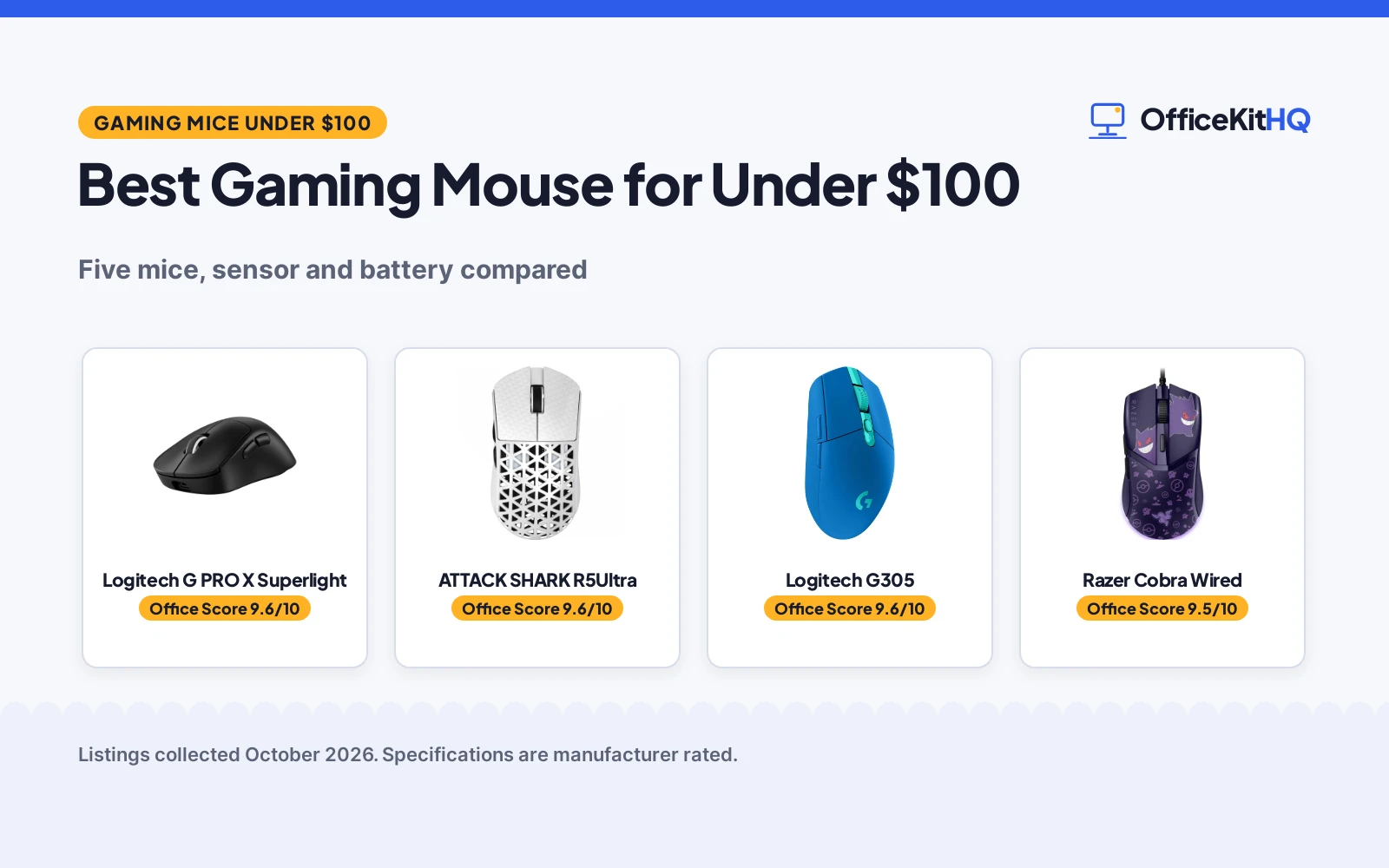
 Best Overall Logitech G PRO X Superlight: 44K DPI sensor, 88 hours battery, 60 grams, 2 year warranty Check price on Amazon
 Best Lightweight ATTACK SHARK R5Ultra: 42,000 DPI, 8K polling, 39 grams, tri-mode connection Check price on Amazon
 Best Wired Razer Cobra Wired: 8500 DPI sensor, Gen-3 switches, 58 grams, 2 year warranty Check price on Amazon
 Lightspeed Wireless Logitech G305: 12,000 DPI HERO sensor, Lightspeed wireless connection Check price on Amazon
 Wireless RGB Redragon M612: 8000 DPI optical sensor, wireless RGB gaming mouse Check price on Amazon
Our desk picks
| # | Product | Office Score | Buy |
|---|---|---|---|
| 1 | Logitech G PRO X Superlight | 9.6/10 | Buy on Amazon |
| 2 | ATTACK SHARK R5Ultra | 9.6/10 | Buy on Amazon |
| 3 | Logitech G305 Lightspeed | 9.6/10 | Buy on Amazon |
| 4 | Razer Cobra Wired | 9.5/10 | Buy on Amazon |
| 5 | Redragon M612 PRO | 9.5/10 | Buy on Amazon |

Logitech G PRO X Superlight
A wireless gaming mouse with a 44K DPI sensor, 60 grams, 5 programmable buttons and up to 88 hours of battery life.
Pros
- HERO 2 sensor tracks up to 44K DPI, 888 IPS and 88 G acceleration
- LIGHTSPEED wireless at 1 kHz polling, through a standard wireless USB receiver
- Up to 88 hours of battery life on a single charge, recharging by USB-A to USB-C cable
- 60 grams, with an asymmetrical right-handed shape and 5 programmable buttons
Cons
- Upgrading to an 8 kHz receiver is sold separately
- Wireless receiver is standard, not the PRO LIGHTSPEED receiver
- Advanced features need Logitech G HUB software
- Right-handed shape only, with no left-handed shape listed
Detailed Review
Logitech lists this black mouse as a wireless gaming mouse with a HERO 2 sensor that tracks up to 44K DPI, 888 IPS and 88 G acceleration, through LIGHTSPEED wireless at 1 kHz polling. It states 5 programmable buttons, LIGHTFORCE hybrid optical-mechanical switches, zero-additive PTFE feet, a 60 gram weight and an asymmetrical right-handed shape. The maker lists up to 88 hours of battery life on a single charge, recharging by the included USB-A to USB-C cable, and a standard wireless USB receiver in the box. The listing states a 2 year limited hardware warranty.
Who it's for: someone who wants a light wireless gaming mouse with a high DPI sensor and a long stated battery life. Who should skip it: anyone who wants an 8 kHz receiver in the box or a left-handed shape.
Its Office Score of 9.6/10 comes from performance 32/35, build 22/25, value 21/25, safety 0/10 and warranty 3/5: 78 of 100 points, placed on our 9.2 to 9.8 scale.
Key Specifications
| Sensor | HERO 2, up to 44K DPI |
|---|---|
| Weight | 60 grams |
| Battery | Up to 88 hours |
| Warranty | 2 Year Limited Hardware Warranty |
These specs mirror the retailer listing as of 18 November 2026; performance figures are stated by the brand.
Safety and Warranty
What this listing states. No FCC or other safety listing is stated, so safety scores zero. 2 Year Limited Hardware Warranty. It does not say everything a buyer needs, such as who pays return shipping, so warranty scores 3 of 5. See How We Pick.
Fit the desk first. Check the stated size against your desk depth and keyboard tray, and charge or pair as the manual describes. No keyboard, mouse or wrist rest prevents or treats injury.
This is general buying information, not professional advice. Follow each product manual and local rules, and see our Safety Disclaimer.
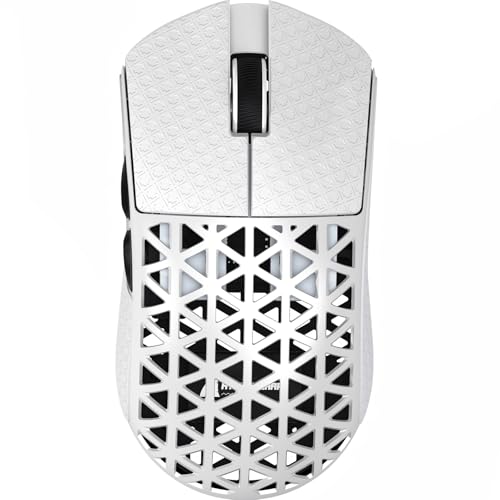
ATTACK SHARK R5Ultra
A tri-mode gaming mouse with a 42,000 DPI sensor, 8K polling, carbon fiber material and a weight of 39 grams.
Pros
- PAW3950 MAX sensor with 42,000 programmable DPI, 750 IPS and 50g acceleration
- 8K polling rate in wireless mode and 1kHz polling rate in wired mode
- Tri-mode connection: Bluetooth, 2.4 GHz wireless and wired USB
- Carbon fiber material with a hollow design, at 39 grams
Cons
- No battery life figure is stated
- Cloud driver is web-based, with no downloaded driver listed
- 39 gram weight suits fast movement, not a heavier grip
- Programmable functions need the cloud driver webpage
Detailed Review
ATTACK SHARK lists this white mouse as a carbon fiber gaming mouse with a PAW3950 MAX sensor, 42,000 programmable DPI, 750 IPS speed and 50g acceleration. It states an 8K polling rate in wireless mode, a 1kHz polling rate in wired mode, and tri-mode switching between Bluetooth, 2.4 GHz wireless and wired USB. The maker lists a weight of 39 grams, zero-additive PTFE feet, and a cloud driver webpage for DPI adjustment, buttons and macros. The listing states a 1 year warranty.
Who it's for: someone who wants a very light tri-mode gaming mouse with a high DPI sensor and 8K polling. Who should skip it: anyone who wants a stated battery life figure or a downloaded driver.
Its Office Score of 9.6/10 comes from performance 33/35, build 22/25, value 21/25, safety 0/10 and warranty 3/5: 79 of 100 points, placed on our 9.2 to 9.8 scale.
Key Specifications
| Sensor | PAW3950 MAX, 42,000 DPI |
|---|---|
| Weight | 39 grams |
| Connection | Bluetooth, 2.4 GHz, wired USB |
| Polling | 8K wireless, 1kHz wired |
These specs mirror the retailer listing as of 18 November 2026; performance figures are stated by the brand.
Safety and Warranty
What this listing states. No FCC or other safety listing is stated, so safety scores zero. 1 Year. It does not say everything a buyer needs, such as who pays return shipping, so warranty scores 3 of 5. See How We Pick.
Fit the desk first. Check the stated size against your desk depth and keyboard tray, and charge or pair as the manual describes. No keyboard, mouse or wrist rest prevents or treats injury.
This is general buying information, not professional advice. Follow each product manual and local rules, and see our Safety Disclaimer.

Logitech G305 Lightspeed
A LIGHTSPEED wireless gaming mouse with a 12,000 DPI HERO sensor, 6 programmable buttons, on-board memory and a stated 250 hours of gameplay on 1 AA battery.
Pros
- 12,000 DPI HERO sensor with 400 IPS precision is the highest stated here
- 1 ms report rate LIGHTSPEED wireless is stated as lag-free
- 250 hours of gameplay on 1 AA, with endurance mode stated up to 9 months
- On-board memory keeps the button mapping on the mouse
Cons
- Nano receiver occupies a USB port for the whole session
- Included Components line names a Black mouse while the title says Blue
- Right-hand orientation only
Detailed Review
Logitech lists the G305 as a Blue Lightspeed wireless mouse with a HERO optical sensor rated at 12,000 DPI and 400 IPS precision, a LIGHTSPEED connection with a 1 ms report rate, 6 programmable buttons and on-board memory. The listing states 250 hours of continuous gameplay on one included AA battery, with an endurance mode via Logitech G HUB software extending life up to 9 months. Two contradictions to note: the bullets give a 3.4 oz mouse weight while the spec table lists the item weight as 4.8 ounces, and the Included Components line names a Black mouse while the title says Blue. The title and bullets are more specific, so we trust them. The listing states a 1 Year Limited Hardware Warranty.
Who it's for: someone who wants the highest stated DPI and programmable buttons on a wireless mouse that stays cordless for months. Who should skip it: anyone who needs a left-hand or ambidextrous shape, or who cannot spare a USB port for the receiver.
Its Office Score of 9.6/10 comes from performance 32/35, build 21/25, value 21/25, safety 0/10 and warranty 4/5: 78 of 100 points, placed on our 9.2 to 9.8 scale.
Key Specifications
| Sensor | 12,000 DPI |
|---|---|
| Buttons | 6 programmable |
| Battery | 1 AA, 250 h stated |
| Report rate | 1 ms |
Figures as published on the retailer listing, collected 22 October 2026. Performance figures are manufacturer rated.
Safety and Warranty
What this listing states. No FCC or other safety listing is stated, so safety scores zero. 1 Year Limited Hardware Warranty. It does not say everything a buyer needs, such as who pays return shipping, so warranty scores 4 of 5. See How We Pick.
Fit the desk first. Check the stated size against your desk depth and keyboard tray, and charge or pair as the manual describes. No keyboard, mouse or wrist rest prevents or treats injury.
This is general buying information, not professional advice. Follow each product manual and local rules, and see our Safety Disclaimer.
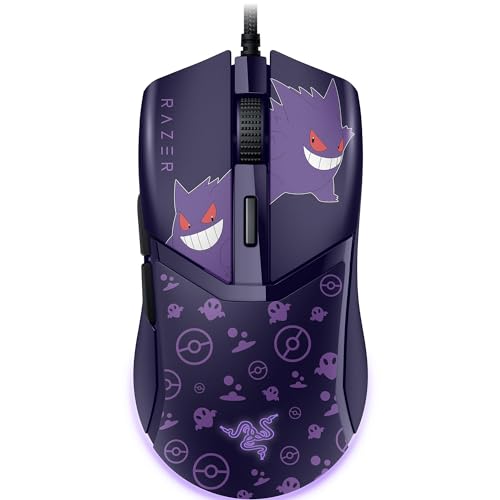
Razer Cobra Wired
A wired gaming mouse with an 8500 DPI sensor, Gen-3 optical switches, Chroma RGB lighting and a weight of 58 grams.
Pros
- 8500 DPI optical sensor, with adjustments in 50 DPI increments
- Gen-3 optical switches with a 90-million click lifecycle and 0.2 ms actuation
- Chroma RGB lighting with 16.8 million colors and gradient underglow
- 58 grams, with 100 percent PTFE mouse feet and a Speedflex cable
Cons
- Wired only, with no wireless mode
- 8500 DPI is lower than the 44K and 42,000 DPI mice here
- Chroma lighting adds light that some desks do not need
- Pokemon Gengar Edition design may not suit every desk
Detailed Review
Razer lists this Gengar Edition mouse as a wired gaming mouse with an 8500 DPI optical sensor, Gen-3 optical switches, Chroma RGB lighting and a Speedflex cable. It states a 90-million click lifecycle, a 0.2 ms actuation time, 16.8 million colors, adjustments in 50 DPI increments, and 100 percent PTFE mouse feet. The maker lists a weight of 58 grams and a shape built to fit most grip styles. The listing states a 2 year manufacturer warranty.
Who it's for: someone who wants a light wired gaming mouse with optical switches and RGB lighting. Who should skip it: anyone who wants a wireless connection or a higher DPI sensor.
Its Office Score of 9.5/10 comes from performance 29/35, build 21/25, value 20/25, safety 0/10 and warranty 3/5: 73 of 100 points, placed on our 9.2 to 9.8 scale.
Key Specifications
| Sensor | 8500 DPI optical |
|---|---|
| Weight | 58 grams |
| Switches | Gen-3 optical, 90-million clicks |
| Warranty | 2 Year Manufacturer |
These specs mirror the retailer listing as of 18 November 2026; performance figures are stated by the brand.
Safety and Warranty
What this listing states. This product does not plug in or run on a battery, so safety is not part of its score. 2 Year Manufacturer. It does not say everything a buyer needs, such as who pays return shipping, so warranty scores 3 of 5. See How We Pick.
Fit the desk first. Check the stated size against your desk depth and keyboard tray, and charge or pair as the manual describes. No keyboard, mouse or wrist rest prevents or treats injury.
This is general buying information, not professional advice. Follow each product manual and local rules, and see our Safety Disclaimer.

Redragon M612 PRO
A wireless mouse with 8000 DPI, 9 programmable buttons, BT and 2.4GHz connection and 7 backlit modes.
Pros
- 8000 DPI with 5 redefinable levels from 500 to 8000
- 9 programmable buttons with macro keybinds
- BT and 2.4GHz wireless with no cable
- 7 backlit modes with RGB lighting
Cons
- 0.24 lb weight is heavier than the 55g and 58g mice here
- Wireless only, with no wired mode stated
- 1 year warranty is shorter than the 2 year warranties here
- No stated polling rate
Detailed Review
Redragon lists the M612 PRO as a wireless mouse with 5 DPI levels from 500 to 8000, 9 programmable buttons, BT and 2.4GHz connection, 7 backlit modes and a frosted coating with rubber texture on the left side. The maker describes a claw-grip ergonomic design for long sessions, with a solid frame and a streamlined shape.
Who it's for: a player who wants a wireless mouse with many programmable buttons. Who should skip it: a buyer who wants a wired mouse or a stated weight in grams.
Its Office Score of 9.5/10 comes from performance 30/35, build 20/25, value 21/25, safety 0/10 and warranty 3/5: 74 of 100 points, placed on our 9.2 to 9.8 scale.
Key Specifications
| DPI | 8000 |
|---|---|
| Buttons | 9 programmable |
| Connection | BT and 2.4GHz |
| Weight | 0.24 lb |
These specs mirror the retailer listing as of 15 November 2026; performance figures are stated by the brand.
Safety and Warranty
What this listing states. No FCC or other safety listing is stated, so safety scores zero. 1 year. It does not say everything a buyer needs, such as who pays return shipping, so warranty scores 3 of 5. See How We Pick.
Fit the desk first. Check the stated size against your desk depth and keyboard tray, and charge or pair as the manual describes. No keyboard, mouse or wrist rest prevents or treats injury.
This is general buying information, not professional advice. Follow each product manual and local rules, and see our Safety Disclaimer.
As an Amazon Associate I earn from qualifying purchases.
Specs compared
| Mouse | Office Score | Sensor DPI | Weight | Connection | Battery | Warranty | Amazon |
|---|---|---|---|---|---|---|---|
| Logitech G PRO X Superlight | 9.6/10 | 44K DPI | 60 grams | Wireless, USB-C | Up to 88 hours | 2 years | View on Amazon |
| ATTACK SHARK R5Ultra | 9.6/10 | 42,000 DPI | 39 grams | Bluetooth, 2.4 GHz, wired USB | Not stated | 1 year | View on Amazon |
| Razer Cobra Wired | 9.5/10 | 8500 DPI | 58 grams | Wired, Speedflex cable | Wired, no battery | 2 years | View on Amazon |
| Logitech G305 | 9.6/10 | 12,000 DPI | Not stated | Wireless, Lightspeed | Not stated | Not stated | |
| Redragon M612 | 9.5/10 | 8000 DPI | Not stated | Wireless | Not stated | Not stated |
We quote these figures from each listing as the brand rates them; captured 18 November 2026. Three of the five state a warranty term; none state a safety certification.
How to choose the best gaming mouse for under 100
Sensor and DPI
Sensor DPI sets how far the cursor moves for a given hand movement, and the mice here cover a wide range. The Logitech PRO X states a HERO 2 sensor with up to 44K DPI, 888 IPS and 88 G acceleration. The ATTACK SHARK mouse states a PAW3950 MAX sensor with 42,000 programmable DPI, 750 IPS speed and 50g acceleration. The Logitech G305 states a HERO sensor with 12,000 DPI. The Razer Cobra states an 8500 DPI optical sensor, with adjustments in 50 DPI increments. The Redragon mouse states an 8000 DPI optical sensor. A higher DPI figure suits a wide display and fast cursor movement, while a lower DPI figure suits careful aim on a small screen. The Razer Cobra also states Gen-3 optical switches with a 90-million click lifecycle and a 0.2 ms actuation time, and the Logitech PRO X states LIGHTFORCE hybrid optical-mechanical switches. See the gaming mouse types guide for more on sensors and switches.
Weight and shape
Weight and shape decide how the mouse feels in the hand, and the three full-data mice state their weights in grams. The ATTACK SHARK mouse states 39 grams, with a carbon fiber material and a hollow design. The Razer Cobra states 58 grams, built to fit most grip styles. The Logitech PRO X states 60 grams, with an asymmetrical right-handed shape and programmable thumb buttons. The ATTACK SHARK mouse also states zero-additive PTFE feet, the Razer Cobra states 100 percent PTFE mouse feet, and the Logitech PRO X states zero-additive PTFE feet. A lighter mouse suits fast movement across the pad, while a shape that fits the hand suits long sessions. See the gaming mouse size guide for more on weight and grip.
Connection and polling rate
Connection and polling rate decide how the mouse talks to the computer, and the mice here split into wired, wireless and tri-mode designs. The Razer Cobra is wired, with a Speedflex cable. The Logitech PRO X is wireless, with LIGHTSPEED wireless technology at 1 kHz polling, through a standard wireless USB receiver, and a USB-A to USB-C cable for charging. The ATTACK SHARK mouse is tri-mode, switching between Bluetooth, 2.4 GHz wireless and wired USB, with an 8K polling rate in wireless mode and a 1kHz polling rate in wired mode. The Logitech G305 is wireless, with Lightspeed, and the Redragon mouse is wireless. A wired connection suits a desk where the cable stays out of the way, while a wireless connection suits a desk where the mouse moves freely. Polling rate is the figure the maker lists for how often the mouse reports its position.
Battery and charging
Battery life matters only for the wireless mice, and only one mouse here states a battery life figure. The Logitech PRO X states up to 88 hours of battery life on a single charge, and recharges through the included USB-A to USB-C cable. The ATTACK SHARK mouse states a tri-mode design with Bluetooth, 2.4 GHz and wired USB, so it can run wired when charging is not wanted. The Razer Cobra is wired, with no battery to charge. The Logitech G305 and the Redragon mouse are wireless, with no battery life figure stated. A stated battery life figure helps plan charging, while a wired mode removes charging from the desk entirely. Check the stated battery figure before ordering, and keep the charging cable close at hand for the wireless mice.
Setup Notes
- Check the stated weight and shape of the mouse against the hand that will use it most, and against the space on the desk pad.
- Keep the USB-A to USB-C cable close at hand for the Logitech PRO X, and plug the wired mice directly into the computer.
- Pair the wireless mice by receiver or Bluetooth where the mouse lists that connection, and keep the receiver with the mouse when it travels.
- Use the Razer Synapse App for the Razer Cobra and G HUB software for the Logitech PRO X, where the maker lists those apps for settings.
FAQ
What DPI should a gaming mouse have?
There is no single DPI figure for every gamer. The mice here state 8000 DPI, 8500 DPI, 12,000 DPI, 42,000 DPI and up to 44K DPI, so pick the mouse whose stated DPI range covers the cursor speed you use most, and adjust it in the software the maker lists.
Wired or wireless for gaming?
Both work, and the choice is about the desk. The Razer Cobra is wired, the Logitech PRO X and the Logitech G305 are wireless, and the ATTACK SHARK mouse switches between Bluetooth, 2.4 GHz wireless and wired USB.
How long does the Logitech PRO X battery last?
The maker lists up to 88 hours of battery life on a single charge for the Logitech PRO X, and it recharges through the included USB-A to USB-C cable.
Which mouse is lightest here?
Of the mice that state a weight, the ATTACK SHARK mouse states 39 grams, the Razer Cobra states 58 grams, and the Logitech PRO X states 60 grams.
Is there a warranty on these mice?
Three of the five state a warranty term. The Razer Cobra states a 2 year warranty, the Logitech PRO X states a 2 year warranty, and the ATTACK SHARK mouse states a 1 year warranty.
Score breakdown
The Office Score weighs performance, build, value, safety and warranty; for a gaming mouse, performance means sensor DPI, polling rate and switches, build means weight, material and feet, and value means what the stated specs offer for a desk under $100. Safety means a stated safety certification, and no listing here states one, so safety scores zero for every mouse. Three listings state a warranty term: the Razer Cobra and the Logitech PRO X each state a 2 year warranty, and the ATTACK SHARK mouse states a 1 year warranty. How we pick explains the weights.
| Product | Office Score | Perf. /35 | Build /25 | Value /25 | Safety /10 | Warranty /5 |
|---|---|---|---|---|---|---|
| Logitech G PRO X Superlight | 9.6 | 32 | 22 | 21 | 0 | 3 |
| ATTACK SHARK R5Ultra | 9.6 | 33 | 22 | 21 | 0 | 3 |
| Razer Cobra Wired | 9.5 | 29 | 21 | 20 | 0 | 3 |
Score placement follows the weighted total: the lowest totals read 9.2, the highest 9.8, and everything between keeps its order.
More for your workspace
See every mice and mouse pads guide and all monitor mounts, keyboards and mice guides.
More picks: gaming mouse for Fortnite, gaming mouse for office, wireless mouse for tablet, mouse pad types.