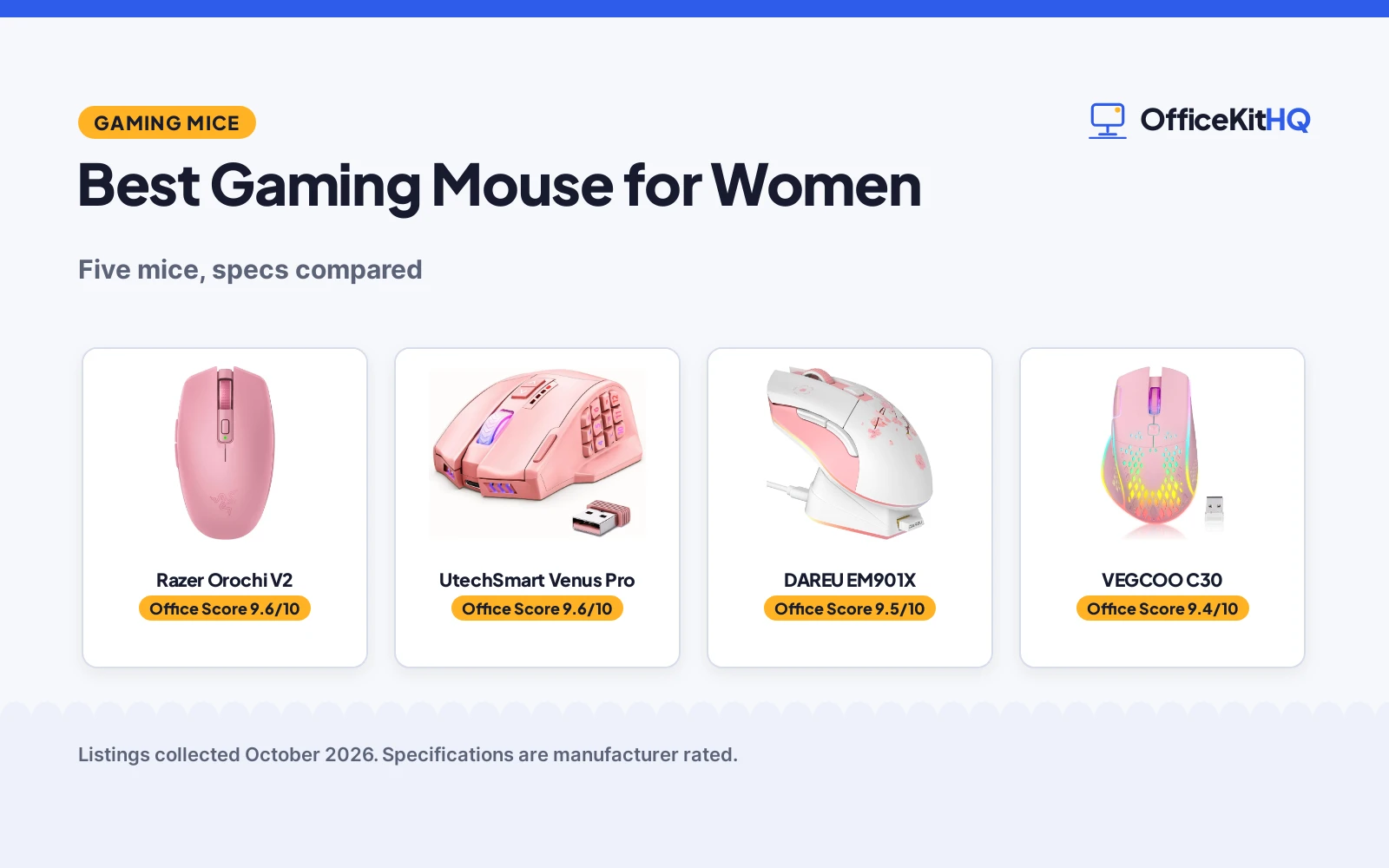
The best gaming mouse for women is the one that fits your hand without giving up the specs that matter in the games you play: enough sensitivity range for fast turns, enough buttons for the shortcuts you actually press, and a shape that stays comfortable past midnight. These pink wireless picks were compared on sensitivity, buttons, battery life and warranty, using only the numbers each Amazon listing publishes. Where a listing contradicted its own spec table, the review says so and we trusted the title and bullets.
OfficeKitHQ earns a commission when you buy through links on this page, at no extra cost to you. As an Amazon Associate I earn from qualifying purchases. Affiliate disclosure.
Quick picks
 Best Overall Razer Orochi V2: 18K DPI sensor, 60M-click switches, dual wireless, 2-year warranty Check price on Amazon
 Best for MMO Macros UtechSmart Venus Pro: 16 programmable buttons, 16K DPI, 1000Hz polling, 70-hour battery Check price on Amazon
 Best Charging Dock DAREU EM901X: Magnetic charging dock, 12K DPI, 300 IPS, 85g weight Check price on Amazon
 Best Double-Click Key VEGCOO C30: Handy double-click key, honeycomb shell, 500mAh rechargeable battery Check price on Amazon
 Quietest Clicks VEGCOO C9: Silent-click buttons, RGB lights, 56-hour battery, thumb rest Check price on Amazon
The picks
| # | Product | Office Score | Buy |
|---|---|---|---|
| 1 | Razer Orochi V2 | 9.6/10 | Buy on Amazon |
| 2 | UtechSmart Venus Pro | 9.6/10 | Buy on Amazon |
| 3 | DAREU EM901X | 9.5/10 | Buy on Amazon |
| 4 | VEGCOO C30 | 9.4/10 | Buy on Amazon |
| 5 | VEGCOO C9 | 9.4/10 | Buy on Amazon |

Razer Orochi V2
A 60-gram-class wireless gaming mouse with an 18K DPI optical sensor, dual Bluetooth and 2.4GHz connectivity, and switches rated for 60 million clicks.
Pros
- 18K DPI Razer Focus X optical sensor with 99.4% resolution accuracy stated
- Dual wireless: Bluetooth for long sessions, HyperSpeed Wireless for low-latency gaming
- 60 million click rating on Razer Mechanical Mouse Switches Gen-2
- 2-year manufacturer warranty is stated
Cons
- No lighting or RGB is listed
- Only 6 buttons, no extra side-button bank
- AA battery adds weight beyond the listed 60g figure
- No charging dock is included
Detailed Review
Razer lists the Orochi V2 in Quartz Pink as a portable wireless gaming mouse weighing under 60g without a battery, with a hybrid battery slot that takes a single AA or AAA battery. The Razer Focus X 18K optical sensor states 18K DPI with 99.4% resolution accuracy, and the Razer Mechanical Mouse Switches Gen-2 with gold-plated contacts are rated for up to 60 million clicks. Dual-mode wireless switches between Bluetooth and HyperSpeed Wireless: the listing states up to 1100 hours on Bluetooth or 445 hours on HyperSpeed Wireless. Dimensions are listed at 4.25 by 2.46 in, and the warranty description states a 2-year manufacturer warranty.
Who it's for: someone who wants a light travel-friendly mouse for both office and gaming. Who should skip it: anyone who wants RGB lighting or more than 6 buttons.
Its Office Score of 9.6/10 comes from performance 33/35, build 22/25, value 20/25, safety 0/10 and warranty 4/5: 79 of 100 points, placed on our 9.2 to 9.8 scale.
Key Specifications
| Max DPI | 18K DPI |
|---|---|
| Weight | Under 60g (without battery) |
| Battery life | 1100 hr Bluetooth, 445 hr HyperSpeed |
| Buttons | 6 |
Figures as published on the retailer listing, collected 22 October 2026. Performance figures are manufacturer rated.
Safety and Warranty
What this listing states. No FCC or other safety listing is stated, so safety scores zero. 2 Year Manufacturer. It does not say everything a buyer needs, such as who pays return shipping, so warranty scores 4 of 5. See How We Pick.
Fit the desk first. Check the stated size against your desk depth and keyboard tray, and charge or pair as the manual describes. No keyboard, mouse or wrist rest prevents or treats injury.
This is general buying information, not professional advice. Follow each product manual and local rules, and see our Safety Disclaimer.
UtechSmart Venus Pro
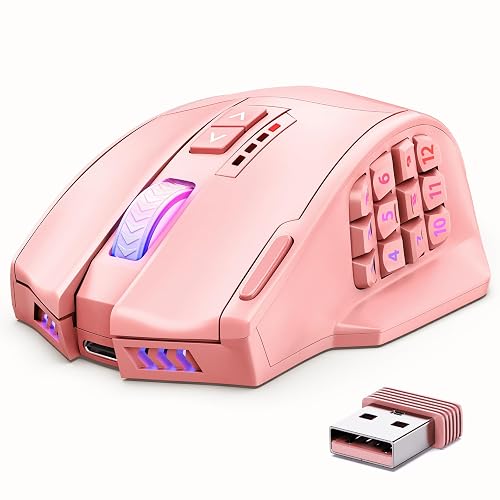
A pink wireless MMO gaming mouse with 16 programmable buttons, a 16,000 DPI optical sensor and up to 70 hours of wireless battery life.
Pros
- 16 programmable buttons with macro coding support
- 16,000 DPI with 5 DPI switchable stages and 1000 Hz polling rate
- 70-hour wireless battery life with 2-hour full charge
- Dual mode: 2.4 GHz wireless or wired connection
Cons
- Spec table lists 18 buttons while the title and bullets state 16
- At 0.2 kg it is the heaviest mouse in this group
- Chroma RGB lighting can be a distraction if you prefer a plain desk mouse
- Right-hand shape only
Detailed Review
UtechSmart lists the Venus Pro in pink as a wireless MMO gaming mouse with 16 programmable buttons, 12 of them on the thumb grip at different inclination angles, and a custom PixArt PMW3335 optical sensor reaching up to 16,000 DPI with 5 switchable stages and a 1000 Hz polling rate. The listing states a 1000mAh battery good for up to 70 hours of wireless use, a 2-hour full charge and over 300 recharge cycles, with 2.4 GHz wireless or a wired connection and a 10-meter reception boundary. One inconsistency: the spec table lists 18 buttons while the title and bullets state 16; we trust the title and bullets. The warranty description offers 12-month product care with 24/7 customer support.
Who it's for: MMO players who want a full button bank under one thumb. Who should skip it: anyone who wants a light ambidextrous mouse.
Its Office Score of 9.6/10 comes from performance 32/35, build 20/25, value 21/25, safety 0/10 and warranty 3/5: 76 of 100 points, placed on our 9.2 to 9.8 scale.
Key Specifications
| Max DPI | 16000 DPI |
|---|---|
| Programmable buttons | 16 |
| Polling rate | 1000 Hz |
| Battery life | 70 hours wireless |
Figures as published on the retailer listing, collected 22 October 2026. Performance figures are manufacturer rated.
Safety and Warranty
What this listing states. No FCC or other safety listing is stated, so safety scores zero. 12-month product care and 24/7 customer support. It does not say everything a buyer needs, such as who pays return shipping, so warranty scores 3 of 5. See How We Pick.
Fit the desk first. Check the stated size against your desk depth and keyboard tray, and charge or pair as the manual describes. No keyboard, mouse or wrist rest prevents or treats injury.
This is general buying information, not professional advice. Follow each product manual and local rules, and see our Safety Disclaimer.

DAREU EM901X
A Sakura pink wireless gaming mouse with a magnetic charging dock, a 12K DPI sensor, 300 IPS tracking and an 85g lightweight build.
Pros
- Magnetic charging dock aligns the mouse for charging by itself
- 12K DPI sensor with 300 IPS and 1000Hz polling
- 85g lightweight build without drilled holes
- 50 million click micro switch rating
Cons
- Battery life is listed at 24 hours, the lowest figure here
- Right-hand claw-grip shape, not ambidextrous
- Dock takes up desk space between sessions
- No DPI level details beyond the 12K maximum
Detailed Review
DAREU lists the EM901X in Sakura Pink as a symmetrical wireless gaming mouse with a strong magnetic charging dock that aligns the mouse automatically for charging. The listing states a 12K DPI gaming sensor, 300 IPS, a 1000Hz polling rate and 1-millisecond wireless transmission, with micro switches rated for 50 million clicks. The mouse weighs 85g, measures 5.51 by 3.54 in, and runs on a rechargeable built-in battery listed at 24 hours of battery average life. Included components are the charging dock, an English manual, the mouse, a USB receiver and a USB-A to type C cable. The warranty description states a 365-day manufacturer warranty.
Who it's for: someone who wants a docked charging routine instead of cables. Who should skip it: anyone who needs more than a day of battery per charge.
Its Office Score of 9.5/10 comes from performance 29/35, build 21/25, value 20/25, safety 0/10 and warranty 3/5: 73 of 100 points, placed on our 9.2 to 9.8 scale.
Key Specifications
| Max DPI | 12K DPI |
|---|---|
| Weight | 85 g |
| Polling rate | 1000 Hz |
| Dimensions | 5.51 x 3.54 in |
Figures as published on the retailer listing, collected 22 October 2026. Performance figures are manufacturer rated.
Safety and Warranty
What this listing states. This product does not plug in or run on a battery, so safety is not part of its score. Manufacturer warranty for 365 days from date of purchase. It does not say everything a buyer needs, such as who pays return shipping, so warranty scores 3 of 5. See How We Pick.
Fit the desk first. Check the stated size against your desk depth and keyboard tray, and charge or pair as the manual describes. No keyboard, mouse or wrist rest prevents or treats injury.
This is general buying information, not professional advice. Follow each product manual and local rules, and see our Safety Disclaimer.

VEGCOO C30
A pink wireless gaming mouse with a dedicated double-click key, a honeycomb shell and chroma RGB lights.
Pros
- Dedicated double-click key in the upper left corner
- Honeycomb shell keeps it light and handy
- Chroma RGB lights can be turned off
- 500mAh rechargeable battery with 2.4G wireless
Cons
- Bullets state 800/1200/1600 DPI while the spec table says 800/1600/3200
- No battery-hour figure is stated
- Double-click key position may not suit every grip
- Only the listed 2.4G wireless mode is stated
Detailed Review
VEGCOO lists the C30 in pink as a wireless gaming mouse with a honeycomb shell, a dedicated double-click key in the upper left corner and chroma RGB lights that can be switched off. The bullets state three DPI levels of 800/1200/1600, a 2.4G wireless connection with up to 10 meters of range, silent left and right clicks and a built-in 500mAh rechargeable battery, while the package includes a charging cable and USB receiver. There is a mismatch: the spec table lists 800/1600/3200 DPI and a maximum sensitivity of 1600 dots per inch, which does not match the bullets' 800/1200/1600; we trust the bullets. The listing states a 365-day manufacturer warranty, a 5.51 by 2.76 in footprint and an item weight of 0.18 kg.
Who it's for: someone who wants a physical double-click key for work shortcuts. Who should skip it: anyone who wants stated battery hours or high DPI.
Its Office Score of 9.4/10 comes from performance 26/35, build 19/25, value 20/25, safety 0/10 and warranty 3/5: 68 of 100 points, placed on our 9.2 to 9.8 scale.
Key Specifications
| Max DPI | 1600 DPI |
|---|---|
| Buttons | 6 |
| Dimensions | 5.51 x 2.76 in |
| Battery | 500mAh rechargeable |
Figures as published on the retailer listing, collected 22 October 2026. Performance figures are manufacturer rated.
Safety and Warranty
What this listing states. No FCC or other safety listing is stated, so safety scores zero. Manufacturer warranty for 365 days from purchase. It does not say everything a buyer needs, such as who pays return shipping, so warranty scores 3 of 5. See How We Pick.
Fit the desk first. Check the stated size against your desk depth and keyboard tray, and charge or pair as the manual describes. No keyboard, mouse or wrist rest prevents or treats injury.
This is general buying information, not professional advice. Follow each product manual and local rules, and see our Safety Disclaimer.

VEGCOO C9
A pink wireless gaming mouse with silent-click buttons, colorful RGB LED lights and a thumb rest.
Pros
- Silent-click left and right buttons for night use
- RGB lights can be turned off
- 56-hour battery life from a 400mAh battery
- Thumb rest and ergonomic grip with ambidextrous hand orientation
Cons
- Spec table lists the color as Black while the title says Pink
- 2400 DPI maximum is modest next to the other picks
- Mouse can be used while charging, so the cable may trail during play
- Warranty description reads 12 mouths instead of 12 months
Detailed Review
VEGCOO lists the C9 in pink as a silent-click wireless gaming mouse with colorful RGB LED lights that change randomly and can be turned off, a thumb rest, and a USB receiver that stores in a card slot under the mouse. The spec table states a maximum sensitivity of 2400 DPI, 6 buttons, a 56-hour battery average life from a 400mAh lithium battery, a 10-meter wireless range and dimensions of 5.51 by 3.54 by 1.97 in at 4.2 ounces. Two mismatches: the spec table lists the color as Black while the title says Pink, and the warranty description says 12 mouths where it means months; we read it as a 12-month term.
Who it's for: someone who games at night and wants quiet clicks. Who should skip it: anyone who needs high DPI or a compact footprint.
Its Office Score of 9.4/10 comes from performance 24/35, build 19/25, value 20/25, safety 0/10 and warranty 3/5: 66 of 100 points, placed on our 9.2 to 9.8 scale.
Key Specifications
| Max DPI | 2400 DPI |
|---|---|
| Buttons | 6 |
| Battery life | 56 hours |
| Dimensions | 5.51 x 3.54 x 1.97 in |
Figures as published on the retailer listing, collected 22 October 2026. Performance figures are manufacturer rated.
Safety and Warranty
What this listing states. No FCC or other safety listing is stated, so safety scores zero. Manufacturer warranty for 12 months from purchase. It does not say everything a buyer needs, such as who pays return shipping, so warranty scores 3 of 5. See How We Pick.
Fit the desk first. Check the stated size against your desk depth and keyboard tray, and charge or pair as the manual describes. No keyboard, mouse or wrist rest prevents or treats injury.
This is general buying information, not professional advice. Follow each product manual and local rules, and see our Safety Disclaimer.
As an Amazon Associate I earn from qualifying purchases.
Compare the picks
| Mouse | Office Score | Max DPI | Battery life | Item weight | Warranty | Amazon |
|---|---|---|---|---|---|---|
| Razer Orochi V2 | 9.6/10 | 18K DPI | 1100 hr Bluetooth, 445 hr HyperSpeed | Under 60g | 2 years | View on Amazon |
| UtechSmart Venus Pro | 9.6/10 | 16000 DPI | 70 hours | 0.2 kg | 12 months | View on Amazon |
| DAREU EM901X | 9.5/10 | 12K DPI | 24 hours | 85g | 365 days | View on Amazon |
| VEGCOO C30 | 9.4/10 | 1600 DPI | Not stated as hours | 0.18 kg | 365 days | View on Amazon |
| VEGCOO C9 | 9.4/10 | 2400 DPI | 56 hours | 4.2 ounces | 12 months | View on Amazon |
Specifications are manufacturer rated as listed, collected 22 October 2026. All five list a warranty term; none list a safety certification.
How we scored them
The Office Score weighs performance (sensitivity range, button count, polling rate and battery life), build (shell, coating, layout and item weight), value for the stated specs, safety and warranty. For a mouse, safety means a stated battery or connectivity certification, and none of the five listings state one, so safety scores zero for all. All five state a warranty term: Razer lists two years, UtechSmart lists twelve months, DAREU lists 365 days, and both VEGCOO mice list a twelve-month or 365-day term. How we pick explains the weights.
| Product | Office Score | Perf. /35 | Build /25 | Value /25 | Safety /10 | Warranty /5 |
|---|---|---|---|---|---|---|
| Razer Orochi V2 | 9.6 | 33 | 22 | 20 | 0 | 4 |
| UtechSmart Venus Pro | 9.6 | 32 | 20 | 21 | 0 | 3 |
| DAREU EM901X | 9.5 | 29 | 21 | 20 | 0 | 3 |
| VEGCOO C30 | 9.4 | 26 | 19 | 20 | 0 | 3 |
| VEGCOO C9 | 9.4 | 24 | 19 | 20 | 0 | 3 |
Scores run from 9.2 to 9.8: each product’s point total is placed on that range, so more points always means a higher score.
How to choose the best gaming mouse for women
Start with grip and hand size
The Razer Orochi V2 lists 4.25 by 2.46 in at under 60g, and the DAREU EM901X states an 85g build with a claw-grip shape, while the VEGCOO C9 adds a thumb rest to its 5.51 by 3.54 by 1.97 in frame. The UtechSmart Venus Pro is a right-hand design, so left-handed users should look elsewhere. If your desk already runs warm with gear, a desk mat keeps the mouse feet gliding and the desk clean.
Count the buttons you will actually use
The UtechSmart Venus Pro carries 16 programmable buttons with macro coding, twelve of them under the thumb at different angles. The Razer, DAREU, VEGCOO C30 and VEGCOO C9 each list 6 buttons, with the DAREU and UtechSmart calling theirs programmable and the C30 adding a dedicated double-click key. A gaming mouse with buttons guide walks through macro layouts for MMO play.
Match the battery to your routine
The Razer lists up to 1100 hours on Bluetooth or 445 hours on HyperSpeed Wireless, the UtechSmart up to 70 hours with a 2-hour full charge, the VEGCOO C9 56 hours, and the DAREU 24 hours with its magnetic charging dock. The VEGCOO C30 states a 500mAh battery with no hour figure, so treat its real-world life as unknown.
| Mouse | Weight | Battery life |
|---|---|---|
| Razer Orochi V2 | Under 60g | 1100 hr Bluetooth, 445 hr HyperSpeed |
| UtechSmart Venus Pro | 0.2 kg | 70 hours |
| DAREU EM901X | 85g | 24 hours |
| VEGCOO C30 | 0.18 kg | Not stated as hours |
| VEGCOO C9 | 4.2 ounces | 56 hours |
Figures as stated in each listing.
Read the warranty line
Every listing here states a warranty term. The Razer states 2 years, the DAREU and VEGCOO C30 state 365 days, and the UtechSmart and VEGCOO C9 state 12 months. A longer term matters less than a term you can find, so keep a copy of the warranty line with the order. The mice and mouse pads category shows how other listings word theirs.
Setup Notes
- The VEGCOO C9 measures 5.51 by 3.54 by 1.97 in; its USB receiver lives in a card slot under the mouse, so it will not roll away in a drawer.
- The Razer Orochi V2 runs on a single AA or AAA battery; the box ships with one AA battery.
- The DAREU EM901X ships with a charging dock, a USB receiver and a USB-A to type C cable; leave a dock-sized spot on the desk.
- The UtechSmart Venus Pro pairs over 2.4 GHz with the nano receiver or over a wired connection, which matters when the PC sits far from the desk.
- All five connect wirelessly within a listed 10-meter range, so keep the receiver or dock within reach of the desk.
Frequently Asked Questions
Is a mouse pad important for a gaming mouse?
An optical mouse reads a surface, and a pad gives it a consistent one. None of the five listings bundle a pad, so plan one separately if your desk is glossy or rough.
What is the best way to clean a gaming mouse and pad?
Unplug the receiver, wipe the shell and sensor area with a dry cloth, and let any damp spot dry before reconnecting. For a honeycomb shell like the C30’s, a soft brush clears dust from the holes.
How do I set the buttons on a gaming mouse?
Use the maker’s software: the UtechSmart software maps its 16 buttons with macros, and the Razer, DAREU and VEGCOO mice list programmable or double-click keys. Remap only the buttons you press without looking.
How long does the battery last on these wireless mice?
The Razer lists up to 1100 hours on Bluetooth or 445 hours on HyperSpeed Wireless, the UtechSmart up to 70 hours, the VEGCOO C9 56 hours and the DAREU 24 hours. The VEGCOO C30 states a 500mAh battery with no hour figure.
What warranty terms do these mice state?
The Razer states 2 years, the DAREU and VEGCOO C30 state 365 days, and the UtechSmart and VEGCOO C9 state 12 months.
Related guides
See every mice and mouse pads guide and all computer peripherals guides. Also see our best gaming mouse for pc. Also see our best gaming mouse with buttons. Also see our best mouse pad for high dpi.
More picks: desk mats and pads, keyboards, best gaming mouse for mac.