
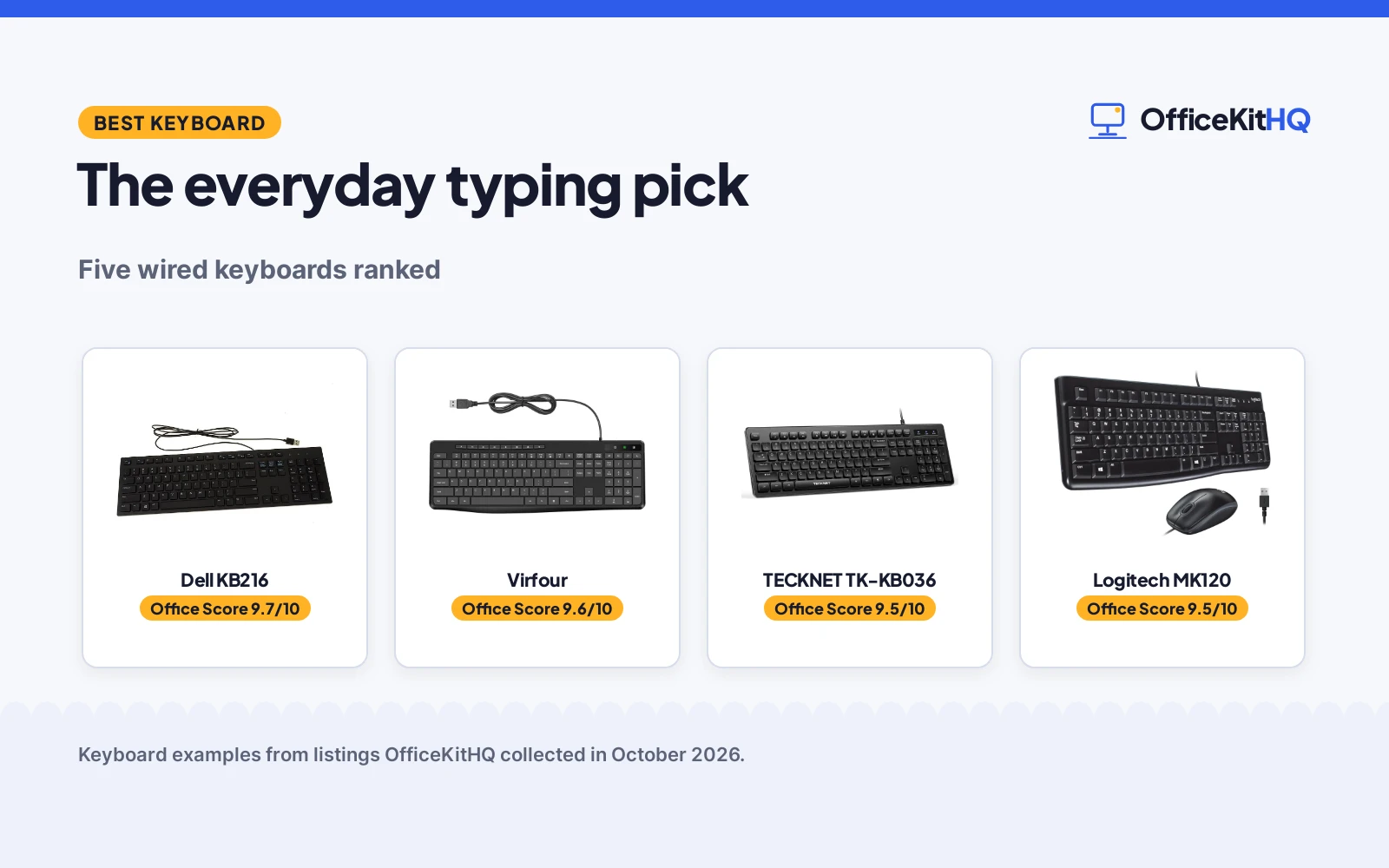
A keyboard for normal use is the one you stop noticing: email, documents, browsing, video calls, a little spreadsheet work. It should type comfortably for hours, connect without fuss and survive the occasional coffee. This guide names the best keyboard for normal use from five current listings, ranked on features, build, value and stated warranty, plus three more options worth a look.
OfficeKitHQ earns a commission when you buy through links on this page, at no extra cost to you. Read our affiliate disclosure.
Quick picks
 Best Overall Dell KB216: Chiclet keys, multimedia controls and a 1-year warranty, the dependable desk standard. Check price on Amazon
 Most Keys Virfour: 117 keys with 13 shortcuts and 12 multimedia keys, quiet and spill-resistant. Check price on Amazon
 Best Silent TECKNET TK-KB036: Silent 104-key wired keyboard with spill resistance. Check price on Amazon
 Best Large Print KOPJIPPOM: Large print backlit keys in a full-size layout. Check price on Amazon
The picks
| # | Product | Office Score | Buy |
|---|---|---|---|
| 1 | Dell KB216 | 9.7/10 | Buy on Amazon |
| 2 | Virfour | 9.6/10 | Buy on Amazon |
| 3 | TECKNET TK-KB036 | 9.5/10 | Buy on Amazon |
| 4 |  Logitech MK120 Combo Logitech MK120 Combo | 9.5/10 | Buy on Amazon |
| 5 | KOPJIPPOM Large Print | 9.3/10 | Buy on Amazon |

Dell KB216
A wired USB keyboard with chiclet keys, plunger mechanism and multimedia controls, backed by a 1-year warranty.
Pros
- Chiclet keys with plunger mechanism
- Volume, mute and play controls
- 1-year warranty stated
- 1.1 lb, compact 17.4 x 5 x 1 in
Cons
- No quiet typing claim stated
- No spill resistance stated
- Wired only, no wireless option
- 104 keys, fewer than the Virfour
Detailed Review
The Dell KB216 is the dependable desk standard: a wired USB keyboard with chiclet keys, a plunger mechanism and volume, mute and play controls in a US English layout. The listing states 104 keys, dimensions of 17.4 x 5 x 1 inches and a weight of 1.1 pounds. It is the only pick here with a stated warranty, 1 year, and the Dell name carries weight in offices.
There is no stated quiet design or spill resistance, and it is wired only. For normal everyday use where reliability beats features, the warranty and the proven design make it the top pick.
Its Office Score of 9.7/10 comes from performance 30/35, build 22/25, value 21/25, safety not scored (non-powered gear) and warranty 2/5: 75 of 90 points, placed on our 9.2 to 9.8 scale.
Key Specifications
| Keys | 104 |
|---|---|
| Key style | Chiclet, plunger mechanism |
| Connection | USB wired |
| Size | 17.4 x 5 x 1 in |
| Weight | 1.1 lb |
| Warranty | 1 year |
Figures as published on the retailer listing, collected 19 October 2026. Performance figures are manufacturer rated.
Safety and Warranty
What this listing states. This product does not plug in or run on a battery, so safety is not part of its score. 1 year warranty. It does not say everything a buyer needs, such as who pays return shipping, so warranty scores 2 of 5. See How We Pick.
Fit the desk first. Check the stated size against your desk depth and keyboard tray, and charge or pair as the manual describes. No keyboard, mouse or wrist rest prevents or treats injury.
This is general buying information, not professional advice. Follow each product manual and local rules, and see our Safety Disclaimer.

Virfour
A quiet 117-key wired keyboard with 13 shortcut buttons, 12 multimedia keys, spill resistance and flip-out tilt legs.
Pros
- 117 keys with 13 shortcuts and 12 multimedia keys
- Noise reduced by 50 percent, per the listing
- Spill-resistant with sealed film circuit
- Flip-out legs for tilt adjustment
Cons
- No warranty stated in the listing
- No brand track record stated
- Membrane only, no mechanical option
- 117 keys need full desk depth
Detailed Review
The Virfour is the feature pick: 117 keys including 13 independent shortcut buttons and 12 combined multimedia keys for video, volume, browsing and email. The listing claims a 50 percent noise reduction, spill resistance via a sealed film circuit, anti-wear letters and flip-out legs for ergonomic tilt. It works across Windows, Mac OS, Chrome OS and Linux with no drivers.
There is no stated warranty and no brand history to lean on. For heavy shortcut and multimedia use in a shared space, the quiet design and the key count make it the strongest alternative to the Dell.
Its Office Score of 9.6/10 comes from performance 29/35, build 21/25, value 22/25, safety not scored (non-powered gear) and warranty 0/5: 72 of 90 points, placed on our 9.2 to 9.8 scale.
Key Specifications
| Keys | 117 |
|---|---|
| Switch | Membrane |
| Connection | USB wired |
| Noise | Reduced 50 percent |
| Spill resistance | Water resistant |
Figures as published on the retailer listing, collected 19 October 2026. Performance figures are manufacturer rated.
Safety and Warranty
What this listing states. This product does not plug in or run on a battery, so safety is not part of its score. No warranty term, so warranty scores zero. See How We Pick.
Fit the desk first. Check the stated size against your desk depth and keyboard tray, and charge or pair as the manual describes. No keyboard, mouse or wrist rest prevents or treats injury.
This is general buying information, not professional advice. Follow each product manual and local rules, and see our Safety Disclaimer.

TECKNET TK-KB036
A silent 104-key membrane keyboard with spill resistance, suited to quiet offices.
Pros
- Silent low-profile membrane keys
- 104-key full-size layout
- Spill-resistant conductive film
- Keys rated for 80 million keystrokes
Cons
- Membrane, not mechanical switches
- No clear warranty term is stated
- Multimedia keys may be limited on Mac OS
- Plastic enclosure is stated
Detailed Review
TECKNET lists the TK-KB036 as a 104-key membrane keyboard with silent low-profile keys, a spill-resistant conductive film and keys rated for up to 80 million keystrokes. It has 12 FN multimedia shortcuts, adjustable tilt feet and USB-A plug and play with no drivers. Compatibility stated includes Windows, Raspberry Pi and Mac OS, with limited multimedia key functionality on Mac OS noted. The bullets claim a lifetime warranty with registration while the table says 2 years, so we treat the term as not clearly stated.
Who it's for: an office worker who needs quiet typing and spill resistance. Who should skip it: someone who wants true mechanical switches.
Its Office Score of 9.5/10 comes from performance 29/35, build 19/25, value 19/25, safety not scored (non-powered gear) and warranty 0/5: 67 of 90 points, placed on our 9.2 to 9.8 scale.
Key Specifications
| Keys | 104 |
|---|---|
| Type | Membrane, silent |
| Connection | USB-A wired |
| Layout | 17.3 x 5.2 x 1.1 in |
Figures as published on the retailer listing, collected 17 October 2026. Performance figures are manufacturer rated.
Safety and Warranty
What this listing states. This product does not plug in or run on a battery, so safety is not part of its score. No warranty term, so warranty scores zero. See How We Pick.
Fit the desk first. Check the stated size against your desk depth and keyboard tray, and charge or pair as the manual describes. No keyboard, mouse or wrist rest prevents or treats injury.
This is general buying information, not professional advice. Follow each product manual and local rules, and see our Safety Disclaimer.

Logitech MK120 Combo
A full-size wired keyboard and mouse combo with keys rated for 10 million keystrokes, suited to desk workers who prefer USB with no batteries.
Pros
- Keys rated for 10 million keystrokes as stated
- 3-year warranty as stated
- Spill-resistant design with adjustable tilt legs as stated
- Wired USB with no batteries to manage
Cons
- The title states Windows only, so Mac users should check compatibility
- No hotkeys or backlight are stated
- Wired connection means cable clutter on the desk
- 100 g is stated as the item weight for the combo
Detailed Review
The listing states a full-size wired keyboard and mouse combo with 104 keys, deep-profile keys, a spill-resistant design and keys rated for 10 million keystrokes. The spec table lists a warranty of 3 years and an item weight of 100 g.
Who it's for: a desk worker who prefers wired USB with no batteries to manage. Who should skip it: a Mac-only user, since the title states Windows only.
Its Office Score of 9.5/10 comes from performance 29/35, build 21/25, value 20/25, safety 0/10 and warranty 4/5: 74 of 100 points, placed on our 9.2 to 9.8 scale.
Key Specifications
| Connection | Wired USB |
|---|---|
| Keys | 104 |
| Keystroke rating | 10 million |
| Warranty | 3 years |
Figures as published on the retailer listing, collected 17 October 2026. Performance figures are manufacturer rated.
Safety and Warranty
What this listing states. This product does not plug in or run on a battery, so safety is not part of its score. 3 years. It does not say everything a buyer needs, such as who pays return shipping, so warranty scores 4 of 5. See How We Pick.
Fit the desk first. Check the stated size against your desk depth and keyboard tray, and charge or pair as the manual describes. No keyboard, mouse or wrist rest prevents or treats injury.
This is general buying information, not professional advice. Follow each product manual and local rules, and see our Safety Disclaimer.

KOPJIPPOM Large Print
A full-size membrane keyboard with 4X large-print keys, white LED backlight and spill resistance.
Pros
- 4X larger key fonts for low-vision typists
- White LED backlight with on/off and brightness
- Spill-resistant design, per the listing
- Full-size 104 keys at 17.7 by 6.3 inches
Cons
- Membrane board, not mechanical switches
- No warranty term is stated
- 690 g with no stated battery, wired only
Detailed Review
KOPJIPPOM lists a full-size 104-key membrane keyboard with 4X larger than standard key fonts, white LED backlighting and a spill-resistant design. The listing states 17.7 by 6.3 by 0.98 inches, 690 g, and keys rated for more than 5000W times, an odd figure taken as stated. No warranty term is stated.
Who it's for: typists who need large-print keys and a simple wired board. Who should skip it: anyone who wants mechanical switches or a stated warranty.
Its Office Score of 9.3/10 comes from performance 23/35, build 16/25, value 18/25, safety not scored (non-powered gear) and warranty 0/5: 57 of 90 points, placed on our 9.2 to 9.8 scale.
Key Specifications
| Layout | Full-size, 104 keys |
|---|---|
| 4X large fonts (stated) | |
| Size | 17.7 x 6.3 x 0.98 in |
| Warranty | Not stated |
Figures as published on the retailer listing, collected 17 October 2026. Performance figures are manufacturer rated.
Safety and Warranty
What this listing states. This product does not plug in or run on a battery, so safety is not part of its score. No warranty term, so warranty scores zero. See How We Pick.
Fit the desk first. Check the stated size against your desk depth and keyboard tray, and charge or pair as the manual describes. No keyboard, mouse or wrist rest prevents or treats injury.
This is general buying information, not professional advice. Follow each product manual and local rules, and see our Safety Disclaimer.
As an Amazon Associate I earn from qualifying purchases.
More picks to compare
 Rii RK907 Ultra-Slim Compact USB WiredCheck on Amazon
 Dell Business Multimedia KeyboardCheck on Amazon
 TvvTvvT Silent Wired Keyboard USB SchoolCheck on Amazon
Compare the picks
| Dell KB216 | Virfour | TECKNET TK-KB036 | KOPJIPPOM | Logitech MK120 | Amazon | |
|---|---|---|---|---|---|---|
| Keys | 104 | 117 | 104 | Full size | Full size | |
| Connection | USB wired | USB wired | USB wired | Wired | Wired | |
| Quiet design | Not stated | Noise reduced 50 percent | Silent | Not stated | Not stated | |
| Spill-resistant | Not stated | Yes | Yes | Not stated | Not stated | |
| Warranty | 1 year | Not stated | Not stated | Not stated | Not stated |
Specifications are manufacturer stated, as published on each listing and collected 19 October 2026.
How we scored them
Each keyboard is scored out of 10 on price value, build, stated features, safety listing and warranty, with the weights published on our How We Pick page. Keyboards carry no safety listing, so every pick scores zero there; only the Dell KB216 states a warranty, 1 year, so warranty separates the field.
| Product | Office Score | Perf. /35 | Build /25 | Value /25 | Safety /10 | Warranty /5 |
|---|---|---|---|---|---|---|
| Dell KB216 | 9.7 | 30 | 22 | 21 | n/a | 2 |
| Virfour | 9.6 | 29 | 21 | 22 | n/a | 0 |
Scores run from 9.2 to 9.8: each product’s point total is placed on that range, so more points always means a higher score. Safety counts only for powered gear or where the listing states safety features; where it does not apply, the score is taken over the remaining 90 points.
How to choose the best keyboard for normal use
Wired or wireless
Every pick here is wired USB, and for normal desk use that is a feature: no batteries, no pairing, no interference, it works the moment you plug it in. The Virfour listing makes the case explicitly, no driver needed and no charging, and it works across Windows, Mac OS, Chrome OS and Linux. Wireless earns its keep when the keyboard travels between couch and desk or pairs with multiple devices; for a keyboard that lives in one place, wired is simpler, cheaper and one less thing to charge. Note the Dell spec table oddly mentions 2 AAA batteries required, which contradicts its wired USB design; go by the wired connection stated everywhere else in the listing.
Key feel: chiclet vs membrane
The Dell KB216 uses chiclet keys with a plunger mechanism, the low, separated laptop-style keys that most people type fastest on. The Virfour uses a membrane switch with low-profile chiclet keys. Both are quiet, soft-press designs rather than clicky mechanical switches, which suits shared offices and late-night typing. If you are coming from a laptop, chiclet feels like home.
Quiet typing
Noise matters when you share space. The Virfour claims its clicking noise is reduced by 50 percent with a noise-reduction design; the TECKNET is sold as a silent wired keyboard. The Dell makes no quiet claim, which is not a demerit, just an unstated spec. For open offices and night owls, favor a stated quiet design.
Spill resistance
Coffee happens. The Virfour and TECKNET listings both state spill resistance, the Virfour with a sealed film circuit against splashing. The others do not state it. Spill resistance never hurts and costs nothing extra here, so treat it as a tiebreaker between otherwise equal picks.
Multimedia keys
Volume, mute, play and shortcut keys save constant trips to the mouse. The Dell KB216 has volume, mute and play controls; the Virfour goes further with 13 independent shortcut buttons and 12 combined multimedia keys covering video, volume, browsing and email. If you live in video calls, shortcut keys are worth more than any other feature. Count the keys you actually use: a keyboard with a dozen shortcuts you never touch is no better than a simpler one, but the Virfour’s video and email keys map neatly onto office routines.
Size and layout
All five picks are full size with a number pad, which suits spreadsheet and data entry work. The Dell states 104 keys at 17.4 x 5 x 1 inches and 1.1 pounds; the Virfour states 117 keys. Full size needs real desk depth, so measure before you buy if your desk is shallow. The flip-out legs on the Virfour add tilt for wrist comfort, a small ergonomic win the others do not state. If desk space is truly tight, that is a sign to look at compact layouts instead, but for normal use at a normal desk, full size remains the comfortable default.
More options worth a look
Three more listings did not make the ranked five but suit specific needs. The Rii RK907 is an ultra-slim compact wired keyboard with 104 low-profile keys and a 24-month warranty, the longest warranty stated anywhere here. The Dell KB522 is a business multimedia keyboard for office fleets that want the Dell name. The TvvTvvT is a silent 104-key wired keyboard with ergonomic lift feet and a stated 10M keystroke durability. None is ranked above, but each is a reasonable buy for its niche.
Frequently Asked Questions
What is the best keyboard for normal everyday use?
A full-size wired USB keyboard with comfortable low-profile keys, like the Dell KB216 that tops this guide. Quiet operation and spill resistance are the two upgrades worth paying attention to; backlighting and macros matter less for normal use.
Should I get a keyboard and mouse combo?
The Logitech MK120 bundles a full-size wired keyboard with a mouse, which is convenient when setting up a new desk from scratch or equipping a second workstation. If your mouse is fine, buy the keyboard alone and skip paying for a duplicate; combos make sense for fresh setups, not upgrades.
Are silent keyboards really quieter?
The listings that claim it, Virfour with 50 percent noise reduction and TECKNET as silent, use membrane or low-profile designs that are genuinely softer than clicky switches. They are not noiseless, but they will not carry across a quiet office.
How do I clean a keyboard?
Unplug it, shake out debris, wipe with a lightly damp cloth. Spill-resistant models like the Virfour and TECKNET survive splashes better, but no keyboard here is dishwasher safe, so keep liquids modest.
Is a backlit keyboard worth it for normal use?
Only if you type in the dark. The KOPJIPPOM pairs large print keys with backlighting, which helps low-vision typists and night workers. For a lit office, backlighting adds cost without benefit.
Related guides
Browse the keyboards section, plus best keyboard for WFH, best wireless keyboard for Chromebook and best keyboard for writers under $100.



