The best laptop desk mount lifts a laptop off the desk and holds the screen where it can be seen without hunching, freeing the desk surface. A laptop sitting flat keeps the screen low and the base warm, while a mount arm with a vented tray raises the screen and leaves the desktop clear.
We compared 6 laptop desk mounts by size, capacity, tray, motion and warranty.
OfficeKitHQ earns a commission when you buy through links on this page, at no extra cost to you. As an Amazon Associate I earn from qualifying purchases. Affiliate disclosure.
Quick picks
 Best Overall Mount-It! MI-6352LT: Gas spring arm, 9 to 18.75 in height, 23.5 in reach, lifetime warranty stated Check price on Amazon
 Best Monitor Fit UPGRAVITY Laptop Mount: Fits monitors up to 32 in, 17.6 lb capacity, 3-year warranty stated Check price on Amazon
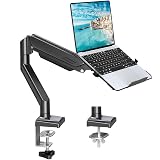 Best 2-in-1 MOUNTUP Laptop Mount: Laptop or monitor use, 2.2 to 22 lb range, 21.2 in extension Check price on Amazon
 Best Light Laptop Fit ErgoFocus Laptop Mount: Holds laptops from 3.3 lb, 11.8 in tray, 3 years warranty stated Check price on Amazon
 Best Height Adjustment Suptek MD6421TP003: 400 mm height adjustment, fits 13 to 27 in screens, C-clamp or grommet Check price on Amazon
Our desk picks
| # | Product | Office Score | Buy |
|---|---|---|---|
| 1 | Mount-It! MI-6352LT | 9.8/10 | Buy on Amazon |
| 2 | UPGRAVITY Laptop Mount | 9.7/10 | Buy on Amazon |
| 3 | MOUNTUP Laptop Mount | 9.7/10 | Buy on Amazon |
| 4 | ErgoFocus Laptop Mount | 9.6/10 | Buy on Amazon |
| 5 | Suptek MD6421TP003 | 9.5/10 | Buy on Amazon |

Mount-It! MI-6352LT
A gas spring arm that lifts a laptop up to 17 in and 13.2 lb to a height of 9 to 18.75 in, with a 23.5 in reach and a lifetime warranty stated.
Pros
- Height adjusts from 9 to 18.75 in on a gas spring arm
- Holds a laptop up to 17 in and 13.2 lb, with a 22 lb total capacity
- Side holders open from 9.5 to 16.5 in wide, with locking buckles, traction pads and tabs
- Lifetime manufacturer warranty is stated, with US-based product specialists
Cons
- Tray measures 11.75 by 11 in, so a wide laptop overhangs the edges
- Raised screen, not a typing surface, so an external keyboard and mouse are needed
- Clamp and grommet both fit desks up to 3.1 in thick, so a thicker desk edge does not work
- Gas spring tension needs a hex key to set for the laptop weight
Detailed Review
Mount-It! lists the MI-6352LT as a gas spring laptop arm mount with a clamp or grommet base for desks up to 3.1 in thick. The arm adjusts from 9 to 18.75 in in height, reaches from 10.5 to 23.5 in, swivels 360 degrees and tilts 90 degrees. The 11.75 by 11 in tray is ventilated, side holders open from 9.5 to 16.5 in wide, and locking buckles, traction pads and tabs keep the laptop from slipping. The tray detaches from a VESA 75x75 and 100x100 head.
Who it's for: someone who wants a gas spring arm that holds a laptop up to 17 in and 13.2 lb at eye level. Who should skip it: anyone whose desk edge is thicker than 3.1 in, or anyone who wants to type on the laptop on the tray.
Its Office Score of 9.8/10 comes from performance 32/35, build 22/25, value 21/25, safety 8/10 and warranty 4/5: 87 of 100 points, placed on our 9.2 to 9.8 scale.
Key Specifications
| Height | 9 to 18.75 in |
|---|---|
| Reach | 10.5 to 23.5 in |
| Laptop limit | 17 in, 13.2 lb |
| Warranty | Lifetime |
These specs mirror the retailer listing as of 22 October 2026; performance figures are stated by the brand.
Safety and Warranty
What this listing states. VESA 75x75 and 100x100 patterns, locking buckles and traction pads are stated, so safety scores 8 of 10. Lifetime manufacturer warranty. It does not say everything a buyer needs, such as who pays return shipping, so warranty scores 4 of 5. See How We Pick.
Match the mount. Check your screen's VESA pattern, size and weight against the stated range, and check that your desk thickness and edge suit a clamp or grommet mount before you drill or clamp.
This is general buying information, not professional advice. Follow each product manual and local rules, and see our Safety Disclaimer.

UPGRAVITY Laptop Mount
A full-motion arm for a laptop up to 17 in or a monitor up to 32 in, with a vented 11.8 by 10.4 in tray and a 3-year warranty stated.
Pros
- Fits monitors up to 32 in and laptops up to 17 in on one arm
- Vented tray measures 11.8 by 10.4 in and detaches to swap between laptop and monitor
- Three joints, 180 degree swivel and 360 degree rotation
- 3-year warranty is stated
Cons
- No height adjustment figure is stated, only that height adjusts along the center pole
- C-clamp fits desks from 0.39 to 1.97 in thick, narrower than the 3.1 in clamps here
- Grommet mount needs a hole up to 2.36 in, so a desk without a hole needs the clamp
- Tray is 11.8 in wide, so a 17 in laptop overhangs the tray edges
Detailed Review
UPGRAVITY lists this mount for a laptop up to 17 in or a monitor up to 32 in, with VESA 75x75 and 100x100 mounting holes and a stated capacity of 17.6 lb. The ventilated tray measures 11.8 by 10.4 in and detaches so the arm swaps between laptop and monitor. The arm has three joints, offers 180 degree swivel, 90 degree tilt and 360 degree rotation, and adjusts in height along the center pole. The C-clamp fits desks from 0.39 to 1.97 in thick while the grommet mount needs a hole up to 2.36 in. The maker gives two swivel figures, 180 degrees and 90 degrees, and two tilt figures, 90 degrees and 45 degrees; check before ordering.
Who it's for: someone who swaps between a laptop and a monitor up to 32 in on one arm. Who should skip it: anyone whose desk edge is thicker than 1.97 in, or anyone who needs a stated height adjustment figure.
Its Office Score of 9.7/10 comes from performance 30/35, build 21/25, value 21/25, safety 8/10 and warranty 4/5: 84 of 100 points, placed on our 9.2 to 9.8 scale.
Key Specifications
| Laptop | Up to 17 in |
|---|---|
| Monitor | Up to 32 in |
| Weight capacity | 17.6 lb |
| Tray | 11.8 by 10.4 in |
These specs mirror the retailer listing as of 22 October 2026; performance figures are stated by the brand.
Safety and Warranty
What this listing states. VESA 75x75 and 100x100 patterns and a 17.6 lb capacity are stated, so safety scores 8 of 10. 3-year warranty. It does not say everything a buyer needs, such as who pays return shipping, so warranty scores 4 of 5. See How We Pick.
Match the mount. Check your screen's VESA pattern, size and weight against the stated range, and check that your desk thickness and edge suit a clamp or grommet mount before you drill or clamp.
This is general buying information, not professional advice. Follow each product manual and local rules, and see our Safety Disclaimer.
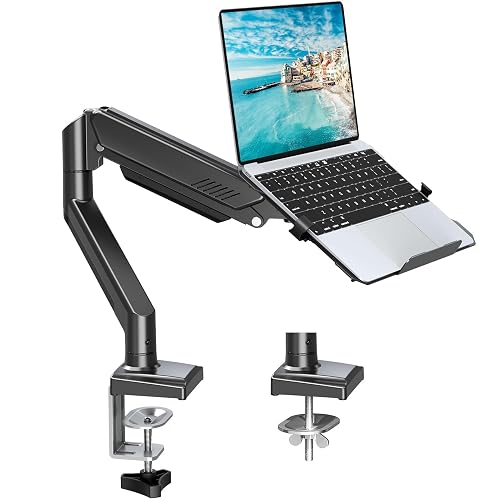
MOUNTUP Laptop Mount
A 2-in-1 arm for a 14 to 17 in laptop or a monitor up to 32 in, supporting 2.2 to 22 lb with a 21.2 in extension.
Pros
- Switches between a laptop and a monitor on one arm
- Supports 2.2 to 22 lb, the widest weight range here
- C-clamp and grommet both fit desks from 0.39 to 2.76 in thick
- 3 year warranty is stated
Cons
- No height adjustment figure is stated
- Rotation is 180 degrees, less than the 360 degree rotation on other arms here
- Tray size is not stated, so fit for a wide laptop is unclear
- Item weight of 3.47 kg adds heft to the desk edge
Detailed Review
MOUNTUP lists this 2-in-1 arm for a laptop from 14 to 17 in or a monitor up to 32 in, supporting 2.2 to 22 lb. The arm tilts 90 degrees one way and 45 degrees the other, swivels 90 degrees each way, rotates 180 degrees and extends to 21.2 in. A locking tab holds the laptop while shifting between work zones. The C-clamp and grommet both fit desks from 0.39 to 2.76 in thick, and the grommet needs a hole from 0.39 to 2.36 in. No height adjustment figure is stated.
Who it's for: someone who wants one arm for a laptop and a monitor. Who should skip it: anyone who needs a stated height adjustment figure or a stated tray size.
Its Office Score of 9.7/10 comes from performance 30/35, build 21/25, value 20/25, safety 7/10 and warranty 4/5: 82 of 100 points, placed on our 9.2 to 9.8 scale.
Key Specifications
| Laptop | 14 to 17 in |
|---|---|
| Monitor | Up to 32 in |
| Weight capacity | 2.2 to 22 lb |
| Extension | 21.2 in |
These specs mirror the retailer listing as of 22 October 2026; performance figures are stated by the brand.
Safety and Warranty
What this listing states. Locking tab and a 2.2 to 22 lb capacity are stated, so safety scores 7 of 10. 3 year warranty. It does not say everything a buyer needs, such as who pays return shipping, so warranty scores 4 of 5. See How We Pick.
Match the mount. Check your screen's VESA pattern, size and weight against the stated range, and check that your desk thickness and edge suit a clamp or grommet mount before you drill or clamp.
This is general buying information, not professional advice. Follow each product manual and local rules, and see our Safety Disclaimer.

ErgoFocus Laptop Mount
A gas spring arm for a laptop up to 17 in or a monitor from 13 to 32 in, with an 11.8 in tray and 3 years warranty stated.
Pros
- Fits a monitor from 13 to 32 in as well as a 17 in laptop
- Tray measures 11.8 in long and 10.23 in wide
- Holds 3.3 to 17.6 lb, so light laptops stay within range
- 3 years warranty is stated
Cons
- No tilt, swivel or rotation figures are stated
- No desk thickness range is stated for the clamp or grommet mount
- No height adjustment figure is stated
- 17.6 lb capacity is lower than the 22 lb total on the Mount-It! and MOUNTUP arms
Detailed Review
ErgoFocus lists this gas spring arm for a laptop up to 17 in or a monitor from 13 to 32 in, holding 3.3 to 17.6 lb with a VESA 75x75 and 100x100 pattern. The tray measures 11.8 in long and 10.23 in wide, and the mount fits a desk with a clamp or a grommet base. No tilt, swivel, rotation, height or desk thickness figures are stated.
Who it's for: someone who wants a gas spring arm for a laptop and a monitor up to 32 in. Who should skip it: anyone who needs stated motion or desk thickness figures before ordering.
Its Office Score of 9.6/10 comes from performance 28/35, build 20/25, value 20/25, safety 7/10 and warranty 4/5: 79 of 100 points, placed on our 9.2 to 9.8 scale.
Key Specifications
| Laptop | Up to 17 in |
|---|---|
| Monitor | 13 to 32 in |
| Weight capacity | 3.3 to 17.6 lb |
| Tray | 11.8 by 10.23 in |
These specs mirror the retailer listing as of 22 October 2026; performance figures are stated by the brand.
Safety and Warranty
What this listing states. VESA 75x75 and 100x100 patterns and a 17.6 lb capacity are stated, so safety scores 7 of 10. 3 years warranty. It does not say everything a buyer needs, such as who pays return shipping, so warranty scores 4 of 5. See How We Pick.
Match the mount. Check your screen's VESA pattern, size and weight against the stated range, and check that your desk thickness and edge suit a clamp or grommet mount before you drill or clamp.
This is general buying information, not professional advice. Follow each product manual and local rules, and see our Safety Disclaimer.

Suptek MD6421TP003
A single arm with a 400 by 300 mm vented tray for a 13 to 27 in screen, with 400 mm of height adjustment and two mounting options.
Pros
- Height adjustment of 400 mm is stated
- Fits screens from 13 to 27 in with VESA 75x75 or 100x100
- Vented tray has a bottom edge lip that holds the laptop in place
- Installs in 10 minutes with all accessories and a manual included
Cons
- No warranty term is stated
- Desk must be 10 to 80 mm thick for either mount
- Grommet mount needs a hole from 10 to 78 mm
- No item weight is stated for the arm
Detailed Review
Suptek lists this single arm with a 400 by 300 mm tray for screens from 13 to 27 in, with VESA 75x75 and 100x100 patterns. The arm swivels 180 degrees, rotates 360 degrees, tilts 90 degrees and adjusts in height by 400 mm. The tray has venting holes and a bottom edge lip, and cable and slot management runs along the arm. The C-clamp and grommet both fit desks from 10 to 80 mm thick, and the grommet needs a hole from 10 to 78 mm. The maker gives two weight figures, 15.6 lb and 10 kg, and two laptop size figures, 17 in and 15.6 in; check before ordering. No warranty term is stated.
Who it's for: someone who wants a wide height adjustment range and two mounting options. Who should skip it: anyone who wants a stated warranty term or a single weight figure to plan around.
Its Office Score of 9.5/10 comes from performance 28/35, build 20/25, value 19/25, safety 7/10 and warranty 0/5: 74 of 100 points, placed on our 9.2 to 9.8 scale.
Key Specifications
| Screen | 13 to 27 in |
|---|---|
| Tray | 400 by 300 mm |
| Height adjustment | 400 mm |
| Mounting | C-clamp or grommet |
These specs mirror the retailer listing as of 22 October 2026; performance figures are stated by the brand.
Safety and Warranty
What this listing states. VESA 75x75 and 100x100 patterns and a bottom edge lip on the tray are stated, so safety scores 7 of 10. No warranty term, so warranty scores zero. See How We Pick.
Match the mount. Check your screen's VESA pattern, size and weight against the stated range, and check that your desk thickness and edge suit a clamp or grommet mount before you drill or clamp.
This is general buying information, not professional advice. Follow each product manual and local rules, and see our Safety Disclaimer.
As an Amazon Associate I earn from qualifying purchases.
More picks to compare
 VIVO STAND-V001O-LFits 10 to 15.6 in laptops up to 9.9 lbs with 9.7 in adjustmentCheck on Amazon
Specs compared
| Mount | Office Score | Laptop size | Monitor size | Weight capacity | Tray | Warranty | Amazon |
|---|---|---|---|---|---|---|---|
| Mount-It! MI-6352LT | 9.8/10 | Up to 17 in | Not stated | 13.2 lb laptop, 22 lb total | 11.75 by 11 in | Lifetime | View on Amazon |
| UPGRAVITY Laptop Mount | 9.7/10 | Up to 17 in | Up to 32 in | 17.6 lb | 11.8 by 10.4 in | 3 years | View on Amazon |
| MOUNTUP Laptop Mount | 9.7/10 | 14 to 17 in | Up to 32 in | 2.2 to 22 lb | Not stated | 3 years | View on Amazon |
| ErgoFocus Laptop Mount | 9.6/10 | Up to 17 in | 13 to 32 in | 3.3 to 17.6 lb | 11.8 by 10.23 in | 3 years | View on Amazon |
| Suptek MD6421TP003 | 9.5/10 | Up to 17 in | 13 to 27 in | 15.6 lb | 400 by 300 mm | Not stated | View on Amazon |
We quote these figures from each listing as the brand rates them; captured 22 October 2026.
How to choose the best laptop desk mount
Match the tray to the laptop
Tray size decides whether a laptop sits flat or hangs over the edges. The Mount-It! tray measures 11.75 by 11 in, the UPGRAVITY tray measures 11.8 by 10.4 in, the ErgoFocus tray measures 11.8 by 10.23 in, and the Suptek tray measures 400 by 300 mm. The MOUNTUP states no tray size.
Check the weight limit before the size
Capacity decides whether an arm holds or sags, so read it before the screen size. The MOUNTUP lists 2.2 to 22 lb, the Mount-It! lists a 13.2 lb laptop limit inside a 22 lb total, the UPGRAVITY and ErgoFocus list 17.6 lb, and the Suptek gives two weight figures, 15.6 lb and 10 kg. Weigh the laptop with its charger and case on.
Pick the mount that fits the desk edge
The Mount-It! clamp and grommet fit desks up to 3.1 in thick, the MOUNTUP fits desks from 0.39 to 2.76 in thick, the UPGRAVITY fits desks from 0.39 to 1.97 in thick, and the Suptek fits desks from 10 to 80 mm thick. The ErgoFocus states a clamp or grommet mount with no desk thickness range. Check the grommet hole size too: the UPGRAVITY and MOUNTUP need a hole up to 2.36 in, and the Suptek needs a hole from 10 to 78 mm.
Motion range decides how the arm gets used
The Mount-It! offers 360 degree swivel, 90 degree tilt and a reach from 10.5 to 23.5 in. The UPGRAVITY offers 180 degree swivel, 90 degree tilt and 360 degree rotation. The MOUNTUP offers 90 degree tilt one way and 45 degrees the other, 90 degree swivel each way and 180 degree rotation, with a 21.2 in extension. The ErgoFocus states no motion figures, and the Suptek states 180 degree swivel, 90 degree tilt and 360 degree rotation with 400 mm of height adjustment.
| Mount | Tray | Reach | Desk thickness |
|---|---|---|---|
| Mount-It! MI-6352LT | 11.75 by 11 in | 10.5 to 23.5 in | Up to 3.1 in |
| UPGRAVITY Laptop Mount | 11.8 by 10.4 in | Not stated | 0.39 to 1.97 in |
| MOUNTUP Laptop Mount | Not stated | 21.2 in | 0.39 to 2.76 in |
| ErgoFocus Laptop Mount | 11.8 by 10.23 in | Not stated | Not stated |
| Suptek MD6421TP003 | 400 by 300 mm | Not stated | 10 to 80 mm |
Reach is the distance the arm extends from the desk edge.
Read the warranty line
The best laptop desk for teachers roundup compares mounts that suit a classroom desk, where a stated term matters more.
Setup Notes
- Measure the laptop width against the tray: 11.75 in on the Mount-It!, 11.8 in on the UPGRAVITY and ErgoFocus, and 400 mm on the Suptek.
- Measure the desk edge before ordering: up to 3.1 in on the Mount-It!, 0.39 to 2.76 in on the MOUNTUP, 0.39 to 1.97 in on the UPGRAVITY, and 10 to 80 mm on the Suptek.
- Check the grommet hole size: up to 2.36 in on the UPGRAVITY and MOUNTUP, and 10 to 78 mm on the Suptek.
- Route cables through the clips on the Mount-It!, UPGRAVITY and MOUNTUP arms.
- Keep the Mount-It! hex key near the desk.
FAQ
What is a laptop desk mount?
A laptop desk mount is an arm that clamps to a desk edge and holds a laptop on a tray above the desktop, so the screen sits higher and the desk surface stays clear.
What size desk works with a laptop desk mount?
The Mount-It! fits desks up to 3.1 in thick, the MOUNTUP fits desks from 0.39 to 2.76 in thick, the UPGRAVITY fits desks from 0.39 to 1.97 in thick, and the Suptek fits desks from 10 to 80 mm thick.
How do I set up a laptop desk mount with a monitor beside it?
Pick an arm that fits both: the UPGRAVITY, MOUNTUP and ErgoFocus each fit a monitor up to 32 in as well as a laptop.
How do I clean a laptop desk mount?
Wipe the tray and arm with a dry cloth, clear dust from the vent slots, and check that the clips and tabs still hold the laptop in place. Keep liquids away from the arm joints.
Which laptop desk mount holds the heaviest laptop?
The MOUNTUP lists a range of 2.2 to 22 lb, and the Mount-It! lists a 13.2 lb laptop limit inside a 22 lb total. The UPGRAVITY and ErgoFocus each list 17.6 lb, and the Suptek lists 15.6 lb.
Score breakdown
The Office Score weighs performance, build, value, safety and warranty. How we pick explains the weights.
| Product | Office Score | Perf. /35 | Build /25 | Value /25 | Safety /10 | Warranty /5 |
|---|---|---|---|---|---|---|
| Mount-It! MI-6352LT | 9.8 | 32 | 22 | 21 | 8 | 4 |
| UPGRAVITY Laptop Mount | 9.7 | 30 | 21 | 21 | 8 | 4 |
| MOUNTUP Laptop Mount | 9.7 | 30 | 21 | 20 | 7 | 4 |
| ErgoFocus Laptop Mount | 9.6 | 28 | 20 | 20 | 7 | 4 |
| Suptek MD6421TP003 | 9.5 | 28 | 20 | 19 | 7 | 0 |
Score placement follows the weighted total: the lowest totals read 9.2, the highest 9.8, and everything between keeps its order.
More for your workspace
See every computer desks guide and all desks and desk lighting guides.
More picks: best laptop desk for teachers, best folding desk with wheels, monitor arms and stands.