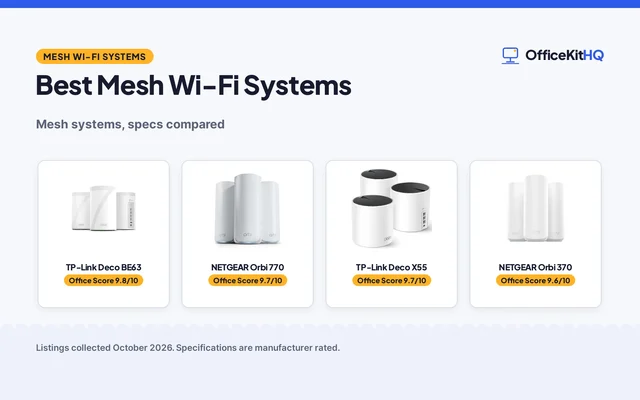
The best mesh wifi for home is the system that reaches the back bedroom without a dead spot, on a network name your devices never have to leave. The morning call runs off a laptop on one hub while the video freezes in the room farthest from the router. We compared five mesh systems by speed, coverage, pack size, security features and warranty term, using only what each listing publishes.
OfficeKitHQ earns a commission when you buy through links on this page, at no extra cost to you. As an Amazon Associate I earn from qualifying purchases. Affiliate disclosure.
Quick picks
 Best Overall TP-Link Deco BE25: WiFi 7, BE5000, 6,600 sq. ft., 2.5G ports Check price on Amazon
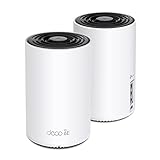 Best Tri-Band TP-Link Deco XE75: WiFi 6E tri-band, 5,400 Mbps, 5,500 sq. ft. Check price on Amazon
 Best Router Amazon eero 6: WiFi 6, 900 Mbps, 1,500 sq. ft., Zigbee hub Check price on Amazon
 Best Extender Amazon eero 6+ Extender: Adds 1,500 sq. ft., 900 Mbps, one-year warranty Check price on Amazon
Our desk picks
| # | Product | Office Score | Buy |
|---|---|---|---|
| 1 | TP-Link Deco BE25 | 9.8/10 | Buy on Amazon |
| 2 | TP-Link Deco XE75 | 9.7/10 | Buy on Amazon |
| 3 |  NETGEAR Orbi 770 | 9.7/10 | Buy on Amazon |
| 4 | Amazon eero 6 | 9.6/10 | Buy on Amazon |
| 5 | Amazon eero 6+ Extender | 9.4/10 | Buy on Amazon |

TP-Link Deco BE25
A WiFi 7 dual-band mesh system in a 3-pack with BE5000 speeds, up to 6,600 sq. ft. of coverage, 2.5G ports and a 2 year manufacturer warranty.
Pros
- Up to 4324 Mbps on 5 GHz and 688 Mbps on 2.4 GHz
- Covers up to 6,600 sq. ft. for over 150 devices, expandable with another Deco
- 2x 2.5G ports with wired and wireless backhaul
- VPN client and server support with MLO and AI-Roaming
Cons
- Requires a separate modem
- Title says 5 Gbps where the bullets say 4324 Mbps on 5 GHz and 688 Mbps on 2.4 GHz
- 2 Year Manufacturer warranty is a short term for a whole-home system
Detailed Review
TP-Link lists the Deco BE25 as a WiFi 7 dual-band mesh system in a 3-pack, with BE5000 speeds, up to 6,600 sq. ft. of coverage for over 150 devices and 2x 2.5G ports with wired and wireless backhaul. The bullets state up to 4324 Mbps on 5 GHz and 688 Mbps on 2.4 GHz, with MLO, AI-Roaming and HomeShield, plus VPN client and server support. The Deco App sets up and manages the network, and all Deco routers work together with the option to expand by adding another Deco. The listing states a 2 Year Manufacturer warranty. All Wi-Fi routers require a separate modem, and the spec table lists long decimal dimensions.
Who it's for: someone who wants WiFi 7 with 2.5G ports and the widest coverage here for a large home. Who should skip it: anyone who needs a modem included or a longer warranty term.
Its Office Score of 9.8/10 comes from performance 33/35, build 22/25, value 21/25, safety 9/10 and warranty 3/5: 88 of 100 points, placed on our 9.2 to 9.8 scale.
Key Specifications
| Speed | Up to 4324 Mbps on 5 GHz |
|---|---|
| Coverage | Up to 6,600 sq. ft. |
| Ports | 2x 2.5G |
| Pack | 3-pack |
These specs mirror the retailer listing as of 13 November 2026; performance figures are stated by the brand.
Safety and Warranty
What this listing states. HomeShield security service, VPN client and server support and CISA pledge are stated, so safety scores 9 of 10. 2 Year Manufacturer. It does not say everything a buyer needs, such as who pays return shipping, so warranty scores 3 of 5. See How We Pick.
Follow the manual. Assemble and use the product as the maker describes, stay under any stated capacity, and read the manual before first use.
This is general buying information, not professional advice. Follow each product manual and local rules, and see our Safety Disclaimer.
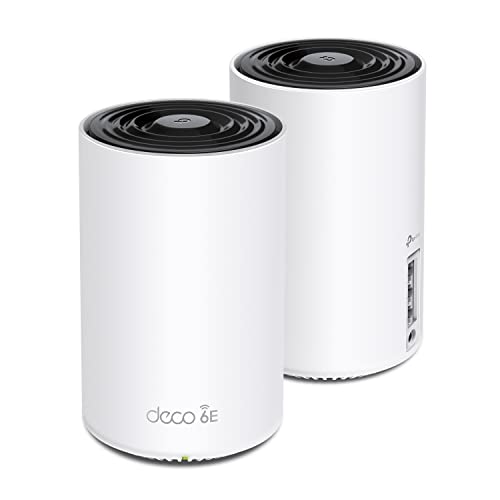
TP-Link Deco XE75
A WiFi 6E tri-band mesh system in a 2-pack with up to 5,400 Mbps, up to 5,500 sq. ft. of coverage, a 6 GHz band and a 2 year manufacturer warranty.
Pros
- Tri-band WiFi 6E with up to 5,400 Mbps across 6 GHz, 5 GHz and 2.4 GHz
- Covers up to 5,500 sq. ft. for 200 devices
- 6 GHz band works as backhaul for stable connections between nodes
- WPA3 with AI-Driven Mesh and HomeShield
Cons
- Requires a separate modem
- 2 year manufacturer warranty is a short term for a whole-home system
- No port count is stated
- 6 GHz band is available only for WiFi 6E devices
Detailed Review
TP-Link lists the Deco XE75 as a WiFi 6E tri-band mesh system in a 2-pack, with total speeds up to 5,400 Mbps, up to 5,500 sq. ft. of coverage and 200 devices. The 6 GHz band works as backhaul for stable connections between nodes by default, with 2402 Mbps on 6 GHz, 2402 Mbps on 5 GHz and 574 Mbps on 2.4 GHz. WPA3, AI-Driven Mesh and HomeShield are stated, and the Deco app sets up the network with Alexa voice commands for guest Wi-Fi. The listing states a 2 year manufacturer warranty, and a modem is required for most internet service providers. No ethernet port count is stated.
Who it's for: someone who wants a 6 GHz band and tri-band speeds for gaming and streaming across a large home. Who should skip it: anyone who needs stated ethernet ports or a longer warranty term.
Its Office Score of 9.7/10 comes from performance 32/35, build 22/25, value 21/25, safety 9/10 and warranty 3/5: 87 of 100 points, placed on our 9.2 to 9.8 scale.
Key Specifications
| Speed | Up to 5,400 Mbps |
|---|---|
| Coverage | Up to 5,500 sq. ft. |
| Bands | Tri-band, 6 GHz |
| Pack | 2-pack |
These specs mirror the retailer listing as of 13 November 2026; performance figures are stated by the brand.
Safety and Warranty
What this listing states. WPA3, HomeShield security service and CISA pledge are stated, so safety scores 9 of 10. 2 year manufacturer. It does not say everything a buyer needs, such as who pays return shipping, so warranty scores 3 of 5. See How We Pick.
Follow the manual. Assemble and use the product as the maker describes, stay under any stated capacity, and read the manual before first use.
This is general buying information, not professional advice. Follow each product manual and local rules, and see our Safety Disclaimer.

NETGEAR Orbi 770
A WiFi 7 tri-band mesh system, speeds up to 11 Gbps, coverage up to 8,000 sq ft.
Pros
- Speeds up to 11 Gbps, tri-band WiFi 7
- Covers up to 8,000 sq ft, the widest here
- Router plus two satellites, a 2.5 Gig port
- Security features enabled out of the box, automatic firmware updates
Cons
- No dimensions or weight stated in the spec table
- Only 100 devices, fewer than the Deco systems
- NETGEAR Armor needs a separate subscription after the 30-day trial
- 1 Year Limited warranty, shorter than the 2 year terms
Detailed Review
NETGEAR lists the Orbi 770 as a WiFi 7 tri-band system with speeds up to 11 Gbps, covering up to 8,000 sq ft with up to 100 devices on one network. The pack holds a router and two satellite extenders, a 2.5 Gig port and Enhanced Backhaul. Security features are enabled out of the box with Advanced Router Protection and automatic firmware updates; NETGEAR Armor includes a 30-day trial with a separate subscription after. The spec table states no dimensions or weight; the warranty is 1 Year Limited. An extra Orbi 770 satellite adds up to 2,750 sq ft of coverage.
Who it's for: large homes that want WiFi 7 speeds and the widest coverage here. Who should skip it: anyone who needs stated dimensions or more than 100 devices.
Its Office Score of 9.7/10 comes from performance 33/35, build 22/25, value 20/25, safety 8/10 and warranty 3/5: 86 of 100 points, placed on our 9.2 to 9.8 scale.
Key Specifications
| WiFi | WiFi 7, tri-band |
|---|---|
| Speed | Up to 11 Gbps |
| Coverage | Up to 8,000 sq ft |
| Devices | 100 |
These specs mirror the retailer listing as of 13 November 2026; performance figures are stated by the brand.
Safety and Warranty
What this listing states. Advanced Router Protection with automatic firmware updates, so safety scores 8 of 10. 1 Year Limited. It does not say everything a buyer needs, such as who pays return shipping, so warranty scores 3 of 5. See How We Pick.
Follow the manual. Assemble and use the product as the maker describes, stay under any stated capacity, and read the manual before first use.
This is general buying information, not professional advice. Follow each product manual and local rules, and see our Safety Disclaimer.

Amazon eero 6
A WiFi 6 mesh router with speeds up to 900 Mbps, coverage up to 1,500 sq. ft., 75+ devices and a built-in Zigbee smart home hub.
Pros
- Covers up to 1,500 sq. ft. with a 22 foot radius
- Supports wifi speeds up to 900 Mbps for 75+ devices
- Built-in Zigbee smart home hub, no separate hub needed
- TrueMesh technology routes traffic to reduce drop-offs
Cons
- No warranty term is stated
- 1,500 sq. ft. is the smallest coverage here
- No ethernet port count is stated
- No VPN support is listed
Detailed Review
Amazon lists the eero 6 as a WiFi 6 mesh router covering up to 1,500 sq. ft. with a 22 foot radius, with wifi speeds up to 900 Mbps and 75+ connected devices. TrueMesh technology routes traffic to reduce drop-offs, and a built-in Zigbee smart home hub connects compatible devices with Alexa, so no separate hub is needed. The eero app walks through setup and manages the network from anywhere, with free customer support 7 days a week in the US. Automatic updates bring new features and security enhancements. No warranty term and no ethernet port count are stated.
Who it's for: someone who wants a simple WiFi 6 router with a smart home hub for a small home. Who should skip it: anyone who needs wider coverage or a warranty term in writing.
Its Office Score of 9.6/10 comes from performance 28/35, build 20/25, value 21/25, safety 7/10 and warranty 0/5: 76 of 100 points, placed on our 9.2 to 9.8 scale.
Key Specifications
| Speed | Up to 900 Mbps |
|---|---|
| Coverage | Up to 1,500 sq. ft. |
| Devices | 75+ devices |
| Hub | Built-in Zigbee |
These specs mirror the retailer listing as of 13 November 2026; performance figures are stated by the brand.
Safety and Warranty
What this listing states. TrueMesh routing and automatic updates that keep the network safe are stated, so safety scores 7 of 10. No warranty term, so warranty scores zero. See How We Pick.
Follow the manual. Assemble and use the product as the maker describes, stay under any stated capacity, and read the manual before first use.
This is general buying information, not professional advice. Follow each product manual and local rules, and see our Safety Disclaimer.

Amazon eero 6+ Extender
An add-on WiFi 6 extender that adds up to 1,500 sq. ft. to an existing eero network, with speeds up to 900 Mbps and a one-year warranty.
Pros
- Adds up to 1,500 sq. ft. of Wi-Fi 6 coverage per extender
- TrueMesh optimizes wifi for wireless speeds up to 900 Mbps
- Supports 75+ devices on internet plans up to 1 Gbps
- One-year warranty with world-class customer support stated
Cons
- Requires an existing eero network; it is not a standalone system
- No ethernet ports are stated
- Coverage is per extender, so a larger home needs more units
- No smart home hub is listed on the extender
Detailed Review
Amazon lists the eero 6+ extender as an add-on that adds up to 1,500 sq. ft. of Wi-Fi 6 coverage per extender, and it requires an existing eero network. TrueMesh optimizes wifi for wireless speeds up to 900 Mbps, it suits internet plans up to 1 Gbps and supports 75+ devices, and the eero app guides setup and manages the network from anywhere. Automatic updates bring new features and security enhancements without interrupting wifi. The listing states a one-year warranty. It is not a standalone system, so it ranks below the full routers here.
Who it's for: someone with an eero network who wants to add coverage to one more room. Who should skip it: anyone without an eero network, or anyone shopping for a full mesh system.
Its Office Score of 9.4/10 comes from performance 23/35, build 19/25, value 19/25, safety 7/10 and warranty 0/5: 68 of 100 points, placed on our 9.2 to 9.8 scale.
Key Specifications
| Speed | Up to 900 Mbps |
|---|---|
| Coverage | Adds up to 1,500 sq. ft. |
| Devices | 75+ devices |
| Size | 3.94 by 3.82 by 2.6 in |
These specs mirror the retailer listing as of 13 November 2026; performance figures are stated by the brand.
Safety and Warranty
What this listing states. TrueMesh routing and automatic updates are stated, so safety scores 7 of 10. No warranty term, so warranty scores zero. See How We Pick.
Follow the manual. Assemble and use the product as the maker describes, stay under any stated capacity, and read the manual before first use.
This is general buying information, not professional advice. Follow each product manual and local rules, and see our Safety Disclaimer.
As an Amazon Associate I earn from qualifying purchases.
More picks to compare
 TP-Link Deco S4AC1900 WiFi 5 system with 2 Gbps ports and up to 100 devices.Check on Amazon
 Amazon eero 6+ RouterGigabit WiFi 6 router with a smart home hub and 160 MHz channel.Check on Amazon
Specs compared
| Mesh System | Office Score | Speed | Coverage | Pack | Warranty | Amazon |
|---|---|---|---|---|---|---|
| TP-Link Deco BE25 | 9.8/10 | Up to 4324 Mbps | Up to 6,600 sq. ft. | 3-pack | 2 Year | View on Amazon |
| TP-Link Deco XE75 | 9.7/10 | Up to 5,400 Mbps | Up to 5,500 sq. ft. | 2-pack | 2 year | View on Amazon |
| Amazon eero 6 | 9.6/10 | Up to 900 Mbps | Up to 1,500 sq. ft. | 1-pack | Not stated | View on Amazon |
| Amazon eero 6+ Extender | 9.4/10 | Up to 900 Mbps | Adds 1,500 sq. ft. | 1-pack | Not stated | View on Amazon |
| NETGEAR Orbi 770 | 9.7/10 | Up to 11 Gbps | Not stated | 3-pack | Not stated | View on Amazon |
All numbers are the manufacturer’s stated specs, not measured in an office, pulled on 13 November 2026. Two of the five state a 2 year warranty term; one states a one-year warranty.
How to choose the best mesh wifi for home
Start with coverage and pack size
Coverage runs from 1,500 sq. ft. on the eero 6 to 6,600 sq. ft. on the Deco BE25, with the Deco XE75 at 5,500 sq. ft. in between. The BE25 comes as a 3-pack, the XE75 as a 2-pack, and the eero 6 as a 1-pack, while the eero 6+ extender adds up to 1,500 sq. ft. per unit to an existing eero network. The Orbi 770 states no coverage figure, so it cannot be placed on this scale. Our guide to mesh Wi-Fi systems compares more systems by coverage.
WiFi 7, 6E or 6
The Deco BE25 is WiFi 7 with BE5000 speeds, the Deco XE75 is WiFi 6E with a 6 GHz band, and the two eero models are WiFi 6. The Orbi 770 title says WiFi 7, with no bands stated beyond tri-band. Speed follows the same order: up to 4324 Mbps on 5 GHz for the BE25, up to 5,400 Mbps total for the XE75, and up to 900 Mbps for the eero models. Match the standard to your devices: a WiFi 6E device uses the 6 GHz band, while older devices use 5 GHz and 2.4 GHz.
| System | Speed | Coverage | Bands | Pack |
|---|---|---|---|---|
| TP-Link Deco BE25 | Up to 4324 Mbps | Up to 6,600 sq. ft. | Dual-band, WiFi 7 | 3-pack |
| TP-Link Deco XE75 | Up to 5,400 Mbps | Up to 5,500 sq. ft. | Tri-band, WiFi 6E | 2-pack |
| Amazon eero 6 | Up to 900 Mbps | Up to 1,500 sq. ft. | WiFi 6 | 1-pack |
| Amazon eero 6+ Extender | Up to 900 Mbps | Adds 1,500 sq. ft. | WiFi 6 | 1-pack |
| NETGEAR Orbi 770 | Up to 11 Gbps | Not stated | Tri-band, WiFi 7 | 3-pack |
Figures as stated in each listing.
Ports and backhaul
Backhaul is the link between units, and a wired link is steadier than a wireless one. The BE25 has 2x 2.5G ports with wired and wireless backhaul working together, and the XE75 uses the 6 GHz band as backhaul for stable connections between nodes by default. The Deco S4 in the more picks has 2 Gbps ports on each unit with wired backhaul. The eero systems state no ethernet port count, so a wired backhaul cannot be confirmed for them. Our guide to ethernet switch setup shows how to wire a home office.
Security features to check
Both TP-Link systems state HomeShield with network and IoT protection, and both carry the CISA pledge. The XE75 adds WPA3, and the BE25 adds VPN client and server support with MLO and AI-Roaming. The eero systems rely on TrueMesh routing with automatic updates that bring security enhancements, and the eero 6 has a built-in Zigbee smart home hub. The eero 6+ router in the more picks adds a Thread and Zigbee hub. Pick the list that matches your home: VPN support, a smart home hub, or WPA3.
Check the warranty line
Three of the five state a warranty term. The Deco BE25 and Deco XE75 each state a 2 year manufacturer warranty, and the eero 6+ extender states a one-year warranty. The eero 6 and the Orbi 770 state no warranty term. The Deco S4 in the more picks also states a 2 year manufacturer warranty. Our guide to WiFi extender types explains how extenders differ from full mesh systems.
Setup Notes
- Place the nodes apart: the BE25 covers up to 6,600 sq. ft. with a 3-pack, and the XE75 covers up to 5,500 sq. ft. with a 2-pack.
- Keep a modem handy: the BE25 and XE75 listings say a modem is required for most internet service providers.
- Plan the wired backhaul: the BE25 has 2x 2.5G ports, and the Deco S4 in the more picks has 2 Gbps ports on each unit.
- Set up with the app: the Deco App and the eero app guide setup in minutes.
- Check the extender rule: the eero 6+ extender needs an existing eero network and adds up to 1,500 sq. ft. per unit.
FAQ
What is a mesh wifi system for home?
A mesh system uses two or more units that work together as one network with a single network name, so devices move between rooms without switching networks. The BE25 3-pack and XE75 2-pack work this way, and the eero 6+ extender adds to an existing eero network.
How does a home mesh wifi system work?
Each unit talks to the others over wired or wireless backhaul: the BE25 uses 2.5G Ethernet and Wi-Fi 7 together, and the XE75 uses the 6 GHz band as backhaul by default. AI-Roaming on the BE25 and AI-Driven Mesh on the XE75 move devices between units.
How do I set up mesh wifi at home?
The Deco App and the eero app guide setup in minutes, and a modem is required for most internet service providers. The BE25 and XE75 use the Deco App, and the eero 6 and 6+ extender use the eero app.
Which mesh system covers the most space?
The Deco BE25 at up to 6,600 sq. ft., then the Deco XE75 at up to 5,500 sq. ft., then the eero 6 at up to 1,500 sq. ft. The Orbi 770 states no coverage figure.
Which mesh systems work with Spectrum?
The Deco XE75 listing names Spectrum among the internet service providers it works with. The BE25 works with any internet service provider, with a modem required for most.
Score breakdown
The Office Score weighs performance (speed, coverage, devices and bands), build (ports, backhaul and pack size), value for the stated specs, safety and warranty. For a mesh system, safety means WPA3 or HomeShield, VPN support, automatic updates and a security pledge; the two TP-Link systems state HomeShield with a CISA pledge, and the eero systems state TrueMesh with automatic updates. Two listings state a 2 year warranty term: the Deco BE25 and the Deco XE75. How we pick explains the weights.
| Product | Office Score | Perf. /35 | Build /25 | Value /25 | Safety /10 | Warranty /5 |
|---|---|---|---|---|---|---|
| TP-Link Deco BE25 | 9.8 | 33 | 22 | 21 | 9 | 3 |
| TP-Link Deco XE75 | 9.7 | 32 | 22 | 21 | 9 | 3 |
| Amazon eero 6 | 9.6 | 28 | 20 | 21 | 7 | 0 |
| Amazon eero 6+ Extender | 9.4 | 23 | 19 | 19 | 7 | 0 |
We fit point totals onto a 9.2 low and 9.8 high in a straight line. One item can outscore another only by earning more points.
More for your workspace
See every Storage and Network guide and all Office Tech guides. Also see our best portable monitor under 100. Also see our mesh wifi system with ethernet ports. Also see our external ssd 1+tb.
More picks: mesh Wi-Fi systems, wifi extender how to set up, ethernet cable for home office, cable management box for wifi router.