When the corner of the kitchen table becomes a desk, the best mini mechanical keyboard is the compact board that ends the turf war with the mouse and gives every press a clean mechanical feel. We compared a set of compact mechanical keyboards by layout, switch type, connection, backlighting, stated dimensions and warranty, using only what each listing publishes. Every number below comes from the listing that states it.
OfficeKitHQ earns a commission when you buy through links on this page, at no extra cost to you. As an Amazon Associate I earn from qualifying purchases. Affiliate disclosure.
Quick picks
 Best Overall Razer Huntsman Mini: Linear optical switches, aluminum frame, doubleshot PBT keycaps, 2-year warranty. Check price on Amazon
 Best Wireless Logitech MX Mechanical Mini: Pairs with up to 3 Bluetooth devices, auto-adjust backlight, 15-day battery stated. Check price on Amazon
 Best Hot-Swap Redragon K617: 3-pin and 5-pin swap-ready socket, 61 keys, 20 lighting modes, 1-year warranty. Check price on Amazon
 Also considered Kisnt KN85: 75% wireless board from a title-only listing; ranked below the full-data picks. Check price on Amazon
 Also listed CACKBIRD 60%: 60% wired board from a title-only listing; ranked below the full-data picks. Check price on Amazon
The picks
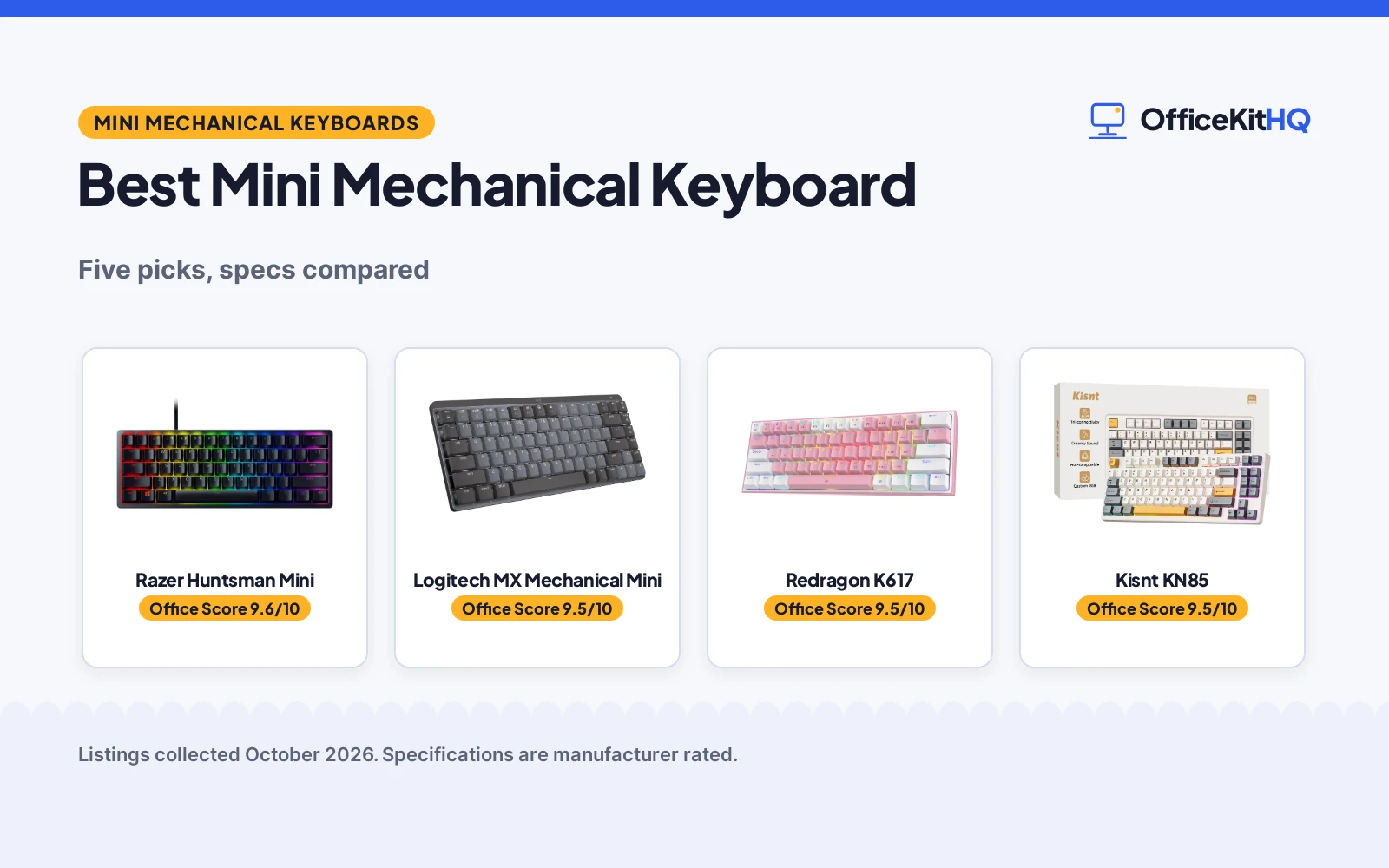
| # | Product | Office Score | Buy |
|---|---|---|---|
| 1 | Razer Huntsman Mini | 9.6/10 | Buy on Amazon |
| 2 | Logitech MX Mechanical Mini | 9.5/10 | Buy on Amazon |
| 3 | Redragon K617 | 9.5/10 | Buy on Amazon |
| 4 | Kisnt KN85 | 9.5/10 | Buy on Amazon |
| 5 | CACKBIRD 60% | 9.4/10 | Buy on Amazon |

Razer Huntsman Mini
A 60% board with Razer Linear Optical switches at a 1.0 mm actuation point, an aluminum top frame, oil-resistant doubleshot PBT keycaps, per-key Chroma RGB and Snap Tap, backed by a stated 2-year manufacturer warranty.
Pros
- Linear Optical switches actuate at 1.0 mm, a 15 to 30% shorter actuation distance than other linear switches, per the listing
- Aluminum top frame and plate with oil-resistant doubleshot PBT keycaps
- Per-key Chroma RGB with 16.8 million colors and onboard memory for profiles
- Stated 2-year manufacturer warranty is the longest term here
Cons
- Wired only; no wireless mode is stated
- Spec table lists Micro USB while the highlights say USB-C wired; the listing is unclear on the port
- 1.1 lb item weight is the heaviest of the three full-data boards
- Linear switches are the only switch type stated; no tactile or quiet option is listed
Detailed Review
Razer lists the Huntsman Mini as a 60% gaming keyboard with 61 keys, Linear Optical switches at a 1.0 mm actuation point, a matte aluminum top frame and plate, oil-resistant doubleshot PBT keycaps, per-key Chroma RGB with 16.8 million colors, onboard memory, fully programmable macros and Snap Tap, which favors the most recent input between two assigned keys. The spec table gives 11.56 in by 4.07 in by 1.45 in dimensions and a 1.1 lb item weight, and a detachable Type C to Type A cable ships in the box. One contradiction: the spec table lists Micro USB connectivity while the highlights say USB-C wired, so treat the port as stated-but-unclear. A 2-year manufacturer warranty is stated.
Who it's for: a gamer who wants optical speed, a solid aluminum frame and per-key lighting on a small board. Who should skip it: anyone who needs wireless, or who wants a tactile or quiet switch option stated.
Its Office Score of 9.6/10 comes from performance 32/35, build 22/25, value 21/25, safety 0/10 and warranty 3/5: 78 of 100 points, placed on our 9.2 to 9.8 scale.
Key Specifications
| Layout | 60%, 61 keys |
|---|---|
| Switches | Linear optical, 1.0 mm actuation |
| Frame and keycaps | Aluminum, doubleshot PBT |
| Warranty | 2-year manufacturer warranty |
Figures as published on the retailer listing, collected 23 October 2026. Performance figures are manufacturer rated.
Safety and Warranty
What this listing states. This product does not plug in or run on a battery, so safety is not part of its score. 2 year manufacturer. It does not say everything a buyer needs, such as who pays return shipping, so warranty scores 3 of 5. See How We Pick.
Fit the desk first. Check the stated size against your desk depth and keyboard tray, and charge or pair as the manual describes. No keyboard, mouse or wrist rest prevents or treats injury.
This is general buying information, not professional advice. Follow each product manual and local rules, and see our Safety Disclaimer.

Logitech MX Mechanical Mini
A compact wireless mini keyboard with tactile quiet low-profile switches, smart backlighting that auto-adjusts, pairing with up to 3 Bluetooth devices plus a Logi Bolt receiver, and USB-C charging with up to 15 days of battery stated.
Pros
- Pairs with up to 3 devices over Bluetooth Low Energy or the included Logi Bolt receiver
- Backlight auto-adjusts to room lighting and lights up as hands approach
- Up to 15 days of battery on a charge, or up to 10 months with backlighting off
- Graphite colorway lists 47% certified post consumer recycled plastic parts
Cons
- Title says full-size while everything else says Mini; the listing contradicts itself
- Spec table dimensions of 13.6 in by 6 in by 2.3 in differ from the bullets' 312.60 mm by 131.55 mm by 26.10 mm
- Item weight is stated two ways: 612 g in the bullets and 1.7 pounds in the spec table
- The 1-year warranty term is shorter than the Razer's 2-year term
Detailed Review
Logitech lists the MX Mechanical Mini as a compact wireless keyboard with tactile quiet low-profile switches, smart backlighting that lights up as hands approach and auto-adjusts, Fn key customization and Flow cross-computer control through Logi Options+, pairing with up to 3 devices over Bluetooth Low Energy or the included Logi Bolt receiver, and USB-C charging with up to 15 days on a full charge or up to 10 months with the backlighting off. The bullets give 312.60 mm by 131.55 mm by 26.10 mm dimensions and a 612 g weight, while the spec table gives 13.6 in by 6 in by 2.3 in, 1.7 pounds and 108 keys, which contradicts the Mini name and compact layout; we trust the title and bullets. A 1 Year Limited Hard Warranty is stated.
Who it's for: someone who wants one quiet board for up to 3 machines and long battery life. Who should skip it: anyone who needs the layout nailed down, since the spec table rows conflict.
Its Office Score of 9.5/10 comes from performance 29/35, build 21/25, value 21/25, safety 0/10 and warranty 3/5: 74 of 100 points, placed on our 9.2 to 9.8 scale.
Key Specifications
| Switches | Tactile, quiet, low-profile |
|---|---|
| Connectivity | Bluetooth + Logi Bolt, up to 3 devices |
| Battery | Up to 15 days, USB-C recharge |
| Dimensions | 312.60 x 131.55 mm, 612 g per bullets |
Figures as published on the retailer listing, collected 23 October 2026. Performance figures are manufacturer rated.
Safety and Warranty
What this listing states. No FCC or other safety listing is stated, so safety scores zero. 1 Year Limited Hard Warranty. It does not say everything a buyer needs, such as who pays return shipping, so warranty scores 3 of 5. See How We Pick.
Fit the desk first. Check the stated size against your desk depth and keyboard tray, and charge or pair as the manual describes. No keyboard, mouse or wrist rest prevents or treats injury.
This is general buying information, not professional advice. Follow each product manual and local rules, and see our Safety Disclaimer.

Redragon K617
A 60% wired board with 61 keys, hot-swap sockets for 3-pin and 5-pin switches, stock Red linear switches rated for 50 million keypresses and 20 RGB lighting modes.
Pros
- Hot-swap socket accepts almost any 3-pin or 5-pin switch without soldering
- 20 preset RGB lighting modes with adjustable brightness and flow speed
- Stock switches rated for 50 million keypresses
- Pro software supports custom lighting effects and macros
Cons
- Spec table names Cherry MX Red while the bullets describe Redragon's own Red linear switches; the listing contradicts itself
- Size is stated two ways: 11.5 by 3.9 in in the size row and 12.4 in by 5.28 in by 1.73 in in the dimensions row
- Wired only; no wireless mode is stated
- ABS enclosure rather than the aluminum frame the Razer states
Detailed Review
Redragon lists the K617 as a 60% wired gaming keyboard with 61 keys, a swap-ready socket for 3-pin or 5-pin switches, stock Red linear switches that keep clicks discreet for shared spaces, 20 preset RGB lighting modes with adjustable brightness and flow speed, switches rated for 50 million keypresses, and pro software for lighting effects and macros. A keycap puller ships in the box, and the weight is listed as 0.43 kg. Two contradictions: the spec table names the switch model as Cherry MX Red while the bullets describe Redragon's own Red linear switches, and the size row gives 11.5 by 3.9 in while the dimensions row gives 12.4 in by 5.28 in by 1.73 in; we trust the bullets on switches and treat the size as uncertain. A 1 year warranty is stated.
Who it's for: a tinkerer who wants to swap switches later and likes RGB on a small board. Who should skip it: anyone who needs wireless or wants the size settled before buying.
Its Office Score of 9.5/10 comes from performance 28/35, build 20/25, value 22/25, safety 0/10 and warranty 3/5: 73 of 100 points, placed on our 9.2 to 9.8 scale.
Key Specifications
| Layout | 60%, 61 keys |
|---|---|
| Switches | Red linear, hot-swap, 50 million keypresses |
| Lighting | RGB, 20 preset modes |
| Connection | Wired USB-C |
Figures as published on the retailer listing, collected 23 October 2026. Performance figures are manufacturer rated.
Safety and Warranty
What this listing states. This product does not plug in or run on a battery, so safety is not part of its score. 1 year. It does not say everything a buyer needs, such as who pays return shipping, so warranty scores 3 of 5. See How We Pick.
Fit the desk first. Check the stated size against your desk depth and keyboard tray, and charge or pair as the manual describes. No keyboard, mouse or wrist rest prevents or treats injury.
This is general buying information, not professional advice. Follow each product manual and local rules, and see our Safety Disclaimer.
Kisnt KN85
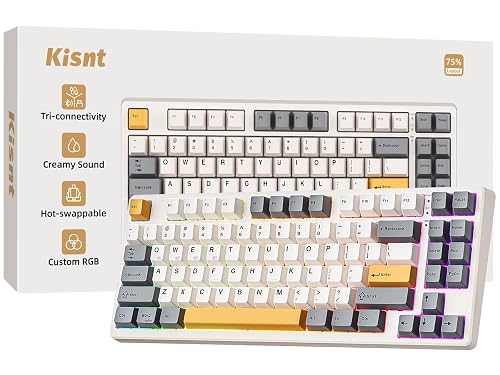
A 75% mechanical keyboard with hot-swappable linear switches, gasket mount and a 4000mAh battery.
Pros
- Hot-swap Bsun linear switches
- Gasket mount, creamy thocky sound
- Tri-mode BT, 2.4GHz, USB-C
- 4000mAh battery
Cons
- No number pad in 75% layout
- No warranty term is stated
- RGB glow may distract at work
- 75% takes a week to learn
Detailed Review
Kisnt lists the KN85 as a 75% mechanical keyboard with 85 keys at 13.68 by 5.51 by 1.77 inches, hot-swappable pre-lubed Bsun linear switches at 45 to 50 grams force and a gasket mount for a creamy thocky sound. The listing states tri-mode Bluetooth 5.0, 2.4GHz and USB-C connectivity, custom RGB backlighting and a 4000mAh rechargeable battery. No warranty term is stated. The listing also notes ultra-low latency figures of 2ms over USB, 5ms over 2.4GHz and 11ms over Bluetooth, plus custom RGB backlighting around the PBT keycaps and case edges. At 13.68 by 5.51 by 1.77 inches it frees about a quarter of the desk space a full-size board would take.
Who it's for: office typists who want a true mechanical feel with hot-swap flexibility. Who should skip it: anyone who needs a number pad for spreadsheets.
The tri-mode setup suits a multi-device desk: pair the work laptop over Bluetooth, the desktop over 2.4GHz and keep the USB-C cable for charging. The macro support with M1 to M3 remappable keys, per the listing, is aimed at gamers, but office users can remap them to common shortcuts.
Its Office Score of 9.5/10 comes from performance 30/35, build 24/25, value 21/25, safety 0/10 and warranty 0/5: 75 of 100 points, placed on our 9.2 to 9.8 scale.
Key Specifications
| Layout | 75%, 85 keys |
|---|---|
| Switches | Bsun linear, hot-swap |
| Battery | 4000mAh |
| Connectivity | BT 5.0, 2.4GHz, USB-C |
| Warranty | Not stated |
Figures as published on the retailer listing, collected 17 October 2026. Performance figures are manufacturer rated.
Safety and Warranty
What this listing states. No FCC or other safety listing is stated, so safety scores zero. No warranty term, so warranty scores zero. See How We Pick.
Fit the desk first. Check the stated size against your desk depth and keyboard tray, and charge or pair as the manual describes. No keyboard, mouse or wrist rest prevents or treats injury.
This is general buying information, not professional advice. Follow each product manual and local rules, and see our Safety Disclaimer.

CACKBIRD 60%
A 61-key wired mechanical board with blue switches for tiny desks; skip it if you need arrow keys or a number pad.
Pros
- True blue mechanical switches with tactile click
- Water resistant, per the listing
- Steel keyboard plate under the ABS
- 11.4 x 3.93 in; the smallest footprint here
Cons
- 60% layout: no dedicated arrows, no number pad, no function row
- Wired only
- Blue switches are loud for shared spaces
- No warranty term stated in the listing
Detailed Review
The CACKBIRD is the minimalist pick: 61 keys, true blue mechanical switches, a steel plate under ABS keycaps and water resistance stated in the listing, all in an 11.4 by 3.93 inch footprint that leaves the desk to the mouse. The detachable Type-C cable suits a bag.
The 60% layout is the whole trade. Arrows live behind Fn+Space, there is no function row and no number pad, so it suits typists who never leave the home row and frustrates everyone else. Blue switches click loudly, and no warranty is stated.
Its Office Score of 9.4/10 comes from performance 26/35, build 20/25, value 19/25, safety 4/10 and warranty 0/5: 69 of 100 points, placed on our 9.2 to 9.8 scale.
Key Specifications
| Layout | 60%, 61 keys |
|---|---|
| Switch | Blue, mechanical |
| Connection | Wired, detachable Type-C |
| Backlight | 18 LED rainbow effects |
| Keycaps | Double injection ABS |
| Water resistance | Stated |
| Dimensions | 11.4 x 3.93 x 1.3 in |
Figures as published on the retailer listing, collected 17 October 2026. Performance figures are manufacturer rated.
Safety and Warranty
What this listing states. The listing states water resistance., so safety scores 4 of 10. No warranty term, so warranty scores zero. See How We Pick.
Fit the desk first. Check the stated size against your desk depth and keyboard tray, and charge or pair as the manual describes. No keyboard, mouse or wrist rest prevents or treats injury.
This is general buying information, not professional advice. Follow each product manual and local rules, and see our Safety Disclaimer.
As an Amazon Associate I earn from qualifying purchases.
More picks to compare
 Razer Reclusa X Mini 65%Hot-swappable 65% board with Orange tactile switches and per-key Chroma RGB.Check on Amazon
Compare the picks
| Mechanical keyboard | Office Score | Layout | Switches | Connection | Warranty | Amazon |
|---|---|---|---|---|---|---|
| Razer Huntsman Mini | 9.6/10 | 60% | Linear optical | USB-C wired | 2-year | View on Amazon |
| Logitech MX Mechanical Mini | 9.5/10 | Mini | Tactile, quiet | Bluetooth + Logi Bolt | 1 year | View on Amazon |
| Redragon K617 | 9.5/10 | 60% | Red linear, hot-swap | Wired USB-C | 1 year | View on Amazon |
| Kisnt KN85 | 9.5/10 | 75% | Not stated | Wireless | Not stated | View on Amazon |
| CACKBIRD 60% | 9.4/10 | 60% | Not stated | Wired | Not stated | View on Amazon |
Specifications are manufacturer rated as listed, collected 23 October 2026. Three of the five state a warranty term; none states a safety certification.
How we scored them
The Office Score weighs performance (layout, switches, connection, lighting, battery and extras), build (frame, keycaps and enclosure), value for the stated specs, safety and warranty. For a keyboard, safety means a stated safety feature or certification, such as a protection level or a certified material. The only related line in these listings is a not water resistant note, which protects nothing, so every safety score is zero. Three of the five state a warranty term: the Razer at 2 years, and the Logitech and Redragon at 1 year each. How we pick explains the weights.
| Product | Office Score | Perf. /35 | Build /25 | Value /25 | Safety /10 | Warranty /5 |
|---|---|---|---|---|---|---|
| Razer Huntsman Mini | 9.6 | 32 | 22 | 21 | 0 | 3 |
| Logitech MX Mechanical Mini | 9.5 | 29 | 21 | 21 | 0 | 3 |
| Redragon K617 | 9.5 | 28 | 20 | 22 | 0 | 3 |
Scores run from 9.2 to 9.8: each product’s point total is placed on that range, so more points always means a higher score.
How to choose the best mini mechanical keyboard
Pick your layout first
The layout decides which keys you give up. The Razer Huntsman Mini and the Redragon K617 are both 60% boards with 61 keys each, trading the full-size key set for desk space; the Redragon’s bullets say dropping the numpad and nav cluster frees room for wider mouse movement. The Kisnt KN85 is a 75% board, keeping more keys than a 60% board in a still-compact frame. The Logitech MX Mechanical Mini is a compact wireless board whose layout is not pinned down: its spec table claims 108 keys, which contradicts the Mini name, so treat that row as an error and trust the title and bullets.
Switches make the feel, hot-swap keeps options open
Three switch stories appear here. The Razer uses Linear Optical switches that actuate at 1.0 mm, with a 15 to 30% shorter actuation distance than other linear switches, per the listing, plus Snap Tap, which favors the most recent input between two assigned keys. The Logitech uses tactile quiet low-profile switches for a softer, quieter press, aimed at shared rooms. The Redragon ships with Red linear switches in a socket that accepts almost any 3-pin or 5-pin switch without soldering, so the feel can change later. If you like a clicky, tactile press, our tactile mechanical keyboards roundup covers more of them.
| Keyboard | Keys | Backlighting | Item weight |
|---|---|---|---|
| Razer Huntsman Mini | 61 | Chroma RGB, 16.8 million colors | 1.1 pounds |
| Logitech MX Mechanical Mini | Not stated | Single color, auto-adjust | 612 g |
| Redragon K617 | 61 | RGB, 20 preset modes | 0.43 kg |
Stated figures only. The Logitech spec table claims 108 keys, which conflicts with the Mini layout, so it is left out here.
Decide how it connects and charges
Connection splits this group. The Logitech pairs with up to 3 devices over Bluetooth Low Energy or the included Logi Bolt receiver and charges over USB-C, with up to 15 days of battery on a full charge or up to 10 months with the backlighting off. The Razer and Redragon are wired: the Razer ships with a detachable Type C to Type A cable and onboard memory, and the Redragon connects over USB-C. If a cable-free desk is the goal, our wireless mechanical keyboards guide lists more options.
Lighting, keycaps and frame
Backlighting ranges from practical to showpiece. The Logitech backlight is single-color and auto-adjusts to room light, lighting up as hands approach. The Razer offers per-key Chroma RGB with 16.8 million colors on oil-resistant doubleshot PBT keycaps under an aluminum top frame. The Redragon offers 20 preset RGB lighting modes on a lighter ABS board. Our RGB mechanical keyboards roundup has more glowing options.
Read the warranty line, not the headline
Three listings state a warranty term. The Razer states a 2-year manufacturer warranty, and the Logitech and Redragon each state 1 year. The two title-only listings state no warranty term at all. A stated term is the only promise you can hold the maker to, so weigh it when the specs are otherwise close.
Setup Notes
- Measure the desk first: the Logitech lists 312.60 mm by 131.55 mm, the Razer 11.56 in by 4.07 in, so check that either fits the space you have.
- Plan the port: the Razer and Redragon are wired and include detachable cables; the Logitech needs a free USB-C port for charging and pairs over Bluetooth or the included Logi Bolt receiver.
- Count your keys: a 60% layout keeps 61 keys, so confirm you can live without a number pad before you buy.
- Set a charging routine: the Logitech lists up to 15 days with the backlight on, or up to 10 months with it off.
Frequently Asked Questions
How do I know if I have a mechanical keyboard?
Look under a keycap: a mechanical keyboard has an individual switch under each key rather than a membrane sheet. The listings here name their switch types, such as Razer Linear Optical, tactile quiet switches and hot-swappable Red switches.
What are the advantages of a mechanical keyboard?
Makers advertise defined keypress feel, quicker actuation and per-key customization. This set lists actuation at 1.0 mm, switches rated for 50 million keypresses and a hot-swap socket for changing switches.
How can I clean a mechanical keyboard without compressed air?
The Redragon ships with a keycap puller, which lets you lift keycaps and wipe around the switches. None of these listings states a cleaning method, so check the maker’s care guide before using liquids.
How many mechanical keyboard switches are there?
These listings name three switch types: Razer Linear Optical switches, Logitech tactile quiet switches and hot-swappable Red linear switches. We report only what the listings state, not the whole market.
How do I take out mechanical keyboard switches?
On the Redragon K617, the hot-swap socket accepts 3-pin or 5-pin switches with no soldering, so a switch lifts out after the keycap. The other listings do not state hot-swap support.
Related guides
See every keyboards and keyboard trays guide and all monitor mounts, keyboards and mice guides. Also see our best mechanical keyboard keycaps. Also see our best keyboard dust cover.
More picks: wireless mechanical keyboards, RGB mechanical keyboards, keyboards with macros.