
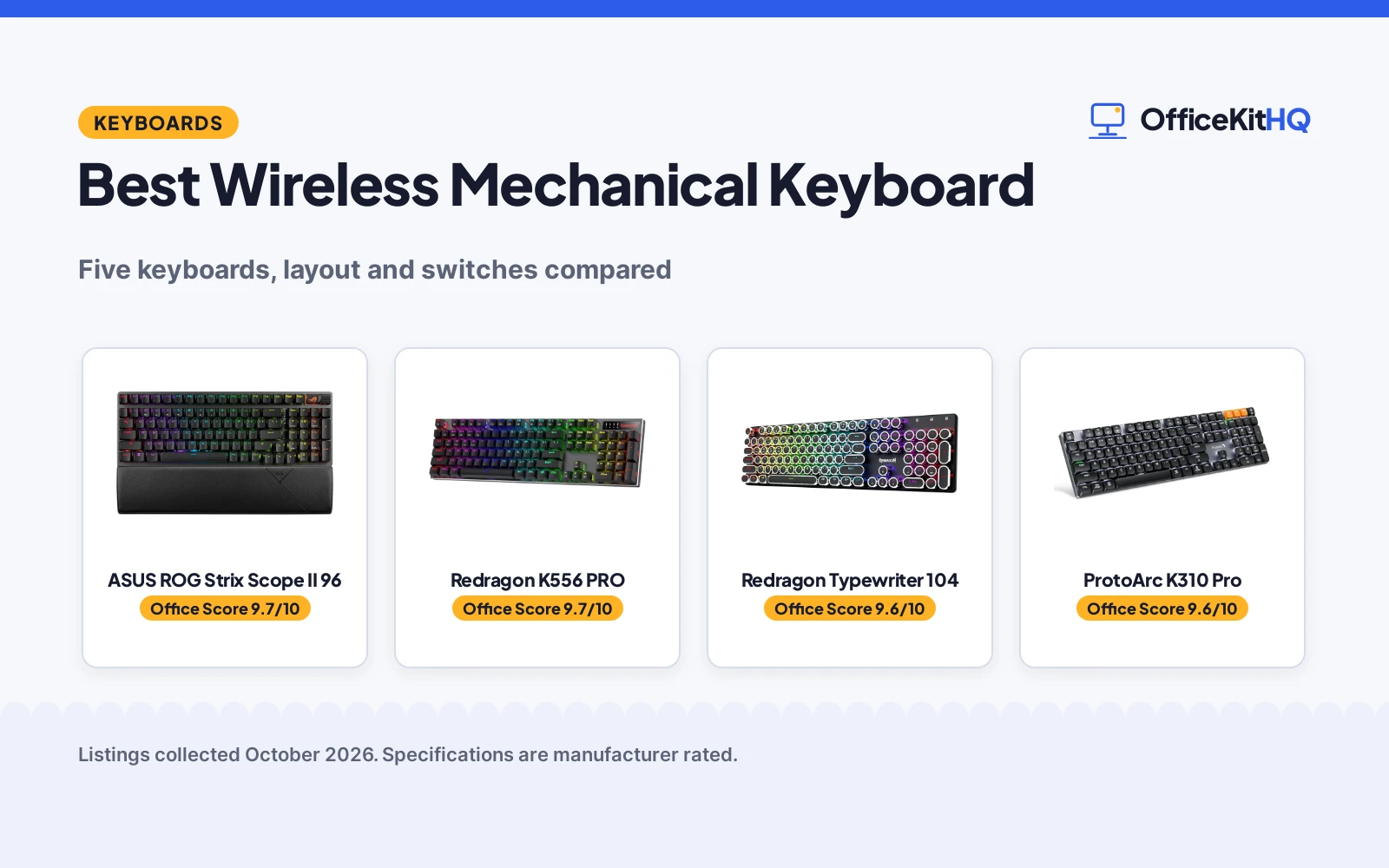
When the cable drags across the desk and the typing feels mushy, the best wireless mechanical keyboard brings back the click without the cord. We compared five wireless mechanical keyboards by layout, switch type, battery and build, using only what each listing publishes. All five are tri-mode or multi-device, so the desk stays clean.
OfficeKitHQ earns a commission when you buy through links on this page, at no extra cost to you. As an Amazon Associate I earn from qualifying purchases. Affiliate disclosure.
Quick picks
 Best Overall ASUS ROG Strix Scope II 96: 96%, tri-mode, 1500-hr battery, PBT keycaps Check price on Amazon
 Best Aluminum Redragon K556 PRO: 104-key, aluminum, tri-mode, hot-swap Check price on Amazon
 Best Retro Redragon Typewriter 104: Typewriter style, blue clicky, 4000mAh Check price on Amazon
 Best Low-Profile ProtoArc K310 Pro: Full size, low-profile, 3 devices Check price on Amazon
 Best 75% AULA F75 75%: 75%, white and brown, wireless Check price on Amazon
The picks
| # | Product | Office Score | Buy |
|---|---|---|---|
| 1 | ASUS ROG Strix Scope II 96 | 9.7/10 | Buy on Amazon |
| 2 | Redragon K556 PRO | 9.7/10 | Buy on Amazon |
| 3 | Redragon Typewriter 104 | 9.6/10 | Buy on Amazon |
| 4 | ProtoArc K310 Pro | 9.6/10 | Buy on Amazon |
| 5 | AULA F75 75% | 9.5/10 | Buy on Amazon |

ASUS ROG Strix Scope II 96
A 96% wireless mechanical keyboard with ROG NX Snow switches and 1500-hour battery.
Pros
- 96% layout with number pad
- Tri-mode with ROG SpeedNova 2.4GHz
- Pre-lubed ROG NX Snow linear switches
- 1500-hour battery in 2.4GHz mode
Cons
- A "1 Year Warranty" is stated in the spec table, shorter than the ProtoArc's 2 years
- Not water resistant
- 14.84 by 5.16 inches, wide
- PBT keycaps only
Detailed Review
ASUS lists a 96% wireless mechanical keyboard with tri-mode connectivity: Bluetooth for 3 devices, 2.4GHz with ROG SpeedNova, and USB wired. It has hot swappable pre-lubed ROG NX Snow linear switches, PBT keycaps and sound-dampening foam. The battery lasts up to 1,500 hours in 2.4GHz wireless mode.
Who it's for: gamers and typists who want full function in less space. Who should skip it: anyone who wants a 75% board, which this is not.
Its Office Score of 9.7/10 comes from performance 33/35, build 22/25, value 22/25, safety 6/10 and warranty 2/5: 85 of 100 points, placed on our 9.2 to 9.8 scale.
Key Specifications
| Layout | 96% |
|---|---|
| Switch | ROG NX Snow linear |
| Battery | 1500 hours |
| Size | 14.84 x 5.16 in |
Figures as published on the retailer listing, collected 22 October 2026. Performance figures are manufacturer rated.
Safety and Warranty
What this listing states. Sound-dampening foam and switch-dampening pads are stated; no safety certification is stated, so safety scores 6 of 10. A "1 Year Warranty" is stated in the spec table. It does not say everything a buyer needs, such as who pays return shipping, so warranty scores 2 of 5. See How We Pick.
Fit the desk first. Check the stated size against your desk depth and keyboard tray, and charge or pair as the manual describes. No keyboard, mouse or wrist rest prevents or treats injury.
This is general buying information, not professional advice. Follow each product manual and local rules, and see our Safety Disclaimer.

Redragon K556 PRO
A 104-key aluminum wireless mechanical keyboard with tri-mode and hot-swap.
Pros
- 104-key brushed aluminum board
- Tri-mode BT, 2.4GHz and USB-C
- Quiet linear red switches
- Hot-swap 3-pin and 5-pin sockets
Cons
- A "1 year" warranty is stated in the spec table, shorter than the ProtoArc's 2 years
- 17.1 inches, the widest here
- No battery figure is stated
- Gaming style only
Detailed Review
Redragon lists a 104-key wireless mechanical keyboard with a tank-solid brushed aluminum board and tri-mode connectivity. The quiet linear red switches need no soldering to swap, with sockets for 3-pin and 5-pin switches. It has 20 preset RGB modes with adjustable brightness and flow speed.
Who it's for: gamers who want aluminum and hot-swap. Who should skip it: anyone who wants a compact board, which this is not.
Its Office Score of 9.7/10 comes from performance 32/35, build 22/25, value 21/25, safety 6/10 and warranty 2/5: 83 of 100 points, placed on our 9.2 to 9.8 scale.
Key Specifications
| Layout | 104-key |
|---|---|
| Switch | Quiet linear red |
| Build | Aluminum |
| RGB | 20 presets |
Figures as published on the retailer listing, collected 22 October 2026. Performance figures are manufacturer rated.
Safety and Warranty
What this listing states. Brushed aluminum board with quiet linear switches is stated; no safety certification is stated, so safety scores 6 of 10. A "1 year" warranty is stated in the spec table. It does not say everything a buyer needs, such as who pays return shipping, so warranty scores 2 of 5. See How We Pick.
Fit the desk first. Check the stated size against your desk depth and keyboard tray, and charge or pair as the manual describes. No keyboard, mouse or wrist rest prevents or treats injury.
This is general buying information, not professional advice. Follow each product manual and local rules, and see our Safety Disclaimer.
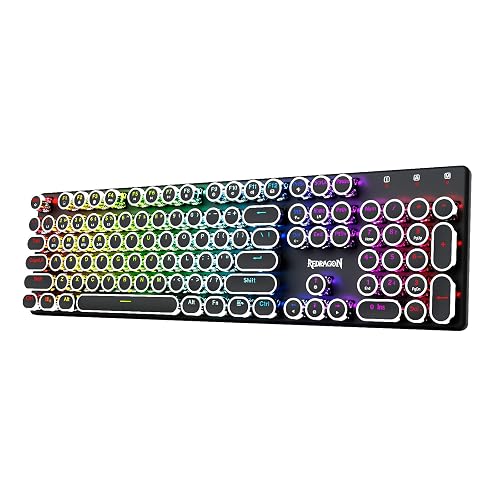
Redragon Typewriter 104
A typewriter-style wireless mechanical keyboard with clicky blue switches.
Pros
- Typewriter style with round keycaps
- Clicky blue switches with tactile feedback
- Tri-mode Bluetooth, 2.4GHz and wired
- 4000mAh rechargeable battery
Cons
- A "1 year" warranty is stated in the spec table, shorter than the ProtoArc's 2 years
- Clicky switches are loud
- 16 RGB presets, fewer than the K556
- Retro style only
Detailed Review
Redragon lists a typewriter-style wireless mechanical keyboard with blue clicky switches and round keycaps. It has tri-mode connectivity, 16 RGB backlight presets and a solid metal panel. The rechargeable battery is 4000mAh.
Who it's for: typists who love the typewriter look and click. Who should skip it: shared offices, since clicky switches are loud.
Its Office Score of 9.6/10 comes from performance 30/35, build 21/25, value 21/25, safety 5/10 and warranty 2/5: 79 of 100 points, placed on our 9.2 to 9.8 scale.
Key Specifications
| Layout | 104-key |
|---|---|
| Switch | Blue clicky |
| Battery | 4000mAh |
| Style | Retro typewriter |
Figures as published on the retailer listing, collected 22 October 2026. Performance figures are manufacturer rated.
Safety and Warranty
What this listing states. Solid metal panel with rechargeable 4000mAh battery is stated; no safety certification is stated, so safety scores 5 of 10. A "1 year" warranty is stated in the spec table. It does not say everything a buyer needs, such as who pays return shipping, so warranty scores 2 of 5. See How We Pick.
Fit the desk first. Check the stated size against your desk depth and keyboard tray, and charge or pair as the manual describes. No keyboard, mouse or wrist rest prevents or treats injury.
This is general buying information, not professional advice. Follow each product manual and local rules, and see our Safety Disclaimer.

ProtoArc K310 Pro
A full-size low-profile wireless mechanical keyboard with 3-device pairing.
Pros
- Full-size low-profile design
- Quiet linear red switches
- Pairs with 3 devices
- Programmable keys
Cons
- A "2 year" warranty is stated in the spec table, the longest term here
- Single color backlight only
- No battery figure is stated
- 17.64 inches, wide
Detailed Review
ProtoArc lists a full-size low-profile wireless mechanical keyboard with linear red switches for quiet typing. It pairs with 3 devices over Bluetooth or USB receiver, with 10 adjustable backlight effects. The aluminum board suits office use.
Who it's for: office workers who want quiet mechanical keys. Who should skip it: anyone who wants RGB, which this lacks.
Its Office Score of 9.6/10 comes from performance 29/35, build 21/25, value 20/25, safety 5/10 and warranty 3/5: 78 of 100 points, placed on our 9.2 to 9.8 scale.
Key Specifications
| Layout | Full size |
|---|---|
| Switch | Low-profile linear red |
| Devices | 3 |
| Backlight | 10 effects |
Figures as published on the retailer listing, collected 22 October 2026. Performance figures are manufacturer rated.
Safety and Warranty
What this listing states. Low-profile aluminum design with quiet linear switches is stated; no safety certification is stated, so safety scores 5 of 10. A "2 year" warranty is stated in the spec table. It does not say everything a buyer needs, such as who pays return shipping, so warranty scores 3 of 5. See How We Pick.
Fit the desk first. Check the stated size against your desk depth and keyboard tray, and charge or pair as the manual describes. No keyboard, mouse or wrist rest prevents or treats injury.
This is general buying information, not professional advice. Follow each product manual and local rules, and see our Safety Disclaimer.

AULA F75 75%
A 75% wireless mechanical keyboard with hot-swappable switches, tri-mode connection and a control knob.
Pros
- Tri-mode: BT5.0, 2.4GHz and USB-C
- Hot-swappable 3-pin and 5-pin switches
- 4000mAh battery stated
- Multi-function control knob
Cons
- 6-month warranty, the shortest stated
- 81 keys, no number pad
- RGB is gamer-styled
- Driver download via short link
Detailed Review
The AULA F75 is the most flexible board here: 75% layout with 81 keys, tri-mode connection for five devices, and hot-swappable sockets that take 3-pin or 5-pin switches without soldering. The control knob adjusts volume or lighting.
For designers, the compact footprint frees desk space for a tablet. The 6-month warranty is the shortest stated, and there is no number pad, so spreadsheet-heavy work goes to the ZORNHER.
Its Office Score of 9.5/10 comes from performance 32/35, build 20/25, value 21/25, safety 0/10 and warranty 2/5: 75 of 100 points, placed on our 9.2 to 9.8 scale.
Key Specifications
| Layout | 75%, 81 keys |
|---|---|
| Connection | BT5.0, 2.4GHz, USB-C |
| Switch | Linear, hot-swappable |
| Battery | 4000mAh |
Figures as published on the retailer listing, collected 20 October 2026. Performance figures are manufacturer rated.
Safety and Warranty
What this listing states. No FCC or other safety listing is stated, so safety scores zero. 6-month warranty stated. It does not say everything a buyer needs, such as who pays return shipping, so warranty scores 2 of 5. See How We Pick.
Fit the desk first. Check the stated size against your desk depth and keyboard tray, and charge or pair as the manual describes. No keyboard, mouse or wrist rest prevents or treats injury.
This is general buying information, not professional advice. Follow each product manual and local rules, and see our Safety Disclaimer.
As an Amazon Associate I earn from qualifying purchases.
Compare the picks
| Keyboard | Office Score | Layout | Switch | Battery | Warranty | Amazon |
|---|---|---|---|---|---|---|
| ASUS ROG Strix Scope II 96 | 9.7/10 | 96% | ROG NX Snow linear | 1500 hours | 1 Year | View on Amazon |
| Redragon K556 PRO | 9.7/10 | 104-key | Quiet linear red | Not stated | 1 year | View on Amazon |
| Redragon Typewriter 104 | 9.6/10 | 104-key | Blue clicky | 4000mAh | 1 year | View on Amazon |
| ProtoArc K310 Pro | 9.6/10 | Full size | Low-profile linear red | Not stated | 2 year | View on Amazon |
| AULA F75 75% | 9.5/10 | 75% | Not stated | Not stated | Not stated | View on Amazon |
Specifications are manufacturer rated as listed, collected 22 October 2026. Four of the five state a warranty term.
How we scored them
The Office Score weighs performance (layout, switch and connectivity), build (materials and key count), value for the stated specs, safety and warranty. For a keyboard, safety means stable typing and a comfortable layout; the Redragon K556 PRO states a tank-solid aluminum board. Four of the five state a warranty term: 1 year on the ASUS and both Redragons, 2 years on the ProtoArc. How we pick explains the weights.
| Product | Office Score | Perf. /35 | Build /25 | Value /25 | Safety /10 | Warranty /5 |
|---|---|---|---|---|---|---|
| ASUS ROG Strix Scope II 96 | 9.7 | 33 | 22 | 22 | 6 | 2 |
| Redragon K556 PRO | 9.7 | 32 | 22 | 21 | 6 | 2 |
| Redragon Typewriter 104 | 9.6 | 30 | 21 | 21 | 5 | 2 |
| ProtoArc K310 Pro | 9.6 | 29 | 21 | 20 | 5 | 3 |
Scores run from 9.2 to 9.8: each product’s point total is placed on that range, so more points always means a higher score.
How to choose the best wireless mechanical keyboard
Layout and size
Layouts here run from 75% on the AULA to 96% on the ASUS to full 104-key and 108-key boards. The ASUS is only 1 cm wider than a standard 80 percent keyboard while keeping the number pad. Pick 75% for a small desk and full size for number work. See our keyboard for WFH guide for work-from-home picks.
Switch type and noise
The K556 PRO and ProtoArc use quiet linear red switches for low-noise typing; the Redragon typewriter uses clicky blue switches for audible feedback; the ASUS uses pre-lubed ROG NX Snow linear switches. Quiet linear suits shared offices; clicky suits solo desks. Our keyboard with macros picks cover programmable boards.
| Keyboard | Layout | Switch |
|---|---|---|
| ASUS | 96% | ROG NX Snow linear |
| K556 PRO | 104-key | Quiet linear red |
| Redragon typewriter | 104-key | Blue clicky |
| ProtoArc | Full size | Low-profile linear red |
| AULA | 75% | Not stated |
Battery and connectivity
The ASUS states up to 1,500 hours in 2.4GHz wireless mode; the Redragon typewriter states a 4000mAh rechargeable battery. All five connect by Bluetooth and 2.4GHz plus wired USB. The ASUS and ProtoArc pair with 3 devices; the K556 PRO swaps between USB-C, Bluetooth and 2.4GHz. See our wireless keyboard for home office for more cord-free picks.
Setup Notes
- Charge the battery before first use; the Redragon typewriter states 4000mAh.
- Pair up to 3 devices on the ASUS and ProtoArc, then switch with one button.
- Use the companion software to remap keys on the K556 PRO and ASUS.
- Keep the 2.4GHz receiver close to the keyboard for the lowest latency.
Frequently Asked Questions
What is a mechanical keyboard?
A keyboard with individual mechanical switches under each key, for tactile and audible feedback. All five here are mechanical.
How long does the battery last?
The ASUS states up to 1,500 hours in 2.4GHz mode. The Redragon typewriter states a 4000mAh battery. The others state no battery figure.
Are these keyboards quiet?
The K556 PRO and ProtoArc state quiet linear red switches for low-noise typing. The Redragon typewriter states clicky blue switches, which are louder.
Can I swap the switches?
The K556 PRO accepts 3-pin and 5-pin switches without soldering. The ASUS is hot swappable with ROG NX switches.
Do any of these state a warranty?
Four of the five do. The ASUS, both Redragons and the ProtoArc state 1 year, 1 year, 1 year and 2 years respectively; the AULA listing states no warranty term.
Related guides
See every keyboard guide and all computer peripherals guides. Also see our best keyboard for receptionists. Also see our best keyboard for WFH.
More picks: wireless keyboards for Chromebook, keyboard covers, keyboard trays with negative tilt, clamp-on keyboard trays.



