The iPad Pro sits on the desk with its USB-C port and a pile of things waiting to plug in: a monitor, a keyboard, a camera card and a pair of wired headphones. Swapping cables between calls gets old fast, and the tablet cannot hold them all at once. The best usb c hub for ipad pro turns that port into a small dock, so the tablet works like a desk setup. We compared four hubs by port count, display output, charging, card readers and stated warranty, using only what each listing publishes.
OfficeKitHQ earns a commission when you buy through links on this page, at no extra cost to you. As an Amazon Associate I earn from qualifying purchases. Affiliate disclosure.
Quick picks
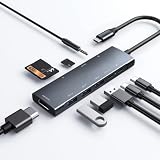 Best Overall NXPGKEA 9-in-1 Hub: 9 ports, 4K at 60Hz HDMI, 100W PD, SD readers, 1-year warranty Check price on Amazon
 Best Compact NXPGKEA 7-in-1 Hub: 7 ports in a 3.8 in body, 4K at 60Hz HDMI, 100W PD charging Check price on Amazon
 Best Stand BKELHS Hub Stand: Folding stand, 3 USB 3.0 ports at 5Gbps, 4K at 60Hz HDMI Check price on Amazon
 USB-C Only Belkin Multiport Hub: 4 USB-C 3.2 Gen 2 ports, 100W charging, 10Gbps data transfer Check price on Amazon
Our desk picks
| # | Product | Office Score | Buy |
|---|---|---|---|
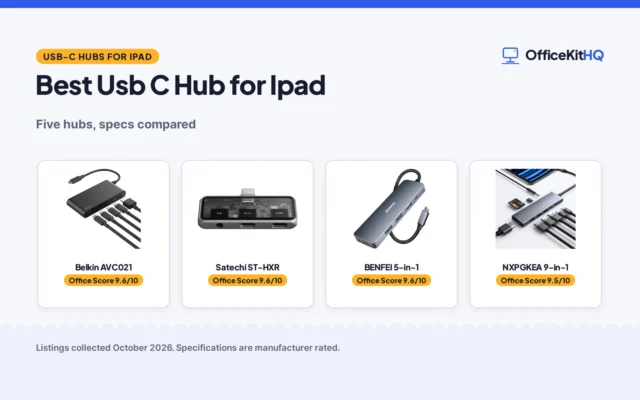
| 1 | NXPGKEA 9-in-1 Hub | 9.6/10 | Buy on Amazon |
| 2 | Belkin 4-Port USB-C Hub | 9.6/10 | Buy on Amazon |
| 3 | NXPGKEA 7-in-1 Hub | 9.5/10 | Buy on Amazon |
| 4 | BKELHS Hub Stand | 9.4/10 | Buy on Amazon |
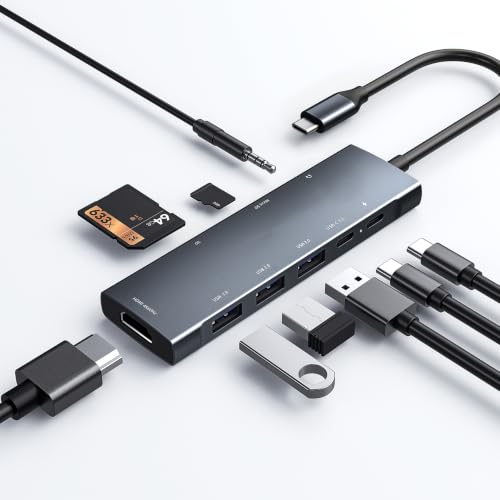
NXPGKEA 9-in-1 Hub
A 9-port hub with 4K HDMI at 60Hz, 100W pass-through charging, SD and microSD readers and a 3.5mm jack, in an 11.8 in bar.
Pros
- 9 ports from one USB-C connection, including HDMI, SD and microSD readers
- 100W pass-through charging through the PD port
- 4K at 60Hz HDMI, with 2K and 1080p at 60Hz also supported
- Built-in DAC chip for 3.5mm audio, up to 384kHz-32bit
Cons
- 11.8 in long, the longest hub in this group
- Two USB-A ports run at 480Mbps, not 5Gbps
- Only one USB 3.0 port at 5Gbps
- A straight bar that hangs off the tablet rather than standing on a desk
Detailed Review
NXPGKEA lists the 9-in-1 as a hub with 1 HDMI port, 1 USB-C PD port, 1 USB-C data port, 1 USB 3.0 port, 2 USB 2.0 ports, a 3.5mm headphone jack and an SD and microSD card reader. The HDMI port mirrors or extends a screen at 4K at 60Hz, with 2K at 60Hz and 1080p at 60Hz also supported, and the USB 3.0 port and USB-C data port move files at 5Gbps while the USB 2.0 ports run at 480Mbps. A 100W wall charger connected to the PD port provides pass-through charging to the iPad, and a built-in DAC chip processes audio for the 3.5mm jack at up to 384kHz-32bit. The maker lists dimensions of 11.8 by 1.3 by 0.6 in and a 1-year warranty.
Who it's for: someone who wants the most ports in this group, a 4K display and card readers on one hub. Who should skip it: anyone who wants the smallest hub in a bag, or a hub that stands on a desk.
Its Office Score of 9.6/10 comes from performance 32/35, build 21/25, value 21/25, safety 0/10 and warranty 4/5: 78 of 100 points, placed on our 9.2 to 9.8 scale.
Key Specifications
| Ports | 9 ports |
|---|---|
| HDMI | 4K at 60Hz |
| Charging | 100W PD |
| Size | 11.8 by 1.3 by 0.6 in |
These specs mirror the retailer listing as of 19 November 2026; performance figures are stated by the brand.
Safety and Warranty
What this listing states. No UL, FCC or over-current protection statement is stated, so safety scores zero. 1-year warranty. It does not say everything a buyer needs, such as who pays return shipping, so warranty scores 4 of 5. See How We Pick.
Power and heat. Use the supplied adapter, treat power delivery wattage and display support as the maker's claims for your laptop model, and give the dock room to vent.
This is general buying information, not professional advice. Follow each product manual and local rules, and see our Safety Disclaimer.

Belkin 4-Port USB-C Hub
A 4-port USB-C hub with 10Gbps on every port, 100W pass-through charging and audio support.
Pros
- Four USB-C 3.2 Gen 2 ports, each rated up to 10Gbps
- 100W pass-through charging powers the host device
- Audio support for headphones, speakers or an audio interface
- Fast Role Swap guards against data loss during power changes
Cons
- No HDMI or other video output stated
- Plastic enclosure rather than aluminum
- Only four ports total
- No cable length stated
Detailed Review
Belkin lists four USB-C 3.2 Gen 2 ports, each rated up to 10Gbps, with 100W pass-through Power Delivery that charges the host device while the hub runs. The bullets add audio support for headphones, speakers or an audio interface, and Fast Role Swap, which the listing says prevents data loss and interruption when a USB power source is added or removed. The spec table gives a 2.95 by 1.65 by 0.55 in plastic enclosure at 50 g, model AVC018BTBK, and a 2 year warranty.
Who it's for: a laptop user who needs more USB-C data ports with full 10Gbps on each and pass-through charging. Who should skip it: anyone who needs HDMI video or more than four ports.
Its Office Score of 9.6/10 comes from performance 29/35, build 20/25, value 20/25, safety 7/10 and warranty 4/5: 80 of 100 points, placed on our 9.2 to 9.8 scale.
Key Specifications
| Ports | 4 USB-C 3.2 Gen 2 |
|---|---|
| Data transfer | 10Gbps per port |
| Power | 100W pass-through PD |
| Warranty | 2 year warranty |
Figures as published on the retailer listing, collected 22 October 2026. Performance figures are manufacturer rated.
Safety and Warranty
What this listing states. Fast Role Swap prevents data loss and interruption when adding or removing a USB power source, so safety scores 7 of 10. 2 year warranty. It does not say everything a buyer needs, such as who pays return shipping, so warranty scores 4 of 5. See How We Pick.
Power and heat. Use the supplied adapter, treat power delivery wattage and display support as the maker's claims for your laptop model, and give the dock room to vent.
This is general buying information, not professional advice. Follow each product manual and local rules, and see our Safety Disclaimer.
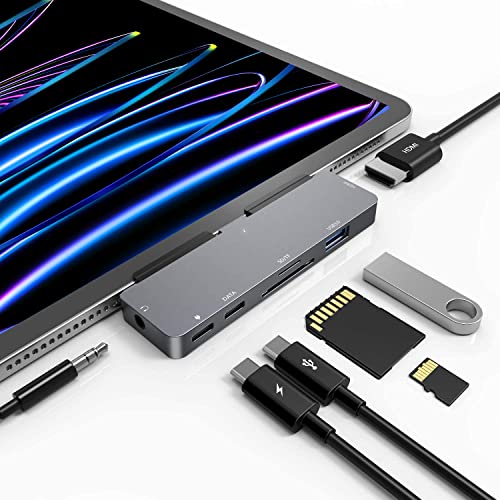
NXPGKEA 7-in-1 Hub
A 7-port hub in a 3.8 in body with 4K HDMI at 60Hz, 100W pass-through charging, SD and microSD readers and a 3.5mm jack.
Pros
- 7 ports in a 3.8 in body, the most compact hub here
- 100W pass-through charging through the PD port
- 4K at 60Hz HDMI output for a monitor or projector
- Built-in DAC chip for 3.5mm audio up to 384kHz-32bit
Cons
- Designed for a bare iPad; thick cases do not fit
- Only one USB 3.0 port at 5Gbps
- 3.8 in body sits close to the iPad, so plugged-in cables crowd the port
- Fewer ports than the 9-in-1, so a full desk may need a second hub
Detailed Review
NXPGKEA lists the 7-in-1 as a hub with 1 HDMI port, 1 USB 3.0 port, 1 USB-C PD port, 1 USB-C data port, a 3.5mm audio jack and an SD and microSD card reader. The HDMI port mirrors or extends a screen at 4K at 60Hz, with 2K at 60Hz and 1080p at 60Hz also supported, and the USB 3.0 port moves files at 5Gbps. A 100W wall charger connected to the PD port provides pass-through charging to the iPad, and a built-in DAC chip processes audio for the 3.5mm jack at up to 384kHz-32bit. The maker lists dimensions of 3.8 by 1.45 by 0.35 in and says the hub is designed for a bare iPad, with ultra-thin or borderless cases fitting loosely and thick cases not fitting.
Who it's for: someone who wants a compact hub with 4K output and card readers for a bare iPad. Who should skip it: anyone whose iPad lives in a thick case, or who needs more than 7 ports.
Its Office Score of 9.5/10 comes from performance 30/35, build 21/25, value 21/25, safety 0/10 and warranty 0/5: 72 of 100 points, placed on our 9.2 to 9.8 scale.
Key Specifications
| Ports | 7 ports |
|---|---|
| HDMI | 4K at 60Hz |
| Charging | 100W PD |
| Size | 3.8 by 1.45 by 0.35 in |
These specs mirror the retailer listing as of 19 November 2026; performance figures are stated by the brand.
Safety and Warranty
What this listing states. No UL, FCC or over-current protection statement is stated, so safety scores zero. No warranty term, so warranty scores zero. See How We Pick.
Power and heat. Use the supplied adapter, treat power delivery wattage and display support as the maker's claims for your laptop model, and give the dock room to vent.
This is general buying information, not professional advice. Follow each product manual and local rules, and see our Safety Disclaimer.

BKELHS Hub Stand
A folding clip-shaped hub stand with 4K HDMI at 60Hz, 3 USB 3.0 ports at 5Gbps, SD and TF readers and a 3.5mm audio port.
Pros
- 3 USB 3.0 ports at 5Gbps, the most here
- Folding clip-shaped stand holds the tablet on a desk
- 4K at 60Hz HDMI output
- SD and TF card readers plus a 3.5mm audio port
Cons
- No warranty term is stated
- Only one PD port for charging
- Folding design adds a hinge to a travel hub
- The stand form suits a desk better than a lap
Detailed Review
BKELHS lists the hub stand as a clip-shaped docking station with 1 HDMI port, 3 USB 3.0 ports, SD and TF outputs, 1 PD port and 1 3.5mm port. The HDMI port supports 4K at 60Hz output, the USB 3.0 ports move files at 5Gbps, and the PD port charges devices while the HDMI, USB 3.0 and card reader ports stay in use. The folding design packs down for travel, and the maker lists compatibility with iPad Pro, iPad Air, iPad mini and Galaxy tablets. No warranty term is stated.
Who it's for: someone who wants a stand-style hub with 3 USB 3.0 ports for a desk setup. Who should skip it: anyone who wants 100W charging stated in watts, or a hub that hangs straight off the tablet.
Its Office Score of 9.4/10 comes from performance 29/35, build 20/25, value 20/25, safety 0/10 and warranty 0/5: 69 of 100 points, placed on our 9.2 to 9.8 scale.
Key Specifications
| Ports | 3 USB 3.0, HDMI, SD/TF, PD, 3.5mm |
|---|---|
| HDMI | 4K at 60Hz |
| Data | 5Gbps on USB 3.0 |
| Design | Folding clip-shaped stand |
These specs mirror the retailer listing as of 19 November 2026; performance figures are stated by the brand.
Safety and Warranty
What this listing states. No UL, FCC or over-current protection statement is stated, so safety scores zero. No warranty term, so warranty scores zero. See How We Pick.
Power and heat. Use the supplied adapter, treat power delivery wattage and display support as the maker's claims for your laptop model, and give the dock room to vent.
This is general buying information, not professional advice. Follow each product manual and local rules, and see our Safety Disclaimer.
As an Amazon Associate I earn from qualifying purchases.
Specs compared
| Hub | Office Score | Ports | HDMI | Charging | Card reader | Warranty | Amazon |
|---|---|---|---|---|---|---|---|
| NXPGKEA 9-in-1 Hub | 9.6/10 | 9 | 4K at 60Hz | 100W PD | SD and microSD | 1 year | View on Amazon |
| NXPGKEA 7-in-1 Hub | 9.5/10 | 7 | 4K at 60Hz | 100W PD | SD and microSD | Not stated | View on Amazon |
| BKELHS Hub Stand | 9.4/10 | 3 USB 3.0, HDMI, SD/TF, PD, 3.5mm | 4K at 60Hz | PD port | SD and TF | Not stated | View on Amazon |
| Belkin Multiport Hub | 9.6/10 | 4 USB-C | Not stated | 100W | Not stated | Not stated |
We quote these figures from each listing as the brand rates them; captured 19 November 2026. One of the four states a warranty term; none states a safety certification.
How to choose the best usb c hub for ipad pro
Count the ports you actually use
Start with the ports the desk needs every day, not the biggest total. The NXPGKEA 9-in-1 carries 9 ports, including an HDMI port, a USB-C PD port, a USB-C data port, 1 USB 3.0 port, 2 USB 2.0 ports, a 3.5mm jack and SD and microSD readers. The NXPGKEA 7-in-1 carries 7 ports in the same pattern with 1 USB 3.0 port and no USB 2.0 ports. The BKELHS stand carries 3 USB 3.0 ports, an HDMI port, SD and TF outputs, a PD port and a 3.5mm port, while the Belkin hub carries 4 USB-C ports and nothing else. If the desk already runs on USB-C alone, the Belkin covers it; if a camera card and a monitor both need a port, the 9-in-1 or the BKELHS stand fits better.
Check the display output before the monitor
Three of the four hubs state an HDMI port with 4K output at 60Hz: both NXPGKEA hubs and the BKELHS stand. That output mirrors or extends the iPad screen onto a monitor, projector or television, and both NXPGKEA hubs also support 2K at 60Hz and 1080p at 60Hz. The Belkin hub states no HDMI port, so it cannot drive a display. Match the hub to the monitor first, then count the remaining ports.
| Hub | HDMI | USB 3.0 ports | Charging |
|---|---|---|---|
| NXPGKEA 9-in-1 Hub | 4K at 60Hz | 1 | 100W PD |
| NXPGKEA 7-in-1 Hub | 4K at 60Hz | 1 | 100W PD |
| BKELHS Hub Stand | 4K at 60Hz | 3 | PD port |
| Belkin Multiport Hub | Not stated | None | 100W |
Charging figures are the maker’s stated ratings; the BKELHS stand lists a PD port without a wattage, so its charging figure is given as the port alone.
Mind the case and the fit
The 7-in-1 is designed for a bare iPad, and the maker says ultra-thin or borderless cases may feel loose while thick cases do not fit. Check the case before ordering, and remove a thick case if the hub must sit flush. The 9-in-1 is an 11.8 in bar, so it spans the width of the tablet and needs a pocket that long in a bag, while the 7-in-1 measures 3.8 by 1.45 by 0.35 in and stays close to the port. The BKELHS stand clips on and folds, so it suits a desk where the tablet stays put. A docking station or USB hub guide can help compare forms if the clip shape is new to you.
Plan charging and the card reader
Charging and card access decide how the hub behaves on a long day. Both NXPGKEA hubs accept a 100W wall charger through the PD port for pass-through charging, and the Belkin title states 100W charging, while the BKELHS stand lists a PD port without a stated wattage. For files, the two NXPGKEA hubs and the BKELHS stand all read SD and microSD or TF cards, with the USB 3.0 ports moving files at 5Gbps and the 9-in-1’s USB 2.0 ports at 480Mbps. If the work is mostly photos from a camera card, a hub with a reader and a 5Gbps port keeps the card and the drive on one hub. See our best USB hub for Mac Mini for a similar comparison on a desktop.
Setup Notes
- Measure the hub against the iPad before ordering: the 9-in-1 bar is 11.8 by 1.3 by 0.6 in and the 7-in-1 is 3.8 by 1.45 by 0.35 in.
- Check the case first: the 7-in-1 is made for a bare iPad and does not fit thick cases.
- Plan power around the PD port: the two NXPGKEA hubs take a 100W wall charger for pass-through charging, and the Belkin hub states 100W.
- Keep SD and microSD cards within reach: three of the four hubs read both, the Belkin does not.
- The BKELHS stand folds for travel, so it packs flat in a bag.
FAQ
Can an iPad Pro hub power a 4K monitor?
Yes, on the three hubs that state HDMI: the two NXPGKEA hubs and the BKELHS stand all list 4K at 60Hz output. The Belkin hub states no HDMI port, so it cannot drive a display on its own.
Do these hubs charge the iPad while in use?
The two NXPGKEA hubs list 100W pass-through charging through the PD port when a 100W wall charger is connected. The BKELHS lists a PD port without a stated wattage, and the Belkin title states 100W.
Will the 7-in-1 hub fit an iPad in a case?
The maker says it is designed for a bare iPad and works with ultra-thin or borderless cases, but not with thick cases. Check the case before ordering.
Which hub has the most USB ports?
The NXPGKEA 9-in-1 has 9 ports, including 1 USB 3.0 port and 2 USB 2.0 ports. The BKELHS stand has 3 USB 3.0 ports, the most USB 3.0 ports here.
Can I read SD cards from a camera with these hubs?
Three of the four hubs list SD and microSD readers: both NXPGKEA hubs and the BKELHS stand. The Belkin hub lists only USB-C ports, so it has no card reader.
Score breakdown
The Office Score weighs performance (port count, display output, charging and data speed), build (form, size and stated materials), value for the stated specs, safety and warranty. For a hub, safety means stated certifications or protection features on the listing; none of the four states one, so safety scores zero across the group. One listing states a warranty term: the NXPGKEA 9-in-1 at 1 year. How we pick explains the weights.
| Product | Office Score | Perf. /35 | Build /25 | Value /25 | Safety /10 | Warranty /5 |
|---|---|---|---|---|---|---|
| NXPGKEA 9-in-1 Hub | 9.6 | 32 | 21 | 21 | 0 | 4 |
| NXPGKEA 7-in-1 Hub | 9.5 | 30 | 21 | 21 | 0 | 0 |
| BKELHS Hub Stand | 9.4 | 29 | 20 | 20 | 0 | 0 |
Score placement follows the weighted total: the lowest totals read 9.2, the highest 9.8, and everything between keeps its order.
More for your workspace
See every docking station and USB hub guide and all audio, power and connectivity guides. Also see our best USB hub for Mac Mini.
More picks: USB-C hubs for Samsung tablets, computer speakers, headsets.