The best usb c hub for macbook air m5 earns its desk space when the laptop has to run a monitor, a drive, a keyboard and a charger through the ports on its side, and the cable pile starts to win. This guide compares five hubs on the ports, video output, data speed and pass-through charging the maker lists for each one, so the choice comes down to the gear already on the desk.
OfficeKitHQ earns a commission when you buy through links on this page, at no extra cost to you. As an Amazon Associate I earn from qualifying purchases. Affiliate disclosure.
Quick picks
 Best Overall Plugable 5-in-1 Hub: 40Gbps port, 6K 60Hz video, Gigabit Ethernet, up to 100W charging Check price on Amazon
 Best Pass-Through Charging THANDBLE 5-in-1 Hub: Up to 95W pass-through, 4K@30Hz HDMI, 2 Year warranty stated Check price on Amazon
 Best for Travel RUUPRRN 5-in-1 Hub: Compact dongle, 4K 30Hz HDMI, up to 90W pass-through charging Check price on Amazon
 Ethernet Option UGREEN Revodok 6-in-1: Gigabit Ethernet, 4K HDMI and 100W PD in a 6-in-1 hub Check price on Amazon
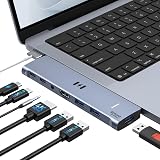 Dual Monitor Option Selore 7-in-2 Hub: 7-in-2 hub with dual monitor support for a dual-display desk Check price on Amazon
Our desk picks
| # | Product | Office Score | Buy |
|---|---|---|---|
| 1 | Plugable 5-in-1 Hub | 9.7/10 | Buy on Amazon |
| 2 | THANDBLE 5-in-1 Hub | 9.6/10 | Buy on Amazon |
| 3 | Selore 7-in-2 Hub | 9.6/10 | Buy on Amazon |
| 4 | RUUPRRN 5-in-1 Hub | 9.5/10 | Buy on Amazon |
| 5 | UGREEN Revodok 6-in-1 | 9.5/10 | Buy on Amazon |

Plugable 5-in-1 Hub
A Mac hub with a 40Gbps USB-C port rated at 6K 60Hz video, Gigabit Ethernet, an audio port and up to 100W pass-through charging.
Pros
- USB-C port stated at 40Gbps with 6K 60Hz video output
- Gigabit Ethernet and a combination audio port on the hub
- Connects to both USB-C ports without blocking MagSafe
- Up to 100W pass-through charging is stated
Cons
- Video runs through the USB-C port, with no HDMI port stated
- Stated for Mac systems only, not Windows, Chrome or Linux
- Not compatible with laptop covers, per the maker
- Fitting it uses both USB-C ports on that side
Detailed Review
Plugable lists this hub for MacBook Pro and Air systems with Apple Silicon CPUs, including M5 models. The USB-C port is stated as USB4 and Thunderbolt 4 compatible, with up to 40Gbps transfer, 6K 60Hz video output and up to 100W pass-through charging. The hub adds 2x USB 3.0 ports, a combination audio port and Gigabit Ethernet, and it connects directly to both USB-C ports without blocking MagSafe. The maker states a size of 5.24 by 2.09 by 0.67 inches and a 2-Year Limited Parts and Labor warranty, with lifetime support from its North American team.
Who it's for: a MacBook Air M5 desk that needs Ethernet, audio and a fast USB-C display path from a hub. Who should skip it: anyone who needs a plain HDMI port, runs Windows or Linux, or keeps a laptop cover fitted.
Its Office Score of 9.7/10 comes from performance 32/35, build 21/25, value 20/25, safety 7/10 and warranty 3/5: 83 of 100 points, placed on our 9.2 to 9.8 scale.
Key Specifications
| Data port | USB-C, up to 40Gbps |
|---|---|
| Video | 6K 60Hz via USB-C port |
| Ports | 2x USB 3.0, audio, Gigabit Ethernet |
| Charging | Up to 100W pass-through |
These specs mirror the retailer listing as of 20 November 2026; performance figures are stated by the brand.
Safety and Warranty
What this listing states. Thunderbolt 4 compatible USB-C port is stated, so safety scores 7 of 10. 2-Year Limited Parts and Labor. It does not say everything a buyer needs, such as who pays return shipping, so warranty scores 3 of 5. See How We Pick.
Power and heat. Use the supplied adapter, treat power delivery wattage and display support as the maker's claims for your laptop model, and give the dock room to vent.
This is general buying information, not professional advice. Follow each product manual and local rules, and see our Safety Disclaimer.

THANDBLE 5-in-1 Hub
A dongle-style hub with 4K@30Hz HDMI, a USB 3.0 port rated at up to 5 Gbps and up to 95W pass-through charging.
Pros
- Up to 95W pass-through charging is stated
- 4K@30Hz HDMI with mirror and extend modes
- USB 3.0 port rated at up to 5 Gbps for drives
- 2 Year warranty is stated
Cons
- HDMI output is capped at 30Hz in the stated figures
- PD port handles host charging only, with no data or video
- USB 2.0 ports suit keyboards and a mouse, not charging
- Host port must support DP Alt Mode for video
Detailed Review
THANDBLE lists a 5-in-1 hub with a 4K@30Hz HDMI port, a 100W PD charging port, a USB A 3.0 port and 2 USB A/C 2.0 ports. The USB 3.0 port is rated at up to 5 Gbps, the HDMI port supports mirror and extend modes, and pass-through charging is stated at up to 95W with 5W reserved for hub operations. The maker lists MacBook Air and M5 models as compatible, with plug-and-play use and no extra drivers. A thermocouple flameout protection device and a 2 Year warranty are stated.
Who it's for: a MacBook Air M5 user who wants an HDMI display, drive access and charging through a dongle. Who should skip it: anyone who needs video above 30Hz, data on the PD port, or an Ethernet port.
Its Office Score of 9.6/10 comes from performance 28/35, build 20/25, value 21/25, safety 5/10 and warranty 3/5: 77 of 100 points, placed on our 9.2 to 9.8 scale.
Key Specifications
| Video | 4K@30Hz HDMI |
|---|---|
| Data | USB A 3.0, up to 5 Gbps |
| Charging | Up to 95W pass-through |
| Ports | HDMI, PD, USB A 3.0, 2 USB A/C 2.0 |
These specs mirror the retailer listing as of 20 November 2026; performance figures are stated by the brand.
Safety and Warranty
What this listing states. Thermocouple flameout protection device is stated, so safety scores 5 of 10. 2 Year. It does not say everything a buyer needs, such as who pays return shipping, so warranty scores 3 of 5. See How We Pick.
Power and heat. Use the supplied adapter, treat power delivery wattage and display support as the maker's claims for your laptop model, and give the dock room to vent.
This is general buying information, not professional advice. Follow each product manual and local rules, and see our Safety Disclaimer.
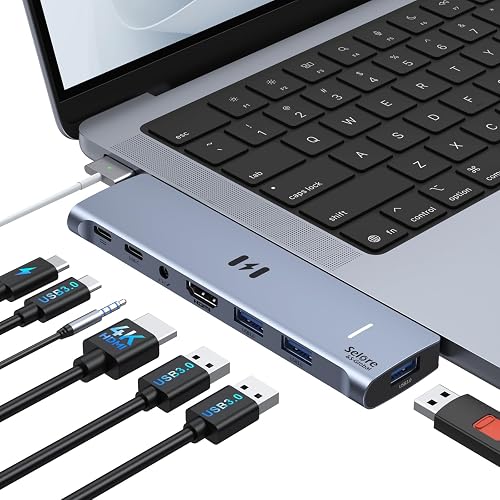
Selore 7-in-2 Hub
A dual-plug 7-in-2 hub with dual-monitor and Thunderbolt 3 support for MacBook Air.
Pros
- Dual monitors: HDMI at 4K@60Hz and Thunderbolt 3 at 5K@60Hz
- Thunderbolt 3 with 100W power delivery, 40Gbps data and 15W downstream charging
- Dual-plug design for the left-side USB-C ports without blocking MagSafe
- 18-month product warranty, per the bullets
Cons
- M1/M2 chips get a single display only; M3 needs Clamshell Mode for dual
- Not compatible with MacBook Pro cases
- No safety certifications are stated on the listing
Detailed Review
The listing states a 7-in-2 hub engineered for MacBook Air and MacBook Pro 13 to 16 inches from 2018 to 2025, with a dual-plug design for the left-side USB-C ports that does not block the MagSafe cable. It expands to one HDMI at 4K@60Hz, one Thunderbolt 3/4, three USB-A, one USB-C data port and 3.5mm audio, with dual-monitor mirror or extend mode. The Thunderbolt 3 port supports up to 100W power delivery for laptop charging or 15W downstream charging for phones, data transfer up to 40Gbps, and 5K@60Hz display output. The bullets state an 18-month product warranty, while the spec table says 2 Year Manufacturer; the bullets win. It is not compatible with MacBook Pro cases.
Who it's for: a MacBook Air user who wants two monitors and Thunderbolt speed in one hub. Who should skip it: an M1/M2 user who needs two extended displays, or anyone with a case on the MacBook Pro.
Its Office Score of 9.6/10 comes from performance 33/35, build 21/25, value 20/25, safety 0/10 and warranty 4/5: 78 of 100 points, placed on our 9.2 to 9.8 scale.
Key Specifications
| Ports | 7-in-2 |
|---|---|
| Display | HDMI 4K@60Hz, Thunderbolt 3 5K@60Hz |
| Power | 100W PD, 15W downstream |
| Warranty | 18-month, per bullets |
Figures as published on the retailer listing, collected 21 October 2026. Performance figures are manufacturer rated.
Safety and Warranty
What this listing states. No UL, FCC or over-current protection statement is stated, so safety scores zero. Selore supports 18-month product warranty. It does not say everything a buyer needs, such as who pays return shipping, so warranty scores 4 of 5. See How We Pick.
Power and heat. Use the supplied adapter, treat power delivery wattage and display support as the maker's claims for your laptop model, and give the dock room to vent.
This is general buying information, not professional advice. Follow each product manual and local rules, and see our Safety Disclaimer.

RUUPRRN 5-in-1 Hub
A compact dongle hub with 4K 30Hz HDMI, a USB 3.0 port rated at up to 5 Gbps and up to 90W pass-through charging.
Pros
- 4K 30Hz HDMI with mirror and extend modes
- USB 3.0 port rated at up to 5 Gbps for drives
- Plug-and-play use with no extra drivers stated
- Compact and lightweight design stated for travel
Cons
- HDMI output is capped at 30Hz in the stated figures
- PD port handles host charging only, with no data or video
- Pass-through charging is stated at up to 90W
- 1 Year warranty is shorter than the 2 Year terms here
Detailed Review
RUUPRRN lists a 5-in-1 hub with a 4K 30Hz HDMI port, a 100W PD charging port, a USB 3.0 port and 2 USB 2.0 ports. Pass-through charging is stated at up to 90W with 10W reserved for hub operations, and the USB 3.0 port is rated at up to 5 Gbps for flash, hard and external drives. The maker lists MacBook Air and M5 models as compatible across Windows, MacOS and Linux, with plug-and-play use. Automatic shut-off flame failure protection and a 1 Year warranty are stated.
Who it's for: a MacBook Air M5 user who carries a hub between desks and needs HDMI, drives and charging in a small dongle. Who should skip it: anyone who needs video above 30Hz, Ethernet, or the longer 2 Year warranty terms in this group.
Its Office Score of 9.5/10 comes from performance 27/35, build 20/25, value 21/25, safety 5/10 and warranty 2/5: 75 of 100 points, placed on our 9.2 to 9.8 scale.
Key Specifications
| Video | 4K 30Hz HDMI |
|---|---|
| Data | USB 3.0, up to 5 Gbps |
| Charging | Up to 90W pass-through |
| Ports | HDMI, PD, USB 3.0, 2 USB 2.0 |
These specs mirror the retailer listing as of 20 November 2026; performance figures are stated by the brand.
Safety and Warranty
What this listing states. Automatic shut-off flame failure protection is stated, so safety scores 5 of 10. 1 Year. It does not say everything a buyer needs, such as who pays return shipping, so warranty scores 2 of 5. See How We Pick.
Power and heat. Use the supplied adapter, treat power delivery wattage and display support as the maker's claims for your laptop model, and give the dock room to vent.
This is general buying information, not professional advice. Follow each product manual and local rules, and see our Safety Disclaimer.

UGREEN Revodok 6-in-1
A 6-in-1 USB-C hub with gigabit ethernet, 4K at 30Hz HDMI and 100W PD charging.
Pros
- Gigabit ethernet at 1000Mbps stated
- 100W PD input with 85W pass-through
- 3 USB-A 3.0 ports at 5Gbps
- 24-month warranty stated
Cons
- HDMI is 4K at 30Hz, not 60Hz
- The USB-C port supports charging only
- No card readers are included
- No safety certification is stated
Detailed Review
The listing states a 6-in-1 USB-C hub with 4K at 30Hz HDMI, gigabit ethernet, 100W PD input with 85W pass-through, 3 USB-A 3.0 ports at 5Gbps and plug-and-play use. The listing notes the USB-C port supports charging only and does not support HDR or 3D. A 24-month warranty is stated.
Who it's for: a straightforward 6-port hub with strong warranty coverage. Who should skip it: 60Hz monitor users, since HDMI is 30Hz here.
Its Office Score of 9.5/10 comes from performance 28/35, build 20/25, value 21/25, safety 0/10 and warranty 4/5: 73 of 100 points, placed on our 9.2 to 9.8 scale.
Key Specifications
| Ports | 6 |
|---|---|
| HDMI | 4K@30Hz |
| Ethernet | Gigabit |
| Warranty | 24 months stated |
Figures as published on the retailer listing, collected 21 October 2026. Performance figures are manufacturer rated.
Safety and Warranty
What this listing states. No UL, FCC or over-current protection statement is stated, so safety scores zero. 24 months warranty stated. It does not say everything a buyer needs, such as who pays return shipping, so warranty scores 4 of 5. See How We Pick.
Power and heat. Use the supplied adapter, treat power delivery wattage and display support as the maker's claims for your laptop model, and give the dock room to vent.
This is general buying information, not professional advice. Follow each product manual and local rules, and see our Safety Disclaimer.
As an Amazon Associate I earn from qualifying purchases.
Specs compared
| Hub | Office Score | Video | Data | Charging | Warranty | Amazon |
|---|---|---|---|---|---|---|
| Plugable 5-in-1 Hub | 9.7/10 | 6K 60Hz via USB-C | 40Gbps | Up to 100W pass-through | 2-Year Limited Parts and Labor | View on Amazon |
| THANDBLE 5-in-1 Hub | 9.6/10 | 4K@30Hz HDMI | 5 Gbps | Up to 95W pass-through | 2 Year | View on Amazon |
| RUUPRRN 5-in-1 Hub | 9.5/10 | 4K 30Hz HDMI | 5 Gbps | Up to 90W pass-through | 1 Year | View on Amazon |
| UGREEN Revodok 6-in-1 | 9.5/10 | 4K HDMI | Not stated | 100W PD | Not stated | View on Amazon |
| Selore 7-in-2 Hub | 9.6/10 | Dual Monitor | Not stated | Not stated | Not stated | View on Amazon |
All numbers are the manufacturer’s stated specs, not measured in an office, pulled on 20 November 2026.
How to choose the best usb c hub for macbook air m5
Start with the monitor connection
Video is where these hubs split. The RUUPRRN and THANDBLE hubs carry an HDMI port rated at 4K 30Hz, with mirror and extend modes, and the maker notes that the host USB-C port must support DP Alt Mode for video output. The Plugable hub takes a different path: its USB-C port is stated at 6K 60Hz video output, so the display connects over USB-C or Thunderbolt 4 rather than a plain HDMI cable. Match the hub to the cable already on the monitor, and check the refresh figure, since 30Hz and 60Hz feel different on a desk display. Readers comparing wired desk setups can check the same port questions on a larger laptop.
Count the ports you plug in daily
Data ports decide whether a hub replaces the daily plug-and-unplug routine. The Plugable hub lists 2x USB 3.0 ports, a combination audio port and Gigabit Ethernet, plus the 40Gbps USB-C port. The RUUPRRN and THANDBLE hubs list a USB 3.0 port rated at up to 5 Gbps for drives, with USB 2.0 ports the maker aims at keyboards and a mouse, and the maker notes that charging from those data ports is not recommended. If a wired network drop reaches the desk, Ethernet belongs on the short list, and the USB hub types guide sorts hub layouts by the ports they carry.
Match pass-through charging to the charger
Pass-through figures need a careful read. The RUUPRRN and THANDBLE hubs list a 100W PD charging port, then state the delivered figure after the hub reserves power for itself: up to 90W on the RUUPRRN with 10W reserved, and up to 95W on the THANDBLE with 5W reserved. The Plugable hub states up to 100W pass-through charging on its USB-C port. On the RUUPRRN and THANDBLE hubs the PD port is for host charging only, with no data or video, and the maker warns against hot-plugging the charger during casting or file transfers. The UGREEN Revodok name carries 100W PD as well, with no delivered figure stated.
Check the fit on the side of the laptop
Fit matters on a thin laptop. The Plugable hub connects directly to both USB-C ports without blocking MagSafe, and the maker states it is not compatible with laptop covers, so a snap-on case has to come off. The RUUPRRN and THANDBLE hubs are dongle-style adapters the maker describes as compact and lightweight for travel, which suits a bag that moves between rooms. The Selore hub is a 7-in-2 design with dual monitor support in its name, a shape that suits a desk running dual monitors where the stated ports line up.
Setup Notes
- Check DP Alt Mode on the host port before counting on HDMI video, as the RUUPRRN and THANDBLE makers require it.
- Treat the PD port on the RUUPRRN and THANDBLE hubs as charging only, and keep the charger plugged in during file transfers.
- Remove a laptop cover before fitting the Plugable hub, and keep the MagSafe charger path clear on the same side.
- Put drives on the USB 3.0 port rated at up to 5 Gbps, and keyboards or a mouse on the USB 2.0 ports.
- Plan the Ethernet cable run to the desk if the Plugable hub or the UGREEN Revodok hub is the pick.
FAQ
Does a USB C hub work with the MacBook Air M5?
Yes, on the stated compatibility here. The Plugable hub names MacBook Pro and Air M1/M2/M3/M4/M5 systems with Apple Silicon CPUs, and the RUUPRRN and THANDBLE hubs list MacBook Air and M5 models among the compatible devices, with plug-and-play use and no extra drivers stated.
Should video run over HDMI or USB-C?
It depends on the display cable on the desk. The RUUPRRN and THANDBLE hubs state 4K 30Hz over HDMI with mirror and extend modes, while the Plugable hub states 6K 60Hz over its USB-C port. Pick the path that matches the monitor input you already use.
How much charging reaches the laptop through the hub?
The stated delivered figures are up to 90W on the RUUPRRN hub, up to 95W on the THANDBLE hub, and up to 100W pass-through on the Plugable hub. The RUUPRRN and THANDBLE makers state that the PD port handles host charging only, with no data or video.
Which of these hubs adds wired Ethernet?
The Plugable hub lists Gigabit Ethernet, and the UGREEN Revodok name lists Gigabit Ethernet as well. The RUUPRRN, THANDBLE and Selore hubs do not state an Ethernet port, so a wired network drop points to the Plugable or UGREEN hub.
Will the HDMI port work on every USB-C laptop port?
Not on the stated terms. The RUUPRRN and THANDBLE makers note that the host USB-C port must support DP Alt Mode for video output, so check that support on the laptop before counting on the HDMI port for a desk display.
Score breakdown
The Office Score weighs performance, build, value, safety and warranty. For a USB-C hub, safety covers the protection and compatibility statements the maker publishes, such as a Thunderbolt 4 compatible port or a stated protection device, and warranty counts only where a term in years is stated. Three of the five hubs here state a warranty term, and the two hubs with the least published detail score below the rest on every count. How we pick explains the weights.
| Product | Office Score | Perf. /35 | Build /25 | Value /25 | Safety /10 | Warranty /5 |
|---|---|---|---|---|---|---|
| Plugable 5-in-1 Hub | 9.7 | 32 | 21 | 20 | 7 | 3 |
| THANDBLE 5-in-1 Hub | 9.6 | 28 | 20 | 21 | 5 | 3 |
| RUUPRRN 5-in-1 Hub | 9.5 | 27 | 20 | 21 | 5 | 2 |
We fit point totals onto a 9.2 low and 9.8 high in a straight line. One item can outscore another only by earning more points.
More for your workspace
See every Docking Stations and USB Hubs guide and all Audio, Power and Connectivity guides.
More picks: USB hub types, USB C to USB A adapters.