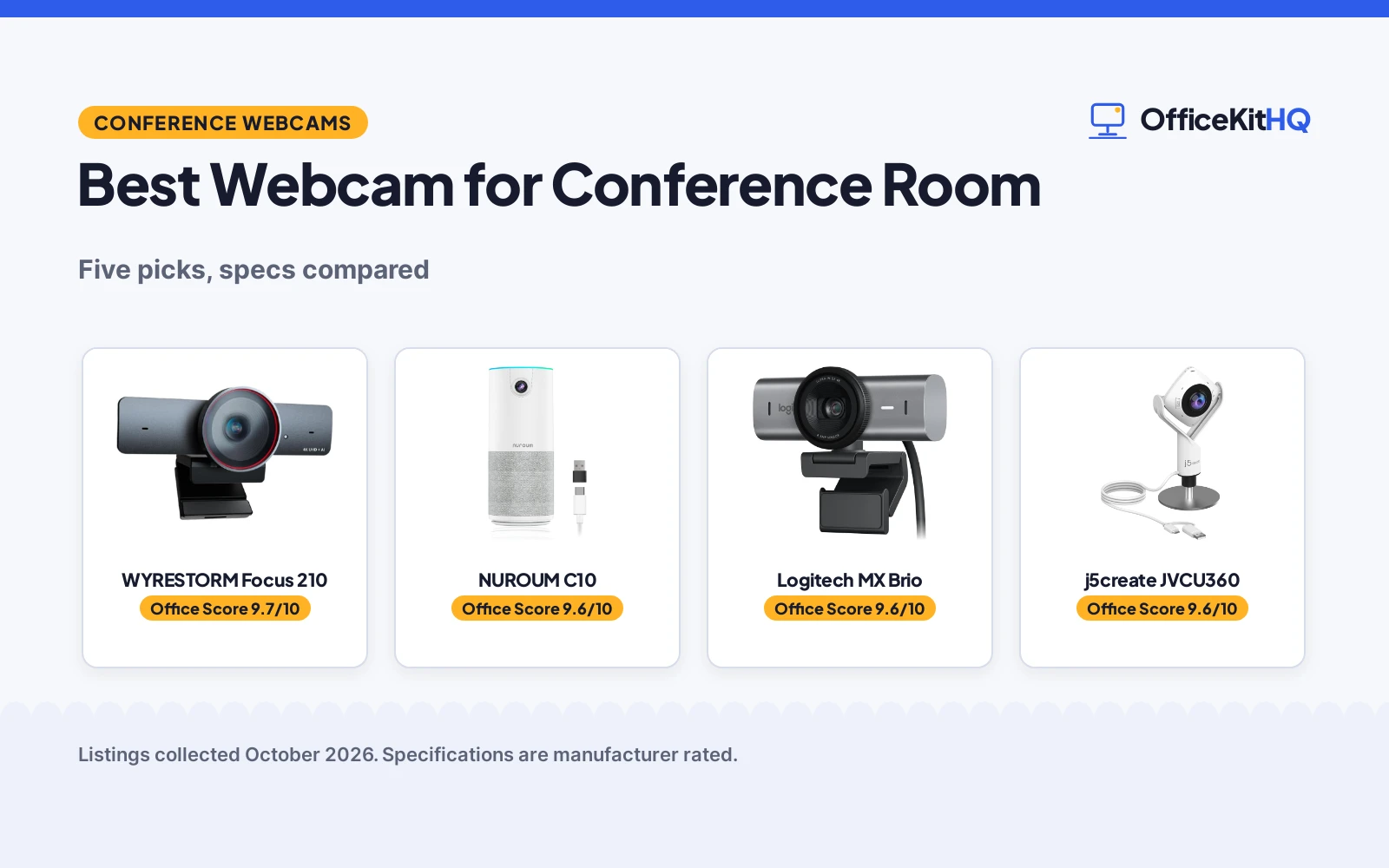
The best webcam for conference room use is the one that shows everyone at the table and picks up every voice without a tangle of extra gear. A dim corner, a wide table and a speakerphone that misses the far end are the usual reasons a meeting camera gets replaced. This roundup compares five conference room webcams on resolution, field of view, microphones, voice pickup range, privacy features and warranty terms, using only what each listing publishes.
OfficeKitHQ earns a commission when you buy through links on this page, at no extra cost to you. As an Amazon Associate I earn from qualifying purchases. Affiliate disclosure.
Quick picks
 Best Overall WYRESTORM Focus 210: 4K, AI auto framing, 120-degree FOV, 2-year warranty stated Check price on Amazon
 Best Audio NUROUM C10: 4 MEMS mics, 10-foot pickup, speaker built in, 1-year warranty Check price on Amazon
 Privacy Pick Logitech Brio 101: 1080p with privacy shutter and auto-light correction Check price on Amazon
 Teams Pick Logitech MX Brio: 4K webcam certified for Teams Check price on Amazon
 360 Pick j5create JVCU360: 360-degree meeting webcam, no further specs stated Check price on Amazon
The picks
| # | Product | Office Score | Buy |
|---|---|---|---|
| 1 | WYRESTORM Focus 210 | 9.7/10 | Buy on Amazon |
| 2 | NUROUM C10 | 9.6/10 | Buy on Amazon |
| 3 | Logitech MX Brio Webcam | 9.6/10 | Buy on Amazon |
| 4 | j5create JVCU360 Camera | 9.6/10 | Buy on Amazon |
| 5 | Logitech Brio 101 | 9.4/10 | Buy on Amazon |

WYRESTORM Focus 210
A 4K AI conference webcam with auto framing, presenter tracking, 8x digital zoom, a 120-degree field of view, dual noise-canceling microphones and built-in speakers.
Pros
- AI auto framing detects and frames all attendees, plus presenter tracking
- 120-degree field of view covers the full meeting space
- Dual AI noise-canceling microphones capture voices up to 5m, with speakers built in
- 2 Year Manufacturer warranty is stated
Cons
- No voice pickup beyond 5m is stated
- Zoom is digital only at 8x
- No tripod mount is stated
- Gray colorway only in this listing
Detailed Review
WYRESTORM lists the Focus 210 as a 4K AI-powered conference webcam with microphones and speakers, built for small conference rooms. The listing describes AI auto framing that detects and frames all attendees, presenter tracking that follows the active speaker, 8x digital zoom, 1080p at 60fps and a 120-degree field of view. Dual AI noise-canceling microphones capture voices up to 5m across the table, and a physical privacy cover is included for office use. It connects over USB, lists compatibility with Zoom, Teams and Webex, and ships with a 5ft USB-A to USB-C cable. A 2 Year Manufacturer warranty is stated.
Who it's for: a small conference room that wants auto framing, presenter tracking and built-in speakers on one USB connection. Who should skip it: anyone who needs a stated pickup range beyond 5m or a stated tripod mount.
Its Office Score of 9.7/10 comes from performance 32/35, build 21/25, value 21/25, safety 5/10 and warranty 4/5: 83 of 100 points, placed on our 9.2 to 9.8 scale.
Key Specifications
| Resolution | 4K |
|---|---|
| Field of view | 120 degrees |
| Microphones | Dual AI noise-canceling |
| Warranty | 2 Year Manufacturer |
Figures as published on the retailer listing, collected 17 October 2026. Performance figures are manufacturer rated.
Safety and Warranty
What this listing states. Physical privacy cover is stated, so safety scores 5 of 10. 2 Year Manufacturer. It does not say everything a buyer needs, such as who pays return shipping, so warranty scores 4 of 5. See How We Pick.
Light and privacy. Use the supplied adapter for ring lights, keep lights and cords away from drinks and paper, and cover or unplug a webcam when it is not in use.
This is general buying information, not professional advice. Follow each product manual and local rules, and see our Safety Disclaimer.
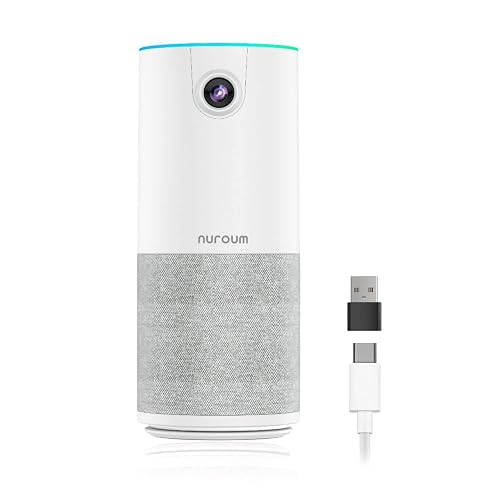
NUROUM C10
A 1080p all-in-one conference webcam with a 90-degree field of view, four noise-canceling MEMS microphones, a built-in speaker and a 1 Year warranty.
Pros
- Four omnidirectional MEMS microphones with full duplex and automatic gain control
- Voice pickup stated up to 10ft with a high-fidelity speaker built in
- 384g portable unit with touch buttons and a status light ring
- 1 Year warranty is stated
Cons
- 1080p only, no 4K mode stated
- 90-degree field of view is narrower than the WYRESTORM's 120 degrees
- Fixed focus, no auto focus stated
- No AI framing or presenter tracking is stated
Detailed Review
NUROUM lists the C10 as a 1080p conference webcam with a microphone and speaker in one compact unit. The 2MP CMOS sensor with a glass lens captures 1080p at 30fps over a 90-degree field of view, and four omnidirectional MEMS microphones with full duplex and automatic gain control pick up voices up to 10ft away. A high-fidelity loudspeaker, four touch buttons for camera, mute and volume, and a status light ring round out the unit. It ships with a folded USB-C cable of 2.2ft/0.7m plus a Type-C to USB-A adapter hidden in the base, weighs 384g and lists compatibility with Windows, macOS and Linux plus Zoom, Teams and Skype. A 1 Year warranty is stated.
Who it's for: huddle rooms and home offices that want camera, mics and speaker in one portable unit. Who should skip it: anyone who needs 4K resolution or a field of view wider than 90 degrees.
Its Office Score of 9.6/10 comes from performance 29/35, build 20/25, value 21/25, safety 3/10 and warranty 3/5: 76 of 100 points, placed on our 9.2 to 9.8 scale.
Key Specifications
| Resolution | 1080p |
|---|---|
| Field of view | 90 degrees |
| Microphones | 4 MEMS |
| Warranty | 1 Year |
Figures as published on the retailer listing, collected 17 October 2026. Performance figures are manufacturer rated.
Safety and Warranty
What this listing states. Touch button to turn off the camera is stated, so safety scores 3 of 10. 1 Year. It does not say everything a buyer needs, such as who pays return shipping, so warranty scores 3 of 5. See How We Pick.
Light and privacy. Use the supplied adapter for ring lights, keep lights and cords away from drinks and paper, and cover or unplug a webcam when it is not in use.
This is general buying information, not professional advice. Follow each product manual and local rules, and see our Safety Disclaimer.

Logitech MX Brio Webcam
A 4K webcam with platform certifications, best for professionals who want 4K.
Pros
- 4K at 30fps or 1080p at 60fps
- AI-enhanced image with dual beamforming mics
- Show Mode for sharing desk notes
- Certified for Zoom, Teams, Meet and Streamlabs
Cons
- 13.12 ounces is the heaviest here
- No stated FOV figure
- 1 Year Limited Hardware Warranty, shorter than others
- Logitech software needed for full controls
Detailed Review
Logitech lists the MX Brio as a 4K webcam at 30fps or 1080p at 60fps with AI-enhanced image quality and autofocus. Dual beamforming noise-reducing mics handle audio, and a built-in privacy cover rotates over the lens. Show Mode tilts down to share desk notes, and the camera is certified for Zoom, Microsoft Teams, Google Meet, Chromebook and Streamlabs. The spec table gives a 5.5 by 5.5 by 2.63 inch size, a 13.12-ounce weight and a 1 Year Limited Hardware Warranty.
Who it's for: professionals who want 4K with platform certifications. Who should skip it: anyone who wants the longest warranty.
Its Office Score of 9.6/10 comes from performance 33/35, build 21/25, value 20/25, safety 5/10 and warranty 3/5: 82 of 100 points, placed on our 9.2 to 9.8 scale.
Key Specifications
| Video | 4K@30fps |
|---|---|
| Audio | Dual beamforming |
| Certified | Zoom, Teams, Meet |
| Warranty | 1 Year |
Figures as published on the retailer listing, collected 17 October 2026. Performance figures are manufacturer rated.
Safety and Warranty
What this listing states. Built-in privacy cover; USB-C connection, so safety scores 5 of 10. 1 Year Limited Hardware Warranty. It does not say everything a buyer needs, such as who pays return shipping, so warranty scores 3 of 5. See How We Pick.
Light and privacy. Use the supplied adapter for ring lights, keep lights and cords away from drinks and paper, and cover or unplug a webcam when it is not in use.
This is general buying information, not professional advice. Follow each product manual and local rules, and see our Safety Disclaimer.
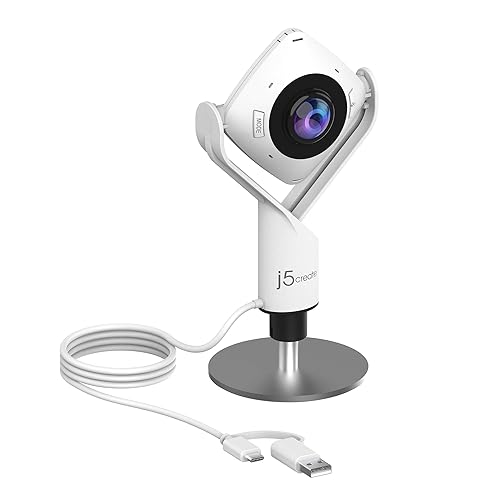
j5create JVCU360 Camera
A 360° meeting webcam, best for small rooms that need full coverage.
Pros
- 360° video with 6 display modes
- Omnidirectional microphone
- 1080p at 30fps with USB-A and USB-C
- 2 year manufacturer warranty
Cons
- Fixed focus, no autofocus
- No privacy cover stated
- 0.27 g is likely a listing error; confirm
- Firmware upgrade may be needed, per the listing
Detailed Review
j5create lists the JVCU360 as a 360-degree meeting webcam at 1080p and 30fps with an omnidirectional microphone. Six display modes cover full screen, host, dual host and wide-angle views, with a touch bar to mark participant locations. USB-A and USB-C connections are included with a 9.84 ft cable. The spec table gives a 1.46 by 3.68 by 7.6 inch size and a 2 year manufacturer warranty.
Who it's for: small rooms that need 360-degree coverage. Who should skip it: anyone who needs autofocus.
Its Office Score of 9.6/10 comes from performance 30/35, build 19/25, value 21/25, safety 5/10 and warranty 3/5: 78 of 100 points, placed on our 9.2 to 9.8 scale.
Key Specifications
| Video | 1080p@30fps |
|---|---|
| View | 360° |
| Mic | Omnidirectional |
| Warranty | 2 year |
Figures as published on the retailer listing, collected 17 October 2026. Performance figures are manufacturer rated.
Safety and Warranty
What this listing states. No stated safety feature; USB-A and USB-C, so safety scores 5 of 10. 2 year manufacturer. It does not say everything a buyer needs, such as who pays return shipping, so warranty scores 3 of 5. See How We Pick.
Light and privacy. Use the supplied adapter for ring lights, keep lights and cords away from drinks and paper, and cover or unplug a webcam when it is not in use.
This is general buying information, not professional advice. Follow each product manual and local rules, and see our Safety Disclaimer.

Logitech Brio 101
A compact 1080p webcam with RightLight auto-light balance, privacy shutter and a 1-year limited hardware warranty.
Pros
- RightLight boosts brightness up to 50%, per the listing
- Integrated sliding privacy shutter
- Compact 4.96 ounce body with USB-A plug-and-play
- Made with 77% post-consumer plastic, per the listing
Cons
- Fixed focus with a narrow 60-degree field of view
- No safety certification is stated
- Model name field says BRIO 100 against the Brio 101 title
- Single built-in mic, no noise-reduction claim stated
Detailed Review
Logitech lists the Brio 101 as a 1080p webcam with RightLight auto-light balance that boosts brightness by up to 50%, a built-in microphone, an integrated sliding privacy shutter and USB-A plug-and-play for Teams, Zoom and Google Meet. The spec table gives a 60-degree viewing angle, fixed focus, a 4.96 ounce weight and a 1.26 by 2.87 by 2.62 inch body, with a 1 year limited hardware warranty. One naming quirk: the model name field says BRIO 100 while the title says Brio 101; we treat them as the same product. The bullets also mention a game console chat mode that has nothing to do with office calls.
Who it's for: someone who wants the most compact webcam here with a privacy shutter for basic calls. Who should skip it: anyone who needs a wide field of view, autofocus or dual mics.
Its Office Score of 9.4/10 comes from performance 24/35, build 19/25, value 19/25, safety 0/10 and warranty 3/5: 65 of 100 points, placed on our 9.2 to 9.8 scale.
Key Specifications
| Resolution | 1080p |
|---|---|
| Focus | Fixed focus |
| Field of view | 60 degrees |
| Warranty | 1 year |
Figures as published on the retailer listing, collected 17 October 2026. Performance figures are manufacturer rated.
Safety and Warranty
What this listing states. This product does not plug in or run on a battery, so safety is not part of its score. 1 Year Limited Hardware Warranty. It does not say everything a buyer needs, such as who pays return shipping, so warranty scores 3 of 5. See How We Pick.
Light and privacy. Use the supplied adapter for ring lights, keep lights and cords away from drinks and paper, and cover or unplug a webcam when it is not in use.
This is general buying information, not professional advice. Follow each product manual and local rules, and see our Safety Disclaimer.
As an Amazon Associate I earn from qualifying purchases.
Compare the picks
| Webcam | Office Score | Resolution | Field of view | Audio | Warranty | Amazon |
|---|---|---|---|---|---|---|
| WYRESTORM Focus 210 | 9.7/10 | 4K | 120 degrees | Dual mics and speakers | 2 Year Manufacturer | View on Amazon |
| NUROUM C10 | 9.6/10 | 1080p | 90 degrees | 4 MEMS mics and speaker | 1 Year | View on Amazon |
| Logitech Brio 101 | 9.4/10 | 1080p | Not stated | Not stated | Not stated | View on Amazon |
| Logitech MX Brio | 9.6/10 | 4K | Not stated | Not stated | Not stated | |
| j5create JVCU360 | 9.6/10 | Not stated | 360-degree | Not stated | Not stated |
Specifications are manufacturer rated as listed, collected 17 October 2026. Two of the five state a warranty term; two state a physical privacy feature.
How we scored them
The Office Score weighs performance (resolution, field of view, framing features and stated pickup range), build (materials, form factor and item weight), value for the stated specs, safety and warranty. For a webcam, safety means a stated privacy feature such as a physical cover, shutter or camera-off control; the WYRESTORM, NUROUM and Brio 101 state one, the other two do not. Two listings state a warranty term: the WYRESTORM at 2 Year Manufacturer and the NUROUM at 1 Year. How we pick explains the weights.
| Product | Office Score | Perf. /35 | Build /25 | Value /25 | Safety /10 | Warranty /5 |
|---|---|---|---|---|---|---|
| WYRESTORM Focus 210 | 9.7 | 32 | 21 | 21 | 5 | 4 |
| NUROUM C10 | 9.6 | 29 | 20 | 21 | 3 | 3 |
Scores run from 9.2 to 9.8: each product’s point total is placed on that range, so more points always means a higher score.
How to choose the best webcam for conference room
Resolution and field of view
Resolution and field of view decide who looks sharp and who fits in frame. The WYRESTORM lists 4K with a 120-degree field of view, the NUROUM lists 1080p at 30fps with a 90-degree field of view, the MX Brio lists 4K and the Brio 101 lists 1080p, both with no stated field of view. A 120-degree lens covers a full table without repositioning the camera, while a 90-degree lens suits huddle rooms and small teams. The j5create takes a different approach with a 360-degree view from the center of the table. See the webcams and ring lights category for more camera types.
Microphones, speakers and pickup range
Audio matters as much as video in a conference room. The WYRESTORM lists dual AI noise-canceling microphones that capture voices up to 5m across the table, with speakers built into the unit. The NUROUM lists four omnidirectional MEMS microphones with full duplex and automatic gain control, picking up voices up to 10ft away, plus a high-fidelity loudspeaker. The three shorter cards state no microphone details at all.
| Webcam | Resolution | Field of view | Voice pickup |
|---|---|---|---|
| WYRESTORM Focus 210 | 4K | 120 degrees | Up to 5m |
| NUROUM C10 | 1080p | 90 degrees | Up to 10ft |
| Logitech Brio 101 | 1080p | Not stated | Not stated |
| Logitech MX Brio | 4K | Not stated | Not stated |
| j5create JVCU360 | Not stated | 360-degree | Not stated |
Figures as stated in each listing. Match the pickup range to your table: a long boardroom table needs the wider of the two stated ranges, and a separate microphone helps when the table outruns the camera. Dim rooms also benefit from extra light; see our best ring light for webcam video calls for lighting help.
AI framing and tracking
Only one listing names AI features. The WYRESTORM describes AI auto framing that detects and frames all attendees, plus presenter tracking that follows the active speaker, aimed at team meetings, boardroom discussions and training sessions. It also lists 8x digital zoom and 1080p at 60fps for smoother motion. The NUROUM lists no framing features but adds four touch buttons for camera, mute and volume with a status light ring, which covers the basic meeting controls. The three shorter cards state no smart features.
Privacy and setup
A physical way to cover the lens matters in shared rooms. The WYRESTORM includes a physical privacy cover, the Brio 101 names a privacy shutter in its title, and the NUROUM has a touch button that turns off the camera. Setup is plug and play across the two full listings: the WYRESTORM ships a 5ft USB-A to USB-C cable, and the NUROUM ships a folded USB-C cable of 2.2ft/0.7m with a Type-C to USB-A adapter hidden in the base, no driver or power adapter required. If your room struggles with backlight from windows, the Brio 101 names auto-light correction in its title; see our best webcam for light correction for more options.
Setup Notes
- Measure the table against the stated pickup range: 5m for the WYRESTORM and 10ft for the NUROUM.
- Check the USB cable reach: 5ft with the WYRESTORM, and a 2.2ft cable plus a Type-C to USB-A adapter with the NUROUM.
- Confirm the conferencing platform: Zoom, Teams and Webex for the WYRESTORM; Zoom, Teams and Skype for the NUROUM.
- Plan the lighting: the NUROUM adjusts to low light and the Brio 101 lists auto-light correction; face the room’s windows rather than sitting with your back to them.
Frequently Asked Questions
What field of view do I need for a conference room?
The WYRESTORM lists 120 degrees, enough to cover a full table without moving the camera. The NUROUM lists 90 degrees, suited to huddle rooms and small teams. The j5create lists a 360-degree view from the center of the table.
Do these webcams include microphones?
The WYRESTORM lists dual AI noise-canceling microphones that capture voices up to 5m, with speakers built in. The NUROUM lists four MEMS microphones with pickup up to 10ft, also with a built-in speaker. The three shorter cards state no microphone details.
Which webcam works with Teams and Zoom?
The WYRESTORM lists Zoom, Teams and Webex. The NUROUM lists Zoom, Teams and Skype. The MX Brio is certified for Teams.
Do any have a privacy cover?
The WYRESTORM includes a physical privacy cover, and the Brio 101 names a privacy shutter in its title. The NUROUM has a touch button that turns off the camera.
Which webcams state a warranty?
Two of the five: the WYRESTORM states 2 Year Manufacturer and the NUROUM states 1 Year. The three shorter cards state no warranty term.
Related guides
See every webcams and ring lights guide and all computer peripherals guides.
More picks: ring light for webcam video calls, webcam for light correction, webcam for eye contact, wireless mouse for travel.