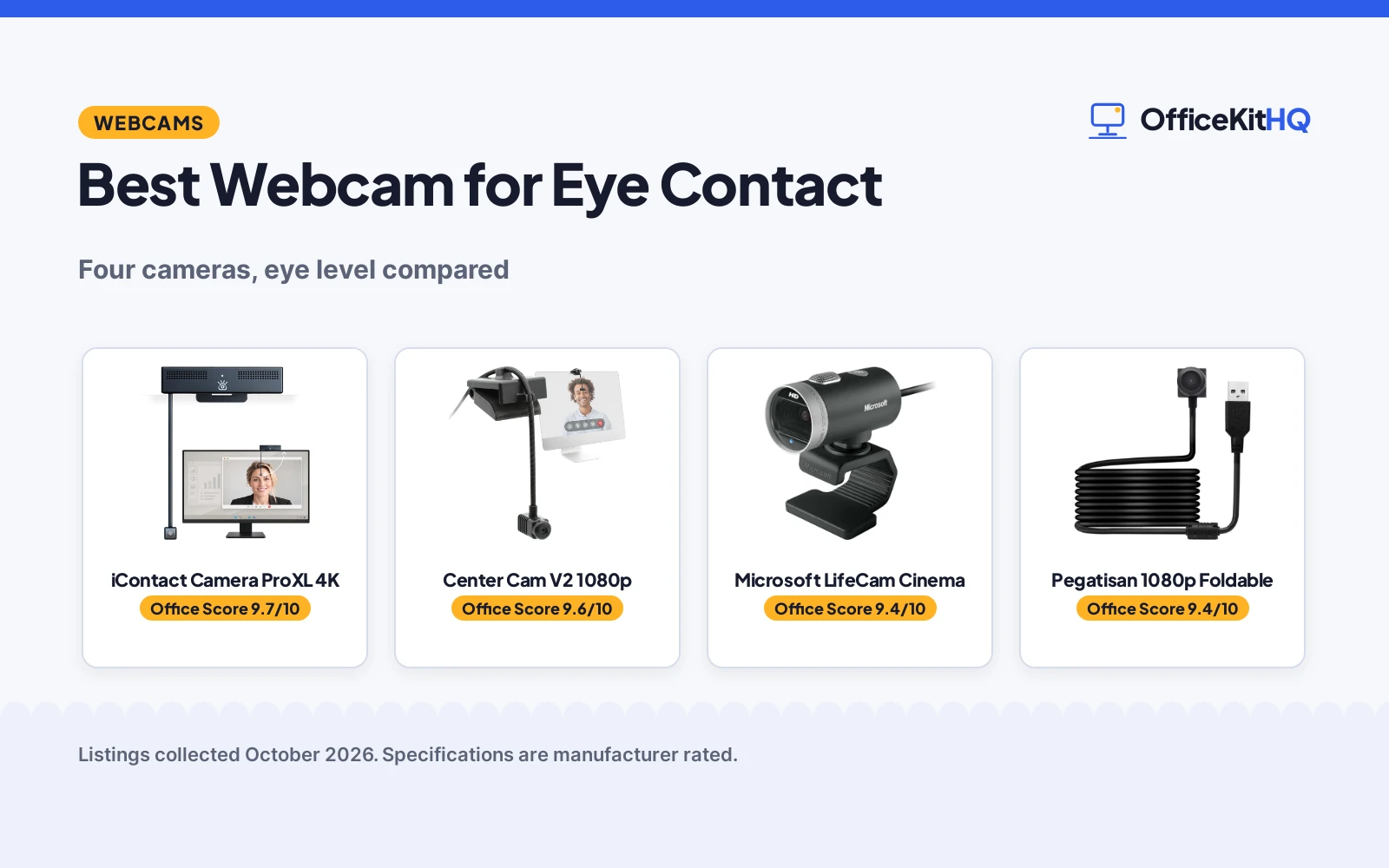
The best webcam for eye contact is not the one with the most megapixels: it is the one that sits at eye level, so the person on the call feels looked at instead of looked past. We compared four webcams that tackle this problem, from center-screen arms to a classic top-of-monitor camera, by resolution, field of view, mounting, microphones and stated warranty.
OfficeKitHQ earns a commission when you buy through links on this page, at no extra cost to you. As an Amazon Associate I earn from qualifying purchases. Affiliate disclosure.
Quick picks
 Best Overall iContact Camera ProXL 4K: 4K eye-level arm, hardware privacy switch, Zoom certified Check price on Amazon
 Best Center Mount Center Cam V2 1080p: 1080p middle-screen cam on a 16-inch flexible arm Check price on Amazon
 Best Classic Microsoft LifeCam Cinema: 720p top-of-monitor cam with 3-year warranty Check price on Amazon
 Best Foldable Pegatisan 1080p Foldable: 1080p center-screen clip, 110-degree view, folds for travel Check price on Amazon
The picks
| # | Product | Office Score | Buy |
|---|---|---|---|
| 1 | iContact Camera ProXL 4K | 9.7/10 | Buy on Amazon |
| 2 | Center Cam V2 1080p | 9.6/10 | Buy on Amazon |
| 3 | Microsoft LifeCam Cinema | 9.4/10 | Buy on Amazon |
| 4 | Pegatisan 1080p Foldable | 9.4/10 | Buy on Amazon |

iContact Camera ProXL 4K
A 4K eye-level webcam on a flip-up arm for large monitors, with a hardware privacy switch and Zoom certification.
Pros
- 4K video at 3840x2160 and 30 fps from a 13MP sensor
- Secure Switch physically cuts power to camera and mics
- Eye-level arm for monitors 20 to 30 inches and larger
- Zoom certified, dual noise-reducing microphones
Cons
- 1-year limited hardware warranty is the briefest stated term here
- Designed for larger monitors; smaller screens need a different model
- No stated cable length
- 6 ounces, heavier than the 0.07 kg foldable pick
Detailed Review
The listing states a 4K eye contact webcam with a 13MP sensor capturing 3840x2160 video at 30 fps and a 78-degree field of view designed for one person. The arm holds the camera at eye level on monitors of 20 to 30 inches and larger, flips up out of the way when done, and carries a Secure Switch that physically cuts power to the camera and microphones. It is Zoom certified, works over USB with Mac, Windows, ChromeOS and Linux, and has dual noise-reducing microphones. A 1-year limited hardware warranty is stated.
Who it's for: remote workers on large monitors who want natural eye contact and hardware privacy. Who should skip it: laptop users and small screens, where the maker points to a different model.
Its Office Score of 9.7/10 comes from performance 33/35, build 21/25, value 21/25, safety 7/10 and warranty 4/5: 86 of 100 points, placed on our 9.2 to 9.8 scale.
Key Specifications
| Resolution | 4K, 3840x2160, 30 fps |
|---|---|
| Field of view | 78 degrees |
| Mounting | Eye-level arm, flips up |
| Weight | 6 ounces |
Figures as published on the retailer listing, collected 18 October 2026. Performance figures are manufacturer rated.
Safety and Warranty
What this listing states. Secure Switch physically cuts power to the camera and microphones, so safety scores 7 of 10. 1 Year Limited Hardware Warranty. It does not say everything a buyer needs, such as who pays return shipping, so warranty scores 4 of 5. See How We Pick.
Light and privacy. Use the supplied adapter for ring lights, keep lights and cords away from drinks and paper, and cover or unplug a webcam when it is not in use.
This is general buying information, not professional advice. Follow each product manual and local rules, and see our Safety Disclaimer.

Center Cam V2 1080p
A 1080p webcam that mounts in the middle of the screen on a flexible arm, for direct eye contact on calls.
Pros
- Center-screen mounting for direct eye contact
- 16-inch flexible metal arm, only 4mm thick
- 6-foot USB cable suits laptops, monitors and tripods
- 2-year limited replacement warranty plus 30-day full refund
Cons
- Built-in mono mic; external mic recommended for pro audio
- 70-degree fixed focus frames tighter than most webcams
- Camera sits visibly on the screen during use
- No hardware privacy switch is stated
Detailed Review
The listing states a 1080p HD webcam at 30 fps with a 70-degree fixed-focus lens, mounted in the middle of the screen on a precisely adjustable 16-inch flexible metal arm that is 4mm thick. It connects over USB with a 6-foot cable, works with Mac, PC, Linux and Android, and lists Zoom, Meet, Teams, Twitch and OBS. The built-in microphone is mono, and the maker recommends an external mic for professional audio. A 30-day full-refund warranty and a 2-year limited replacement warranty are stated.
Who it's for: professionals who live on video calls and want the most natural eye contact. Who should skip it: anyone bothered by a camera sitting on the screen, or anyone wanting a hardware privacy switch.
Its Office Score of 9.6/10 comes from performance 30/35, build 20/25, value 21/25, safety 0/10 and warranty 4/5: 75 of 100 points, placed on our 9.2 to 9.8 scale.
Key Specifications
| Resolution | 1080p, 30 fps |
|---|---|
| Field of view | 70 degrees |
| Arm | 16 in flexible, 4mm thick |
| Cable | 6 ft USB |
Figures as published on the retailer listing, collected 18 October 2026. Performance figures are manufacturer rated.
Safety and Warranty
What this listing states. This product does not plug in or run on a battery, so safety is not part of its score. 2 year limited replacement warranty. It does not say everything a buyer needs, such as who pays return shipping, so warranty scores 4 of 5. See How We Pick.
Light and privacy. Use the supplied adapter for ring lights, keep lights and cords away from drinks and paper, and cover or unplug a webcam when it is not in use.
This is general buying information, not professional advice. Follow each product manual and local rules, and see our Safety Disclaimer.

Microsoft LifeCam Cinema
A classic 720p top-of-monitor webcam with autofocus and a noise-canceling mic, backed by a 3-year warranty.
Pros
- 3-year limited hardware warranty, the longest stated term
- Autofocus from 6 inches to infinity with glass lens
- Digital noise-canceling microphone
- Universal base fits desktops, laptops and LCDs
Cons
- 720p video is the lowest resolution here
- Spec table also mentions 1080P in one row, against the 720p title and bullets
- Traditional top-of-monitor position, no eye-level design
- No hardware privacy switch is stated
Detailed Review
The listing states a 720p HD webcam capturing 1280x720 video at up to 30 fps, with autofocus from 6 inches to infinity, a high-precision glass element lens and ClearFrame technology. It has a digital noise-canceling microphone, an aluminum body and a flexible stand for notebooks and desktops, with a 72-inch cable. One spec table row mentions Full HD 1080P, but the title and bullets say 720p, so treat 720p as the video resolution. A 3-year limited hardware warranty is stated.
Who it's for: business buyers who want a simple proven webcam with long warranty coverage. Who should skip it: anyone chasing eye-level framing or 4K sharpness.
Its Office Score of 9.4/10 comes from performance 26/35, build 20/25, value 19/25, safety 0/10 and warranty 4/5: 69 of 100 points, placed on our 9.2 to 9.8 scale.
Key Specifications
| Resolution | 720p, 1280x720, 30 fps |
|---|---|
| Field of view | 73 degrees diagonal |
| Focus | Autofocus, 6 in to infinity |
| Cable | 72 inches |
Figures as published on the retailer listing, collected 18 October 2026. Performance figures are manufacturer rated.
Safety and Warranty
What this listing states. This product does not plug in or run on a battery, so safety is not part of its score. 3-year limited hardware warranty. It does not say everything a buyer needs, such as who pays return shipping, so warranty scores 4 of 5. See How We Pick.
Light and privacy. Use the supplied adapter for ring lights, keep lights and cords away from drinks and paper, and cover or unplug a webcam when it is not in use.
This is general buying information, not professional advice. Follow each product manual and local rules, and see our Safety Disclaimer.

Pegatisan 1080p Foldable
A foldable 1080p center-screen webcam with a wide 110-degree view, for travel and multi-person calls.
Pros
- 1080p at 30 fps with 100 to 110-degree wide angle
- Foldable design for travel
- Center-screen mounting for eye-level calls
- Built-in noise-canceling microphone
Cons
- No warranty term is stated
- Heating is described as normal due to chips in a small space
- Screen rotation needs the potplayer software
- No hardware privacy switch is stated
Detailed Review
The listing states a 1080p webcam at 1920x1080 and 30 fps with a 100 to 110-degree wide angle, mounting at the center of the screen for eye-level calls. It folds for travel, connects over USB with no drivers, and has a built-in noise-canceling microphone. The maker notes that heating is normal given the chips in a small space, and that the potplayer software adjusts the screen direction. No warranty term is stated.
Who it's for: travelers and teachers who want a pocketable eye-contact camera with a wide view. Who should skip it: anyone who wants a stated warranty term or a hardware privacy switch.
Its Office Score of 9.4/10 comes from performance 28/35, build 19/25, value 22/25, safety 0/10 and warranty 0/5: 69 of 100 points, placed on our 9.2 to 9.8 scale.
Key Specifications
| Resolution | 1080p, 1920x1080, 30 fps |
|---|---|
| Field of view | 100 to 110 degrees |
| Weight | 80 g |
| Mounting | Center screen clip, foldable |
Figures as published on the retailer listing, collected 18 October 2026. Performance figures are manufacturer rated.
Safety and Warranty
What this listing states. This product does not plug in or run on a battery, so safety is not part of its score. No warranty term, so warranty scores zero. See How We Pick.
Light and privacy. Use the supplied adapter for ring lights, keep lights and cords away from drinks and paper, and cover or unplug a webcam when it is not in use.
This is general buying information, not professional advice. Follow each product manual and local rules, and see our Safety Disclaimer.
As an Amazon Associate I earn from qualifying purchases.
More picks to compare
 iContact Camera ProHello 4K Eye ContactCheck on Amazon
 Uyissykia 4K Center Screen WebcamCheck on Amazon
 iContact Camera Pro 4K Eye Contact WebcamCheck on Amazon
Compare the picks
| Webcam | OfficeKit Score | Resolution | Field of view | Mounting | Warranty | Amazon |
|---|---|---|---|---|---|---|
| iContact Camera ProXL 4K | 9.7/10 | 4K, 30 fps | 78 degrees | Eye-level arm | 1-year limited | View on Amazon |
| Center Cam V2 1080p | 9.6/10 | 1080p, 30 fps | 70 degrees | Center screen, 16 in arm | 2-year limited | View on Amazon |
| Microsoft LifeCam Cinema | 9.4/10 | 720p, 30 fps | 73 degrees diagonal | Top of monitor | 3-year limited | View on Amazon |
| Pegatisan 1080p Foldable | 9.4/10 | 1080p, 30 fps | 100 to 110 degrees | Center clip, foldable | Not stated | View on Amazon |
Specifications are manufacturer rated as listed, collected 18 October 2026. Three of the four state a warranty term; one states a hardware privacy switch.
How we scored them
The OfficeKit Score weighs performance (resolution, eye-contact design and mounting flexibility), build, value, safety and warranty. For a webcam, safety means a stated hardware privacy feature; the iContact ProXL lists a Secure Switch that physically cuts power to the camera and microphones, and the others state none. Three listings state a warranty term. How we pick explains the weights.
| Product | Office Score | Perf. /35 | Build /25 | Value /25 | Safety /10 | Warranty /5 |
|---|---|---|---|---|---|---|
| iContact Camera ProXL 4K | 9.7 | 33 | 21 | 21 | 7 | 4 |
| Center Cam V2 1080p | 9.6 | 30 | 20 | 21 | 0 | 4 |
| Microsoft LifeCam Cinema | 9.4 | 26 | 20 | 19 | 0 | 4 |
| Pegatisan 1080p Foldable | 9.4 | 28 | 19 | 22 | 0 | 0 |
Scores run from 9.2 to 9.8: each product’s point total is placed on that range, so more points always means a higher score.
How to choose the best webcam for eye contact
Decide where the camera should sit
Eye contact webcams work by moving the lens to where you look. The iContact ProXL hangs at eye level on an arm for monitors of 20 to 30 inches and larger, and flips up out of the way when the call ends. The Center Cam V2 mounts in the middle of the screen on a 16-inch flexible metal arm that is only 4mm thick, with a 6-foot USB cable for laptops, monitors or tripods. The Pegatisan clips to the center of the screen and folds for travel. The Microsoft LifeCam Cinema is the traditional kind: it sits on top of the monitor on a universal attachment base, so you look slightly up at it. Browse every webcams and ring lights guide if you also need lighting.
Match resolution to the call
Resolution sets how sharp you look. The iContact ProXL lists 4K video at 3840×2160 and 30 fps from a 13MP sensor, the Center Cam V2 and the Pegatisan list 1080p at 30 fps, and the LifeCam Cinema lists 720p at 30 fps with still images up to 5 megapixels. Note the LifeCam spec table also mentions Full HD 1080P in one row; the title and bullets say 720p, so treat 720p as the video resolution. For most video calls 1080p is plenty, and 4K matters most if you crop or present.
| Webcam | Resolution | Field of view | Mounting |
|---|---|---|---|
| iContact Camera ProXL 4K | 4K, 30 fps | 78 degrees | Eye-level arm, flips up |
| Center Cam V2 1080p | 1080p, 30 fps | 70 degrees | Center screen, 16 in arm |
| Microsoft LifeCam Cinema | 720p, 30 fps | 73 degrees diagonal | Top of monitor base |
| Pegatisan 1080p Foldable | 1080p, 30 fps | 100 to 110 degrees | Center screen clip, foldable |
Check the microphone and the fine print
All four list a built-in microphone, but they differ. The iContact ProXL lists dual noise-reducing microphones, the LifeCam Cinema lists a digital noise-canceling microphone, the Pegatisan lists noise-canceling tech, and the Center Cam V2 lists a built-in mono microphone while recommending an external mic for professional audio. On warranties: the LifeCam Cinema states a 3-year limited hardware warranty, the Center Cam V2 states a 2-year limited replacement warranty plus a 30-day full refund, the iContact ProXL states a 1-year limited hardware warranty, and the Pegatisan states none. For teaching calls, see our best webcam for ESL teachers picks.
Setup Notes
- Measure your monitor first: the iContact ProXL is designed for monitors of 20 to 30 inches and larger.
- Plan cable routing: the Center Cam V2 includes a 6-foot USB cable, and the LifeCam Cinema lists a 72-inch cable.
- Center-screen cameras sit on your display during calls; move the Center Cam V2 to the monitor edge when not in use.
- Flip the iContact arm up after calls: the Secure Switch cuts power to the camera and microphones.
Frequently Asked Questions
How does an eye contact webcam work?
It puts the lens at eye level instead of above the screen. The iContact ProXL hangs on an arm at eye level, and the Center Cam V2 mounts in the middle of the screen on a 16-inch flexible arm, so you look at the person on the call and the lens at the same time.
What resolution do I need for video calls?
The listings here range from 720p on the LifeCam Cinema to 1080p on the Center Cam V2 and Pegatisan, up to 4K on the iContact ProXL, all at 30 fps. For typical Zoom or Teams calls, 1080p is plenty.
Do these webcams work with Zoom and Teams?
The iContact ProXL is Zoom certified and lists Zoom, Teams, Meet and Webex, and the Center Cam V2 lists Zoom, Meet, Teams, Twitch and OBS. All four connect over USB with no drivers stated as required.
Which of these has a privacy shutter or switch?
The iContact ProXL lists a Secure Switch: flipping the arm up physically cuts power to the camera and microphones. The other three list no hardware privacy feature.
Which listings state a warranty?
The LifeCam Cinema states a 3-year limited hardware warranty, the Center Cam V2 states a 2-year limited replacement warranty with a 30-day full refund, and the iContact ProXL states a 1-year limited hardware warranty. The Pegatisan states no warranty term.
Related guides
See every webcams and ring lights guide and all computer peripherals guides.
More picks: webcams for ESL teachers, webcams with light correction and webcams for eye tracking.