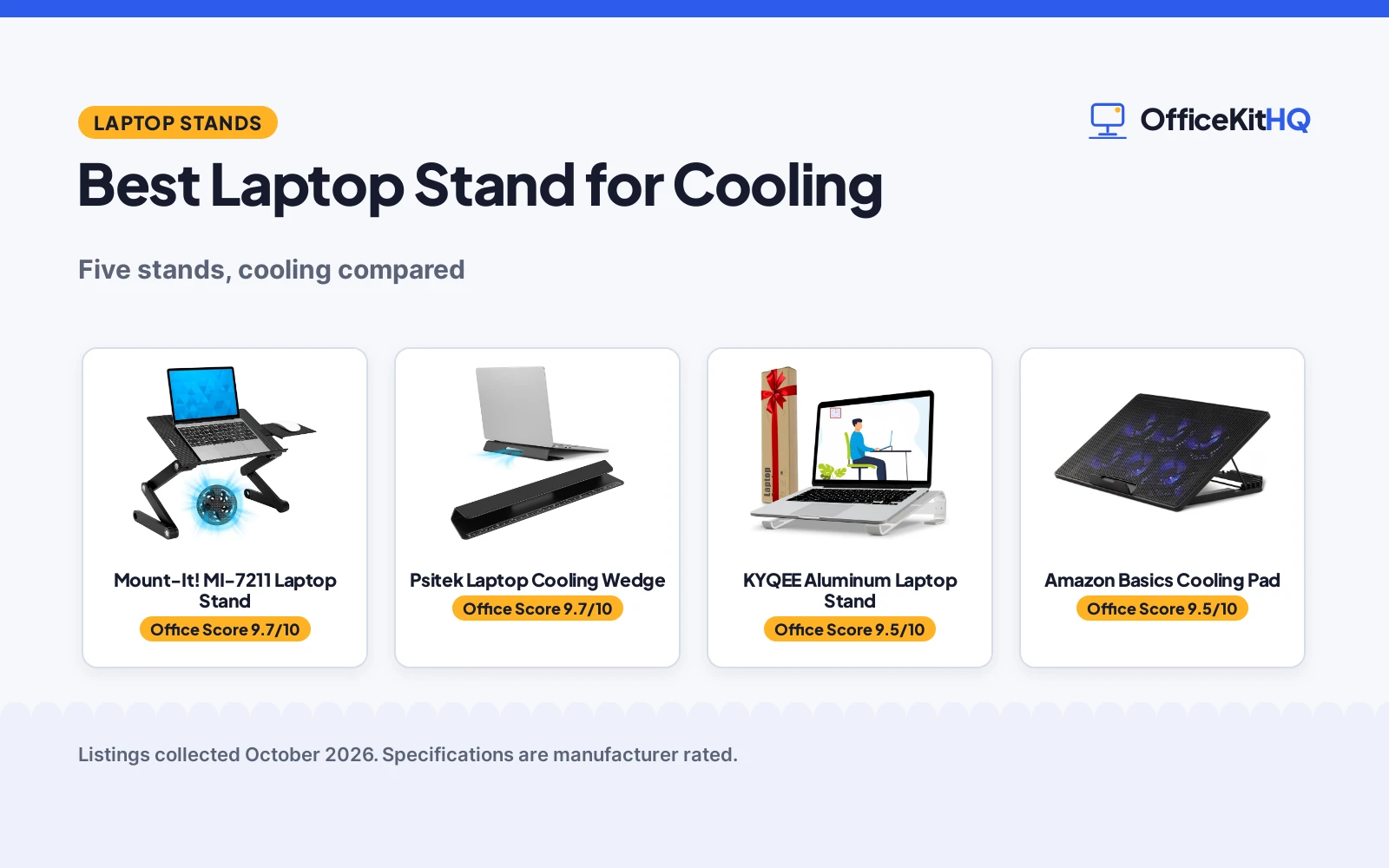
The best laptop stand for cooling is the one whose cooling method matches how hard your laptop works, because a fan-free riser and a six-fan pad solve different problems. A laptop that only gets warm during video calls needs airflow underneath; one that renders video all afternoon wants fans moving heat away. We compared five stands by cooling method, height range, stated fit and warranty, from a tall dual-fan stand to a silent fixed riser.
OfficeKitHQ earns a commission when you buy through links on this page, at no extra cost to you. As an Amazon Associate I earn from qualifying purchases. Affiliate disclosure.
Quick picks
 Best Overall Mount-It! MI-7211 Laptop Stand: Dual fans, 1.75 to 18.75 in height, lifetime warranty Check price on Amazon
 Best Passive Cooling KYQEE Aluminum Laptop Stand: Fan-free aluminum stand at a fixed 17 degree angle Check price on Amazon
 Most Fans Amazon Basics Cooling Pad: 6 quiet fans, 6 height settings, fits up to 17 in Check price on Amazon
 Wedge Pick Psitek Laptop Cooling Wedge: Aluminum cooling wedge from the title Check price on Amazon
 Adjustable Pick Tonmom Adjustable Laptop Stand: Adjustable stand from the title Check price on Amazon
The picks
| # | Product | Office Score | Buy |
|---|---|---|---|
| 1 | Mount-It! MI-7211 Laptop Stand | 9.7/10 | Buy on Amazon |
| 2 | Psitek CoolingStand Wedge | 9.7/10 | Buy on Amazon |
| 3 | KYQEE Aluminum Laptop Stand | 9.5/10 | Buy on Amazon |
| 4 | Amazon Basics Cooling Pad | 9.5/10 | Buy on Amazon |
| 5 | Tonmom 104S | 9.5/10 | Buy on Amazon |

Mount-It! MI-7211 Laptop Stand
A height-adjustable laptop stand with dual USB-powered cooling fans, a removable mouse tray and a lifetime warranty.
Pros
- Dual USB-powered cooling fans for active cooling
- Height runs from 1.75 to 18.75 in, the widest range here
- 30 lb stated capacity, the highest here
- Lifetime manufacturer warranty stated
Cons
- Title says up to 16.5 in while the spec table says 11 to 17 in
- Weight listed as both 3.97 lb and 3.1 lb
- No quiet-fan claim stated
- Works best on a flat, level surface per the maker
Detailed Review
The Mount-It! MI-7211 listing states dual USB-powered cooling fans that draw power from the included USB-A cable, with no batteries to charge. It runs from 1.75 to 18.75 in tall with 360-degree rotating legs and pivot joints that auto-lock, holds up to 30 lb, and includes a removable side mouse tray that fits either side. The title says it fits laptops up to 16.5 in while the spec table says 11 to 17 inches, and the weight appears as both 3.97 lb and 3.1 lb; per site rules, the title and bullets win, so treat it as a 16.5 in stand and check the weight yourself. It folds flat, ships fully assembled and carries a lifetime manufacturer warranty with US-based support.
Who it's for: anyone who moves between desk, couch and bed and wants active cooling plus mouse space. Who should skip it: anyone who only needs a small fixed riser for one desk.
Its Office Score of 9.7/10 comes from performance 33/35, build 22/25, value 21/25, safety 7/10 and warranty 4/5: 87 of 100 points, placed on our 9.2 to 9.8 scale.
Key Specifications
| Height | 1.75 to 18.75 in |
|---|---|
| Capacity | 30 lb stated |
| Cooling | Dual USB-powered fans |
| Fits | Laptops up to 16.5 in |
Figures as published on the retailer listing, collected 20 October 2026. Performance figures are manufacturer rated.
Safety and Warranty
What this listing states. 30 lb stated capacity with auto-locking pivot joints, so safety scores 7 of 10. Lifetime manufacturer warranty. It does not say everything a buyer needs, such as who pays return shipping, so warranty scores 4 of 5. See How We Pick.
Match the mount. Check your screen's VESA pattern, size and weight against the stated range, and check that your desk thickness and edge suit a clamp or grommet mount before you drill or clamp.
This is general buying information, not professional advice. Follow each product manual and local rules, and see our Safety Disclaimer.

Psitek CoolingStand Wedge
A 6061 aluminum cooling wedge that raises the laptop 35 mm for airflow, with a nonslip base and a built-in ruler.
Pros
- Raises the rear 35 mm (1.38 inches) for airflow underneath
- 6061 aluminum with sandblasted and anodized finish
- 11.8 x 2.6 inch base distributes weight evenly
- 5 Year Manufacturer warranty is stated
Cons
- Fixed wedge angle, no height adjustment
- Ruler markings are a bonus, not a desk need
- No certification is stated
- 260 g weight is light but not the lightest here
Detailed Review
Psitek lists an aluminum laptop stand riser that raises the rear of the laptop by 35 mm (1.38 inches) for airflow, made from 6061 aluminum with a sandblasted and anodized finish. The 30 x 6.5 cm (11.8 x 2.6 inch) base spreads weight evenly, silicone pads keep it in place, and laser-engraved inch and centimeter markings add a desktop ruler. The listing states a 5 Year Manufacturer warranty.
Who it's for: sitters who want a simple, sturdy wedge with a long warranty. Who should skip it: anyone who needs adjustable height.
Its Office Score of 9.7/10 comes from performance 28/35, build 22/25, value 21/25, safety not scored (non-powered gear) and warranty 4/5: 75 of 90 points, placed on our 9.2 to 9.8 scale.
Key Specifications
| Lift | 35 mm (1.38 in) |
|---|---|
| Material | 6061 aluminum |
| Size | 11.81 x 2.36 x 1.38 in |
| Warranty | 5 Year Manufacturer |
Figures as published on the retailer listing, collected 17 October 2026. Performance figures are manufacturer rated.
Safety and Warranty
What this listing states. This product does not plug in or run on a battery, so safety is not part of its score. 5 Year Manufacturer. It does not say everything a buyer needs, such as who pays return shipping, so warranty scores 4 of 5. See How We Pick.
Match the mount. Check your screen's VESA pattern, size and weight against the stated range, and check that your desk thickness and edge suit a clamp or grommet mount before you drill or clamp.
This is general buying information, not professional advice. Follow each product manual and local rules, and see our Safety Disclaimer.

KYQEE Aluminum Laptop Stand
A fixed-angle aluminum riser with open passive airflow, silicone pads and an included assembly tool.
Pros
- Fan-free open design keeps the underside ventilated with no noise
- Rigid aluminum triangular design for steady typing
- Silicone-padded rails, front hooks and feet resist slipping
- Assembly tool included in the box
Cons
- Fixed 17 degree angle with no adjustability
- Passive airflow only, no active cooling
- Fits 11 to 16 in laptops only
- Ships as parts with screws to assemble
Detailed Review
The KYQEE listing states a fixed, non-folding aluminum laptop stand set at a 17 degree angle that lifts the screen 2.5 in, with an open base for passive airflow and no fan noise. It fits most 11 to 16 in laptops, uses silicone-padded rails, front hooks and feet to reduce slipping and scuffs, and measures 9.8 x 10.2 x 2.6 in at 10.24 oz. The 1-pack includes one stand, four screws and an assembly tool, and the warranty description states one year.
Who it's for: a desk worker who wants silent, passive cooling and a rock-steady typing angle. Who should skip it: anyone who wants adjustable height or fan-powered cooling.
Its Office Score of 9.5/10 comes from performance 26/35, build 21/25, value 20/25, safety 5/10 and warranty 0/5: 72 of 100 points, placed on our 9.2 to 9.8 scale.
Key Specifications
| Angle | Fixed 17 degrees |
|---|---|
| Lift | 2.5 in |
| Fits | 11 to 16 in laptops |
| Weight | 10.24 ounces |
Figures as published on the retailer listing, collected 20 October 2026. Performance figures are manufacturer rated.
Safety and Warranty
What this listing states. Silicone-padded rails, front hooks and feet reduce slipping, so safety scores 5 of 10. No warranty term, so warranty scores zero. See How We Pick.
Match the mount. Check your screen's VESA pattern, size and weight against the stated range, and check that your desk thickness and edge suit a clamp or grommet mount before you drill or clamp.
This is general buying information, not professional advice. Follow each product manual and local rules, and see our Safety Disclaimer.

Amazon Basics Cooling Pad
A cooling pad with 6 ultra-quiet fans, adjustable fan speed and 6 height settings for laptops up to 17 in.
Pros
- 6 built-in ultra-quiet fans for active cooling
- Adjustable fan speed with turn knob control
- 6 adjustable-height settings
- USB-A and USB-C hubs plus a stored USB-A to USB-C cable
Cons
- No warranty term is stated
- No weight capacity stated
- No anti-slip features stated
- Not designed for charging phones per the maker
Detailed Review
The Amazon Basics listing states a laptop cooling pad with 6 built-in ultra-quiet fans that push heat away from multiple angles, with adjustable fan speed on a turn knob and a blue LED indicator that shows when the fans run. Six adjustable-height settings tilt the pad for heat release and typing comfort, and it fits laptops up to 17 in including MacBook, Dell, HP and ASUS models. Built-in USB-A and USB-C hubs connect peripherals, and a USB-A to USB-C cable ships in a cable slot; the maker notes it is not designed for charging phones. No warranty term is stated.
Who it's for: anyone who wants the most fans here and extra USB ports on one pad. Who should skip it: anyone who needs a stated warranty or a weight capacity.
Its Office Score of 9.5/10 comes from performance 32/35, build 19/25, value 20/25, safety 0/10 and warranty 0/5: 71 of 100 points, placed on our 9.2 to 9.8 scale.
Key Specifications
| Fans | 6 ultra-quiet |
|---|---|
| Height settings | 6 adjustable |
| Fits | Laptops up to 17 in |
| Ports | USB-A and USB-C hubs |
Figures as published on the retailer listing, collected 20 October 2026. Performance figures are manufacturer rated.
Safety and Warranty
What this listing states. This product does not plug in or run on a battery, so safety is not part of its score. No warranty term, so warranty scores zero. See How We Pick.
Match the mount. Check your screen's VESA pattern, size and weight against the stated range, and check that your desk thickness and edge suit a clamp or grommet mount before you drill or clamp.
This is general buying information, not professional advice. Follow each product manual and local rules, and see our Safety Disclaimer.

Tonmom 104S
For the traveler who packs light, this 0.53 lb folding stand adjusts across 7 levels from 2.78 to 6.5 in, though no concrete warranty term is stated.
Pros
- 7 height levels from 2.78 to 6.5 in, per the listing
- 0.53 lb and folds to 10.5 by 1.96 by 0.68 in, per the listing
- Anti-slip silicone pad, per the listing
- Light ABS and silicone build for travel
Cons
- No concrete warranty term is stated; the listing gives only 1
- No load capacity is stated
- ABS plastic build, unlike the aluminum picks
- The spec table gives 0.92 in depth while the bullets give a folded 0.68 in
Detailed Review
Tonmom lists the 104S as a foldable ABS and silicone laptop stand for 10 to 15.6 in laptops with 7 height levels from 2.78 to 6.5 in and an anti-slip silicone pad. One oddity: the spec table gives 0.92 in depth while the bullets give a folded size of 10.5 by 1.96 by 0.68 in; we trust the bullets for the folded figure. The warranty description reads 1 with no unit, so no concrete term is stated.
Who it's for: a traveler who wants the lightest folding stand. Who should skip it: anyone who wants a warranty term or a metal build.
Its Office Score of 9.5/10 comes from performance 28/35, build 19/25, value 20/25, safety 5/10 and warranty 0/5: 72 of 100 points, placed on our 9.2 to 9.8 scale.
Key Specifications
| Height | 2.78 to 6.5 in, 7 levels |
|---|---|
| Folded | 10.5 x 1.96 x 0.68 in |
| Weight | 0.53 lb |
| Compatibility | 10-15.6 in |
Figures as published on the retailer listing, collected 17 October 2026. Performance figures are manufacturer rated.
Safety and Warranty
What this listing states. Anti-slip silicone pad is stated, so safety scores 5 of 10. No warranty term, so warranty scores zero. See How We Pick.
Match the mount. Check your screen's VESA pattern, size and weight against the stated range, and check that your desk thickness and edge suit a clamp or grommet mount before you drill or clamp.
This is general buying information, not professional advice. Follow each product manual and local rules, and see our Safety Disclaimer.
As an Amazon Associate I earn from qualifying purchases.
Compare the picks
| Stand | Office Score | Cooling | Height | Fits laptops | Warranty | Amazon |
|---|---|---|---|---|---|---|
| Mount-It! MI-7211 Laptop Stand | 9.7/10 | Dual USB fans | 1.75 to 18.75 in | Up to 16.5 in | Lifetime | View on Amazon |
| KYQEE Aluminum Laptop Stand | 9.5/10 | Passive open airflow | Fixed | 11 to 16 in | Not stated | View on Amazon |
| Amazon Basics Cooling Pad | 9.5/10 | 6 quiet fans | 6 settings | Up to 17 in | Not stated | View on Amazon |
| Psitek Laptop Cooling Wedge | 9.7/10 | Cooling wedge stated | Not stated | Not stated | Not stated | |
| Tonmom Adjustable Laptop Stand | 9.5/10 | Not stated | Adjustable | Not stated | Not stated |
Specifications are manufacturer rated as listed, collected 20 October 2026.
How we scored them
The Office Score weighs performance, build, value, safety and warranty. Here safety means stated stability features such as anti-slip pads, locking joints and weight capacity, and one of the five listings states a scoreable warranty. How we pick explains the weights.
| Product | Office Score | Perf. /35 | Build /25 | Value /25 | Safety /10 | Warranty /5 |
|---|---|---|---|---|---|---|
| Mount-It! MI-7211 Laptop Stand | 9.7 | 33 | 22 | 21 | 7 | 4 |
| KYQEE Aluminum Laptop Stand | 9.5 | 26 | 21 | 20 | 5 | 0 |
| Amazon Basics Cooling Pad | 9.5 | 32 | 19 | 20 | 0 | 0 |
Scores run from 9.2 to 9.8: each product’s point total is placed on that range, so more points always means a higher score.
How to choose the best laptop stand for cooling
Pick the cooling method first
Active cooling means fans: the Amazon Basics pad runs 6 ultra-quiet fans with a speed knob, and the Mount-It! stand runs dual USB-powered fans off the included cable. Passive cooling means airflow through an open design, like the KYQEE aluminum riser, which cools silently but cannot push air the way fans do. If your laptop only runs warm during calls, a passive riser may be enough; for sustained heavy work, the fan models are the safer bet. For a stand that also adds connectivity, see our best laptop stand with dock.
Match the height range to where you work
The Mount-It! stand runs from 1.75 to 18.75 in, so it works on a desk, a couch or a bed, while the KYQEE is a fixed 17 degree riser that lifts the screen 2.5 in and never moves. The Amazon Basics pad offers 6 adjustable-height settings but stays a desk pad. If you work in one spot, a fixed or pad-style stand is simpler; if you roam the house, the tall adjustable stand earns its keep. For fan stands made for desks, see our best laptop stand for desk with fan.
Check the fit and the fine print
Fit ranges here run from 11 to 16 in on the KYQEE up to 17 in on the Amazon Basics pad, and the Mount-It! title says up to 16.5 in while its spec table says 11 to 17 in. Measure your laptop footprint before you buy, and trust the title and bullets when a listing disagrees with itself. One listing states a scoreable warranty, the lifetime cover on the Mount-It!, while the rest state none. For stands aimed at moving heat specifically, see our best laptop stand for heat dissipation.
Frequently Asked Questions
Do I need fans, or is a passive stand enough?
Passive stands like the KYQEE cool by opening airflow under the laptop with no noise. The Amazon Basics and Mount-It! listings state built-in fans, which move heat actively and suit heavier workloads.
Which stand fits the biggest laptop here?
The Amazon Basics pad fits laptops up to 17 in. The Mount-It! title states up to 16.5 in, and the KYQEE fits 11 to 16 in laptops.
Which stand adjusts the tallest?
The Mount-It! stand runs from 1.75 to 18.75 in, the tallest range here. The KYQEE is fixed at a 17 degree angle with a 2.5 in lift.
Which stands state a warranty?
The Mount-It! listing states a lifetime manufacturer warranty, and the KYQEE listing states a one-year warranty. The other three listings state no warranty term.
Can these stands charge my phone?
The Amazon Basics listing states its USB-A and USB-C hubs connect peripherals but are not designed for charging phones. Use a dedicated charger for that.
Related guides
See every monitor arms and stands guide and all computer peripherals guides. Also see our best laptop stand for heat dissipation. Also see our best laptop stand with dock.
More picks: laptop stand for desk with fan, laptop stand for standing desk and ergonomic laptop stand for desk.