The best usb hub for cable management is the one that turns a snarl of cords into a single tidy run from your laptop to the back of the desk. Picture a morning video call with the webcam, keyboard and external drive all plugged into a laptop that is short on ports, while you trace each cable to find the one that belongs to the keyboard. We compared five USB hubs by stated cable length, port mix, 5Gbps data transfer, casing material and warranty term, using only what each Amazon listing publishes. Every hub here states a cable length meant to keep the clutter off the desk surface, from a short stub to a long run.
OfficeKitHQ earns a commission when you buy through links on this page, at no extra cost to you. As an Amazon Associate I earn from qualifying purchases. Affiliate disclosure.
Quick picks
 Best Overall ABFCRTTW 7-Port USB Hub: 7 ports, 4 USB-A plus 3 USB-C, 6 ft cable stated Check price on Amazon
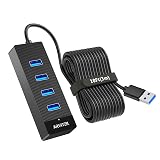 Longest Cable Arvitek 4-Port USB Hub: 10 ft (3 m) cable, the longest cable stated here Check price on Amazon
 Compact USB-C Anker 4-in-1 USB-C Hub: 0.7 ft cable, 1.12 oz, 4.24 in long Check price on Amazon
 Port Switches PANPEO 7-Port USB Hub: 7 ports with individual on/off switches Check price on Amazon
 2 ft Cable Anker 4-in-1 USB-C 2 ft: Anker 4-in-1 USB-C hub, 5Gbps, 2 ft cable Check price on Amazon
The picks
| # | Product | Office Score | Buy |
|---|---|---|---|
| 1 | ABFCRTTW 7-Port USB Hub | 9.7/10 | Buy on Amazon |
| 2 | Arvitek 4-Port USB Hub | 9.7/10 | Buy on Amazon |
| 3 | Anker 4-in-1 USB-C Hub | 9.6/10 | Buy on Amazon |
| 4 | PANPEO 7-Port Hub with Switches | 9.5/10 | Buy on Amazon |
| 5 | Anker 4-in-1 USB-C Hub | 9.4/10 | Buy on Amazon |

ABFCRTTW 7-Port USB Hub
A 7-port aluminum USB hub with a 6 ft cable, 4 USB-A plus 3 USB-C ports and a stated 20-month warranty.
Pros
- 7 ports mix 4 USB-A and 3 USB-C, the widest port selection stated here
- 6 ft cable stated, long enough to route along a desk edge
- Aluminum casing with a stated heat dissipation claim and a 20-month warranty
- 15W Type-C port (5V/3A) stated for high-power devices such as external hard drives
Cons
- The spec table lists the color as '5Gbps' instead of a color name
- Listed dimensions of 1 by 0.66 by 5.3 in are unusually slim for a 7-port hub; measure first
- No individual port on/off switches are stated
- No laptop charging is claimed; the focus is data transfer and the 15W device port
Detailed Review
The listing states a 7-port aluminum hub with 4 USB-A and 3 USB-C ports, a 6 ft cable, 5Gbps transfer and a dual-chip processor, plus a 15W Type-C port at 5V/3A for high-power devices and a 20-month warranty. One line in the spec table reads oddly: the color field says '5Gbps' instead of a color name, and the dimensions list as 1 by 0.66 by 5.3 in, which is unusually slim for the port count. Trust the title and bullets on the cable and ports, and measure the hub footprint before ordering.
Who it's for: a desk worker who needs both USB-A and USB-C ports on one 6 ft run to the back of the desk. Who should skip it: anyone who wants individual port switches or a stated laptop-charging hub.
Its Office Score of 9.7/10 comes from performance 30/35, build 22/25, value 21/25, safety not scored (non-powered gear) and warranty 3/5: 76 of 90 points, placed on our 9.2 to 9.8 scale.
Key Specifications
| Ports | 7 (4 USB-A, 3 USB-C) |
|---|---|
| Cable length | 6 ft |
| Data transfer | 5Gbps |
| Enclosure | Aluminum |
Figures as published on the retailer listing, collected 20 October 2026. Performance figures are manufacturer rated.
Safety and Warranty
What this listing states. This product does not plug in or run on a battery, so safety is not part of its score. 20 Months. It does not say everything a buyer needs, such as who pays return shipping, so warranty scores 3 of 5. See How We Pick.
Power and heat. Use the supplied adapter, treat power delivery wattage and display support as the maker's claims for your laptop model, and give the dock room to vent.
This is general buying information, not professional advice. Follow each product manual and local rules, and see our Safety Disclaimer.
Arvitek 4-Port USB Hub
A 4-port USB 3.0 hub on a stated 10 ft (3 m) cable with 5Gbps transfer and a 2 YEAR warranty.
Pros
- 10 ft (3 m) cable stated, the longest cable in this roundup
- 4 USB 3.0 ports with stated 5Gbps data transfer
- Dual high-performance chips stated for plug-and-play stability
- 2 YEAR warranty stated, one of the longest terms here
Cons
- The spec table says 'Number of Items' is 4 while the bullets pack a single hub; trust the bullets
- Data transmission only; charging is explicitly not supported
- Only USB flash drives are listed as compatible devices
- No USB-C ports are stated
Detailed Review
The listing states a 4-port USB 3.0 hub on a 10 ft (3 m) cable with 5Gbps transfer, dual high-performance chips and plug-and-play use across Windows, Mac OS and Linux, with a 2 YEAR warranty and a 0.12 kg item weight. There is one contradiction: the spec table says 'Number of Items' is 4, while the bullets pack a single 4-port hub with one cable; trust the bullets. The listing is explicit that the hub handles data only, not charging.
Who it's for: anyone whose desktop tower or dock sits across the room and needs the longest stated run. Who should skip it: anyone who needs charging support or stated USB-C ports.
Its Office Score of 9.7/10 comes from performance 29/35, build 20/25, value 21/25, safety not scored (non-powered gear) and warranty 3/5: 73 of 90 points, placed on our 9.2 to 9.8 scale.
Key Specifications
| Ports | 4 USB 3.0 |
|---|---|
| Cable length | 10 ft (3 m) |
| Data transfer | 5Gbps |
| Item weight | 0.12 kg |
Figures as published on the retailer listing, collected 20 October 2026. Performance figures are manufacturer rated.
Safety and Warranty
What this listing states. This product does not plug in or run on a battery, so safety is not part of its score. 2 YEAR. It does not say everything a buyer needs, such as who pays return shipping, so warranty scores 3 of 5. See How We Pick.
Power and heat. Use the supplied adapter, treat power delivery wattage and display support as the maker's claims for your laptop model, and give the dock room to vent.
This is general buying information, not professional advice. Follow each product manual and local rules, and see our Safety Disclaimer.

Anker 4-in-1 USB-C Hub
A compact Anker 4-in-1 USB-C hub with stated 5Gbps transfer on a 0.7 ft cable.
Pros
- 5Gbps data transfer stated across 4 USB ports
- Compact 4.24 by 1.24 by 0.4 in body at 1.12 oz
- USB-C host connector suits laptops with USB-C ports
- 18-month worry-free term stated
Cons
- The bullets call the 20 cm cable 'long' while the title states 0.7 ft; it is a short run
- Charging is explicitly not supported
- Plastic enclosure with no stated heat or drop claims
- Only 4 ports, the smallest count in this roundup
Detailed Review
The listing states a 4-in-1 USB-C hub with 5Gbps transfer, a 20 cm cable (the title calls it 0.7 ft), a plastic enclosure at 4.24 by 1.24 by 0.4 in and 1.12 oz, plus an 18-month worry-free term. The marketing copy calls this a 'long cable' while the stated length is 0.7 ft, so treat 'long' as the maker's flourish and the 0.7 ft as the fact. Charging is not supported, which the title states plainly.
Who it's for: a laptop user who wants a pocket-sized hub parked right next to the machine. Who should skip it: anyone who needs cable reach or charging support.
Its Office Score of 9.6/10 comes from performance 28/35, build 20/25, value 20/25, safety not scored (non-powered gear) and warranty 3/5: 71 of 90 points, placed on our 9.2 to 9.8 scale.
Key Specifications
| Ports | 4 |
|---|---|
| Cable length | 0.7 ft (20 cm) |
| Data transfer | 5Gbps |
| Enclosure | Plastic |
Figures as published on the retailer listing, collected 20 October 2026. Performance figures are manufacturer rated.
Safety and Warranty
What this listing states. This product does not plug in or run on a battery, so safety is not part of its score. 18-month worry-free. It does not say everything a buyer needs, such as who pays return shipping, so warranty scores 3 of 5. See How We Pick.
Power and heat. Use the supplied adapter, treat power delivery wattage and display support as the maker's claims for your laptop model, and give the dock room to vent.
This is general buying information, not professional advice. Follow each product manual and local rules, and see our Safety Disclaimer.

PANPEO 7-Port Hub with Switches
A 7-port hub with individual on/off switches and LEDs on a 4 ft cable.
Pros
- Individual on/off switches with LEDs on all 7 ports
- 7 ports with per-port switches, a combination none of the others offer
- 5Gbps across all ports
- Plug and play with wide device compatibility stated
Cons
- Power adapter not included; needs a DC 5V cord for hungry devices
- Does not support charging
- No warranty term is stated
- Plastic enclosure rather than aluminum
Detailed Review
PANPEO lists a 7-port USB 3.0 hub with individual on/off switches and LEDs per port, a 4 ft cable and 5Gbps data rate. The listing states the hub does not support charging and that a DC 5V power cord (3.5 x 1.35mm) is required for hungrier devices but not included. No warranty term is stated.
Who it's for: users who want per-port switches to silence idle devices without unplugging. Who should skip it: anyone who needs a powered hub out of the box or a stated warranty.
Its Office Score of 9.5/10 comes from performance 30/35, build 19/25, value 21/25, safety 0/10 and warranty 0/5: 70 of 100 points, placed on our 9.2 to 9.8 scale.
Key Specifications
| Cable | 4 ft |
|---|---|
| Ports | 7 USB 3.0 with on/off switches |
| Data rate | 5Gbps |
| Warranty | Not stated |
Figures as published on the retailer listing, collected 18 October 2026. Performance figures are manufacturer rated.
Safety and Warranty
What this listing states. This product does not plug in or run on a battery, so safety is not part of its score. No warranty term, so warranty scores zero. See How We Pick.
Power and heat. Use the supplied adapter, treat power delivery wattage and display support as the maker's claims for your laptop model, and give the dock room to vent.
This is general buying information, not professional advice. Follow each product manual and local rules, and see our Safety Disclaimer.

Anker 4-in-1 USB-C Hub
A compact 4-in-1 USB-C hub with 5Gbps transfers, a 2 ft cable and an 18-month stated warranty.
Pros
- 5Gbps transfers in a 4.2 x 1.2 x 0.4 in pocketable body
- 2 ft cable for placement flexibility
- 18-month warranty stated
- 1.12 oz, the lowest weight stated here
Cons
- Only 4 ports, the fewest here
- Charging not supported
- Plastic enclosure
- USB-C host only; needs a Type-C port
Detailed Review
Anker lists a 4-in-1 USB-C data hub with 5Gbps transfer speeds and a 2 ft cable. The body measures 4.2 x 1.2 x 0.4 in at 1.12 oz with a plastic enclosure, and the bullets state an 18-month warranty. Charging is not supported: this is a data-only hub for USB-C port laptops, PCs and desktops. The spec table lists 4 total USB ports.
Who it's for: a light travel or minimal-desk setup that needs a few fast USB-C ports. Who should skip it: anyone needing more than 4 ports, charging, or a USB-A host connection.
Its Office Score of 9.4/10 comes from performance 27/35, build 19/25, value 20/25, safety 0/10 and warranty 3/5: 69 of 100 points, placed on our 9.2 to 9.8 scale.
Key Specifications
| Ports | 4 USB-C |
|---|---|
| Speed | 5Gbps |
| Cable | 2 ft |
| Warranty | 18 months |
Figures as published on the retailer listing, collected 19 October 2026. Performance figures are manufacturer rated.
Safety and Warranty
What this listing states. This product does not plug in or run on a battery, so safety is not part of its score. 18-month warranty. It does not say everything a buyer needs, such as who pays return shipping, so warranty scores 3 of 5. See How We Pick.
Power and heat. Use the supplied adapter, treat power delivery wattage and display support as the maker's claims for your laptop model, and give the dock room to vent.
This is general buying information, not professional advice. Follow each product manual and local rules, and see our Safety Disclaimer.
As an Amazon Associate I earn from qualifying purchases.
More picks to compare
 StarTech.com StarTech 4-Port USB-A Hub 5GbpsCheck on Amazon
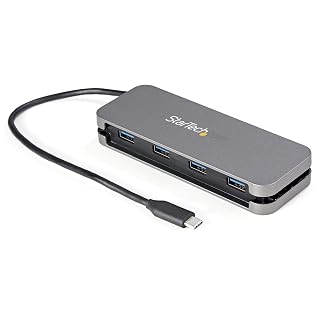 StarTech.com StarTech 4-Port USB-C HubCheck on Amazon
Compare the picks
| Hub | Office Score | Ports | Cable length | Data transfer | Casing | Warranty | Amazon |
|---|---|---|---|---|---|---|---|
| ABFCRTTW 7-Port USB Hub | 9.7/10 | 7 (4 USB-A, 3 USB-C) | 6 ft | 5Gbps | Aluminum | 20 Months | View on Amazon |
| Arvitek 4-Port USB Hub | 9.7/10 | 4 | 10 ft | 5Gbps | Plastic | 2 YEAR | View on Amazon |
| Anker 4-in-1 USB-C Hub | 9.6/10 | 4 | 0.7 ft | 5Gbps | Plastic | 18-month | View on Amazon |
| PANPEO 7-Port USB Hub | 9.5/10 | 7 | 4 ft | Not stated | Not stated | Not stated | |
| Anker 4-in-1 USB-C 2 ft | 9.6/10 | 4 | 2 ft | 5Gbps | Not stated | Not stated |
Specifications are manufacturer rated as listed, collected 20 October 2026. Three of the five state a warranty term; none state a safety certification.
How we scored them
The Office Score weighs performance, build, value, safety and warranty. For a USB hub, safety means a stated certification, protection circuitry or a stated power safeguard on the listing; none of the five state any, so all five score zero for safety. Three listings state a warranty term: the Arvitek at 2 YEAR, the ABFCRTTW at 20 Months and the Anker 4-in-1 at 18-month. The other two state no warranty term. How we pick explains the weights.
| Product | Office Score | Perf. /35 | Build /25 | Value /25 | Safety /10 | Warranty /5 |
|---|---|---|---|---|---|---|
| ABFCRTTW 7-Port USB Hub | 9.7 | 30 | 22 | 21 | n/a | 3 |
| Arvitek 4-Port USB Hub | 9.7 | 29 | 20 | 21 | n/a | 3 |
| Anker 4-in-1 USB-C Hub | 9.6 | 28 | 20 | 20 | n/a | 3 |
Scores run from 9.2 to 9.8: each product’s point total is placed on that range, so more points always means a higher score. Safety counts only for powered gear or where the listing states safety features; where it does not apply, the score is taken over the remaining 90 points.
How to choose the best usb hub for cable management
Match the cable to your desk layout
Cable length is the first number to check, because it decides where the hub can live. The stated lengths here run from 0.7 ft on the compact Anker 4-in-1 to 10 ft (3 m) on the Arvitek, with 2 ft, 4 ft and 6 ft in between. Measure from your laptop’s USB port to the spot where the hub will sit, along the path the cable will actually travel, then pick the stated length that covers it with a little slack. A hub alone will not tame a floor-level tangle, so pair it with hardware from our surge protectors and cable management guides or a set of cable management trays. Two StarTech listings we did not score here state 11 in and 11.2 in cables with hideaway cable management and a 2 year warranty, and are worth a look if the five picks above do not fit your setup.
Count ports and mind the mix
Seven ports beat four only if you have the devices to fill them. The ABFCRTTW states 7 ports split as 4 USB-A and 3 USB-C, the PANPEO states 7 USB 3.0 ports, and the remaining three picks each state 4 ports. If most of your gear ends in a USB-A plug, the USB-C downstream ports on the ABFCRTTW add little; if your newest devices are USB-C, the Anker hubs’ USB-C host connector matters more. The PANPEO is the only pick here that states individual on/off switches per port, which lets you park an idle device without pulling its plug. If the hub will sit farther than any stated cable reaches, a USB extension cable can bridge the gap.
Aluminum or plastic, and what the listing proves
Only one pick states its casing metal. The ABFCRTTW states an aluminum casing and claims it aids heat dissipation, while the Anker 4-in-1 states plastic at 1.12 oz and the Arvitek states plastic as well. The PANPEO and the 2 ft Anker state no casing material at all, which is worth noting since the casing is the part you handle every day. Treat the heat claim as the maker’s claim; none of these listings state a drop, crush or heat figure to back a build comparison.
| Hub | Cable length | Ports | Data transfer | Casing | Warranty |
|---|---|---|---|---|---|
| ABFCRTTW 7-Port USB Hub | 6 ft | 7 (4 USB-A, 3 USB-C) | 5Gbps | Aluminum | 20 Months |
| Arvitek 4-Port USB Hub | 10 ft | 4 | 5Gbps | Plastic | 2 YEAR |
| Anker 4-in-1 USB-C Hub | 0.7 ft | 4 | 5Gbps | Plastic | 18-month |
| PANPEO 7-Port USB Hub | 4 ft | 7 | Not stated | Not stated | Not stated |
| Anker 4-in-1 USB-C 2 ft | 2 ft | 4 | 5Gbps | Not stated | Not stated |
Figures as stated in each listing’s title or spec table. Where a listing states no figure, the cell reads Not stated.
Read the warranty line, then the power fine print
Three of the five listings state a warranty term: the Arvitek at 2 YEAR, the ABFCRTTW at 20 Months and the Anker 4-in-1 at 18-month. The PANPEO and the 2 ft Anker state no term, so their cards say “No warranty term is stated” plainly. Then read the power lines with the same care. The Anker 4-in-1 states that charging is not supported, and the Arvitek states it is data only, not charging, so neither will top up a laptop. The ABFCRTTW is the exception: it states a 15W Type-C port at 5V/3A for high-power devices such as external hard drives and USB fans. Report each of these as the maker’s claim; none of the listings state a laptop-charging hub.
Setup Notes
- Measure the run from your laptop’s USB port to the hub’s parking spot, then pick the stated cable length that covers it. The options here run from 0.7 ft to 10 ft.
- Count your USB-A and USB-C devices before choosing. Only the ABFCRTTW states USB-C downstream ports, three of them, while the Anker hubs use a USB-C host connector.
- Plan power around the stated limits. The Anker 4-in-1 and the Arvitek state data only with no charging, while the ABFCRTTW states a 15W Type-C port at 5V/3A for high-power devices.
- Check the stated warranty term before you buy. The Arvitek states 2 YEAR, the ABFCRTTW 20 Months and the Anker 4-in-1 18-month; the PANPEO and the 2 ft Anker state none.
Frequently Asked Questions
Which hub has the longest stated cable?
The Arvitek states a 10 ft (3 m) cable, the longest stated here. Next is the ABFCRTTW at 6 ft, then the PANPEO at 4 ft, the 2 ft Anker and the 0.7 ft Anker.
Can any of these hubs charge a laptop?
No. The Anker 4-in-1 states that charging is not supported, and the Arvitek states it handles data only, not charging. The other three listings state no charging claim.
Which listings state a warranty term?
Three do: the Arvitek states 2 YEAR, the ABFCRTTW states 20 Months and the Anker 4-in-1 states 18-month. The PANPEO and the 2 ft Anker state no warranty term.
Which hub lets me switch ports off individually?
The PANPEO states individual on/off switches for its 7 USB 3.0 ports. No other pick here states per-port switches.
Which hubs state an aluminum casing?
Only the ABFCRTTW states an aluminum casing, with a stated heat dissipation claim. The Anker 4-in-1 and the Arvitek state plastic, and the PANPEO and the 2 ft Anker state no casing material.
Related guides
See every Surge Protectors and Cable Management guide and all Audio, Power and Connectivity guides.
More picks: cable management trays for desks, cable raceways for desks, cable clips for desks.