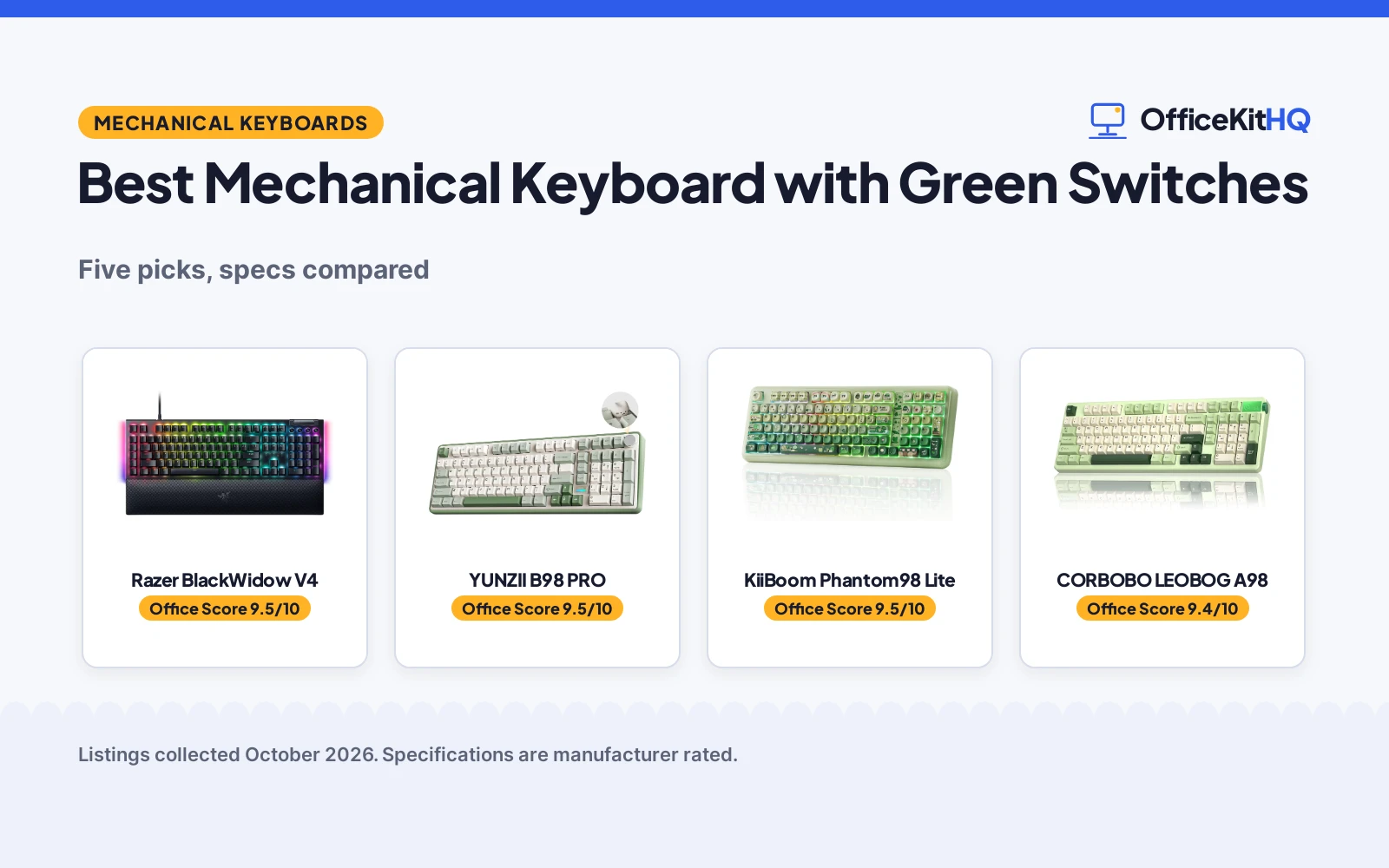
Finding the best mechanical keyboard with green switches means deciding what green means to you. We compared green mechanical keyboards, from a full-size board with true clicky green switches to wireless boards in matcha green and other green finishes. Some have the switch, some have the color, and one has both. Here is how they stack up on switches, layout and the details that matter at a desk.
OfficeKitHQ earns a commission when you buy through links on this page, at no extra cost to you. As an Amazon Associate I earn from qualifying purchases. Affiliate disclosure.
Quick picks
 Best Overall Razer BlackWidow V4: True green clicky switches, 1.9mm actuation and Chroma RGB. Check price on Amazon
 Best 96% Wireless YUNZII B98 PRO: Tri-mode, QMK/VIA, 8000mAh battery and a volume knob. Check price on Amazon
 Best VIA Pick KiiBoom Phantom98 Lite: VIA tuning, tri-mode and 8000mAh in a 96% layout. Check price on Amazon
 Best PBT Keycaps CORBOBO LEOBOG A98: Double-shot PBT, a knob and tri-mode connectivity. Check price on Amazon
 Best Retro Style Camiysn Typewriter Keyboard: Typewriter look with round keycaps and blue switches. Check price on Amazon
The picks
| # | Product | Office Score | Buy |
|---|---|---|---|
| 1 | Razer BlackWidow V4 | 9.5/10 | Buy on Amazon |
| 2 | YUNZII B98 PRO | 9.5/10 | Buy on Amazon |
| 3 | KiiBoom Phantom98 Lite | 9.5/10 | Buy on Amazon |
| 4 | CORBOBO LEOBOG A98 | 9.4/10 | Buy on Amazon |
| 5 | Camiysn Typewriter Keyboard | 9.4/10 | Buy on Amazon |

Razer BlackWidow V4
Full-size wired board with clicky Razer Green switches, Chroma RGB and a magnetic wrist rest.
Pros
- Razer Green switches with 1.9mm actuation and 50g force
- Per-key Chroma RGB plus 2-side underglow
- 6 dedicated macro keys
- Magnetic plush leatherette wrist rest included
Cons
- Wired only, no wireless option
- 3.3 lb, the heaviest in this roundup
- Doubleshot ABS keycaps, not PBT
- 21 in long, needs a deep desk
Detailed Review
The listing states Razer Green tactile and clicky switches with a 1.9mm actuation point and 50g of force, per-key Chroma RGB with 2-side underglow, 6 dedicated macro keys and a magnetic plush leatherette wrist rest. Doubleshot ABS keycaps and Snap Tap are listed. The spec table gives 104 keys, a 3.3 lb weight and 21 by 8 by 3 in dimensions, with a 2 year manufacturer warranty.
Who it's for: a gamer or typist who wants true green clicky switches with full RGB. Who should skip it: anyone who needs wireless.
Its Office Score of 9.5/10 comes from performance 30/35, build 21/25, value 21/25, safety 0/10 and warranty 2/5: 74 of 100 points, placed on our 9.2 to 9.8 scale.
Key Specifications
| Switch | Razer Green (1.9mm, 50g) |
|---|---|
| Keys | 104 |
| Lighting | Chroma RGB |
| Weight | 3.3 lb |
Figures as published on the retailer listing, collected 23 October 2026. Performance figures are manufacturer rated.
Safety and Warranty
What this listing states. This product does not plug in or run on a battery, so safety is not part of its score. 2 year manufacturer. It does not say everything a buyer needs, such as who pays return shipping, so warranty scores 2 of 5. See How We Pick.
Fit the desk first. Check the stated size against your desk depth and keyboard tray, and charge or pair as the manual describes. No keyboard, mouse or wrist rest prevents or treats injury.
This is general buying information, not professional advice. Follow each product manual and local rules, and see our Safety Disclaimer.

YUNZII B98 PRO
96% tri-mode board in matcha green with QMK/VIA, a knob and an 8000mAh battery.
Pros
- Tri-mode: Bluetooth 5.0, 2.4GHz and USB-C
- QMK/VIA for remapping and macros
- 8000mAh battery
- Hot-swappable with gasket mount
Cons
- Title says Candy Switch, spec table says Linear
- Bullets say 100-key, spec table says 104 keys
- 1-year warranty, shorter than the Razer's 2-year
- No dedicated macro keys
Detailed Review
The listing states a 96% layout with a numpad, tri-mode connectivity (Bluetooth 5.0, 2.4GHz, USB-C), QMK/VIA firmware, an 8000mAh battery, hot-swappable switches and a gasket mount with five layers. Two knobs (3D cat and round metal) are included. Contradiction: the title says 'Candy Switch' but the spec table says 'Switch Type: Linear'; the bullets say '100-key' but the spec table says 'Number of Keys: 104'. Per the title and bullets, it is a Candy-switch 100-key board. A 1 Year Manufacturer warranty is listed.
Who it's for: someone who wants a 96% wireless board with deep customization. Who should skip it: anyone who needs a full-size layout.
Its Office Score of 9.5/10 comes from performance 29/35, build 21/25, value 21/25, safety 0/10 and warranty 1/5: 72 of 100 points, placed on our 9.2 to 9.8 scale.
Key Specifications
| Layout | 96% with numpad |
|---|---|
| Connectivity | BT 5.0, 2.4GHz, USB-C |
| Battery | 8000mAh |
| Firmware | QMK/VIA |
Figures as published on the retailer listing, collected 23 October 2026. Performance figures are manufacturer rated.
Safety and Warranty
What this listing states. No FCC or other safety listing is stated, so safety scores zero. 1 Year Manufacturer. It does not say everything a buyer needs, such as who pays return shipping, so warranty scores 1 of 5. See How We Pick.
Fit the desk first. Check the stated size against your desk depth and keyboard tray, and charge or pair as the manual describes. No keyboard, mouse or wrist rest prevents or treats injury.
This is general buying information, not professional advice. Follow each product manual and local rules, and see our Safety Disclaimer.

KiiBoom Phantom98 Lite
96% tri-mode board with VIA, an 8000mAh battery and a gasket mount.
Pros
- Tri-mode: 2.4GHz, Bluetooth 5.0 and USB-C
- VIA for key and lighting customization
- 8000mAh battery
- Gasket mount with detailed damping layers
Cons
- Title says Mochi Switch, spec says Linear and cherry_mx_white
- Bullets say 97 keys, model name says 98
- 1-year warranty
- No knob (the YUNZII has one)
Detailed Review
The listing states a 96% layout, tri-mode connectivity, VIA compatibility, an 8000mAh battery, hot-swappable switches and a gasket mount with latex, IXPE, PET and silicone layers. Contradiction: the title says 'Mochi Switch' but the spec table says 'Switch Type: Linear' and 'Mechanical Keyboard Switch Model: cherry_mx_white'; the bullets say '97 keys' but the model name is 'Phantom98'. Per the title and bullets, it is a Mochi-switch 97-key board. A 1 YEAR WARRANTY is listed.
Who it's for: a DIY user who wants VIA tuning in a 96% board. Who should skip it: anyone who wants a knob for volume.
Its Office Score of 9.5/10 comes from performance 28/35, build 21/25, value 20/25, safety 0/10 and warranty 1/5: 70 of 100 points, placed on our 9.2 to 9.8 scale.
Key Specifications
| Layout | 96% (97 keys) |
|---|---|
| Connectivity | 2.4GHz, BT 5.0, USB-C |
| Battery | 8000mAh |
| Firmware | VIA |
Figures as published on the retailer listing, collected 23 October 2026. Performance figures are manufacturer rated.
Safety and Warranty
What this listing states. No FCC or other safety listing is stated, so safety scores zero. 1 YEAR WARRANTY. It does not say everything a buyer needs, such as who pays return shipping, so warranty scores 1 of 5. See How We Pick.
Fit the desk first. Check the stated size against your desk depth and keyboard tray, and charge or pair as the manual describes. No keyboard, mouse or wrist rest prevents or treats injury.
This is general buying information, not professional advice. Follow each product manual and local rules, and see our Safety Disclaimer.

CORBOBO LEOBOG A98
96% tri-mode board with double-shot PBT keycaps, a knob and an 8000mAh battery.
Pros
- Double-shot PBT keycaps
- Tri-mode: BT5.0, 2.4GHz and USB-C
- Knob for volume and lighting
- 8000mAh battery
Cons
- Spec says 108 keys, title says 96%
- Driver software Windows only, not macOS
- 12-month warranty
- No QMK/VIA (unlike YUNZII and KiiBoom)
Detailed Review
The listing states a 96% layout with a numpad, tri-mode connectivity, a gasket mount, hot-swappable switches, double-shot PBT keycaps, a knob and an 8000mAh battery. Contradiction: the spec table says 'Number of Keys: 108' but the title says '96%'; per the title it is a 96% board. The driver software is Windows only, not macOS. A 12 Months warranty is listed.
Who it's for: someone who wants PBT keycaps and a knob without VIA complexity. Who should skip it: a Mac user who needs driver software.
Its Office Score of 9.4/10 comes from performance 28/35, build 20/25, value 20/25, safety 0/10 and warranty 1/5: 69 of 100 points, placed on our 9.2 to 9.8 scale.
Key Specifications
| Layout | 96% with numpad |
|---|---|
| Connectivity | BT 5.0, 2.4GHz, USB-C |
| Battery | 8000mAh |
| Keycaps | Double-shot PBT |
Figures as published on the retailer listing, collected 23 October 2026. Performance figures are manufacturer rated.
Safety and Warranty
What this listing states. No FCC or other safety listing is stated, so safety scores zero. 12 Months. It does not say everything a buyer needs, such as who pays return shipping, so warranty scores 1 of 5. See How We Pick.
Fit the desk first. Check the stated size against your desk depth and keyboard tray, and charge or pair as the manual describes. No keyboard, mouse or wrist rest prevents or treats injury.
This is general buying information, not professional advice. Follow each product manual and local rules, and see our Safety Disclaimer.

Camiysn Typewriter Keyboard
Green typewriter-style wired board with 104 keys, blue switches and white backlight.
Pros
- 104 keys with Cherry MX Blue switches
- Unique round keycaps, typewriter style
- White backlight with multiple modes
- Wired USB, no charging needed
Cons
- No warranty term is stated
- Wired only, no wireless
- Single-color backlight, not RGB
- Blue switches, not green (green is the color)
Detailed Review
The listing states a green typewriter-style keyboard with 104 keys, Cherry MX Blue switches, white backlighting with multiple modes (Fn + Ins), round keycaps with two-color injection molding, 26 anti-ghosting keys and adjustable rear feet. It is a wired USB board for Windows, Mac and Linux. No warranty term is stated.
Who it's for: someone who loves the retro typewriter look. Who should skip it: anyone who wants actual green switches (the Razer has them).
Its Office Score of 9.4/10 comes from performance 26/35, build 19/25, value 20/25, safety 0/10 and warranty 0/5: 65 of 100 points, placed on our 9.2 to 9.8 scale.
Key Specifications
| Keys | 104 |
|---|---|
| Switch | Cherry MX Blue |
| Backlight | White |
| Connection | Wired USB |
Figures as published on the retailer listing, collected 23 October 2026. Performance figures are manufacturer rated.
Safety and Warranty
What this listing states. This product does not plug in or run on a battery, so safety is not part of its score. No warranty term, so warranty scores zero. See How We Pick.
Fit the desk first. Check the stated size against your desk depth and keyboard tray, and charge or pair as the manual describes. No keyboard, mouse or wrist rest prevents or treats injury.
This is general buying information, not professional advice. Follow each product manual and local rules, and see our Safety Disclaimer.
As an Amazon Associate I earn from qualifying purchases.
More picks to compare
 Razer BlackWidow V4 Low ProfileWireless low-profile board with green switches and 980-hour battery.Check on Amazon
Compare the picks
| Keyboard | Office Score | Switch | Keys | Connection | Backlight | Amazon |
|---|---|---|---|---|---|---|
| Razer BlackWidow V4 | 9.5/10 | Razer Green | 104 | Wired | Chroma RGB | View on Amazon |
| YUNZII B98 PRO | 9.5/10 | Candy | 100 | BT/2.4GHz/USB-C | RGB | View on Amazon |
| KiiBoom Phantom98 Lite | 9.5/10 | Mochi | 97 | BT/2.4GHz/USB-C | RGB | View on Amazon |
| CORBOBO LEOBOG A98 | 9.4/10 | Cherry MX Red | 96% | BT/2.4GHz/USB-C | RGB | View on Amazon |
| Camiysn Typewriter Keyboard | 9.4/10 | Cherry MX Blue | 104 | Wired | White | View on Amazon |
Specifications are manufacturer rated as listed, collected 23 October 2026.
How we scored them
The Office Score weighs performance, build, value, safety and warranty. For keyboards, safety covers stable feet, spill resistance and cable strain relief where stated; none of these listings state safety certifications, so safety scores are zero across the board. One listing states a 2-year warranty, three state a 1-year or 12-month term, and one states no warranty. How we pick explains the weights.
| Product | Office Score | Perf. /35 | Build /25 | Value /25 | Safety /10 | Warranty /5 |
|---|---|---|---|---|---|---|
| Razer BlackWidow V4 | 9.5 | 30 | 21 | 21 | 0 | 2 |
| YUNZII B98 PRO | 9.5 | 29 | 21 | 21 | 0 | 1 |
| KiiBoom Phantom98 Lite | 9.5 | 28 | 21 | 20 | 0 | 1 |
| CORBOBO LEOBOG A98 | 9.4 | 28 | 20 | 20 | 0 | 1 |
| Camiysn Typewriter Keyboard | 9.4 | 26 | 19 | 20 | 0 | 0 |
Scores run from 9.2 to 9.8: each product’s point total is placed on that range, so more points always means a higher score.
How to choose the best mechanical keyboard with green switches
Decide what green means
Green switches are a clicky switch type; a green keyboard is green in color. Only the Razer BlackWidow V4 in this roundup has actual Razer Green switches, with a 1.9mm actuation point and 50g of force. The Camiysn, YUNZII, KiiBoom and CORBOBO are green in color but use blue, Candy, Mochi or Cherry MX Red switches. If the click is the point, the Razer is the pick; if the color is the point, the 96% boards give more choices. For more boards where the glow is the star, see our RGB mechanical keyboard picks.
Choose a layout
Full-size boards (Razer, Camiysn) have 104 keys including a numpad; 96% boards (YUNZII, KiiBoom, CORBOBO) keep the numpad in a shorter case. The Razer measures 21 by 8 in, so it needs a deep desk; the 96% boards save space. If you live in spreadsheets, keep the numpad; if your desk is small, the 96% layout is the compromise.
Wired or wireless
The Razer and Camiysn are wired USB boards; the YUNZII, KiiBoom and CORBOBO offer Bluetooth 5.0, 2.4GHz and USB-C, with 8000mAh batteries in all three. Wired means no charging and no pairing; wireless means a cleaner desk and use across devices. For more cord-free options, see wireless mechanical keyboards.
Setup Notes
- Measure your desk: the Razer is 21 in long and 8 in wide; 96% boards are shorter.
- Check the cable: the Razer and Camiysn need a USB port; the wireless boards charge over USB-C.
- Plan for comfort: the Razer includes a magnetic wrist rest; the others do not list one.
- Keep the puller: the YUNZII, KiiBoom and CORBOBO include a keycap puller for cleaning and swapping.
Frequently Asked Questions
How long do mechanical keyboard switches last?
The listings do not state switch lifespans. The Razer lists a 2-year warranty; the YUNZII, KiiBoom and CORBOBO list 1-year or 12-month terms. Hot-swappable boards (YUNZII, KiiBoom, CORBOBO) let you replace a worn switch without soldering.
How do I clean mechanical keyboard keys?
The YUNZII, KiiBoom and CORBOBO include a keycap puller. Pull the caps, wipe the board, and press the caps back on. The Camiysn’s round keycaps lift off the same way.
How do I remove mechanical keyboard keys?
Use a keycap puller, included with the YUNZII, KiiBoom and CORBOBO. On hot-swappable boards you can also pull the switches themselves. The Razer and Camiysn do not list hot-swap, so remove keys only.
What is the benefit of a mechanical keyboard?
Each key has its own switch, which gives distinct tactile feedback. The listings describe clicky options (Razer Green, Cherry MX Blue) and linear options, so you can pick the feel you like.
What is the difference between green switches and a green keyboard?
Green switches are a clicky switch type, like the Razer Green in the BlackWidow V4. A green keyboard is green in color and can use any switch; the Camiysn uses blue switches, and the 96% boards use Candy, Mochi or Cherry MX Red. Only the Razer here has both.
Related guides
See every Keyboards and Keyboard Trays guide and all Monitor Mounts, Keyboards and Mice guides.
More picks: gaming mouse and keyboard combos, keyboards with macros, wireless keyboards for travel.