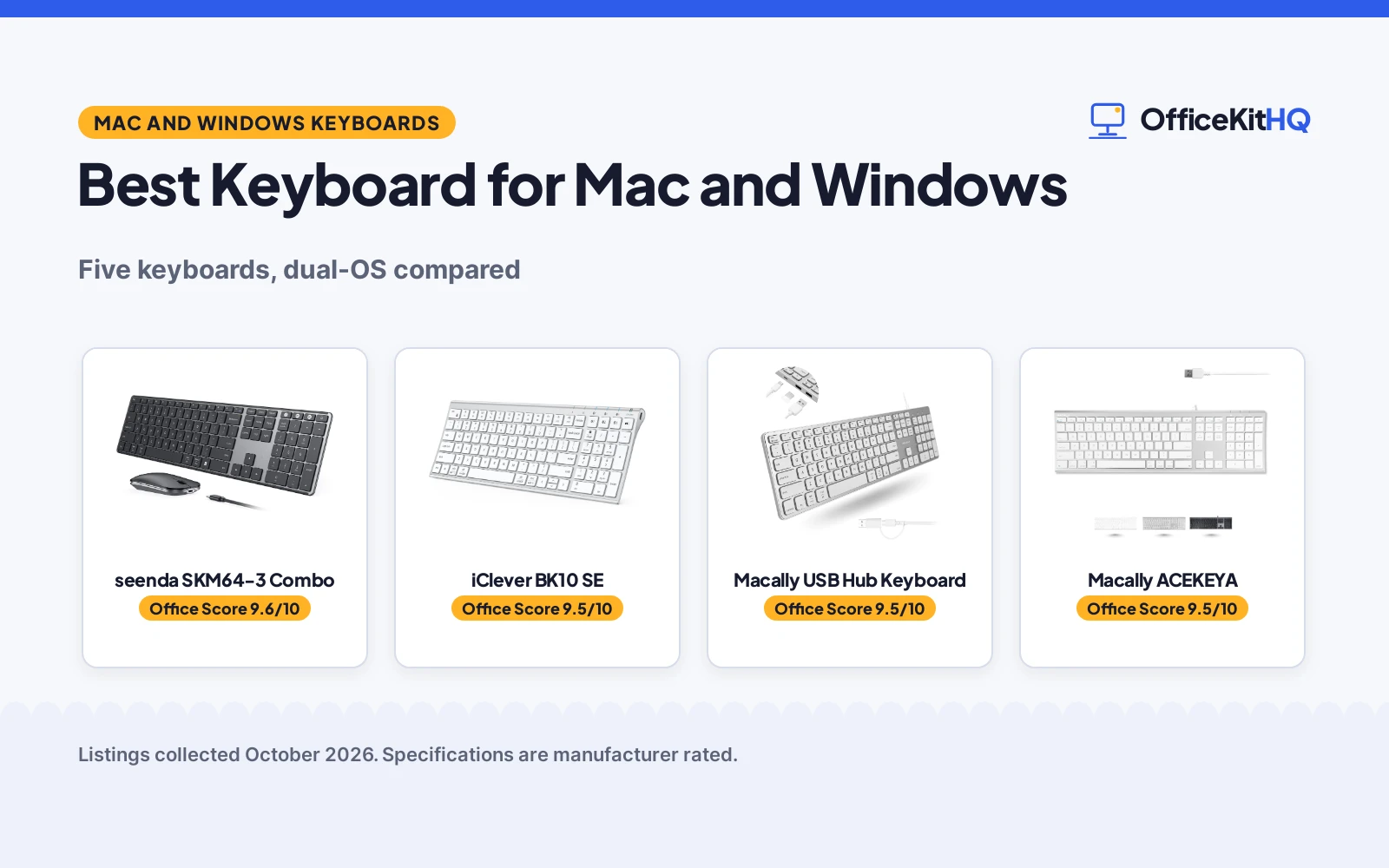
The best keyboard for mac and windows is the one that switches cleanly between the two systems without relearning keys. A desk with a MacBook and a Windows PC needs a keyboard that speaks both layouts, and ideally one that jumps between devices at a keypress. We compared six keyboards by connection type, key count, multi-device switching, OS support and warranty terms, using only what each listing publishes.
OfficeKitHQ earns a commission when you buy through links on this page, at no extra cost to you. As an Amazon Associate I earn from qualifying purchases. Affiliate disclosure.
Quick picks
 Best Overall seenda SKM64-3 Combo: 3-device switching, 24-month warranty Check price on Amazon
 Longest Battery iClever BK10 SE: 180-day use, USB-C rechargeable Check price on Amazon
 Best Wired Hub Macally USB Hub Keyboard: USB hub, backlit, up to 2-year warranty Check price on Amazon
 Best Simple Wired Macally ACEKEYA: 110 keys, 1-year warranty Check price on Amazon
 Ergonomic Pick Logitech Ergo K860: Split ergonomic layout with wrist rest Check price on Amazon
The picks
| # | Product | Office Score | Buy |
|---|---|---|---|
| 1 | seenda SKM64-3 Combo | 9.6/10 | Buy on Amazon |
| 2 | iClever BK10 SE | 9.5/10 | Buy on Amazon |
| 3 | Macally USB Hub Keyboard | 9.5/10 | Buy on Amazon |
| 4 | Macally ACEKEYA | 9.5/10 | Buy on Amazon |
| 5 | Logitech Ergo K860 | 9.5/10 | Buy on Amazon |

seenda SKM64-3 Combo
A wireless keyboard and mouse combo with triple-device switching, a dual OS layout and a 24-month warranty.
Pros
- Switches between 3 devices via USB-A, BT1 and BT2
- Dual OS layout for Windows and Apple keys
- 200 hours of use, recharges in 3 hours
- 24-month warranty stated
Cons
- 2.4G USB mode is for Windows only
- Bluetooth needs version 4.0 or above
- No wired mode stated
- Set weighs 650 g to carry
Detailed Review
The seenda SKM64-3 is the only keyboard and mouse combo here. It switches between three devices over USB-A, BT1 and BT2 channels, uses a dual OS layout for Windows and Apple keys, and pairs a full-size 104-key scissor-switch keyboard with a silent optical mouse with adjustable DPI of 1000/1600/2400. The built-in battery gives 200 hours of use and recharges in 3 hours over Type-C, and the set weighs 650 g. It states a 24-month warranty, the longest term here.
Who it's for: Anyone running Windows and Mac side by side who wants one keyboard and mouse for three devices. Who should skip it: Anyone who needs 2.4G on a Mac, since that mode is for Windows only.
Its Office Score of 9.6/10 comes from performance 32/35, build 21/25, value 21/25, safety 0/10 and warranty 3/5: 77 of 100 points, placed on our 9.2 to 9.8 scale.
Key Specifications
| Connection | 2.4G USB + dual Bluetooth |
|---|---|
| Keys | 104 |
| Battery | 200 hours use, 3-hour recharge |
| Warranty | 24-month warranty |
Figures as published on the retailer listing, collected 23 October 2026. Performance figures are manufacturer rated.
Safety and Warranty
What this listing states. No FCC or other safety listing is stated, so safety scores zero. 24-month warranty. It does not say everything a buyer needs, such as who pays return shipping, so warranty scores 3 of 5. See How We Pick.
Fit the desk first. Check the stated size against your desk depth and keyboard tray, and charge or pair as the manual describes. No keyboard, mouse or wrist rest prevents or treats injury.
This is general buying information, not professional advice. Follow each product manual and local rules, and see our Safety Disclaimer.

iClever BK10 SE
A slim Bluetooth keyboard with 3-device switching, automatic OS key mapping and 180-day battery life.
Pros
- Pairs with 3 devices, auto-maps keys per OS
- Up to 180 days of use per charge
- USB-C charging
- 12-month warranty stated
Cons
- Bluetooth only, no receiver stated
- Navigation keys share the number pad
- Arrow keys are smaller than standard
- 12.96 oz to carry
Detailed Review
The iClever BK10 SE pairs with up to three devices over Bluetooth and automatically recognizes the system to map keys correctly across Windows, macOS, iOS and Android. It uses low-profile scissor-switch keys with 15 mm full-size keycaps, measures 0.16 inches at its thinnest edge, and runs up to 180 days on a charge with USB-C recharging. The stainless steel and ABS build weighs 12.96 oz, and it states a 12-month warranty.
Who it's for: Anyone who switches between a laptop, tablet and phone and wants the keys remapped automatically. Who should skip it: Anyone who needs a 2.4G dongle or full-size arrow keys.
Its Office Score of 9.5/10 comes from performance 30/35, build 21/25, value 20/25, safety 0/10 and warranty 3/5: 74 of 100 points, placed on our 9.2 to 9.8 scale.
Key Specifications
| Connection | Bluetooth |
|---|---|
| Multi-device | 3 devices |
| Battery | 180 days per charge |
| Thinnest edge | 0.16 inches |
Figures as published on the retailer listing, collected 23 October 2026. Performance figures are manufacturer rated.
Safety and Warranty
What this listing states. No FCC or other safety listing is stated, so safety scores zero. 12-month warranty. It does not say everything a buyer needs, such as who pays return shipping, so warranty scores 3 of 5. See How We Pick.
Fit the desk first. Check the stated size against your desk depth and keyboard tray, and charge or pair as the manual describes. No keyboard, mouse or wrist rest prevents or treats injury.
This is general buying information, not professional advice. Follow each product manual and local rules, and see our Safety Disclaimer.

Macally USB Hub Keyboard
A wired keyboard with a built-in USB hub, backlit keys and auto OS detection.
Pros
- Built-in hub: 2x USB-A and 1x USB-C
- White LED backlight with 3 brightness levels
- Auto OS detection across Mac, Windows, Android, iPad
- 107 keys with 16 shortcuts
Cons
- Bullets say up to 2-year warranty, spec table says 1 year
- Wired only
- Plastic enclosure
- No multi-device switching stated
Detailed Review
The Macally hub keyboard is the only one here with a built-in USB hub: 2 USB-A ports and 1 USB-C port for a mouse, hard drive or other peripherals. It has 107 keys with 16 shortcuts, white LED backlighting with 3 brightness levels, auto OS detection, and a 2-in-1 USB-C and USB-A plug. One contradiction: its bullets promise up to a 2-year warranty while its spec table says 1 year; the bullets are the safer figure to trust.
Who it's for: Anyone short on USB ports who wants the keyboard to be the hub. Who should skip it: Anyone who needs wireless or multi-device switching.
Its Office Score of 9.5/10 comes from performance 30/35, build 20/25, value 20/25, safety 0/10 and warranty 3/5: 73 of 100 points, placed on our 9.2 to 9.8 scale.
Key Specifications
| Keys | 107 |
|---|---|
| Hub | 2x USB-A + 1x USB-C |
| Backlight | White LED, 3 levels |
| Warranty | Up to 2-year per bullets |
Figures as published on the retailer listing, collected 23 October 2026. Performance figures are manufacturer rated.
Safety and Warranty
What this listing states. This product does not plug in or run on a battery, so safety is not part of its score. Up to 2-year warranty. It does not say everything a buyer needs, such as who pays return shipping, so warranty scores 3 of 5. See How We Pick.
Fit the desk first. Check the stated size against your desk depth and keyboard tray, and charge or pair as the manual describes. No keyboard, mouse or wrist rest prevents or treats injury.
This is general buying information, not professional advice. Follow each product manual and local rules, and see our Safety Disclaimer.

Macally ACEKEYA
A slim aluminum wired keyboard with 110 keys, 20 Mac shortcut keys and a 1-year warranty.
Pros
- 110 keys with 20 Mac shortcut keys
- Aluminum backing, weighs 1.1 lb
- Plug and play, no drivers needed
- 1-year warranty plus lifetime support stated
Cons
- Wired only
- No backlight stated
- No multi-device switching stated
- Spec table dimensions read oddly
Detailed Review
The Macally ACEKEYA is a full-size wired keyboard with 110 keys, 20 Apple shortcut keys, a numeric keypad and an aluminum backing at 1.1 lb. It is plug and play with no drivers, works with macOS 10.6 or later and Windows PCs, and states a 1-year warranty with lifetime customer support. Its spec table lists odd dimensions, so treat the full-size claim from the bullets as the guide.
Who it's for: Anyone who wants a simple wired Mac-layout keyboard with a numeric keypad. Who should skip it: Anyone who needs wireless, backlighting or multi-device switching.
Its Office Score of 9.5/10 comes from performance 29/35, build 20/25, value 19/25, safety 0/10 and warranty 3/5: 71 of 100 points, placed on our 9.2 to 9.8 scale.
Key Specifications
| Keys | 110 |
|---|---|
| Switches | Scissor |
| Connection | Wired USB |
| Warranty | 1-year warranty |
Figures as published on the retailer listing, collected 23 October 2026. Performance figures are manufacturer rated.
Safety and Warranty
What this listing states. This product does not plug in or run on a battery, so safety is not part of its score. 1-year warranty. It does not say everything a buyer needs, such as who pays return shipping, so warranty scores 3 of 5. See How We Pick.
Fit the desk first. Check the stated size against your desk depth and keyboard tray, and charge or pair as the manual describes. No keyboard, mouse or wrist rest prevents or treats injury.
This is general buying information, not professional advice. Follow each product manual and local rules, and see our Safety Disclaimer.

Logitech Ergo K860
The Logitech Ergo K860 wireless ergonomic split keyboard with a curved keyframe, pillowed wrist rest and Bluetooth or USB connection.
Pros
- Curved split keyframe
- Memory foam wrist rest
- Bluetooth and USB receiver
- Adjustable palm lift
Cons
- 78 keys, no separate numpad
- Battery powered, 2 batteries
- Ergonomic shape takes adapting
- No warranty stated
Detailed Review
The listing states a curved, split keyframe that slopes to reduce wrist and forearm strain, a pillowed wrist rest with a memory foam layer, scooped Perfect Stroke keys shaped to the fingertips, and an adjustable palm lift for seated or standing work. Its support figures are stated comparatively: 54 per cent more wrist support and 25 per cent less wrist bending than a standard keyboard without a palm rest. Connection is Bluetooth or the included USB receiver, across Windows and Mac, on battery power.
Who it is for: full-day typists whose wrists are complaining, on any PC. Who should skip it: number pad heavy workers, since its 78 keys fold the numbers into the main field, and anyone who wants a keyboard tonight without a week of relearning the split.
Its Office Score of 9.5/10 comes from performance 32/35, build 21/25, value 18/25, safety 0/10 and warranty 0/5: 71 of 100 points, placed on our 9.2 to 9.8 scale.
Key Specifications
| Layout | Split, curved |
|---|---|
| Keys | 78 |
| Connection | Bluetooth, USB |
| Power | Battery, 2 required |
Figures as published on the retailer listing, collected 22 October 2026. Performance figures are manufacturer rated.
Safety and Warranty
What this listing states. No FCC or other safety listing is stated, so safety scores zero. No warranty term, so warranty scores zero. See How We Pick.
Fit the desk first. Check the stated size against your desk depth and keyboard tray, and charge or pair as the manual describes. No keyboard, mouse or wrist rest prevents or treats injury.
This is general buying information, not professional advice. Follow each product manual and local rules, and see our Safety Disclaimer.
As an Amazon Associate I earn from qualifying purchases.
More picks to compare
 Macally ACEKEYSG Space GraySpace gray wired keyboard with 110 keys and 1-year warrantyCheck on Amazon
Compare the picks
| Keyboard | Office Score | Connection | Keys | Multi-device | Warranty | Amazon |
|---|---|---|---|---|---|---|
| seenda SKM64-3 Combo | 9.6/10 | 2.4G USB + dual Bluetooth | 104 | 3 devices | 24 months | View on Amazon |
| iClever BK10 SE | 9.5/10 | Bluetooth | Not stated | 3 devices | 12 months | View on Amazon |
| Macally USB Hub Keyboard | 9.5/10 | USB-A + USB-C | 107 | Not stated | Up to 2 years | View on Amazon |
| Macally ACEKEYA | 9.5/10 | Wired USB | 110 | Not stated | 1 year | View on Amazon |
| Logitech Ergo K860 | 9.5/10 | Bluetooth + USB | Not stated | Not stated | Not stated | View on Amazon |
Specifications are manufacturer rated as listed, collected 23 October 2026. Four of the six state a warranty term; the Logitech lists too little data to score one.
How we scored them
The Office Score weighs performance (connection options, key count and multi-device switching), build (materials and stated construction), value for the stated specs, safety and warranty. For a keyboard, safety means a stated certification or safety-relevant feature on the listing; none of the six states one, so safety is zero for all. Four listings state a warranty term: the seenda at 24 months, the iClever at 12 months, the Macally ACEKEYA at 1 year, and the Macally hub keyboard at up to 2 years in its bullets. How we pick explains the weights.
| Product | Office Score | Perf. /35 | Build /25 | Value /25 | Safety /10 | Warranty /5 |
|---|---|---|---|---|---|---|
| seenda SKM64-3 Combo | 9.6 | 32 | 21 | 21 | 0 | 3 |
| iClever BK10 SE | 9.5 | 30 | 21 | 20 | 0 | 3 |
| Macally USB Hub Keyboard | 9.5 | 30 | 20 | 20 | 0 | 3 |
| Macally ACEKEYA | 9.5 | 29 | 20 | 19 | 0 | 3 |
Scores run from 9.2 to 9.8: each product’s point total is placed on that range, so more points always means a higher score.
How to choose the best keyboard for mac and windows
Count the devices, not the keyboards
The seenda SKM64-3 switches between three devices over USB-A, BT1 and BT2 channels, and the iClever BK10 SE pairs with up to three devices over Bluetooth with automatic key mapping per system. If you run a MacBook and a Windows desktop side by side, that switching is the feature that matters most. The two Macally keyboards and the Logitech name no multi-device switching.
Wired, wireless or both
The Macally ACEKEYA and the Macally hub keyboard are wired USB, with the hub model adding a 2-in-1 USB-C and USB-A plug. The seenda pairs 2.4G USB with dual Bluetooth, the iClever is Bluetooth only, and the Logitech title names Bluetooth and USB. Note the seenda’s fine print: its 2.4G USB mode is for Windows only, while Bluetooth covers macOS 10.12 and up. If the desk also needs a pointer, the seenda is the only pick here that bundles a mouse; a wireless mouse for work guide covers standalone options.
| Keyboard | Connection | Keys | Multi-device | Warranty |
|---|---|---|---|---|
| seenda SKM64-3 Combo | 2.4G USB plus dual Bluetooth | 104 | 3 devices | 24 months |
| iClever BK10 SE | Bluetooth | Not stated | 3 devices | 12 months |
| Macally USB Hub Keyboard | USB-A plus USB-C | 107 | Not stated | Up to 2 years |
| Macally ACEKEYA | Wired USB | 110 | Not stated | 1 year |
| Logitech Ergo K860 | Bluetooth plus USB | Not stated | Not stated | Not stated |
Check the OS switching
The seenda is built with a dual OS layout for Windows and Apple keys, the iClever automatically recognizes the system and maps keys correctly, and the Macally hub keyboard advertises auto OS detection across Mac, Windows, Android and iPad. The Macally ACEKEYA targets macOS 10.6 or later and Windows PCs with 20 Apple shortcut keys. Switching layouts is where scissor-switch boards differ: a keyboard with red switches guide covers the mechanical alternative if you prefer that feel.
Read the warranty line
The seenda states 24 months, the longest term here, and the iClever states 12 months. The Macally ACEKEYA states a 1-year warranty with lifetime customer support. The Macally hub keyboard contradicts itself: its bullets promise up to a 2-year warranty while its spec table says 1 year, so treat the longer figure as the maker’s claim and confirm at checkout. The Logitech lists too little data to state any term.
Frequently Asked Questions
Which keyboard connects the most devices?
The seenda SKM64-3 and the iClever BK10 SE. Both switch between three devices, the seenda over USB-A plus two Bluetooth channels and the iClever over Bluetooth.
Which keyboard has the longest stated warranty?
The seenda SKM64-3 at 24 months. The iClever states 12 months, the Macally ACEKEYA states 1 year, and the Macally hub keyboard’s bullets say up to 2 years.
Which of these keyboards are wired?
The Macally ACEKEYA and the Macally USB Hub Keyboard. Both are wired USB; the hub model adds a 2-in-1 USB-C and USB-A plug.
Which keyboard has a built-in USB hub?
The Macally USB Hub Keyboard, with 2 USB-A ports and 1 USB-C port for connecting a mouse, a hard drive or other peripherals.
Does the seenda 2.4G mode work with a Mac?
No. The listing says the 2.4G USB mode is for Windows only; Bluetooth mode supports macOS 10.12 and up.
Related guides
See every keyboard and keyboard tray guide and all computer peripheral guides.
More picks: keyboard dust covers, keyboard cleaning spray, keyboard tray mounts.