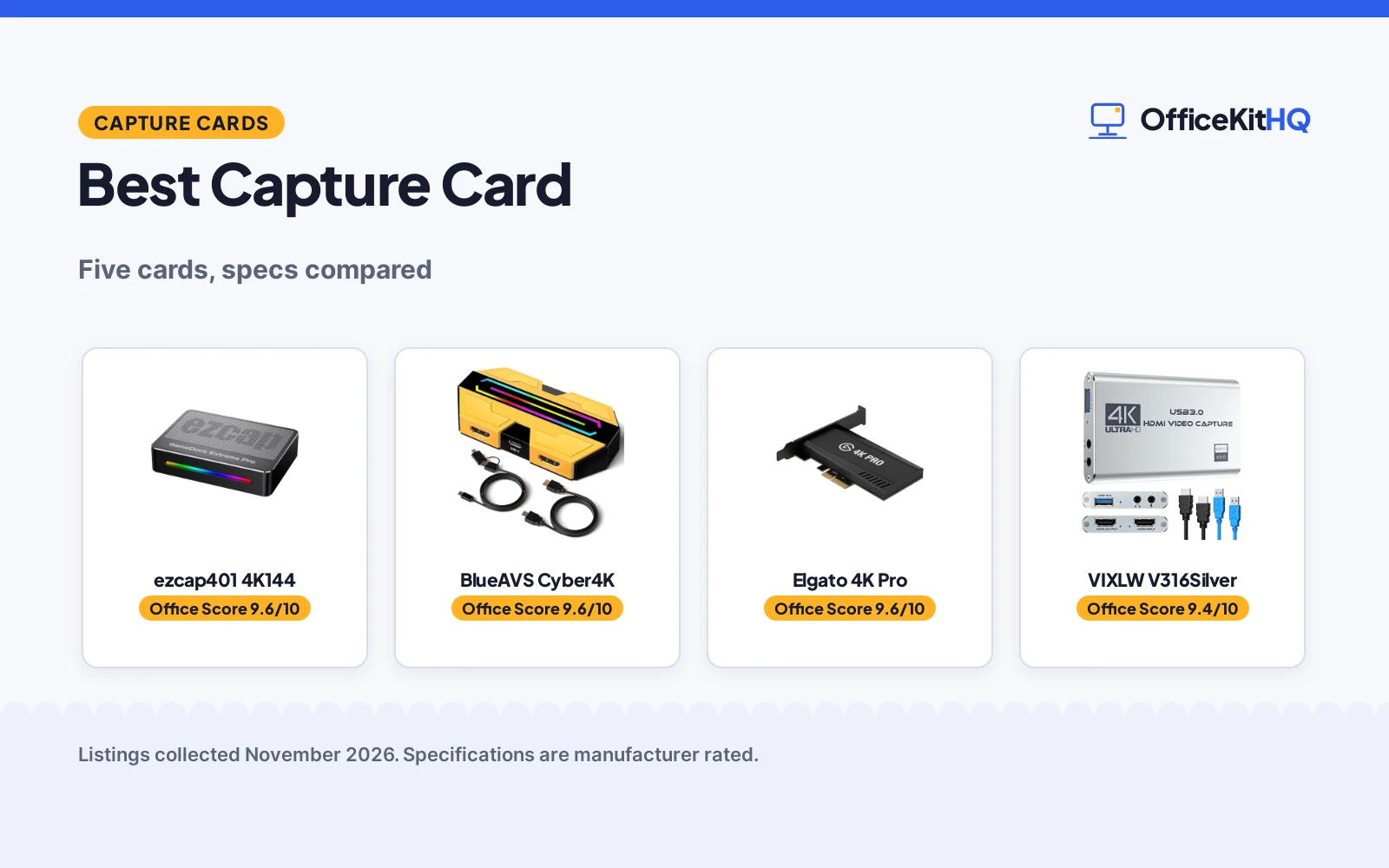
The best capture card sits between the console and the computer without getting in the way of the game. A stream that stutters or drops audio loses viewers fast, and a card that needs drivers or a separate power brick adds another cable to a crowded desk. This roundup compares capture cards by capture resolution, passthrough, audio ports, USB interface and warranty term, using only what each listing publishes.
OfficeKitHQ earns a commission when you buy through links on this page, at no extra cost to you. As an Amazon Associate I earn from qualifying purchases. Affiliate disclosure.
Quick picks
 Best Overall ezcap401 4K144: 4K144 capture, HDMI 2.1, 1080p240, 1 year warranty Check price on Amazon
 Longest Warranty BlueAVS Cyber4K: 4K60 capture, 1440p at 144Hz, 1080p240, 2 year warranty Check price on Amazon
 Best 8K Passthrough Elgato 4K Pro: 8K60 passthrough, 4K60 HDR10 capture, HDMI 2.1 Check price on Amazon
 Best 1080p60 Starter VIXLW V316Silver: 1080p60 capture, mic input, 2 year warranty Check price on Amazon
 Best RGB Pick FIFINE V3W: 1080p60 capture, 4K, 30fps passthrough, 9 RGB modes Check price on Amazon
Our desk picks
| # | Product | Office Score | Buy |
|---|---|---|---|
| 1 | ezcap401 4K144 | 9.6/10 | Buy on Amazon |
| 2 | BlueAVS Cyber4K | 9.6/10 | Buy on Amazon |
| 3 | Elgato 4K Pro | 9.6/10 | Buy on Amazon |
| 4 | VIXLW V316Silver | 9.4/10 | Buy on Amazon |
| 5 | FIFINE V3W | 9.4/10 | Buy on Amazon |

ezcap401 4K144
A 4K144 capture card with HDMI 2.1 passthrough, 1080p240 recording, a USB 3.2 Gen 2 interface rated at 10Gbps and a 1 year warranty.
Pros
- 4K144 capture with 1080p240 recording is the highest capture rate here
- HDMI 2.1 passthrough up to 4K144 with HDR and VRR stated
- USB 3.2 Gen 2 interface rated at 10Gbps
- 3.5mm line in and headset ports cover game audio and commentary
Cons
- 1 year warranty is the smallest term stated here
- Needs a USB 3.2 Gen 2 port for the stated 10Gbps rate
- No 8K passthrough is stated
- No RGB lighting is stated
Detailed Review
The maker lists the ezcap401 as a 4K144 capture card with HDMI 2.1 passthrough up to 4K144 HDR/VRR, 1440p240 or 1080p360, and native 4K144 or 1080p240 recording. The USB 3.2 Gen 2 interface is rated at 10Gbps, and the card carries a 3.5mm line in port and a 4-pole headset port for game audio and voice commentary. The listing states plug and play across Windows and macOS with OBS Studio, Streamlabs, XSplit and Discord, and a 1 Year Manufacturer warranty.
Who it's for: a streamer who wants the highest capture rate in this group and records high-refresh gameplay. Who should skip it: anyone without a USB 3.2 Gen 2 port, or anyone who wants 8K passthrough.
Its Office Score of 9.6/10 comes from performance 33/35, build 22/25, value 21/25, safety 0/10 and warranty 3/5: 79 of 100 points, placed on our 9.2 to 9.8 scale.
Key Specifications
| Capture | 4K144 |
|---|---|
| Passthrough | 4K144 HDR/VRR |
| Interface | USB 3.2 Gen 2, 10Gbps |
| Audio | 3.5mm line in, headset |
These specs mirror the retailer listing as of 21 November 2026; performance figures are stated by the brand.
Safety and Warranty
What this listing states. No safety listing or safety feature is stated, so safety scores zero. 1 Year Manufacturer. It does not say everything a buyer needs, such as who pays return shipping, so warranty scores 3 of 5. See How We Pick.
Follow the manual. Assemble and use the product as the maker describes, stay under any stated capacity, and read the manual before first use.
This is general buying information, not professional advice. Follow each product manual and local rules, and see our Safety Disclaimer.

BlueAVS Cyber4K
A 4K60 capture card with 1440p at 144Hz and 1080p240 options, HDR VRR passthrough, a 3.5mm audio port and a 2 year limited warranty.
Pros
- 4K60 capture with 1440p at 144Hz and 1080p240 options
- HDR VRR passthrough with ultrawide 21:9 support stated
- 3.5mm port takes line-in and headset audio
- 2 year limited warranty is stated
Cons
- Needs a USB 5Gbps or higher port; USB 2.0 ports cap at 1080P
- No 8K passthrough is stated
- No 4K144 capture is stated
- No RGB lighting is stated
Detailed Review
BlueAVS lists the Cyber4K as a 4K60 capture card with passthrough up to 4K@60Hz, 1440P@144Hz and 1080P@240Hz, with support for ultrawide 21:9 monitors and HDR VRR. The card uses a USB-C connection and asks for a USB 5Gbps or higher port; USB 2.0 ports support up to 1080P resolution. A 3.5mm audio port takes line-in audio and headset audio, and the listing states MJPEG, YUY2, NV12, P010 and RGB video formats. It measures 4.33 inches x 2.36 inches x 0.9 inches and carries a 2 Year Limited Warranty.
Who it's for: a streamer with a high-refresh or ultrawide display who wants 4K60 capture and a stated 2 year warranty. Who should skip it: anyone who needs 8K passthrough or 4K144 capture.
Its Office Score of 9.6/10 comes from performance 30/35, build 21/25, value 21/25, safety 0/10 and warranty 3/5: 75 of 100 points, placed on our 9.2 to 9.8 scale.
Key Specifications
| Capture | 4K60 |
|---|---|
| Passthrough | 4K60, HDR VRR |
| Dimensions | 4.33 x 2.36 x 0.9 in |
| Audio | 3.5mm |
These specs mirror the retailer listing as of 21 November 2026; performance figures are stated by the brand.
Safety and Warranty
What this listing states. No safety listing or safety feature is stated, so safety scores zero. 2 Year Limited Warranty. It does not say everything a buyer needs, such as who pays return shipping, so warranty scores 3 of 5. See How We Pick.
Follow the manual. Assemble and use the product as the maker describes, stay under any stated capacity, and read the manual before first use.
This is general buying information, not professional advice. Follow each product manual and local rules, and see our Safety Disclaimer.

Elgato 4K Pro
An internal capture card with 8K60 passthrough, 4K60 HDR10 capture, 1080p240 recording and VRR support over HDMI 2.1.
Pros
- 8K60 passthrough is the highest stated here
- 4K60 HDR10 capture over HDMI 2.1
- 1080p240 recording with VRR support
- Ultra-low latency stated, dual PC setup compatible
Cons
- No warranty term is stated
- Internal design suits a desktop, not a laptop
- No 3.5mm audio input is stated
- No 4K144 capture is stated
Detailed Review
Elgato lists the 4K Pro as an internal capture card with 8K60 passthrough and 4K60 HDR10 capture over HDMI 2.1, recording up to 1080p240 with VRR support and ultra-low latency. The listing states compatibility with OBS, Streamlabs, Twitch Studio, Restream, Zoom, Teams and Discord, and with dual PC setups. No warranty term is stated in the listing.
Who it's for: a desktop streamer who wants the highest passthrough in this group and records at 4K60 HDR10. Who should skip it: a laptop streamer, or anyone who wants a warranty term in writing.
Its Office Score of 9.6/10 comes from performance 34/35, build 24/25, value 22/25, safety 0/10 and warranty 0/5: 80 of 100 points, placed on our 9.2 to 9.8 scale.
Key Specifications
| Capture | 4K60 HDR10 |
|---|---|
| Passthrough | 8K60 |
| Interface | HDMI 2.1 |
| Recording | 1080p240 |
These specs mirror the retailer listing as of 21 November 2026; performance figures are stated by the brand.
Safety and Warranty
What this listing states. This product does not plug in or run on a battery, so safety is not part of its score. No warranty term, so warranty scores zero. See How We Pick.
Follow the manual. Assemble and use the product as the maker describes, stay under any stated capacity, and read the manual before first use.
This is general buying information, not professional advice. Follow each product manual and local rules, and see our Safety Disclaimer.
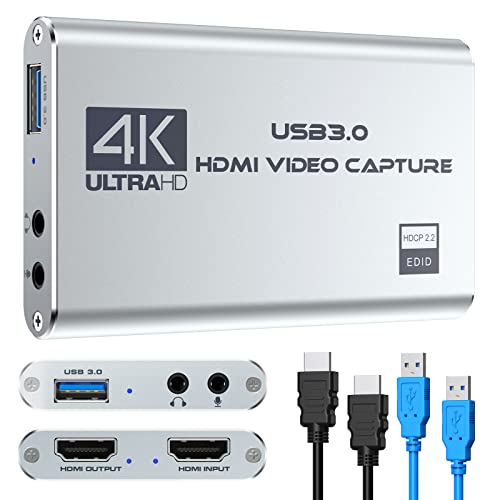
VIXLW V316Silver
A 1080p60 capture device over USB 3.0 with a mic input, plug and play setup and a 2 year manufacturer warranty.
Pros
- 1080p60 capture over USB 3.0 with plug and play setup
- Mic input for commentary through a 3.5mm TRS jack
- Works with PS4, PS5, Xbox, PC, Mac and cameras
- 2 year manufacturer warranty is stated
Cons
- 1080p60 capture is the lowest rate here
- No 4K60 capture is stated
- No RGB lighting is stated
- No HDMI passthrough resolution is stated
Detailed Review
VIXLW lists the V316Silver as a 1080p60 capture device over USB 3.0, with a mic input for commentary through a standard TRS 3.5mm headset jack. The listing states plug and play with no driver or external power, and compatibility with PS4, PS5, Xbox, PC and Mac on Windows 10/11, plus OBS, PotPlayer and VLC. The title mentions 4K while the description puts capture at 1080p, so plan on 1080p60 capture. It carries a 2 Year Manufacturer warranty.
Who it's for: a beginner streamer who wants a simple 1080p60 card with a mic input and a stated 2 year warranty. Who should skip it: anyone who needs 4K capture or a stated passthrough resolution.
Its Office Score of 9.4/10 comes from performance 26/35, build 19/25, value 20/25, safety 0/10 and warranty 3/5: 68 of 100 points, placed on our 9.2 to 9.8 scale.
Key Specifications
| Capture | 1080p60 |
|---|---|
| Interface | USB 3.0 |
| Audio | Mic input, 3.5mm TRS |
| Warranty | 2 years |
These specs mirror the retailer listing as of 21 November 2026; performance figures are stated by the brand.
Safety and Warranty
What this listing states. No safety listing or safety feature is stated, so safety scores zero. 2 Year Manufacturer. It does not say everything a buyer needs, such as who pays return shipping, so warranty scores 3 of 5. See How We Pick.
Follow the manual. Assemble and use the product as the maker describes, stay under any stated capacity, and read the manual before first use.
This is general buying information, not professional advice. Follow each product manual and local rules, and see our Safety Disclaimer.

FIFINE V3W
A 1080p60 capture card with 4K, 30fps HDMI output, 9 RGB modes, a 3.5mm audio input and plug and play setup.
Pros
- 4K, 30fps HDMI output with 1080p60 capture
- 9 RGB modes with onboard controls
- 3.5mm audio input
- Plug and play with PS4, PS5, Switch, Xbox, Windows and macOS
Cons
- No warranty term is stated
- 1080p60 capture is the lowest rate here
- No 4K60 capture is stated
- No HDMI passthrough above 4K, 30fps is stated
Detailed Review
FIFINE lists the V3W as a 1080p60 capture card with 4K, 30fps HDMI output, low latency over USB 3.0 and a 3.5mm audio input. The card offers 9 RGB modes with onboard controls, and the listing states plug and play with PS4, PS5, Switch, Xbox, Windows and macOS, plus OBS, YouTube and Twitch. The listing describes a limited warranty without stating a term.
Who it's for: a streamer who wants RGB lighting on the desk and a simple 1080p60 card for console streaming. Who should skip it: anyone who needs 4K capture or a warranty term in writing.
Its Office Score of 9.4/10 comes from performance 28/35, build 20/25, value 21/25, safety 0/10 and warranty 0/5: 69 of 100 points, placed on our 9.2 to 9.8 scale.
Key Specifications
| Capture | 1080p60 |
|---|---|
| Passthrough | 4K, 30fps |
| Audio | 3.5mm input |
| RGB | 9 modes |
These specs mirror the retailer listing as of 21 November 2026; performance figures are stated by the brand.
Safety and Warranty
What this listing states. This product does not plug in or run on a battery, so safety is not part of its score. No warranty term, so warranty scores zero. See How We Pick.
Follow the manual. Assemble and use the product as the maker describes, stay under any stated capacity, and read the manual before first use.
This is general buying information, not professional advice. Follow each product manual and local rules, and see our Safety Disclaimer.
As an Amazon Associate I earn from qualifying purchases.
More picks to compare
 MOORESHOW 1080p601080p60 capture with 4K loop-out and mic input for streamingCheck on Amazon
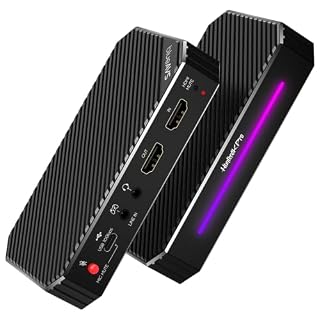 BlueAVS Hunter4K Pro4K144 capture and passthrough with party chat audio for PS5Check on Amazon
 Elgato Game Capture Neo4K60 HDR passthrough with 1080p60 recording for consoles and iPadCheck on Amazon
 AGPTEK USB3.0 Capture1080p60 capture with mic input for consoles, cameras and meetingsCheck on Amazon
 BENFEI 4K60 Loop-Out1080p60 capture with 4K60 loop-out, mic input and 18-month warrantyCheck on Amazon
Specs compared
| Capture card | Office Score | Capture | Passthrough | Audio | Warranty | Amazon |
|---|---|---|---|---|---|---|
| ezcap401 4K144 | 9.6/10 | 4K144 | 4K144 HDR/VRR | 3.5mm line in, headset | 1 year | View on Amazon |
| BlueAVS Cyber4K | 9.6/10 | 4K60 | 4K60, HDR VRR | 3.5mm | 2 years | View on Amazon |
| Elgato 4K Pro | 9.6/10 | 4K60 HDR10 | 8K60 | Not stated | Not stated | View on Amazon |
| VIXLW V316Silver | 9.4/10 | 1080p60 | Not stated | Mic input, 3.5mm | 2 years | View on Amazon |
| FIFINE V3W | 9.4/10 | 1080p60 | 4K, 30fps | 3.5mm | Not stated | View on Amazon |
Specs reflect manufacturer claims on each product listing (as of 21 November 2026). Three of the five state a warranty term; none states a safety certification.
How to choose the best capture card
Start with capture resolution, not passthrough
Capture resolution is the resolution the computer records, and it is lower than passthrough on most of these cards. The ezcap401 records at 4K144 or 1080p240, the BlueAVS Cyber4K at 4K60, the Elgato 4K Pro at 4K60 HDR10, and the FIFINE V3W and VIXLW V316Silver at 1080p60. Pick the capture rate that matches the stream or recording the maker of the card lists, then check passthrough separately. A card that captures at 1080p60 still suits a stream that goes out at 1080p60, while a 4K60 card suits a recording kept at 4K60.
| Capture card | Capture | Passthrough | Audio |
|---|---|---|---|
| ezcap401 4K144 | 4K144 | 4K144 HDR/VRR | 3.5mm line in, headset |
| BlueAVS Cyber4K | 4K60 | 4K60, HDR VRR | 3.5mm |
| Elgato 4K Pro | 4K60 HDR10 | 8K60 | Not stated |
| VIXLW V316Silver | 1080p60 | Not stated | Mic input, 3.5mm |
| FIFINE V3W | 1080p60 | 4K, 30fps | 3.5mm |
Figures as stated in each listing. Capture is the resolution the computer records; passthrough is the resolution the connected display receives while recording.
Passthrough decides what you see while you play
Passthrough carries the game to the monitor or TV while the card records. The Elgato 4K Pro passes through at 8K60, the ezcap401 at 4K144 HDR/VRR, the BlueAVS Cyber4K at 4K60 with HDR VRR, and the FIFINE V3W at 4K, 30fps. The VIXLW V316Silver states no passthrough resolution, so the display feed is unlisted. Match passthrough to the display: a monitor that runs at 4K60 needs a card that passes 4K60, and a high-refresh display needs the 144Hz or 240Hz passthrough the BlueAVS and ezcap401 list.
Audio ports and the mic
Four of the five cards list a 3.5mm audio port. The ezcap401 lists a 3.5mm line in port and a 4-pole headset port, the BlueAVS Cyber4K lists a 3.5mm port for line-in and headset audio, the FIFINE V3W lists a 3.5mm audio input, and the VIXLW V316Silver lists a mic input for a standard TRS 3.5mm headset. The Elgato 4K Pro states no audio port, so commentary needs a separate route into the stream. If the stream needs live commentary, pick a card with the mic input listed; a HDMI cable for streaming carries the game audio, not the voice.
USB interface and the laptop port
The port on the computer sets the ceiling for the card. The ezcap401 uses USB 3.2 Gen 2 rated at 10Gbps, the FIFINE V3W and VIXLW V316Silver use USB 3.0, and the BlueAVS Cyber4K uses USB-C with a USB 5Gbps or higher port required; USB 2.0 ports on that card support up to 1080P resolution. The Elgato 4K Pro is an internal card, so it suits a desktop with a spare slot rather than a laptop. Check the laptop first: a capture card for MacBook roundup covers cards that list Mac support, and a capture card for Twitch roundup covers cards aimed at live streaming.
Read the warranty line
Three listings state a warranty term and two do not. The BlueAVS Cyber4K states a 2 Year Limited Warranty, the VIXLW V316Silver states a 2 Year Manufacturer warranty, and the ezcap401 states a 1 Year Manufacturer warranty. The Elgato 4K Pro states no warranty term, and the FIFINE V3W describes a limited warranty without a term. A stated term matters more than a vague promise, so weigh it beside capture and passthrough when two cards look close.
Setup Notes
- Measure the desk space for the card and its cables: the BlueAVS Cyber4K measures 4.33 inches x 2.36 inches x 0.9 inches.
- Check the USB port before ordering: the BlueAVS Cyber4K asks for a USB 5Gbps or higher port, and the ezcap401 uses USB 3.2 Gen 2 rated at 10Gbps.
- Plan the audio route: four cards list a 3.5mm port for a mic or headset, while the Elgato 4K Pro states no audio port.
- Plan the HDMI run: the console plugs into the card, the card plugs into the computer, and the passthrough output goes to the display.
- No driver install is stated for the plug and play cards here, so setup is plugging in cables and selecting the card in the streaming software.
FAQ
How do I use a capture card on a laptop?
Plug the console HDMI output into the card, plug the card USB into the laptop, and select the card as the video source in OBS Studio or similar software. The ezcap401, BlueAVS Cyber4K, FIFINE V3W and VIXLW V316Silver all state plug and play with no driver install. The Elgato 4K Pro is an internal card, so it suits a desktop rather than a laptop.
Do I need a capture card for streaming?
A capture card is needed when the game runs on a console and the stream runs on a computer: the card carries the console HDMI signal into the computer. If the game already runs on the streaming computer, no card is needed for that game. Console streamers also use the passthrough output to keep playing on a TV or monitor while the card records.
How does a capture card work for PS5?
The PS5 HDMI output plugs into the card, the card USB plugs into the computer, and the card passthrough output goes to the display. The computer sees the card as a video source in OBS Studio, and the stream records at the card capture rate: 4K60 on the BlueAVS Cyber4K and Elgato 4K Pro, 4K144 on the ezcap401, and 1080p60 on the FIFINE V3W and VIXLW V316Silver.
Can a capture card work with a camera as well as a console?
Yes, if the listing says so. The VIXLW V316Silver lists DSLR cameras, cameras and security cameras among its HDMI sources. Check the listing for camera support before ordering, since not every card here lists it.
Which capture card here has an HDMI passthrough?
Four cards state a passthrough resolution: the Elgato 4K Pro at 8K60, the ezcap401 at 4K144 HDR/VRR, the BlueAVS Cyber4K at 4K60 with HDR VRR, and the FIFINE V3W at 4K, 30fps. The VIXLW V316Silver states no passthrough resolution.
Score breakdown
The Office Score weighs performance (capture resolution, passthrough, audio ports and USB interface), build (housing, ports and stated dimensions), value for the stated specs, safety and warranty. For a capture card, safety means stated protections and stable operation features on the listing; none of these five listings states a safety certification, so safety scores zero across the group. Three listings state a warranty term: the ezcap401 at 1 year, the BlueAVS Cyber4K at 2 years and the VIXLW V316Silver at 2 years. How we pick explains the weights.
| Product | Office Score | Perf. /35 | Build /25 | Value /25 | Safety /10 | Warranty /5 |
|---|---|---|---|---|---|---|
| ezcap401 4K144 | 9.6 | 33 | 22 | 21 | 0 | 3 |
| BlueAVS Cyber4K | 9.6 | 30 | 21 | 21 | 0 | 3 |
| Elgato 4K Pro | 9.6 | 34 | 24 | 22 | 0 | 0 |
| VIXLW V316Silver | 9.4 | 26 | 19 | 20 | 0 | 3 |
| FIFINE V3W | 9.4 | 28 | 20 | 21 | 0 | 0 |
The scale opens at 9.2 and closes at 9.8; between those marks, weighted points translate linearly into the score you see.
More for your workspace
See every streaming gear guide and all home studio guides. Also see best capture card USB. Also see best capture card for Mac. Also see best capture card for computer. Also see best capture card for Twitch. Also see best capture card for iPhone. Also see best AV capture card. Also see best capture card for Linux. Also see best home studio essentials.
More picks: home studio essentials, key light for home streaming, stream deck for streaming, HDMI cable for streaming.